受 X 案例啓發的 6 組創意 GPT Image 2.5 提示詞
GPT Image 2.5 發布首日,精靈圖和定格動畫風格的場景獲得了不少關注。這些貼文真正值得借鑒的是圖片的組織方式:包含多少個姿勢、哪些元素保持不動,以及靠哪些細節讓同一個角色始終容易辨認。
我們在 2026 年 9 月 9 日核對了以下 X 貼文。本文的六個可複製模板都是原創改編和編輯示例,要求模型生成靜態圖片或幀畫面表。要讓這些畫面動起來,還需要單獨進行組裝。
哪些 X 貼文受到關注,哪些公開了提示詞?
| 來源 | 採集時可見互動資料 | 可以讀到的內容 |
|---|---|---|
| @charlierguo:定格動畫示例 | 5,124 個贊;283 次轉發;445,788 次瀏覽 | 結果和說明;沒有完整生成提示詞 |
| @8co28:精靈圖工作流程 | 3,678 個贊;556 次轉發;315,047 次瀏覽 | 一條後續指令;未公開初始生成提示詞 |
| @higgsfield:精靈圖示例 | 252 個贊;27 次轉發;14,435 次瀏覽 | 作者在回復中公開了完整提示詞 |
| @higgsfield:黏土花參考圖 | 126 個贊;8 次轉發;10,206 次瀏覽 | 一張參考圖的完整提示詞 |
四組互動資料均於 2026 年 9 月 9 日中國標準時間(UTC+8)15:11 至 15:14 之間記錄。這些數字只是當時的快照,不是全平台熱度排名。模型歸屬信息來自貼文作者。Higgsfield 的示例屬於供應商發布內容。
熱門的 @8co28 貼文還記錄了一次實際失敗:第一次處理背景透明度沒有成功,作者把後續任務移到了另一個對話中。動畫成品看起來很順利,不代表每個步驟都是自動完成的。
1. 動作清晰可讀的機器人精靈圖
Higgsfield 發布的精靈圖提示詞採用 4×4 排列,並在各幀中重復強調約束。其中一小段是:
“consistent sprite scale and identical ground line”
可以先為另一個主體製作八個姿勢。嘗試更長的序列前,逐一檢查每個姿勢。
Create a single sprite sheet showing a small orange delivery robot walking. Arrange eight equally sized cells in two rows of four, read left to right. Use a clear pixel-art style and a plain white background. Keep the robot's rectangular body, one round camera eye, and short legs the same size in every cell. Show the whole robot in each cell. Progress through one walking cycle with small changes between poses. Keep the feet on the same baseline and the camera at the same angle. Leave space between poses. Add no captions or cell numbers.
數清格子,再把最後一個姿勢與第一個並排檢查。如果角色的比例或位置跳動,應先修正整張精靈圖,再組裝循環動畫。要求的格子尺寸和網格只是指令;用於遊戲或動畫切圖前,要測量實際輸出。
2. 用作參考幀的黏土場景
Higgsfield 的花朵貼文指定了一張參考圖、準確的物體數量和固定構圖。下面把這些約束換到一個玩具帆船場景中,方便後續繼續編輯。
Make one square photograph of a handmade clay sailboat on a blue clay pond. The boat has a yellow hull, one white triangular sail, and a short red mast. Place it slightly left of center with empty water to its right. Use a low, fixed camera angle and a simple pale gray backdrop. Show faint fingerprints in the clay and three small ripples near the hull. Light the scene softly from the upper left. Include the entire boat. Add no people, animals, words, or frame grid.
保存驗收通過的畫面。下一輪編輯可以讓船向右移動一小段,同時保留地平線和光線。每次都檢查桅桿、船帆形狀和水線,這些地方很容易失去連續性。
3. 講清楚一件小事的故事板
@Osmbproduction 的早期故事板貼文分享了結果,但我們核對時看不到完整提示詞。以下四格需求由我們原創。
Create a four-panel illustrated storyboard in a two-by-two layout. A child in a red raincoat discovers a paper boat beside a puddle. Panel 1: wide view of the child noticing the boat on the pavement. Panel 2: closer view of the child kneeling to pick it up. Panel 3: side view of the child setting it onto the puddle. Panel 4: wide view as the child watches the boat float away. Keep the same raincoat, yellow boots, paper boat, and street in all panels. Use soft colored-pencil texture. Separate panels with clean white gutters. Add no dialogue, labels, or decorative text.
不看提示詞,直接按順序讀四格畫面。如果動作不清楚,先簡化情節,再考慮增加機位。這類畫面表適合規劃鏡頭,即使最終製作會換用另一種媒介也一樣。
4. 仍像參考人物的復古肖像
OpenAI 的發布頁面鏈接了一條官方分享的 20 世紀 80 年代肖像提示詞。思路是在改變造型的同時,讓人物仍然容易辨認。下面的原創版本採用更克制的百貨公司照相館風格。
Use my uploaded portrait as the reference for my face and expression. Create a late-1980s department-store studio portrait from the chest up. Give me a burgundy knit sweater and use a softly mottled blue backdrop. Use gentle frontal studio light, subtle film grain, and slightly faded color. Keep my facial proportions, skin tone, and distinctive features recognizable. Make the styling feel like a printed family photograph. Include no date stamp, brand name, decorative border, or lettering.
請使用你擁有或獲得編輯許可的照片。判斷復古效果之前,先對比面部比例;服裝和膠片顆粒不應掩蓋不需要的身份變化。
5. 一組虛構旅行郵票
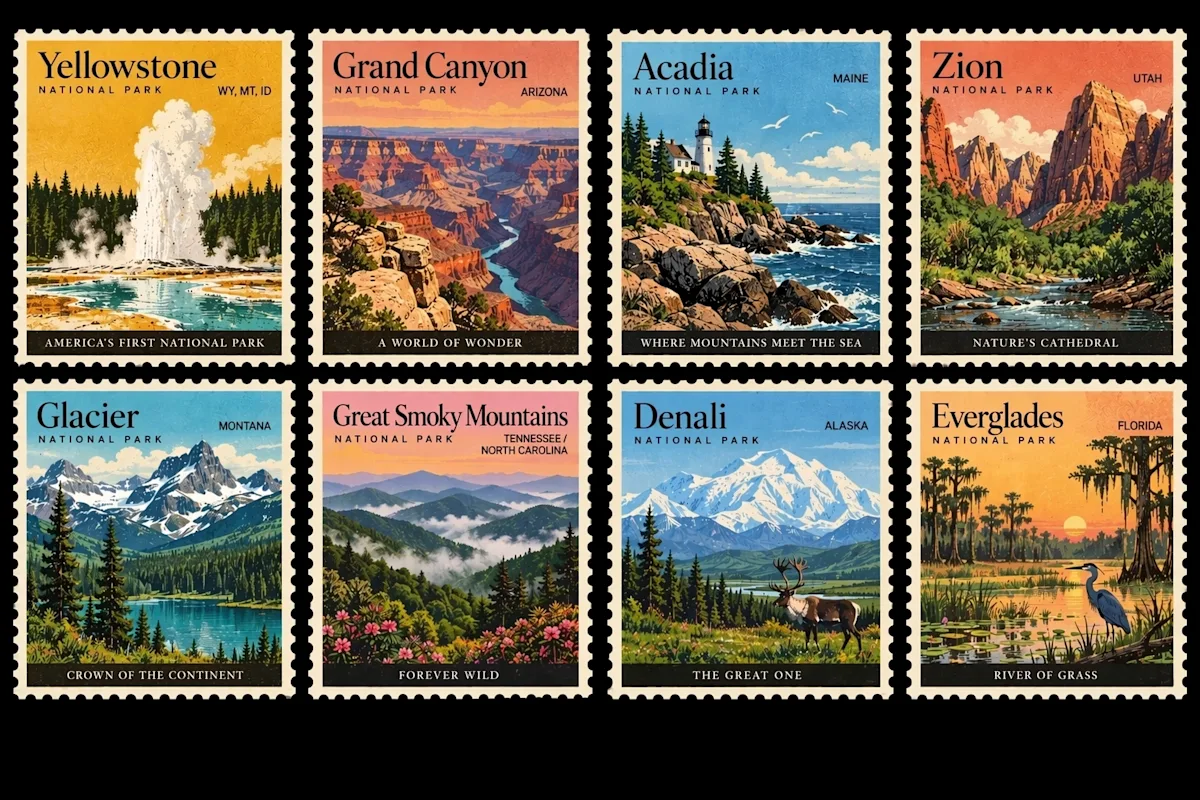
OpenAI Images 2.5 公告中的官方作品,展示了重復邊框、緊湊風景和簡短標籤。
重復結構讓整版郵票成為很好的排版練習。如果希望風景也能自由發揮,可以使用虛構地點。
Design a sheet of four illustrated travel stamps in a two-by-two grid. Use matching perforated borders, warm paper, and a limited ink palette. Stamp 1: a lighthouse on a violet cliff, labeled "NORTH LIGHT". Stamp 2: a greenhouse beside a lake, labeled "GLASS GARDEN". Stamp 3: a train crossing a snowy bridge, labeled "WINTER LINE". Stamp 4: a tiny observatory at dusk, labeled "STAR HILL". Keep all labels large enough to read and all stamp borders the same size. Add no dates, prices, country names, or other lettering.
檢查每個地名是否仍與對應插畫放在一起。如果某張郵票太擁擠,應簡化那一格,不要把所有標籤都縮小。
6. 比例感明確的復古未來主義場景
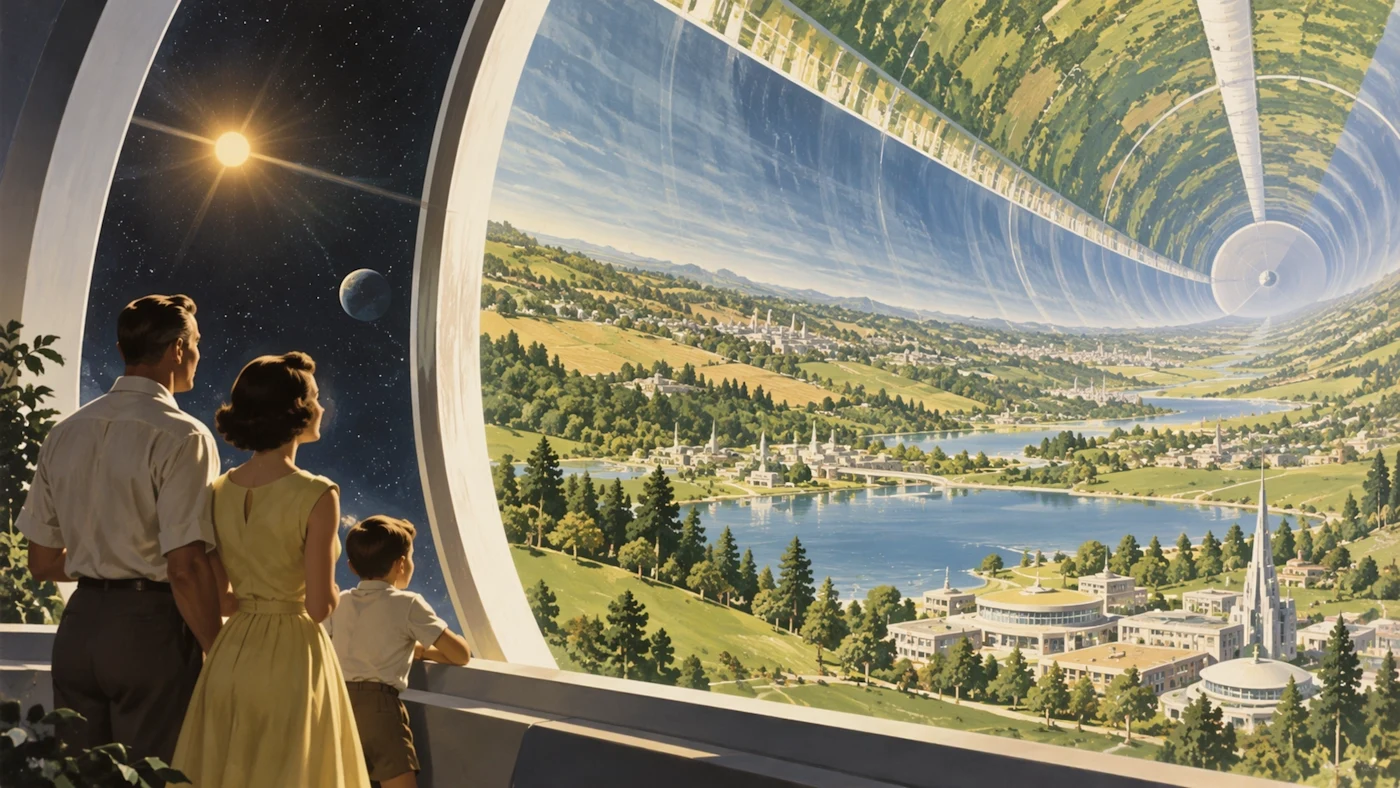
OpenAI 的 ChatGPT Images 2.5 官方作品。前景中的小人物幫助觀眾理解棲息地的巨大尺度。
這條原創提示詞把場景移到水下,同時保留清楚的前景和遠處主體。
Paint a 1950s magazine illustration of an underwater research city. In the foreground, two visitors stand inside a glass observation tunnel. Beyond the glass, small illuminated buildings sit on the seabed. A huge gentle whale passes above them, partly fading into blue water. Use cream highlights, muted turquoise, and warm light inside the tunnel. Make the visitors small enough to show the scale of the whale and city. Keep the image readable as one scene. Add no text or collage panels.
“復古未來主義”只提供方向,隧道、遊客、建築和鯨魚才組成具體構圖。如果畫面太擁擠,先移除一個主體,不要繼續堆疊風格詞。
如何把提示詞改成自己的版本
OpenAI 的圖片幫助頁面說得很直接:
“Be specific about the details that matter.”
只選擇你確實會檢查的細節。精靈圖要看姿勢數量和角色比例,肖像要看面部特徵,郵票整版要看排版和拼寫。具體要求只有能幫助你判斷輸出是否合格時,才真正有用。
GPT Image 2.5 能根據這些提示詞直接生成成品影片嗎?
這些需求讓圖片模型生成靜幀。精靈圖或故事板可以進入動畫工作流程,但幀組裝、時間安排和影片生成是另外的操作。鏈接中的 X 案例可能包含這些附加步驟。
六條提示詞都複製自熱門貼文嗎?
表格說明瞭 X 證據,也注明哪些作者公開了提示詞。六條編號提示詞都是原創改編,或明確標注受官方示例啓發的練習。只有精靈圖提示詞的簡短引文來自原帖。你可以通過來源鏈接閱讀作者的完整指令。
如果我需要廣告和產品圖呢?
我們的八組實用 GPT Image 2.5 提示詞涵蓋產品照片、海報文字和局部編輯。Image 2.0 與 2.5 對比則說明 Flare 與 Sunburst 各自適合什麼場景。