SeedVideo AI
SeedVideo AI

Best Veo Alternative for AI Video Generation in 2026

SeedVideo AI
SeedVideo AI
|
Published on Jun 30, 2026

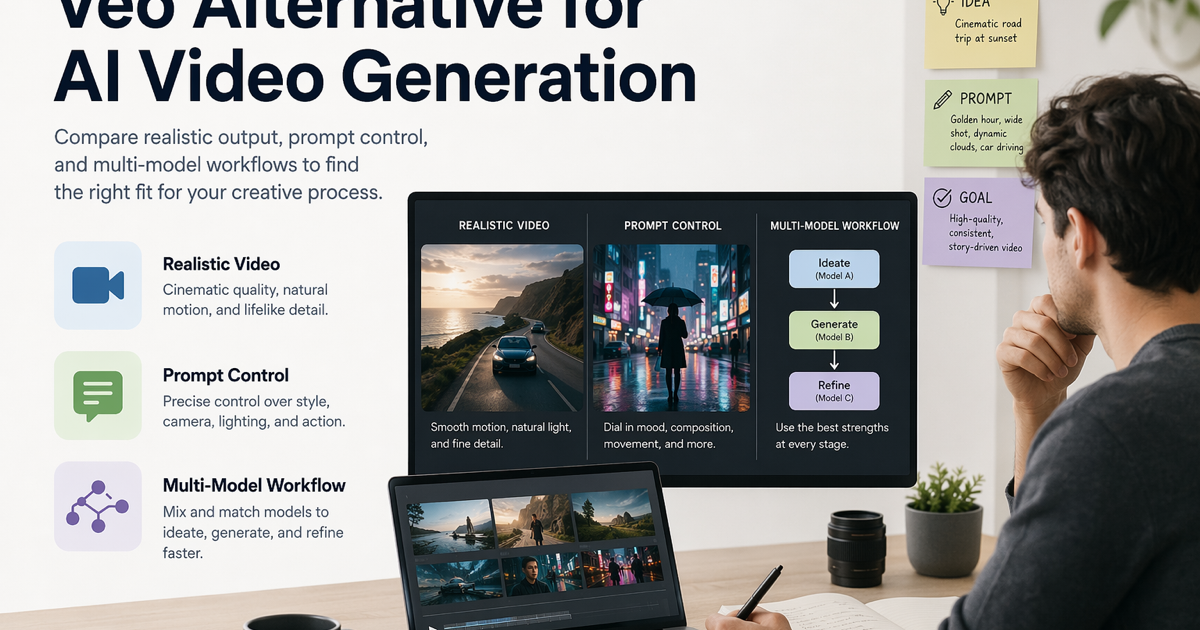
Veo alternative comparison for AI video generation.
Compare AI video tools by realism, control, workflow flexibility, and output fit.

If you are searching for a Veo alternative, you probably do not need a tool that simply claims to be "better than Veo." You need the right AI video workflow for the job: realistic output, controllable references, fast iteration, usable pricing, and a path from rough concept to production-ready clip. Google Veo is a strong choice when cinematic realism, native audio, and Google's creative ecosystem are your priorities. A Veo alternative makes sense when your team wants to compare multiple models, test both text-to-video and image-to-video from one workspace, or keep iteration cost and prompt experiments under tighter control. SeedVideo AI fits that second workflow: it gives creators a practical way to generate, compare, and refine videos with leading AI video models while keeping the decision focused on the actual shot you need to ship.

TL;DR

  • Choose Veo when you specifically need Google's Veo workflow, native audio generation, or access through Gemini, Flow, or Google AI Studio.
  • Choose SeedVideo AI when you want a flexible Google Veo alternative for testing text prompts, image references, and multiple model families in one place.
  • Do not compare only final image quality. Compare realism, audio needs, reference control, iteration speed, workflow flexibility, cost awareness, and export fit.
  • For most creator, marketing, and social video teams, the best choice is the tool that lets you run more useful tests before production decisions become expensive.

Quick Answer

The best Veo alternative is the one that matches your starting point. If your idea starts as a script or scene description, test a text-to-video workflow. If your idea starts with a product image, storyboard frame, character reference, or visual style, test image-to-video. If your team is still deciding which model fits the shot, use a multi-model workflow such as SeedVideo AI so you can compare outputs before committing to one direction.

Veo remains a high-end option for cinematic generation and audio-oriented video creation. SeedVideo AI is not trying to replace every Veo use case. It is a practical Veo AI alternative when you care about rapid iteration, model choice, reference-led workflows, and the ability to move between text-to-video and image-to-video without rebuilding your process.

Why Creators Look for a Veo Alternative

Creators usually start looking for a Veo alternative for one of five reasons:

  1. They want to compare more than one AI video model before choosing a final workflow.
  2. They need a lower-friction way to run many prompt variations.
  3. They already have product, character, or scene references and want image-to-video control.
  4. They do not need native audio on every shot.
  5. They want one workspace for ideation, reference testing, and production handoff.

That does not make Veo weak. Veo is strong when the project is built around Google's model quality, native audio, and filmmaking tools. The question is whether your production bottleneck is model power or workflow fit.

For many teams, the real bottleneck is not "Can an AI model make a beautiful clip?" It is "Can we test enough versions to find the one that matches our brief?" A Google Veo alternative should help you answer that second question quickly.

Veo vs SeedVideo AI: What to Compare

Do not judge a video generator from a single demo clip. Use a comparison table that reflects the work you actually do.

Evaluation area Veo may be best for SeedVideo AI may be best for
Realism High-end cinematic scenes and Google Veo-specific generation Testing realistic options across supported models
Native audio Projects where generated sound or dialogue is central Projects where visual iteration matters before audio finishing
Reference control Google Flow-style creative controls and Veo-specific features Moving between text prompts, uploaded images, and model comparisons
Iteration speed Teams already committed to Google tools Teams that need many prompt and reference tests quickly
Workflow flexibility Veo-first production workflows Multi-model text-to-video and image-to-video workflows
Cost awareness High-value shots where Veo-specific quality is worth the spend Campaigns that need repeated tests before choosing a final clip

Best for / not best for

SeedVideo AI is best for:

  • Creators comparing Veo, Seedance, Kling, Sora-style workflows, and other AI video options.
  • Marketers making many short-form variations from the same concept.
  • Product teams turning still images, product renders, or campaign frames into motion.
  • Editors who need a practical first-pass video before final audio, captions, or brand polish.

SeedVideo AI is not best for:

  • Teams that specifically require Google Veo as the model of record.
  • Projects where native audio generation is the main creative requirement.
  • Workflows that must stay entirely inside Google's Gemini, Flow, or AI Studio environment.

Veo may still be better for:

  • Cinematic scenes where Veo's specific realism and audio strengths are the reason you chose it.
  • Google-native creative teams using Flow controls and Google account workflows.
  • Experiments where the model itself matters more than cross-model comparison.

Best Use Cases for a Veo Alternative

A good AI video generator alternative is especially useful when the final creative direction is still uncertain. These are the most practical use cases.

Social ad concepts

For paid social, you rarely need one perfect clip on the first try. You need five to twenty variations that test hooks, visual pacing, product angles, and opening frames. SeedVideo AI is useful here because you can start with text, bring in image references, and compare model behavior without changing the whole workflow.

Product and ecommerce video

If you already have product photography, package renders, or a landing-page hero image, image-to-video is often a better starting point than pure text-to-video. It keeps the product recognizable and lets the prompt focus on motion, camera movement, environment, and mood.

Creator storyboards

Creators often begin with a rough scene: a person walking into frame, a camera orbit, a city establishing shot, or a stylized transition. A Veo alternative helps when you want to test the storyboard logic first, then decide whether a premium Veo workflow is necessary for the final.

SEO and content marketing clips

Blog posts, tutorials, product explainers, and landing pages need visual support more than Hollywood-level fidelity. A fast multi-model workflow lets content teams generate supporting clips, thumbnails, and motion ideas for articles such as Best AI Video Generators in 2026 without slowing the editorial calendar.

Workflow Decision Tree

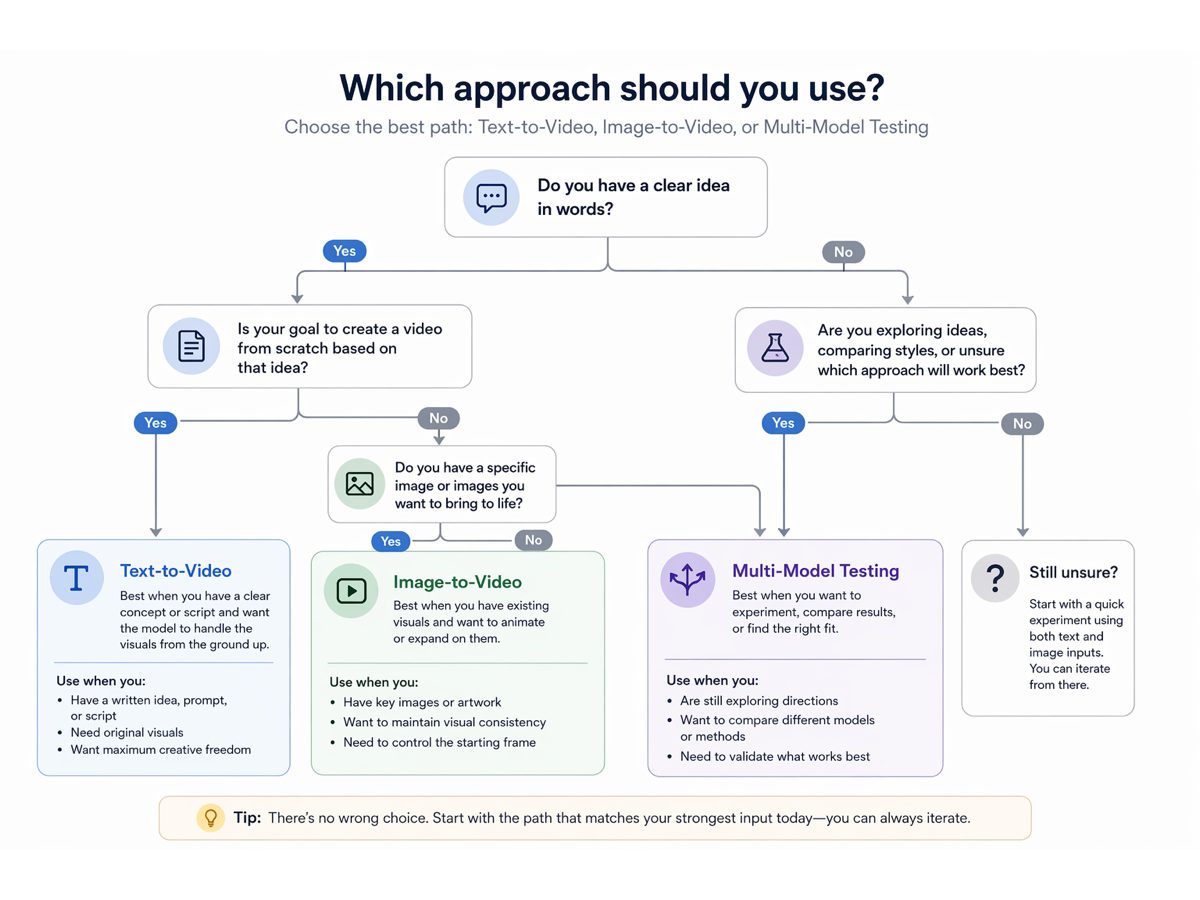
Use this simple decision tree before you choose between Veo and a Veo alternative.

AI video workflow decision tree for Veo alternatives.
Choose the workflow based on whether the idea starts with text, image, or model comparison.

Starting point Best first workflow What to test
A written scene idea Text-to-video Prompt following, camera movement, visual style
A product image or character frame Image-to-video Reference consistency, motion, object stability
A campaign concept with multiple directions Multi-model testing Which model fits the creative brief fastest
A scene requiring generated sound Veo-first test Native audio quality and sync
A production asset needing many revisions SeedVideo AI workflow Iteration speed, cost awareness, export usability

Text-to-Video Workflow

Use text-to-video when the idea is still abstract. This is the best path for early story exploration, campaign hooks, world-building, and visual style discovery.

  1. Write a one-sentence scene goal.
  2. Add subject, action, camera movement, setting, lighting, and duration.
  3. Generate two or three variations with different camera language.
  4. Compare prompt following before comparing beauty.
  5. Keep the best prompt and test it across models.
  6. Save the winner as a reference for final edits.

Example prompt structure:

A close-up product reveal of a matte black smart speaker on a kitchen counter, slow dolly-in camera, warm morning light, steam in the background, realistic commercial style, smooth motion, 5 seconds.

For more prompt structure, use the Text to Video Prompt Guide before you start changing models. Many failed video generations are prompt problems, not model problems.

Image-to-Video Workflow

Use image-to-video when visual consistency matters more than free-form invention. This is usually the stronger workflow for products, character continuity, brand assets, and campaign visuals.

  1. Start with the cleanest image reference you have.
  2. Describe only the motion, camera path, and scene change you need.
  3. Avoid asking the model to redesign the subject unless that is intentional.
  4. Run a short test before extending the idea.
  5. Compare whether the subject stays recognizable.
  6. Only then refine lighting, mood, and output format.

If your team is new to this workflow, read the Image to Video AI Guide. It explains when an image reference gives you better control than a long text prompt.

When Veo May Still Be a Better Fit

Veo may still be the better fit when your project is built around Google's model ecosystem. If your creative requirement is native audio, Google Flow controls, or a Veo-specific production path, you should test Veo directly before looking elsewhere.

Veo can also be the right choice for premium cinematic shots where a small number of clips justify a deeper model-specific workflow. In that case, a Veo alternative may still be useful as a previsualization stage. You can use SeedVideo AI to test the concept, identify the strongest prompt direction, and then decide whether the final shot deserves a Veo-first pass.

The strongest workflow is not always either-or. Many teams use alternatives to reduce uncertainty before they spend time on the most expensive or specialized generation step.

Testing Checklist

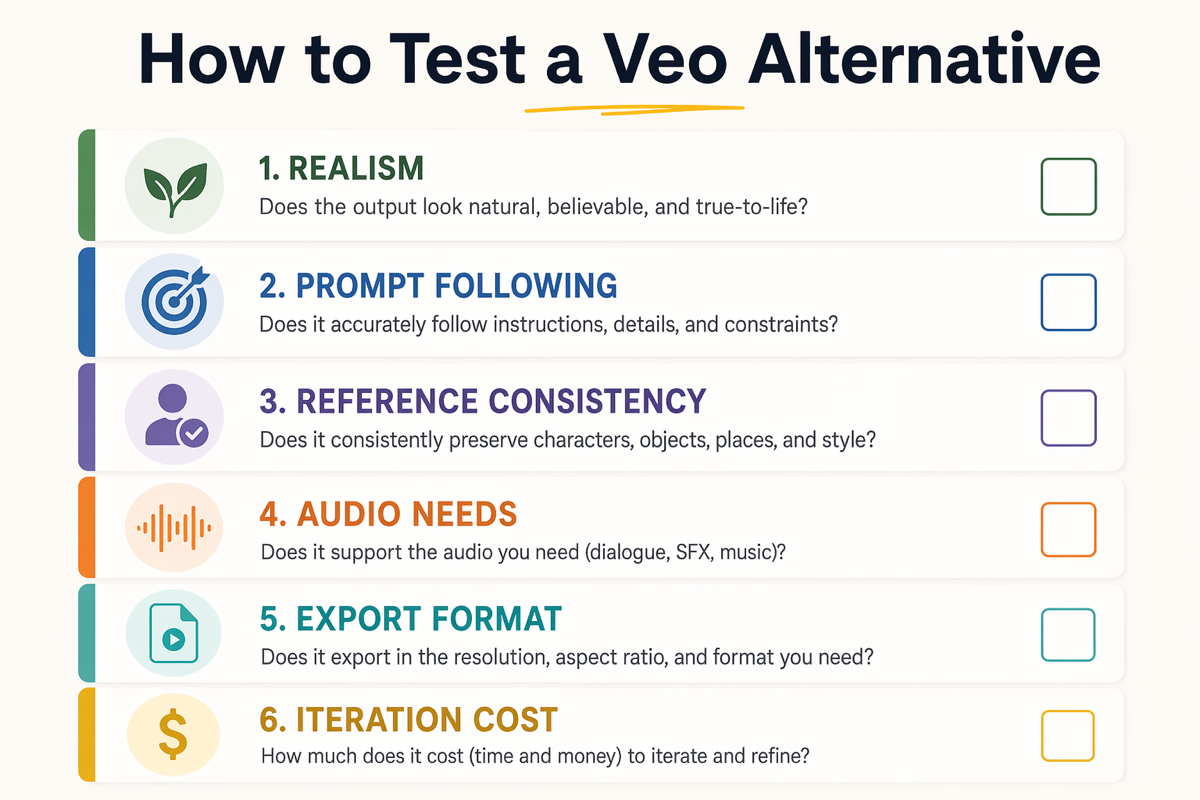
Before choosing any Veo AI alternative, run the same test across tools.

Checklist for testing a Veo alternative.
Test the workflow against your actual production needs before choosing a tool.

Test What to look for Why it matters
Realism Natural motion, coherent physics, believable lighting Prevents demo-only quality decisions
Prompt following The output matches the requested subject, action, and camera Saves time during revision
Reference consistency Products, characters, and scenes remain recognizable Crucial for brand and ecommerce work
Audio needs Decide whether native sound is required or can be added later Prevents choosing the wrong workflow
Export fit Aspect ratio, duration, quality, and watermark requirements Determines whether the clip can ship
Iteration cost How many useful variations you can afford to run Impacts campaign testing speed

Practical Recommendation

Use Veo when the project needs Veo. Use SeedVideo AI when the project needs choice.

That distinction is important. A creator comparing Veo vs SeedVideo AI should not ask which one is universally better. Ask which workflow reduces risk for the next shot.

If the next shot depends on native audio or Google's filmmaking tools, start with Veo. If the next shot depends on comparing models, testing image references, or running more prompt variations before production, start with SeedVideo AI.

For teams publishing regular campaigns, tutorials, ads, and creator content, that flexibility often matters more than a single-model benchmark. The best AI video tool is the one that helps you make a reliable decision faster.

FAQ

What is the best Veo alternative?

The best Veo alternative depends on your workflow. SeedVideo AI is a strong option if you want text-to-video, image-to-video, and multi-model testing in one place. Veo is still a strong choice when you specifically need Google's Veo ecosystem or native audio generation.

Is SeedVideo AI better than Veo?

Not universally. SeedVideo AI is better for flexible comparison workflows, faster prompt iteration, and switching between model options. Veo may be better for Google-native workflows, cinematic realism, and audio-focused generation.

When should I use a Google Veo alternative?

Use a Google Veo alternative when you want to test multiple models, animate image references, control iteration cost, or create many short-form variations before choosing a final direction.

Can I use SeedVideo AI for image-to-video?

Yes. SeedVideo AI supports image-to-video workflows, which are useful when you already have a product image, character reference, storyboard frame, or brand visual that needs motion.

Does every Veo alternative include native audio?

No. Native audio support varies by model and platform. If generated dialogue, ambient sound, or synchronized audio is central to the shot, include audio quality in your first test instead of treating it as a later detail.

What should I compare before switching from Veo?

Compare realism, prompt following, reference control, iteration speed, audio needs, output format, watermark policy, and cost per usable clip. A single beautiful demo is not enough evidence for production.

Can I use both Veo and SeedVideo AI?

Yes. Many creators use a multi-tool workflow. You can test ideas and references in SeedVideo AI, then use Veo for shots where Google's model or native audio workflow is specifically required.

Conclusion

A Veo alternative is not about dismissing Veo. It is about choosing the workflow that fits your production reality. If your team needs native audio and a Google-first filmmaking path, Veo deserves a direct test. If your team needs model flexibility, image-to-video control, prompt iteration, and cost-aware experimentation, SeedVideo AI is a practical place to start.

Try a small test: one text-to-video prompt, one image-to-video reference, and one multi-model comparison. The result will tell you more than any generic ranking list.

#Veo alternative#Google Veo alternative#Veo AI alternative#Veo vs SeedVideo AI#AI video generator alternative#text-to-video#image-to-video
Related Posts
Best Runway Alternative for AI Video Generation in 2026

Best Runway Alternative for AI Video Generation in 2026

Compare SeedVideo AI and Runway for AI video generation, including best-fit use cases, workflow tradeoffs, migration steps, and decision criteria.

Best Pika Alternative for AI Video Creators in 2026

Best Pika Alternative for AI Video Creators in 2026

Compare Pika and SeedVideo AI for social clips, product demos, travel videos, and brand workflows. Use a neutral testing checklist to choose.

Seedance 2.0 Guide: What It Is and How to Use It for AI Video Creation

Seedance 2.0 Guide: What It Is and How to Use It for AI Video Creation

Learn what Seedance 2.0 is, how SeedVideo AI supports text-to-video and image-to-video workflows, who it fits, and how to start safely today.

30 AI Video Prompt Examples for Cinematic, Product, Travel, and Social Videos

30 AI Video Prompt Examples for Cinematic, Product, Travel, and Social Videos

Copy 30 AI video prompt examples for cinematic, product, travel, social, and image-to-video clips, plus a practical prompt formula and workflow.