Se você quer a resposta curta: o melhor gerador de vídeo por IA em 2026 depende do trabalho. Seedance 2.0 é a opção mais forte para controle multimodal e vídeo direcionado por referência. Google Veo 3.1 é excelente para clipes curtos realistas com áudio nativo. Runway Gen-4 continua sendo um dos melhores conjuntos criativos para cineastas que se preocupam com consistência de personagens, locais e fluxos de produção. Kling AI 3.0 é uma opção forte para criadores para controle de movimento, trabalho com personagens e transformação de imagem em vídeo. Pika é útil para efeitos rápidos para redes sociais. Adobe Firefly é a escolha mais segura para equipes que priorizam segurança comercial. Sora 2 permanece como um padrão de qualidade, mas sua disponibilidade precisa de cuidado extra, pois a OpenAI marcou os modelos de vídeo Sora 2 e a API de Vídeos como obsoletos.
Para a maioria dos criadores que não querem alternar entre várias plataformas separadas, um workspace multimodelo como SeedVideo AI frequentemente é o ponto de partida mais prático. Você pode testar workflows ao estilo Seedance, Veo, Kling, Sora e outros modelos de vídeo de uma só interface, e então escolher o modelo que se encaixa na cena em vez de forçar todos os prompts em uma única ferramenta.
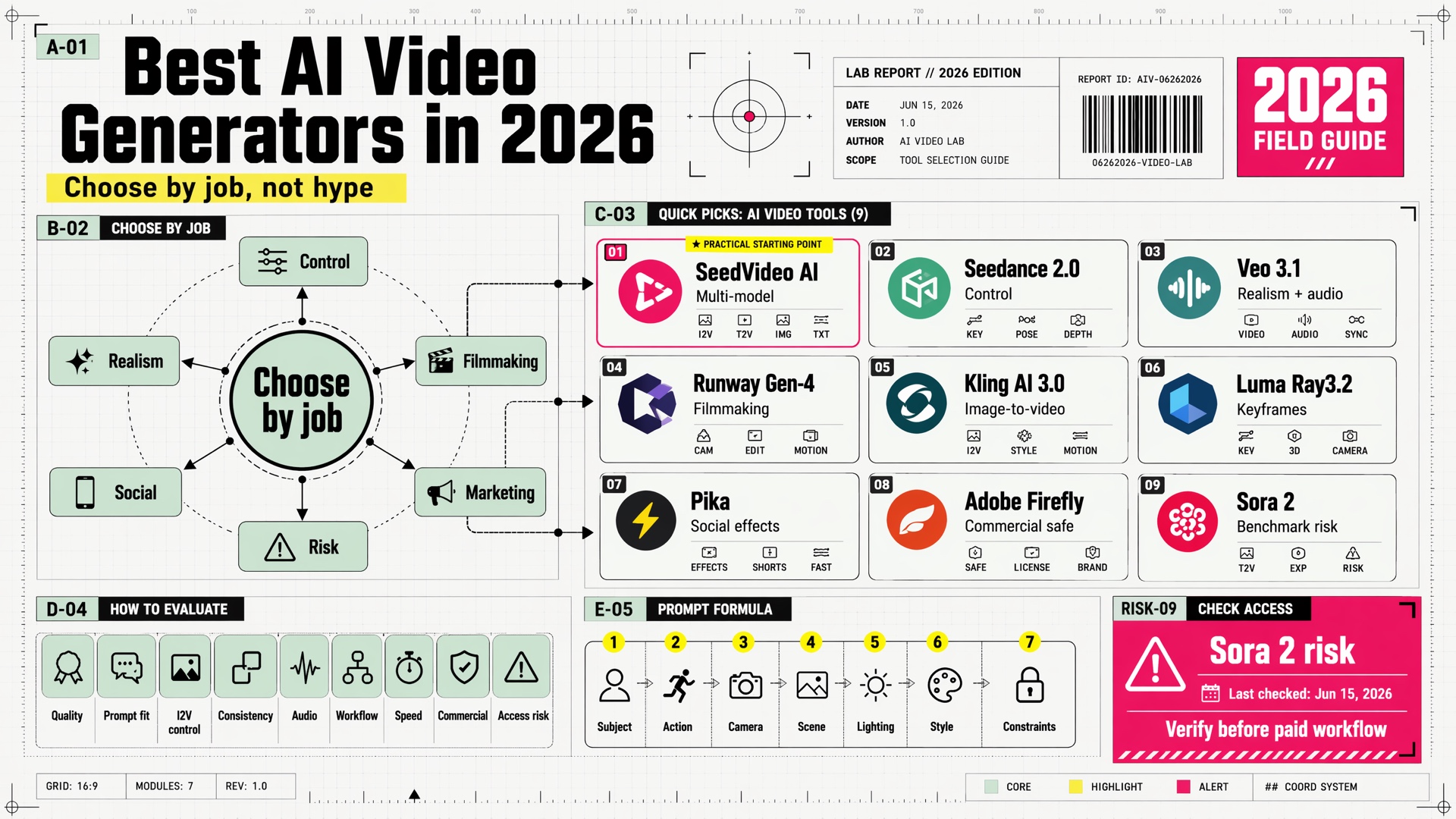
Resumo visual: escolha o gerador de vídeo por IA pelo fluxo de trabalho, não pelo hype.
Escolhas rápidas
| Caso de uso | Melhor escolha | Por que se encaixa |
|---|---|---|
| Melhor fluxo de trabalho multimodelo geral | SeedVideo AI | Permite comparar vários modelos de vídeo líderes em um único fluxo de trabalho de criação. |
| Melhor para controle multimodal | Seedance 2.0 | Suporta referências de texto, imagem, áudio e vídeo para geração controlada. |
| Melhor para realismo e áudio nativo | Google Veo 3.1 | Clipes fotorealistas fortes, áudio nativo, geração 16:9 e 9:16, e opções de alta resolução. |
| Melhor para fluxos de trabalho de cinematografia | Runway Gen-4 | Conjunto robusto para personagens, objetos, locações e estilo visual consistentes. |
| Melhor para criadores de imagem-para-vídeo | Kling AI 3.0 | Ferramentas fortes de vídeo orientadas a referências, movimento, texto e criadores. |
| Melhor para direção precisa de keyframes | Luma Ray3.2 | Útil quando você quer direção ao nível de quadro e mudanças controladas dentro de uma tomada. |
| Melhor para efeitos virais em redes sociais | Pika | Efeitos rápidos e amigáveis às tendências, como trocas, adições, giros e edições estilizadas. |
| Melhor para ativos de marketing seguros para uso comercial | Adobe Firefly | Projetado em torno da criação de vídeos seguros para uso comercial e fluxos de trabalho de marcas. |
| Padrão de melhor qualidade com risco de disponibilidade | Sora 2 | Forte em física, áudio e realismo cinematográfico, mas é necessário verificar a disponibilidade e o suporte de API a longo prazo. |
Como avaliamos esses geradores de vídeo de IA
Este guia foi escrito para criadores, profissionais de marketing, fundadores e pequenas equipes escolhendo uma pilha prática de geração de vídeo em 2026. Avaliamos cada ferramenta pelas perguntas que geralmente importam após a primeira demonstração impressionante:
- Qualidade de saída: O vídeo parece utilizável sem grandes reparos?
- Aderência ao prompt: O modelo segue as instruções de câmera, sujeito, movimento e estilo?
- Controle de imagem para vídeo: Ele pode animar uma imagem de referência sem destruir o sujeito?
- Consistência de personagens e objetos: Ele consegue manter uma pessoa, produto ou cena coerente entre os takes?
- Suporte de áudio: Ele consegue gerar ou preservar diálogos, sons ambientes ou efeitos?
- Profundidade do fluxo de trabalho: É apenas uma caixa de prompt única, ou pode suportar etapas reais de produção?
- Velocidade e custo de iteração: Você consegue testar ideias rapidamente sem gastar todo o orçamento?
- Ajuste para uso comercial: A ferramenta é adequada para marketing, anúncios, visuais de produtos ou trabalho para clientes?
- Risco de disponibilidade: O modelo é amplamente acessível, estável e provavelmente continuará disponível?
Nenhum modelo único vence em todas as categorias. A estratégia prática é escolher o modelo certo para cada trabalho: Seedance para controle de referência multimodal, Veo para clipes audiovisuais realistas, Runway para fluxos de trabalho estilo cinema, Kling para controle de movimento amigável ao criador, Pika para efeitos rápidos e Firefly para ativos seguros para a marca.
Tabela de comparação
| Ferramenta | Mais indicado para | Pontos fortes | Atenção |
|---|---|---|---|
| SeedVideo AI | Fluxo de trabalho de vídeo de IA multimodelo | Um espaço de trabalho para testar múltiplos modelos, texto-para-vídeo, imagem-para-vídeo e fluxos de trabalho de criadores | Nenhum modelo específico; a qualidade da saída depende do modelo selecionado. |
| Seedance 2.0 | Geração de referência multimodal | Referências de texto, imagem, áudio e vídeo; movimento forte e controlabilidade | Disponibilidade e acesso exato ao modelo podem variar conforme a plataforma. |
| Google Veo 3.1 | Vídeo realista com áudio nativo | Áudio nativo, forte realismo, 16:9 e 9:16, referências de imagem, opções de alta resolução | Resolução mais alta aumenta custo e latência. |
| Runway Gen-4 | Fluxo de trabalho de filme e produção | Personagens, objetos, locais consistentes e controle de estilo cinematográfico | Maior profundidade do fluxo de trabalho significa uma curva de aprendizado mais íngreme. |
| Kling AI 3.0 | Vídeo de criador e de imagem para vídeo | Recursos de referência, controle de movimento, preservação de texto, forte ecossistema de criadores | A qualidade depende fortemente da seleção do prompt e do modo. |
| Luma Ray3.2 | Cenas dirigidas e keyframes | Controle multi-keyframe, modificação de vídeo, ferramentas de re enquadramento | O uso de créditos pode aumentar rapidamente para saídas de maior qualidade. |
| Pika | Efeitos sociais e edições rápidas | Efeitos compatíveis com tendências, trocas, adições e conversão rápida de imagem em vídeo | Melhor para clipes sociais curtos do que para fluxos de produção controlados. |
| Adobe Firefly | Vídeo de marketing seguro para uso comercial | Texto para vídeo, imagem para vídeo, posicionamento seguro para marca, ecossistema Adobe | O alcance criativo pode parecer mais controlado do que modelos abertos e experimentais. |
| Sora 2 | Referência em física e realismo | Forte realismo físico, áudio, estilos cinematográficos e anime | OpenAI marca modelos de vídeo Sora 2 e a API de Vídeos como obsoletos; verifique o acesso antes de construir em torno deles. |
1. SeedVideo AI - melhor fluxo de trabalho completo para geração de vídeo com IA
SeedVideo AI é o melhor ponto de partida se seu verdadeiro problema não é "qual modelo é melhor para sempre?" mas "qual modelo é melhor para esta cena?" A geração de vídeo por IA muda rápido demais para que a maioria dos criadores se comprometa com apenas um modelo. Um prompt de texto para vídeo que funciona bem no Seedance pode não ser a melhor escolha para geração no estilo Veo, Kling ou Runway.
SeedVideo AI é útil porque oferece um lugar único para testar diferentes modos de geração:
- Texto para Vídeo AI para cenas inicialmente baseadas em prompt.
- Imagem para Vídeo AI para animar capturas de produtos, retratos, personagens ou arte conceitual.
- Vídeo para Vídeo IA para transformar clipes existentes.
- Várias opções de modelos, incluindo Seedance, Veo, Kling e estilos tipo Sora quando disponíveis.
A principal vantagem é a velocidade do fluxo de trabalho. Em vez de criar contas separadas, aprender várias interfaces e comparar os resultados manualmente, você pode começar com a tarefa criativa e escolher o modelo depois de ver o que o take precisa.
Escolha SeedVideo IA se:
- Você quer comparar múltiplos modelos de vídeo IA em um só lugar.
- Você cria conteúdo tanto de texto-para-vídeo quanto de imagem-para-vídeo.
- Você se importa mais com velocidade, iteração e produção prática do que com lealdade de marca a um único modelo.
- Você está criando anúncios, clipes curtos, vídeos conceituais ou visuais de produtos e precisa de acesso flexível a modelos.
O compromisso é que SeedVideo IA é uma camada de fluxo de trabalho, não um modelo fundamental único. Se você estiver avaliando um modelo específico de forma científica, ainda deve comparar os resultados modelo por modelo. Mas para criadores e profissionais de marketing, a abordagem multi-modelo geralmente é mais útil do que tentar adivinhar o único vencedor permanente.
2. Seedance 2.0 - melhor para controle de referência multimodal
Seedance 2.0 é um dos modelos de vídeo de IA mais importantes em 2026 porque é construído em torno do controle multimodal. A ByteDance descreve o Seedance 2.0 como uma arquitetura unificada de geração de áudio e vídeo que suporta entradas de texto, imagem, áudio e vídeo. Isso é importante porque o trabalho real com vídeo frequentemente começa com referências: uma foto de produto, uma imagem de personagem, uma pequena amostra de movimento, um mood board ou um clipe existente que precisa de variação.
O Seedance 2.0 é especialmente forte quando o prompt precisa de mais do que um único take gerado. Ele pode ajudar com:
- Takes guiados por referência onde o sujeito deve permanecer reconhecível.
- Visuais de produtos ou personagens onde a composição importa.
- Clipes cinematográficos curtos que precisam de iluminação controlada, movimento de câmera e performance.
- Prompts multimodais que combinam instruções de texto com referências visuais ou de áudio.
Para muitos criadores, o Seedance é mais eficiente quando usado através de um fluxo de trabalho que facilita as entradas de referência. Revise as capacidades e acesso na página do modelo Seedance 2.0, então comece com SeedVideo AI de texto para vídeo para cenas de prompt ou imagem para vídeo quando a referência visual é o ponto de partida.
Escolha o Seedance 2.0 se:
- Você precisa de mais controle do que um prompt de texto simples.
- Você quer guiar o modelo com imagens, vídeos ou referências de áudio.
- Você cria pequenos anúncios, visuais de produtos, clipes baseados em histórias ou vídeos conceituais.
- Você se importa com câmera, iluminação, movimento e direção visual consistente.
O principal destaque é o acesso. Seedance 2.0 pode aparecer em diferentes produtos, APIs e plataformas de terceiros, e as capacidades exatas podem variar de fornecedor para provedor. Sempre verifique qual modo Seedance você está usando antes de comparar os resultados.
3. Google Veo 3.1 - melhor para clipes curtos realistas com áudio
Google Veo 3.1 é uma escolha forte quando realismo e áudio importam. A documentação para desenvolvedores do Google descreve o Veo 3.1 como gerador de vídeos de alta fidelidade com áudio nativo, com opções para 720p, 1080p e 4K dependendo da variante e disponibilidade do modelo. Também suporta geração de paisagem e retrato, extensão de vídeo, controle de primeiro e último quadro e direção baseada em imagem com múltiplas imagens de referência.
Isso faz do Veo uma escolha forte para:
- B-roll realista.
- Clipes sociais cinematográficos.
- Cenas curtas de marca com som natural.
- Experimentos visuais baseados em prompts onde o realismo é o objetivo.
- Imagens que precisam de geração visual e áudio na mesma passagem.
Veo nem sempre é o modelo mais barato para iteração, especialmente em resoluções mais altas, mas é uma das melhores opções quando o resultado final precisa parecer realista e polido.
Escolha Veo 3.1 se:
- Você quer áudio nativo com seu vídeo gerado.
- Você se importa mais com realismo do que com efeitos estilizados.
- Você precisa de saídas tanto em 16:9 quanto em 9:16.
- Você quer testar o controle de imagem do primeiro e último quadro.
A principal limitação é custo e latência em níveis de qualidade mais altos. Use configurações mais baixas para rascunhos e, em seguida, passe para resolução mais alta apenas depois que o prompt, o enquadramento e a direção do movimento estiverem funcionando.
4. Runway Gen-4 - melhor para cinema e mundos consistentes
O Runway ainda é uma das plataformas de vídeo com IA mais importantes para criação no estilo cinematográfico. A Gen-4 foi construída em torno da consistência: personagens, locais, objetos e estilos visuais podem ser mantidos entre cenas de maneira mais confiável do que nas gerações anteriores de ferramentas de vídeo com IA.
Isso é valioso porque muitos modelos de vídeo com IA podem criar um clipe impressionante, mas o trabalho de produção precisa de continuidade. Se o seu conceito inclui o mesmo personagem em várias cenas, o mesmo produto em diferentes ambientes ou um mundo consistente ao longo de uma sequência curta, o Runway geralmente vale a pena testar.
O Runway se encaixa em:
- Curta-metragens e videoclipes.
- Vídeos de apresentação e trailers conceituais.
- Campanhas de marca com linguagem visual repetida.
- Fluxos de trabalho de consistência de personagens, objetos e locais.
- Equipes que querem uma suíte criativa mais ampla, não apenas uma caixa de prompts.
Escolha o Runway se:
- Você estiver construindo um projeto criativo com várias cenas.
- Você quiser ferramentas de produção robustas em torno da geração.
- Você precisar de sujeitos, locais e estilo consistentes.
- Você está confortável em aprender uma interface mais profunda.
O ponto de atenção é a complexidade. Runway pode ser poderoso, mas iniciantes podem obter resultados mais rápidos primeiro com SeedVideo AI, Pika ou um fluxo de trabalho mais simples de imagem para vídeo.
5. Kling AI 3.0 - melhor para criadores de vídeos de imagem para vídeo e controle de movimento
Kling AI 3.0 é uma opção forte de geração de vídeo focada em criadores. Os próprios materiais da Kling 3.0 enfatizam capacidades de referência, preservação de texto, controle de movimento e ferramentas criativas tudo-em-um. Na prática, Kling é frequentemente útil quando você começa com uma imagem e precisa adicionar movimento sem perder o objeto.
Kling é adequado para:
- Clipes de imagem para vídeo.
- Vídeos de criadores centrados em personagens.
- Animação de produtos.
- Vídeos sociais com movimento forte.
- Clipes criativos curtos onde você deseja controles práticos.
Escolha Kling AI se:
- Você quer uma plataforma de vídeo amigável para criadores.
- Você trabalha com imagens estáticas e precisa de movimento realista.
- Você se importa em controlar o movimento da câmera ou do objeto.
- Você quer uma alternativa ao Runway para fluxos de trabalho de criadores mais rápidos.
A principal limitação é que você ainda precisa de disciplina nos prompts. Um prompt vago, como "torne isso legal", geralmente dá resultados menos confiáveis do que um prompt que separa o movimento do objeto, movimento da câmera, movimento de fundo, iluminação e estilo.
6. Luma Ray3.2 - melhor para tomadas dirigidas e controle por quadros-chave
Luma Ray3.2 é útil quando você quer dirigir a tomada com mais precisão. Luma descreve o Ray3.2 como um modelo para fluxos de trabalho de vídeo escaláveis com controle mais rico, continuidade e direção cinematográfica. Seu fluxo de trabalho com múltiplos quadros-chave é especialmente relevante para criadores que querem decidir o que muda, o que mantém e como uma tomada termina.
Ray3.2 se encaixa em:
- Movimento dirigido dentro de um único clipe.
- Direção criativa baseada em quadros-chave.
- Modificação de vídeo.
- Reenquadramento entre formatos.
- Equipes que querem mais controle sobre a tomada do que um simples prompt.
Escolha Luma Ray3.2 se:
- Você pensa em quadros, mudanças e transições.
- Você quer guiar um clipe com múltiplos quadros-chave.
- Você precisa modificar filmagens existentes.
- Você se sente confortável gerenciando créditos e configurações de qualidade.
O cuidado é com o controle de custos. Maior resolução, clipes mais longos, HDR e tarefas de vídeo-para-vídeo podem consumir mais créditos, então é melhor rascunhar em baixa qualidade e finalizar em alta.
7. Pika - melhor para efeitos virais e edições de vídeo para redes sociais
Pika não tenta ser o ambiente de produção cinematográfica mais sério. Sua força é vídeo rápido, divertido e orientado a efeitos. Pika promove ferramentas como Pikascenes, Pikaswaps, Pikadditions, Pikatwists e Pikaffects, o que o torna útil para criadores que querem visuais curtos, surpreendentes e alinhados às tendências.
Pika se encaixa em:
- Clipes de redes sociais.
- Vídeos com foco em efeitos.
- Experimentos rápidos de imagem para vídeo.
- Ideias criativas tipo meme ou baseadas em tendências.
- Criadores que querem rapidez mais do que controle profundo de produção.
Escolha Pika se:
- Você cria conteúdo curto para redes sociais.
- Você quer efeitos estilizados e edições rápidas.
- Você precisa de experimentos visuais rápidos a partir de entradas simples.
- Você se importa menos com continuidade de longa duração.
A limitação é o controle. Pika pode produzir clipes que chamam atenção rapidamente, mas nem sempre é a melhor escolha para sequências narrativas complexas, cenas de marca precisas ou fluxos de produção com requisitos estritos de continuidade.
8. Adobe Firefly - melhor para vídeo de marketing seguro para uso comercial
Adobe Firefly é a melhor escolha quando a segurança comercial e o fluxo de trabalho da marca são mais importantes do que a experimentação pura. As ferramentas de vídeo do Firefly cobrem texto-para-vídeo e imagem-para-vídeo, e a Adobe posiciona o modelo Firefly Video ao redor da criação segura para uso comercial.
Firefly se encaixa em:
- B-roll de marketing.
- Visuais de produtos.
- Anúncios para redes sociais.
- Exploração criativa segura para marcas.
- Equipes já trabalhando com ferramentas da Adobe.
Escolha o Adobe Firefly se:
- Você precisa de um fluxo de trabalho comercial conservador.
- Sua equipe já usa o Adobe Creative Cloud.
- Você quer texto para vídeo e imagem para vídeo em um ambiente de marca familiar.
- Questões legais, de marca e conforto do cliente importam mais do que ter a saída de modelo mais ousada.
A desvantagem é a margem criativa. Alguns laboratórios de modelo podem parecer mais abertos ou experimentais, mas o Firefly geralmente é mais fácil de justificar em equipes comerciais.
9. Sora 2 - melhor referência de qualidade, mas verifique a disponibilidade
O Sora 2 continua sendo um ponto de referência importante para a qualidade de vídeo de IA. A OpenAI o descreve como um modelo principal de geração de vídeo e áudio com precisão física aprimorada, realismo, controlabilidade, diálogo sincronizado e efeitos sonoros.
No entanto, o Sora não é mais uma recomendação padrão simples em 2026. A documentação para desenvolvedores da OpenAI diz que os modelos de geração de vídeo Sora 2 e a API de Vídeos estão obsoletos e serão encerrados em 24 de setembro de 2026. Isso não apaga a qualidade do Sora, mas muda a forma como os criadores devem pensar sobre ele.
Escolha o Sora 2 apenas se:
- Você confirmou o acesso atual.
- Você precisa de uma referência de qualidade para realismo, física ou áudio.
- Você não está construindo um fluxo de produção de longo prazo em torno da API obsoleta.
- Você entende o risco de disponibilidade.
Para a maioria das equipes, o Sora deve ser tratado como um modelo para comparação, e não como a base mais segura para um novo pipeline de conteúdo.
Melhor gerador de vídeo com IA por fluxo de trabalho
Se você é iniciante
Comece com SeedVideo AI ou Pika. SeedVideo oferece mais flexibilidade de modelos, enquanto Pika fornece saídas rápidas com efeitos. Se você já tem uma imagem estática, comece com image-to-video, não text-to-video.
Se você está fazendo anúncios
Use Seedance 2.0, Veo 3.1, Firefly ou Runway. Seedance é bom para controle de referência, Veo para clipes audiovisuais realistas, Firefly para ativos de marketing seguros para a marca e Runway para fluxos de trabalho de produção.
Se você está fazendo vídeos de produtos
Use Seedance, Kling, Runway ou Firefly. O ponto chave é a consistência de referência: faça o upload da imagem do produto, descreva o movimento do produto separadamente do movimento da câmera e mantenha o fundo simples até que o objeto esteja estável.
Se você está fazendo cenas cinematográficas
Use Veo, Runway, Seedance ou Sora, se disponível. Veo e Sora são fortes benchmarks de realismo. Runway é útil para mundos criativos consistentes. Seedance é forte quando a cena depende de múltiplas referências.
Se você está fazendo clipes para redes sociais
Use Pika, Kling ou SeedVideo. Clipes sociais valorizam velocidade, ganchos, movimento e formatos repetíveis. Não otimize demais a primeira renderização. Gere várias variações e então refine a mais forte.
Dicas de prompts que melhoram quase todos os geradores de vídeo com IA
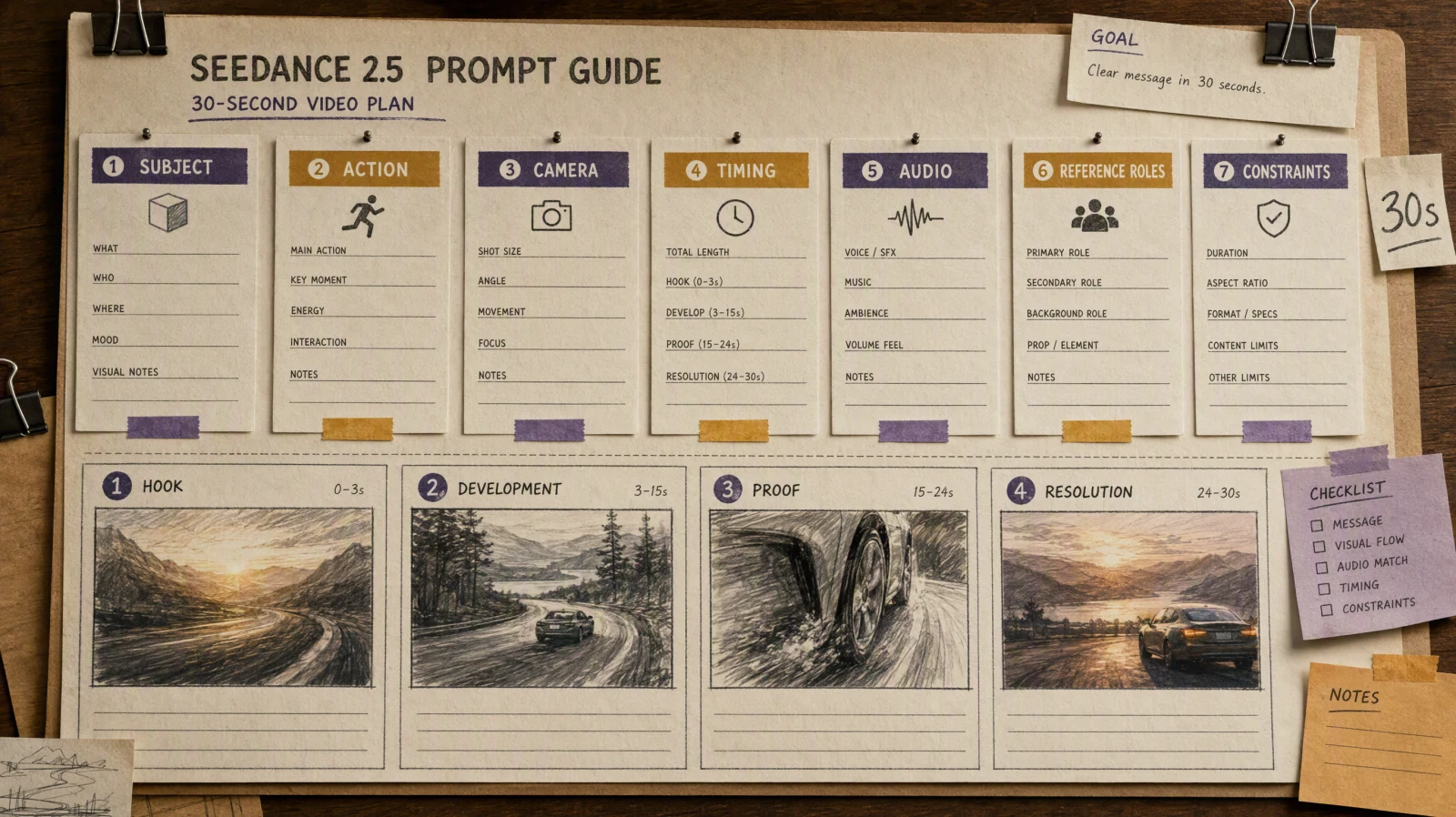
Um bom resultado de vídeo com IA depende de quão claramente você descreve a cena. Um prompt confiável geralmente separa:
- Assunto: Quem ou o que está na cena?
- Ação: O que exatamente muda durante o clipe?
- Câmera: A câmera está fixa, na mão, em dolly, panorâmica, orbitando ou fazendo zoom?
- Cena: Onde a cena acontece?
- Iluminação: Qual é o horário do dia, o clima e o contraste?
- Estilo: Realista, cinematográfico, anime, 3D, anúncio de produto, documentário, moda ou claymation?
- Restrições: O que deve permanecer fixo? O que não deve aparecer?
Exemplo:
A close-up product shot of a matte black wireless earbud case on a reflective glass table. The case slowly opens as soft blue light glows from inside. Camera pushes in slightly, shallow depth of field, clean studio background, premium tech commercial style. Keep the logo sharp and do not change the product shape.Testar este prompt no SeedVideo AI
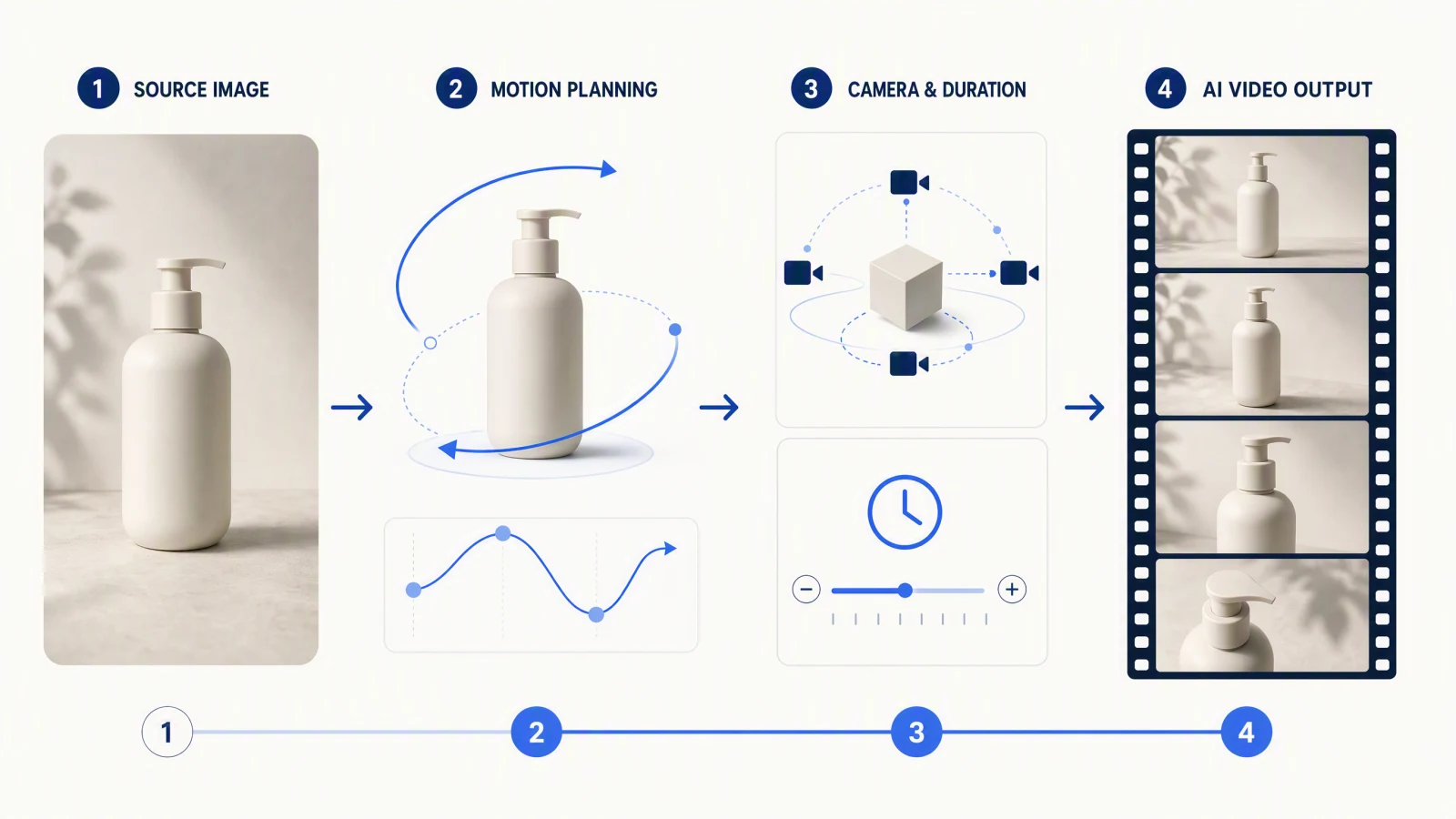
Para imagem-para-vídeo, torne o prompt mais específico sobre movimento:
Animate the uploaded product photo. Keep the product shape, color, and logo unchanged. Add a slow clockwise camera orbit, subtle reflection movement on the table, and soft studio light passing from left to right. Background remains minimal and out of focus.Testar este prompt no SeedVideo AI
Erros comuns ao escolher um gerador de vídeo por IA
Erro 1: Escolher apenas pela qualidade do demo
Vídeos de demonstração são úteis, mas muitas vezes mostram o melhor resultado possível. Teste a ferramenta com seu caso de uso real: seu produto, seu personagem, o estilo da sua marca, sua proporção de tela e seu orçamento.
Erro 2: Usar um modelo para todas as cenas
Um modelo pode ser melhor para realismo, outro para imagem-para-vídeo, outro para efeitos sociais e outro para marketing seguro para marcas. Fluxos de trabalho com múltiplos modelos estão se tornando normais porque o melhor modelo muda de acordo com o tipo de cena.
Erro 3: Ignorar o custo de iteração
A primeira geração raramente é a geração final. Uma ferramenta mais barata que precisa de 20 tentativas pode custar mais do que um modelo mais forte que chega perto em 4 tentativas.
Erro 4: Escrever prompts vagos
Modelos de vídeo de IA precisam de direção. Substitua "faça cinematic" por instruções reais sobre câmera, iluminação, movimento, sujeito e restrições.
Erro 5: Construir em torno de acesso instável
Antes de construir um fluxo de trabalho em torno de qualquer modelo, verifique a disponibilidade atual, direitos de uso, preços e status da API. Isso é especialmente importante para o Sora 2 em 2026 devido ao aviso de descontinuação da OpenAI.
Qual gerador de vídeo de IA você deve escolher?
Escolha SeedVideo AI se você quiser um espaço de trabalho prático para múltiplos modelos e fluxos de trabalho diários de criadores.
Escolha Seedance 2.0 se sua cena depender de referências, entradas multimodais ou movimento controlado.
Escolha Veo 3.1 se realismo e áudio nativo forem mais importantes.
Escolha Runway Gen-4 se você está criando um projeto estilo cinema com personagens, locais e estilo consistentes.
Escolha Kling AI 3.0 se você quer forte controle de movimento focado no criador e conversão de imagem para vídeo.
Escolha Luma Ray3.2 se você quer direção de cena no nível de keyframe.
Escolha Pika se você quer efeitos sociais rápidos e clipes compatíveis com tendências.
Escolha Adobe Firefly se você precisa de um fluxo de trabalho de marketing mais seguro comercialmente.
Escolha Sora 2 somente após verificar o acesso atual e o status da API.
FAQ
Qual é o melhor gerador de vídeo com IA em 2026?
Não existe uma única ferramenta melhor para todos. SeedVideo AI é o ponto de partida mais prático para fluxos de trabalho multimodelos, Seedance 2.0 é forte para controle multimodal, Veo 3.1 é forte para realismo e áudio nativo, Runway é forte para fluxos de trabalho cinematográficos, Kling é forte para criadores de imagem para vídeo, e Pika é forte para efeitos sociais.
Qual é o melhor gerador de vídeo com IA para texto para vídeo?
Para texto-para-vídeo, comece com o SeedVideo AI se quiser comparar modelos a partir de uma única interface. Para saída específica de modelo, teste Seedance 2.0, Veo 3.1, Runway Gen-4, Kling AI 3.0 e Sora 2 se ainda tiver acesso.
Qual é o melhor gerador de vídeo AI para imagem-para-vídeo?
Seedance 2.0, Kling AI 3.0, Veo 3.1, Runway Gen-4 e Luma Ray3.2 são todas opções fortes de imagem-para-vídeo. Se você quer um ponto de partida simples, use SeedVideo AI Image to Video e compare os resultados entre os modelos.
Ainda vale a pena usar o Sora 2?
O Sora 2 ainda é importante como referência de qualidade, especialmente para realismo, física e áudio. Mas a documentação para desenvolvedores da OpenAI diz que os modelos de vídeo Sora 2 e a API de Vídeos estão descontinuados e serão desativados em 24 de setembro de 2026, então é arriscado usá-lo como base para um fluxo de trabalho de longo prazo.
Qual gerador de vídeo AI é melhor para marketing?
Para marketing, use SeedVideo AI para testes flexíveis de múltiplos modelos, Firefly para fluxos de trabalho de marca comerciais seguros, Veo para clipes audiovisuais realistas, Seedance para controle de referência e Runway para campanhas mais voltadas à produção.
Fontes verificadas
Este guia foi verificado pela última vez em 15 de junho de 2026. O acesso aos modelos, preços e status da API mudam rapidamente, então verifique os detalhes atuais antes de se comprometer com um fluxo de trabalho pago.
- ByteDance Seedance 2.0
- Documentação de geração de vídeo Google Veo 3.1
- Página de pesquisa Runway Gen-4
- Preços do Runway
- Guia Kling AI Video 3.0
- Luma Ray3.2
- Pika
- Preços do Pika
- Gerador de vídeo AI Adobe Firefly
- Anúncio do OpenAI Sora 2
- Documentação da API de geração de vídeo do OpenAI Sora
Leitura relacionada: Seedance 2.0 vs Sora 2 vs Kling: Comparação de Geradores de Vídeo AI 2026