How to Keep Characters Consistent in AI Video
To keep characters consistent in AI video, start with one strong reference image, describe stable identity traits in every prompt, and plan the video as separate shots instead of one long scene. Character consistency AI video work is mostly about reducing ambiguity: the model needs the same face, outfit, color palette, age range, body type, and style anchors each time it generates motion. A reference image helps, but it does not guarantee a perfect match. You still need a character lock prompt, short clips, and a review pass after every shot. The safest workflow is to generate one scene at a time, compare each result against the reference, then adjust only the detail that drifted. This guide shows how to choose the reference image, write the lock prompt, plan shots, catch common mistakes, and test image-to-video variations in SeedVideo AI without promising impossible 100% identity control.
TL;DR
- Use one clear reference image or reference sheet before you generate video.
- Write the same stable identity details into every prompt.
- Separate identity, outfit, motion, scene, camera, and constraints.
- Generate short shots instead of asking for one long continuous scene.
- Review each output against the reference before extending or editing.
- Avoid real celebrities, copyrighted characters, and unapproved portraits.
- Test image-to-video variations in SeedVideo AI when you need a practical reference-first workflow.
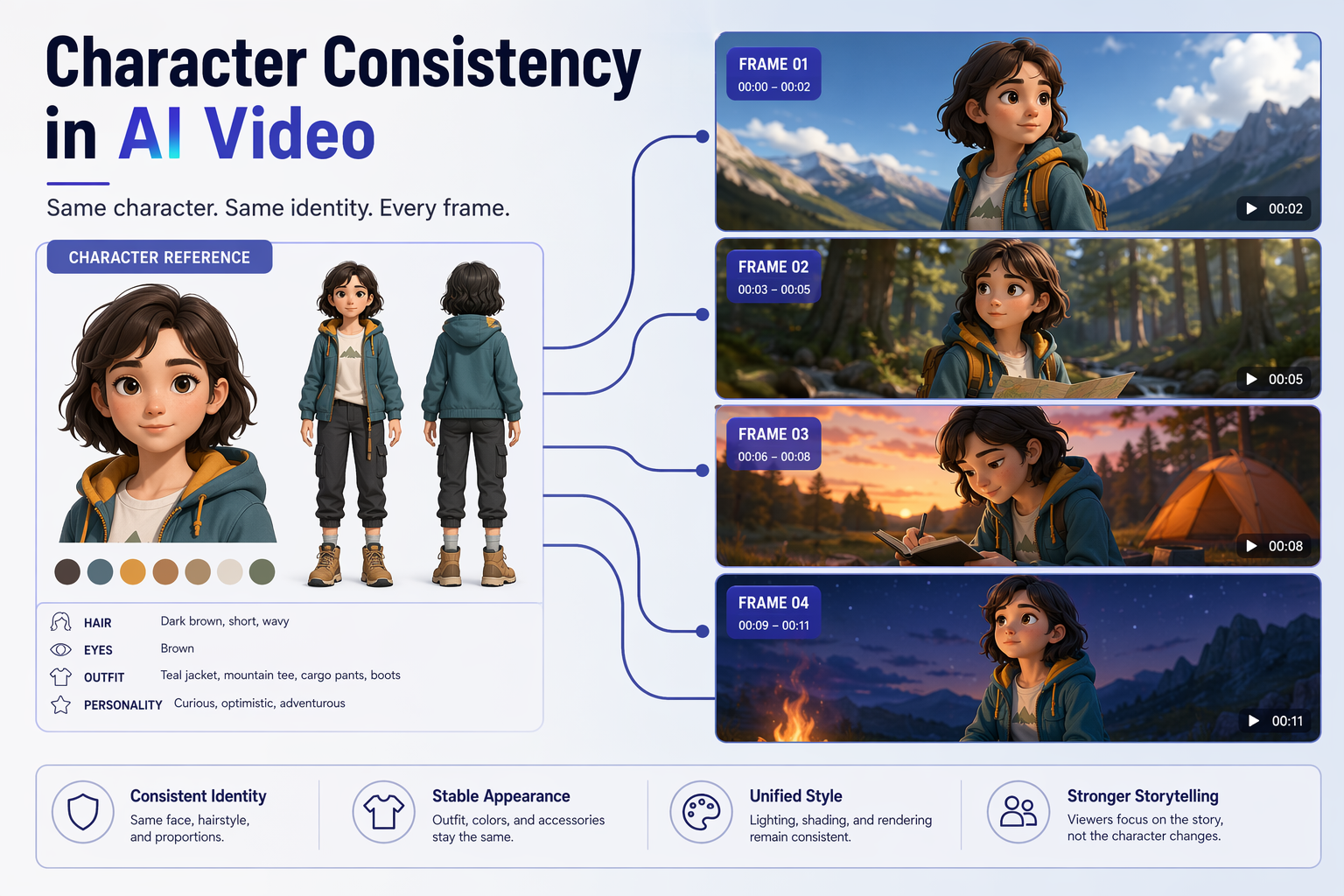
Better reference images and structured prompts help reduce character drift in AI video.
Quick Answer
The best way to keep the same character in AI video is to combine a reference image with a repeatable prompt structure and a shot plan. Use the reference image to anchor the face, hairstyle, outfit, body proportions, and visual style. Then reuse a character lock prompt that names those stable traits before you describe motion or camera movement. Generate one short shot, compare the result to the reference, fix the prompt, and only then move to the next shot.
This workflow will not make every model perfectly preserve identity. AI video character consistency still depends on the source image, model behavior, prompt clarity, motion complexity, and how carefully you review drafts. But the method below gives the model fewer chances to invent a new person between shots.
| Consistency layer | What it controls | Practical rule |
|---|---|---|
| Reference image | Face, outfit, proportions, palette | Use one clear character anchor before prompting |
| Character lock prompt | Stable written identity | Repeat the same identity block in every shot |
| Shot plan | Motion, framing, continuity risk | Keep each clip short and reviewable |
| Review pass | Drift detection | Compare face, outfit, hair, age, and style after every render |
Why AI Video Characters Drift
AI video models generate motion across time. When the prompt is vague, the model may treat each new frame or shot as a chance to reinterpret the character. That is why a face can become older, a jacket can change color, hair can grow longer, or a side profile can stop matching the front view.
The most common causes are simple:
- The reference image is low quality, cropped, busy, or inconsistent.
- The prompt describes the scene but not the character identity.
- The user changes wording between shots, so the model gets new signals.
- The requested action is too complex for one generation.
- The camera angle hides important facial or outfit details.
- The creator accepts the first output instead of reviewing drift early.
If you are still learning how prompt structure affects video outputs, read the Text to Video Prompt Guide before building a long scene. If your workflow starts from a still image, the Image to Video AI Guide explains the image-first approach in more depth.
Use a Strong Reference Image
A reference image is the visual anchor for a consistent character AI video workflow. It should make the character easy to recognize even before motion begins. Do not use a real celebrity, a copyrighted character, or a private portrait unless you have the rights and consent to use it. For most creator workflows, use an original character, a licensed asset, or a brand-approved model image.
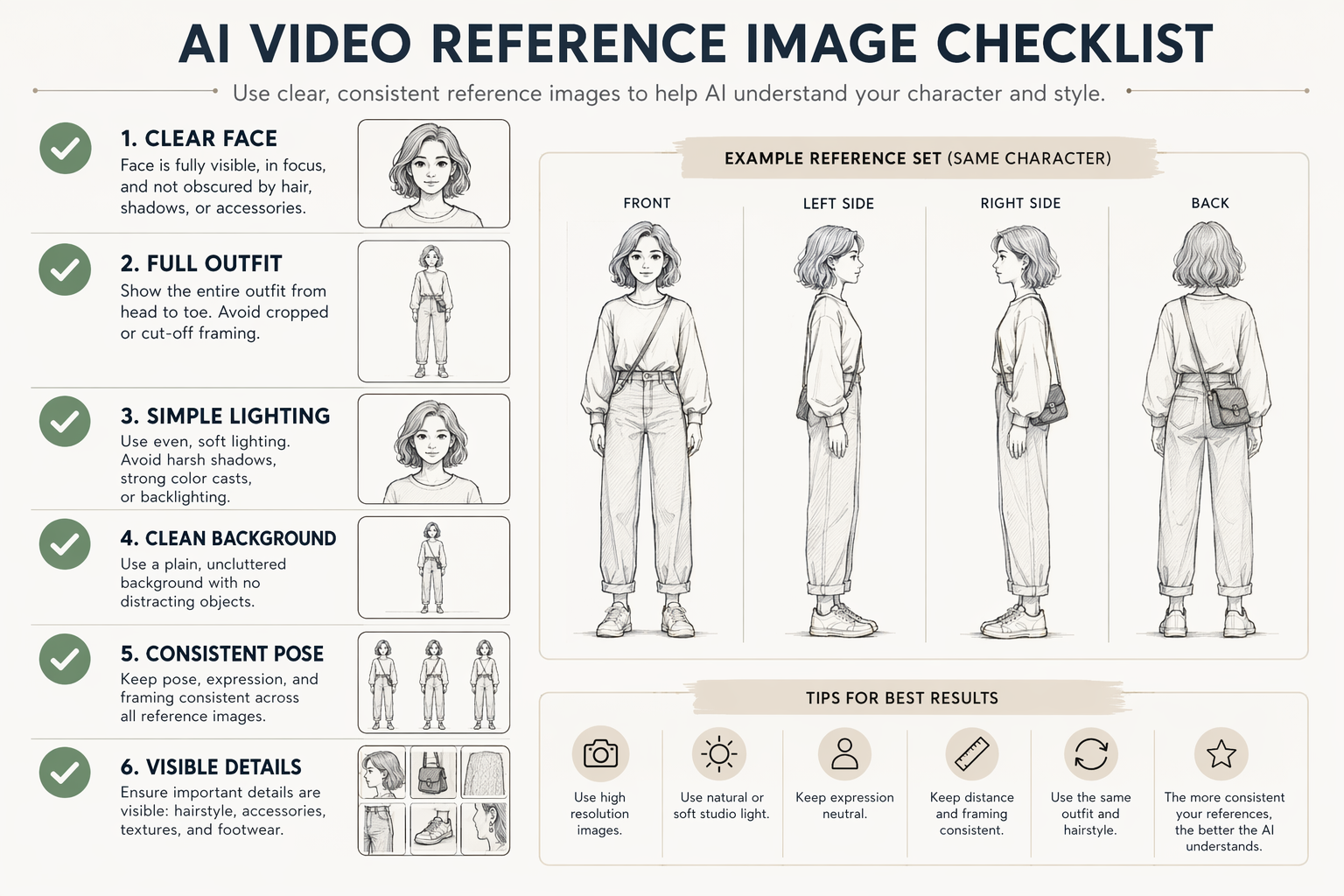
A strong reference image gives the model clearer visual anchors.
| Reference image check | Why it matters | What to avoid |
|---|---|---|
| Clear face | Helps preserve identity and expression | Hair, hands, glasses, or shadows hiding the face |
| Full outfit | Keeps clothing consistent across shots | Cropped torsos, changing accessories, hidden shoes |
| Simple lighting | Reduces false changes in skin, color, and texture | Harsh colored light or deep backlight |
| Clean background | Keeps the model focused on the character | Busy props that may become part of the identity |
| Stable pose | Makes body shape and silhouette easier to read | Extreme angles or motion blur |
| Visible details | Anchors hair, fabric, accessories, and palette | Tiny, low-resolution, compressed references |
For multi-shot projects, create a small reference sheet: front view, side view, back view, one neutral close-up, and one full-body pose. You do not always need all of these, but they help when the story uses different camera angles.
Write a Character Lock Prompt
A character lock prompt is a reusable identity block. It tells the model what should stay the same before you describe the action. Keep this block stable across every shot, then add a separate shot-specific section for motion, camera, and environment.
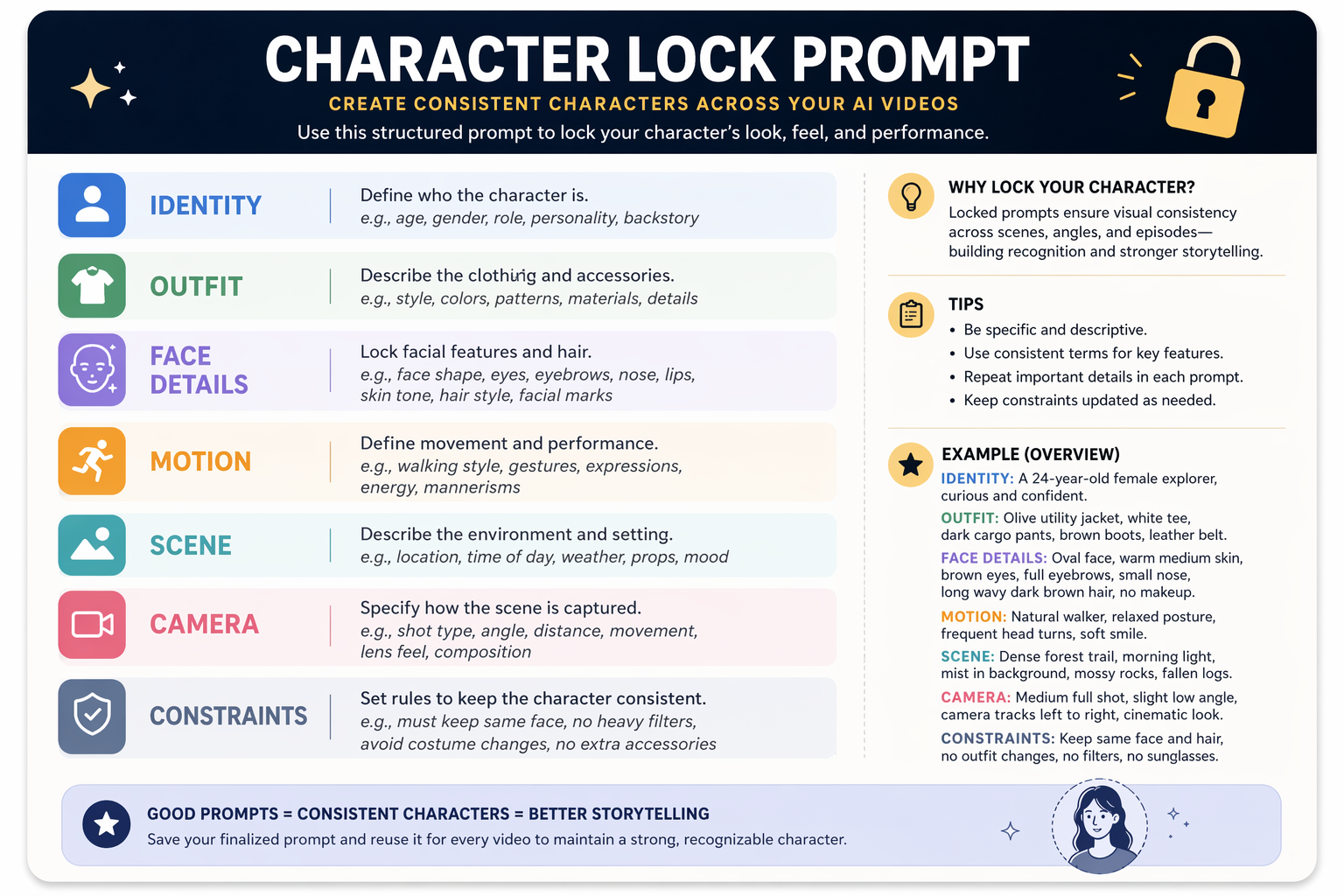
Describe stable character traits separately from scene motion and camera movement.
Use this template:
| Prompt field | What to write | Example guidance |
|---|---|---|
| Identity | Age range, role, personality, body type | Original young adult explorer, calm and curious |
| Face details | Face shape, eyes, brows, nose, lips, skin tone | Oval face, brown eyes, soft brows, warm medium skin |
| Hair | Style, length, color, texture | Short dark brown wavy hair, same length in every shot |
| Outfit | Clothing, colors, accessories, shoes | Teal jacket, cream shirt, dark cargo pants, brown boots |
| Motion | One physical action | Walks slowly, turns head, smiles lightly |
| Scene | Location and mood | Forest trail at morning, soft natural light |
| Camera | Framing and movement | Medium shot, slow push-in, eye-level camera |
| Constraints | What must not change | Same face, same hair, same outfit, no extra accessories |
A copyable character lock prompt might look like this:
Original fictional character, young adult explorer with an oval face, brown eyes, soft brows, short dark brown wavy hair, warm medium skin, teal utility jacket, cream shirt, dark cargo pants, and brown boots. Keep the same face shape, hairstyle, outfit colors, body proportions, and illustrated-realistic visual style in every shot. No celebrity likeness, no copyrighted character, no extra accessories, no outfit change.
Try this prompt in SeedVideo AI
Then add the shot instruction:
Shot 01: medium wide shot on a quiet forest trail at morning. The character walks slowly toward camera, glances at a map, and smiles subtly. Camera makes a gentle push-in. Soft natural light, stable framing, 6 seconds.
Try this prompt in SeedVideo AI
Notice the split: identity first, shot direction second. That keeps character consistency separate from the creative action.
Plan Shots Before Generating
Character drift gets worse when you ask for a long scene with too many changes. Instead, plan the story as short shots. Each shot should have one action, one camera idea, and one continuity risk to review.
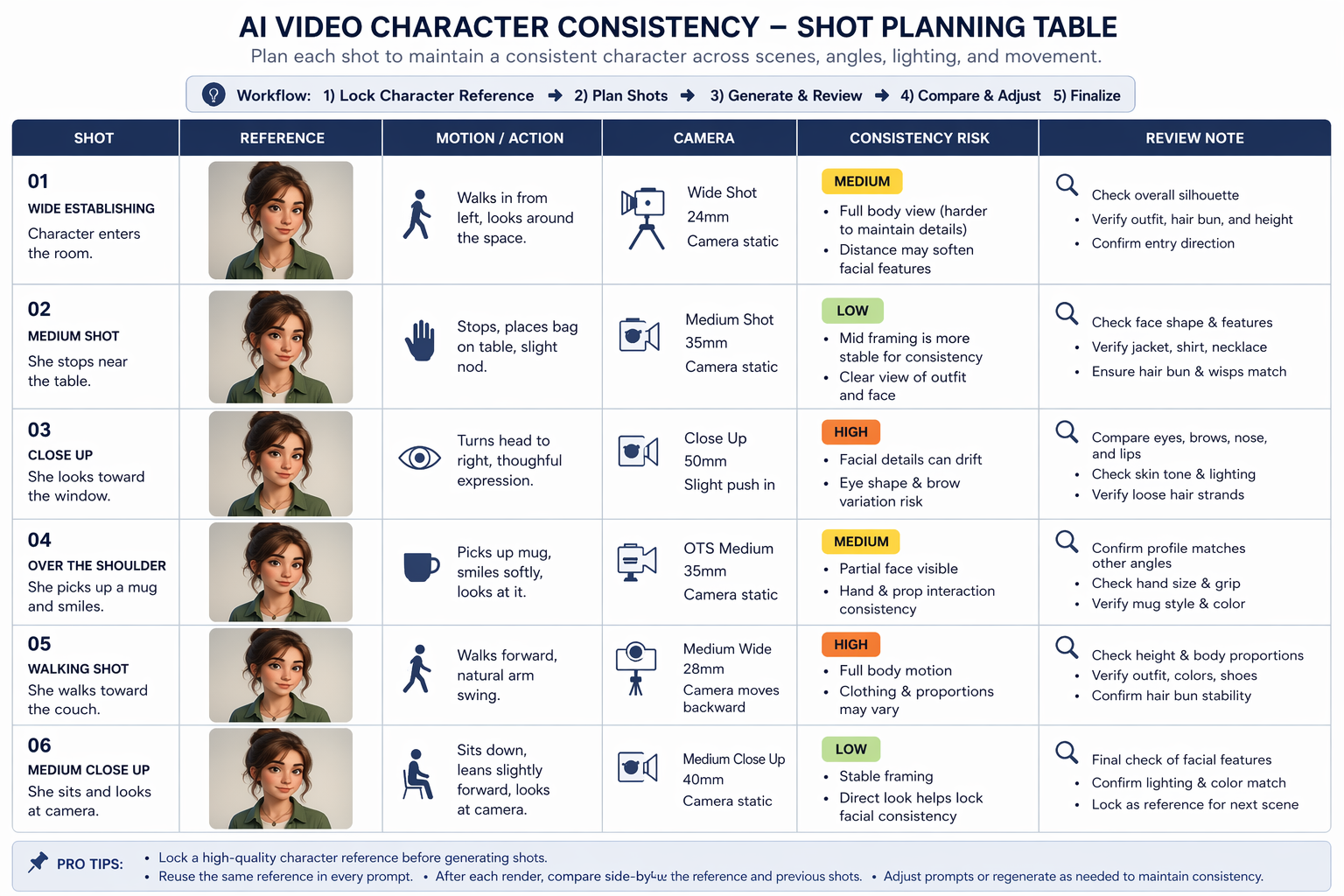
Plan multiple shots before generating to avoid inconsistent character changes.
| Shot | Reference to use | Motion | Camera | Consistency risk | Review note |
|---|---|---|---|---|---|
| 1. Establishing shot | Full-body reference | Character enters frame | Wide or medium wide | Outfit and proportions may drift | Check silhouette, jacket color, body height |
| 2. Dialogue or reaction | Face close-up | Character turns head | Medium close-up | Face shape and age may shift | Compare eyes, brows, nose, mouth, skin tone |
| 3. Action moment | Full outfit and side view | Character reaches or walks | Medium shot | Hands, accessories, and clothing can change | Check sleeves, bag, shoes, and hand count |
| 4. Transition shot | Same face plus same outfit | Character moves between spaces | Static or slow pan | Lighting may alter identity | Keep palette and hair detail stable |
| 5. Final shot | Best previous output as review anchor | Character holds final pose | Close or medium shot | Style may change after iterations | Match rendering style to earlier shots |
Use the same character lock prompt in every row. Only change the motion, camera, and scene details needed for that shot. If a shot needs a new angle, add a matching reference view rather than hoping the model will infer it.
Practical Workflow in SeedVideo AI
For reference image AI video work, a controlled workflow matters more than a dramatic prompt. A practical sequence inside SeedVideo AI looks like this:
- Start with a clean character reference image.
- Open an image-to-video workflow and upload the reference.
- Paste your character lock prompt at the top of the prompt.
- Add one shot instruction with one action and one camera move.
- Generate a short draft, usually 4 to 8 seconds.
- Compare the result against the reference image and previous approved shots.
- Fix only the trait that drifted, such as hair length, jacket color, or face shape.
- Save the best result as a visual review anchor before generating the next shot.
If you need broader model selection context, keep Best AI Video Generators in 2026 open while you test. For prompt examples you can adapt to Seedance-style workflows, see Seedance Prompts.
Consistency Checklist
Before you approve a shot, check the same details every time:
- Does the face still match the reference?
- Are the eyes, brows, nose, mouth, and jaw shape stable?
- Did the age range change?
- Is the hairstyle the same length, color, and texture?
- Did the outfit, shoes, or accessories change?
- Are body proportions and height still believable?
- Did lighting or color grading make the character look like a different person?
- Did the style shift from realistic to cartoon, anime, glossy, or painterly?
- Did the model add extra people, logos, text, or props?
- Does this shot still match the previous approved shot?
Do not wait until the final edit to check these issues. Fix drift while each shot is short and cheap to regenerate.
Common Mistakes
| Mistake | What happens | Better fix |
|---|---|---|
| Using a beautiful but unclear reference | The output looks polished but identity drifts | Use a plain, sharp, well-lit reference first |
| Writing a new character description for every shot | The model treats each shot as a new person | Reuse the same character lock prompt |
| Asking for a long scene in one generation | Face, outfit, and style change over time | Split the scene into short shots |
| Changing camera angle without a matching reference | Side views or profiles stop matching | Add a side or full-body reference |
| Mixing too many visual styles | The character changes rendering style | Pick one style and repeat it in every prompt |
| Ignoring small first-shot drift | Later shots amplify the mistake | Review and fix before extending the sequence |
| Using protected or real-person references casually | Legal, ethical, and platform issues can follow | Use original, licensed, or approved references |
FAQ
Can AI video keep the same character perfectly?
No reliable workflow should promise perfect identity preservation. A strong reference image, a character lock prompt, and short shot planning can reduce drift, but results still depend on the model, input quality, motion, and review process.
What is the best reference image for consistent character AI video?
Use a sharp, well-lit image where the face, outfit, hairstyle, and body shape are easy to see. For multi-shot videos, a reference sheet with front, side, back, close-up, and full-body views is stronger than one cropped portrait.
Should I use text-to-video or image-to-video for character consistency?
Use image-to-video when identity matters because the model starts from a visual anchor. Use text-to-video for scenes where the exact character identity is less important. The Image to Video AI Guide gives a fuller image-first workflow.
How long should each consistent character shot be?
Start short, usually 4 to 8 seconds. Short clips are easier to review and regenerate. Long prompts with multiple actions create more chances for the character to change.
What should be inside a character lock prompt?
Include identity, face shape, eye color, hairstyle, outfit, body proportions, visual style, and constraints. Keep this block stable and add shot-specific motion separately.
Can I use a celebrity or copyrighted character as my reference?
Avoid that unless you have the required rights and consent. For safer workflows, use original characters, licensed images, brand-approved assets, or your own authorized references.
Why does my character look different from another angle?
The model may not know how the character should look from that angle. Add side, back, or full-body references, then make the camera move simpler until the identity holds.
Conclusion
The practical answer to character consistency AI video is not one magic prompt. It is a workflow: start with a strong reference image, write a reusable character lock prompt, plan short shots, review every output, and fix drift before it compounds. SeedVideo AI can help you test reference-first image-to-video ideas from a single workspace, but the creative discipline still matters. Start with one clear character, one short shot, and one review checklist. Then build the sequence only after the character stays recognizable.
Ready to test a reference image workflow? Start from SeedVideo AI or open the image-to-video workspace and build your first controlled character shot.