Best Pika Alternative for AI Video Creators in 2026
If you are searching for a Pika alternative, you probably do not need a tool that "beats" Pika in every category. You need an AI video workflow that fits the way you create: fast social clips, image-to-video experiments, product demos, travel edits, or repeatable brand content. Pika is still useful for quick visual ideas and effect-led short clips, especially if you like its first-party creative ecosystem. SeedVideo AI is a practical alternative when you want a focused place to test text-to-video and image-to-video prompts, compare outputs, and move from idea to review without building a complicated production stack. The best choice depends on prompt control, source-image preservation, motion quality, iteration speed, and whether the finished clip fits your publishing channel. This guide gives you a neutral Pika vs SeedVideo AI framework so you can test both tools with your own creator workflow.
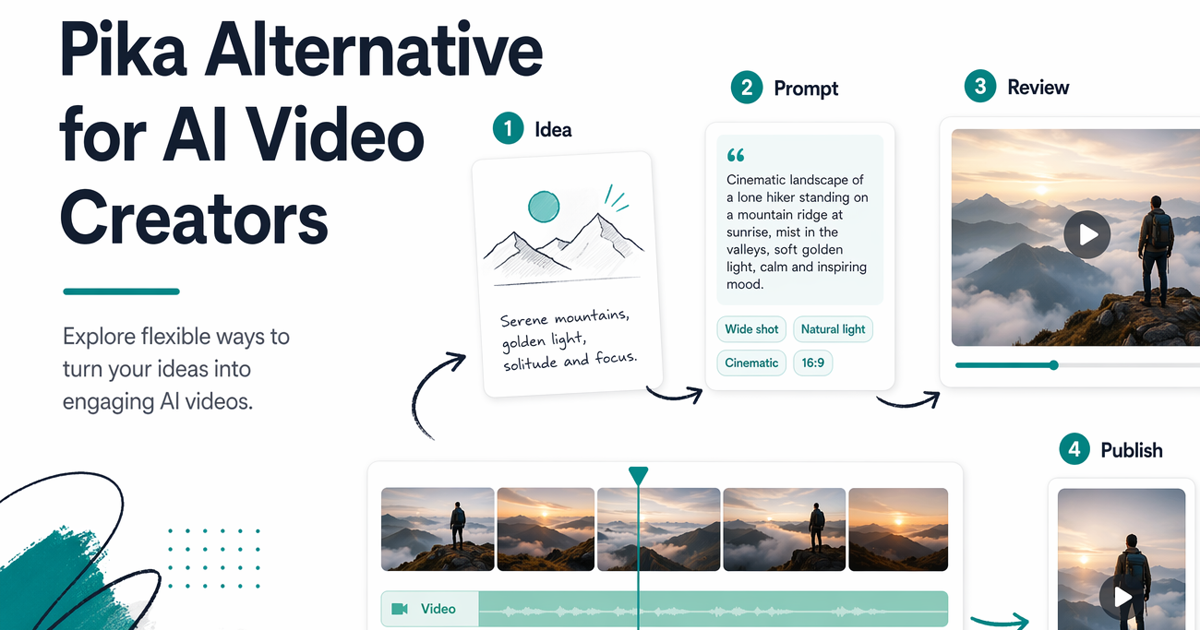
Compare AI video creator workflows by speed, control, and use case.
TL;DR
- A good Pika alternative should be judged by workflow fit, not by a generic tool ranking.
- Pika may still be a strong fit for creators who want its first-party experience and fast effect-style clips.
- SeedVideo AI is useful when you want one practical workspace for testing prompt-first and image-first AI video ideas.
- For social clips, product demos, travel videos, and brand storytelling, compare outputs with the same prompt, source image, aspect ratio, and review checklist.
- If you are still comparing the broader market, keep the Best AI Video Generators in 2026 guide open while you test.
Quick Answer
The best Pika alternative for many AI video creators is the tool that gives them more reliable control over their actual production loop: brief, prompt, source image, generation, review, edit, and publish. SeedVideo AI is a strong option when you want to test creator workflows from one place rather than treating every video model as a separate island. It is not automatically better than Pika for every job. Pika can remain the better fit when you specifically want Pika's own creative tools, visual effects, and native ecosystem. Choose SeedVideo AI when your priority is practical comparison, repeatable prompts, image-to-video testing, and a simpler path from concept to usable clip.
Why Creators Look for a Pika Alternative
Creators usually look for a Pika AI alternative for one of five reasons. First, they may need more structure than a fast one-off generation flow gives them. A social video creator can accept a few playful surprises, but a product marketer often needs consistent framing, brand-safe language, clear subject motion, and repeatable review notes.
Second, teams may want to test more than one AI video model or workflow without rebuilding the same prompt library in several places. That matters when a shot starts as text, another starts from a product image, and another needs a reference-heavy look.
Third, creators may care about output fit more than novelty. A clip that looks impressive but does not work in a vertical ad, product launch page, travel reel, or client storyboard still creates editing work.
Fourth, Pika-specific creative features may be fun but not always the center of the job. If the project is a practical tutorial, explainer, ecommerce demo, or brand concept, the review process is often more important than a single effect.
Finally, creators want a way to make decisions without hype. A neutral test should answer: which tool follows the brief, protects the source material, supports iteration, and produces video that can actually be published?
What to Compare
Use the same prompt, source image, aspect ratio, and success criteria when comparing Pika vs SeedVideo AI. Otherwise you are comparing random outputs, not workflow fit.
| Comparison area | What to test | Why it matters |
|---|---|---|
| Prompt control | Camera movement, subject action, style, negative constraints | Shows whether the tool follows direction rather than only producing an attractive clip |
| Image-to-video quality | Source-image preservation, motion naturalness, identity stability | Important for product shots, characters, landmarks, and brand visuals |
| Iteration speed | How quickly you can revise prompts and compare versions | Determines whether the tool fits daily creator work |
| Use-case fit | Social clip, product demo, travel edit, brand story | A tool can be excellent for one format and weak for another |
| Publishing readiness | Aspect ratio, visual clarity, editing needs, review handoff | Measures whether the output can move into real production |
| Workflow overhead | Number of steps from idea to usable clip | Hidden complexity matters when you publish often |
For broader model selection, the Best AI Video Generators in 2026 hub is a useful companion. If you need prompt inspiration before running tests, use the published AI Video Prompt Examples guide.
SeedVideo AI for Creator Workflows
SeedVideo AI is most useful when the task is not simply "make something visually surprising." It is useful when you want a repeatable creator workflow:
- Define the video job in plain language.
- Choose whether the starting point is text, an image, or a visual reference.
- Generate a short clip.
- Review motion, framing, subject consistency, and channel fit.
- Rewrite the prompt with a specific correction.
- Export the best result into your editing or publishing process.
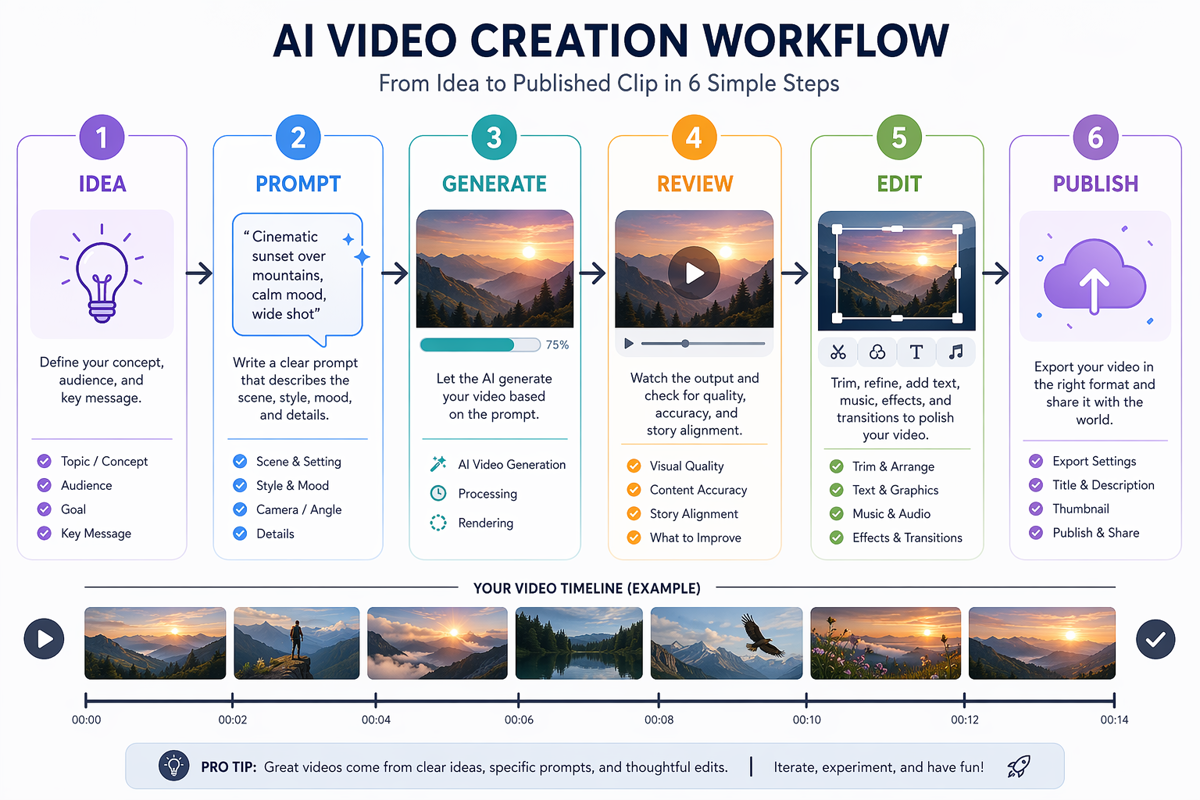
A practical workflow for turning ideas into AI-generated social clips.
This makes SeedVideo AI a practical Pika alternative for creators who want less friction around testing. You can start from the SeedVideo AI homepage, try a prompt-first workflow in text-to-video, or use an image-first workflow in image-to-video. The goal is not to declare a permanent winner. The goal is to find which workflow gives you the most usable output for the current shot.
SeedVideo AI is best for:
- Creators comparing several prompt styles before choosing a final direction.
- Marketers turning product concepts into quick visual drafts.
- Teams that need a repeatable review checklist.
- Writers, founders, and educators who want simple video concepts without a full editing suite.
- Social teams that need consistent testing across short-form formats.
SeedVideo AI is not best for:
- Users who specifically need Pika-only effects or Pika's native ecosystem.
- Teams that require a full professional editing suite inside the same platform.
- Projects where the final video must match exact frame-level direction without additional editing.
- Any workflow where unreviewed AI output would be published as a factual demonstration.
Use Cases: Social Clips, Product Demos, Travel Videos, Brand Videos
Different creator jobs need different tests. Do not evaluate every Pika alternative with the same generic prompt.
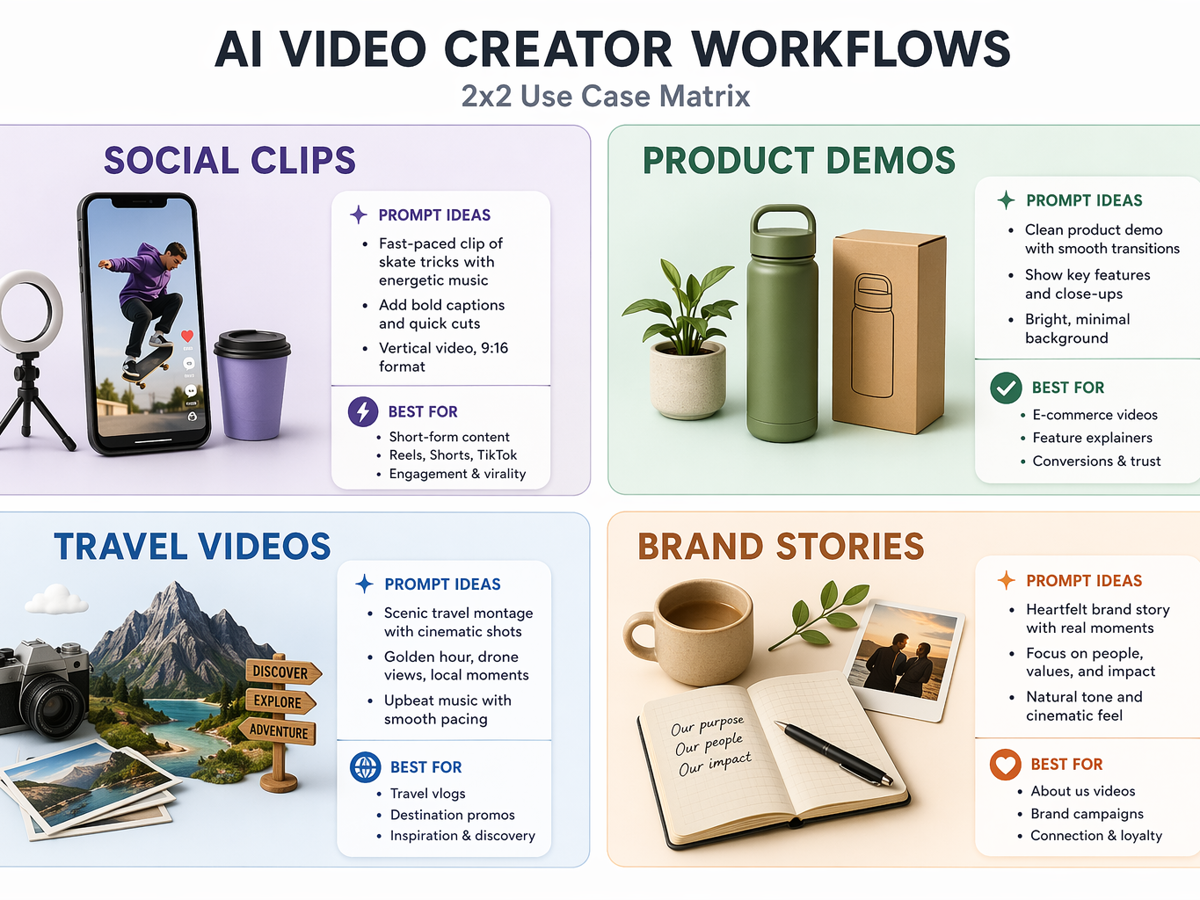
Match the AI video workflow to the type of content you want to produce.
| Use case | What matters most | How to test SeedVideo AI vs Pika |
|---|---|---|
| Social clips | Speed, visual hook, mobile framing | Use a short prompt, vertical framing, and a clear first-second visual idea |
| Product demos | Product shape, material, framing, brand safety | Start from a clean product image and test whether the item stays recognizable |
| Travel videos | Scene continuity, camera motion, atmosphere | Use prompts with location, time of day, camera path, and motion constraints |
| Brand videos | Consistency, reviewability, editing fit | Run the same brand-safe prompt several times and compare how easy the clips are to approve |
For social content, Pika may be a strong fit if the project depends on quick playful effects and the creator likes Pika's own toolset. For product and brand workflows, SeedVideo AI can be a better test environment when you want a calmer process: define the brief, generate, compare, and refine. For travel videos, the deciding factor is often not the tool name but whether the clip holds the scene together while the camera moves.
When Pika May Still Be a Better Fit
A neutral comparison should include cases where Pika may be the better choice. Pika's official site emphasizes fast AI video creation and creative features around turning prompts, images, and edits into short videos. If your work depends on Pika's native features, first-party workflow, or specific effect style, staying with Pika can be the more efficient decision.
Pika may be better for:
- Creators who already have a working Pika prompt library.
- Short social experiments where surprise and speed matter more than repeatability.
- Projects that depend on Pika-specific creative effects.
- Users who prefer the first-party Pika environment.
- Teams that have already approved Pika in their workflow and do not need another review process.
SeedVideo AI may be better for:
- Creators who want to compare prompt-first and image-first workflows in one place.
- Teams testing a Pika alternative for repeatable video production.
- Marketers who need product, travel, social, and brand concepts with a shared review checklist.
- Users who care more about workflow fit than one-off novelty.
- Writers and founders who want to move from article, landing page, or campaign idea into a video draft.
The practical decision is not "Pika or SeedVideo AI forever." It is "which tool should handle this type of video job this week?"
Testing Workflow
Use a controlled test before switching tools. A weak test will make every platform look inconsistent because AI video generation naturally varies across attempts.
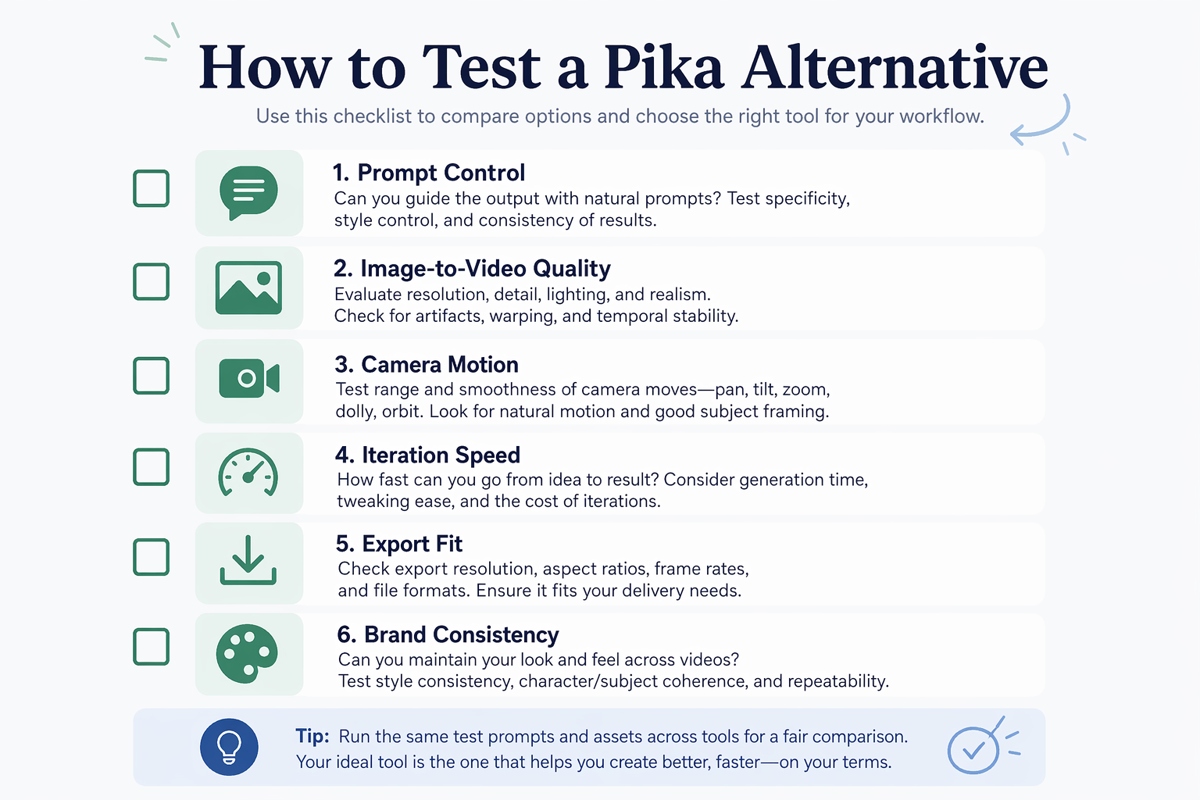
Evaluate an AI video tool by workflow fit, not only visual style.
- Choose one real project. Use a clip you actually need: a product teaser, travel reel, social ad, explainer, or brand concept.
- Write one base prompt. Include subject, setting, camera movement, visual style, duration expectation, and what should not change.
- Use the same source image when relevant. For image-to-video tests, the starting image must be identical.
- Run one fair pass in each tool. Do not keep regenerating in one tool and compare it against a first attempt in the other.
- Score the output. Review prompt control, image preservation, motion, editing effort, aspect ratio, and publishing fit.
- Revise once. Give each tool one targeted correction and compare how well it responds.
- Decide by use case. You may choose Pika for social effects and SeedVideo AI for structured brand or product workflows.
Here is a simple scoring template:
| Criterion | Weight | What a good result looks like |
|---|---|---|
| Prompt control | 25% | The output follows the main camera, subject, and style instructions |
| Source consistency | 20% | The product, person, or scene remains recognizable |
| Motion quality | 20% | Movement feels intentional instead of random |
| Iteration effort | 15% | The next prompt revision is obvious and fast |
| Channel fit | 10% | The clip works for the target format without heavy repair |
| Brand review | 10% | The output is easy to approve, reject, or revise |
If you need more examples for the base prompt stage, start with 30 AI Video Prompt Examples. If your project starts from a still image, the Image to Video AI Guide is a useful next read.
FAQ
What is the best Pika alternative for AI video creators?
The best Pika alternative is the tool that fits your creator workflow. SeedVideo AI is a strong option when you want a practical workspace for text-to-video, image-to-video, prompt testing, and review. Pika may still be better when your project depends on Pika's own creative features or ecosystem.
Is SeedVideo AI better than Pika?
Not universally. SeedVideo AI can be a better fit for structured creator workflows, product concepts, prompt comparison, and repeatable review. Pika can be a better fit for creators who want Pika-specific effects, quick social experiments, or the first-party Pika experience.
How should I compare Pika vs SeedVideo AI?
Use the same prompt, source image, aspect ratio, and review checklist. Score prompt control, image-to-video quality, camera motion, iteration speed, export fit, and brand consistency. Do not compare one carefully regenerated output against another tool's first attempt.
Can I use SeedVideo AI for social video clips?
Yes. SeedVideo AI can be useful for social video concepts when you want to test short prompts, image references, and publishable framing. For fast effect-led posts, Pika may still be worth testing beside it.
What should I avoid when testing a Pika AI alternative?
Avoid vague prompts, unverified product claims, unsupported pricing comparisons, and one-off tests that do not match your real publishing workflow. Also avoid using generated clips as factual product demos without human review.
Does a Pika alternative need to replace Pika completely?
No. Many creators use different AI video tools for different jobs. You might keep Pika for fast creative effects while using SeedVideo AI for structured prompt tests, product concepts, travel videos, or brand-safe workflows.
Where should I start if I am new to AI video creation?
Start with a simple prompt-first workflow on SeedVideo AI, then compare your result with the broader Best AI Video Generators in 2026 guide. If you need prompt patterns, use the AI Video Prompt Examples article before running tests.
Conclusion
A good Pika alternative should make your video workflow clearer, not just give you another place to type prompts. Pika remains useful for fast creative clips and Pika-specific workflows. SeedVideo AI is a practical alternative when you want a focused way to test prompts, compare text-to-video and image-to-video approaches, and decide based on the kind of content you actually publish.
Try SeedVideo AI with one real creator brief. Use the checklist above, compare it against your Pika workflow, and choose the tool that gives you the most usable clip with the least production friction.