

Kling 4.0 gratis: 30 segundos con sonido
Kling 4.0 genera hasta 30 segundos con audio estéreo y sincronización labial en una sola pasada, a partir de un prompt de texto o de un primer y un último fotograma. ¡Prueba Kling 4.0 gratis en línea!
Seedance 2.5
Clips de hasta 30 s con referencias de imagen, video y audio.
Kling 4.0 Flash
La versión rápida de Kling 4.0: clips 720p con sonido por menos créditos.
Wan 3.0
Clips de hasta 30 s con audio nativo y diálogos sincronizados.
GPT Image 2.6
Genera y edita imágenes con el modelo más nuevo de OpenAI.

GPT Image 2.5
Genera y edita imágenes desde 1 crédito.
Nano Banana 2.1
El modelo de imagen de Google: más detalle y texto más limpio.
Seedance 2.0
Video cinematográfico multitoma con audio nativo y lip sync.
Ejemplos de videos de IA creados con Kling 4.0
Funciones de Kling 4.0 de un vistazo
- Videos de 30 segundos con Kling 4.0 en una sola generación: Kling 4.0 genera de 3 a 30 segundos por ejecución, así que un prompt puede llevar una escena completa, del planteamiento al remate, con el sonido generado junto a la imagen.
- Imagen a video con Kling 4.0 a partir de una sola foto: Dale a Kling 4.0 un primer fotograma y describe qué debe moverse. El encuadre, las caras y los colores de tu imagen serán el plano inicial.
- Audio nativo en Kling 4.0 con diálogos y sincronización labial: Cada clip de Kling 4.0 llega con pista de sonido estéreo. Escribe las frases entre comillas y los personajes las dicen, con la boca sincronizada con las palabras.
- Texto a video en Kling 4.0 con personas realistas: Dos frases bastan para un plano de vlog natural, cámara en mano: Kling 4.0 completa a la persona, la habitación y su forma de hablar a cámara.
- Actuación realista y expresiones faciales en Kling 4.0: Las miradas, las pausas y los pequeños cambios de expresión se leen con claridad, así que la escena funciona como una interpretación.
- Control de cámara en Kling 4.0 para escenas de acción: Acercamientos, alejamientos, panorámicas, planos de seguimiento y órbitas se mantienen fluidos, incluso en escenas rápidas.
- Control de primer y último fotograma en Kling 4.0: Sube un primer fotograma y, si quieres, uno final. Kling 4.0 completa el movimiento entre ambos para que un producto, una pose o un cierre queden justo donde los necesitas.
- Ajustes de Kling 4.0 para duración, resolución y relación de aspecto: Duración, resolución, relación de aspecto, entradas y límites del prompt, tal como los ofrece hoy el generador.
- Especificaciones y capacidades de Kling 4.0: Las especificaciones publicadas por Kling para el modelo completo. Lo que Kling marca como «próximamente» aparece aquí con la misma etiqueta.
Videos de 30 segundos con Kling 4.0 en una sola generación
Kling 4.0 genera de 3 a 30 segundos por ejecución, así que un prompt puede llevar una escena completa, del planteamiento al remate, con el sonido generado junto a la imagen.
En esta demo de lanzamiento de Kling, la única entrada es un primer fotograma de un joven ante un micrófono en una cabina de grabación. Kling 4.0 mantiene la toma durante los 30 segundos completos, con su voz y el sonido de la sala generados a la vez y sus labios sincronizados con el audio.
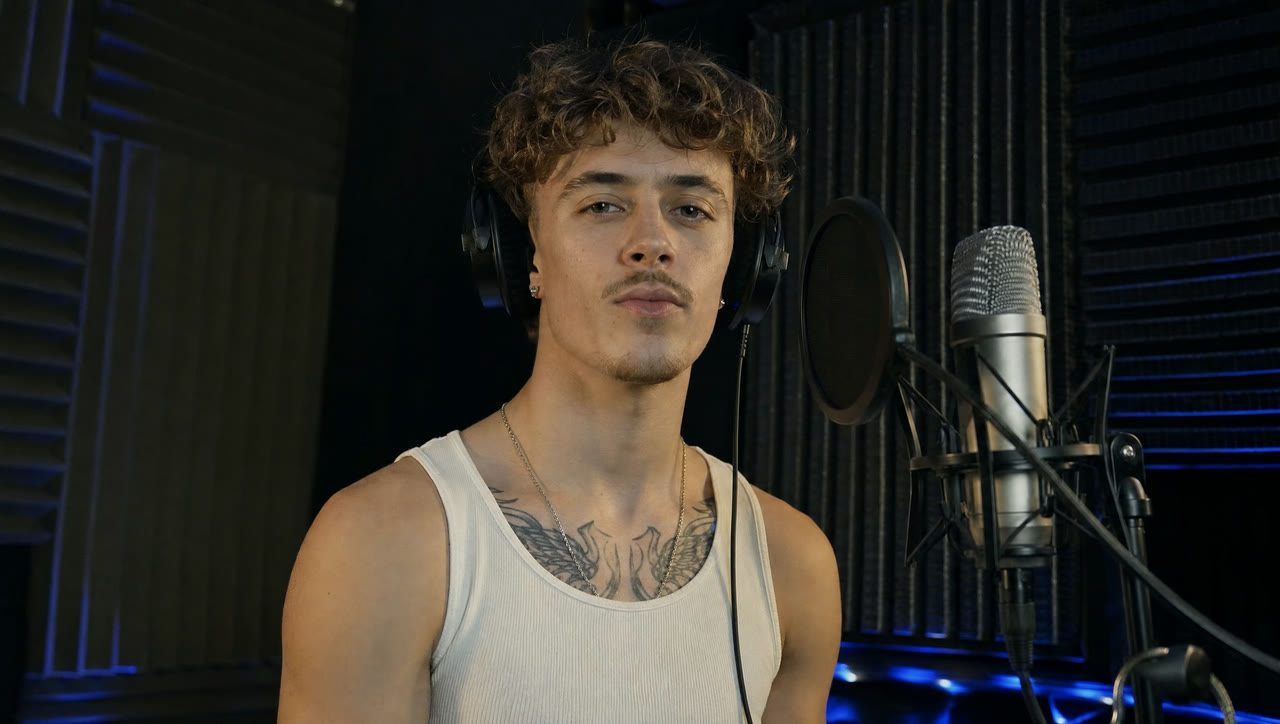
Imagen a video con Kling 4.0 a partir de una sola foto
Dale a Kling 4.0 un primer fotograma y describe qué debe moverse. El encuadre, las caras y los colores de tu imagen serán el plano inicial.
Kling publicó esta demo solo con su primer fotograma: una hechicera entre hilos rojos y monedas antiguas. Kling 4.0 convirtió la imagen fija en 15 segundos de movimiento amplio y rápido, con hilos que azotan el aire y monedas que salen disparadas hacia el objetivo, mientras su rostro y su vestuario no cambian.

Audio nativo en Kling 4.0 con diálogos y sincronización labial
Cada clip de Kling 4.0 llega con pista de sonido estéreo. Escribe las frases entre comillas y los personajes las dicen, con la boca sincronizada con las palabras.
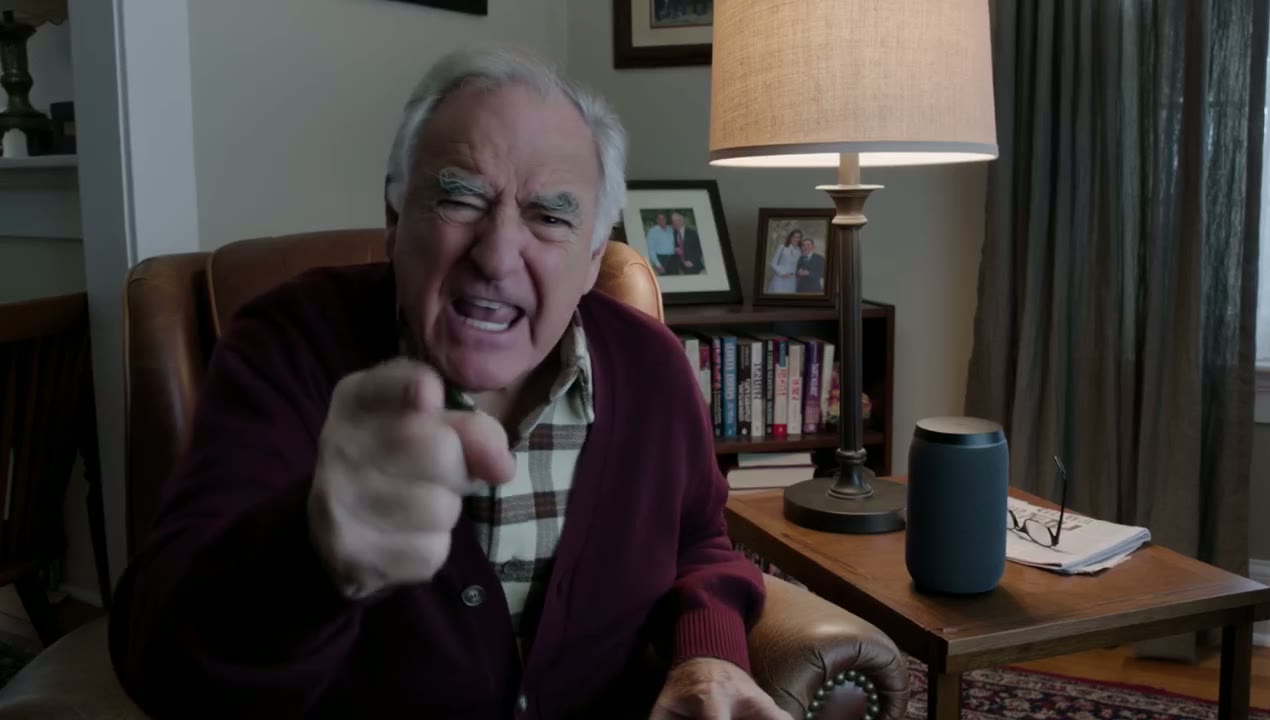
Todo el prompt de la demo es una sola línea: «An old man ranting about AI.» Kling 4.0 eligió al hombre, ambientó la sala de estar y escribió la diatriba por su cuenta.
 Kling 4.0
Prompt: An old man ranting about AI. (Kling 4.0 · 16:9 · 15s · 1080p)
Texto a video en Kling 4.0 con personas realistas
Dos frases bastan para un plano de vlog natural, cámara en mano: Kling 4.0 completa a la persona, la habitación y su forma de hablar a cámara.
El prompt de la demo son dos frases que piden una vlogger alegre que se presenta; el encuadre, la habitación y su forma de hablar a cámara son cosa de Kling.
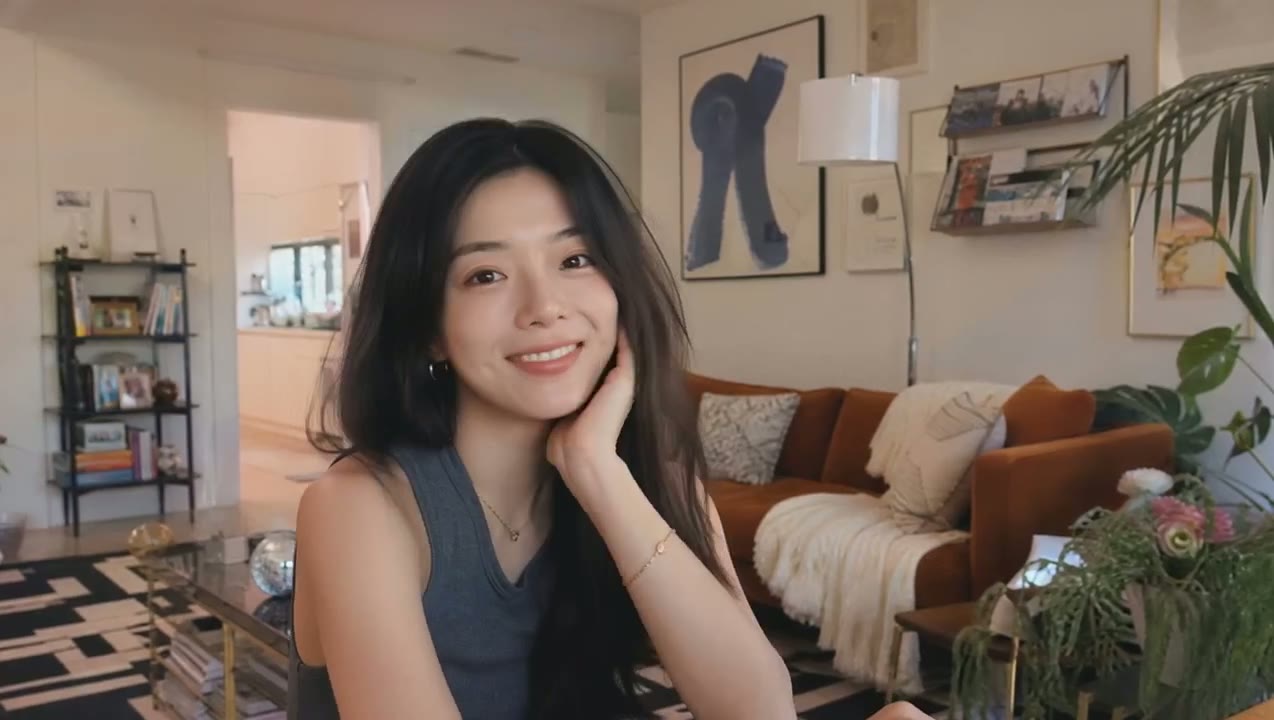 Kling 4.0
Prompt: A vlogger-style video in which the woman cheerfully introduces herself to the audience. Maintain a natural, authentic look and realistic image quality. (Kling 4.0 · 16:9 · 7s · 720p)
Actuación realista y expresiones faciales en Kling 4.0
Kling 4.0 maneja mejor los detalles que hacen creíbles a las personas: una mirada que se sostiene un instante de más, una duda antes de una frase, el cambio de postura cuando una discusión da un giro. La piel, la luz y las telas se ven naturales del primer fotograma al último.
La demo de Kling parte de un único fotograma de dos mujeres enfrentadas en un pasillo. El resultado, de 11 segundos, desarrolla la confrontación: una de ellas se da la vuelta y se marcha, y la escena termina con algo hecho añicos en el suelo.
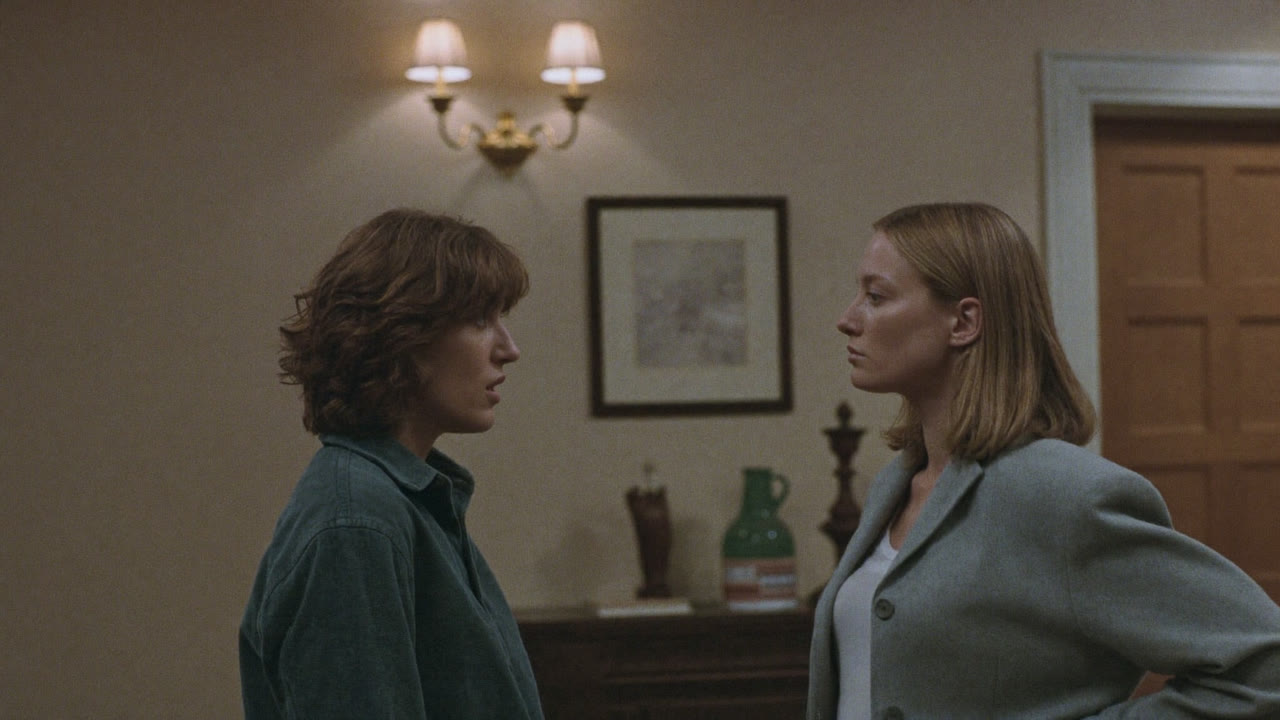
Control de cámara en Kling 4.0 para escenas de acción
Nombra el movimiento en tu prompt y Kling 4.0 lo lleva hasta el final: un acercamiento a una cara, un alejamiento que revela la habitación, un plano de seguimiento que acompaña a un corredor. Los tamaños de plano cambian y los cortes encajan sin que la imagen tiemble ni los personajes cambien de aspecto.
En esta demo de lanzamiento de 10 segundos, dos luchadores de taekwondo combaten mientras la cámara se mantiene cerca, sube hasta una vista cenital del tatami y vuelve a bajar a la altura de los ojos, con cada golpe y cada paso todavía nítidos.
Control de primer y último fotograma en Kling 4.0
Sube un primer fotograma y, si quieres, uno final. Kling 4.0 completa el movimiento entre ambos para que un producto, una pose o un cierre queden justo donde los necesitas.
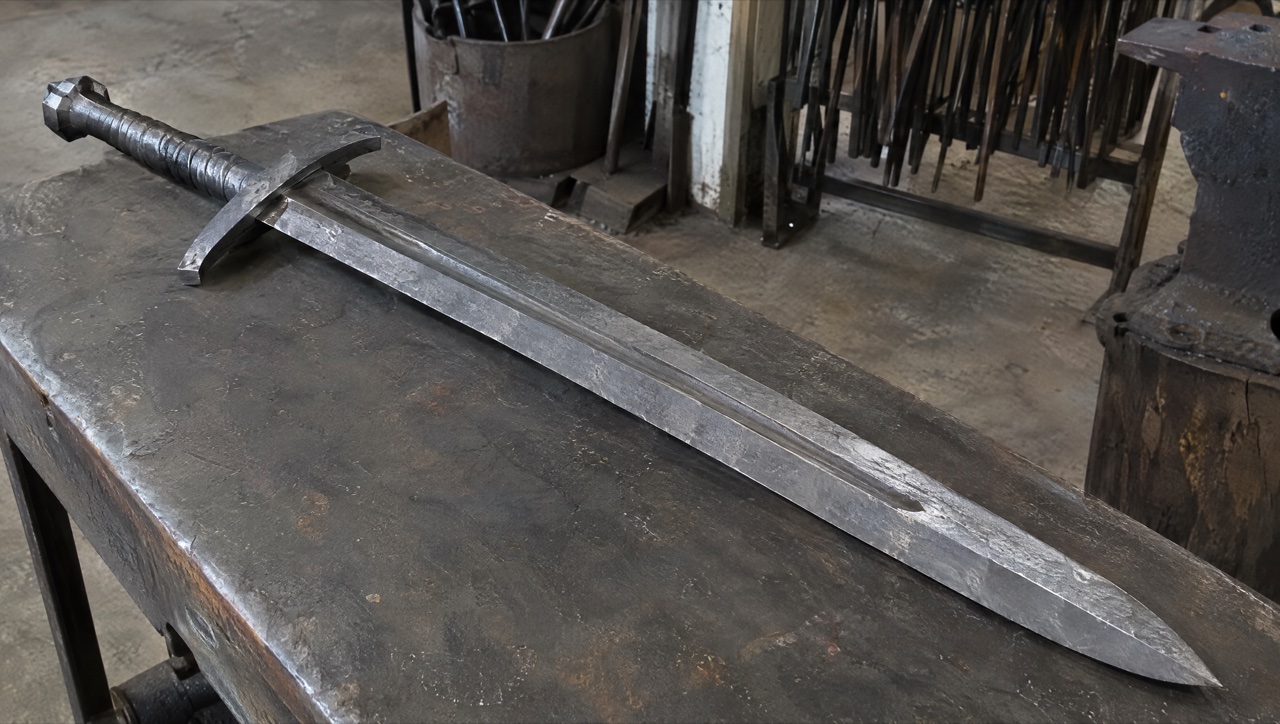
En la demo, el primer fotograma muestra bloques de hierro en bruto sobre un banco de trabajo y el último, un mandoble terminado en el mismo banco. Kling 4.0 llenó los 15 segundos intermedios con seis planos de forja.
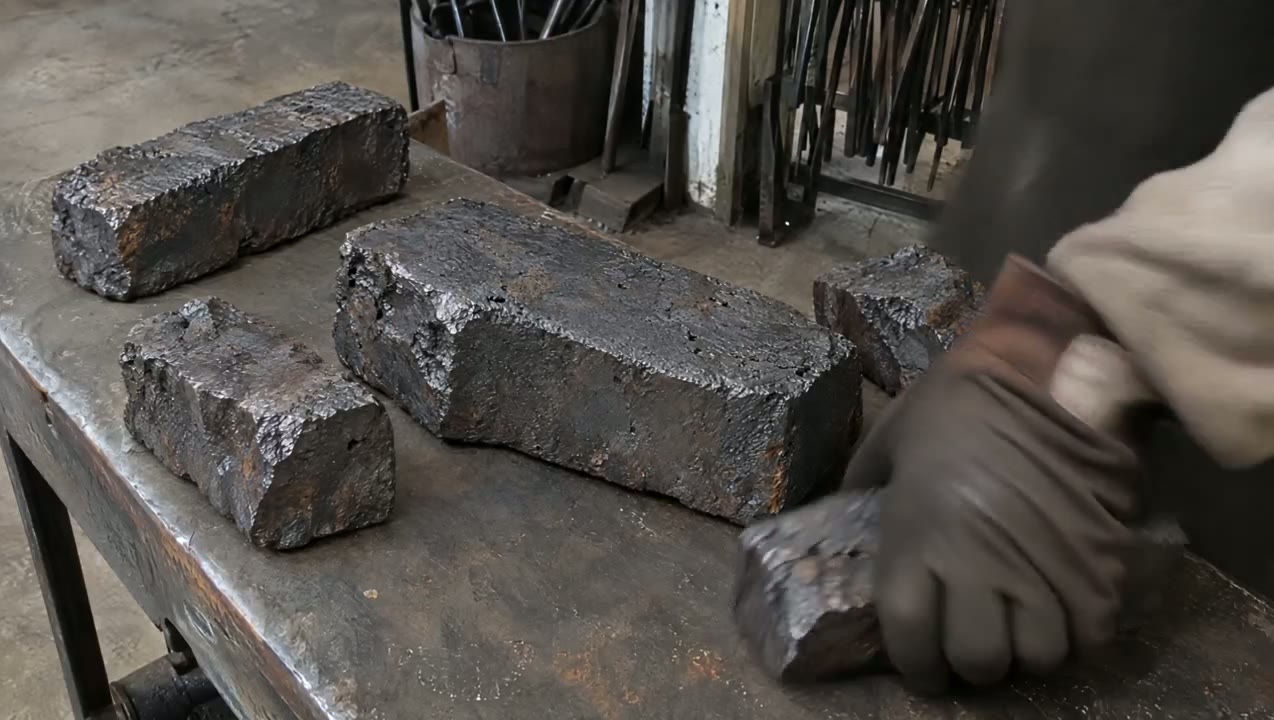
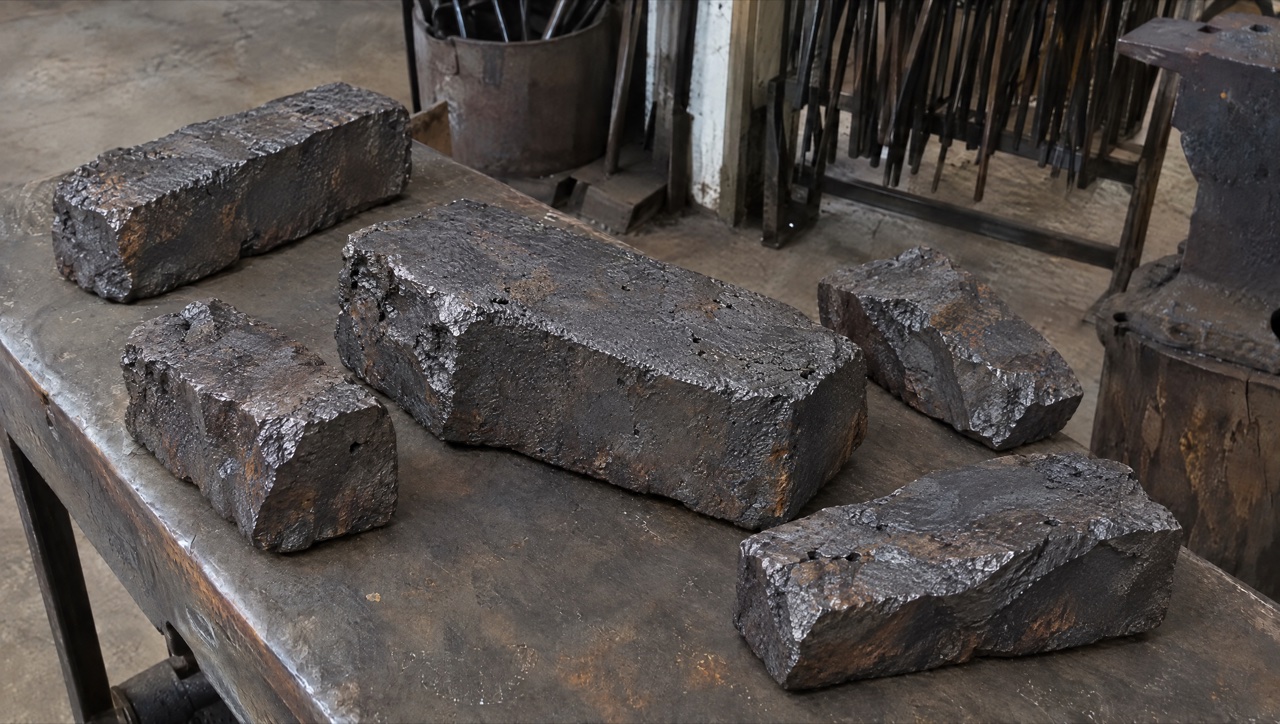
 Kling 4.0
Prompt: SCENE CONTEXT EXACT 1 CHARACTER — NO DUPLICATES. Interior, a worn blacksmith workshop, daytime. The same blacksmith removes the raw material, works it into a greatsword, and returns the completed sword to the original table.15 seconds, six shots. Manufacturing time is compressed through editorial cuts; individual actions retain natural weight and speed. ACTIVE REFERENCES: @Image1: exact first-frame anchor. Preserve all five iron blocks, their arrangement, the tabletop, background tools, perspective, and lighting. This image is the starting state of an active pickup shot.@Image2: exact final-frame anchor and finished-sword design. Preserve the blade silhouette, central fuller, angular curved crossguard, spiral metal grip, faceted pommel, diagonal placement, perspective, and background. This composition is reached through a visible physical placement. LOCATION MAP: The worktable fills the foreground. The tool bucket stands behind its left-center edge, the rod rack occupies the rear right, and the anvil stands at the right. The blacksmith works from the left side of the table in both endpoint shots. The camera stays on the original viewer-facing side of the table. During blade-working inserts, the tang points screen-left and the tip points screen-right. The final sword position runs from the upper-left pommel to the lower-right tip. FIRST FRAME AND SPATIAL BLOCKING: At 0.0 seconds, the frame exactly matches the raw-material reference, with five iron blocks and no hands visible. The same blacksmith immediately reaches in from the left edge. Both gloved hands approach the largest central block from opposite ends, preparing a supported two-handed lift. The blacksmith wears soot-gray sleeves, brown leather gloves, and a narrow dark strap around the right cuff. These details remain identical throughout every shot. FORMAT MODE: 15 seconds total, six shots.Hard cuts at 3.0, 5.0, 8.0, 10.0, and 11.0 seconds. Cuts compress the omitted manufacturing work and bench clearing. The opening pickup and closing placement each play as continuous physical actions.No fades, dissolves, or object-morph transitions. OPTICS: Shots 1 and 6: reference-matched elevated three-quarter framing, approximately 63° diagonal field of view and approximately 1.8 meters from the tabletop center. Exact endpoint framing takes priority over estimated optical measurements. Shots 2–5: 40° diagonal field of view, approximately 0.8 meters from the working contact point. Focus follows the hands and metal contact; the workshop background remains softly readable. Each shot holds one fixed field of view. CAMERA: A real camera operator holds the camera from the viewer-facing side of the workspace. All shots use handheld SETTLE: visible breathing sway, slight roll, and small delayed corrections. The opening camera holds its position while the iron block leaves the frame. The closing camera holds the empty tabletop composition while the sword enters, then settles into the exact final reference. The blacksmith is the only visible worker; the camera operator remains outside the image. ACTION TIMING: 0.0–3.0s — TAKE THE IRON. Start on the exact first reference; during 0.0–0.6s, the blacksmith’s matching gloved hands enter from screen-left and grip opposite ends of the largest central block. During 0.6–1.5s, the wrists brace and both hands lift the block clear of the tabletop, exposing the patch of table beneath it. During 1.5–3.0s, the blacksmith carries the supported block out through screen-left; the other four blocks remain resting on the table through the cut.3.0–5.0s — HEAT THE STOCK. Hard cut forward in time to one thick billet already glowing orange among forge coals. The same gray sleeves, brown gloves, and right-cuff strap appear at screen-left as the blacksmith holds long tongs around the billet. A short controlled pull draws the billet toward the forge mouth, with heat shimmer rising above its scaled surface.5.0–8.0s — FORGE THE BLADE. Hard cut forward to an elongated orange-hot blade blank supported on the anvil, tang left and emerging tip right. The same blacksmith braces the tang with left-hand tongs and delivers three deliberate right-hand hammer strikes along the blade flat. Each strike produces local compression, wrist recoil, and a brief scatter of dark scale.8.0–10.0s — FINISH THE METAL. Hard cut forward to a cooled blade with its fuller already formed, held by the same gloved hands against an abrasive wheel. The blacksmith makes one controlled finishing pass along the bevel. A narrow stream of sparks falls from the actual contact point as a brighter strip of metal appears.10.0–11.0s — COMPLETE THE HILT. Hard cut forward to the nearly finished sword supported on a separate assembly bench, its crossguard and spiral metal grip already fitted. The same blacksmith’s left hand braces the grip while the right hand gives the faceted pommel its final tightening turn. The completed sword now has the exact construction and finish required for the final image.11.0–15.0s — PLACE THE FINISHED SWORD.Hard cut to the original worktable, now completely clear; show its empty surface for 0.4 seconds before the same gloved hands carry the completed sword in from screen-left, one hand around the grip and the other supporting the blade flat near its balance point. From 11.4–13.8s, the blacksmith lowers the entire rigid sword diagonally, hilt toward upper-left and tip toward lower-right, easing it onto the tabletop and sliding the supporting hand free as its weight transfers to the table. From 13.8–15.0s, both hands release and withdraw through screen-left; the sword remains motionless in the exact final-reference position as the camera settles onto the final frame. PHYSICS: The raw block retains its shape and mass throughout the pickup. Both hands support it continuously; the forearms tense and the lift accelerates slowly under its weight. The anvil supports the hot blade during forging. Large changes of shape occur across editorial time jumps. The completed sword remains rigid during carrying and placement. The blade-supporting hand has visible clearance to slide free as the sword settles; the hand never passes through the blade or tabletop. Metal contact produces a short scrape and a low, heavy clink, followed by stillness. The same blacksmith clears the remaining raw stock during omitted time before the final shot. LIGHTING: The original table shots use soft daylight from upper camera-left, matching both references. Retain dark detail in the iron and protect the silver blade highlights. The forge insert uses orange coal glow from below-left as its dominant source. Return to the original neutral daylight before the sword enters the final tabletop shot. AUDIO: Quiet workshop air and distant furnace draft form the ambient bed. Opening: leather creaks, a brief iron scrape, and a restrained exertion breath as the heavy block rises.Middle: forge crackle, tong contact, three synchronized hammer impacts, abrasive scraping, and a short fitting sound.Ending: sleeve movement, glove friction against metal, a weighted sword-to-table clink, then quiet workshop ambience. The blacksmith speaks no dialogue.SFX only, no music, no score, no song, no soundtrack. CHARACTER ACTING: One consistent blacksmith performs every visible action. Soot-gray sleeves, brown leather gloves, and the dark right-cuff strap remain unchanged. Hands work deliberately: brace before lifting, maintain firm tool contact, and reduce speed before lowering the finished sword. The physical rhythm shifts from effort during the raw-block pickup to careful control during the final placement. The face and torso remain outside the crop. STYLE: Grounded workshop documentary with tactile iron, worn tools, and convincing manual labor.Soft old-photograph texture, restrained grain, and natural motion blur; no digital sharpening. Charcoal metal and muted brown surfaces dominate, with silver highlights and localized forge orange. The first and last frames preserve the supplied images’ appearance. QUALITY: Maintain consistent hands, gloves, sleeve details, metal geometry, and contact shadows. The lifted block reveals the tabletop underneath it. The closing shot visibly establishes the empty tabletop before the sword enters. Keep the full final sword readable, including its tip, guard, grip, and pommel. Avoid duplicate limbs, flickering geometry, and intersecting solid surfaces. POSITIVE CONSTRAINTS: The first frame contains exactly five iron blocks. The largest central block physically leaves the table in the same blacksmith’s two hands. The final shot begins with an empty table. The completed sword enters while visibly supported by that same blacksmith, contacts the tabletop, and remains after both hands withdraw. The last frame matches the finished-sword reference exactly. The opening pickup and final placement each remain continuous, with visible hand-object contact. Exactly one finished sword is present.No text overlays, subtitles, or music. (Kling 4.0 · 16:9 · 15s · 1080p)
Ajustes de Kling 4.0 para duración, resolución y relación de aspecto
Kling ha anunciado más de lo que este sitio ejecuta por ahora. Estos son los ajustes que el generador te ofrece de verdad para Kling 4.0, así que lo que planifiques es lo que podrás renderizar.
| Duración | De 3 a 30 segundos5 segundos por defecto. |
|---|---|
| Resolución | 720p o 1080p720p por defecto. |
| Relación de aspecto | 16:9, 9:16, 1:1 o 21:9Con un primer fotograma, el clip adopta el formato de tu imagen. |
| Entradas | Texto, un primer fotograma o un primer y un último fotogramaLos modos de varios fotogramas clave, de referencias y de edición de Kling aún no están disponibles aquí. |
| Prompt | Hasta 2.500 caracteres |
| Sonido | Siempre activoVoz, efectos y ambiente en estéreo en cada clip; no hay ninguna opción para desactivarlo. |
| Créditos | Se cobran por segundoLa tarifa depende de la resolución. El generador muestra el total antes de empezar, y la tabla de precios de abajo recoge las duraciones más comunes. |
Especificaciones y capacidades de Kling 4.0
Las especificaciones publicadas por Kling para el modelo completo. Lo que Kling marca como «próximamente» aparece aquí con la misma etiqueta.
| Lanzamiento | Kling 4.0 Flash abrió el acceso a un grupo limitado el 28 de septiembre de 2026. La versión completa de Kling 4.0 está disponible desde el 15 de octubre de 2026. |
|---|---|
| Modos | Texto a vídeo, imagen a vídeo, primer y último fotograma, varios fotogramas clave, Omni Reference y edición de vídeo. |
| Duración del clip | De 3 a 30 segundos en una sola generación. |
| Fotogramas clave | Hasta 10 imágenes como fotogramas clave para fijar el estado de los personajes, los cambios de escena y los momentos de la historia. |
| Referencias | Hasta 15 recursos por generación: hasta 10 imágenes, hasta 5 vídeos (30 segundos en total) y hasta 7 sujetos, a los que se puede asociar una referencia de voz. |
| Resolución | 720p, 1080p y 4K. El HDR de 10 bits en 1080p y 4K está marcado como «próximamente». |
| Relaciones de aspecto | 21:9, 16:9, 1:1, 9:16 y automática. |
| Audio | Estéreo de dos canales con sincronización labial; diálogos en chino, inglés, japonés, coreano, español, portugués, alemán, francés y más, incluidos acentos regionales. |
| Longitud del prompt | Hasta 8.000 tokens. |
| Extensión de vídeo | Extensiones sucesivas hasta 2 minutos, marcadas como «próximamente». |
Casos de uso de Kling 4.0
Tomas largas sin cortes, planos con principio y final fijados y escenas de diálogo a partir de un prompt corto.
- Tomas continuas de 30 segundos: Un plano secuencia largo —un recorrido, una persecución, la presentación de un producto— sin unir dos clips.
- Tomas con principio y final fijados: Un primer y un último fotograma fijan dónde empieza la escena y dónde acaba; Kling 4.0 rellena el movimiento intermedio.
- Clips de diálogo y de presentador a cámara: Un prompt de una o dos líneas se convierte en una escena hablada natural, con sonido estéreo y sincronización labial.
- Diálogos en varios idiomas: Audio estéreo con sincronización labial y texto en pantalla que se mantiene legible aunque la cámara se mueva.
Kling 4.0 vs Seedance 2.5, Kling 3.0, Veo 3.1 y Wan 3.0
Todas las celdas salvo la última fila salen de la configuración en vivo de los modelos en SeedVideo AI, así que la tabla coincide con lo que el generador te deja elegir hoy.
¿Quieres otra versión de la misma idea? El generador de videos con IA tiene Kling 4.0 junto a Seedance, Kling, Veo y Wan, así que puedes volver a lanzar el prompt en otro modelo con los créditos que ya tienes.
| Característica |  Kling 4.0 | Kling 4.0 Flash |  Seedance 2.5 | Kling 3.0 |  Veo 3.1 Fast |  Wan 3.0 |
|---|---|---|---|---|---|---|
| Clip más largo | 30 s | 20 s | 30 s | 15 s | 8 s | 30 s |
| Resolución máxima | 1080p | 720p | 1080p | 4K | 4K | 1080p |
| Relaciones de aspecto | 16:9, 9:16, 1:1, 21:9 | 16:9, 9:16, 1:1, 21:9 | 16:9, 9:16, 1:1, 4:3, 3:4, 21:9 | 16:9, 9:16, 1:1 | 16:9, 9:16 | 16:9, 9:16, 1:1, 4:3, 3:4 |
| Imágenes de referencia | No | No | 30 | No | No | 10 |
| Videos de referencia | No | No | 10 | No | No | 5 |
| Editar y extender un clip | No | No | Sí | No | No | No |
| Créditos por 5 s a 720p | 24 créditos | 14 créditos | 31 créditos | 13 créditos | 15 créditos | 12 créditos |
| Ideal para | Hasta 30 s con sonido estéreo, desde texto o un primer fotograma | Borradores 720p más rápidos y baratos, hasta 20 s | Clips largos de varias tomas con muchas referencias y sonido nativo | Clips de Kling más baratos, de hasta 15 s | Tomas cortas realistas con sonido | Tomas largas con menos presupuesto |
Los créditos son tarifas de pack para un clip de 5 segundos a 720p; con suscripción, cada segundo cuesta menos.
Ventajas y desventajas de Kling 4.0
Lo que hace bien hoy en SeedVideo AI y lo que conviene sortear.
Puntos fuertes
- Duración: Cualquier duración de 3 a 30 segundos en una sola generación.
- Sonido: Cada clip llega con pista estéreo y el habla en sincronización labial con la imagen.
- Control de fotogramas: Un primer fotograma, más un último opcional, fija dónde empieza y termina la toma.
- Prompts cortos: Una idea de una o dos líneas suele bastar para una escena natural y creíble.
Límites
- Modos en este sitio: Por ahora solo texto a video y primer/último fotograma; los modos de varios fotogramas clave y de referencias de Kling aún no están disponibles aquí.
- Sin modo silencioso: El sonido no se puede desactivar; silencia el clip después si piensas poner tu propia música.
- Tiempo de renderizado: Más lento que la mayoría de los modelos: un clip de prueba de 3 segundos tardó unos tres minutos.
- Longitud del prompt: El editor admite prompts de hasta 2.500 caracteres, así que los briefs muy largos hay que recortarlos.
Cuánto cuesta Kling 4.0 y cómo empezar
Puntos de partida para Kling 4.0
Elige un punto de partida abajo y el generador se abrirá con Kling 4.0 ya seleccionado.
Precio de Kling 4.0 por clip
Precios con packs de créditos, tomados de la configuración actual del generador. Con una suscripción, cada segundo sale más barato.
| Resolución | 5 s | 10 s | 30 s |
|---|---|---|---|
| 720p | 24 créditos | 47 créditos | 141 créditos |
| 1080p | 35 créditos | 70 créditos | 210 créditos |
Cómo usar Kling 4.0 en 4 pasos
- Paso 1
Elige Kling 4.0
Abre el campo de esta página, o el generador completo, y elige Kling 4.0 en el menú de modelos, bajo el filtro Kling.
- Paso 2
Escribe los momentos de la historia
Empieza por lo que se mueve y cuándo: el sujeto, la acción, la cámara y el instante en que ocurre cada momento. Aquí el prompt admite hasta 2.500 caracteres.
- Paso 3
Añade un primer fotograma si quieres
Sube un primer fotograma para que la toma arranque desde tu imagen, y un último fotograma si quieres fijar dónde termina.
- Paso 4
Fija la duración y envía
Elige una duración de entre 3 y 30 segundos y la relación de aspecto, revisa el coste en créditos y envía.
Ejemplos de prompts para Kling 4.0
Prompts que Kling AI publicó con sus ejemplos de Kling 4.0, cada uno junto al clip que produjo; aquí el prompt largo del herrero está abreviado. Carga uno en el generador y cambia el sujeto, el escenario o la duración. El prompt con fotogramas necesita tu propio primer y último fotograma.
La diatriba de un anciano
Texto a video · 15 sAn old man ranting about AI.
Fuente: Kling AI
Probar este promptUna vlogger saluda
Texto a video · 7 sA vlogger-style video in which the woman cheerfully introduces herself to the audience. Maintain a natural, authentic look and realistic image quality.
Fuente: Kling AI
Probar este promptViejos amigos se reencuentran al atardecer
Texto a video · 7 sA continuous 7-second shot set in the UK. Two friends who have not seen each other for a long time meet at the corner of a quiet street at dusk, surrounded by a diverse crowd going about their daily lives. They smile, walk quickly toward each other, and share a warm embrace. Their facial expressions and body movements are natural. A handheld camera follows them with subtle camera shake. Soft, warm lighting with a nostalgic cinematic film look. Include natural footsteps, street ambience, background music, and English dialogue.
Fuente: Kling AI
Probar este promptDel hierro al mandoble
Primer + último fotograma · 15 sInterior, a worn blacksmith workshop, daytime. The same blacksmith removes the raw material, works it into a greatsword, and returns the completed sword to the original table. 15 seconds, six shots, hard cuts at 3.0, 5.0, 8.0, 10.0 and 11.0 seconds. First frame: exactly five iron blocks on the worktable, no hands visible. Last frame: the finished sword lying diagonally on the same table. 0.0–3.0s — TAKE THE IRON: both gloved hands lift the largest central block and carry it out through screen-left. 3.0–5.0s — HEAT THE STOCK: one thick billet glowing orange among forge coals. 5.0–8.0s — FORGE THE BLADE: three deliberate hammer strikes along the orange-hot blade on the anvil. 8.0–10.0s — FINISH THE METAL: one finishing pass on an abrasive wheel, sparks falling from the contact point. 10.0–11.0s — COMPLETE THE HILT: the final tightening turn of the faceted pommel. 11.0–15.0s — PLACE THE FINISHED SWORD: the empty table, then the sword carried in and lowered into the exact final position. Handheld camera, soft daylight from upper camera-left, orange coal glow in the forge shot. AUDIO: workshop air, forge crackle, three synchronized hammer impacts, a weighted sword-to-table clink. SFX only, no music. No text overlays or subtitles.
Fuente: Kling AI
Probar este prompt
Más modelos de video con IA en SeedVideo AI
Guías y comparativas de Kling AI
Comparativas y tutoriales del blog de SeedVideo AI.
Preguntas frecuentes sobre Kling 4.0
¿Cuándo salió Kling 4.0?
¿Kling 4.0 es gratis aquí?
¿Kling 4.0 o Kling 4.0 Flash?
¿Qué no está disponible todavía?
¿Qué es Kling 4.0?
¿Qué cambia respecto a Kling 3.0?
¿Qué es Kling 4.0 Flash?
¿Qué modelos de Kling funcionan en SeedVideo AI?
¿SeedVideo AI está asociada a Kling AI o Kuaishou?
Crea tu primer video con Kling 4.0
Prompt, primer y último fotograma si los necesitas, duración, enviar. Cada generación se guarda en la misma biblioteca de recursos que tu trabajo con Seedance.
Abrir el generador