

Kling 4.0 grátis: 30 segundos com som
O Kling 4.0 gera até 30 segundos com áudio estéreo e sincronização labial numa só geração, a partir de um prompt de texto ou de um primeiro e um último quadro. Experimente o Kling 4.0 grátis online!
Seedance 2.5
Clipes de até 30 s com referências de imagem, vídeo e áudio.
Kling 4.0 Flash
A versão rápida do Kling 4.0: clipes 720p com som por menos créditos.
Wan 3.0
Clipes de até 30 s com áudio nativo e diálogos sincronizados.

GPT Image 2.5
Gere e edite imagens com o modelo mais novo da OpenAI.
Nano Banana 2.1
O modelo de imagem do Google: mais detalhe e texto mais nítido.
Seedance 2.0
Vídeo cinematográfico multitomada com áudio nativo e lip sync.
Exemplos de vídeos de IA criados com o Kling 4.0
Recursos do Kling 4.0 em resumo
- Vídeos de 30 segundos com o Kling 4.0 em uma única geração: O Kling 4.0 gera de 3 a 30 segundos por vez, então um prompt pode levar uma cena inteira, da preparação ao desfecho, com o som gerado junto com a imagem.
- Imagem para vídeo com o Kling 4.0 a partir de uma única foto: Dê ao Kling 4.0 um primeiro quadro e descreva o que deve se mover. O enquadramento, os rostos e as cores da sua imagem viram o plano de abertura.
- Áudio nativo do Kling 4.0 com diálogos e sincronização labial: Todo clipe do Kling 4.0 vem com trilha estéreo. Escreva as falas entre aspas e os personagens as dizem, com a boca acompanhando as palavras.
- Texto para vídeo no Kling 4.0 com pessoas realistas: Duas frases bastam para uma cena de vlog natural, com câmera na mão: o Kling 4.0 completa a pessoa, o ambiente e o jeito de falar para a câmera.
- Atuação realista e expressões faciais no Kling 4.0: Olhares, pausas e pequenas mudanças de expressão aparecem com clareza, então a cena se desenrola como uma atuação.
- Controle de câmera no Kling 4.0 para cenas de ação: Aproximações, afastamentos, panorâmicas, travellings e movimentos orbitais continuam suaves, mesmo em cenas rápidas.
- Controle de primeiro e último quadro no Kling 4.0: Envie um primeiro quadro e, se quiser, um último. O Kling 4.0 preenche o movimento entre eles para que o produto, a pose ou o final fiquem exatamente onde você precisa.
- Configurações do Kling 4.0 para duração, resolução e proporção: Duração, resolução, proporção, entradas e limites de prompt, do jeito que o gerador oferece hoje.
- Especificações e recursos do Kling 4.0: Especificações publicadas pelo próprio Kling para o modelo completo. O que o Kling indica como “em breve” também aparece assim aqui.
Vídeos de 30 segundos com o Kling 4.0 em uma única geração
O Kling 4.0 gera de 3 a 30 segundos por vez, então um prompt pode levar uma cena inteira, da preparação ao desfecho, com o som gerado junto com a imagem.
Nesta demo de lançamento da Kling, a única entrada é um primeiro quadro de um jovem diante de um microfone numa cabine de gravação. O Kling 4.0 sustenta a tomada pelos 30 segundos inteiros, com a voz dele e o som do ambiente gerados junto e os lábios sincronizados com o áudio.
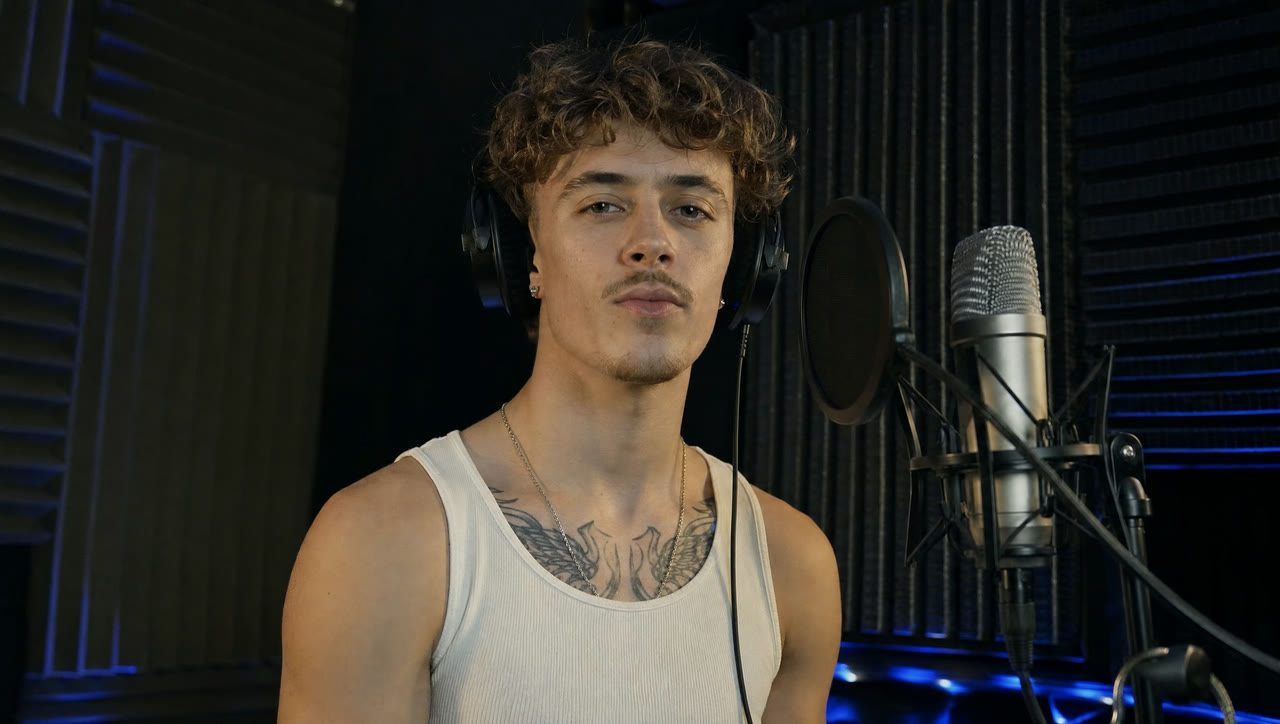
Imagem para vídeo com o Kling 4.0 a partir de uma única foto
Dê ao Kling 4.0 um primeiro quadro e descreva o que deve se mover. O enquadramento, os rostos e as cores da sua imagem viram o plano de abertura.
A Kling publicou esta demo só com o primeiro quadro: uma feiticeira entre fios vermelhos e moedas antigas. O Kling 4.0 transformou a imagem parada em 15 segundos de movimento amplo e rápido, com fios chicoteando e moedas voando em direção à lente, enquanto o rosto e o figurino dela continuam iguais.

Áudio nativo do Kling 4.0 com diálogos e sincronização labial
Todo clipe do Kling 4.0 vem com trilha estéreo. Escreva as falas entre aspas e os personagens as dizem, com a boca acompanhando as palavras.
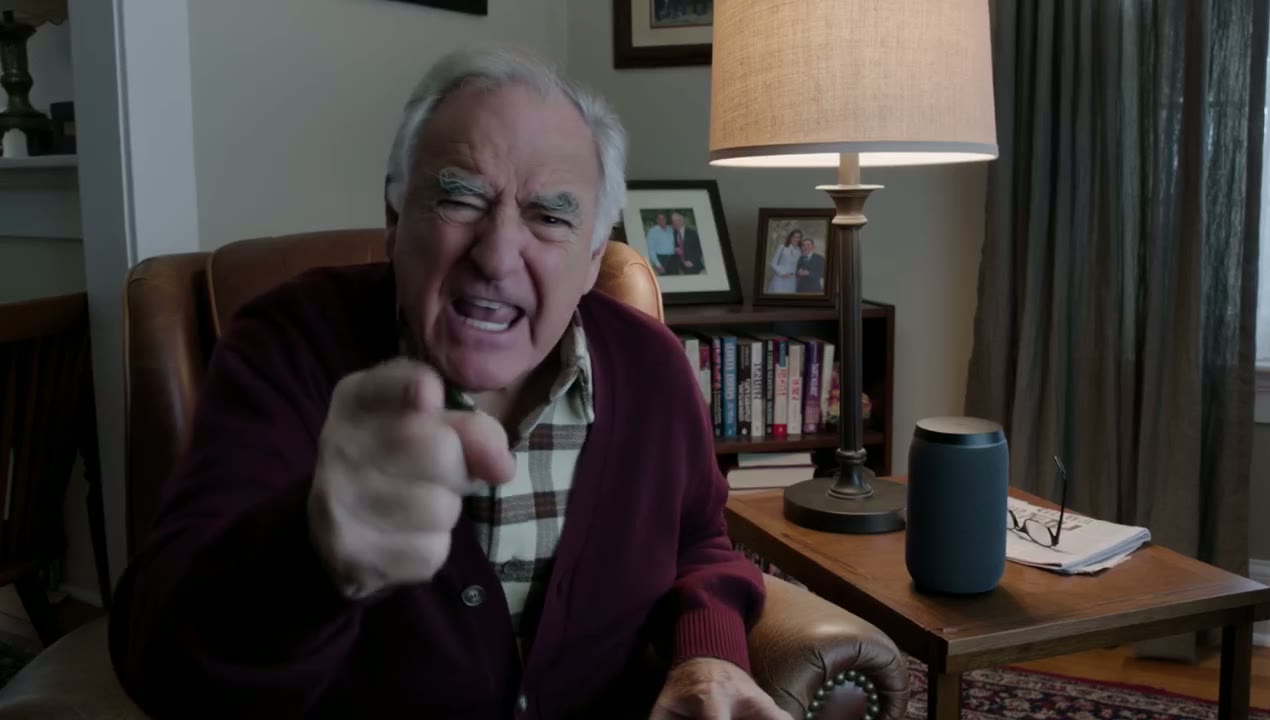
O prompt inteiro da demo é uma linha só: “An old man ranting about AI.” O Kling 4.0 escolheu o homem, montou a sala de estar e escreveu o desabafo sozinho.
 Kling 4.0
Prompt: An old man ranting about AI. (Kling 4.0 · 16:9 · 15s · 1080p)
Texto para vídeo no Kling 4.0 com pessoas realistas
Duas frases bastam para uma cena de vlog natural, com câmera na mão: o Kling 4.0 completa a pessoa, o ambiente e o jeito de falar para a câmera.
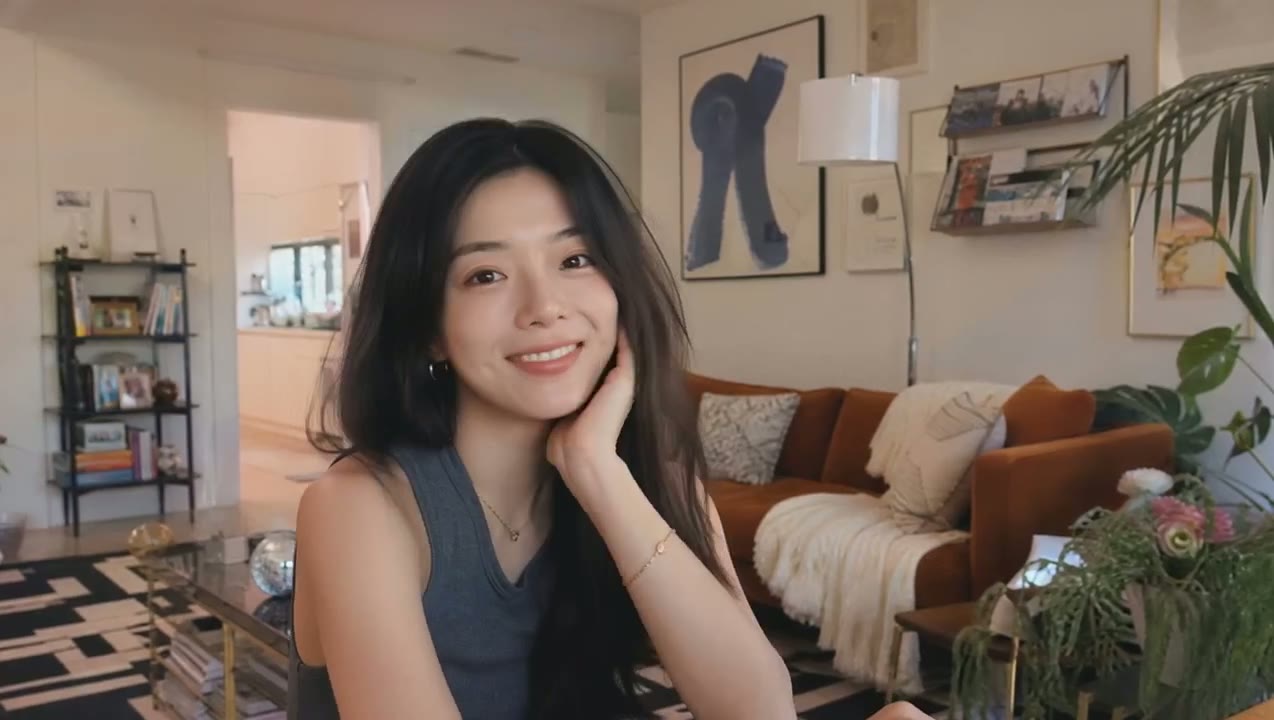
O prompt da demo são duas frases pedindo uma vlogueira animada que se apresenta; o enquadramento, o ambiente e o jeito como ela fala para a câmera ficam por conta do Kling.
 Kling 4.0
Prompt: A vlogger-style video in which the woman cheerfully introduces herself to the audience. Maintain a natural, authentic look and realistic image quality. (Kling 4.0 · 16:9 · 7s · 720p)
Atuação realista e expressões faciais no Kling 4.0
O Kling 4.0 se sai melhor nos detalhes que tornam as pessoas convincentes: um olhar que dura um instante a mais, uma hesitação antes de uma fala, a mudança de postura quando a discussão muda de rumo. Pele, luz e tecidos continuam naturais do primeiro ao último quadro.
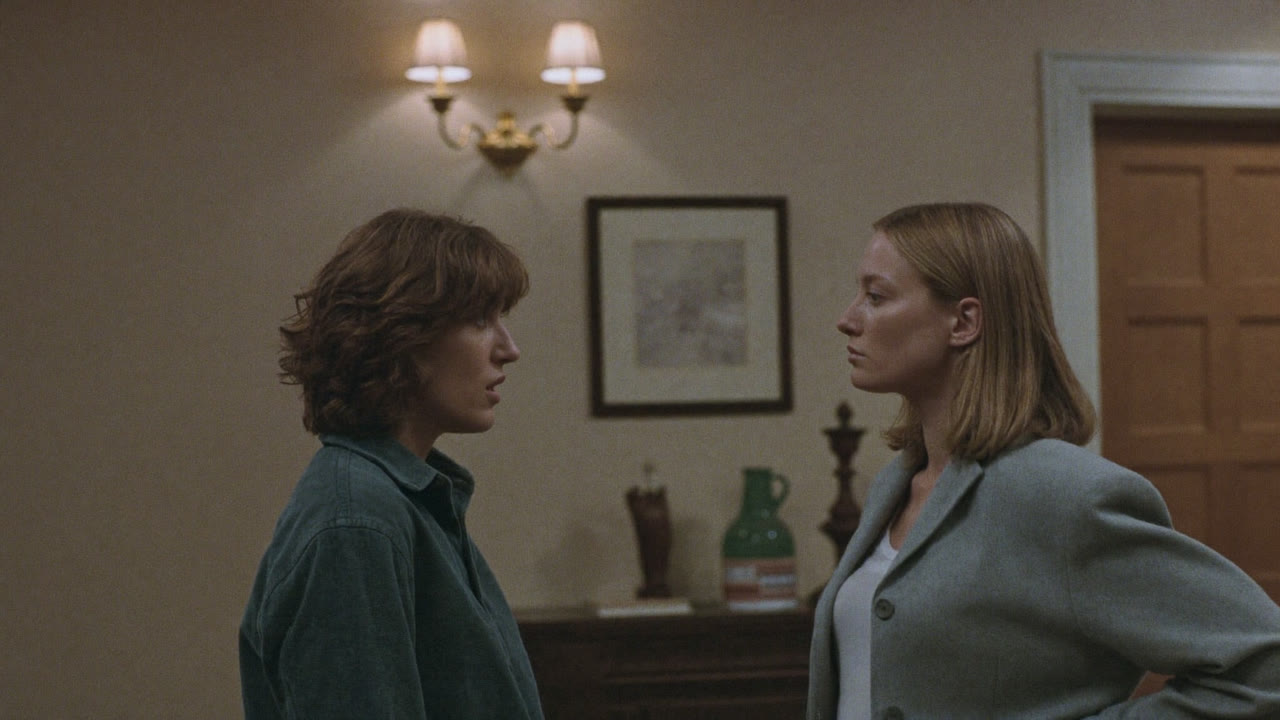
A demo da Kling parte de um único quadro com duas mulheres frente a frente num corredor. O resultado, de 11 segundos, mostra o confronto: uma delas se vira e vai embora, e a cena termina com algo espatifado no chão.
Controle de câmera no Kling 4.0 para cenas de ação
Descreva o movimento no prompt e o Kling 4.0 o executa até o fim: uma aproximação num rosto, um afastamento que revela o ambiente, um travelling que acompanha alguém correndo. Os tamanhos de plano mudam e os cortes entram sem a imagem tremer nem os personagens mudarem de aparência.
Nesta demo de lançamento de 10 segundos, dois lutadores de taekwondo fazem sparring enquanto a câmera fica bem perto, sobe até uma vista de cima do tatame e volta à altura dos olhos, com cada golpe e cada passo ainda nítidos.
Controle de primeiro e último quadro no Kling 4.0
Envie um primeiro quadro e, se quiser, um último. O Kling 4.0 preenche o movimento entre eles para que o produto, a pose ou o final fiquem exatamente onde você precisa.
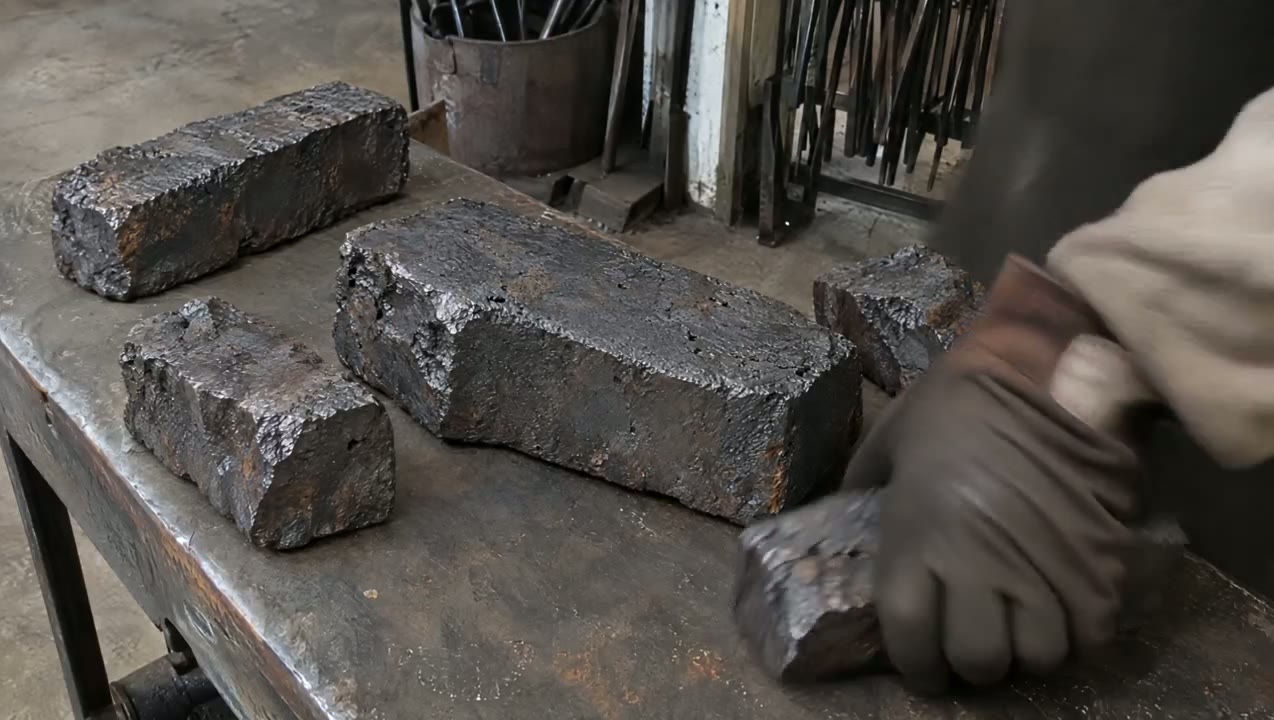
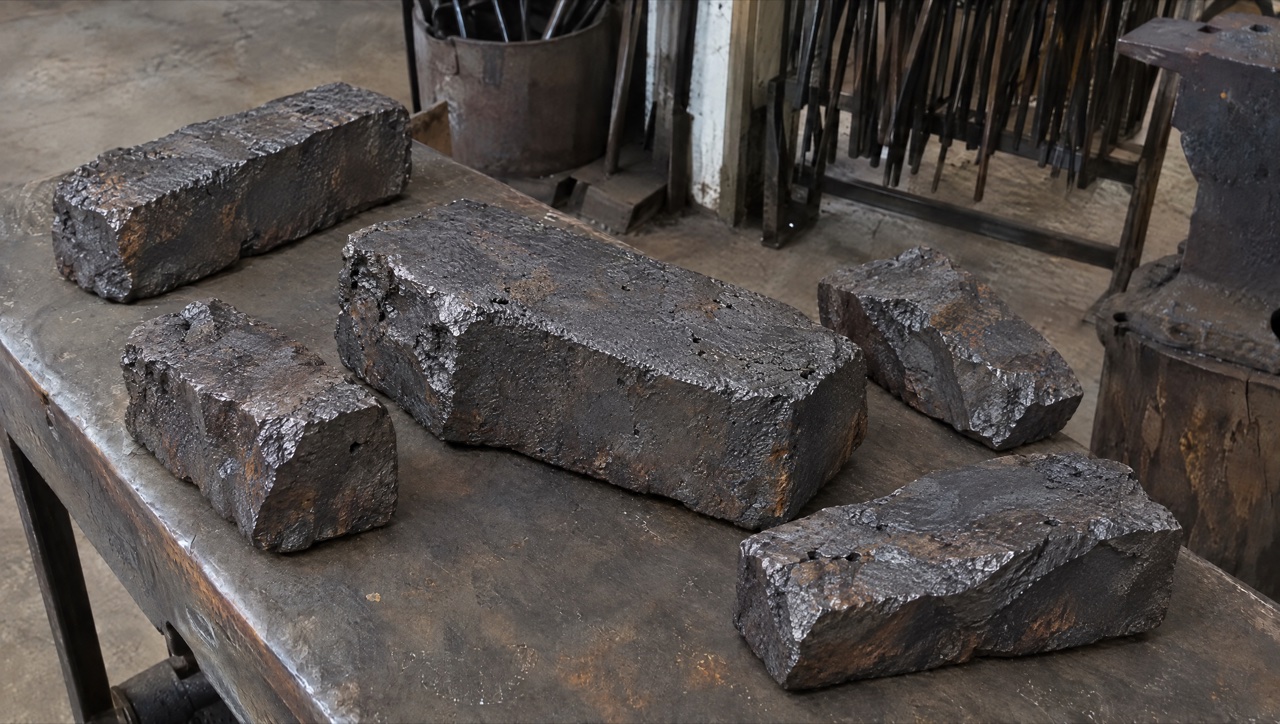
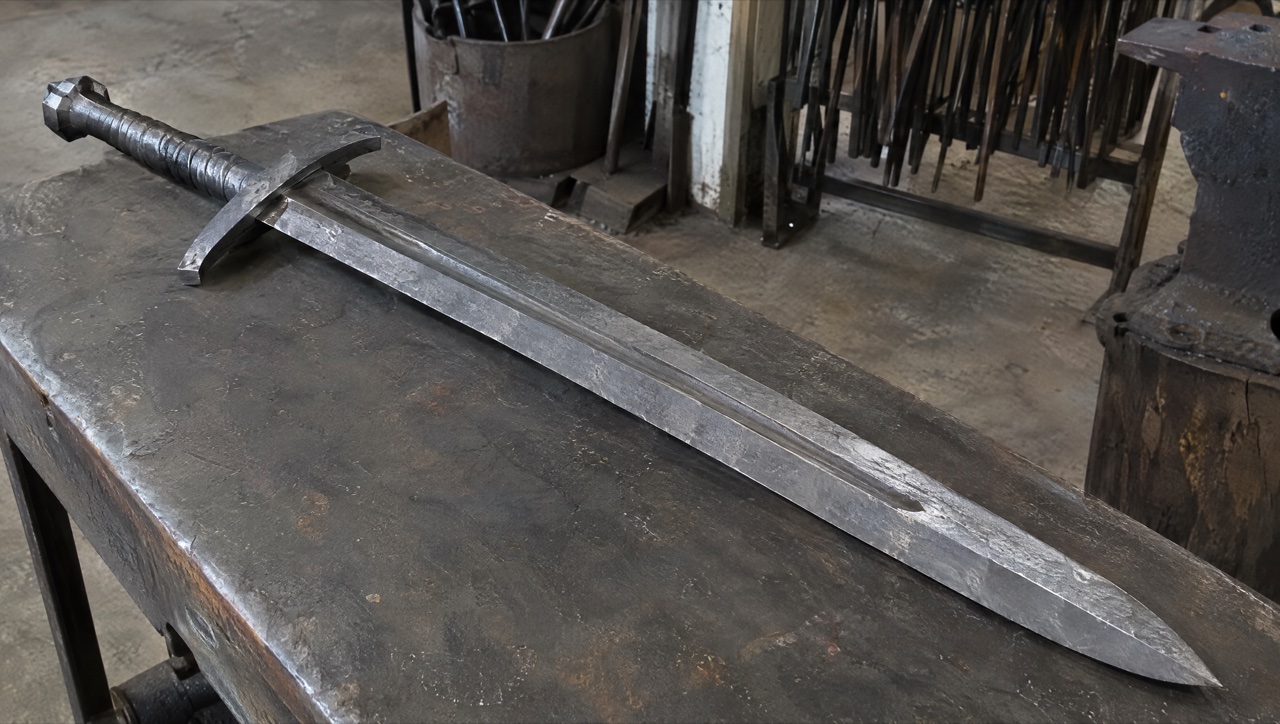
Na demo, o primeiro quadro mostra blocos de ferro bruto numa bancada e o último, um espadão pronto na mesma bancada. O Kling 4.0 preencheu os 15 segundos entre eles com seis planos de forja.
 Kling 4.0
Prompt: SCENE CONTEXT EXACT 1 CHARACTER — NO DUPLICATES. Interior, a worn blacksmith workshop, daytime. The same blacksmith removes the raw material, works it into a greatsword, and returns the completed sword to the original table.15 seconds, six shots. Manufacturing time is compressed through editorial cuts; individual actions retain natural weight and speed. ACTIVE REFERENCES: @Image1: exact first-frame anchor. Preserve all five iron blocks, their arrangement, the tabletop, background tools, perspective, and lighting. This image is the starting state of an active pickup shot.@Image2: exact final-frame anchor and finished-sword design. Preserve the blade silhouette, central fuller, angular curved crossguard, spiral metal grip, faceted pommel, diagonal placement, perspective, and background. This composition is reached through a visible physical placement. LOCATION MAP: The worktable fills the foreground. The tool bucket stands behind its left-center edge, the rod rack occupies the rear right, and the anvil stands at the right. The blacksmith works from the left side of the table in both endpoint shots. The camera stays on the original viewer-facing side of the table. During blade-working inserts, the tang points screen-left and the tip points screen-right. The final sword position runs from the upper-left pommel to the lower-right tip. FIRST FRAME AND SPATIAL BLOCKING: At 0.0 seconds, the frame exactly matches the raw-material reference, with five iron blocks and no hands visible. The same blacksmith immediately reaches in from the left edge. Both gloved hands approach the largest central block from opposite ends, preparing a supported two-handed lift. The blacksmith wears soot-gray sleeves, brown leather gloves, and a narrow dark strap around the right cuff. These details remain identical throughout every shot. FORMAT MODE: 15 seconds total, six shots.Hard cuts at 3.0, 5.0, 8.0, 10.0, and 11.0 seconds. Cuts compress the omitted manufacturing work and bench clearing. The opening pickup and closing placement each play as continuous physical actions.No fades, dissolves, or object-morph transitions. OPTICS: Shots 1 and 6: reference-matched elevated three-quarter framing, approximately 63° diagonal field of view and approximately 1.8 meters from the tabletop center. Exact endpoint framing takes priority over estimated optical measurements. Shots 2–5: 40° diagonal field of view, approximately 0.8 meters from the working contact point. Focus follows the hands and metal contact; the workshop background remains softly readable. Each shot holds one fixed field of view. CAMERA: A real camera operator holds the camera from the viewer-facing side of the workspace. All shots use handheld SETTLE: visible breathing sway, slight roll, and small delayed corrections. The opening camera holds its position while the iron block leaves the frame. The closing camera holds the empty tabletop composition while the sword enters, then settles into the exact final reference. The blacksmith is the only visible worker; the camera operator remains outside the image. ACTION TIMING: 0.0–3.0s — TAKE THE IRON. Start on the exact first reference; during 0.0–0.6s, the blacksmith’s matching gloved hands enter from screen-left and grip opposite ends of the largest central block. During 0.6–1.5s, the wrists brace and both hands lift the block clear of the tabletop, exposing the patch of table beneath it. During 1.5–3.0s, the blacksmith carries the supported block out through screen-left; the other four blocks remain resting on the table through the cut.3.0–5.0s — HEAT THE STOCK. Hard cut forward in time to one thick billet already glowing orange among forge coals. The same gray sleeves, brown gloves, and right-cuff strap appear at screen-left as the blacksmith holds long tongs around the billet. A short controlled pull draws the billet toward the forge mouth, with heat shimmer rising above its scaled surface.5.0–8.0s — FORGE THE BLADE. Hard cut forward to an elongated orange-hot blade blank supported on the anvil, tang left and emerging tip right. The same blacksmith braces the tang with left-hand tongs and delivers three deliberate right-hand hammer strikes along the blade flat. Each strike produces local compression, wrist recoil, and a brief scatter of dark scale.8.0–10.0s — FINISH THE METAL. Hard cut forward to a cooled blade with its fuller already formed, held by the same gloved hands against an abrasive wheel. The blacksmith makes one controlled finishing pass along the bevel. A narrow stream of sparks falls from the actual contact point as a brighter strip of metal appears.10.0–11.0s — COMPLETE THE HILT. Hard cut forward to the nearly finished sword supported on a separate assembly bench, its crossguard and spiral metal grip already fitted. The same blacksmith’s left hand braces the grip while the right hand gives the faceted pommel its final tightening turn. The completed sword now has the exact construction and finish required for the final image.11.0–15.0s — PLACE THE FINISHED SWORD.Hard cut to the original worktable, now completely clear; show its empty surface for 0.4 seconds before the same gloved hands carry the completed sword in from screen-left, one hand around the grip and the other supporting the blade flat near its balance point. From 11.4–13.8s, the blacksmith lowers the entire rigid sword diagonally, hilt toward upper-left and tip toward lower-right, easing it onto the tabletop and sliding the supporting hand free as its weight transfers to the table. From 13.8–15.0s, both hands release and withdraw through screen-left; the sword remains motionless in the exact final-reference position as the camera settles onto the final frame. PHYSICS: The raw block retains its shape and mass throughout the pickup. Both hands support it continuously; the forearms tense and the lift accelerates slowly under its weight. The anvil supports the hot blade during forging. Large changes of shape occur across editorial time jumps. The completed sword remains rigid during carrying and placement. The blade-supporting hand has visible clearance to slide free as the sword settles; the hand never passes through the blade or tabletop. Metal contact produces a short scrape and a low, heavy clink, followed by stillness. The same blacksmith clears the remaining raw stock during omitted time before the final shot. LIGHTING: The original table shots use soft daylight from upper camera-left, matching both references. Retain dark detail in the iron and protect the silver blade highlights. The forge insert uses orange coal glow from below-left as its dominant source. Return to the original neutral daylight before the sword enters the final tabletop shot. AUDIO: Quiet workshop air and distant furnace draft form the ambient bed. Opening: leather creaks, a brief iron scrape, and a restrained exertion breath as the heavy block rises.Middle: forge crackle, tong contact, three synchronized hammer impacts, abrasive scraping, and a short fitting sound.Ending: sleeve movement, glove friction against metal, a weighted sword-to-table clink, then quiet workshop ambience. The blacksmith speaks no dialogue.SFX only, no music, no score, no song, no soundtrack. CHARACTER ACTING: One consistent blacksmith performs every visible action. Soot-gray sleeves, brown leather gloves, and the dark right-cuff strap remain unchanged. Hands work deliberately: brace before lifting, maintain firm tool contact, and reduce speed before lowering the finished sword. The physical rhythm shifts from effort during the raw-block pickup to careful control during the final placement. The face and torso remain outside the crop. STYLE: Grounded workshop documentary with tactile iron, worn tools, and convincing manual labor.Soft old-photograph texture, restrained grain, and natural motion blur; no digital sharpening. Charcoal metal and muted brown surfaces dominate, with silver highlights and localized forge orange. The first and last frames preserve the supplied images’ appearance. QUALITY: Maintain consistent hands, gloves, sleeve details, metal geometry, and contact shadows. The lifted block reveals the tabletop underneath it. The closing shot visibly establishes the empty tabletop before the sword enters. Keep the full final sword readable, including its tip, guard, grip, and pommel. Avoid duplicate limbs, flickering geometry, and intersecting solid surfaces. POSITIVE CONSTRAINTS: The first frame contains exactly five iron blocks. The largest central block physically leaves the table in the same blacksmith’s two hands. The final shot begins with an empty table. The completed sword enters while visibly supported by that same blacksmith, contacts the tabletop, and remains after both hands withdraw. The last frame matches the finished-sword reference exactly. The opening pickup and final placement each remain continuous, with visible hand-object contact. Exactly one finished sword is present.No text overlays, subtitles, or music. (Kling 4.0 · 16:9 · 15s · 1080p)
Configurações do Kling 4.0 para duração, resolução e proporção
A Kling anunciou mais do que este site roda até agora. Estas são as configurações que o gerador realmente oferece para o Kling 4.0, então o que você planejar é o que vai conseguir renderizar.
| Duração | De 3 a 30 segundos5 segundos por padrão. |
|---|---|
| Resolução | 720p ou 1080p720p por padrão. |
| Proporção | 16:9, 9:16, 1:1 ou 21:9Com um primeiro quadro, o clipe segue o formato da sua imagem. |
| Entradas | Texto, um primeiro quadro ou um primeiro e um último quadroOs modos de múltiplos quadros-chave, de referência e de edição do Kling ainda não estão disponíveis aqui. |
| Prompt | Até 2.500 caracteres |
| Som | Sempre ativoFala, efeitos e ambiente em estéreo em todo clipe; não há opção para desativar. |
| Créditos | Cobrados por segundoA tarifa depende da resolução. O gerador mostra o total antes de você começar, e a tabela de preços abaixo traz as durações mais comuns. |
Especificações e recursos do Kling 4.0
Especificações publicadas pelo próprio Kling para o modelo completo. O que o Kling indica como “em breve” também aparece assim aqui.
| Lançamento | O Kling 4.0 Flash foi liberado para um grupo limitado em 28 de setembro de 2026. A versão completa do Kling 4.0 ficou disponível em 15 de outubro de 2026. |
|---|---|
| Modos | Texto para vídeo, imagem para vídeo, primeiro e último frame, múltiplos quadros-chave, Omni Reference e edição de vídeo. |
| Duração do clipe | De 3 a 30 segundos numa única geração. |
| Quadros-chave | Até 10 imagens como quadros-chave para fixar o estado do personagem, as mudanças de cena e os momentos da história. |
| Referências | Até 15 itens por geração: até 10 imagens, até 5 vídeos (30 segundos no total) e até 7 sujeitos, que podem incluir uma referência de voz. |
| Resolução | 720p, 1080p e 4K. O HDR de 10 bits em 1080p e 4K aparece como “em breve”. |
| Proporções | 21:9, 16:9, 1:1, 9:16 e automática. |
| Áudio | Estéreo de dois canais com sincronização labial; diálogos em chinês, inglês, japonês, coreano, espanhol, português, alemão, francês e outros idiomas, incluindo sotaques regionais. |
| Tamanho do prompt | Até 8.000 tokens. |
| Extensão de vídeo | Extensões sucessivas até 2 minutos — indicada como “em breve”. |
Casos de uso do Kling 4.0
Tomadas longas e contínuas, planos com começo e fim definidos e cenas de diálogo a partir de um prompt curto.
- Tomadas contínuas de 30 segundos: Um plano-sequência longo — um percurso, uma perseguição, a revelação de um produto — sem emendar dois clipes.
- Tomadas com começo e fim definidos: Um primeiro e um último quadro definem onde a cena começa e onde termina; o Kling 4.0 preenche o movimento entre eles.
- Clipes de apresentador e de diálogo: Um prompt de uma ou duas linhas vira uma cena falada natural, com som estéreo e sincronização labial.
- Diálogos em vários idiomas: Áudio estéreo com sincronização labial e textos na tela que continuam legíveis enquanto a câmera se move.
Kling 4.0 vs Seedance 2.5, Kling 3.0, Veo 3.1 e Wan 3.0
Todas as células, exceto a última linha, vêm das configurações ao vivo dos modelos no SeedVideo AI, então a tabela corresponde ao que o gerador deixa você escolher hoje.
Quer outra versão da mesma ideia? O gerador de vídeo IA mantém o Kling 4.0 ao lado de Seedance, Kling, Veo e Wan, então você pode rodar o prompt de novo em outro modelo com os créditos que já tem.
| Recurso |  Kling 4.0 | Kling 4.0 Flash |  Seedance 2.5 | Kling 3.0 |  Veo 3.1 Fast |  Wan 3.0 |
|---|---|---|---|---|---|---|
| Clipe mais longo | 30 s | 20 s | 30 s | 15 s | 8 s | 30 s |
| Resolução máxima | 1080p | 720p | 1080p | 4K | 4K | 1080p |
| Proporções | 16:9, 9:16, 1:1, 21:9 | 16:9, 9:16, 1:1, 21:9 | 16:9, 9:16, 1:1, 4:3, 3:4, 21:9 | 16:9, 9:16, 1:1 | 16:9, 9:16 | 16:9, 9:16, 1:1, 4:3, 3:4 |
| Imagens de referência | Não | Não | 30 | Não | Não | 10 |
| Vídeos de referência | Não | Não | 10 | Não | Não | 5 |
| Editar e estender um clipe | Não | Não | Sim | Não | Não | Não |
| Créditos por 5 s em 720p | 24 créditos | 14 créditos | 31 créditos | 13 créditos | 15 créditos | 12 créditos |
| Ideal para | Até 30 s com som estéreo, a partir de texto ou de um primeiro quadro | Rascunhos 720p mais rápidos e baratos, até 20 s | Clipes longos com vários planos, muitas referências e som nativo | Clipes Kling mais baratos, de até 15 s | Planos curtos realistas com som | Tomadas longas com orçamento menor |
Os créditos são taxas de pacote para um clipe de 5 segundos em 720p; nas assinaturas, cada segundo custa menos.
Prós e contras do Kling 4.0
O que ele faz bem hoje no SeedVideo AI e o que é preciso contornar.
Pontos fortes
- Duração: Qualquer duração de 3 a 30 segundos em uma única geração.
- Som: Todo clipe vem com trilha estéreo e a fala em sincronização labial com a imagem.
- Controle de quadros: Um primeiro quadro, mais um último opcional, define onde a tomada começa e termina.
- Prompts curtos: Uma ideia de uma ou duas linhas muitas vezes basta para uma cena natural e convincente.
Limitações
- Modos neste site: Por enquanto, só texto para vídeo e primeiro/último quadro; os modos de múltiplos quadros-chave e de referência do Kling ainda não estão disponíveis aqui.
- Sem opção sem som: O som não pode ser desativado; silencie o clipe depois se for colocar sua própria trilha.
- Tempo de renderização: Mais lento que a maioria dos modelos: um clipe de teste de 3 segundos levou cerca de três minutos.
- Tamanho do prompt: O compositor aceita prompts de até 2.500 caracteres, então briefings muito longos precisam ser enxugados.
Quanto custa o Kling 4.0 e como começar
Pontos de partida para o Kling 4.0
Escolha um ponto de partida abaixo e o gerador abre com o Kling 4.0 já selecionado.
Preço do Kling 4.0 por clipe
Preços com pacotes de créditos, tirados das configurações atuais do gerador. Com assinatura, cada segundo sai mais barato.
| Resolução | 5 s | 10 s | 30 s |
|---|---|---|---|
| 720p | 24 créditos | 47 créditos | 141 créditos |
| 1080p | 35 créditos | 70 créditos | 210 créditos |
Como usar o Kling 4.0 em 4 passos
- Passo 1
Escolha o Kling 4.0
Abra o campo desta página, ou o gerador completo, e selecione o Kling 4.0 no menu de modelos, dentro do filtro Kling.
- Passo 2
Escreva os momentos da história
Comece pelo que se move e quando: o sujeito, a ação, a câmera e o instante em que cada momento acontece. Aqui o prompt aceita até 2.500 caracteres.
- Passo 3
Adicione um primeiro quadro, se quiser
Envie um primeiro quadro para a tomada começar a partir da sua imagem e um último quadro se quiser definir onde ela termina.
- Passo 4
Defina a duração e envie
Escolha qualquer valor entre 3 e 30 segundos, defina a proporção, confira o custo em créditos e envie.
Exemplos de prompts para o Kling 4.0
Prompts que a Kling AI publicou com seus exemplos do Kling 4.0, cada um ao lado do clipe que gerou; aqui o prompt longo do ferreiro está resumido. Carregue um no gerador e troque o tema, o cenário ou a duração. O prompt com quadros precisa do seu próprio primeiro e último quadro.
O desabafo de um idoso
Texto para vídeo · 15 sAn old man ranting about AI.
Fonte: Kling AI
Usar este promptUma vlogueira dá oi
Texto para vídeo · 7 sA vlogger-style video in which the woman cheerfully introduces herself to the audience. Maintain a natural, authentic look and realistic image quality.
Fonte: Kling AI
Usar este promptVelhos amigos se reencontram ao entardecer
Texto para vídeo · 7 sA continuous 7-second shot set in the UK. Two friends who have not seen each other for a long time meet at the corner of a quiet street at dusk, surrounded by a diverse crowd going about their daily lives. They smile, walk quickly toward each other, and share a warm embrace. Their facial expressions and body movements are natural. A handheld camera follows them with subtle camera shake. Soft, warm lighting with a nostalgic cinematic film look. Include natural footsteps, street ambience, background music, and English dialogue.
Fonte: Kling AI
Usar este promptDo ferro ao espadão
Primeiro + último quadro · 15 sInterior, a worn blacksmith workshop, daytime. The same blacksmith removes the raw material, works it into a greatsword, and returns the completed sword to the original table. 15 seconds, six shots, hard cuts at 3.0, 5.0, 8.0, 10.0 and 11.0 seconds. First frame: exactly five iron blocks on the worktable, no hands visible. Last frame: the finished sword lying diagonally on the same table. 0.0–3.0s — TAKE THE IRON: both gloved hands lift the largest central block and carry it out through screen-left. 3.0–5.0s — HEAT THE STOCK: one thick billet glowing orange among forge coals. 5.0–8.0s — FORGE THE BLADE: three deliberate hammer strikes along the orange-hot blade on the anvil. 8.0–10.0s — FINISH THE METAL: one finishing pass on an abrasive wheel, sparks falling from the contact point. 10.0–11.0s — COMPLETE THE HILT: the final tightening turn of the faceted pommel. 11.0–15.0s — PLACE THE FINISHED SWORD: the empty table, then the sword carried in and lowered into the exact final position. Handheld camera, soft daylight from upper camera-left, orange coal glow in the forge shot. AUDIO: workshop air, forge crackle, three synchronized hammer impacts, a weighted sword-to-table clink. SFX only, no music. No text overlays or subtitles.
Fonte: Kling AI
Usar este prompt
Mais modelos de vídeo com IA no SeedVideo AI
Guias e comparações sobre o Kling AI
Comparações e tutoriais do blog do SeedVideo AI.
Perguntas frequentes sobre o Kling 4.0
Quando o Kling 4.0 foi lançado?
O Kling 4.0 é gratuito aqui?
Kling 4.0 ou Kling 4.0 Flash?
O que ainda não está disponível?
O que é o Kling 4.0?
O que mudou em relação ao Kling 3.0?
O que é o Kling 4.0 Flash?
Quais modelos Kling rodam no SeedVideo AI?
O SeedVideo AI tem vínculo com o Kling AI ou a Kuaishou?
Crie seu primeiro vídeo com o Kling 4.0
Prompt, primeiro e último quadro se quiser, duração e enviar. Cada geração vai para a mesma biblioteca de ativos dos seus trabalhos com o Seedance.
Abrir o gerador