
SeedVideo AI
GPT Image 2.6 Free Online: Faster Drafts, Steadier Edits

GPT Image 2.6 Free Online: Faster Drafts, Steadier Edits

Pick GPT Image 2.6 Sunburst or Flare, write a prompt or attach references, and generate. New accounts get starter credits, enough for a first GPT Image 2.6 image. Try GPT Image 2.6 online for free!
GPT Image 2.6 Examples from Our Test

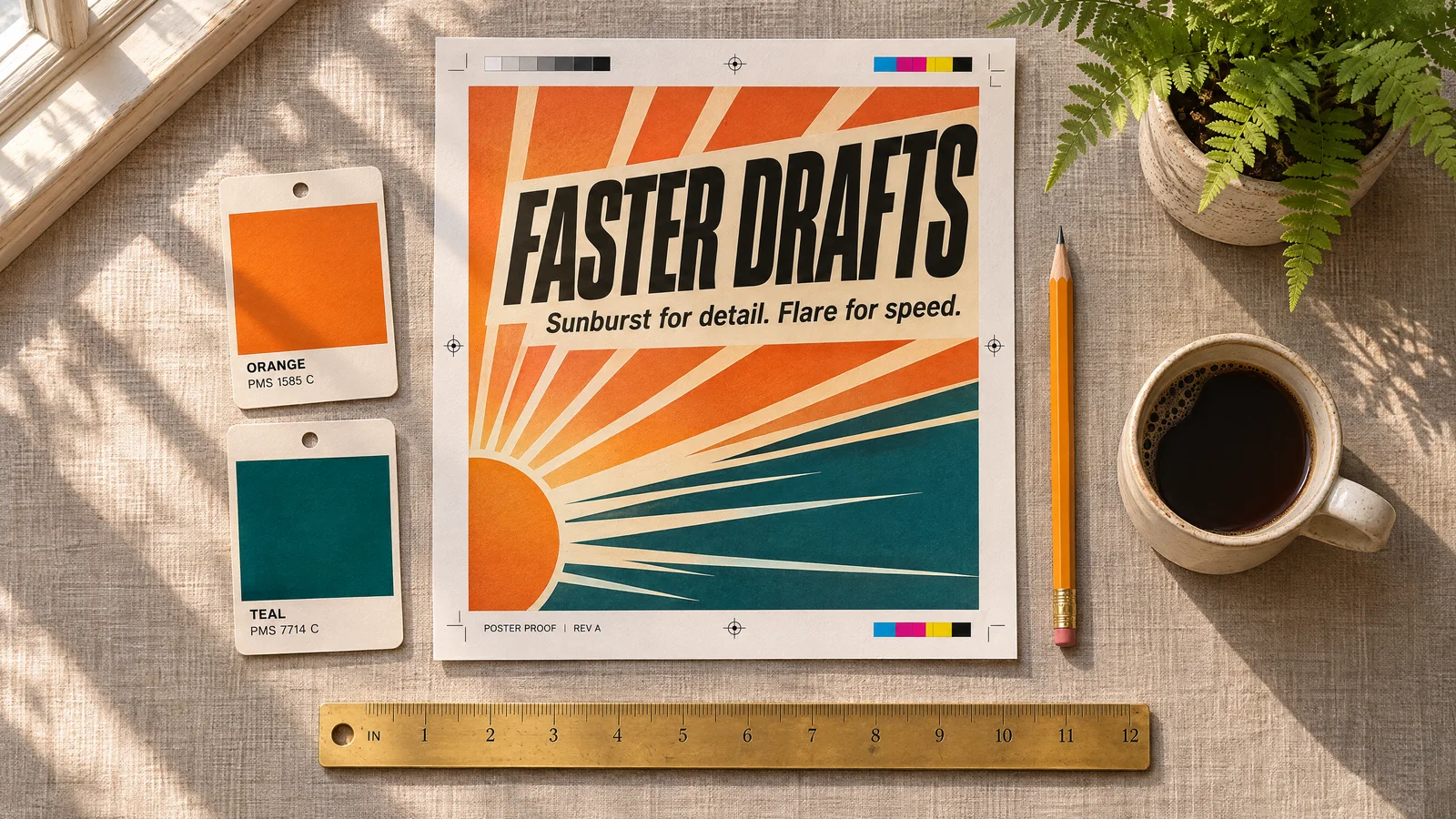
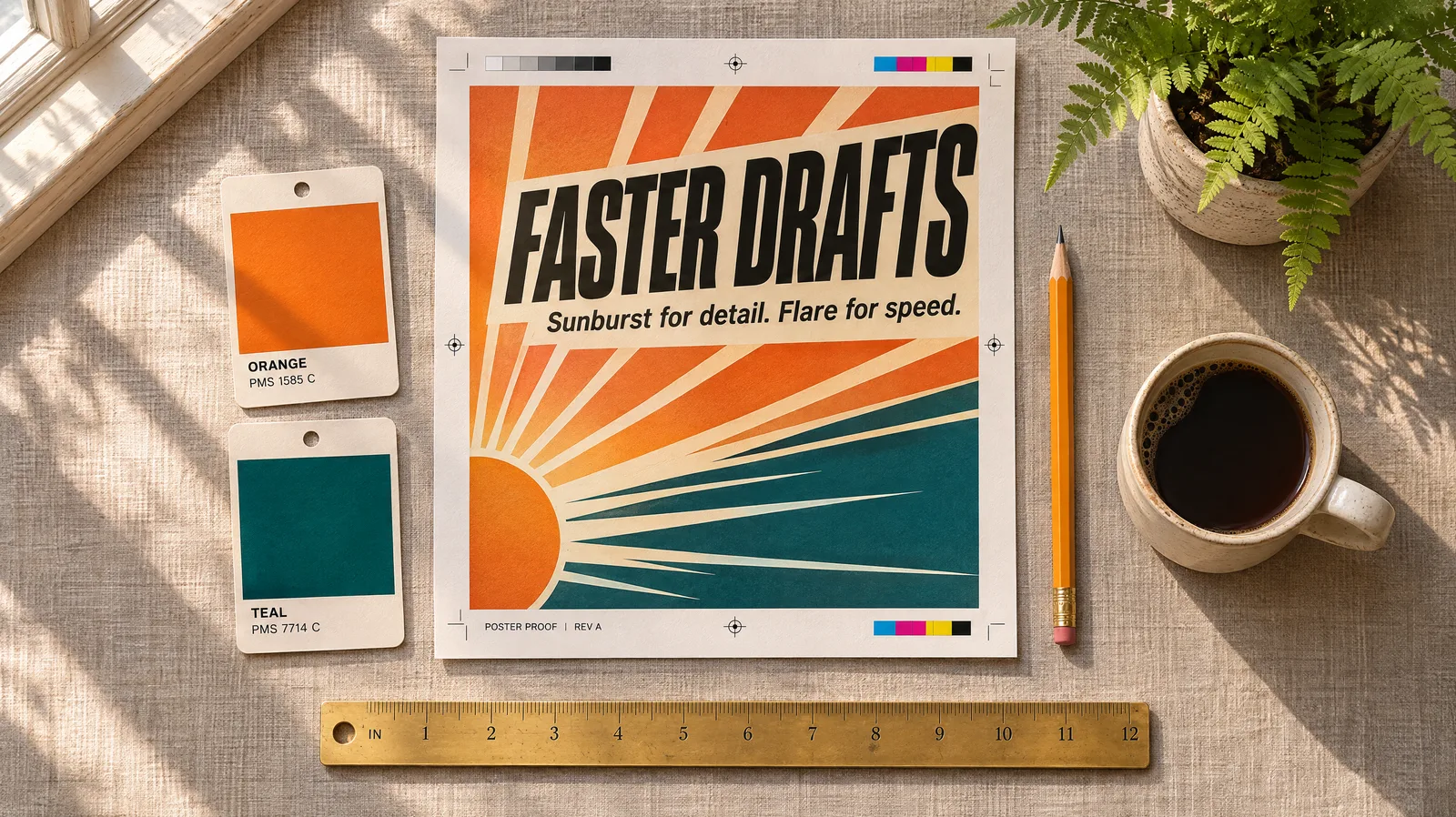
FASTER DRAFTS poster proof
FASTER DRAFTS poster proofSunburst · 16:9 · 2K high
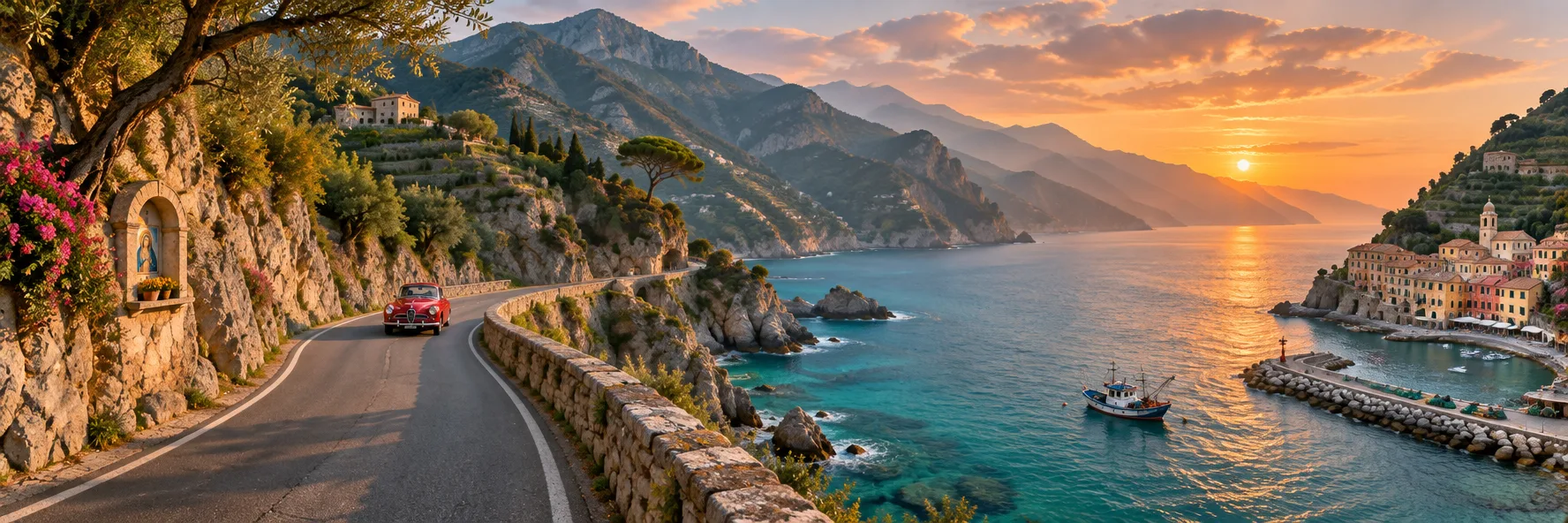
Coastal road panorama
Coastal road panoramaSunburst · 3:1 · 1K medium
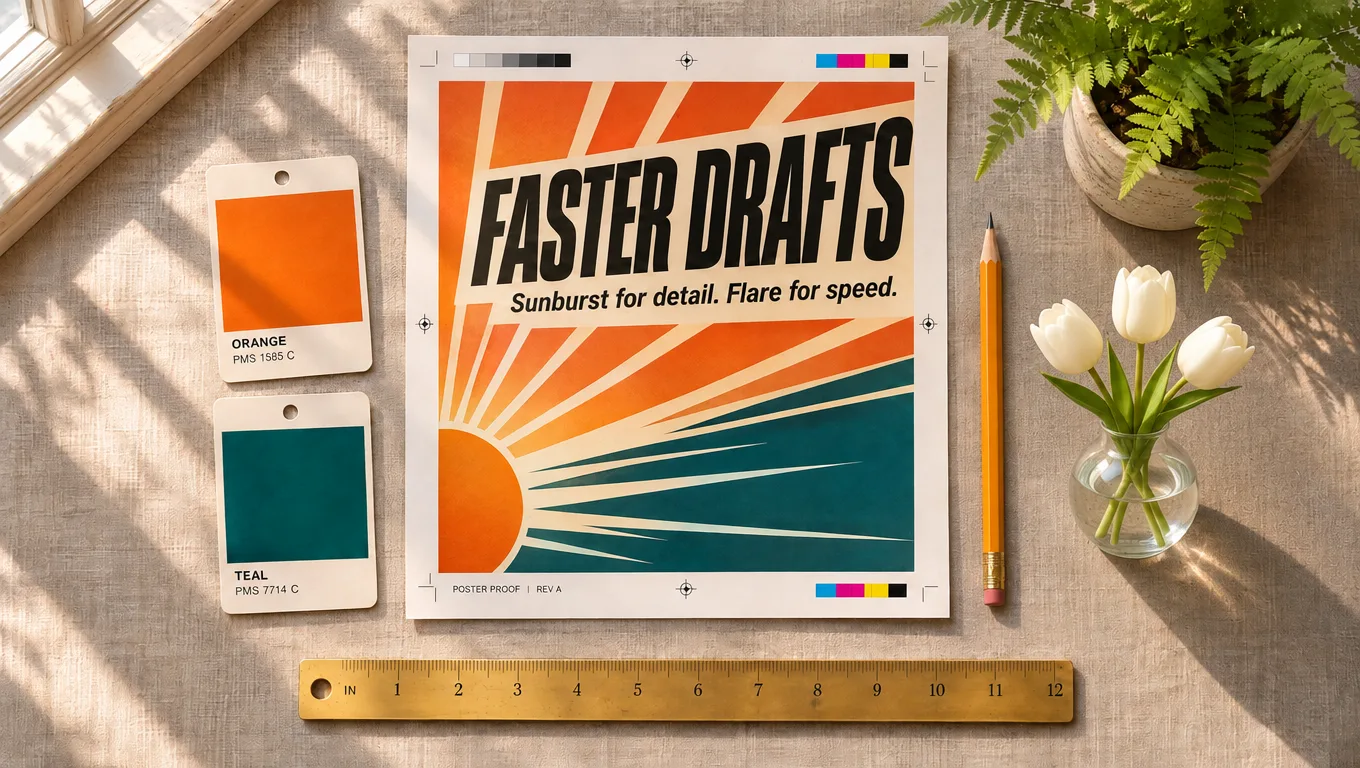
Desk flat-lay after a markup edit
Desk flat-lay after a markup editSunburst · 16:9 · markup edit
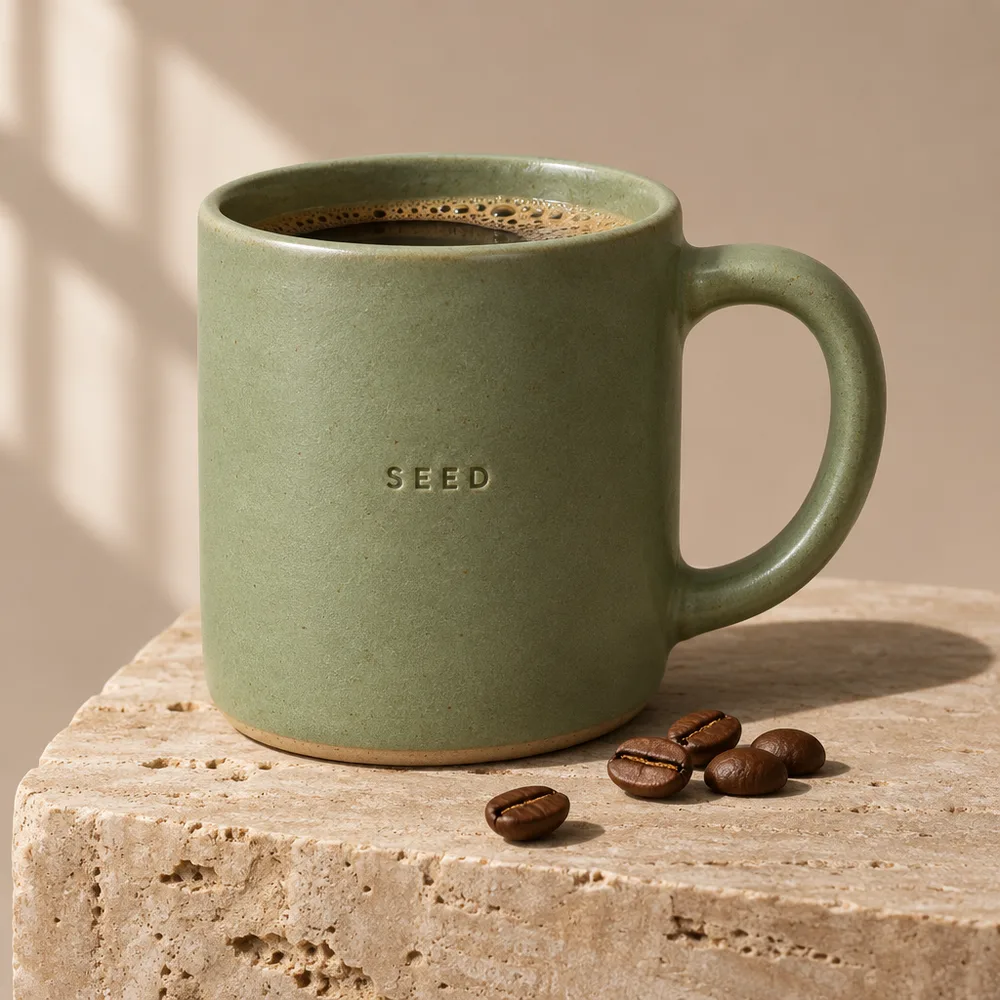
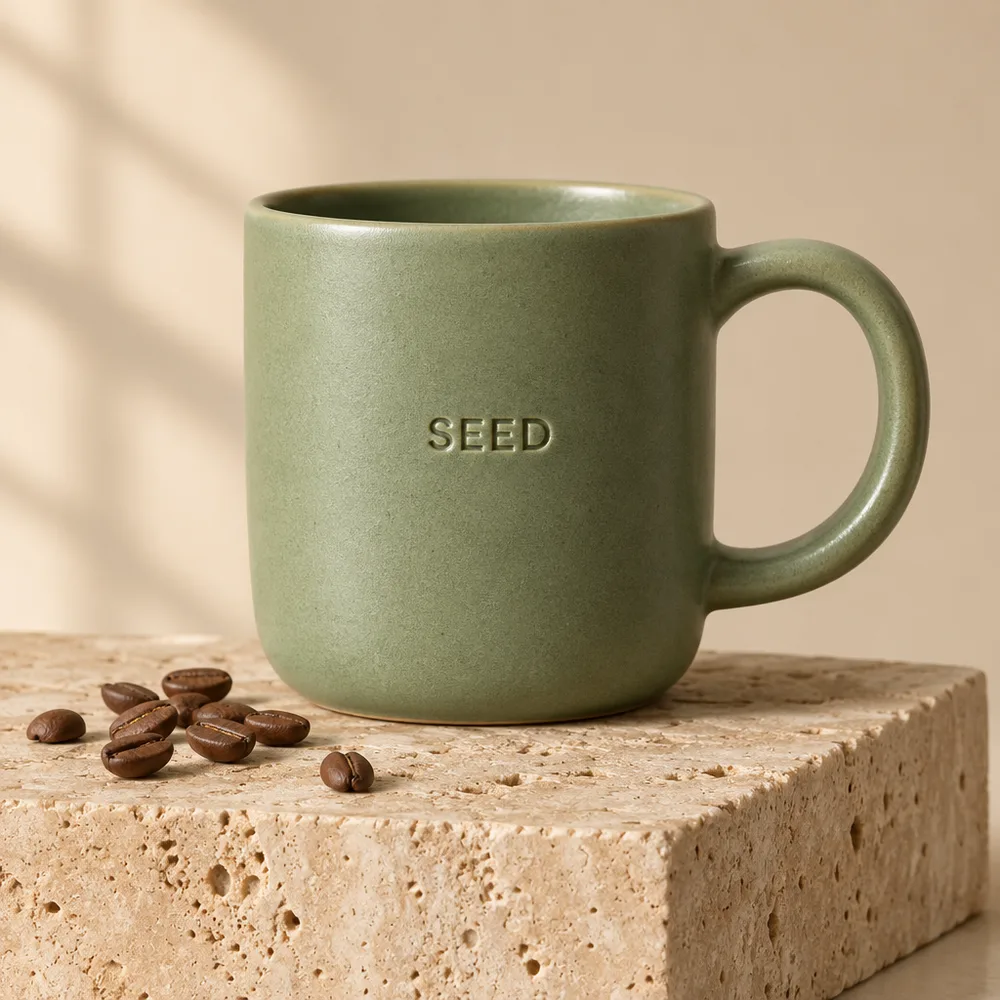
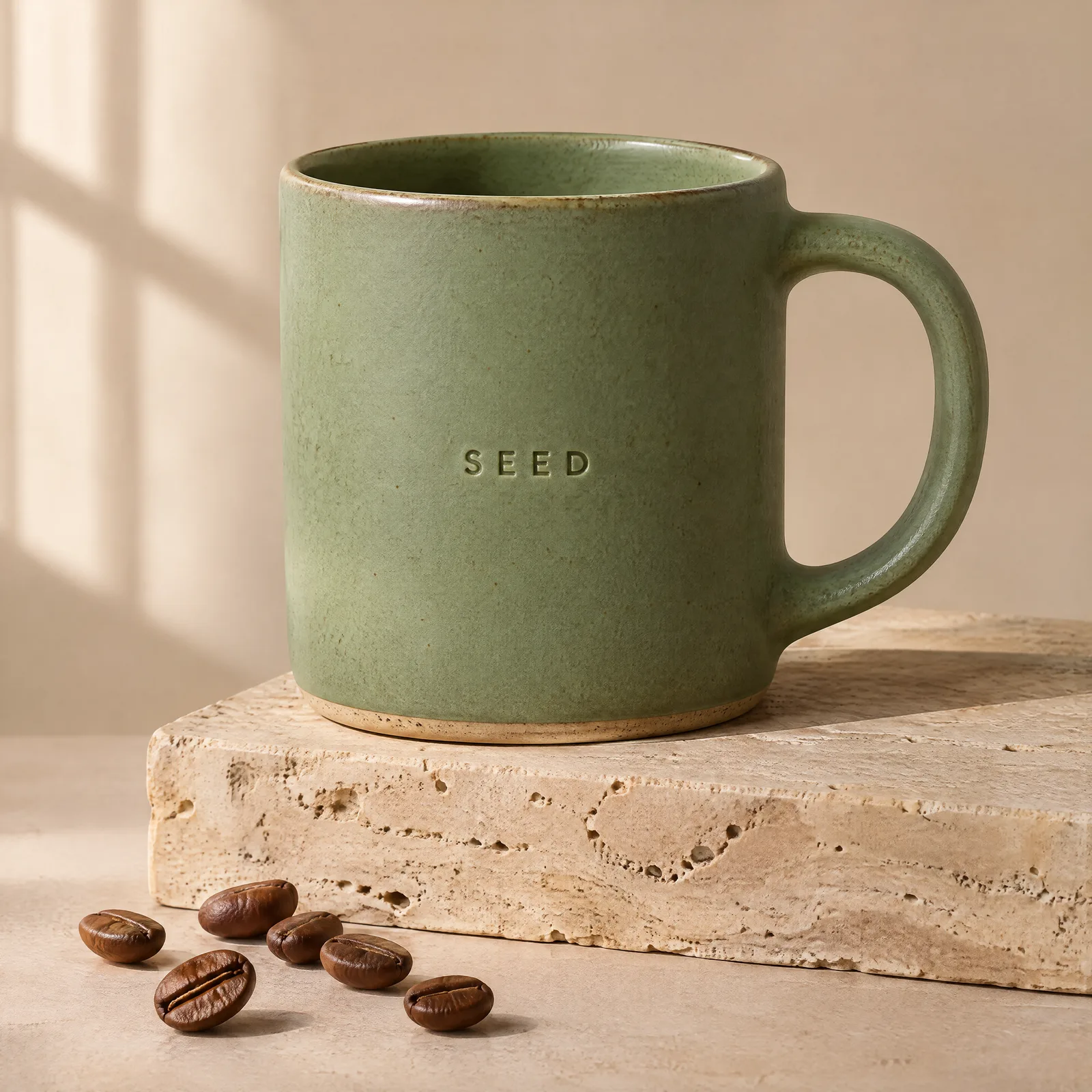
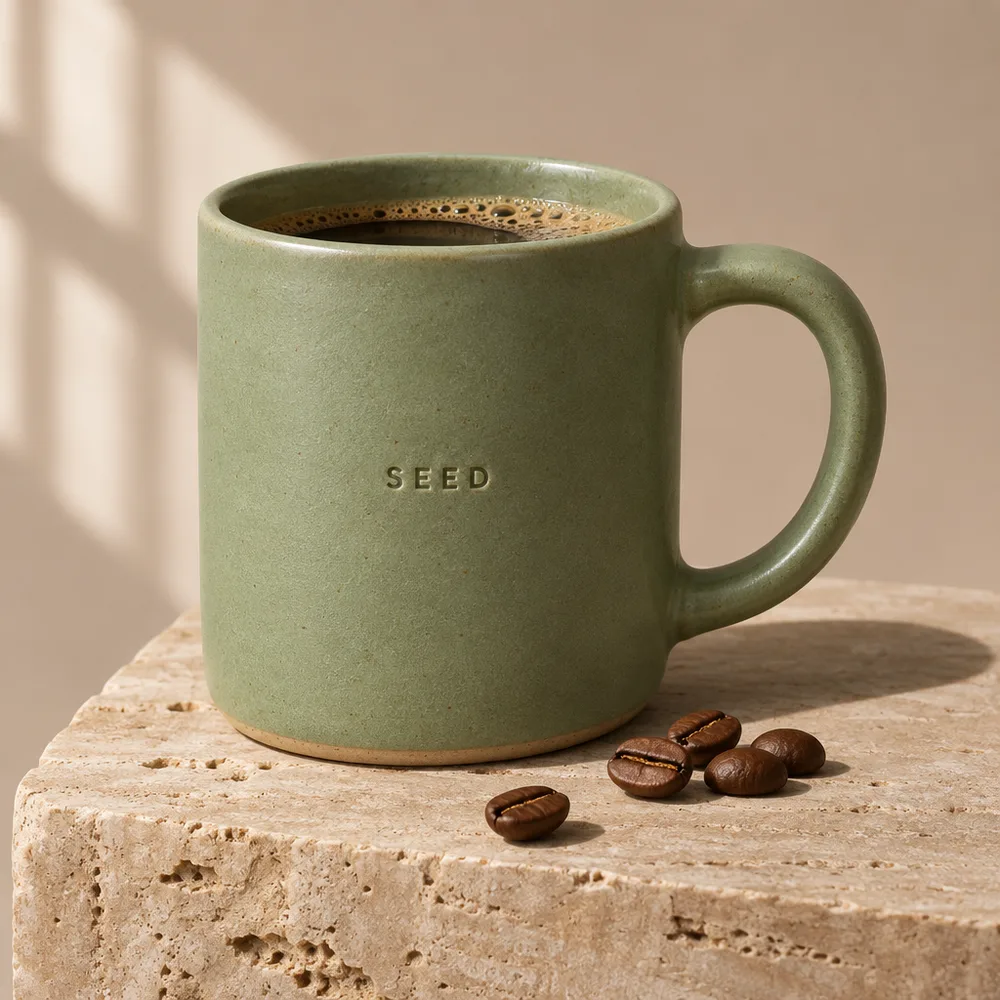
Embossed mug product shot
Embossed mug product shotSunburst · 1:1 · 4K medium
The same panorama prompt on Flare
The same panorama prompt on FlareFlare · 3:1 · 1K medium
Scooter swapped in by a markup edit
Scooter swapped in by a markup editSunburst · 3:1 · markup edit
Create a GPT Image 2.6 image

GPT Image 2.6 Features at a Glance

GPT Image 2.6 Text Rendering for Menus, Posters and Infographics

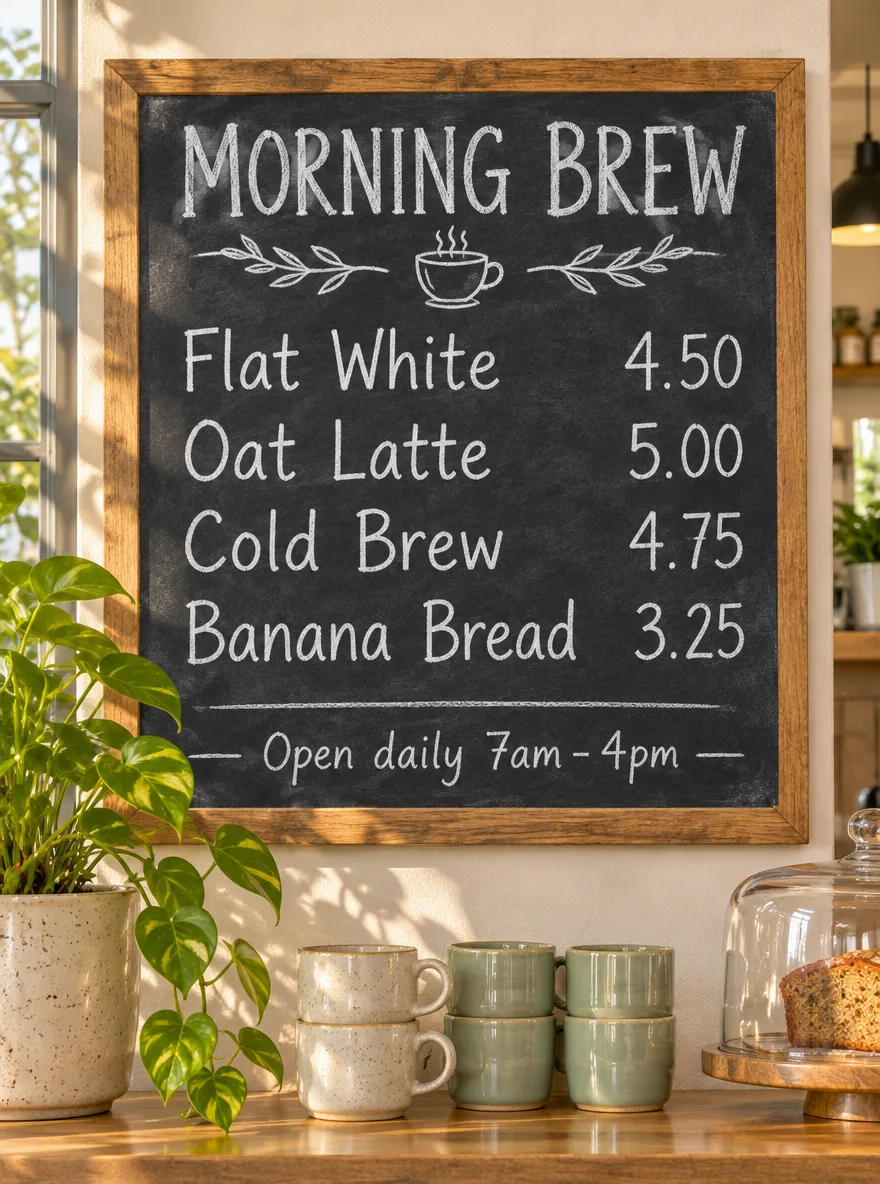
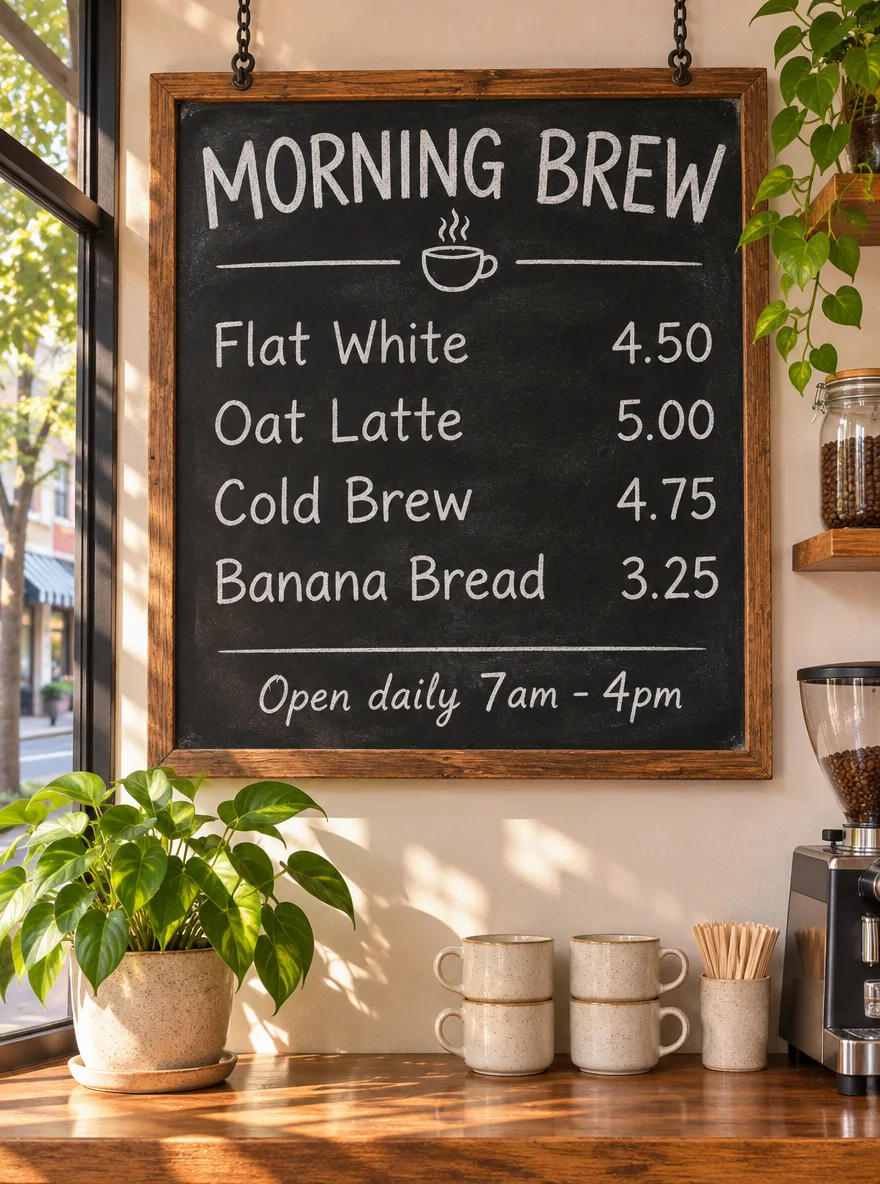
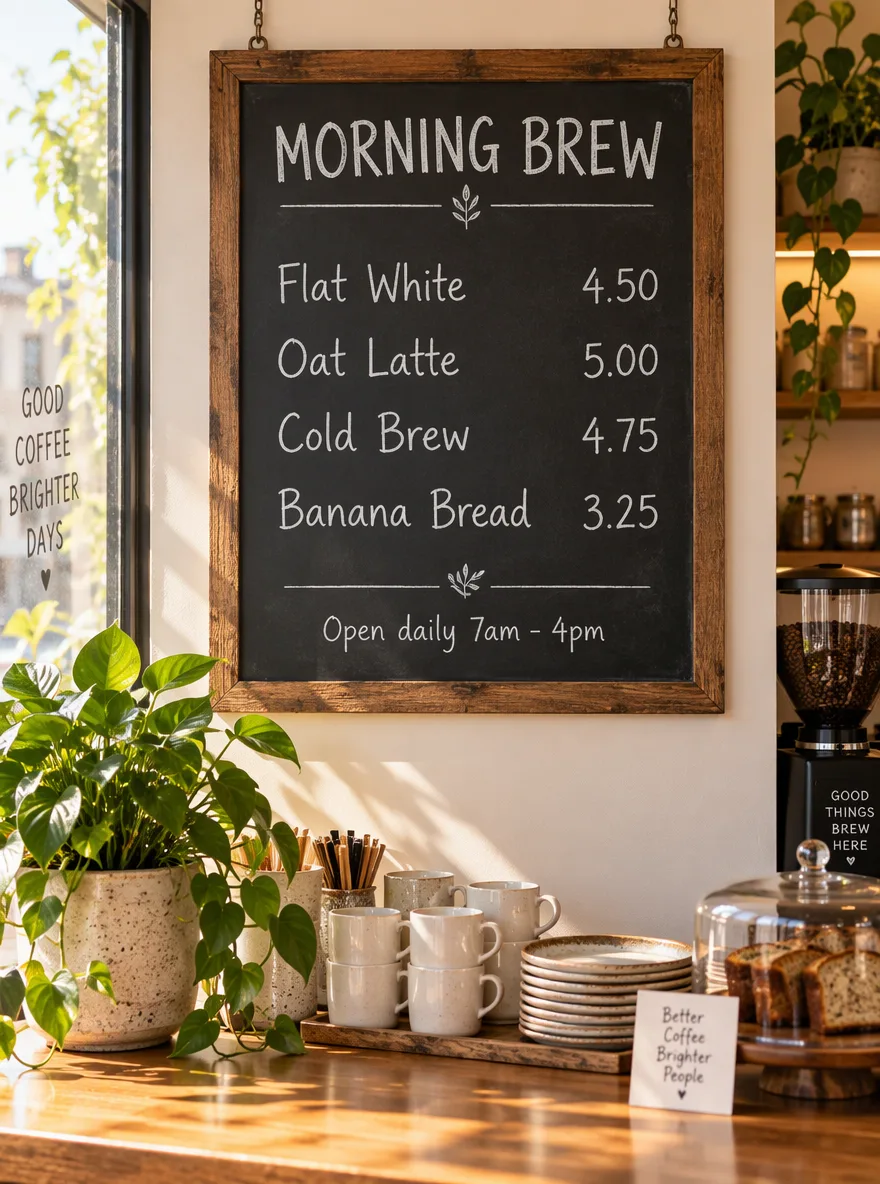
All three spelled every item and price correctly. GPT Image 2.5 Sunburst also wrote three things nobody asked for: a window decal, a counter card and a label on the grinder. Both 2.6 variants drew only the requested lines, plus a small coffee-cup doodle.

Put headlines, labels and prices in quotation marks and say where they go. The menu prompt listed each line with its price and came back exact on every 2.6 run.

The image is the GPT Image 2.6 Sunburst result for the prompt below at 3:4, 1K and medium quality, a 3-credit run. We also ran the same menu at all five quality tiers on both variants: all ten images spelled every word and price correctly, so for text at 1K the low tier, at 2 credits, is enough to check the wording.
Every image from the four prompts, on all three models, is in the GPT Image 2.6 vs 2.5 same-prompt test.

GPT Image 2.6 Text Rendering for Menus, Posters and Infographics – GPT Image 2.6 Sunburst
GPT Image 2.6 Sunburst logoGPT Image 2.6 Sunburst
Prompt: A chalkboard menu hanging in a sunlit neighborhood coffee shop, photographed straight on. Hand-lettered white chalk text, spelled exactly: title "MORNING BREW"; then four lines with prices aligned on the right: "Flat White 4.50", "Oat Latte 5.00", "Cold Brew 4.75", "Banana Bread 3.25"; small footer "Open daily 7am - 4pm". Warm natural light, a potted plant and ceramic cups on the counter below. All text sharp, correctly spelled, and readable. (GPT Image 2.6 Sunburst · 3:4 · 1K medium)

GPT Image 2.6 Flare vs Sunburst Speed on the Same Prompt

Same parameters, same token rates and, in our runs, identical output tokens at the same settings. The difference is time and behaviour: Flare’s median was 13 seconds against 30 for Sunburst, while Sunburst followed placement more closely. Draft with Flare, finish with Sunburst.

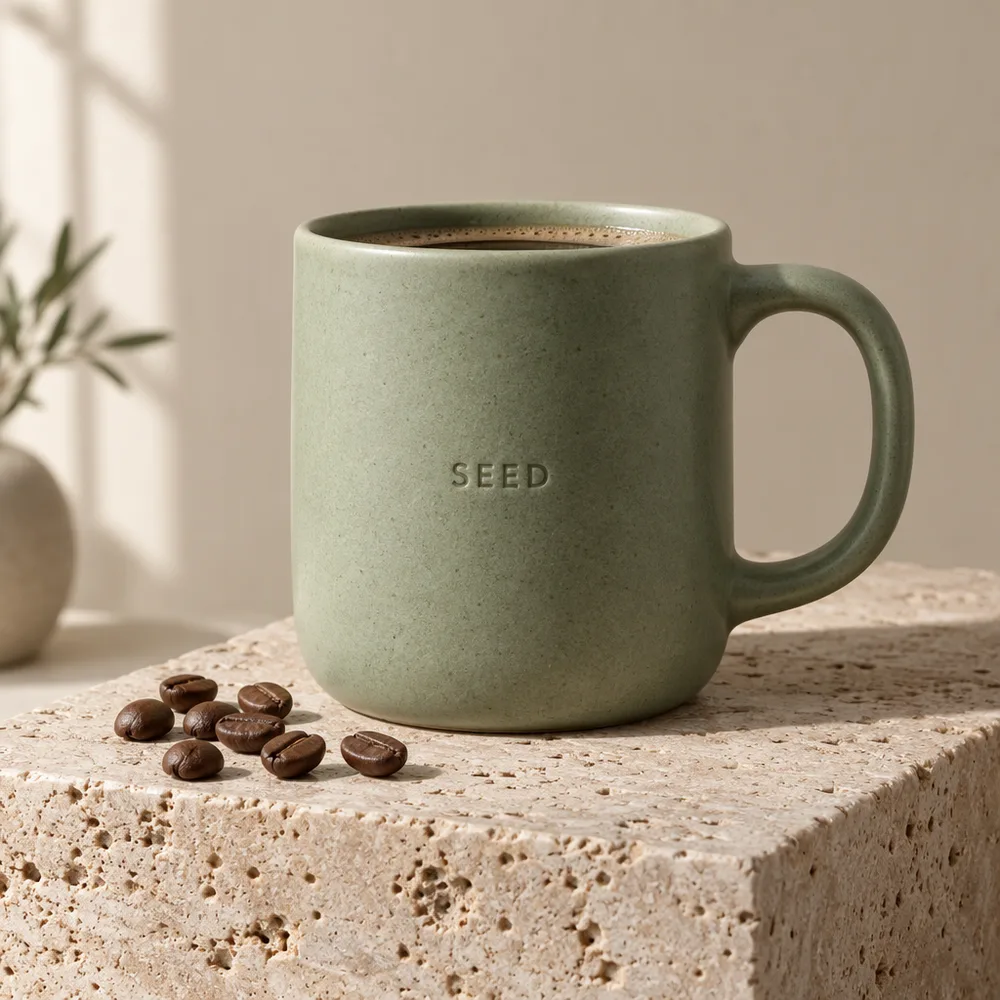
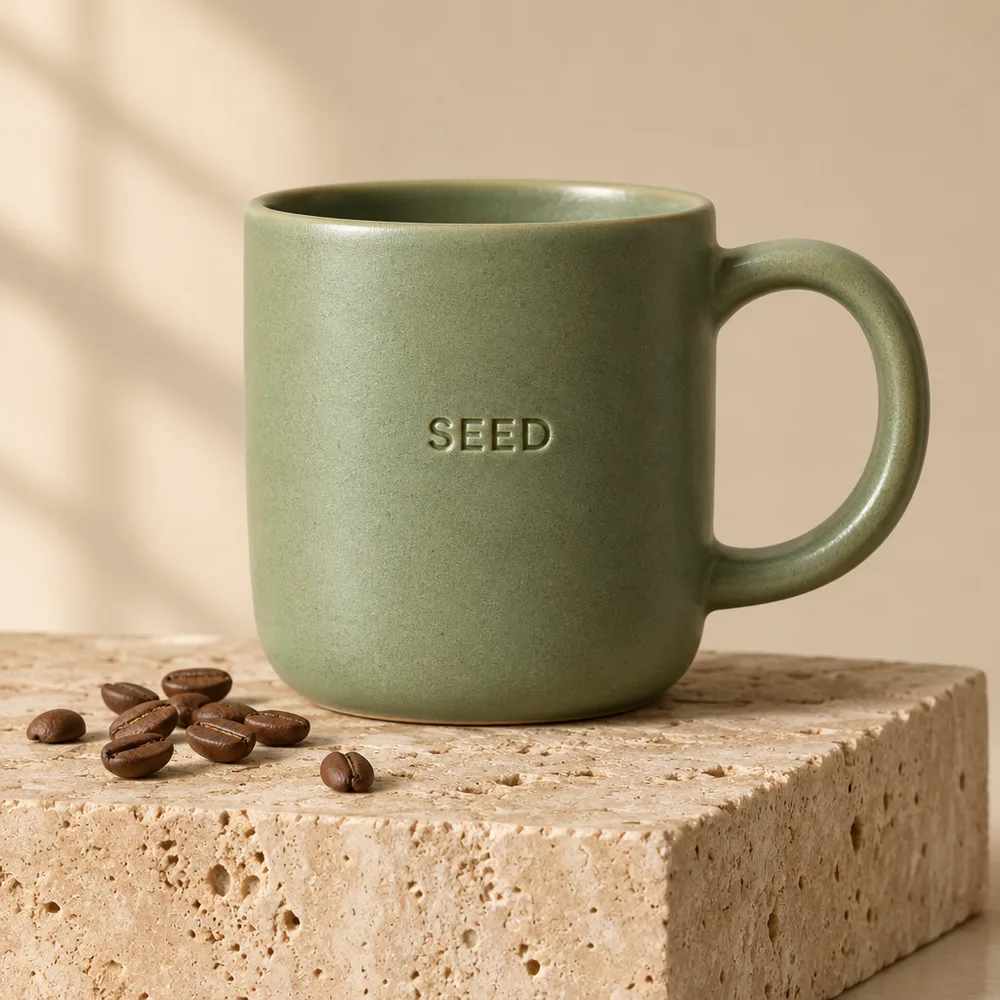
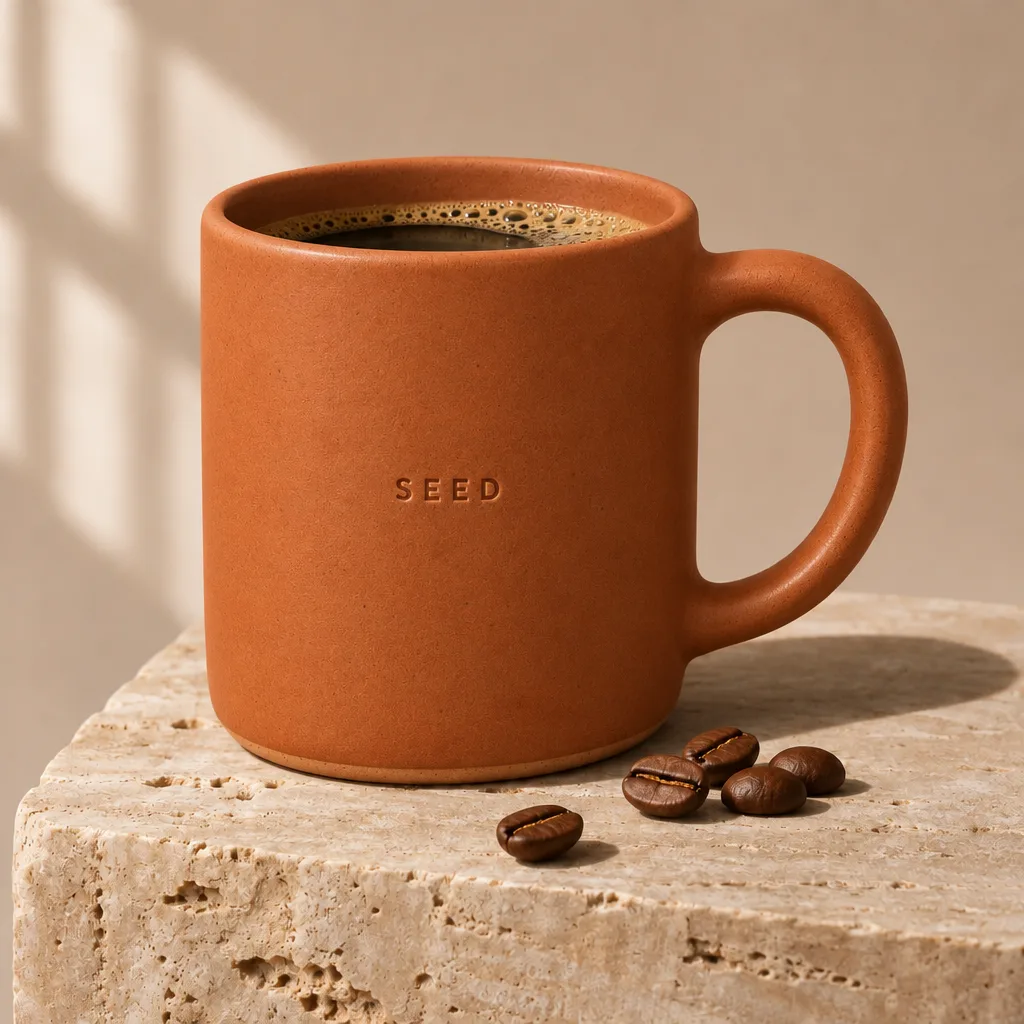
The mug is Flare’s fastest run in the test: 7 seconds for the prompt below at 1:1, 1K and medium quality. The same prompt, run six times on each model, gave medians of 13 seconds on Flare, 30 on GPT Image 2.6 Sunburst and 27 on GPT Image 2.5 Sunburst. Across all medium runs Flare took 7 to 85 seconds and Sunburst 25 to 346; three of the eleven Sunburst runs took longer than two and a half minutes.
GPT Image 2.6 went live on SeedVideo AI on November 10, 2026, so it has too few jobs here for a site-wide wait figure. As a comparison point only, not a GPT Image 2.6 number: half of the GPT Image 2.5 Sunburst images made here from October 12, 2026 to November 10, 2026 finished within 35 s, and 9 in 10 within 2 min 8 s.

GPT Image 2.6 Flare vs Sunburst Speed on the Same Prompt – GPT Image 2.6 Flare
GPT Image 2.6 Flare logoGPT Image 2.6 Flare

Prompt: Premium studio product photograph of a matte sage-green ceramic coffee mug with a small embossed logo reading "SEED" on the side, standing on a travertine stone block, soft window light from the left, gentle shadow, a few roasted coffee beans scattered in front, minimal beige background. Photorealistic, crisp detail on the glaze texture. (GPT Image 2.6 Flare · 1:1 · 1K medium)

GPT Image 2.6 Animated GIF Output from a Prompt or a Photo

GPT Image 2.6 draws every frame in one request and returns a looping GIF with 512 × 512 frames. The cost follows the sheet the frames are drawn on, not the frame count alone: at low quality, 4 to 8 frames cost 1 credit, 9 to 12 frames 2 credits and 13 to 16 frames 3 credits.

In the generator, set Format to GIF, then pick Frames (4, 6, 9, 12 or 16) and Speed (0.08 to 0.4 s per frame). Attach a photo to animate it instead of starting from text.

The loop shown is GPT Image 2.6 Flare at low quality, 9 frames at 0.12 s each: 17 seconds and 3 credits. At medium quality 9 frames cost 4 credits and 16 frames 6. A GIF run returns one file and has no ratio, size or transparent-background setting.

GPT Image 2.6 Animated GIF Output from a Prompt or a Photo

Prompt: A seamless looping animation of a white ceramic cup of hot coffee on a wooden table. Soft steam curls upward and drifts; the cup, the table and the light stay perfectly still. Fixed camera, warm morning light, shallow depth of field. No text.

GPT Image 2.6 Markup Editing on a Circled Area

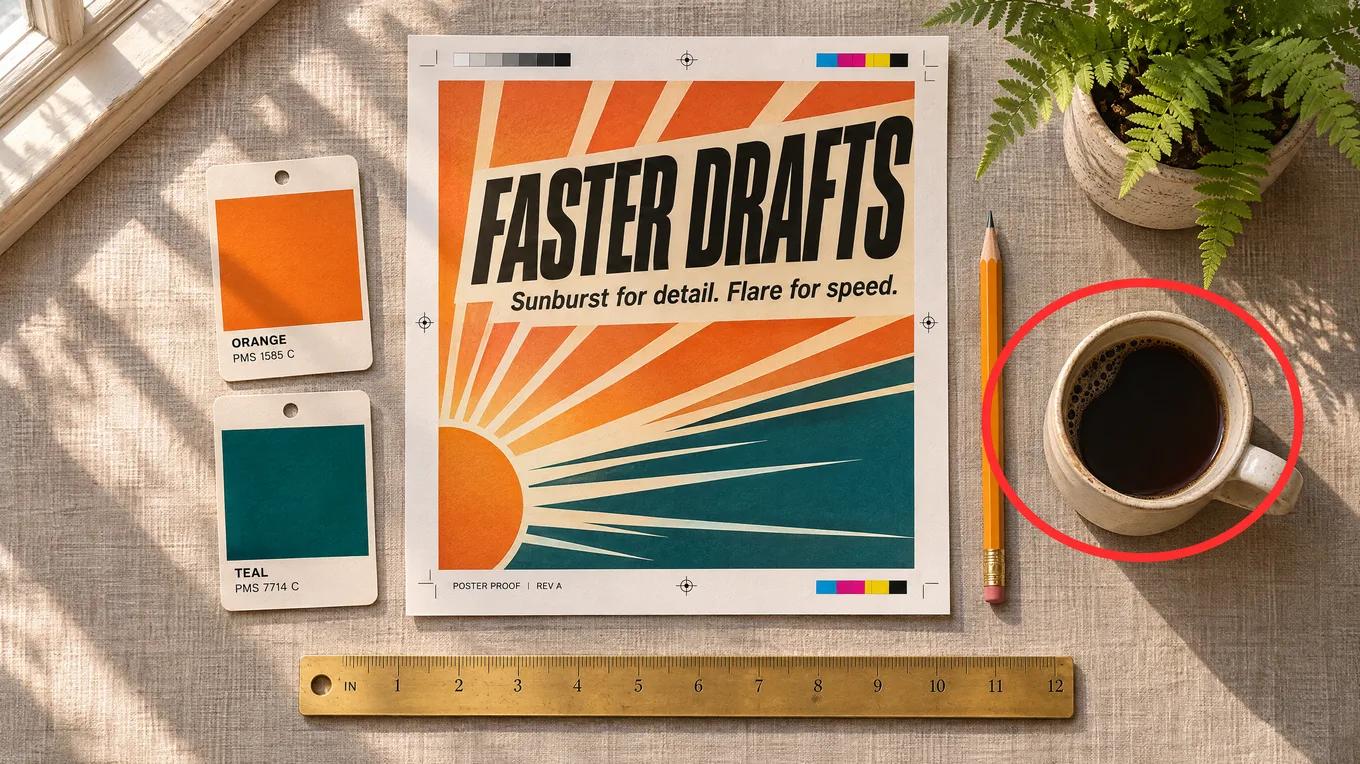
Your drawing goes to the model as a separate transparent layer over the first reference image, so it knows where the edit lands. In all four tests only the circled thing changed, and no red circle showed up in a result. The markup layer added no input tokens, so a marked-up edit costs the same as a plain reference edit.

Add a reference image, click Mark up on its thumbnail, circle or sketch over the area, then describe the change in the prompt. Works with Sunburst and Flare.

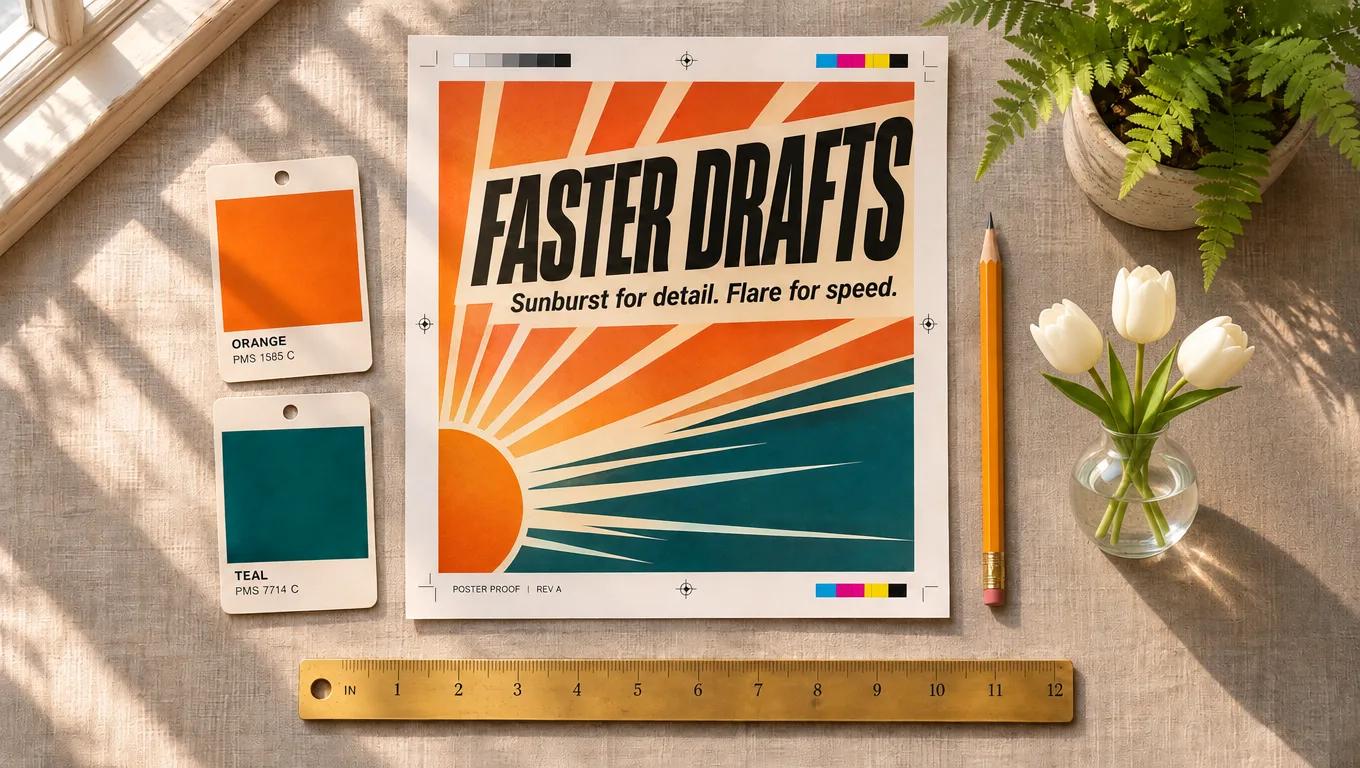
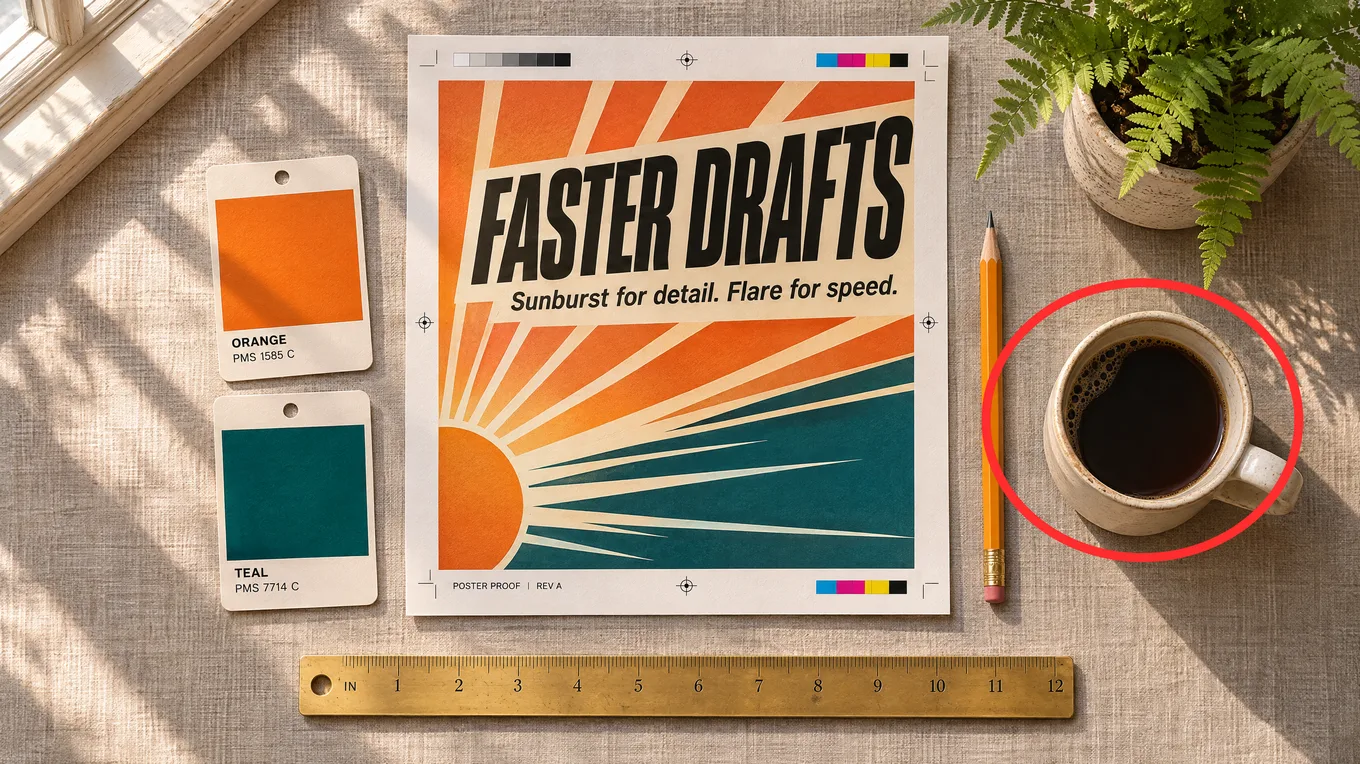
The demo is one of the four tests: a reference image with a red circle drawn over the coffee cup, sent to GPT Image 2.6 Sunburst with the prompt below at 16:9, 1K and medium quality. It took 24 seconds and cost 4 credits, what a 1K medium edit with one reference costs without markup.
The coffee cup became a glass vase with three white tulips, with a shadow that matches the window light. The poster text, both swatches, the pencil, the ruler and the fern are unchanged.

GPT Image 2.6 Markup Editing on a Circled Area – GPT Image 2.6 Sunburst
Input
1
GPT Image 2.6 Sunburst logoGPT Image 2.6 Sunburst

Prompt: Replace the circled coffee cup with a small glass vase holding three white tulips. Keep the poster, swatches, pencil, ruler, fern and tabletop exactly the same. Remove the red circle. (GPT Image 2.6 Sunburst · 16:9 · 1K medium)

GPT Image 2.6 Complexity Setting for Maps, Planners and Dense Layouts

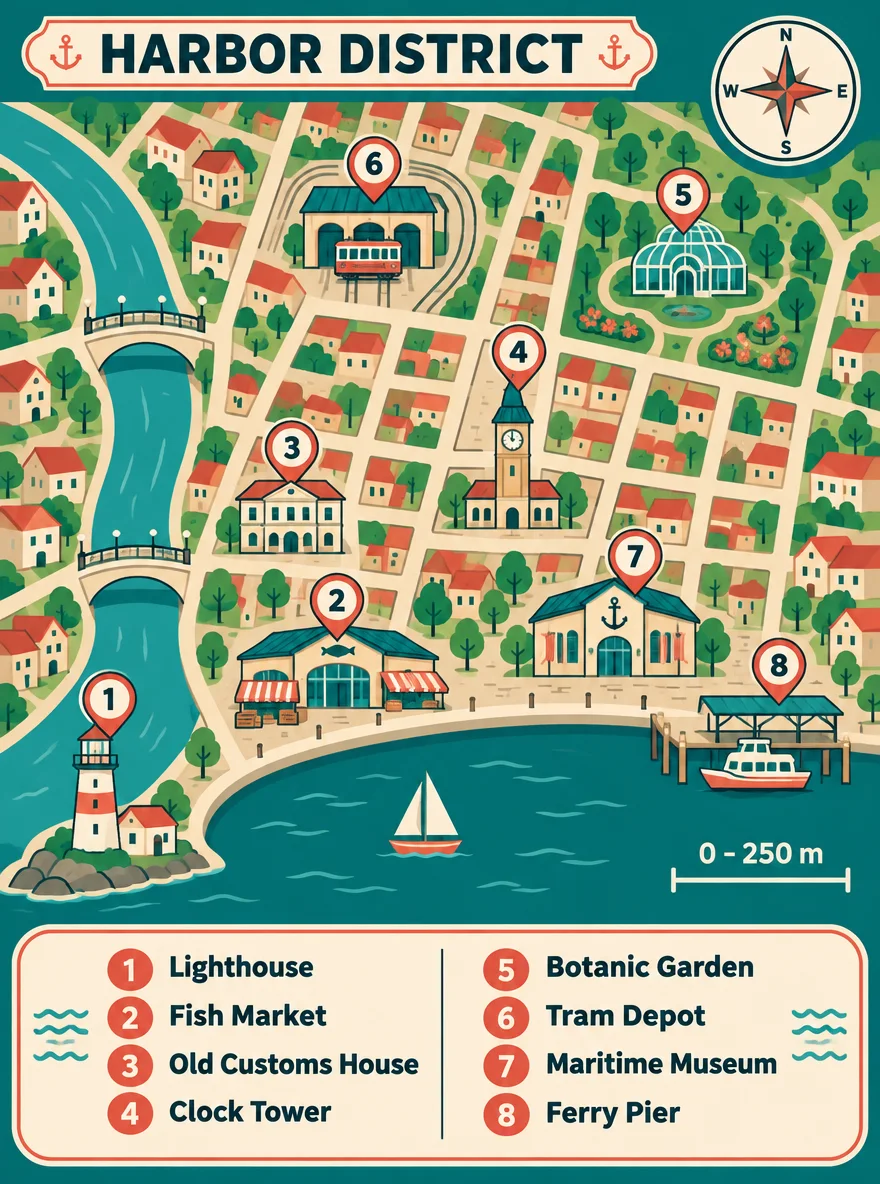
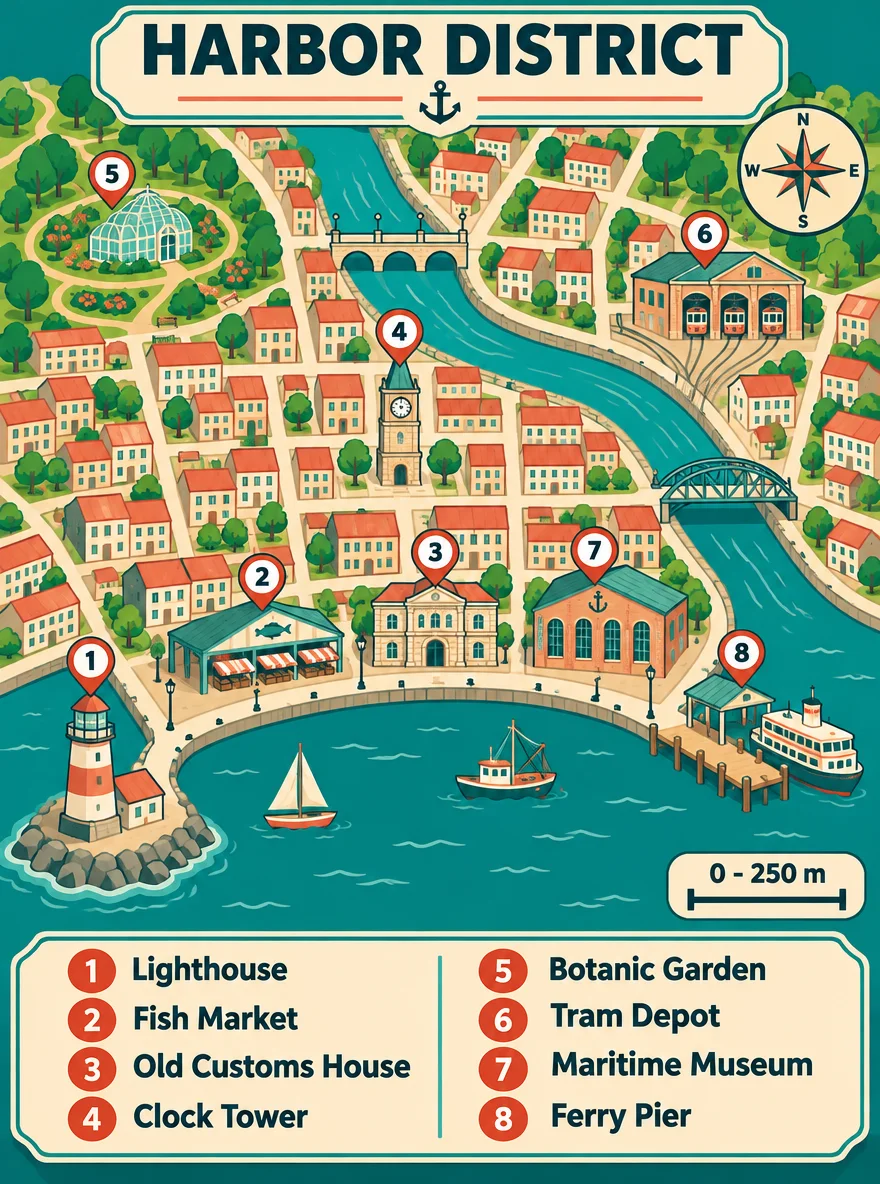
Complexity sets how much GPT Image 2.6 plans a layout before it draws: low, medium or high. It costs nothing extra here, and in our runs it did not change the token count either: all six images below used 1,086 output tokens.

Use the Plan setting in the settings row; for still images it sits under More settings. It starts at high, the model’s own default.

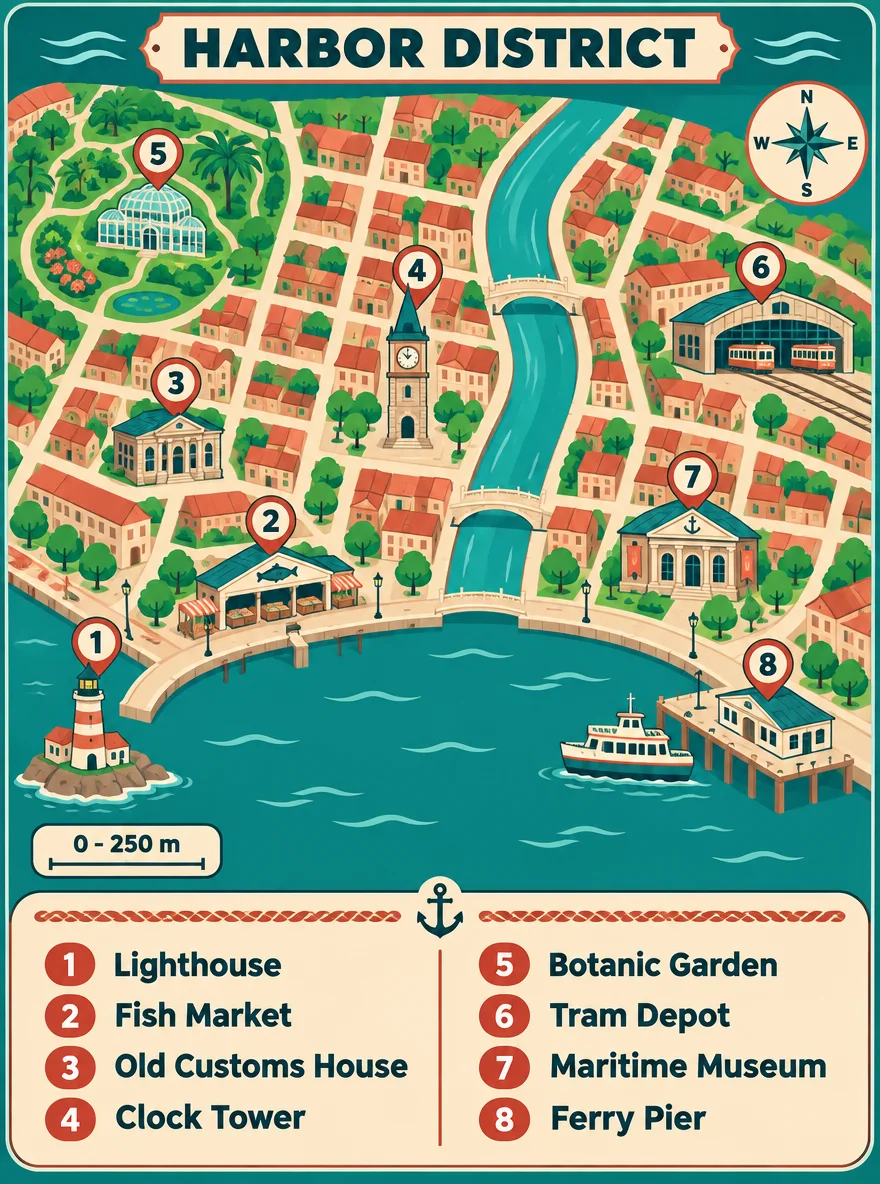
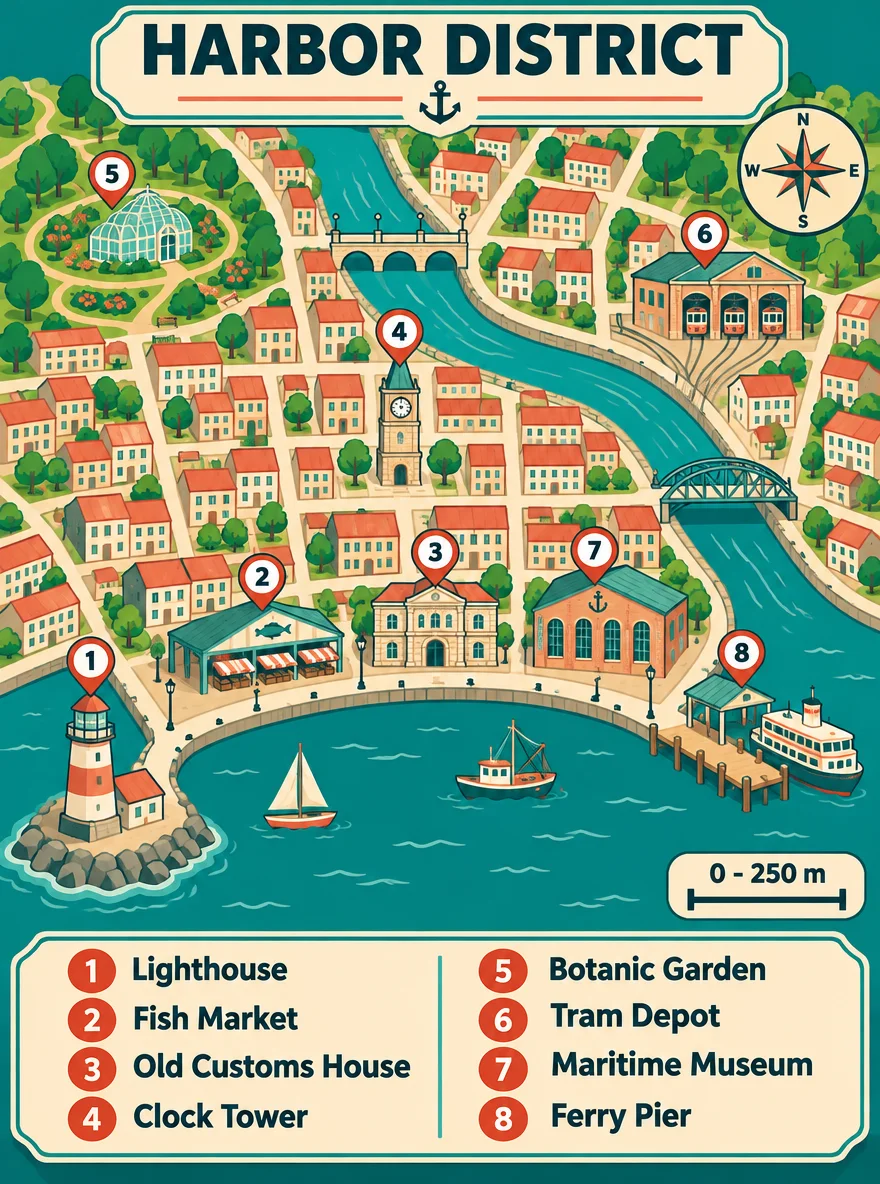
The map is the high run of the prompt below on GPT Image 2.6 Sunburst, at 3:4, 1K and medium quality.

All three levels placed pins 1 to 8 once each, matched the legend word for word and drew the compass and the “0 - 250 m” scale bar. High took 66 seconds against 39 and 37.

On these two dense layouts, high was no more accurate than low, and on the map it was the slowest run. One run per level is a small sample, so treat it as a starting point: draft at low, and raise it only when a crowded scene comes back with something missing or misplaced.

GPT Image 2.6 Complexity Setting for Maps, Planners and Dense Layouts – GPT Image 2.6 Sunburst
GPT Image 2.6 Sunburst logoGPT Image 2.6 Sunburst

Prompt: An illustrated walking-map poster titled "HARBOR DISTRICT" in bold letters at the top. A stylised top-down map of a small harbour town with a curved waterfront, a river with two bridges and a grid of streets. Eight numbered pins on the map, and a legend box at the bottom listing them exactly: "1 Lighthouse", "2 Fish Market", "3 Old Customs House", "4 Clock Tower", "5 Botanic Garden", "6 Tram Depot", "7 Maritime Museum", "8 Ferry Pier". Add a compass rose in the top-right corner and a scale bar reading "0 - 250 m". Flat vector style, teal, sand and coral palette. All text spelled exactly as written; every pin number appears once on the map and once in the legend. (GPT Image 2.6 Sunburst · 3:4 · 1K medium)

GPT Image 2.6 Image Editing with up to 16 Reference Images

OpenAI positions Sunburst for consistency across rounds of edits. In our one-instruction test, changing a mug’s glaze from sage green to terracotta, the logo, beans, stone block, light and shadow all stayed in place on both 2.6 variants. Available here through reference images.

Attach up to 16 PNG, JPEG or WebP images per run. Unlike GPT Image 2.5, which charges nothing for references, GPT Image 2.6 bills them in steps: at 1K medium a prompt-only image is 3 credits, the first 0 references keep that price, 8 references make it 8 and 16 make it 13. In our edit test each reference added 1,024 input tokens.

The demo is that edit: the GPT Image 2.6 Sunburst mug from our same-prompt test as the one reference, the prompt below, 1:1, 1K and medium quality. It took 19 seconds and cost 4 credits.

Our edit named the one change and then listed the logo, mug shape, stone block, beans, lighting, shadow and background as fixed. All of them stayed.

GPT Image 2.6 Image Editing with up to 16 Reference Images – GPT Image 2.6 Sunburst
Input
1
GPT Image 2.6 Sunburst logoGPT Image 2.6 Sunburst

Prompt: Change the mug's glaze from sage green to matte terracotta orange. Keep everything else exactly the same: the embossed "SEED" logo, the mug shape and handle, the travertine block, the coffee beans, the lighting, the shadow and the beige background. (GPT Image 2.6 Sunburst · 1:1 · 1K medium)

GPT Image 2.6 Quality Tiers and Sizes from 1K to 4K

Low used 618 tokens and max 5,184 for the same 3:4 image, an eightfold spread. Medium and high sit close together (1,086 and 1,316), which is why they cost the same 3 credits at 1K here. Start at low or medium and move up only when a result needs finer detail.

From low to max, one image costs 2, 3, 4, 6 and 13 credits at 1K; 4, 6, 7, 12 and 27 at 2K; and 6, 9, 11, 20 and 44 at 4K. Sunburst and Flare cost the same, on every plan. On Pro billed yearly the default setting, 1K medium, is $0.218 an image and 4K max is $3.19.

At medium quality a 1:1 image used 1,449 tokens at 1K, 2,944 at 2K and 4,894 at 4K (2880 × 2880). Elongated shapes use fewer: 3:4 used 75% of the square figure and a 3:1 panorama about a third.

Credits here follow the size and the quality, not the shape: a 3:1 panorama costs the same as a square. The poster proof is the prompt below at 16:9, 2K and high quality on Sunburst: 61 seconds and 7 credits.

GPT Image 2.6 Quality Tiers and Sizes from 1K to 4K – GPT Image 2.6 Sunburst
GPT Image 2.6 Sunburst logoGPT Image 2.6 Sunburst

Prompt: Editorial flat-lay photograph of a designer's desk seen from directly above: a printed poster proof with the headline "FASTER DRAFTS" in bold condensed type and a smaller line "Sunburst for detail. Flare for speed.", two paint swatch cards in warm orange and deep teal, a ceramic cup of black coffee, a pencil, a brass ruler and a small potted fern. Soft morning window light from the top left, long gentle shadows, linen tabletop texture, natural colour. All printed text sharp and spelled exactly as written. (GPT Image 2.6 Sunburst · 16:9 · 2K high)

GPT Image 2.6 Settings and Limits on SeedVideo AI

These rows are read from the settings the composer and the API check a request against, and they are the same for Sunburst and Flare. A value outside them is rejected before the job starts and costs nothing.

Output size1K, 2K or 4K1K medium by default. Or exact pixel dimensions in multiples of 16, up to 3,840 per edge and 8.29 megapixels, no longer than 3:1.
Qualitylow, medium, high, xhigh or max2 to 13 credits at 1K, 4 to 27 at 2K and 6 to 44 at 4K.
Aspect ratioAuto or 15 ratios1:1, 1:2, 2:1, 1:3, 3:1, 2:3, 3:2, 3:4, 4:3, 4:5, 5:4, 9:16, 16:9, 9:21, 21:9.
Images per runUp to 10Credits multiply by the count: 10 images at 1K medium cost 30. A GIF run returns one file.
Reference imagesUp to 16PNG, JPEG or WebP in this composer, billed in steps. A request with more than 16 is rejected.
MarkupOn the first reference imageThe drawn layer needs a reference image under it and adds no credits.
Complexitylow, medium or highThe Plan setting; high by default, no effect on credits.
BackgroundOpaque or transparentTransparent returns a PNG with an alpha channel at the same credits. Not available for a GIF.
GIF output4, 6, 9, 12 or 16 frames of 512 × 512At 0.08, 0.12, 0.2 or 0.4 s per frame. 2 to 27 credits, depending on frames and quality.
PromptUp to 32,000 charactersA longer prompt is rejected.
Without an accountNot availableThe no-login run uses other image models. A new account gets 5 credits, enough for 2 images at 1K low.
Not available hereSVG output, JPEG or WebP exportOpenAI’s model page lists SVG output. Here a still is saved as PNG and an animation as GIF.

GPT Image 2.6 Use Cases

Where each variant fits, based on OpenAI’s positioning and what we saw in testing.

  • Fast drafts and variants with Flare: Thumbnails, social variants and early concepts, where a result in about 13 seconds matters more than the last bit of texture.
  • Approved copy on posters and menus: Every menu, infographic and poster image in our test, 17 in all, came back with zero spelling errors, and the 2.6 menu scene had no invented signage. Still read critical copy letter by letter before it ships.
  • Product recolors and seasonal edits with Sunburst: Change one thing, a glaze, a background or a line of copy, and keep the composition the team already approved.
  • Stills that become video: Use a finished GPT Image 2.6 frame as the start frame for Seedance 2.5 or Kling 4.0 in the same workspace.

GPT Image 2.6 Sunburst vs Flare, GPT Image 2.5, Nano Banana 2.1 and Seedream 5.0 Pro

Every cell except the last row is read from the image models’ live settings and price table on SeedVideo AI, so the table matches what the generator lets you pick today.

GPT Image 2.6 is one of the models in SeedVideo AI’s AI image generator: the same prompt works on every image model there.

GPT Image 2.6 compared with other image models on SeedVideo AI
FeatureGPT Image 2.6 SunburstGPT Image 2.6 FlareGPT Image 2.5 SunburstNano Banana 2.1Seedream 5.0 Pro
Output sizes1K, 2K, 4K1K, 2K, 4K1K, 2K, 4K1K, 2K, 4K1K, 1.5K, 2K
Aspect ratios1:1, 1:2, 2:1, 1:3, 3:1, 2:3, 3:2, 3:4, 4:3, 4:5, 5:4, 9:16, 16:9, 9:21, 21:91:1, 1:2, 2:1, 1:3, 3:1, 2:3, 3:2, 3:4, 4:3, 4:5, 5:4, 9:16, 16:9, 9:21, 21:91:1, 1:2, 2:1, 1:3, 3:1, 2:3, 3:2, 3:4, 4:3, 4:5, 5:4, 9:16, 16:9, 9:21, 21:91:1, 1:4, 4:1, 1:8, 8:1, 2:3, 3:2, 3:4, 4:3, 4:5, 5:4, 9:16, 16:9, 21:91:1, 4:3, 3:4, 3:2, 2:3, 16:9, 9:16, 4:5, 5:4, 21:9, 9:21
Reference images1616161410
Images per run10101011
Prompt limit, characters32,00032,00032,0002,0002,600
Default setting3 credits · 1K medium3 credits · 1K medium1 credit · 1K medium3 credits · 2K2 credits · 1.5K
Cheapest image2 credits · 1K low2 credits · 1K low1 credit · 1K low2 credits · 1K2 credits · 1K
Dearest image44 credits · 4K max44 credits · 4K max33 credits · 4K max7 credits · 4K3 credits · 2K
Best forFinals where placement matters, markup edits and dense layoutsFast drafts and variants at the same priceThe cheapest 1K drafts; no GIF, markup or complexity settingUltra-wide strips up to 8:1, one price per size; one image per runLow-cost 1K to 2K images with up to 10 references

Credits are for one image with no reference images, at the setting named in the cell, and are the same on every plan.

GPT Image 2.6 Pros and Cons

What the composer’s settings, the live price table and our November 10, 2026 test runs show.

Strengths

  • Flare speed: A 13-second median over six runs of one prompt at 1K medium, against 27 seconds for GPT Image 2.5 Sunburst.
  • Exact text: Zero spelling errors across the menu, infographic and poster images in our test, and no invented signage on the 2.6 menu.
  • Local edits: In four markup tests only the circled area changed, and the markup layer adds no credits.
  • Formats: 15 ratios from 1:3 to 3:1, exact pixel sizes, transparent PNGs and looping GIFs.
  • Batches and long prompts: Up to 10 images per run and prompts up to 32,000 characters.
  • One price for both variants: Sunburst and Flare cost the same credits at every setting.

Limits

  • Dearer drafts than 2.5: 3 credits at 1K medium against 1 for GPT Image 2.5, and 2 against 1 at low.
  • References are billed: At 1K medium the first 0 add nothing; 16 references bring one image to 13 credits.
  • Uneven Sunburst timing: Three of eleven Sunburst medium runs in launch week took longer than two and a half minutes; the slowest took 346 seconds.
  • Flare placement: Flare moved the village we asked for at the far right of the panorama toward the centre.
  • No site-wide numbers yet: It went live here on November 10, 2026 and has too few jobs for a wait or refusal figure of its own.
  • Not available here: SVG output, JPEG or WebP export, and a run without an account.

GPT Image 2.6 vs 2.5: What We Measured

On November 10, 2026 we ran 51 paid requests through GPT Image 2.5 Sunburst, 2.6 Sunburst and 2.6 Flare: four identical prompts, a five-tier quality ladder, edits, GIFs and repeated timing runs. Every image below is shown as generated.

Measured on November 10, 2026GPT Image 2.5 SunburstGPT Image 2.6 SunburstGPT Image 2.6 Flare
Median time, same prompt run 6 times (1:1, medium, 1K)27 s30 s13 s
Fastest to slowest across all medium runs21–29 s (9 runs)25–346 s (11 runs)7–85 s (9 runs)
Output tokens for one 1:1 medium image at 1K4391,4491,449
Credits for that image on SeedVideo AI133
Spelling errors in requested text000
Text added that the menu prompt did not ask for3 extra signsNoneNone

Quality ladder: tokens and credits per tier

One chalkboard-menu prompt at 3:4 and 1K, run at every quality tier on both 2.6 variants. Sunburst and Flare used the same output tokens at each tier. All ten images spelled every word and price correctly, so on a text-heavy 1K image the higher tiers bought finer chalk texture, not accuracy. A 1:1 image uses about a third more tokens than these 3:4 figures; credits are the same for every aspect ratio.

QualityOutput tokensCredits at 1KSpelling errors
low61820
medium1,08630
high1,31640
xhigh2,33760
max5,184130

Chalkboard menu with exact prices

All three spelled every item and price correctly. GPT Image 2.5 Sunburst also wrote three things nobody asked for: a window decal, a counter card and a label on the grinder. Both 2.6 variants drew only the requested lines, plus a small coffee-cup doodle.

Prompt · 3:4 · 1K · medium A chalkboard menu hanging in a sunlit neighborhood coffee shop, photographed straight on. Hand-lettered white chalk text, spelled exactly: title "MORNING BREW"; then four lines with prices aligned on the right: "Flat White 4.50", "Oat Latte 5.00", "Cold Brew 4.75", "Banana Bread 3.25"; small footer "Open daily 7am - 4pm". Warm natural light, a potted plant and ceramic cups on the counter below. All text sharp, correctly spelled, and readable.
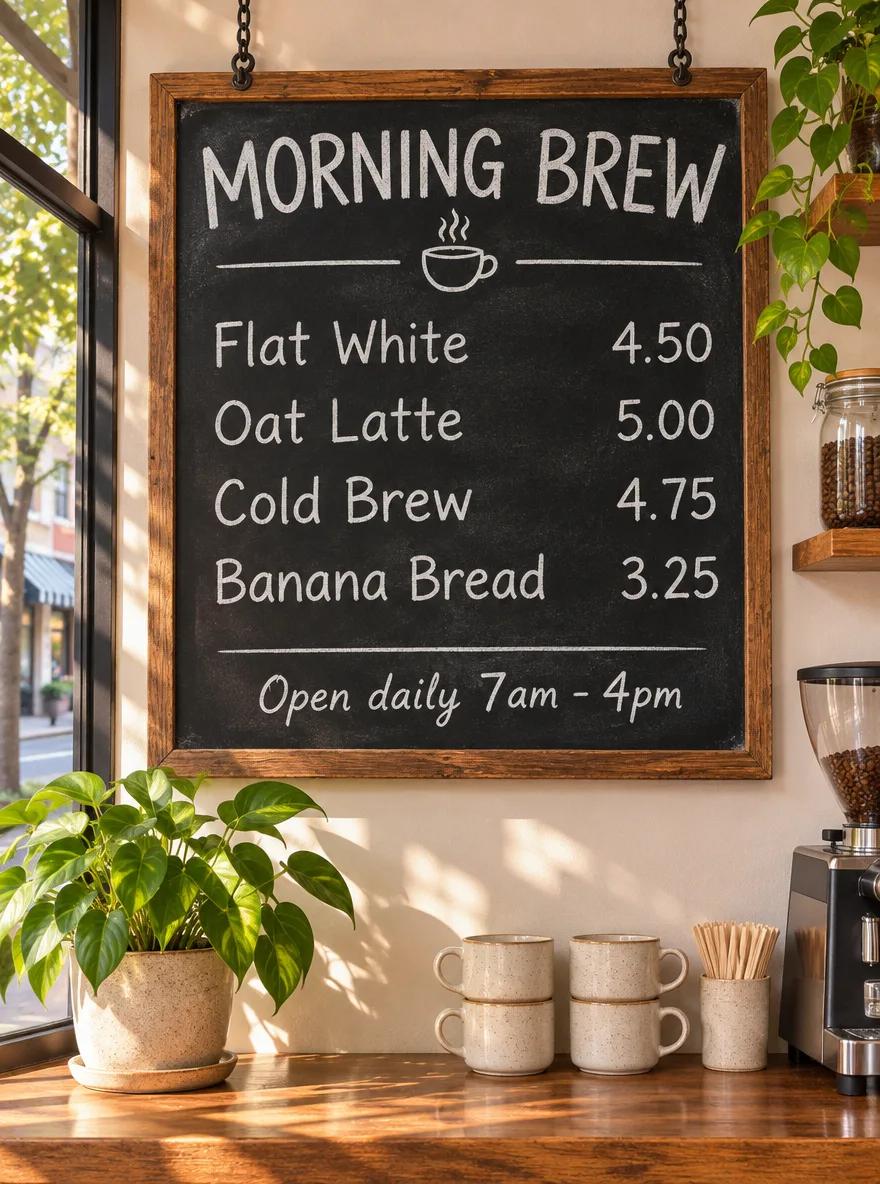
GPT Image 2.5 Sunburst · Chalkboard menu with exact prices
GPT Image 2.5 Sunburst · 25 s
GPT Image 2.6 Sunburst · Chalkboard menu with exact prices
GPT Image 2.6 Sunburst · 346 s
GPT Image 2.6 Flare · Chalkboard menu with exact prices
GPT Image 2.6 Flare · 26 s

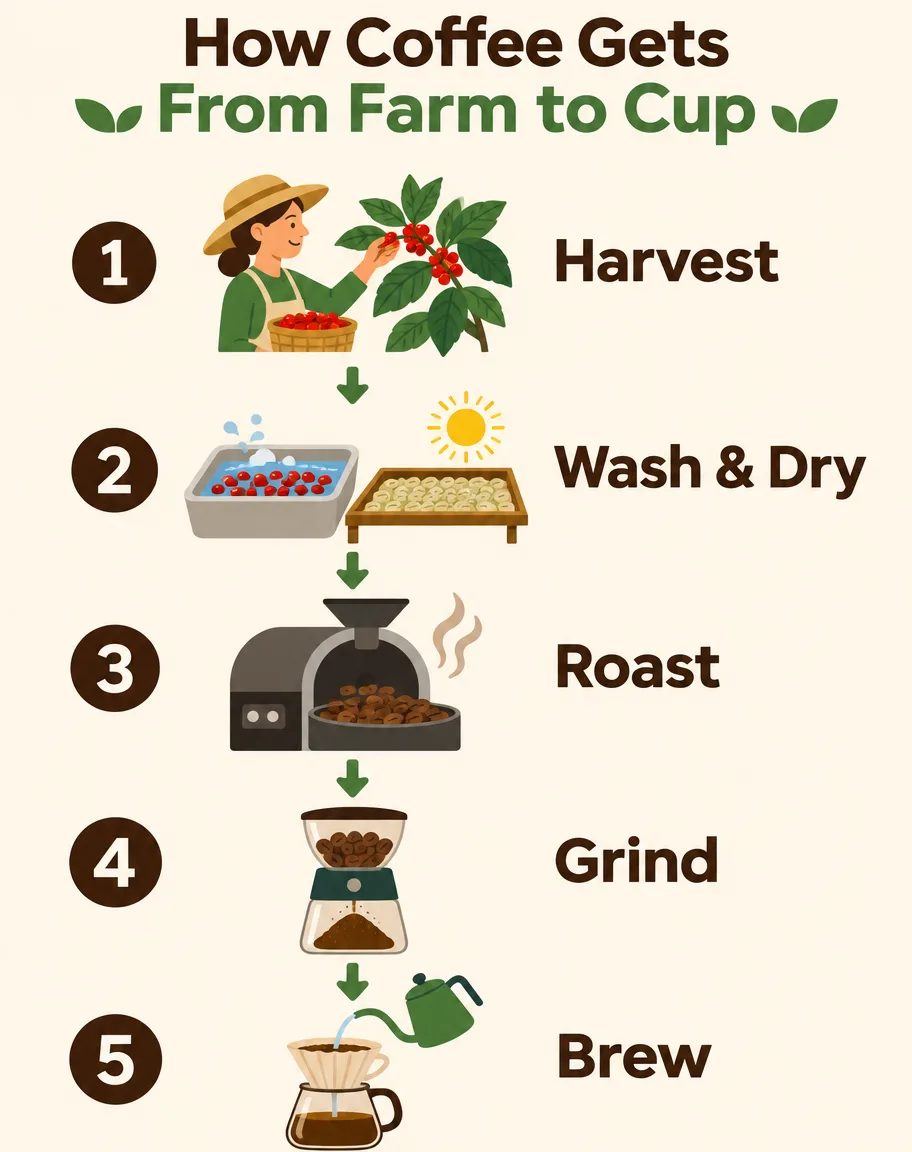
Five-step infographic

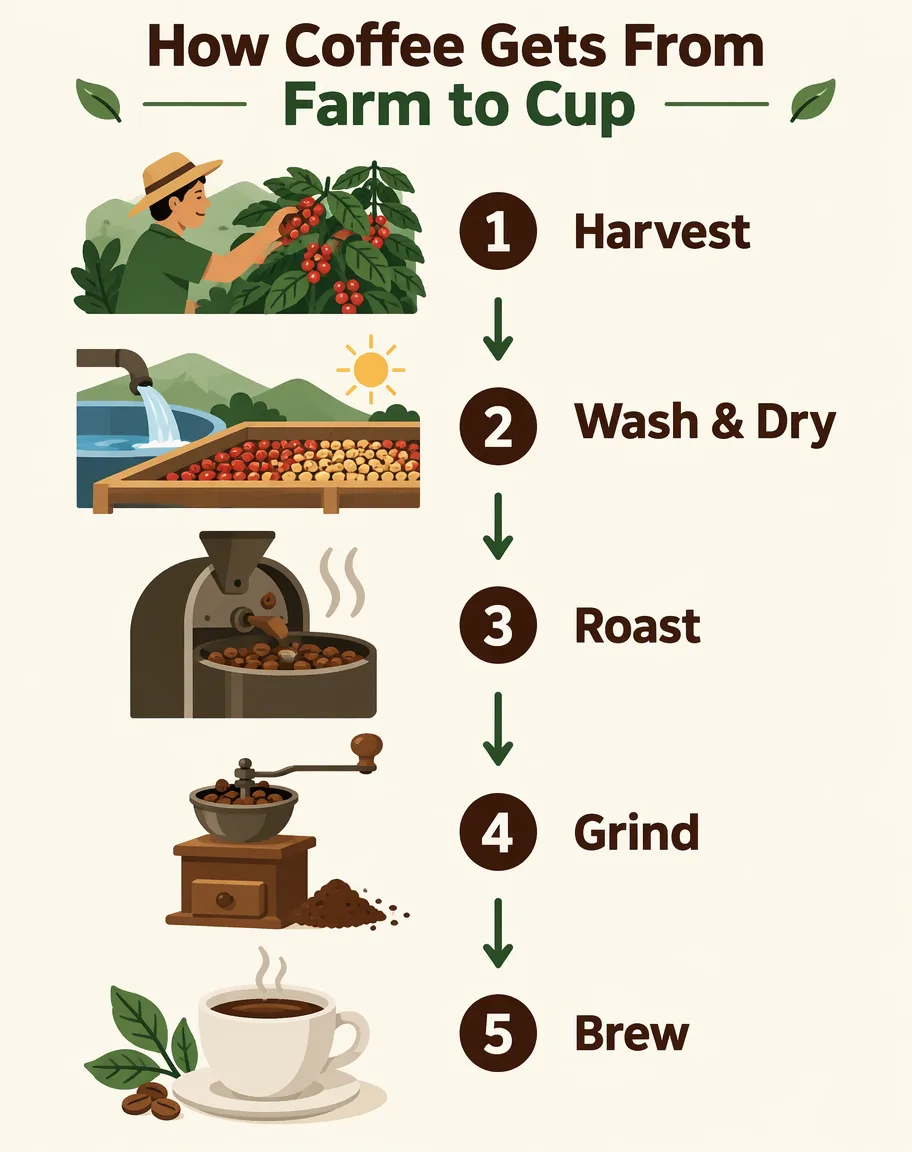
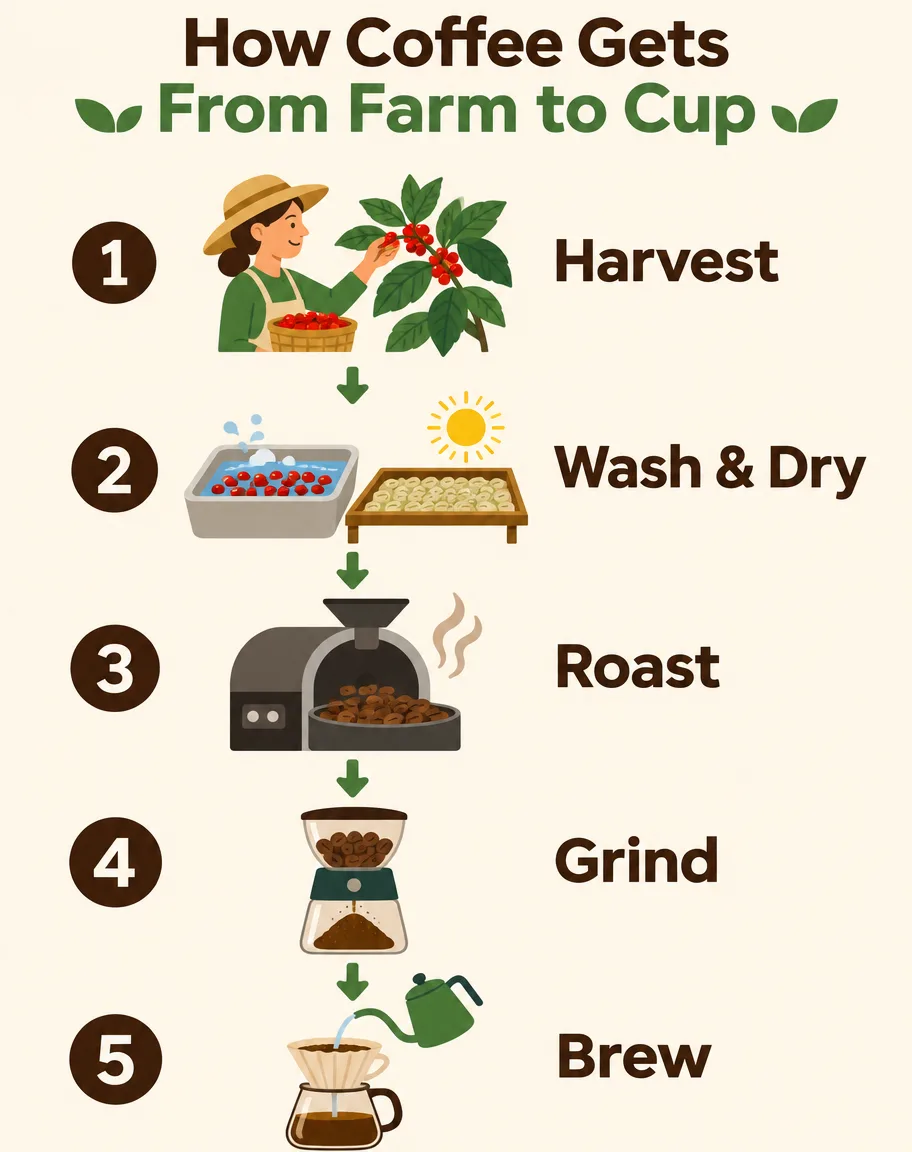
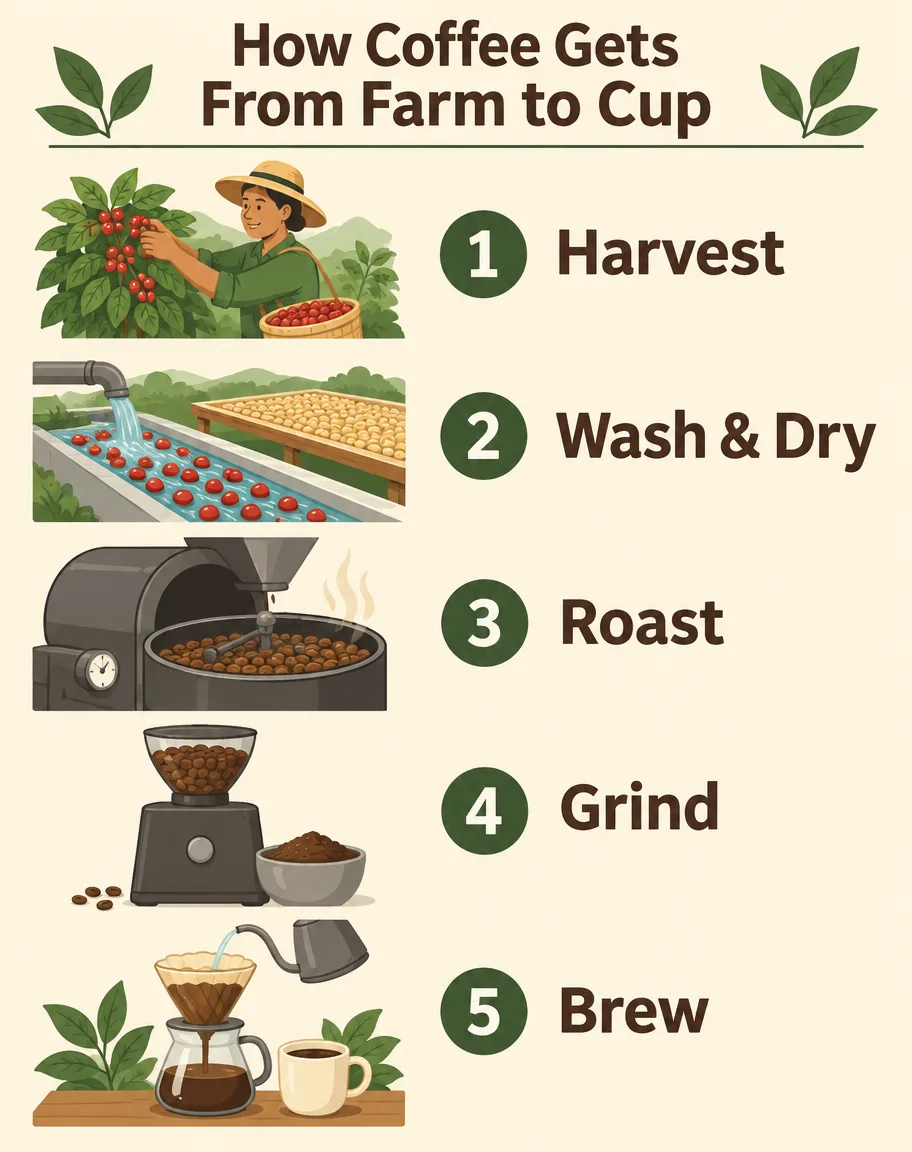
Title and all five labels were correct on every model. GPT Image 2.6 Sunburst linked simple icons with arrows; Flare used larger type and fuller scene illustrations. Rerunning 2.6 Sunburst at low and medium complexity changed neither the spelling nor the token count.

Prompt · 4:5 · 1K · medium A clean educational infographic titled "How Coffee Gets From Farm to Cup" with five numbered steps arranged top to bottom, each with a small flat illustration and a one-line label: "1 Harvest", "2 Wash & Dry", "3 Roast", "4 Grind", "5 Brew". Cream background, dark brown and green palette, modern sans-serif type, generous spacing, all labels spelled exactly as written.

GPT Image 2.5 Sunburst · Five-step infographic
GPT Image 2.5 Sunburst · 25 s
GPT Image 2.6 Sunburst · Five-step infographic
GPT Image 2.6 Sunburst · 165 s
GPT Image 2.6 Flare · Five-step infographic
GPT Image 2.6 Flare · 85 s

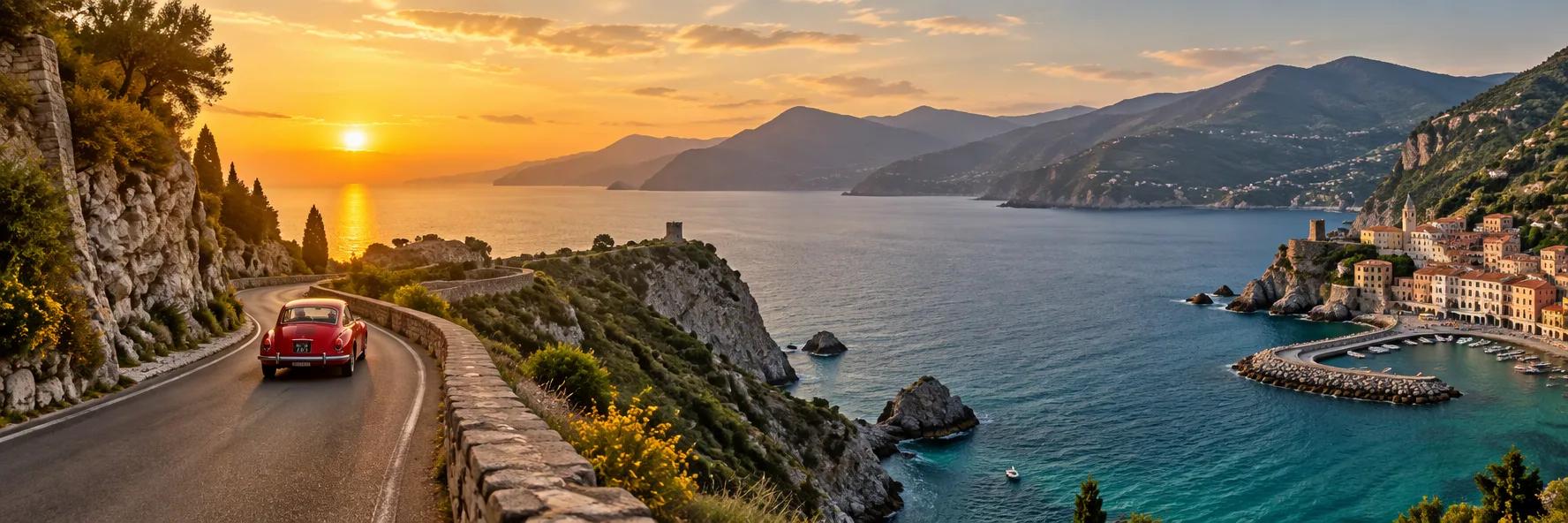
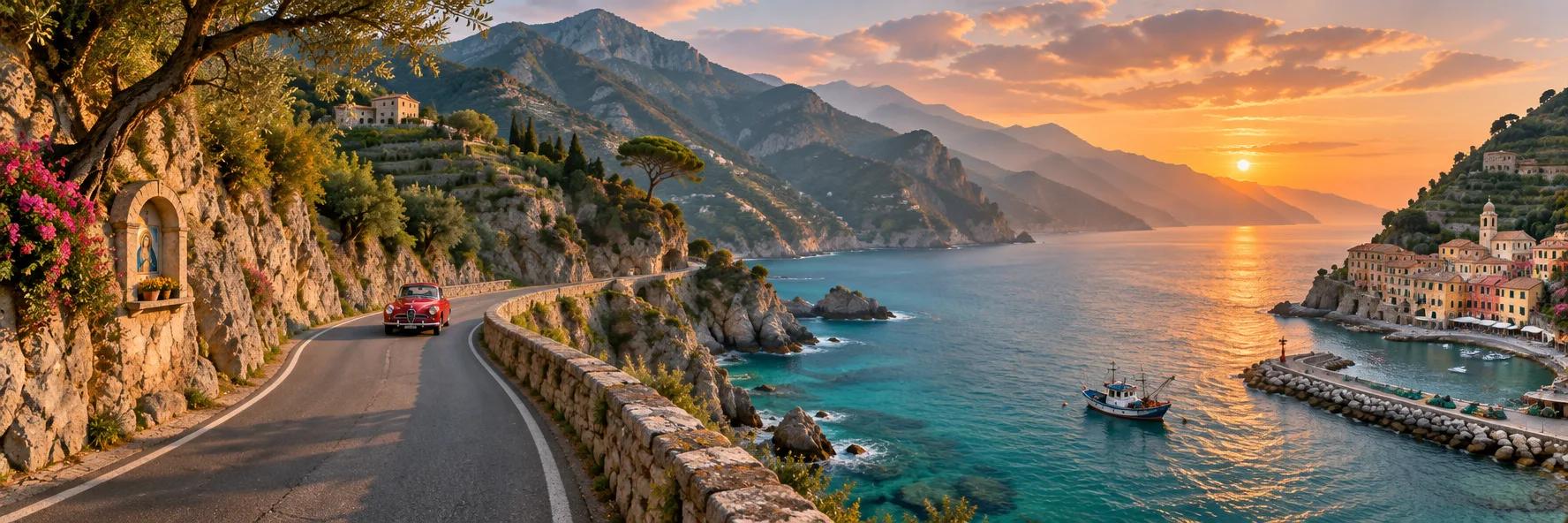
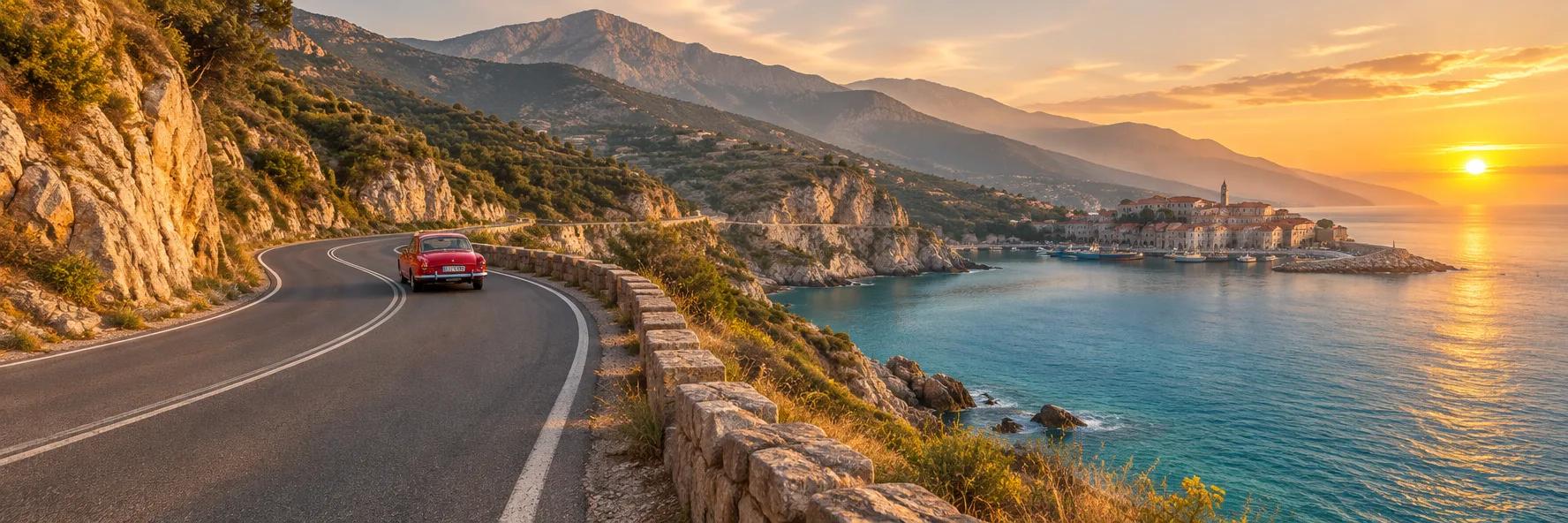
3:1 coastal panorama

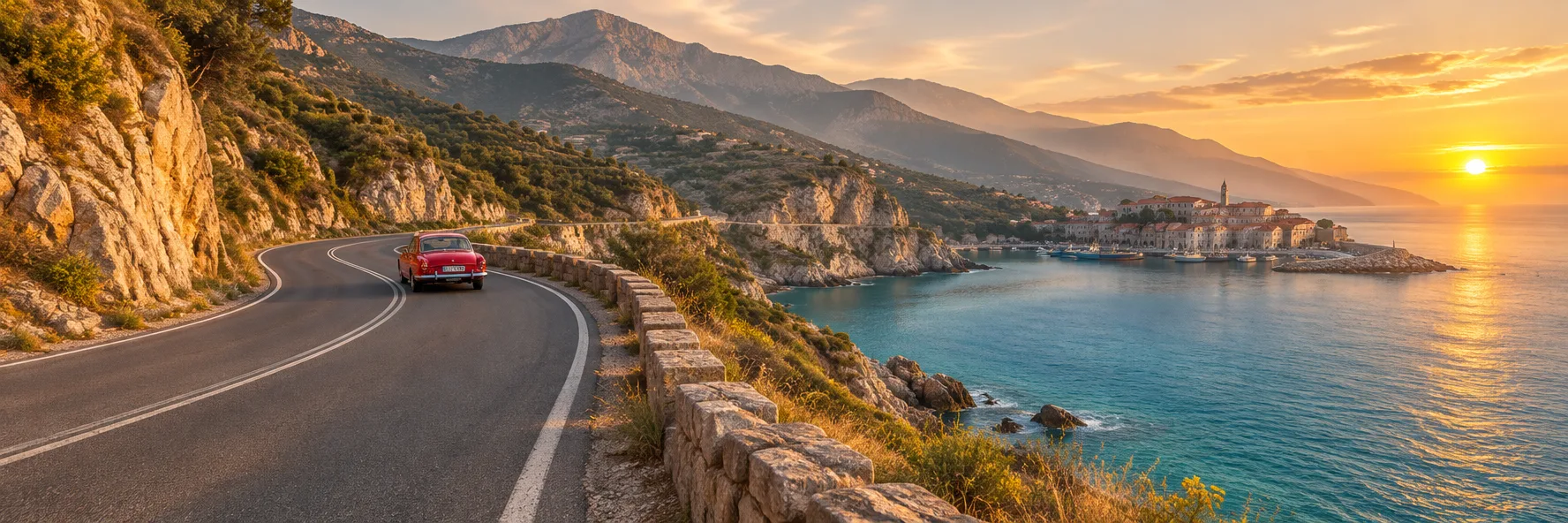
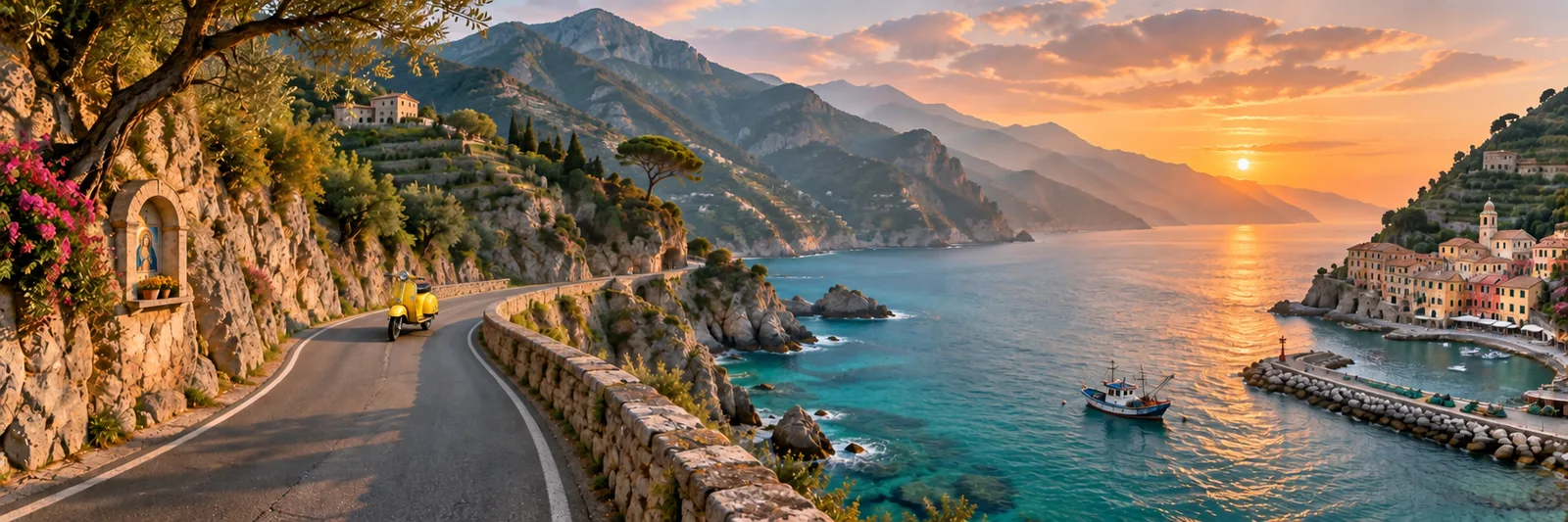
All three returned a continuous 1776 × 592 landscape with one red car. GPT Image 2.6 Sunburst kept the village at the far right as asked and added a fishing boat and a roadside shrine; Flare moved the village toward the centre and put the sun at the right edge instead.

Prompt · 3:1 · 1K · medium An ultra-wide panoramic photograph of a coastal mountain road at golden hour: the road winds along cliffs above a turquoise sea, a single red vintage car in the middle distance, small fishing village at the far right, layered mountains fading into haze. Natural, continuous landscape with no repeated elements, realistic light, high detail.

GPT Image 2.5 Sunburst · 3:1 coastal panorama
GPT Image 2.5 Sunburst · 21 s
GPT Image 2.6 Sunburst · 3:1 coastal panorama
GPT Image 2.6 Sunburst · 55 s
GPT Image 2.6 Flare · 3:1 coastal panorama
GPT Image 2.6 Flare · 56 s

Product shot with an embossed logo

The “SEED” emboss was legible on all three. Flare left the mug empty, which matches the prompt most literally; both Sunburst models filled it with coffee, and 2.5 added a vase to a background we asked to keep minimal.

Prompt · 1:1 · 1K · medium Premium studio product photograph of a matte sage-green ceramic coffee mug with a small embossed logo reading "SEED" on the side, standing on a travertine stone block, soft window light from the left, gentle shadow, a few roasted coffee beans scattered in front, minimal beige background. Photorealistic, crisp detail on the glaze texture.

GPT Image 2.5 Sunburst · Product shot with an embossed logo
GPT Image 2.5 Sunburst · 26 s
GPT Image 2.6 Sunburst · Product shot with an embossed logo
GPT Image 2.6 Sunburst · 31 s
GPT Image 2.6 Flare · Product shot with an embossed logo
GPT Image 2.6 Flare · 7 s

Method: requests went through the same API route the SeedVideo AI workspace uses, one image per request, timed from submission to a finished file, so queue time is included. Timing in launch week was uneven: three of eleven Sunburst medium runs took longer than two and a half minutes. One run per image is a small sample; treat this as a first look, not a benchmark.

GPT Image 2.6 Credits, Dollar Cost and Reference Billing on SeedVideo AI

What the composer charges for GPT Image 2.6 Sunburst and Flare today, read from the live price table; both variants cost the same, on every plan. GPT Image 2.6 went live here on November 10, 2026 and has too few jobs for site-wide wait or refusal figures, so the two GPT Image 2.5 tables are a comparison point only.

A GPT Image 2.6 image costs 2 credits at 1K low and 3 at 1K medium, the default, which is $0.218 on Pro billed yearly. 2K medium is 6 credits, 4K medium 9 and the dearest setting, 4K max, 44; a 4-frame GIF at low quality is 2.

How many credits is a GPT Image 2.6 image?

One image, prompt only, by quality tier and size.

Quality1K2K4K
low246
medium369
high4711
xhigh61220
max132744

How many credits is a GPT Image 2.6 GIF?

One looping GIF, prompt only, at the frame counts the composer offers.

Frameslowmediumhighxhighmax
422349
622349
9345919
12245817
164671227

What does a GPT Image 2.6 image cost in dollars?

The credits above at each plan’s price per credit. See pricing for the plans.

PlanYou pay1K low1K medium2K medium4K medium4K max
Lite, monthly$14.90 a month · 100 credits a month$0.298$0.447$0.894$1.34$6.56
Pro, monthly$29 a month · 200 credits a month$0.29$0.435$0.87$1.30$6.38
Premium, monthly$149 a month · 1,300 credits a month$0.229$0.344$0.688$1.03$5.04
Lite, billed yearly$156 a year · 100 credits a month$0.26$0.39$0.78$1.17$5.72
Pro, billed yearly$174 a year · 200 credits a month$0.145$0.218$0.435$0.653$3.19
Premium, billed yearly$1,188 a year · 1,300 credits a month$0.152$0.228$0.457$0.685$3.35
Starter pack$29.90 once · 200 credits$0.299$0.449$0.897$1.35$6.58
Creator pack$49.90 once · 375 credits$0.266$0.399$0.798$1.20$5.85
Studio pack$79.90 once · 600 credits$0.266$0.40$0.799$1.20$5.86
Max pack$199 once · 1,500 credits$0.265$0.398$0.796$1.19$5.84
Agency pack$999 once · 8,000 credits$0.25$0.375$0.749$1.12$5.49

What do reference images add to a GPT Image 2.6 image?

Credits for one image with that many reference images attached. The markup layer is not billed.

Reference images1K low1K medium2K medium4K medium
02369
134610
234711
446812
8781114
1612131519

How long does GPT Image 2.5 Sunburst take here? (comparison, not GPT Image 2.6)

1,551 GPT Image 2.5 Sunburst jobs from 354 accounts reached the model on SeedVideo AI from October 12, 2026 to November 10, 2026. Waits count finished jobs paid with credits.

Output sizeFinished jobsMedian wait9 in 10 within
1K98835 s2 min 6 s
2K8244 s2 min 59 s
4K4151 s1 min 58 s

How often does GPT Image 2.5 Sunburst refuse a job? (comparison, not GPT Image 2.6)

Jobs the model’s content check stopped, same window. A stopped job gives its credits back.

InputJobsStoppedShare stopped
Text only4488519%
With input images1,10324722.4%

How to Use GPT Image 2.6 on SeedVideo AI

  1. Step 1

    Choose Sunburst or Flare

    Open the AI Image Generator and pick GPT Image 2.6 Flare for quick drafts or GPT Image 2.6 Sunburst for detailed work and edits.

  2. Step 2

    Write the Prompt or Add References

    Describe the subject, layout, light and any exact text in quotation marks. For an edit, attach up to 16 reference images and say what must stay the same.

  3. Step 3

    Set Quality, Size and Ratio

    Draft at low or medium and 1K. The credit cost shows before you generate: 2 credits at low and 3 at medium or high for a 1K image.

  4. Step 4

    Download, Refine or Animate

    Keep the image, rerun the approved prompt at 2K or 4K, or send it to image-to-video.

GPT Image 2.6 Prompt Examples

Four prompts from our November 10, 2026 runs, each beside the image GPT Image 2.6 Sunburst returned, resized only. A card opens the generator with the prompt filled in; set the ratio, size and quality shown on the card.

  • Five-step infographic

    Five-step infographic

    4:5 · 1K · medium

    A clean educational infographic titled "How Coffee Gets From Farm to Cup" with five numbered steps arranged top to bottom, each with a small flat illustration and a one-line label: "1 Harvest", "2 Wash & Dry", "3 Roast", "4 Grind", "5 Brew". Cream background, dark brown and green palette, modern sans-serif type, generous spacing, all labels spelled exactly as written.

    Try this prompt
  • 3:1 coastal panorama

    3:1 coastal panorama

    3:1 · 1K · medium

    An ultra-wide panoramic photograph of a coastal mountain road at golden hour: the road winds along cliffs above a turquoise sea, a single red vintage car in the middle distance, small fishing village at the far right, layered mountains fading into haze. Natural, continuous landscape with no repeated elements, realistic light, high detail.

    Try this prompt
  • Die-cut sticker on a transparent background

    Die-cut sticker on a transparent background

    1:1 · 1K · medium · transparent

    A die-cut vinyl sticker of a cheerful orange tabby cat wearing tiny round sunglasses and holding a paper coffee cup, thick white sticker border, flat vector illustration with soft cel shading, centered, nothing else in the frame. Transparent background.

    Try this prompt
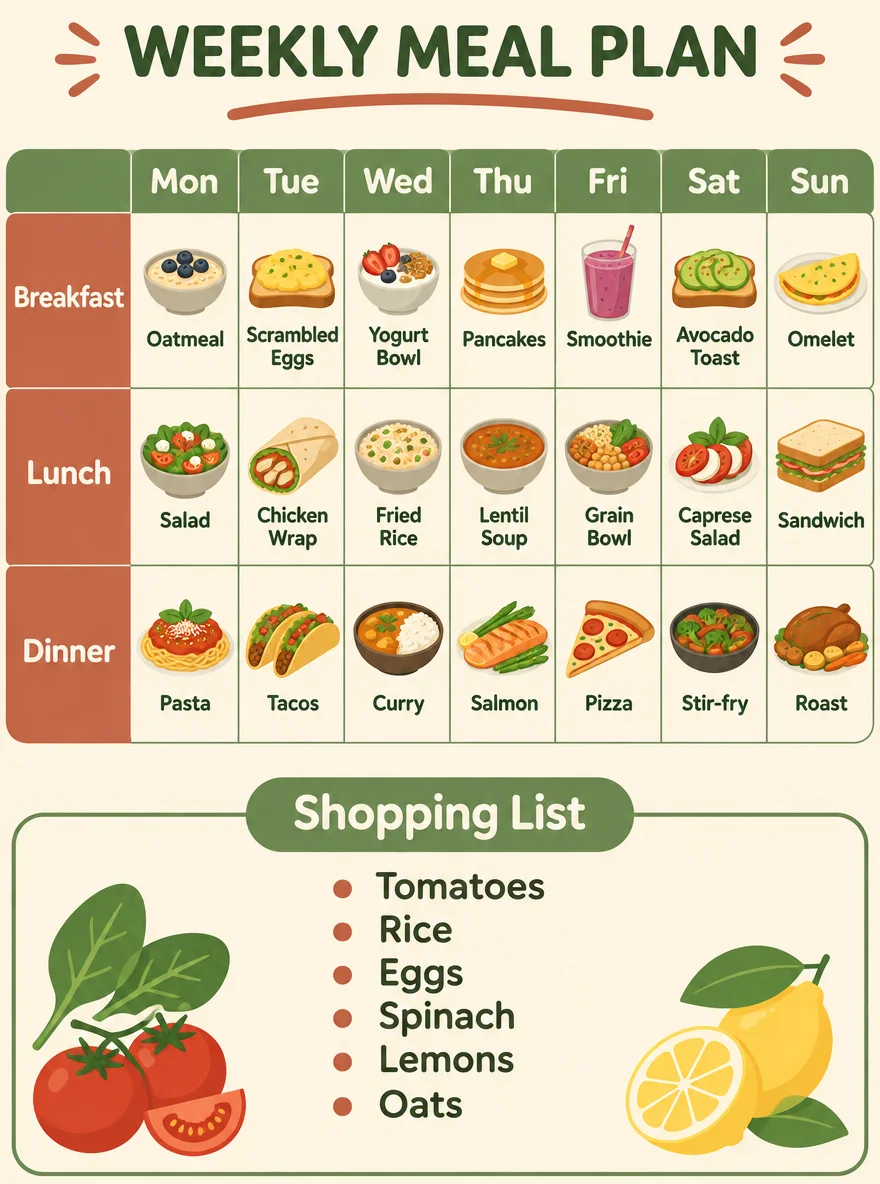
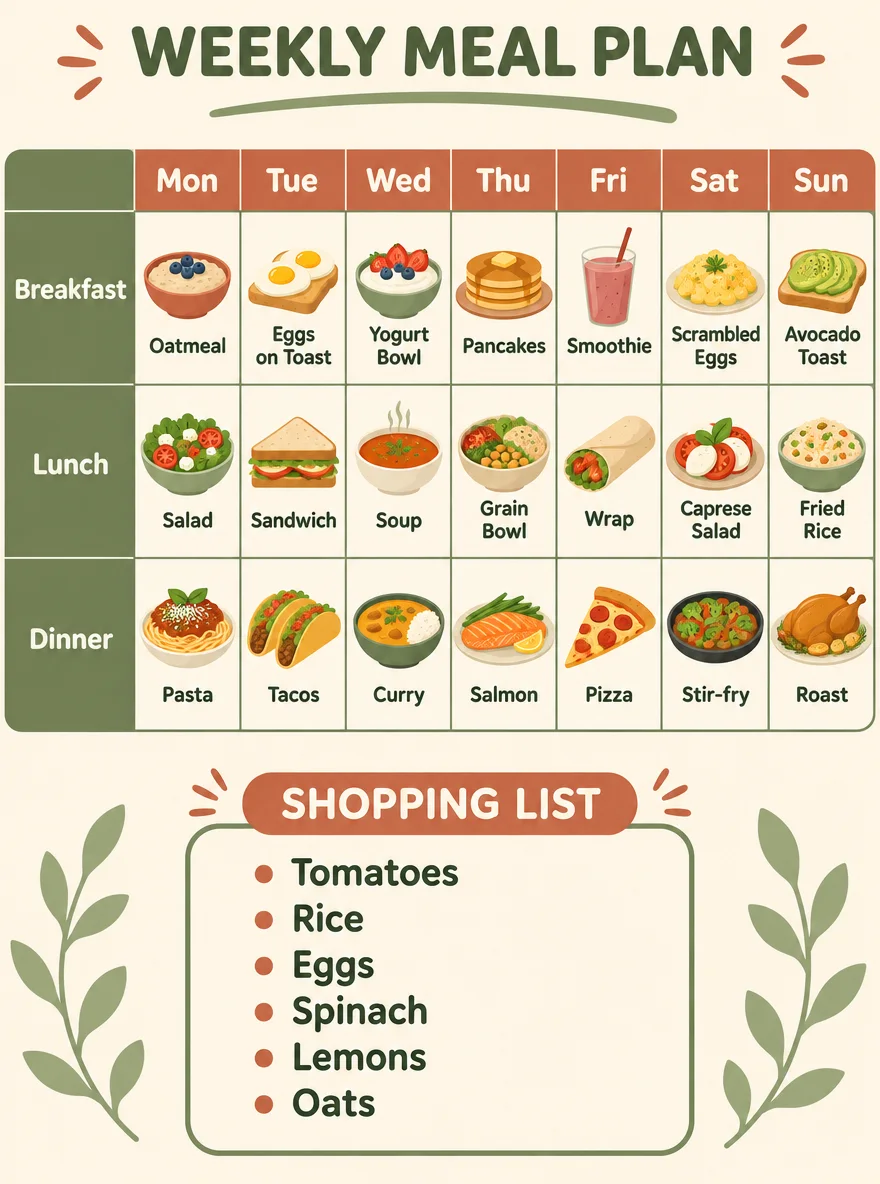
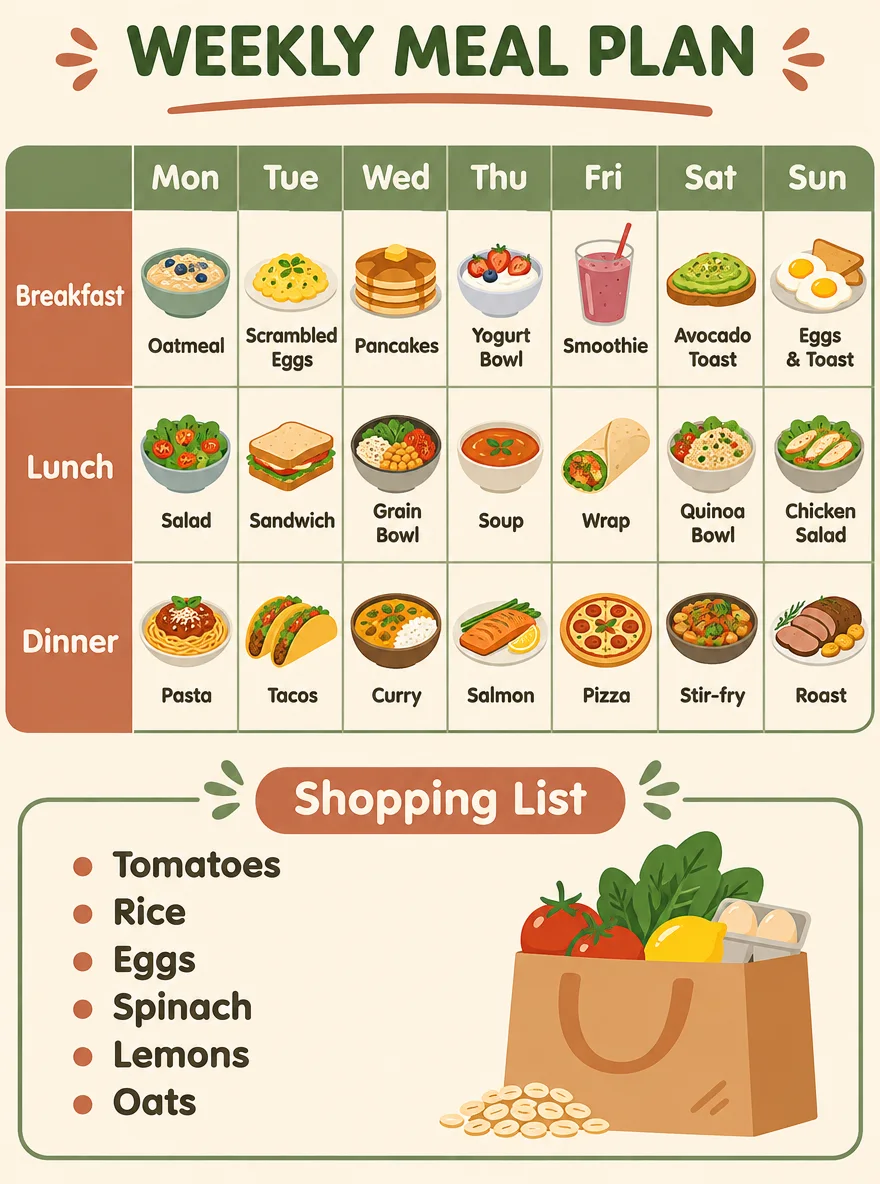
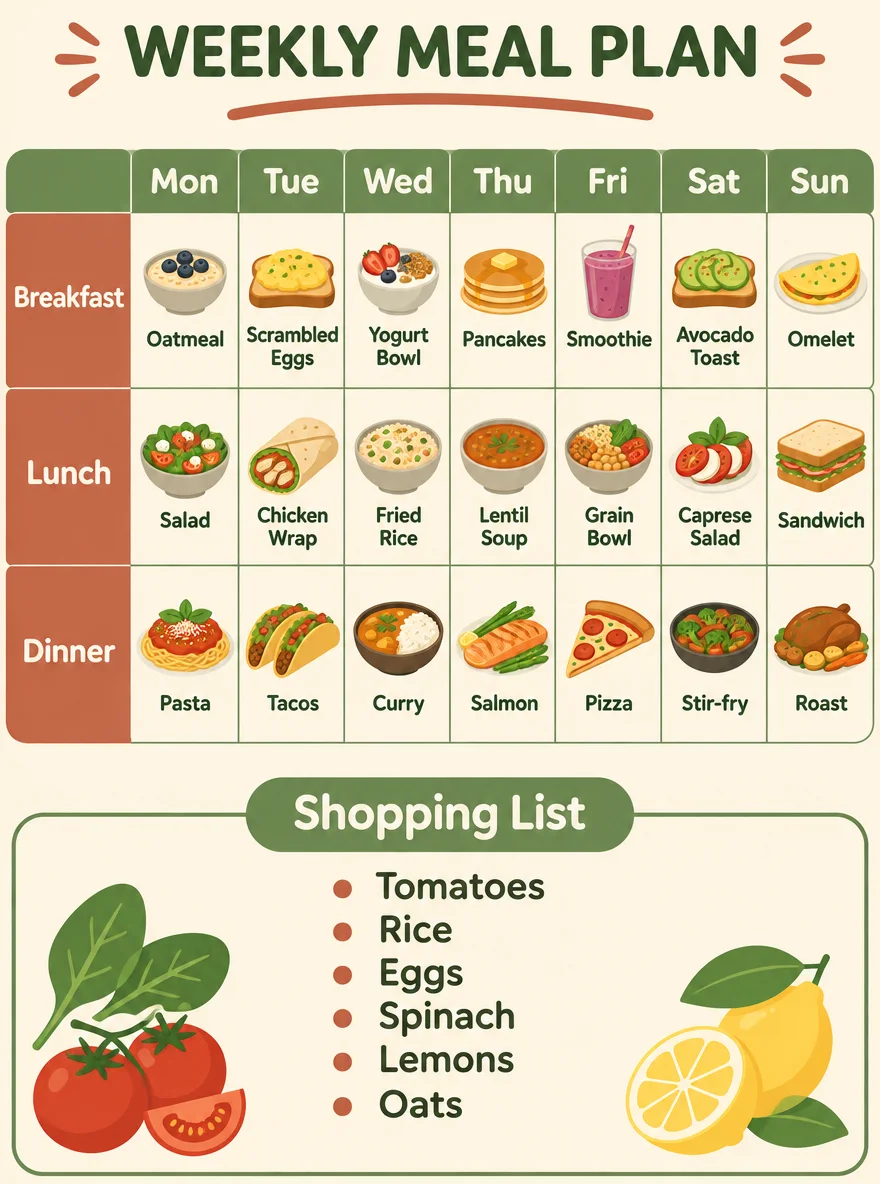
  • Meal planner with 21 filled cells

    Meal planner with 21 filled cells

    3:4 · 1K · medium

    A weekly meal-planner poster with a clean grid layout. Title "WEEKLY MEAL PLAN" at the top. A table with seven columns headed "Mon", "Tue", "Wed", "Thu", "Fri", "Sat", "Sun" and three rows labelled "Breakfast", "Lunch", "Dinner". Fill all 21 cells with a small flat food icon and a short dish name; the Dinner row must read exactly: "Pasta", "Tacos", "Curry", "Salmon", "Pizza", "Stir-fry", "Roast". Below the table, a shopping-list box with exactly six bullet items: "Tomatoes", "Rice", "Eggs", "Spinach", "Lemons", "Oats". Soft cream background, sage green and terracotta accents, rounded sans-serif type. All text spelled exactly as written.

    Try this prompt

GPT Image 2.6 Guides and Test Write-Ups

The complete numbers and prompts behind this page, plus related guides.

GPT Image 2.6 GIF, Markup and Complexity Tests

The three additions in GPT Image 2.6 all run in the SeedVideo AI image generator. On November 10, 2026 we sent 15 more paid requests to see what each one does. Every result below is shown as generated, next to the prompt that made it.

Animated GIFs from a Prompt or a Photo

Steam over a coffee cup, from text
Flare · low · 9 frames · 120 ms

Steam over a coffee cup, from text

17 s · 1,172 output tokens · 3 credits

Prompt: A seamless looping animation of a white ceramic cup of hot coffee on a wooden table. Soft steam curls upward and drifts; the cup, the table and the light stay perfectly still. Fixed camera, warm morning light, shallow depth of field. No text.

An origami bird flapping in place
Sunburst · medium · 12 frames · 120 ms

An origami bird flapping in place

32 s · 1,835 output tokens · 4 credits

Prompt: A seamless looping animation of an orange origami paper bird flapping its wings up and down in place on a pale blue background. Fixed camera, the bird keeps the same size and position in every frame, flat paper-craft style, soft shadow underneath. No text.

A neon sign lighting up letter by letter
Flare · medium · 16 frames · 80 ms

A neon sign lighting up letter by letter

17 s · 2,944 output tokens · 6 credits

Prompt: A looping animation of a neon sign reading "OPEN" on a dark brick wall. The letters light up one at a time, O, P, E, N, then the whole word flashes twice and goes dark. Fixed camera, glowing pink and blue tubes, no other text.

A product photo turned into a loop
Flare · low · 9 frames · 1 reference

A product photo turned into a loop

26 s · 1,172 output tokens · 3 credits

Prompt: Animate this photo as a seamless loop: gentle steam rises from the coffee in the mug and drifts away. Keep the mug, the embossed "SEED" logo, the coffee beans, the stone block, the light and the background exactly the same in every frame.

Markup Edits: Circle It, Then Say What Changes

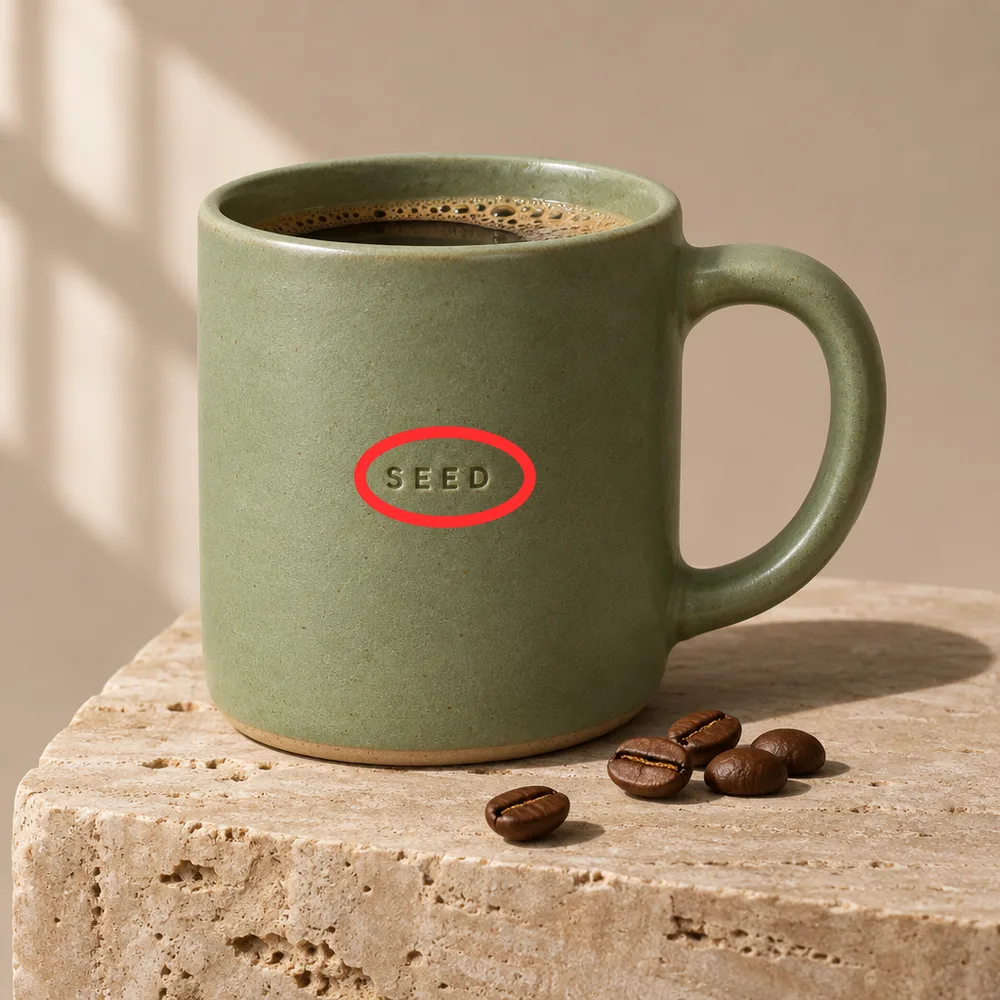
Embossed logo: SEED to BREW · Marked up
Marked up
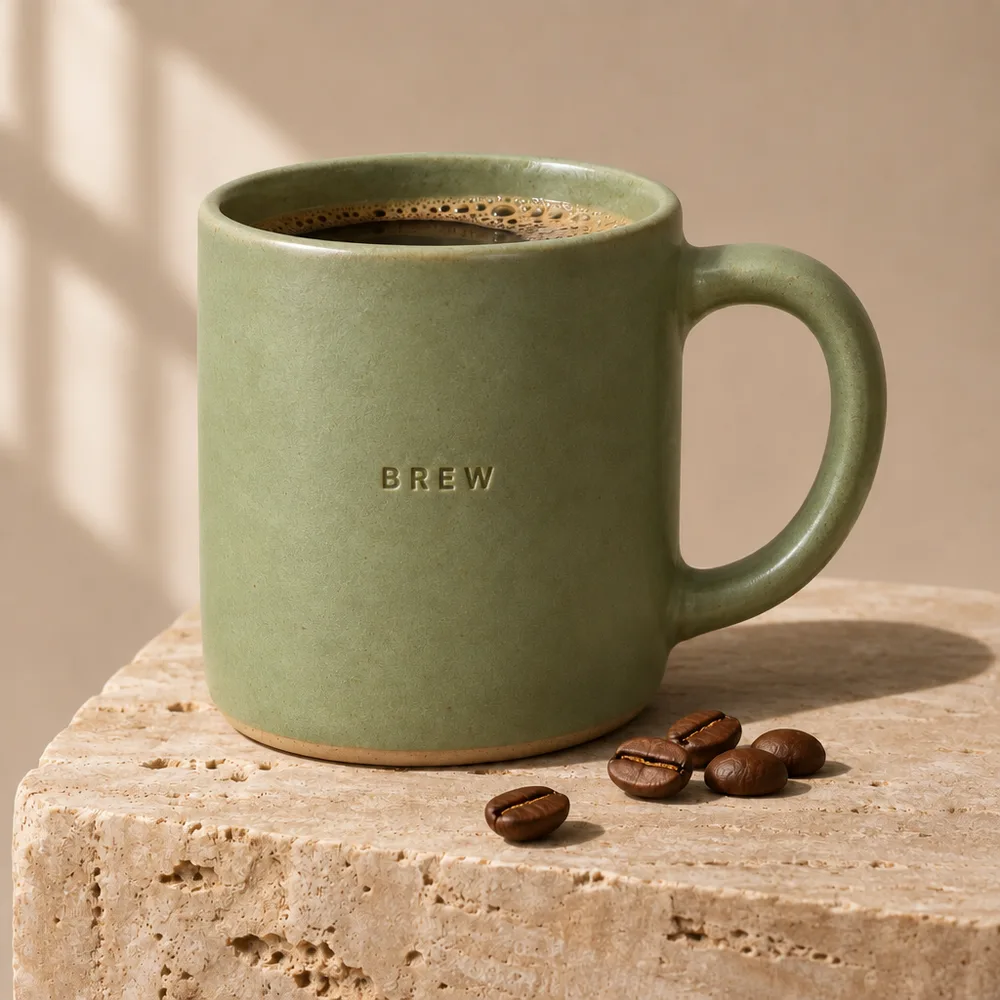
Embossed logo: SEED to BREW · Result
Result

Embossed logo: SEED to BREW

The four letters changed and kept the same embossed depth and spacing. The glaze, the coffee, the beans and the stone block are where they were.

30 s · 4 credits · Sunburst, medium, 1K

Prompt: Replace the circled embossed text with the word "BREW" in the same embossed style. Keep everything else exactly the same and remove the red circle.

One line of a menu rewritten · Marked up
Marked up
One line of a menu rewritten · Result
Result

One line of a menu rewritten

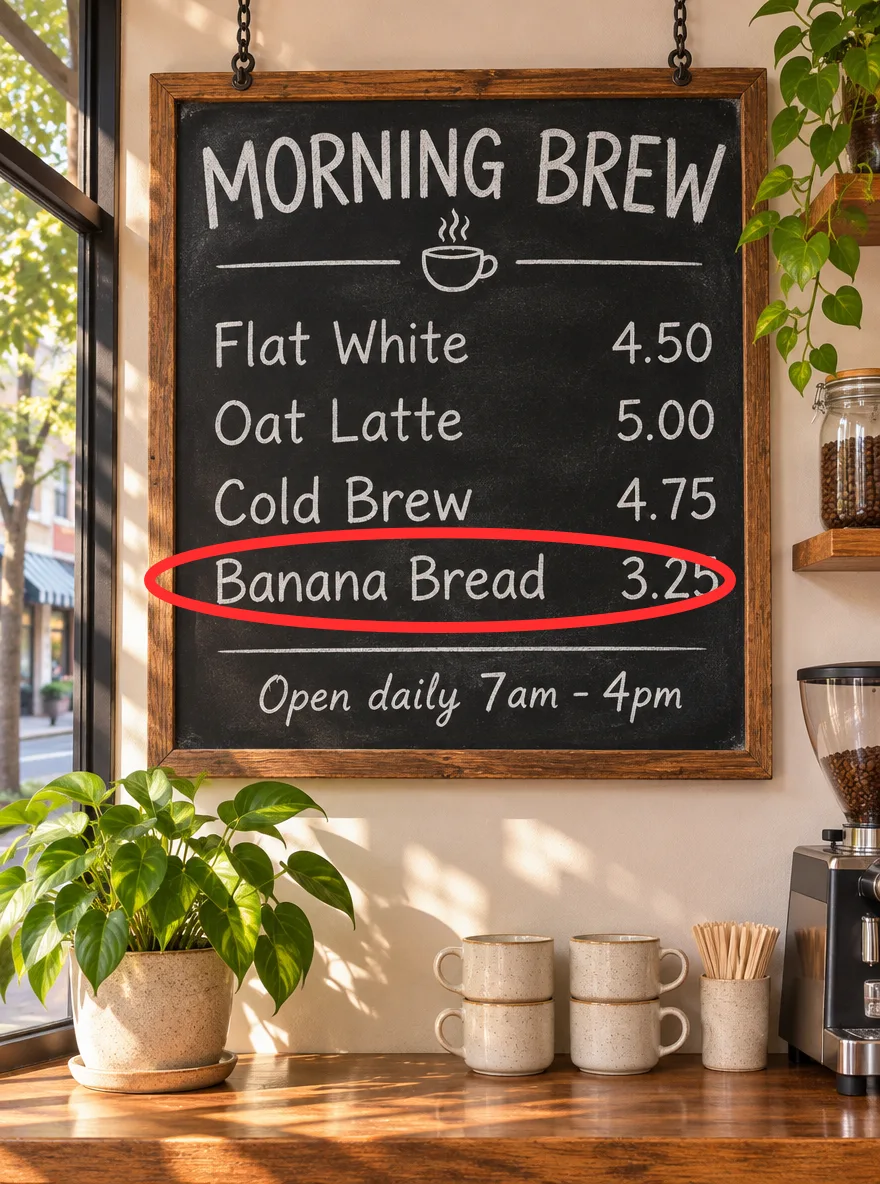
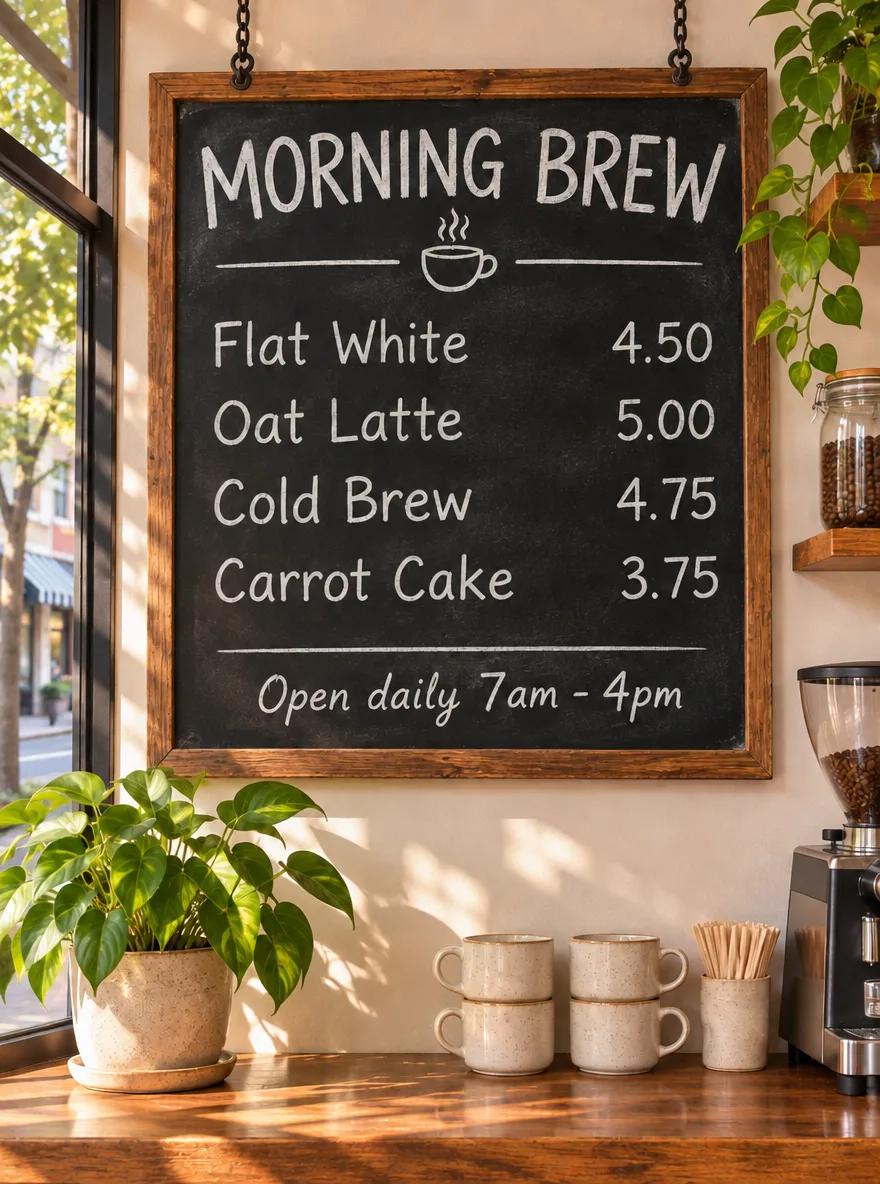
“Banana Bread 3.25” became “Carrot Cake 3.75” in the same chalk lettering. The title, the other three lines, the opening hours and the room did not change.

19 s · 4 credits · Sunburst, medium, 1K

Prompt: Change the circled line to read "Carrot Cake 3.75" in the same chalk lettering. Keep every other line, the frame and the room exactly the same. Remove the red circle.

A car swapped in a 3:1 panorama · Marked up
Marked up
A car swapped in a 3:1 panorama · Result
Result

A car swapped in a 3:1 panorama

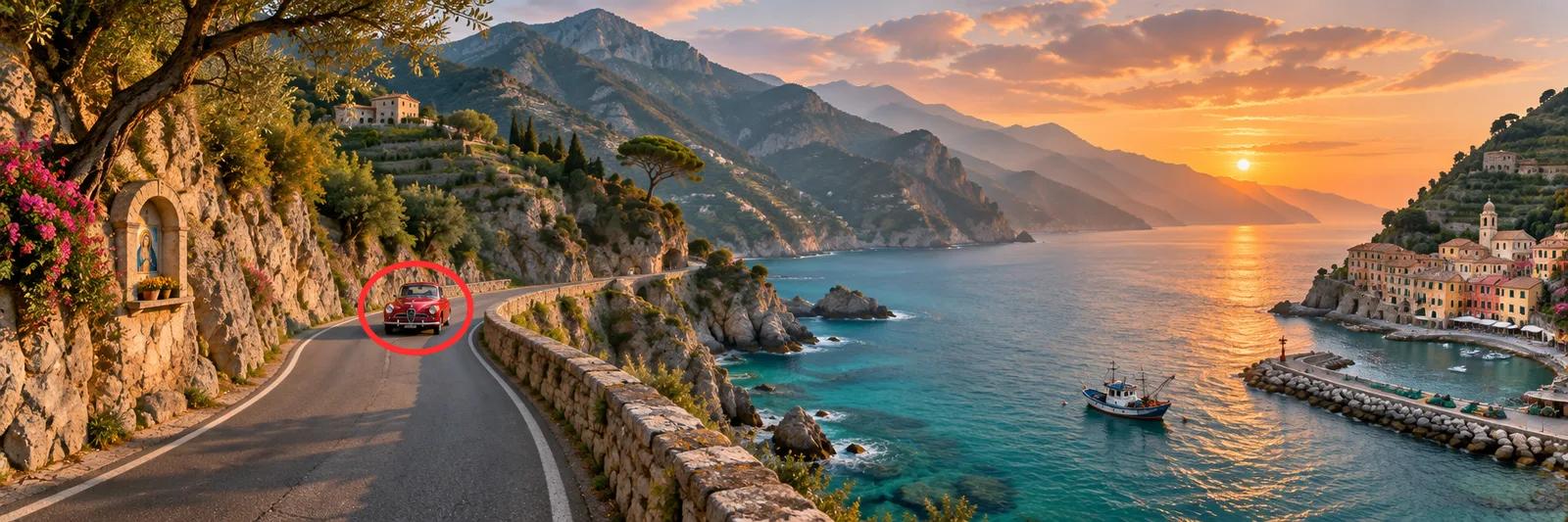
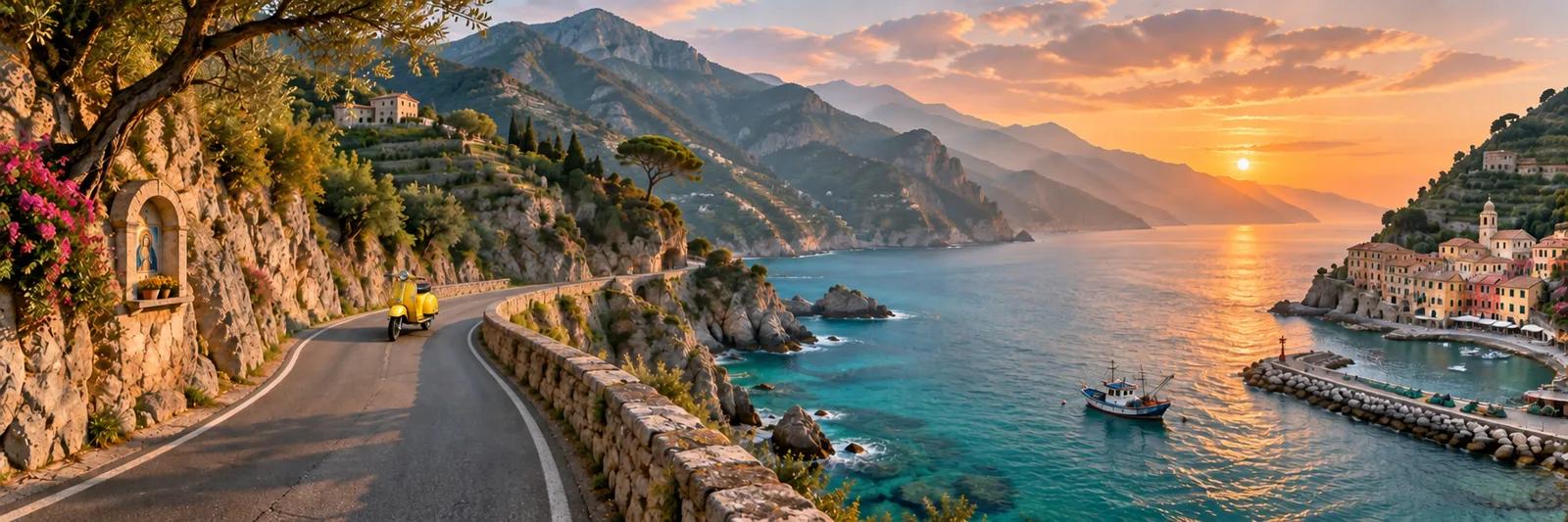
The red car became a yellow scooter on the same bend of the road, a target that fills a tiny part of the frame. The shrine, the boat, the village and the sunset stayed put.

17 s · 4 credits · Sunburst, medium, 1K

Prompt: Replace the circled car with a yellow vintage scooter parked on the road. Keep the rest of the landscape exactly the same. Remove the red circle.

One object replaced on a busy desk · Marked up
Marked up
One object replaced on a busy desk · Result
Result

One object replaced on a busy desk

The coffee cup became a glass vase with three white tulips, with a shadow that matches the window light. The poster text, both swatches, the pencil, the ruler and the fern are unchanged.

24 s · 4 credits · Sunburst, medium, 1K

Prompt: Replace the circled coffee cup with a small glass vase holding three white tulips. Keep the poster, swatches, pencil, ruler, fern and tabletop exactly the same. Remove the red circle.

Complexity: How Much the Model Plans

Walking map with eight numbered pins · complexity low
low · 39 s
Walking map with eight numbered pins · complexity medium
medium · 37 s
Walking map with eight numbered pins · complexity high
high · 66 s

Walking map with eight numbered pins

All three levels placed pins 1 to 8 once each, matched the legend word for word and drew the compass and the “0 - 250 m” scale bar. High took 66 seconds against 39 and 37.

Prompt: An illustrated walking-map poster titled "HARBOR DISTRICT" in bold letters at the top. A stylised top-down map of a small harbour town with a curved waterfront, a river with two bridges and a grid of streets. Eight numbered pins on the map, and a legend box at the bottom listing them exactly: "1 Lighthouse", "2 Fish Market", "3 Old Customs House", "4 Clock Tower", "5 Botanic Garden", "6 Tram Depot", "7 Maritime Museum", "8 Ferry Pier". Add a compass rose in the top-right corner and a scale bar reading "0 - 250 m". Flat vector style, teal, sand and coral palette. All text spelled exactly as written; every pin number appears once on the map and once in the legend.

Meal planner with 21 filled cells · complexity low
low · 34 s
Meal planner with 21 filled cells · complexity medium
medium · 31 s
Meal planner with 21 filled cells · complexity high
high · 30 s

Meal planner with 21 filled cells

All three filled every cell, wrote the seven-dish Dinner row and the six-item shopping list exactly as asked, and finished in 30 to 34 seconds.

Prompt: A weekly meal-planner poster with a clean grid layout. Title "WEEKLY MEAL PLAN" at the top. A table with seven columns headed "Mon", "Tue", "Wed", "Thu", "Fri", "Sat", "Sun" and three rows labelled "Breakfast", "Lunch", "Dinner". Fill all 21 cells with a small flat food icon and a short dish name; the Dinner row must read exactly: "Pasta", "Tacos", "Curry", "Salmon", "Pizza", "Stir-fry", "Roast". Below the table, a shopping-list box with exactly six bullet items: "Tomatoes", "Rice", "Eggs", "Spinach", "Lemons", "Oats". Soft cream background, sage green and terracotta accents, rounded sans-serif type. All text spelled exactly as written.

SVG output is not available yet

The API route this workspace uses does not return SVG for GPT Image 2.6. Stills are saved as PNG and animations as GIF.

GPT Image 2.6 FAQ

What is GPT Image 2.6?

GPT Image 2.6 is OpenAI’s image generation and editing model released on November 4, 2026, shown as Images 2.6 in ChatGPT and Codex. In the API it is two models, gpt-image-2.6-sunburst for detail and gpt-image-2.6-flare for speed. It adds animated GIF output, markup-guided edits and a complexity setting.

Can I use GPT Image 2.6 for free?

A new SeedVideo AI account starts with 5 credits, and every image spends credits. One GPT Image 2.6 image costs 2 credits at 1K low and 3 at 1K medium, the default, on Sunburst and Flare alike. In the generator you pick the model and the setting that fit the credits you have; the plans are on the pricing page.

How much does GPT Image 2.6 cost?

On SeedVideo AI a 1K image costs 2 credits at low, 3 at medium, 4 at high, 6 at xhigh and 13 at max, the same for Sunburst and Flare and on every plan. The default, 1K medium, is $0.218 on Pro billed yearly, $0.435 on Pro monthly and $0.449 from a Starter credit pack. 2K medium is 6 credits, $0.435 on Pro billed yearly, and 4K medium is 9 credits, $0.653. The tiers follow output tokens: in our test a 1:1 image at 1K used 824 at low, 1,449 at medium, 1,756 at high, 3,122 at xhigh and 7,024 at max. The composer shows the credit total before you generate.

Is GPT Image 2.6 more expensive than GPT Image 2.5?

On SeedVideo AI, yes at 1K: 2 credits against 1 at low, 3 against 1 at medium, 4 against 2 at high and 13 against 8 at max. At 4K, high and max cost about the same on both: 11 and 44 credits on GPT Image 2.6, 9 and 33 on GPT Image 2.5. GPT Image 2.6 also bills reference images, which GPT Image 2.5 does not. The cause is output tokens: in our test a 1:1 medium image used 1,449 on 2.6 against 439 on 2.5, and a low one 824 against 196, while high, xhigh and max used the same number on both.

What is the difference between Flare and Sunburst?

Flare is tuned for speed and Sunburst for detail and consistent edits. They accept the same parameters and cost the same. In our six repeated runs Flare’s median was 13 seconds and Sunburst’s 30 seconds; Sunburst followed a placement instruction that Flare missed.

How fast is GPT Image 2.6?

OpenAI says generation is 50% faster and Flare can finish a low-quality image in about six seconds. We measured 7 seconds as Flare’s fastest and 13 seconds as its median at medium quality. Sunburst’s median was 30 seconds, with some launch-week runs taking several minutes.

Can GPT Image 2.6 make GIFs?

Yes: a looping GIF of 2 to 16 frames, 512 × 512 per frame. On SeedVideo AI, set Format to GIF in the image generator and choose 4, 6, 9, 12 or 16 frames and the time per frame. Our 9-frame loop used 1,172 output tokens on Flare at low quality and costs 2 credits here.

How do markup edits work in GPT Image 2.6?

You draw on the image to show where the edit goes and describe the change in the prompt. On SeedVideo AI, add a reference image, click Mark up on its thumbnail and circle the area. In our four tests only the circled part changed, no circle appeared in the result, and the edit cost the same as a normal reference edit.

What sizes and resolutions does GPT Image 2.6 support?

Fifteen aspect ratios from 1:3 to 3:1, at 1K, 2K or 4K, or a custom size in multiples of 16 pixels up to 3,840 per edge and 8.29 megapixels. A 1:1 image is 1024 × 1024 at 1K, 2048 × 2048 at 2K and 2880 × 2880 at 4K.

Does GPT Image 2.6 support transparent backgrounds?

Yes. Our sticker test returned a PNG with a real alpha channel at the same output tokens as an opaque image. OpenAI labels transparency a preview feature, so check edges before production use.

Do reference images cost extra with GPT Image 2.6?

Yes, in steps. At 1K medium an image with up to 0 references costs the same 3 credits as a prompt-only one; 4 references make it 6, 8 make it 8 and 16 make it 13. The markup layer is not billed. GPT Image 2.5 charges nothing for references.

How much does a GPT Image 2.6 GIF cost?

It depends on the frame count and the quality, not on the speed. At low quality the credits are 2 for 4 or 6 frames, 3 for 9 or 12 and 4 for 16; at medium quality, 2, 4 and 6. A reference photo is billed on top, as it is for a still, and a GIF run returns one file.

How many GPT Image 2.6 images can I generate in one run?

Up to 10 stills per run. Credits multiply by the count, so 10 images at 1K medium cost 30 credits. A GIF run returns one file. A prompt can be up to 32,000 characters.

How does GPT Image 2.6 speed compare with GPT Image 2.5 on SeedVideo AI?

In our November 10, 2026 test of one prompt run six times at 1K medium, the median was 13 seconds on GPT Image 2.6 Flare, 30 on GPT Image 2.6 Sunburst and 27 on GPT Image 2.5 Sunburst. GPT Image 2.6 went live here that day and has too few jobs for a site-wide figure. For comparison only: GPT Image 2.5 Sunburst images made on SeedVideo AI from October 12, 2026 to November 10, 2026 had a median wait of 35 s, and 9 in 10 finished within 2 min 8 s.

Is there a refusal rate for GPT Image 2.6 on SeedVideo AI yet?

Not yet: GPT Image 2.6 has run too few jobs here since November 10, 2026. As a comparison point, and not a GPT Image 2.6 figure, the content check stopped 21.4% of GPT Image 2.5 Sunburst jobs on SeedVideo AI from October 12, 2026 to November 10, 2026: 19% of text-only jobs and 22.4% of jobs with input images. A stopped job gives its credits back.
Create with GPT Image 2.6 Now

Create with GPT Image 2.6 Now

Draft with Flare, finish with Sunburst, and turn the result into video in the same workspace.

Start Now