
Kling 4.0 무료 체험: 30초, 사운드 포함
Kling 4.0은 한 번에 최대 30초를 생성하고 립싱크되는 스테레오 오디오까지 만들며, 텍스트 프롬프트나 첫·마지막 프레임에서 시작할 수 있습니다. 지금 Kling 4.0을 무료로 체험해 보세요!
Seedance 2.5
이미지·영상·오디오 레퍼런스로 최대 30초 클립 생성.
Kling 4.0 Flash
Kling 4.0의 빠른 버전: 사운드가 있는 720p 영상을 더 적은 크레딧으로.
Wan 3.0
네이티브 오디오와 립싱크 대화가 담긴 최대 30초 클립.
GPT Image 2.6
OpenAI 최신 모델로 이미지를 생성하고 편집하세요.

GPT Image 2.5
1크레딧부터 이미지를 생성하고 편집하세요.
Nano Banana 2.1
Google 이미지 모델: 더 선명한 디테일과 깔끔한 텍스트.
Seedance 2.0
네이티브 오디오와 립싱크를 갖춘 멀티샷 시네마틱 영상.
Kling 4.0 AI 영상 예시
Kling 4.0(클링 4.0) 주요 기능 한눈에 보기
- Kling 4.0으로 30초 영상을 한 번에 생성: Kling 4.0은 한 번에 3~30초를 만듭니다. 도입부터 마무리까지 프롬프트 하나에 담을 수 있고, 소리도 영상과 함께 생성됩니다.
- Kling 4.0 이미지 투 비디오, 사진 한 장으로 영상 만들기: 첫 프레임 한 장을 주고 무엇이 움직일지 적으세요. 원본 이미지의 구도, 인물, 색감이 그대로 오프닝 장면이 됩니다.
- Kling 4.0 네이티브 오디오, 대사와 립싱크까지 동시 생성: Kling 4.0 영상에는 모두 스테레오 사운드트랙이 붙습니다. 대사를 따옴표로 쓰면 캐릭터가 말하고, 입 모양도 말에 맞춰 움직입니다.
- Kling 4.0 텍스트 투 비디오, 두 문장으로 실제 같은 인물 영상: 두 문장만으로 자연스러운 핸드헬드 브이로그 장면이 나옵니다. 인물, 공간, 카메라를 향해 말하는 모습은 Kling 4.0이 채웁니다.
- Kling 4.0의 사실적인 연기와 표정: 시선, 뜸, 작은 표정 변화가 또렷하게 읽혀 장면이 한 편의 연기처럼 펼쳐집니다.
- Kling 4.0 카메라 컨트롤, 빠른 액션도 매끄럽게: 푸시 인, 풀백, 팬, 트래킹, 오비트 샷이 빠른 장면에서도 부드럽게 이어집니다.
- Kling 4.0 첫 프레임과 마지막 프레임 제어: 첫 프레임을 넣고 필요하면 마지막 프레임도 추가하세요. Kling 4.0이 그 사이 움직임을 채워 제품, 포즈, 엔딩 컷이 원하는 자리에 놓입니다.
- Kling 4.0 길이, 해상도, 화면 비율 설정: 지금 생성기가 제공하는 길이, 해상도, 화면 비율, 입력 방식, 프롬프트 한도.
- Kling 4.0 사양과 기능: Kling이 직접 공개한 정식 버전 사양입니다. Kling이 출시 예정으로 표시한 항목은 여기서도 출시 예정으로 표시했습니다.
Kling 4.0으로 30초 영상을 한 번에 생성
Kling 4.0은 한 번에 3~30초를 만듭니다. 도입부터 마무리까지 프롬프트 하나에 담을 수 있고, 소리도 영상과 함께 생성됩니다.
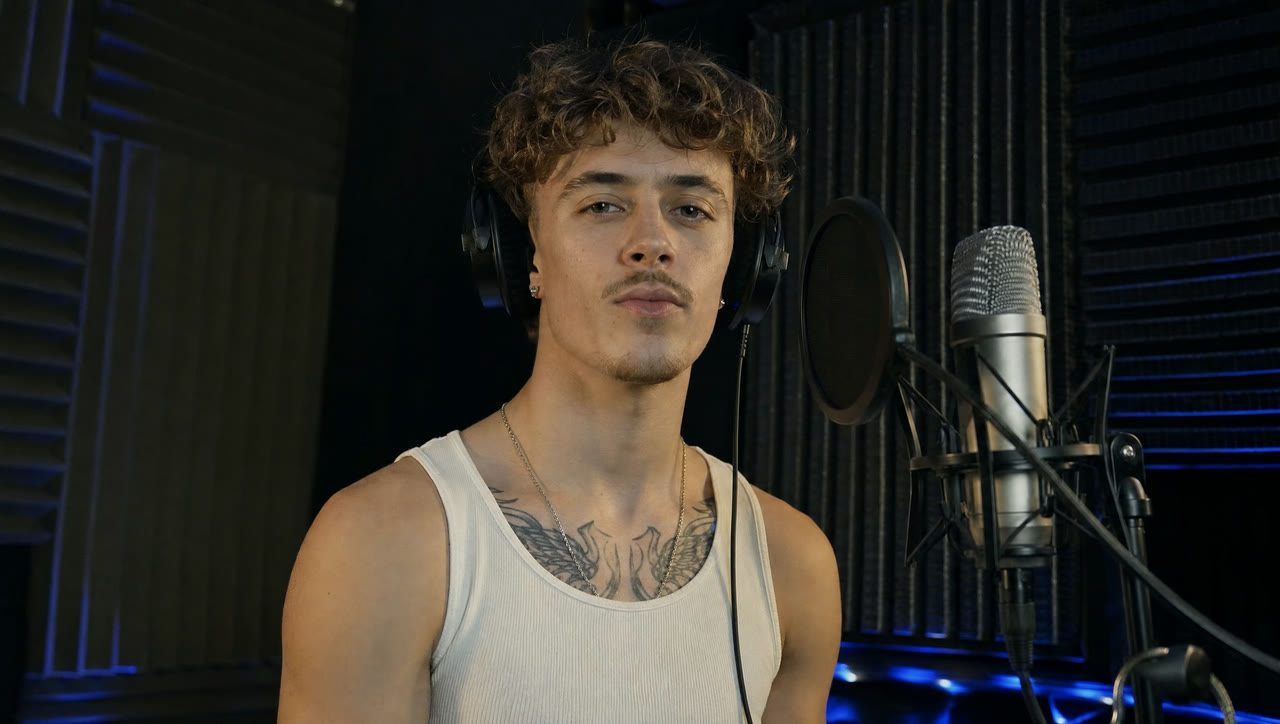
Kling의 이 출시 데모에서 입력은 보컬 부스의 마이크 앞에 있는 젊은 남성을 담은 첫 프레임 한 장뿐입니다. Kling 4.0은 이 샷을 30초 내내 이어 가며 그의 목소리와 공간의 소리를 함께 생성하고, 입 모양도 오디오에 맞췄습니다.
Kling 4.0 이미지 투 비디오, 사진 한 장으로 영상 만들기
첫 프레임 한 장을 주고 무엇이 움직일지 적으세요. 원본 이미지의 구도, 인물, 색감이 그대로 오프닝 장면이 됩니다.
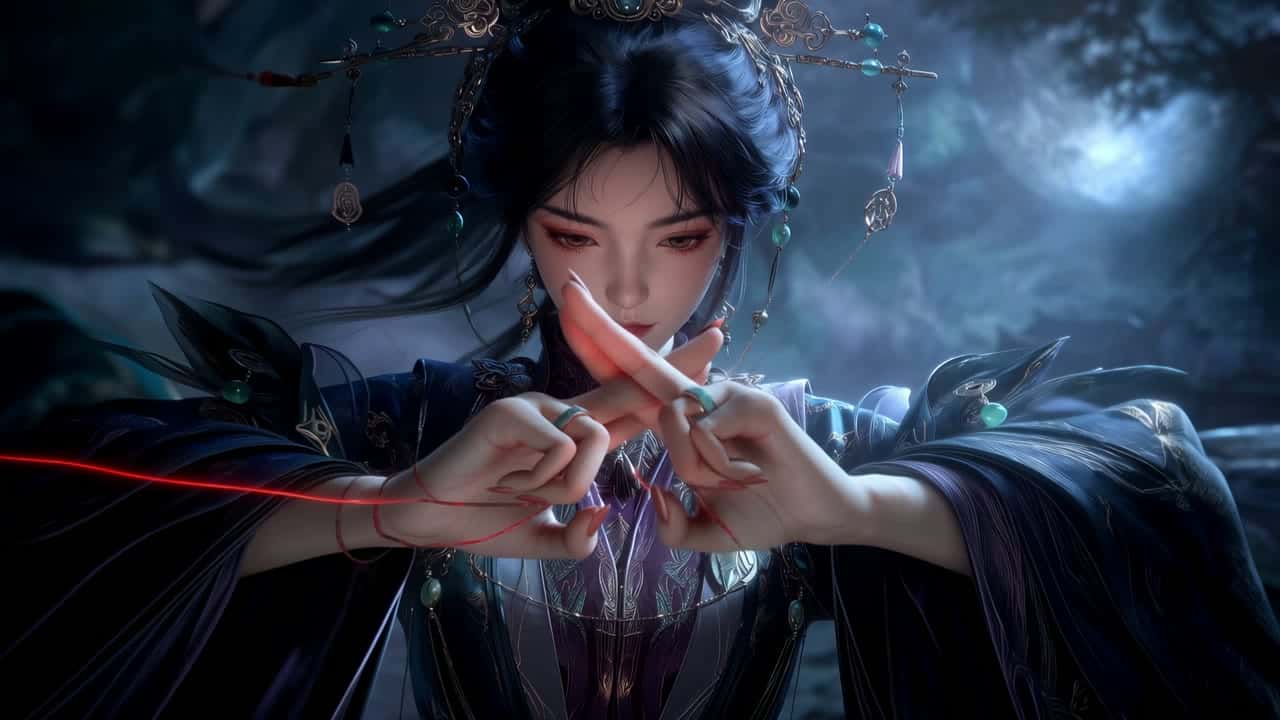
Kling이 이 데모와 함께 공개한 것은 첫 프레임뿐으로, 붉은 실과 오래된 동전 사이에 선 여마법사가 담겨 있습니다. Kling 4.0은 이 정지 이미지를 크고 빠른 움직임이 담긴 15초 영상으로 바꿨습니다. 실이 휘몰아치고 동전이 렌즈를 향해 날아와도 그녀의 얼굴과 의상은 그대로입니다.

Kling 4.0 네이티브 오디오, 대사와 립싱크까지 동시 생성
Kling 4.0 영상에는 모두 스테레오 사운드트랙이 붙습니다. 대사를 따옴표로 쓰면 캐릭터가 말하고, 입 모양도 말에 맞춰 움직입니다.
데모의 프롬프트는 “An old man ranting about AI.” 한 줄이 전부입니다. 노인 캐스팅과 거실 연출은 물론, 열변을 토하는 대사까지 Kling 4.0이 직접 만들었습니다.
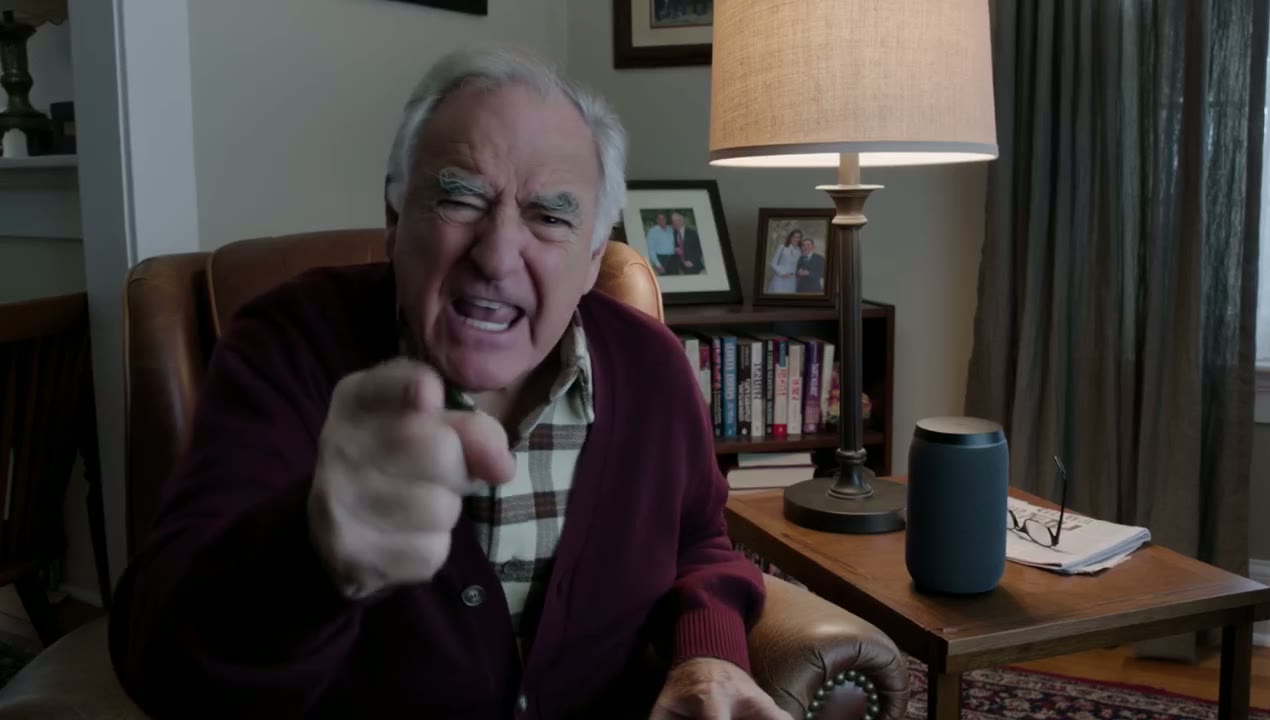
 Kling 4.0
프롬프트: An old man ranting about AI. (Kling 4.0 · 16:9 · 15s · 1080p)
Kling 4.0 텍스트 투 비디오, 두 문장으로 실제 같은 인물 영상
두 문장만으로 자연스러운 핸드헬드 브이로그 장면이 나옵니다. 인물, 공간, 카메라를 향해 말하는 모습은 Kling 4.0이 채웁니다.
데모 프롬프트는 밝은 브이로거가 자기소개를 하는 장면을 요청하는 두 문장뿐입니다. 프레이밍, 방, 카메라를 향해 말하는 방식은 모두 Kling이 만든 것입니다.
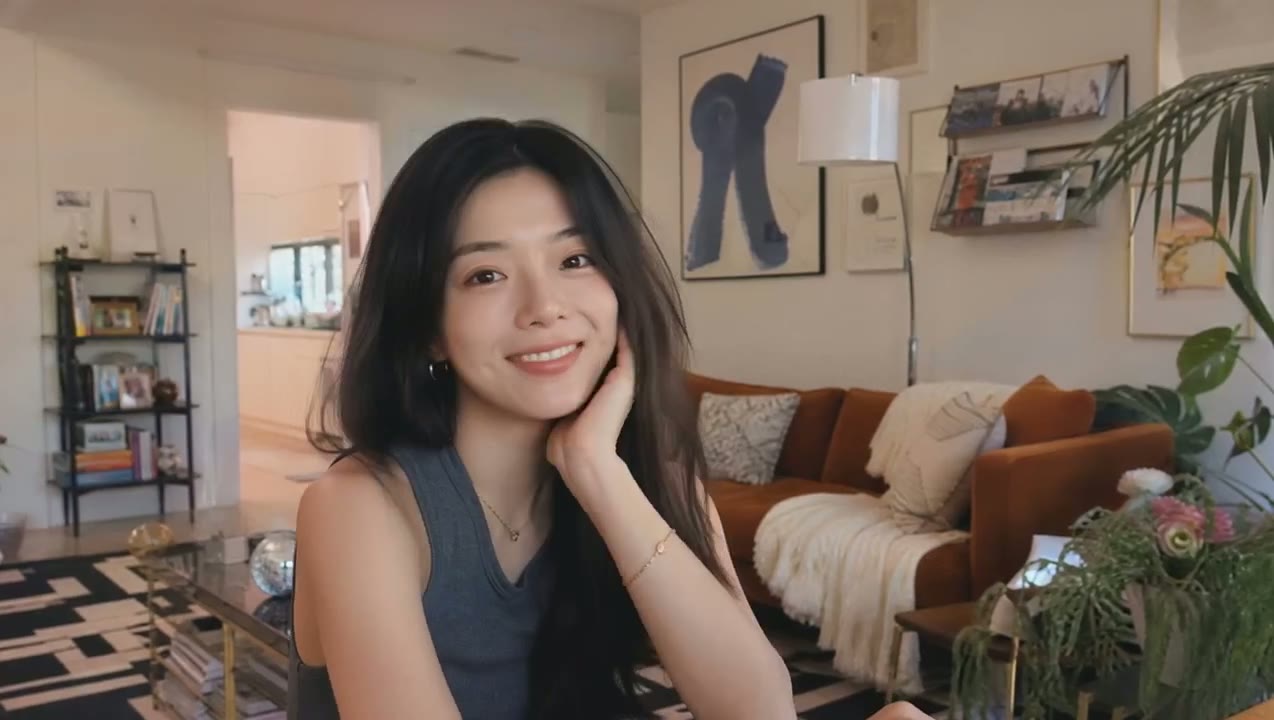 Kling 4.0
프롬프트: A vlogger-style video in which the woman cheerfully introduces herself to the audience. Maintain a natural, authentic look and realistic image quality. (Kling 4.0 · 16:9 · 7s · 720p)
Kling 4.0의 사실적인 연기와 표정
Kling 4.0은 인물을 믿을 만하게 만드는 디테일을 더 잘 살립니다. 한 박자 더 머무는 눈빛, 대사 직전의 망설임, 말다툼의 흐름이 바뀔 때의 자세 변화 같은 것들입니다. 피부, 빛, 옷감도 첫 프레임부터 마지막 프레임까지 자연스럽게 유지됩니다.
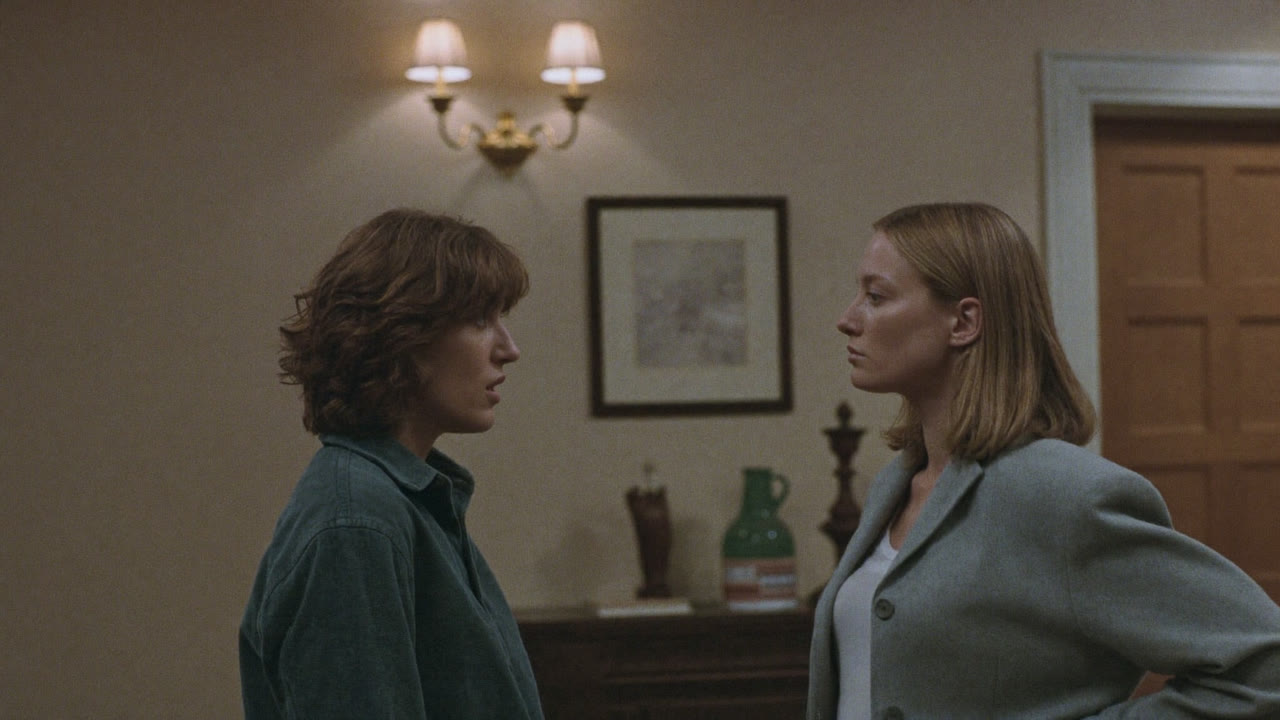
Kling의 데모는 복도에서 맞서 있는 두 여성을 담은 프레임 한 장에서 시작합니다. 11초 결과물은 그 대치를 끝까지 연기해 냅니다. 한 사람이 돌아서서 걸어 나가고, 장면은 바닥에 깨진 무언가를 비추며 끝납니다.
Kling 4.0 카메라 컨트롤, 빠른 액션도 매끄럽게
프롬프트에 카메라 움직임을 적으면 Kling 4.0이 끝까지 그대로 구현합니다. 얼굴로 다가가는 푸시 인, 방 전체를 드러내는 풀백, 달리는 사람과 속도를 맞추는 트래킹 샷처럼요. 샷 크기가 바뀌고 컷이 넘어가도 화면이 흔들리거나 캐릭터 모습이 무너지지 않습니다.
이 10초 출시 데모에서는 두 태권도 선수가 겨루기를 하는 동안 카메라가 가까이 붙어 있다가 매트를 내려다보는 부감으로 올라간 뒤 다시 눈높이로 내려옵니다. 그래도 공격 하나하나와 발놀림이 모두 선명합니다.
Kling 4.0 첫 프레임과 마지막 프레임 제어
첫 프레임을 넣고 필요하면 마지막 프레임도 추가하세요. Kling 4.0이 그 사이 움직임을 채워 제품, 포즈, 엔딩 컷이 원하는 자리에 놓입니다.
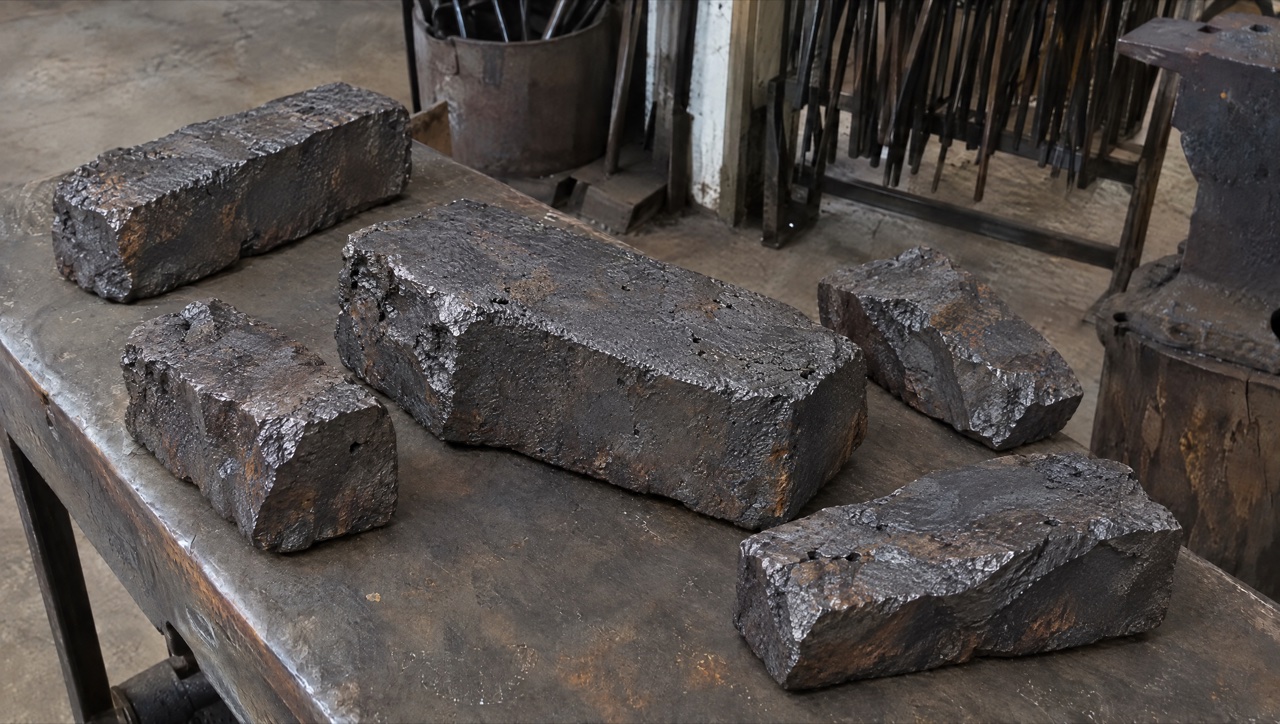
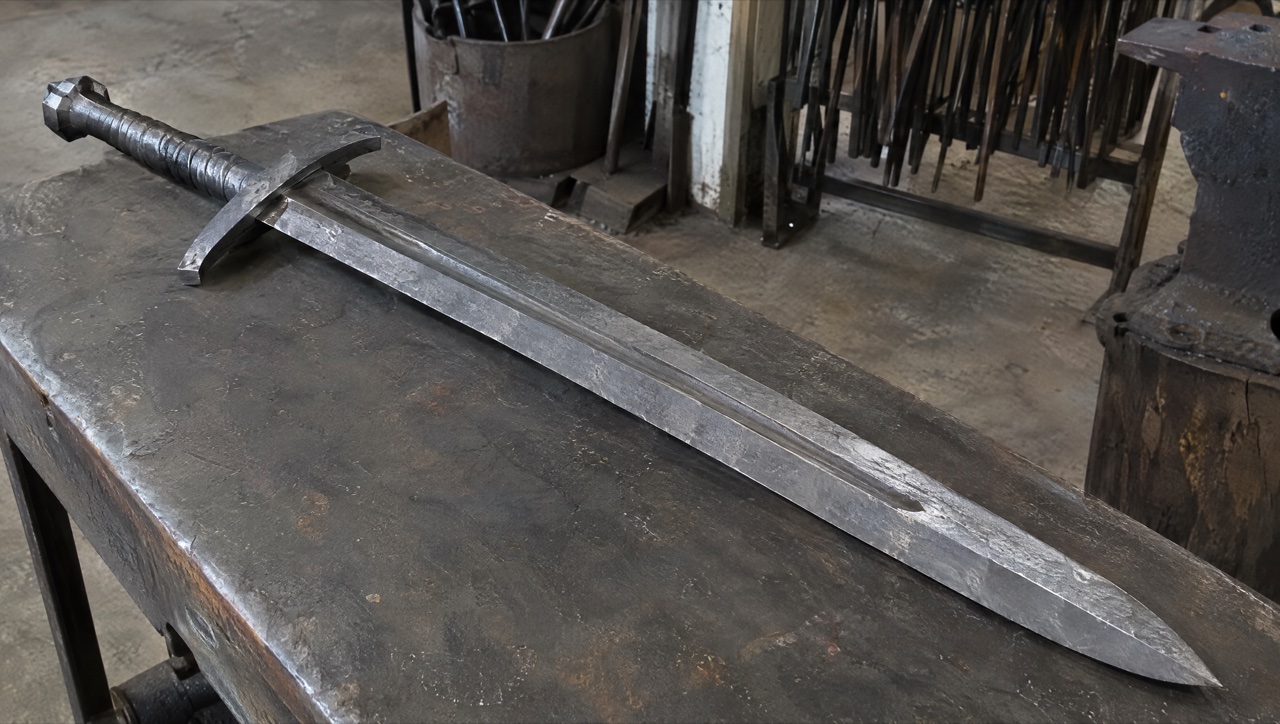
데모에서 첫 프레임은 작업대 위의 거친 쇳덩이, 마지막 프레임은 같은 작업대 위에 놓인 완성된 대검입니다. 그 사이 15초는 Kling 4.0이 여섯 개의 단조 샷으로 채웠습니다.
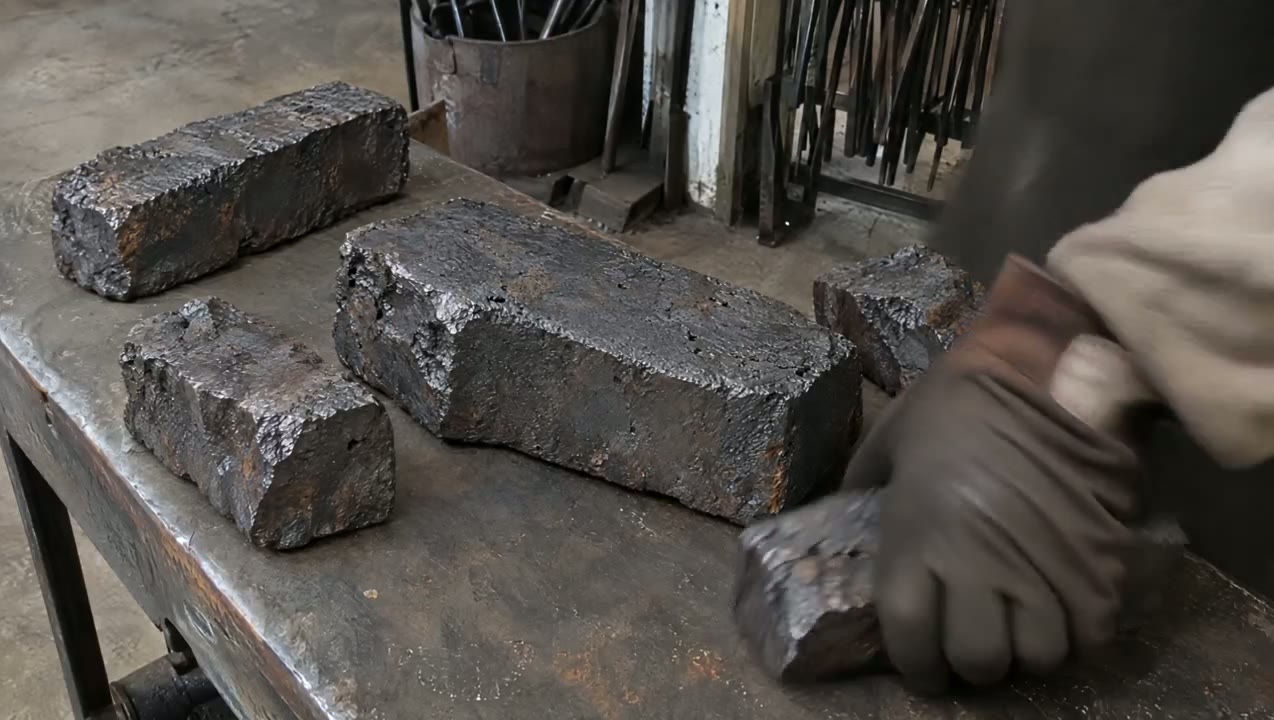
 Kling 4.0
프롬프트: SCENE CONTEXT EXACT 1 CHARACTER — NO DUPLICATES. Interior, a worn blacksmith workshop, daytime. The same blacksmith removes the raw material, works it into a greatsword, and returns the completed sword to the original table.15 seconds, six shots. Manufacturing time is compressed through editorial cuts; individual actions retain natural weight and speed. ACTIVE REFERENCES: @Image1: exact first-frame anchor. Preserve all five iron blocks, their arrangement, the tabletop, background tools, perspective, and lighting. This image is the starting state of an active pickup shot.@Image2: exact final-frame anchor and finished-sword design. Preserve the blade silhouette, central fuller, angular curved crossguard, spiral metal grip, faceted pommel, diagonal placement, perspective, and background. This composition is reached through a visible physical placement. LOCATION MAP: The worktable fills the foreground. The tool bucket stands behind its left-center edge, the rod rack occupies the rear right, and the anvil stands at the right. The blacksmith works from the left side of the table in both endpoint shots. The camera stays on the original viewer-facing side of the table. During blade-working inserts, the tang points screen-left and the tip points screen-right. The final sword position runs from the upper-left pommel to the lower-right tip. FIRST FRAME AND SPATIAL BLOCKING: At 0.0 seconds, the frame exactly matches the raw-material reference, with five iron blocks and no hands visible. The same blacksmith immediately reaches in from the left edge. Both gloved hands approach the largest central block from opposite ends, preparing a supported two-handed lift. The blacksmith wears soot-gray sleeves, brown leather gloves, and a narrow dark strap around the right cuff. These details remain identical throughout every shot. FORMAT MODE: 15 seconds total, six shots.Hard cuts at 3.0, 5.0, 8.0, 10.0, and 11.0 seconds. Cuts compress the omitted manufacturing work and bench clearing. The opening pickup and closing placement each play as continuous physical actions.No fades, dissolves, or object-morph transitions. OPTICS: Shots 1 and 6: reference-matched elevated three-quarter framing, approximately 63° diagonal field of view and approximately 1.8 meters from the tabletop center. Exact endpoint framing takes priority over estimated optical measurements. Shots 2–5: 40° diagonal field of view, approximately 0.8 meters from the working contact point. Focus follows the hands and metal contact; the workshop background remains softly readable. Each shot holds one fixed field of view. CAMERA: A real camera operator holds the camera from the viewer-facing side of the workspace. All shots use handheld SETTLE: visible breathing sway, slight roll, and small delayed corrections. The opening camera holds its position while the iron block leaves the frame. The closing camera holds the empty tabletop composition while the sword enters, then settles into the exact final reference. The blacksmith is the only visible worker; the camera operator remains outside the image. ACTION TIMING: 0.0–3.0s — TAKE THE IRON. Start on the exact first reference; during 0.0–0.6s, the blacksmith’s matching gloved hands enter from screen-left and grip opposite ends of the largest central block. During 0.6–1.5s, the wrists brace and both hands lift the block clear of the tabletop, exposing the patch of table beneath it. During 1.5–3.0s, the blacksmith carries the supported block out through screen-left; the other four blocks remain resting on the table through the cut.3.0–5.0s — HEAT THE STOCK. Hard cut forward in time to one thick billet already glowing orange among forge coals. The same gray sleeves, brown gloves, and right-cuff strap appear at screen-left as the blacksmith holds long tongs around the billet. A short controlled pull draws the billet toward the forge mouth, with heat shimmer rising above its scaled surface.5.0–8.0s — FORGE THE BLADE. Hard cut forward to an elongated orange-hot blade blank supported on the anvil, tang left and emerging tip right. The same blacksmith braces the tang with left-hand tongs and delivers three deliberate right-hand hammer strikes along the blade flat. Each strike produces local compression, wrist recoil, and a brief scatter of dark scale.8.0–10.0s — FINISH THE METAL. Hard cut forward to a cooled blade with its fuller already formed, held by the same gloved hands against an abrasive wheel. The blacksmith makes one controlled finishing pass along the bevel. A narrow stream of sparks falls from the actual contact point as a brighter strip of metal appears.10.0–11.0s — COMPLETE THE HILT. Hard cut forward to the nearly finished sword supported on a separate assembly bench, its crossguard and spiral metal grip already fitted. The same blacksmith’s left hand braces the grip while the right hand gives the faceted pommel its final tightening turn. The completed sword now has the exact construction and finish required for the final image.11.0–15.0s — PLACE THE FINISHED SWORD.Hard cut to the original worktable, now completely clear; show its empty surface for 0.4 seconds before the same gloved hands carry the completed sword in from screen-left, one hand around the grip and the other supporting the blade flat near its balance point. From 11.4–13.8s, the blacksmith lowers the entire rigid sword diagonally, hilt toward upper-left and tip toward lower-right, easing it onto the tabletop and sliding the supporting hand free as its weight transfers to the table. From 13.8–15.0s, both hands release and withdraw through screen-left; the sword remains motionless in the exact final-reference position as the camera settles onto the final frame. PHYSICS: The raw block retains its shape and mass throughout the pickup. Both hands support it continuously; the forearms tense and the lift accelerates slowly under its weight. The anvil supports the hot blade during forging. Large changes of shape occur across editorial time jumps. The completed sword remains rigid during carrying and placement. The blade-supporting hand has visible clearance to slide free as the sword settles; the hand never passes through the blade or tabletop. Metal contact produces a short scrape and a low, heavy clink, followed by stillness. The same blacksmith clears the remaining raw stock during omitted time before the final shot. LIGHTING: The original table shots use soft daylight from upper camera-left, matching both references. Retain dark detail in the iron and protect the silver blade highlights. The forge insert uses orange coal glow from below-left as its dominant source. Return to the original neutral daylight before the sword enters the final tabletop shot. AUDIO: Quiet workshop air and distant furnace draft form the ambient bed. Opening: leather creaks, a brief iron scrape, and a restrained exertion breath as the heavy block rises.Middle: forge crackle, tong contact, three synchronized hammer impacts, abrasive scraping, and a short fitting sound.Ending: sleeve movement, glove friction against metal, a weighted sword-to-table clink, then quiet workshop ambience. The blacksmith speaks no dialogue.SFX only, no music, no score, no song, no soundtrack. CHARACTER ACTING: One consistent blacksmith performs every visible action. Soot-gray sleeves, brown leather gloves, and the dark right-cuff strap remain unchanged. Hands work deliberately: brace before lifting, maintain firm tool contact, and reduce speed before lowering the finished sword. The physical rhythm shifts from effort during the raw-block pickup to careful control during the final placement. The face and torso remain outside the crop. STYLE: Grounded workshop documentary with tactile iron, worn tools, and convincing manual labor.Soft old-photograph texture, restrained grain, and natural motion blur; no digital sharpening. Charcoal metal and muted brown surfaces dominate, with silver highlights and localized forge orange. The first and last frames preserve the supplied images’ appearance. QUALITY: Maintain consistent hands, gloves, sleeve details, metal geometry, and contact shadows. The lifted block reveals the tabletop underneath it. The closing shot visibly establishes the empty tabletop before the sword enters. Keep the full final sword readable, including its tip, guard, grip, and pommel. Avoid duplicate limbs, flickering geometry, and intersecting solid surfaces. POSITIVE CONSTRAINTS: The first frame contains exactly five iron blocks. The largest central block physically leaves the table in the same blacksmith’s two hands. The final shot begins with an empty table. The completed sword enters while visibly supported by that same blacksmith, contacts the tabletop, and remains after both hands withdraw. The last frame matches the finished-sword reference exactly. The opening pickup and final placement each remain continuous, with visible hand-object contact. Exactly one finished sword is present.No text overlays, subtitles, or music. (Kling 4.0 · 16:9 · 15s · 1080p)
Kling 4.0 길이, 해상도, 화면 비율 설정
Kling이 발표한 기능은 지금 이 사이트에서 실행되는 것보다 많습니다. 아래는 생성기에서 Kling 4.0에 실제로 쓸 수 있는 설정이므로, 계획한 그대로 렌더링할 수 있습니다.
| 길이 | 3초에서 30초기본값은 5초입니다. |
|---|---|
| 해상도 | 720p 또는 1080p기본값은 720p입니다. |
| 화면 비율 | 16:9, 9:16, 1:1 또는 21:9첫 프레임을 쓰면 클립이 이미지 비율을 따릅니다. |
| 입력 | 텍스트, 첫 프레임, 또는 첫 프레임과 마지막 프레임Kling의 멀티 키프레임, 참조, 편집 모드는 아직 여기서 쓸 수 없습니다. |
| 프롬프트 | 최대 2,500자 |
| 사운드 | 항상 켜짐모든 클립에 스테레오 음성, 효과음, 주변음이 들어가며 끄는 스위치는 없습니다. |
| 크레딧 | 초 단위 과금요금은 해상도에 따라 달라집니다. 생성을 시작하기 전에 생성기에 총액이 표시되고, 아래 요금표에 자주 쓰는 길이별 요금이 나와 있습니다. |
Kling 4.0 사양과 기능
Kling이 직접 공개한 정식 버전 사양입니다. Kling이 출시 예정으로 표시한 항목은 여기서도 출시 예정으로 표시했습니다.
| 출시 | Kling 4.0 Flash는 2026년 9월 28일 일부 사용자에게 먼저 공개됐고, 정식 버전 Kling 4.0은 2026년 10월 15일에 출시됐습니다. |
|---|---|
| 모드 | 텍스트 투 비디오, 이미지 투 비디오, 첫·마지막 프레임, 멀티 키프레임, Omni Reference, 영상 편집. |
| 클립 길이 | 한 번 생성할 때 3초에서 30초까지. |
| 키프레임 | 키프레임 이미지를 최대 10장까지 넣어 캐릭터의 상태 변화, 장면 전환, 스토리 비트를 고정합니다. |
| 참조 | 생성당 최대 15개: 이미지 최대 10장, 영상 최대 5개(합계 30초), 피사체 최대 7개. 피사체에는 음성 참조를 붙일 수 있습니다. |
| 해상도 | 720p, 1080p, 4K. 1080p·4K의 10-bit HDR은 출시 예정으로 표시되어 있습니다. |
| 화면 비율 | 21:9, 16:9, 1:1, 9:16, 자동. |
| 오디오 | 립싱크를 지원하는 2채널 스테레오. 대사는 중국어, 영어, 일본어, 한국어, 스페인어, 포르투갈어, 독일어, 프랑스어 등을 지역 억양까지 포함해 지원합니다. |
| 프롬프트 길이 | 최대 8,000토큰. |
| 영상 확장 | 반복 확장으로 최대 2분까지(출시 예정으로 표시됨). |
Kling 4.0 활용 사례
긴 원테이크, 시작과 끝을 고정한 샷, 짧은 프롬프트로 만드는 대화 장면.
- 30초 원테이크: 공간을 따라 걷는 장면, 추격, 제품 공개 같은 긴 원테이크를 두 클립을 이어 붙이지 않고 한 번에 만듭니다.
- 시작과 끝을 고정한 샷: 첫 프레임과 마지막 프레임으로 장면이 시작하는 곳과 끝나는 곳을 정하면, 그 사이 움직임은 Kling 4.0이 채웁니다.
- 토킹헤드와 대화 클립: 한두 줄짜리 프롬프트가 립싱크된 스테레오 사운드와 함께 자연스럽게 말하는 장면이 됩니다.
- 다국어 대사: 립싱크되는 스테레오 오디오, 그리고 카메라가 움직여도 또렷하게 읽히는 화면 속 텍스트.
Kling 4.0 vs Seedance 2.5, Kling 3.0, Veo 3.1, Wan 3.0
마지막 행을 제외한 모든 칸은 SeedVideo AI에 있는 각 모델의 실시간 설정에서 가져왔으므로, 지금 생성기에서 고를 수 있는 옵션과 일치합니다.
같은 아이디어를 다른 모델로도 만들어 보고 싶으신가요? AI 영상 생성기에는 Kling 4.0 옆에 Seedance, Kling, Veo, Wan이 나란히 있어서, 이미 가진 크레딧으로 같은 프롬프트를 다른 모델에서 다시 생성할 수 있습니다.
| 항목 |  Kling 4.0 | Kling 4.0 Flash |  Seedance 2.5 | Kling 3.0 |  Veo 3.1 Fast |  Wan 3.0 |
|---|---|---|---|---|---|---|
| 최대 길이 | 30초 | 20초 | 30초 | 15초 | 8초 | 30초 |
| 최고 해상도 | 1080p | 720p | 1080p | 4K | 4K | 1080p |
| 화면 비율 | 16:9, 9:16, 1:1, 21:9 | 16:9, 9:16, 1:1, 21:9 | 16:9, 9:16, 1:1, 4:3, 3:4, 21:9 | 16:9, 9:16, 1:1 | 16:9, 9:16 | 16:9, 9:16, 1:1, 4:3, 3:4 |
| 레퍼런스 이미지 | 미지원 | 미지원 | 30 | 미지원 | 미지원 | 10 |
| 레퍼런스 영상 | 미지원 | 미지원 | 10 | 미지원 | 미지원 | 5 |
| 클립 편집·연장 | 미지원 | 미지원 | 지원 | 미지원 | 미지원 | 미지원 |
| 720p 5초 크레딧 | 24 크레딧 | 14 크레딧 | 31 크레딧 | 13 크레딧 | 15 크레딧 | 12 크레딧 |
| 추천 용도 | 텍스트나 첫 프레임으로 만드는 최대 30초 스테레오 사운드 영상 | 더 빠르고 저렴한 720p 초안, 최대 20초 | 레퍼런스가 많고 네이티브 사운드가 필요한 긴 멀티샷 클립 | 최대 15초의 더 저렴한 Kling 클립 | 사운드가 있는 사실적인 짧은 샷 | 적은 예산으로 만드는 롱테이크 |
크레딧은 720p 5초 클립을 크레딧 팩으로 만들 때의 요금이며, 구독하면 초당 요금이 더 낮습니다.
Kling 4.0 장단점
지금 SeedVideo AI에서 잘하는 것과, 우회해서 써야 하는 부분.
강점
- 길이: 한 번에 3초부터 30초까지 자유롭게 생성합니다.
- 사운드: 모든 클립에 스테레오 트랙이 붙고, 말소리는 영상에 립싱크됩니다.
- 프레임 제어: 첫 프레임과 선택 사항인 마지막 프레임으로 샷의 시작과 끝을 고정합니다.
- 짧은 프롬프트: 한두 줄 아이디어만으로도 자연스럽고 그럴듯한 장면이 나오는 경우가 많습니다.
한계
- 이 사이트의 모드: 지금은 텍스트 투 비디오와 첫·마지막 프레임만 지원합니다. Kling의 멀티 키프레임과 참조 모드는 아직 여기서 쓸 수 없습니다.
- 무음 옵션 없음: 사운드를 끌 수 없으니, 직접 음악을 입힐 계획이라면 생성 후 음소거하세요.
- 렌더링 시간: 대부분의 모델보다 느립니다. 3초 테스트 클립에 약 3분이 걸렸습니다.
- 프롬프트 길이: 입력창은 프롬프트를 2,500자까지 받으므로 아주 긴 브리프는 줄여야 합니다.
Kling 4.0 요금과 시작하는 방법
Kling 4.0 클립당 가격
크레딧 팩 기준 가격이며, 생성기의 현재 설정에서 가져왔습니다. 구독 플랜은 초당 비용이 더 낮습니다.
| 해상도 | 5초 | 10초 | 30초 |
|---|---|---|---|
| 720p | 24 크레딧 | 47 크레딧 | 141 크레딧 |
| 1080p | 35 크레딧 | 70 크레딧 | 210 크레딧 |
Kling 4.0 사용법: 4단계로 영상 만들기
- 1단계
Kling 4.0 선택
이 페이지의 입력창이나 전체 생성기를 열고, 모델 메뉴의 Kling 필터에서 Kling 4.0을 고릅니다.
- 2단계
스토리 비트 쓰기
무엇이 언제 움직이는지부터 씁니다. 피사체, 동작, 카메라, 그리고 각 비트가 들어갈 타이밍까지. 여기서는 프롬프트를 최대 2,500자까지 쓸 수 있습니다.
- 3단계
원하면 첫 프레임 추가
첫 프레임을 올리면 내 이미지에서 샷이 시작되고, 끝나는 장면을 고정하고 싶다면 마지막 프레임도 넣습니다.
- 4단계
길이 정하고 제출
3초에서 30초 사이에서 길이를 고르고, 화면 비율을 정하고, 차감될 크레딧을 확인한 뒤 제출합니다.
Kling 4.0 프롬프트 예시
Kling AI가 Kling 4.0 예시와 함께 공개한 프롬프트를 생성된 영상과 나란히 모았습니다. 긴 대장장이 프롬프트는 여기서 줄였습니다. 생성기에 불러온 뒤 피사체, 배경, 길이를 바꿔 보세요. 프레임 프롬프트에는 직접 준비한 첫 프레임과 마지막 프레임이 필요합니다.
브이로거의 인사
텍스트 투 비디오 · 7초A vlogger-style video in which the woman cheerfully introduces herself to the audience. Maintain a natural, authentic look and realistic image quality.
출처: Kling AI
이 프롬프트 사용하기해 질 녘 다시 만난 옛 친구
텍스트 투 비디오 · 7초A continuous 7-second shot set in the UK. Two friends who have not seen each other for a long time meet at the corner of a quiet street at dusk, surrounded by a diverse crowd going about their daily lives. They smile, walk quickly toward each other, and share a warm embrace. Their facial expressions and body movements are natural. A handheld camera follows them with subtle camera shake. Soft, warm lighting with a nostalgic cinematic film look. Include natural footsteps, street ambience, background music, and English dialogue.
출처: Kling AI
이 프롬프트 사용하기쇳덩이에서 대검으로
첫 프레임 + 마지막 프레임 · 15초Interior, a worn blacksmith workshop, daytime. The same blacksmith removes the raw material, works it into a greatsword, and returns the completed sword to the original table. 15 seconds, six shots, hard cuts at 3.0, 5.0, 8.0, 10.0 and 11.0 seconds. First frame: exactly five iron blocks on the worktable, no hands visible. Last frame: the finished sword lying diagonally on the same table. 0.0–3.0s — TAKE THE IRON: both gloved hands lift the largest central block and carry it out through screen-left. 3.0–5.0s — HEAT THE STOCK: one thick billet glowing orange among forge coals. 5.0–8.0s — FORGE THE BLADE: three deliberate hammer strikes along the orange-hot blade on the anvil. 8.0–10.0s — FINISH THE METAL: one finishing pass on an abrasive wheel, sparks falling from the contact point. 10.0–11.0s — COMPLETE THE HILT: the final tightening turn of the faceted pommel. 11.0–15.0s — PLACE THE FINISHED SWORD: the empty table, then the sword carried in and lowered into the exact final position. Handheld camera, soft daylight from upper camera-left, orange coal glow in the forge shot. AUDIO: workshop air, forge crackle, three synchronized hammer impacts, a weighted sword-to-table clink. SFX only, no music. No text overlays or subtitles.
출처: Kling AI
이 프롬프트 사용하기
SeedVideo AI에서 쓸 수 있는 다른 AI 영상 모델
Kling 4.0 자주 묻는 질문
Kling 4.0은 언제 출시됐나요?
여기서 Kling 4.0은 무료인가요?
Kling 4.0과 Kling 4.0 Flash, 무엇을 쓸까요?
아직 나오지 않은 기능은 무엇인가요?
Kling 4.0은 무엇인가요?
Kling 3.0에서 무엇이 달라졌나요?
Kling 4.0 Flash는 무엇인가요?
SeedVideo AI에서는 어떤 Kling 모델을 쓸 수 있나요?
SeedVideo AI는 Kling AI나 콰이쇼우와 관련이 있나요?
첫 Kling 4.0 영상을 만들어 보세요
프롬프트를 쓰고, 필요하면 첫 프레임과 마지막 프레임을 넣고, 길이를 정해 제출하면 됩니다. 모든 생성물은 Seedance 작업과 같은 자산 라이브러리에 저장됩니다.
생성기 열기