

Kling 4.0 kostenlos: 30 Sekunden mit Ton
Kling 4.0 erzeugt bis zu 30 Sekunden mit Stereo-Audio und Lippensynchronisation in einem Durchlauf, aus einem Text-Prompt oder aus Start- und Endframe. Jetzt Kling 4.0 kostenlos online testen!
Seedance 2.5
Clips bis 30 s mit Bild-, Video- und Audioreferenzen.
Kling 4.0 Flash
Die schnelle Stufe von Kling 4.0: 720p-Clips mit Ton für weniger Credits.
Wan 3.0
Clips bis 30 s mit nativem Ton und lippensynchronen Dialogen.
GPT Image 2.6
Bilder erstellen und bearbeiten mit OpenAIs neuestem Modell.

GPT Image 2.5
Bilder erstellen und bearbeiten – ab 1 Credit.
Nano Banana 2.1
Googles Bildmodell: schärfere Details, sauberer Text.
Seedance 2.0
Filmische Multi-Shot-Videos mit nativem Ton und Lipsync.
KI-Video-Beispiele mit Kling 4.0
Kling 4.0 Funktionen im Überblick
- 30-Sekunden-Videos mit Kling 4.0 in einer Generierung: Kling 4.0 erzeugt 3 bis 30 Sekunden pro Durchlauf. Ein Prompt trägt so eine ganze Szene vom Aufbau bis zur Pointe, der Ton entsteht zusammen mit dem Bild.
- Bild zu Video mit Kling 4.0 aus einem einzigen Standbild: Gib Kling 4.0 einen ersten Frame und beschreibe, was sich bewegen soll. Bildausschnitt, Gesichter und Farben deines Bildes werden zur ersten Einstellung.
- Natives Audio in Kling 4.0 mit Dialog und Lippensynchronisation: Jeder Kling 4.0 Clip kommt mit Stereo-Tonspur. Schreib die Sätze in Anführungszeichen, dann sprechen die Figuren sie, die Lippen passend zu den Worten.
- Text zu Video in Kling 4.0 mit lebensechten Menschen: Zwei Sätze reichen für eine natürliche Vlog-Einstellung aus der Hand: Person, Raum und die Art, wie sie in die Kamera spricht, ergänzt Kling 4.0.
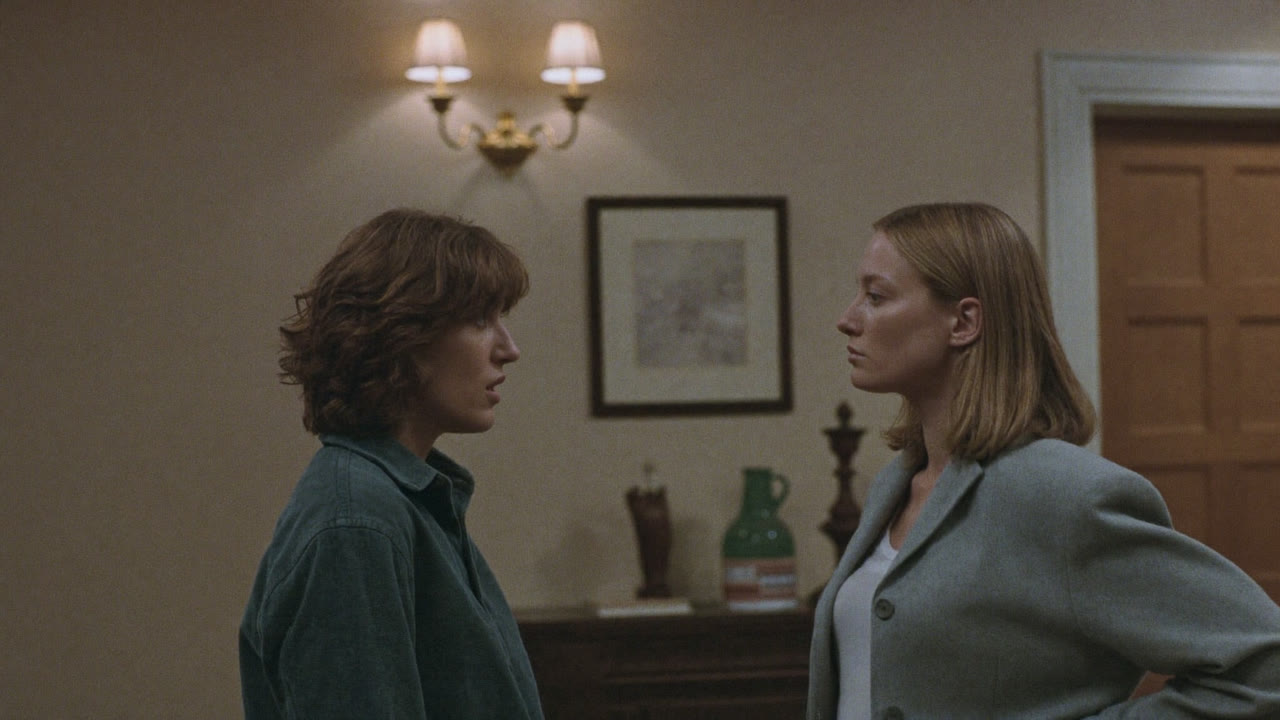
- Realistisches Schauspiel und Mimik in Kling 4.0: Blicke, Pausen und kleine Veränderungen im Ausdruck sind klar zu erkennen, so wirkt eine Szene wie echtes Schauspiel.
- Kamerasteuerung in Kling 4.0 für schnelle Action: Heranfahrten, Rückfahrten, Schwenks, Tracking- und Orbit-Shots bleiben flüssig, selbst in schnellen Szenen.
- Start- und Endframe in Kling 4.0 festlegen: Lade einen ersten Frame hoch und bei Bedarf einen letzten. Kling 4.0 füllt die Bewegung dazwischen, damit Produkt, Pose oder Schlussbild genau sitzen.
- Kling 4.0 Einstellungen für Länge, Auflösung und Seitenverhältnis: Länge, Auflösung, Seitenverhältnis, Eingaben und Prompt-Limits, so wie der Generator sie heute anbietet.
- Technische Daten und Funktionen von Kling 4.0: Die von Kling selbst veröffentlichten Specs der Vollversion. Was Kling als „demnächst verfügbar“ führt, ist hier ebenso gekennzeichnet.
30-Sekunden-Videos mit Kling 4.0 in einer Generierung
Kling 4.0 erzeugt 3 bis 30 Sekunden pro Durchlauf. Ein Prompt trägt so eine ganze Szene vom Aufbau bis zur Pointe, der Ton entsteht zusammen mit dem Bild.
In dieser Release-Demo von Kling ist die einzige Eingabe ein Startframe mit einem jungen Mann am Mikrofon in einer Gesangskabine. Kling 4.0 hält die Einstellung die vollen 30 Sekunden; seine Stimme und der Raumklang entstehen gleich mit, und seine Lippen sitzen synchron zum Ton.
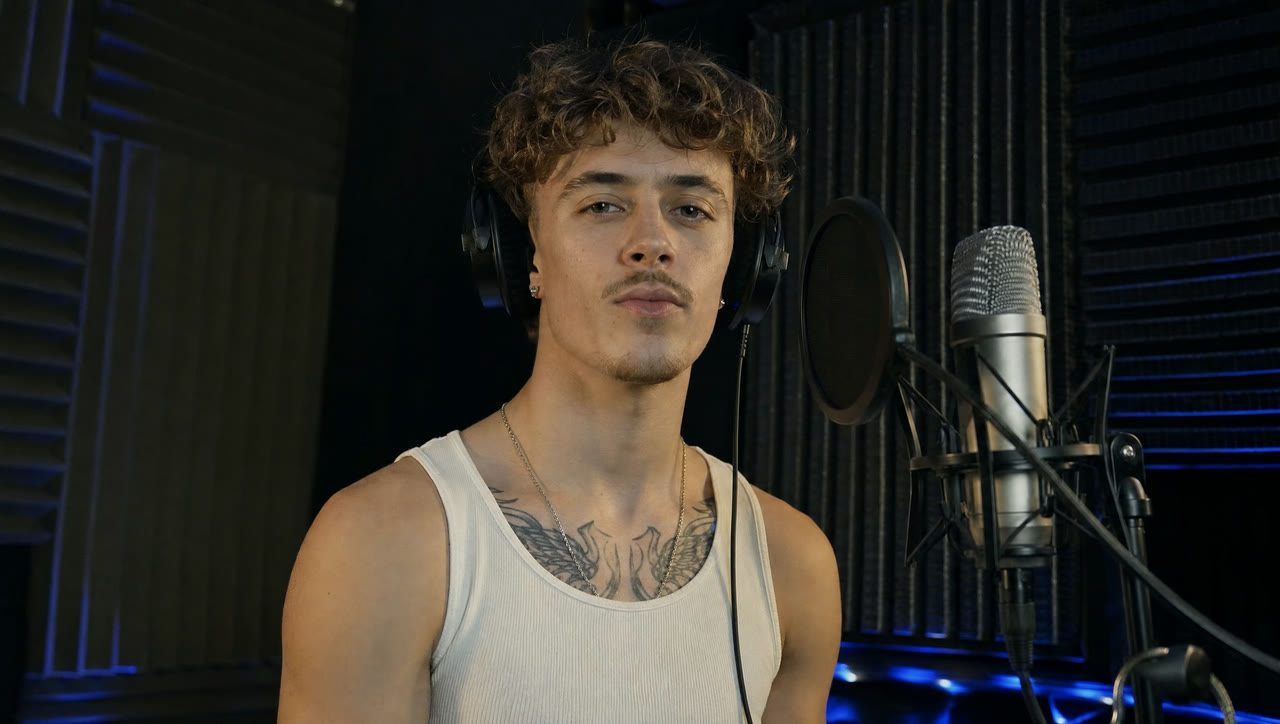
Bild zu Video mit Kling 4.0 aus einem einzigen Standbild
Gib Kling 4.0 einen ersten Frame und beschreibe, was sich bewegen soll. Bildausschnitt, Gesichter und Farben deines Bildes werden zur ersten Einstellung.
Kling hat diese Demo nur mit ihrem Startframe veröffentlicht: eine Zauberin zwischen roten Fäden und alten Münzen. Kling 4.0 machte aus dem Standbild 15 Sekunden großer, schneller Bewegung: Fäden peitschen, Münzen fliegen auf die Linse zu, und ihr Gesicht und ihr Kostüm bleiben dabei gleich.

Natives Audio in Kling 4.0 mit Dialog und Lippensynchronisation
Jeder Kling 4.0 Clip kommt mit Stereo-Tonspur. Schreib die Sätze in Anführungszeichen, dann sprechen die Figuren sie, die Lippen passend zu den Worten.
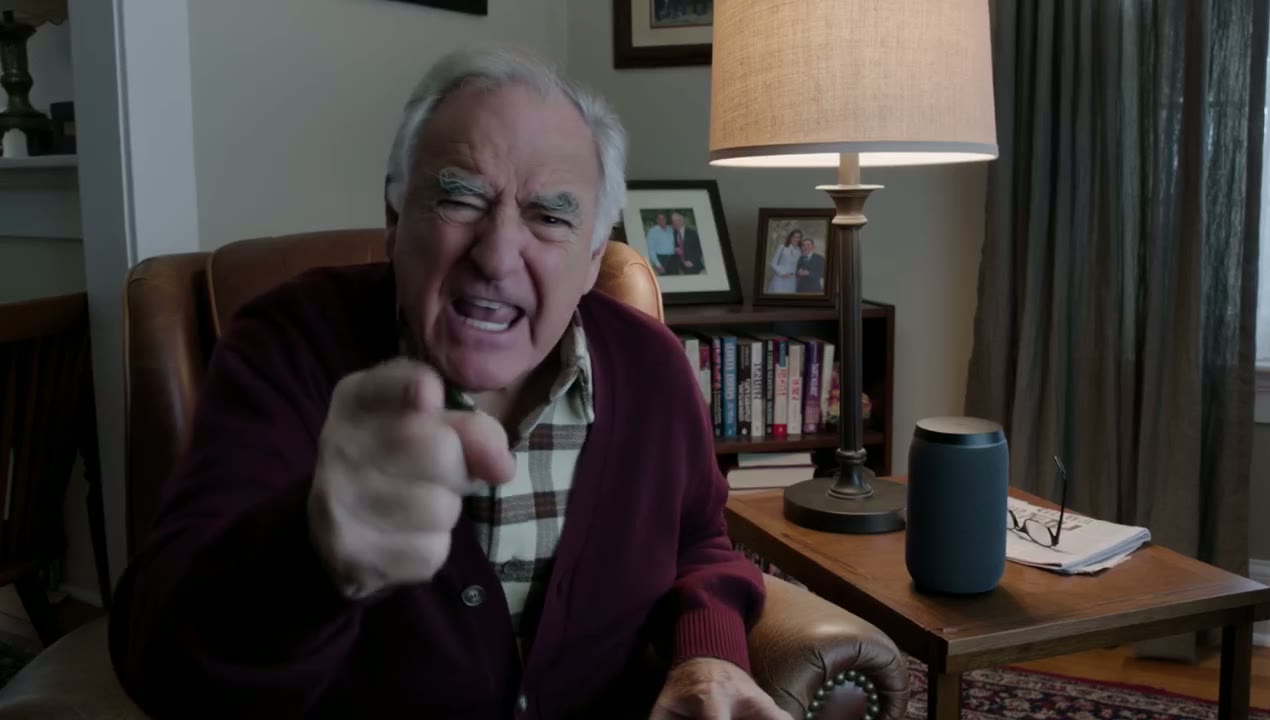
Der ganze Prompt der Demo ist eine Zeile: „An old man ranting about AI.“ Kling 4.0 hat den Mann besetzt, das Wohnzimmer eingerichtet und die Schimpftirade selbst geschrieben.
 Kling 4.0
Prompt: An old man ranting about AI. (Kling 4.0 · 16:9 · 15s · 1080p)
Text zu Video in Kling 4.0 mit lebensechten Menschen
Zwei Sätze reichen für eine natürliche Vlog-Einstellung aus der Hand: Person, Raum und die Art, wie sie in die Kamera spricht, ergänzt Kling 4.0.
Der Demo-Prompt besteht aus zwei Sätzen und verlangt eine fröhliche Vloggerin, die sich vorstellt; Bildausschnitt, Raum und die Art, wie sie in die Kamera spricht, stammen alle von Kling.
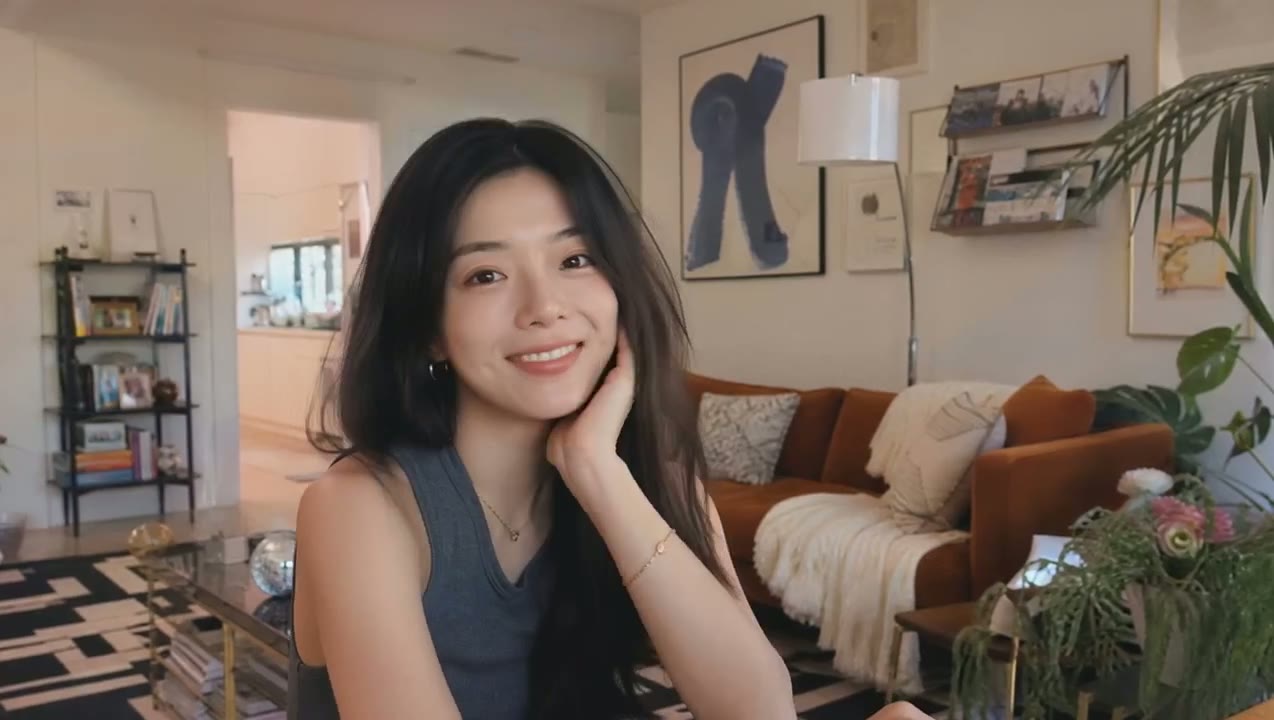 Kling 4.0
Prompt: A vlogger-style video in which the woman cheerfully introduces herself to the audience. Maintain a natural, authentic look and realistic image quality. (Kling 4.0 · 16:9 · 7s · 720p)
Realistisches Schauspiel und Mimik in Kling 4.0
Kling 4.0 ist besser bei den Details, die Menschen glaubwürdig machen: ein Blick, der einen Moment zu lang hält, ein Zögern vor einem Satz, die veränderte Haltung, wenn ein Streit kippt. Haut, Licht und Stoff wirken vom ersten bis zum letzten Frame natürlich.
Die Demo von Kling beginnt mit einem einzigen Frame: zwei Frauen, die sich in einem Flur gegenüberstehen. Im 11 Sekunden langen Ergebnis spielt sich die Konfrontation ab: Eine von ihnen dreht sich um und geht, und die Szene endet mit etwas, das zerschmettert auf dem Boden liegt.
Kamerasteuerung in Kling 4.0 für schnelle Action
Nenn die Bewegung im Prompt, und Kling 4.0 zieht sie durch: eine Heranfahrt auf ein Gesicht, eine Rückfahrt, die den Raum freigibt, ein Tracking-Shot, der mit einem Läufer Schritt hält. Einstellungsgrößen wechseln und Schnitte sitzen, ohne dass das Bild wackelt oder die Figuren von ihrem Aussehen abweichen.
In dieser 10-sekündigen Release-Demo liefern sich zwei Taekwondo-Kämpfer ein Sparring, während die Kamera nah dranbleibt, in eine Draufsicht über der Matte steigt und wieder auf Augenhöhe sinkt; jeder Schlag und jeder Schritt bleibt dabei scharf.
Start- und Endframe in Kling 4.0 festlegen
Lade einen ersten Frame hoch und bei Bedarf einen letzten. Kling 4.0 füllt die Bewegung dazwischen, damit Produkt, Pose oder Schlussbild genau sitzen.
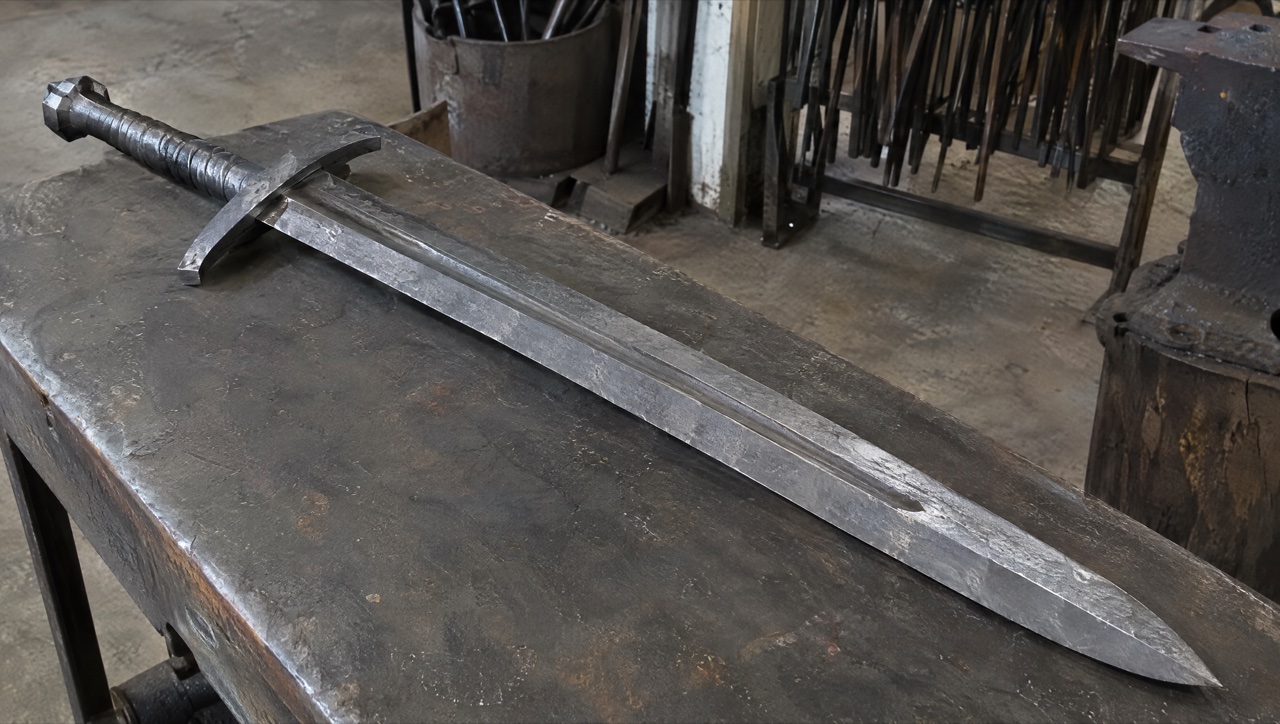
In der Demo zeigt der erste Frame rohe Eisenblöcke auf einer Werkbank, der letzte einen fertigen Zweihänder auf derselben Bank. Die 15 Sekunden dazwischen füllt Kling 4.0 mit sechs Shots vom Schmieden.
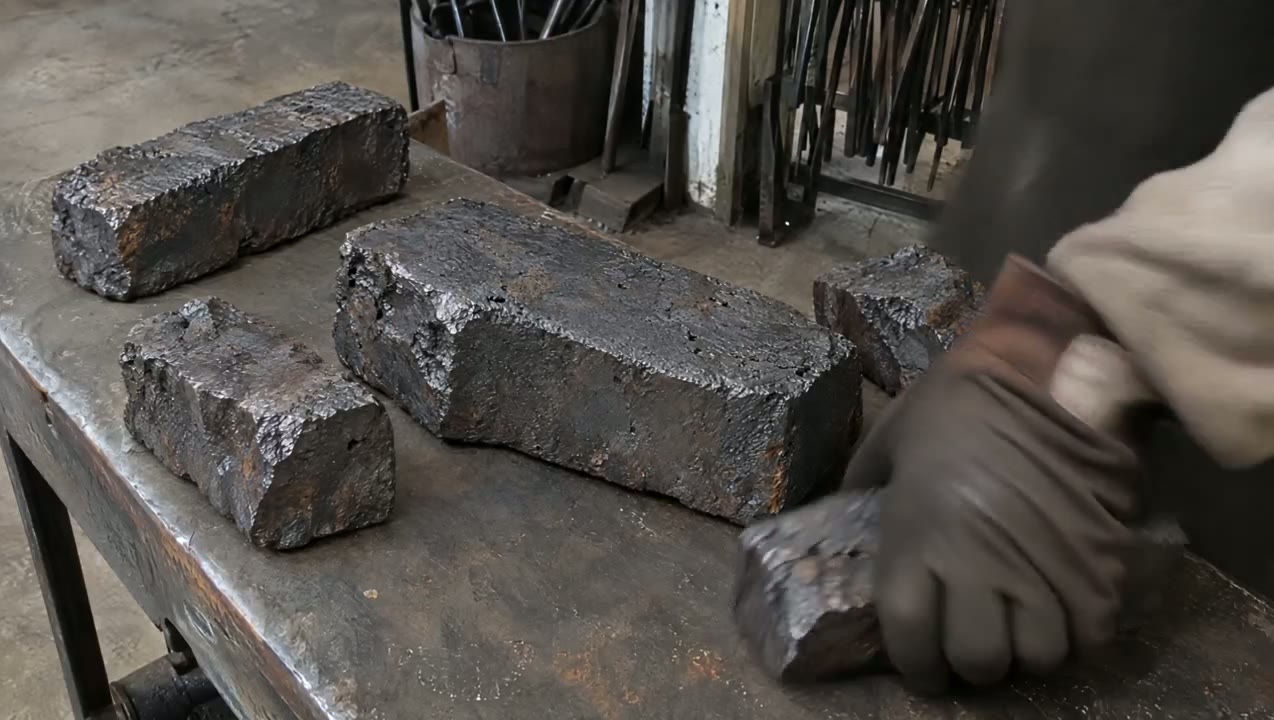
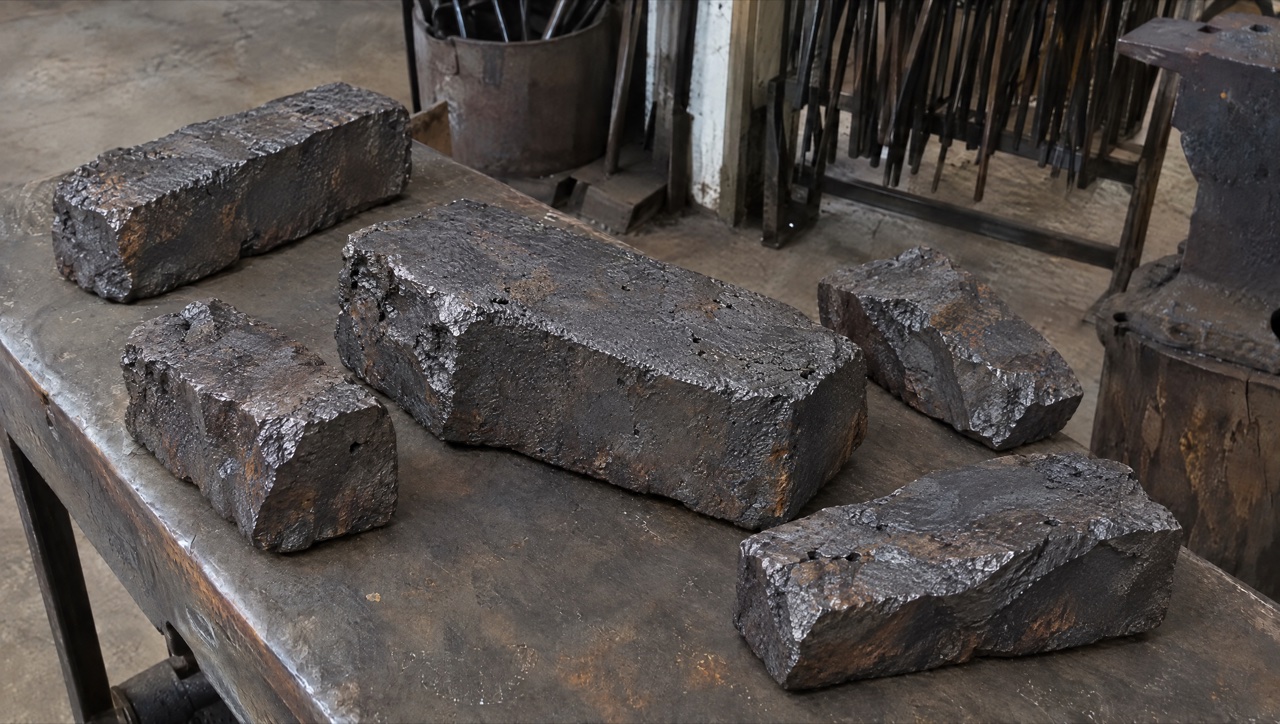
 Kling 4.0
Prompt: SCENE CONTEXT EXACT 1 CHARACTER — NO DUPLICATES. Interior, a worn blacksmith workshop, daytime. The same blacksmith removes the raw material, works it into a greatsword, and returns the completed sword to the original table.15 seconds, six shots. Manufacturing time is compressed through editorial cuts; individual actions retain natural weight and speed. ACTIVE REFERENCES: @Image1: exact first-frame anchor. Preserve all five iron blocks, their arrangement, the tabletop, background tools, perspective, and lighting. This image is the starting state of an active pickup shot.@Image2: exact final-frame anchor and finished-sword design. Preserve the blade silhouette, central fuller, angular curved crossguard, spiral metal grip, faceted pommel, diagonal placement, perspective, and background. This composition is reached through a visible physical placement. LOCATION MAP: The worktable fills the foreground. The tool bucket stands behind its left-center edge, the rod rack occupies the rear right, and the anvil stands at the right. The blacksmith works from the left side of the table in both endpoint shots. The camera stays on the original viewer-facing side of the table. During blade-working inserts, the tang points screen-left and the tip points screen-right. The final sword position runs from the upper-left pommel to the lower-right tip. FIRST FRAME AND SPATIAL BLOCKING: At 0.0 seconds, the frame exactly matches the raw-material reference, with five iron blocks and no hands visible. The same blacksmith immediately reaches in from the left edge. Both gloved hands approach the largest central block from opposite ends, preparing a supported two-handed lift. The blacksmith wears soot-gray sleeves, brown leather gloves, and a narrow dark strap around the right cuff. These details remain identical throughout every shot. FORMAT MODE: 15 seconds total, six shots.Hard cuts at 3.0, 5.0, 8.0, 10.0, and 11.0 seconds. Cuts compress the omitted manufacturing work and bench clearing. The opening pickup and closing placement each play as continuous physical actions.No fades, dissolves, or object-morph transitions. OPTICS: Shots 1 and 6: reference-matched elevated three-quarter framing, approximately 63° diagonal field of view and approximately 1.8 meters from the tabletop center. Exact endpoint framing takes priority over estimated optical measurements. Shots 2–5: 40° diagonal field of view, approximately 0.8 meters from the working contact point. Focus follows the hands and metal contact; the workshop background remains softly readable. Each shot holds one fixed field of view. CAMERA: A real camera operator holds the camera from the viewer-facing side of the workspace. All shots use handheld SETTLE: visible breathing sway, slight roll, and small delayed corrections. The opening camera holds its position while the iron block leaves the frame. The closing camera holds the empty tabletop composition while the sword enters, then settles into the exact final reference. The blacksmith is the only visible worker; the camera operator remains outside the image. ACTION TIMING: 0.0–3.0s — TAKE THE IRON. Start on the exact first reference; during 0.0–0.6s, the blacksmith’s matching gloved hands enter from screen-left and grip opposite ends of the largest central block. During 0.6–1.5s, the wrists brace and both hands lift the block clear of the tabletop, exposing the patch of table beneath it. During 1.5–3.0s, the blacksmith carries the supported block out through screen-left; the other four blocks remain resting on the table through the cut.3.0–5.0s — HEAT THE STOCK. Hard cut forward in time to one thick billet already glowing orange among forge coals. The same gray sleeves, brown gloves, and right-cuff strap appear at screen-left as the blacksmith holds long tongs around the billet. A short controlled pull draws the billet toward the forge mouth, with heat shimmer rising above its scaled surface.5.0–8.0s — FORGE THE BLADE. Hard cut forward to an elongated orange-hot blade blank supported on the anvil, tang left and emerging tip right. The same blacksmith braces the tang with left-hand tongs and delivers three deliberate right-hand hammer strikes along the blade flat. Each strike produces local compression, wrist recoil, and a brief scatter of dark scale.8.0–10.0s — FINISH THE METAL. Hard cut forward to a cooled blade with its fuller already formed, held by the same gloved hands against an abrasive wheel. The blacksmith makes one controlled finishing pass along the bevel. A narrow stream of sparks falls from the actual contact point as a brighter strip of metal appears.10.0–11.0s — COMPLETE THE HILT. Hard cut forward to the nearly finished sword supported on a separate assembly bench, its crossguard and spiral metal grip already fitted. The same blacksmith’s left hand braces the grip while the right hand gives the faceted pommel its final tightening turn. The completed sword now has the exact construction and finish required for the final image.11.0–15.0s — PLACE THE FINISHED SWORD.Hard cut to the original worktable, now completely clear; show its empty surface for 0.4 seconds before the same gloved hands carry the completed sword in from screen-left, one hand around the grip and the other supporting the blade flat near its balance point. From 11.4–13.8s, the blacksmith lowers the entire rigid sword diagonally, hilt toward upper-left and tip toward lower-right, easing it onto the tabletop and sliding the supporting hand free as its weight transfers to the table. From 13.8–15.0s, both hands release and withdraw through screen-left; the sword remains motionless in the exact final-reference position as the camera settles onto the final frame. PHYSICS: The raw block retains its shape and mass throughout the pickup. Both hands support it continuously; the forearms tense and the lift accelerates slowly under its weight. The anvil supports the hot blade during forging. Large changes of shape occur across editorial time jumps. The completed sword remains rigid during carrying and placement. The blade-supporting hand has visible clearance to slide free as the sword settles; the hand never passes through the blade or tabletop. Metal contact produces a short scrape and a low, heavy clink, followed by stillness. The same blacksmith clears the remaining raw stock during omitted time before the final shot. LIGHTING: The original table shots use soft daylight from upper camera-left, matching both references. Retain dark detail in the iron and protect the silver blade highlights. The forge insert uses orange coal glow from below-left as its dominant source. Return to the original neutral daylight before the sword enters the final tabletop shot. AUDIO: Quiet workshop air and distant furnace draft form the ambient bed. Opening: leather creaks, a brief iron scrape, and a restrained exertion breath as the heavy block rises.Middle: forge crackle, tong contact, three synchronized hammer impacts, abrasive scraping, and a short fitting sound.Ending: sleeve movement, glove friction against metal, a weighted sword-to-table clink, then quiet workshop ambience. The blacksmith speaks no dialogue.SFX only, no music, no score, no song, no soundtrack. CHARACTER ACTING: One consistent blacksmith performs every visible action. Soot-gray sleeves, brown leather gloves, and the dark right-cuff strap remain unchanged. Hands work deliberately: brace before lifting, maintain firm tool contact, and reduce speed before lowering the finished sword. The physical rhythm shifts from effort during the raw-block pickup to careful control during the final placement. The face and torso remain outside the crop. STYLE: Grounded workshop documentary with tactile iron, worn tools, and convincing manual labor.Soft old-photograph texture, restrained grain, and natural motion blur; no digital sharpening. Charcoal metal and muted brown surfaces dominate, with silver highlights and localized forge orange. The first and last frames preserve the supplied images’ appearance. QUALITY: Maintain consistent hands, gloves, sleeve details, metal geometry, and contact shadows. The lifted block reveals the tabletop underneath it. The closing shot visibly establishes the empty tabletop before the sword enters. Keep the full final sword readable, including its tip, guard, grip, and pommel. Avoid duplicate limbs, flickering geometry, and intersecting solid surfaces. POSITIVE CONSTRAINTS: The first frame contains exactly five iron blocks. The largest central block physically leaves the table in the same blacksmith’s two hands. The final shot begins with an empty table. The completed sword enters while visibly supported by that same blacksmith, contacts the tabletop, and remains after both hands withdraw. The last frame matches the finished-sword reference exactly. The opening pickup and final placement each remain continuous, with visible hand-object contact. Exactly one finished sword is present.No text overlays, subtitles, or music. (Kling 4.0 · 16:9 · 15s · 1080p)
Kling 4.0 Einstellungen für Länge, Auflösung und Seitenverhältnis
Kling hat mehr angekündigt, als auf dieser Website bisher läuft. Das sind die Einstellungen, die dir der Generator für Kling 4.0 tatsächlich bietet – was du planst, kannst du also auch rendern.
| Länge | 3 bis 30 SekundenStandardmäßig 5 Sekunden. |
|---|---|
| Auflösung | 720p oder 1080pStandardmäßig 720p. |
| Seitenverhältnis | 16:9, 9:16, 1:1 oder 21:9Mit einem Startframe übernimmt der Clip das Format deines Bildes. |
| Eingaben | Text, ein Startframe oder Start- und EndframeDie Multi-Keyframe-, Referenz- und Bearbeitungsmodi von Kling gibt es hier noch nicht. |
| Prompt | Bis zu 2.500 Zeichen |
| Ton | Immer anSprache, Effekte und Umgebungsgeräusche in Stereo in jedem Clip; einen Schalter zum Abschalten gibt es nicht. |
| Credits | Abrechnung pro SekundeDie Rate hängt von der Auflösung ab. Der Generator zeigt die Gesamtsumme vor dem Start, und die Preistabelle unten listet gängige Längen auf. |
Technische Daten und Funktionen von Kling 4.0
Die von Kling selbst veröffentlichten Specs der Vollversion. Was Kling als „demnächst verfügbar“ führt, ist hier ebenso gekennzeichnet.
| Release | Kling 4.0 Flash wurde am 28. September 2026 für einen begrenzten Nutzerkreis geöffnet. Die Vollversion von Kling 4.0 ist seit dem 15. Oktober 2026 verfügbar. |
|---|---|
| Modi | Text-zu-Video, Bild-zu-Video, Start- und Endframe, Multi-Keyframes, Omni Reference und Videobearbeitung. |
| Cliplänge | 3 bis 30 Sekunden in einer Generierung. |
| Keyframes | Bis zu 10 Keyframe-Bilder, um Figurenzustände, Szenenwechsel und Story-Beats festzulegen. |
| Referenzen | Bis zu 15 Assets pro Generierung: bis zu 10 Bilder, bis zu 5 Videos (zusammen 30 Sekunden) und bis zu 7 Motive, die eine Stimmreferenz enthalten können. |
| Auflösung | 720p, 1080p und 4K. 10-Bit-HDR in 1080p und 4K ist als „demnächst verfügbar“ gekennzeichnet. |
| Seitenverhältnisse | 21:9, 16:9, 1:1, 9:16 und automatisch. |
| Audio | Zweikanal-Stereo mit Lippensynchronisation; Dialoge auf Chinesisch, Englisch, Japanisch, Koreanisch, Spanisch, Portugiesisch, Deutsch, Französisch und mehr, einschließlich regionaler Akzente. |
| Promptlänge | Bis zu 8.000 Tokens. |
| Videoverlängerung | Mehrfach verlängerbar auf bis zu 2 Minuten – als „demnächst verfügbar“ gekennzeichnet. |
Anwendungsfälle für Kling 4.0
Lange Einzel-Takes, Einstellungen mit festem Anfang und Ende und Dialogszenen aus einem kurzen Prompt.
- Einzel-Takes von 30 Sekunden: Eine lange Plansequenz – ein Rundgang, eine Verfolgungsjagd, ein Produkt-Reveal – ohne zwei Clips zusammenschneiden zu müssen.
- Einstellungen mit festem Anfang und Ende: Ein Start- und ein Endframe legen fest, wo die Szene beginnt und wo sie landet; Kling 4.0 erzeugt die Bewegung dazwischen.
- Talking-Head- und Dialogclips: Aus einem Prompt von ein, zwei Zeilen wird eine natürliche Sprechszene mit lippensynchronem Stereoton.
- Mehrsprachige Dialoge: Stereo-Audio mit Lippensynchronisation und eingeblendeter Text, der auch bei Kamerabewegungen lesbar bleibt.
Kling 4.0 vs. Seedance 2.5, Kling 3.0, Veo 3.1 und Wan 3.0
Jede Zelle außer der letzten Zeile stammt aus den Live-Einstellungen der Modelle auf SeedVideo AI – die Tabelle zeigt also, was der Generator heute zur Auswahl bietet.
Du willst dieselbe Idee noch einmal anders sehen? Im KI-Video-Generator steht Kling 4.0 neben Seedance, Kling, Veo und Wan, also kannst du einen Prompt mit deinen vorhandenen Credits auf einem anderen Modell neu laufen lassen.
| Merkmal |  Kling 4.0 | Kling 4.0 Flash |  Seedance 2.5 | Kling 3.0 |  Veo 3.1 Fast |  Wan 3.0 |
|---|---|---|---|---|---|---|
| Längster Clip | 30 s | 20 s | 30 s | 15 s | 8 s | 30 s |
| Höchste Auflösung | 1080p | 720p | 1080p | 4K | 4K | 1080p |
| Seitenverhältnisse | 16:9, 9:16, 1:1, 21:9 | 16:9, 9:16, 1:1, 21:9 | 16:9, 9:16, 1:1, 4:3, 3:4, 21:9 | 16:9, 9:16, 1:1 | 16:9, 9:16 | 16:9, 9:16, 1:1, 4:3, 3:4 |
| Referenzbilder | Nein | Nein | 30 | Nein | Nein | 10 |
| Referenzvideos | Nein | Nein | 10 | Nein | Nein | 5 |
| Clip bearbeiten und verlängern | Nein | Nein | Ja | Nein | Nein | Nein |
| Credits für 5 s in 720p | 24 Credits | 14 Credits | 31 Credits | 13 Credits | 15 Credits | 12 Credits |
| Am besten für | Bis zu 30 s mit Stereoton, aus Text oder einem ersten Frame | Schnellere, günstigere 720p-Entwürfe bis 20 s | Lange Multi-Shot-Clips mit vielen Referenzen und nativem Ton | Günstigere Kling-Clips bis 15 s | Realistische kurze Shots mit Ton | Lange Takes mit kleinerem Budget |
Credits sind Raten mit Credit-Paket für einen 5-Sekunden-Clip in 720p; mit Abo kostet die Sekunde weniger.
Vor- und Nachteile von Kling 4.0
Was es auf SeedVideo AI heute gut kann – und was du umschiffen musst.
Stärken
- Länge: Alles von 3 bis 30 Sekunden in einer Generierung.
- Ton: Jeder Clip kommt mit Stereotonspur, die Sprache lippensynchron zum Bild.
- Frame-Kontrolle: Ein erster Frame, optional plus letzter Frame, legt fest, wo die Einstellung beginnt und endet.
- Kurze Prompts: Eine Idee in ein, zwei Zeilen reicht oft für eine natürliche, glaubwürdige Szene.
Grenzen
- Modi auf dieser Website: Vorerst nur Text zu Video und erster/letzter Frame; die Multi-Keyframe- und Referenzmodi von Kling gibt es hier noch nicht.
- Keine stumme Option: Der Ton lässt sich nicht abschalten; schalte den Clip danach stumm, wenn du ihn selbst vertonen willst.
- Renderzeit: Langsamer als die meisten Modelle: Ein 3-Sekunden-Testclip brauchte etwa drei Minuten.
- Prompt-Länge: Der Composer nimmt Prompts bis 2.500 Zeichen, sehr lange Briefings müssen also gekürzt werden.
Was Kling 4.0 kostet und wie du loslegst
Startpunkte für Kling 4.0
Wähle unten einen Startpunkt – der Generator öffnet sich mit Kling 4.0 schon ausgewählt.
Kling 4.0: Preis pro Clip
Preise für Credit-Pakete, übernommen aus den aktuellen Einstellungen des Generators. Mit einem Abo kostet jede Sekunde weniger.
| Auflösung | 5 s | 10 s | 30 s |
|---|---|---|---|
| 720p | 24 Credits | 47 Credits | 141 Credits |
| 1080p | 35 Credits | 70 Credits | 210 Credits |
So nutzt du Kling 4.0 in 4 Schritten
- Schritt 1
Kling 4.0 auswählen
Öffne das Eingabefeld auf dieser Seite oder den vollen Generator und wähle im Modellmenü unter dem Kling-Filter Kling 4.0.
- Schritt 2
Die Story-Beats schreiben
Beginne mit dem, was sich wann bewegt: Motiv, Aktion, Kamera und der Moment, in dem jeder Beat sitzt. Prompts dürfen hier bis zu 2.500 Zeichen lang sein.
- Schritt 3
Optional einen Startframe hinzufügen
Lade einen Startframe hoch, damit die Einstellung mit deinem Bild beginnt, und einen Endframe, wenn du festlegen willst, wo sie endet.
- Schritt 4
Länge festlegen und absenden
Wähle eine Länge von 3 bis 30 Sekunden, bestimme das Seitenverhältnis, prüfe den Credit-Preis und sende ab.
Prompt-Beispiele für Kling 4.0
Prompts, die Kling AI mit seinen Kling 4.0 Beispielen veröffentlicht hat, jeweils neben dem erzeugten Clip; der lange Schmiede-Prompt ist hier gekürzt. Lade einen in den Generator und ändere dann Motiv, Umgebung oder Länge. Für den Frame-Prompt brauchst du einen eigenen Start- und Endframe.
Die Schimpftirade eines alten Mannes
Text zu Video · 15 sAn old man ranting about AI.
Quelle: Kling AI
Prompt ausprobierenEine Vloggerin sagt Hallo
Text zu Video · 7 sA vlogger-style video in which the woman cheerfully introduces herself to the audience. Maintain a natural, authentic look and realistic image quality.
Quelle: Kling AI
Prompt ausprobierenAlte Freunde treffen sich in der Dämmerung
Text zu Video · 7 sA continuous 7-second shot set in the UK. Two friends who have not seen each other for a long time meet at the corner of a quiet street at dusk, surrounded by a diverse crowd going about their daily lives. They smile, walk quickly toward each other, and share a warm embrace. Their facial expressions and body movements are natural. A handheld camera follows them with subtle camera shake. Soft, warm lighting with a nostalgic cinematic film look. Include natural footsteps, street ambience, background music, and English dialogue.
Quelle: Kling AI
Prompt ausprobierenVom Eisen zum Zweihänder
Start- und Endframe · 15 sInterior, a worn blacksmith workshop, daytime. The same blacksmith removes the raw material, works it into a greatsword, and returns the completed sword to the original table. 15 seconds, six shots, hard cuts at 3.0, 5.0, 8.0, 10.0 and 11.0 seconds. First frame: exactly five iron blocks on the worktable, no hands visible. Last frame: the finished sword lying diagonally on the same table. 0.0–3.0s — TAKE THE IRON: both gloved hands lift the largest central block and carry it out through screen-left. 3.0–5.0s — HEAT THE STOCK: one thick billet glowing orange among forge coals. 5.0–8.0s — FORGE THE BLADE: three deliberate hammer strikes along the orange-hot blade on the anvil. 8.0–10.0s — FINISH THE METAL: one finishing pass on an abrasive wheel, sparks falling from the contact point. 10.0–11.0s — COMPLETE THE HILT: the final tightening turn of the faceted pommel. 11.0–15.0s — PLACE THE FINISHED SWORD: the empty table, then the sword carried in and lowered into the exact final position. Handheld camera, soft daylight from upper camera-left, orange coal glow in the forge shot. AUDIO: workshop air, forge crackle, three synchronized hammer impacts, a weighted sword-to-table clink. SFX only, no music. No text overlays or subtitles.
Quelle: Kling AI
Prompt ausprobieren
Weitere KI-Videomodelle auf SeedVideo AI
Häufige Fragen zu Kling 4.0
Wann ist Kling 4.0 erschienen?
Ist Kling 4.0 hier kostenlos?
Kling 4.0 oder Kling 4.0 Flash?
Was ist noch nicht verfügbar?
Was ist Kling 4.0?
Was hat sich gegenüber Kling 3.0 geändert?
Was ist Kling 4.0 Flash?
Welche Kling-Modelle laufen auf SeedVideo AI?
Steht SeedVideo AI mit Kling AI oder Kuaishou in Verbindung?
Erstelle dein erstes Video mit Kling 4.0
Prompt, Start- und Endbild nach Bedarf, Länge, absenden. Jede Generierung landet in derselben Asset-Bibliothek wie deine Seedance-Arbeit.
Generator öffnen