

Kling 4.0 gratuit : 30 secondes avec le son
Kling 4.0 génère jusqu’à 30 secondes en une passe, avec audio stéréo et synchronisation labiale, à partir d’un prompt texte ou d’une première et d’une dernière image. Essayez Kling 4.0 gratuitement en ligne !
Seedance 2.5
Clips jusqu'à 30 s avec références image, vidéo et audio.
Kling 4.0 Flash
La version rapide de Kling 4.0 : clips 720p avec son pour moins de crédits.
Wan 3.0
Clips jusqu'à 30 s avec audio natif et dialogues synchronisés.

GPT Image 2.5
Générez et retouchez des images avec le dernier modèle d'OpenAI.
Nano Banana 2.1
Le modèle d'image de Google : plus de détails, texte plus net.
Seedance 2.0
Vidéo cinéma multi-plans avec audio natif et synchro labiale.
Exemples de vidéos IA créées avec Kling 4.0
Fonctionnalités de Kling 4.0 en un coup d’œil
- Vidéos de 30 secondes avec Kling 4.0 en une seule génération: Kling 4.0 produit de 3 à 30 secondes par génération : un seul prompt peut porter une scène entière, de la mise en place à la chute, avec le son généré en même temps que l’image.
- Image en vidéo avec Kling 4.0 à partir d’une seule photo: Donnez à Kling 4.0 une première image et décrivez ce qui doit bouger. Le cadrage, les visages et les couleurs de votre image deviennent le plan d’ouverture.
- Audio natif de Kling 4.0 avec dialogues et synchronisation labiale: Chaque clip Kling 4.0 sort avec une bande son stéréo. Écrivez les répliques entre guillemets : les personnages les disent, les lèvres suivent les mots.
- Texte en vidéo avec Kling 4.0, des personnages plus vrais que nature: Deux phrases suffisent pour un plan vlog naturel, caméra à la main : Kling 4.0 complète la personne, la pièce et sa façon de parler face caméra.
- Jeu d’acteur réaliste et expressions faciales avec Kling 4.0: Regards, pauses et petits changements d’expression se lisent clairement, si bien qu’une scène se joue comme une vraie interprétation.
- Contrôle de caméra avec Kling 4.0 pour les scènes d’action: Travellings avant et arrière, panoramiques, plans de suivi et plans orbitaux restent fluides, même dans les scènes rapides.
- Contrôle par première et dernière image avec Kling 4.0: Ajoutez une première image et, si besoin, une dernière. Kling 4.0 comble le mouvement entre les deux, pour qu’un produit, une pose ou un plan final tombe exactement où il faut.
- Réglages de Kling 4.0 pour la durée, la résolution et le format d’image: Durée, résolution, format d’image, entrées et limites de prompt, tels que le générateur les propose aujourd’hui.
- Caractéristiques et capacités de Kling 4.0: Les caractéristiques officielles publiées par Kling pour la version complète. Les fonctions que Kling annonce « bientôt disponibles » sont signalées comme telles.
Vidéos de 30 secondes avec Kling 4.0 en une seule génération
Kling 4.0 produit de 3 à 30 secondes par génération : un seul prompt peut porter une scène entière, de la mise en place à la chute, avec le son généré en même temps que l’image.
Dans cette démo de lancement de Kling, la seule entrée est une première image : un jeune homme devant un micro, dans une cabine d’enregistrement. Kling 4.0 tient le plan pendant les 30 secondes complètes, génère en même temps sa voix et le son de la pièce, et cale ses lèvres sur l’audio.
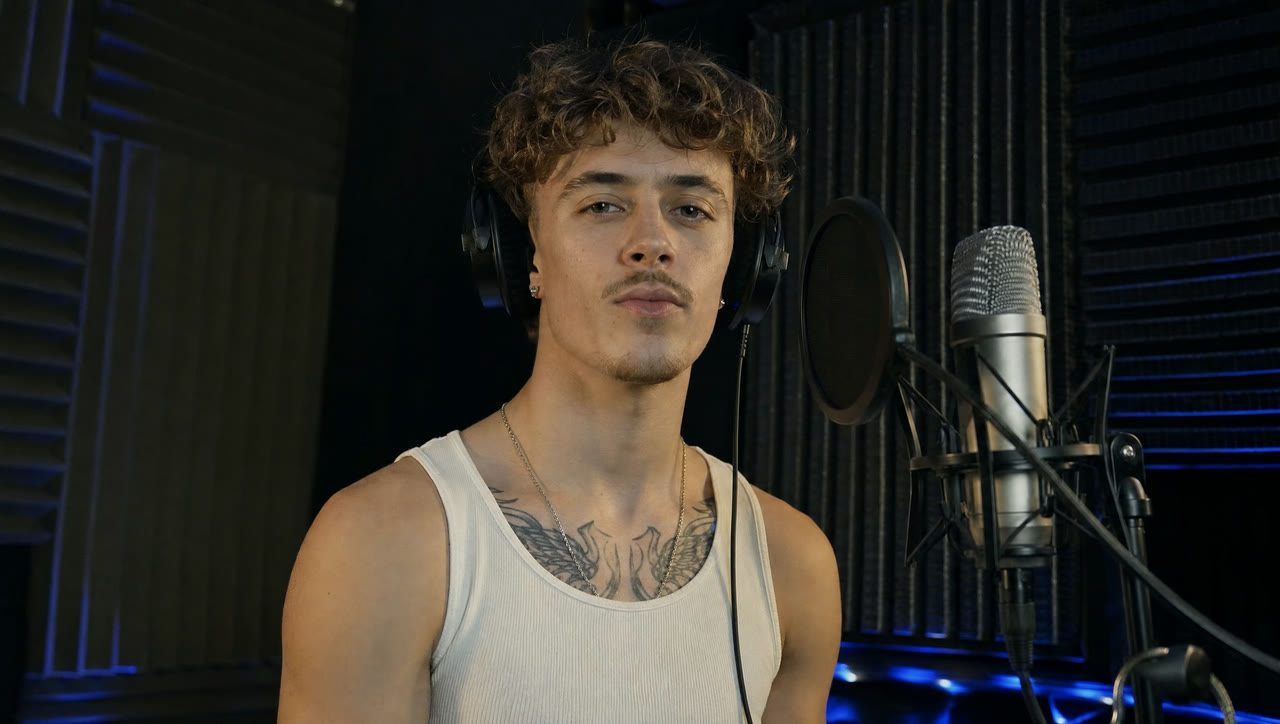
Image en vidéo avec Kling 4.0 à partir d’une seule photo
Donnez à Kling 4.0 une première image et décrivez ce qui doit bouger. Le cadrage, les visages et les couleurs de votre image deviennent le plan d’ouverture.
Kling a publié cette démo avec sa seule première image : une sorcière au milieu de fils rouges et de vieilles pièces. Kling 4.0 a transformé l’image fixe en 15 secondes de mouvements amples et rapides, fils qui fouettent l’air et pièces qui volent vers l’objectif, tandis que son visage et son costume restent identiques.

Audio natif de Kling 4.0 avec dialogues et synchronisation labiale
Chaque clip Kling 4.0 sort avec une bande son stéréo. Écrivez les répliques entre guillemets : les personnages les disent, les lèvres suivent les mots.
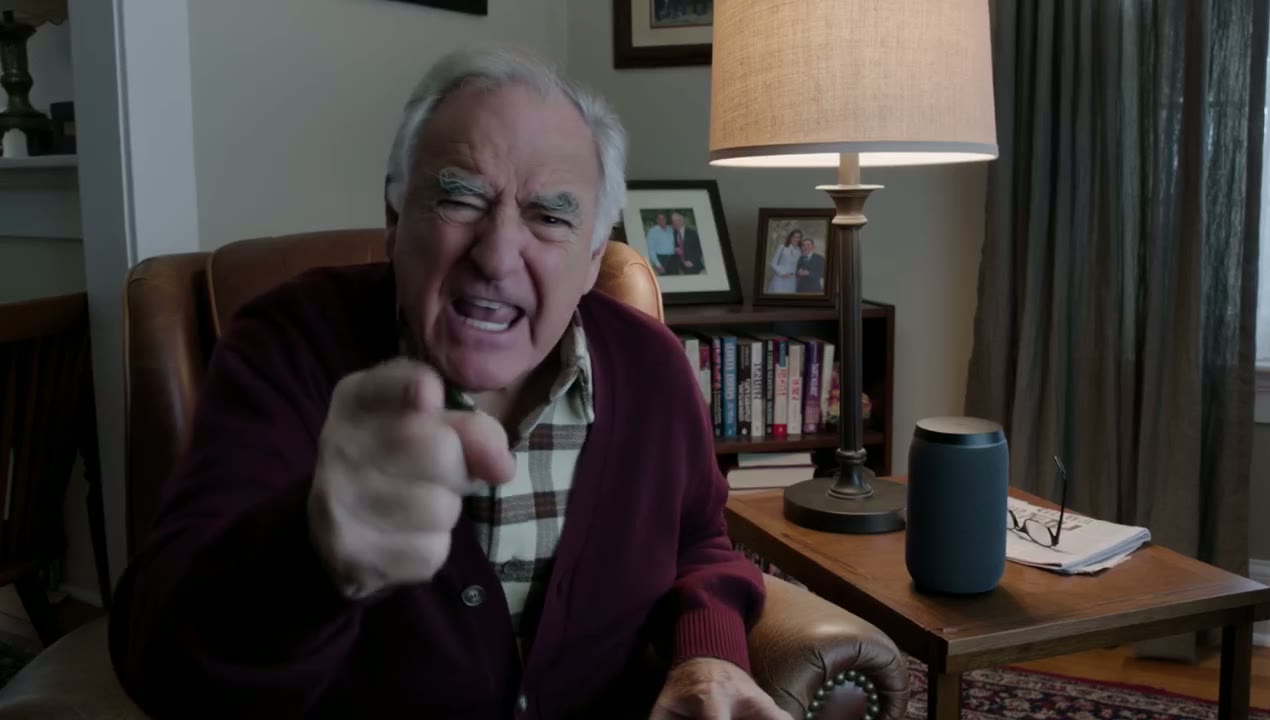
Dans la démo, le prompt tient en une ligne : « An old man ranting about AI. » Kling 4.0 a choisi l’homme, meublé le salon et écrit la diatribe lui-même.
 Kling 4.0
Prompt : An old man ranting about AI. (Kling 4.0 · 16:9 · 15s · 1080p)
Texte en vidéo avec Kling 4.0, des personnages plus vrais que nature
Deux phrases suffisent pour un plan vlog naturel, caméra à la main : Kling 4.0 complète la personne, la pièce et sa façon de parler face caméra.
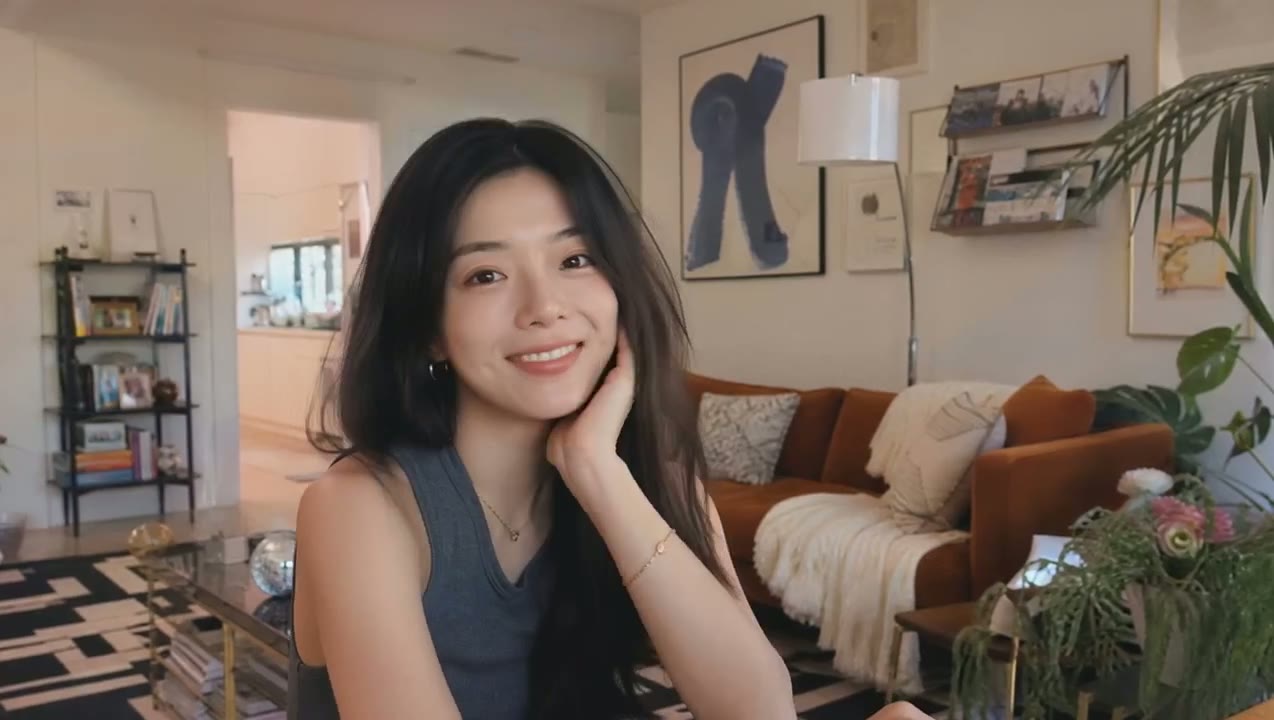
Le prompt de la démo fait deux phrases et demande une vlogueuse enjouée qui se présente ; le cadrage, la pièce et sa façon de parler face caméra viennent tous de Kling.
 Kling 4.0
Prompt : A vlogger-style video in which the woman cheerfully introduces herself to the audience. Maintain a natural, authentic look and realistic image quality. (Kling 4.0 · 16:9 · 7s · 720p)
Jeu d’acteur réaliste et expressions faciales avec Kling 4.0
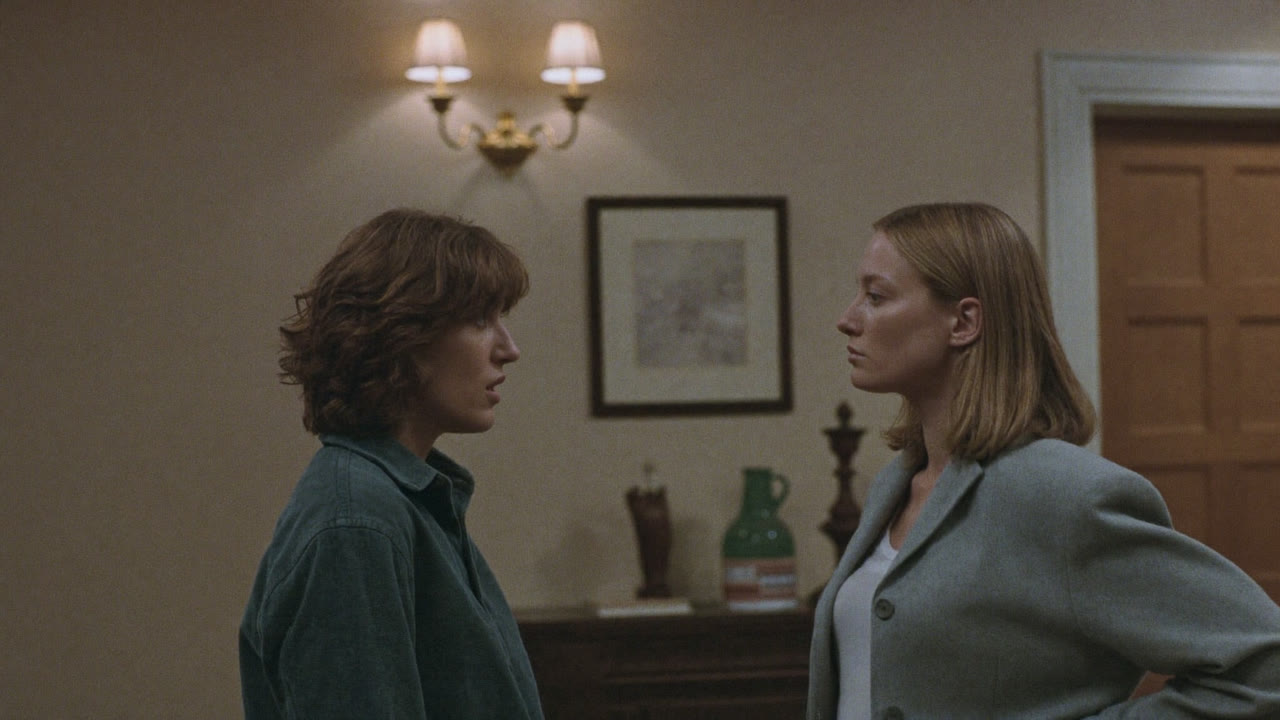
Kling 4.0 soigne mieux les détails qui rendent les personnes crédibles : un regard qui s’attarde un temps de trop, une hésitation avant une réplique, le changement de posture quand une dispute bascule. La peau, la lumière et les tissus restent naturels de la première à la dernière image.
La démo de Kling part d’une seule image : deux femmes qui se font face dans un couloir. Le résultat de 11 secondes déroule la confrontation : l’une d’elles se retourne et s’en va, et la scène se termine sur quelque chose de brisé au sol.
Contrôle de caméra avec Kling 4.0 pour les scènes d’action
Nommez le mouvement dans votre prompt et Kling 4.0 le mène jusqu’au bout : un travelling avant sur un visage, un travelling arrière qui révèle la pièce, un plan de suivi qui garde le rythme d’un coureur. Les valeurs de plan changent et les coupes tombent juste, sans que l’image tremble ni que les personnages changent d’apparence.
Dans cette démo de lancement de 10 secondes, deux pratiquants de taekwondo font un combat d’entraînement pendant que la caméra reste au plus près, monte jusqu’à une vue de dessus du tapis puis redescend à hauteur d’yeux ; chaque coup et chaque pas restent nets.
Contrôle par première et dernière image avec Kling 4.0
Ajoutez une première image et, si besoin, une dernière. Kling 4.0 comble le mouvement entre les deux, pour qu’un produit, une pose ou un plan final tombe exactement où il faut.
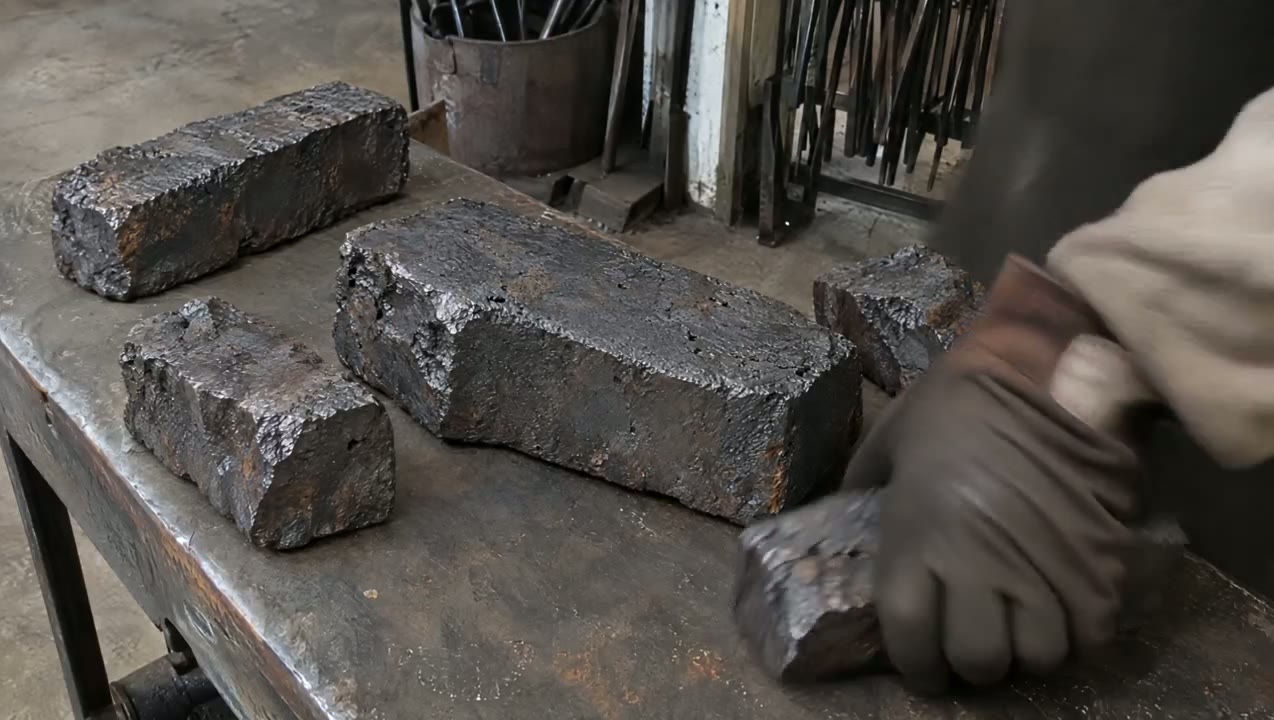
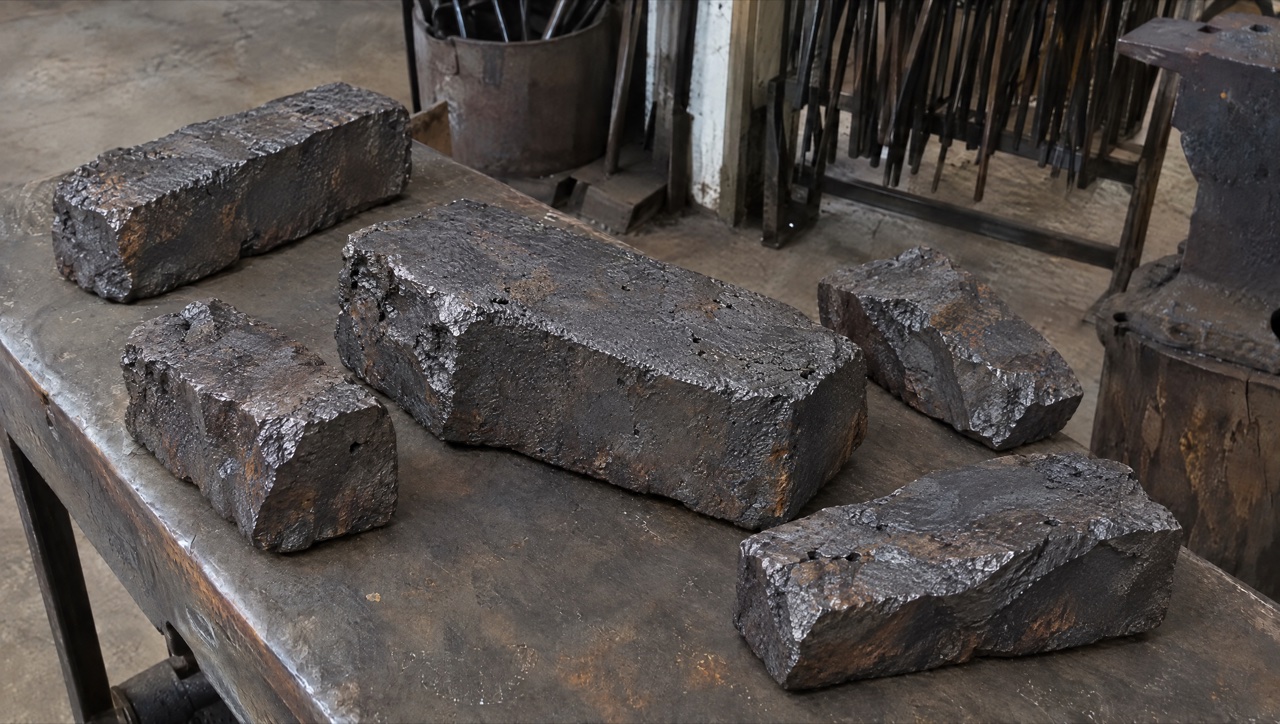
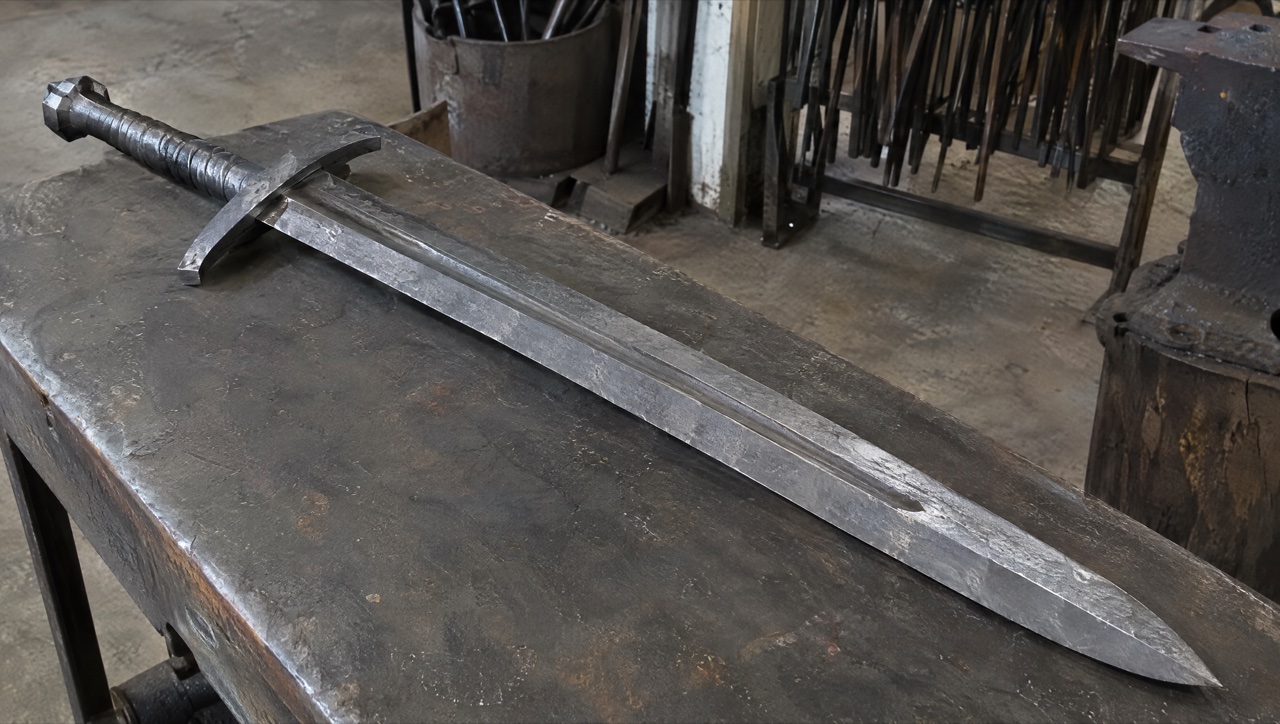
Dans la démo, la première image montre des blocs de fer brut sur un établi, et la dernière une épée à deux mains terminée sur le même établi. Kling 4.0 a rempli les 15 secondes entre les deux avec six plans de forge.
 Kling 4.0
Prompt : SCENE CONTEXT EXACT 1 CHARACTER — NO DUPLICATES. Interior, a worn blacksmith workshop, daytime. The same blacksmith removes the raw material, works it into a greatsword, and returns the completed sword to the original table.15 seconds, six shots. Manufacturing time is compressed through editorial cuts; individual actions retain natural weight and speed. ACTIVE REFERENCES: @Image1: exact first-frame anchor. Preserve all five iron blocks, their arrangement, the tabletop, background tools, perspective, and lighting. This image is the starting state of an active pickup shot.@Image2: exact final-frame anchor and finished-sword design. Preserve the blade silhouette, central fuller, angular curved crossguard, spiral metal grip, faceted pommel, diagonal placement, perspective, and background. This composition is reached through a visible physical placement. LOCATION MAP: The worktable fills the foreground. The tool bucket stands behind its left-center edge, the rod rack occupies the rear right, and the anvil stands at the right. The blacksmith works from the left side of the table in both endpoint shots. The camera stays on the original viewer-facing side of the table. During blade-working inserts, the tang points screen-left and the tip points screen-right. The final sword position runs from the upper-left pommel to the lower-right tip. FIRST FRAME AND SPATIAL BLOCKING: At 0.0 seconds, the frame exactly matches the raw-material reference, with five iron blocks and no hands visible. The same blacksmith immediately reaches in from the left edge. Both gloved hands approach the largest central block from opposite ends, preparing a supported two-handed lift. The blacksmith wears soot-gray sleeves, brown leather gloves, and a narrow dark strap around the right cuff. These details remain identical throughout every shot. FORMAT MODE: 15 seconds total, six shots.Hard cuts at 3.0, 5.0, 8.0, 10.0, and 11.0 seconds. Cuts compress the omitted manufacturing work and bench clearing. The opening pickup and closing placement each play as continuous physical actions.No fades, dissolves, or object-morph transitions. OPTICS: Shots 1 and 6: reference-matched elevated three-quarter framing, approximately 63° diagonal field of view and approximately 1.8 meters from the tabletop center. Exact endpoint framing takes priority over estimated optical measurements. Shots 2–5: 40° diagonal field of view, approximately 0.8 meters from the working contact point. Focus follows the hands and metal contact; the workshop background remains softly readable. Each shot holds one fixed field of view. CAMERA: A real camera operator holds the camera from the viewer-facing side of the workspace. All shots use handheld SETTLE: visible breathing sway, slight roll, and small delayed corrections. The opening camera holds its position while the iron block leaves the frame. The closing camera holds the empty tabletop composition while the sword enters, then settles into the exact final reference. The blacksmith is the only visible worker; the camera operator remains outside the image. ACTION TIMING: 0.0–3.0s — TAKE THE IRON. Start on the exact first reference; during 0.0–0.6s, the blacksmith’s matching gloved hands enter from screen-left and grip opposite ends of the largest central block. During 0.6–1.5s, the wrists brace and both hands lift the block clear of the tabletop, exposing the patch of table beneath it. During 1.5–3.0s, the blacksmith carries the supported block out through screen-left; the other four blocks remain resting on the table through the cut.3.0–5.0s — HEAT THE STOCK. Hard cut forward in time to one thick billet already glowing orange among forge coals. The same gray sleeves, brown gloves, and right-cuff strap appear at screen-left as the blacksmith holds long tongs around the billet. A short controlled pull draws the billet toward the forge mouth, with heat shimmer rising above its scaled surface.5.0–8.0s — FORGE THE BLADE. Hard cut forward to an elongated orange-hot blade blank supported on the anvil, tang left and emerging tip right. The same blacksmith braces the tang with left-hand tongs and delivers three deliberate right-hand hammer strikes along the blade flat. Each strike produces local compression, wrist recoil, and a brief scatter of dark scale.8.0–10.0s — FINISH THE METAL. Hard cut forward to a cooled blade with its fuller already formed, held by the same gloved hands against an abrasive wheel. The blacksmith makes one controlled finishing pass along the bevel. A narrow stream of sparks falls from the actual contact point as a brighter strip of metal appears.10.0–11.0s — COMPLETE THE HILT. Hard cut forward to the nearly finished sword supported on a separate assembly bench, its crossguard and spiral metal grip already fitted. The same blacksmith’s left hand braces the grip while the right hand gives the faceted pommel its final tightening turn. The completed sword now has the exact construction and finish required for the final image.11.0–15.0s — PLACE THE FINISHED SWORD.Hard cut to the original worktable, now completely clear; show its empty surface for 0.4 seconds before the same gloved hands carry the completed sword in from screen-left, one hand around the grip and the other supporting the blade flat near its balance point. From 11.4–13.8s, the blacksmith lowers the entire rigid sword diagonally, hilt toward upper-left and tip toward lower-right, easing it onto the tabletop and sliding the supporting hand free as its weight transfers to the table. From 13.8–15.0s, both hands release and withdraw through screen-left; the sword remains motionless in the exact final-reference position as the camera settles onto the final frame. PHYSICS: The raw block retains its shape and mass throughout the pickup. Both hands support it continuously; the forearms tense and the lift accelerates slowly under its weight. The anvil supports the hot blade during forging. Large changes of shape occur across editorial time jumps. The completed sword remains rigid during carrying and placement. The blade-supporting hand has visible clearance to slide free as the sword settles; the hand never passes through the blade or tabletop. Metal contact produces a short scrape and a low, heavy clink, followed by stillness. The same blacksmith clears the remaining raw stock during omitted time before the final shot. LIGHTING: The original table shots use soft daylight from upper camera-left, matching both references. Retain dark detail in the iron and protect the silver blade highlights. The forge insert uses orange coal glow from below-left as its dominant source. Return to the original neutral daylight before the sword enters the final tabletop shot. AUDIO: Quiet workshop air and distant furnace draft form the ambient bed. Opening: leather creaks, a brief iron scrape, and a restrained exertion breath as the heavy block rises.Middle: forge crackle, tong contact, three synchronized hammer impacts, abrasive scraping, and a short fitting sound.Ending: sleeve movement, glove friction against metal, a weighted sword-to-table clink, then quiet workshop ambience. The blacksmith speaks no dialogue.SFX only, no music, no score, no song, no soundtrack. CHARACTER ACTING: One consistent blacksmith performs every visible action. Soot-gray sleeves, brown leather gloves, and the dark right-cuff strap remain unchanged. Hands work deliberately: brace before lifting, maintain firm tool contact, and reduce speed before lowering the finished sword. The physical rhythm shifts from effort during the raw-block pickup to careful control during the final placement. The face and torso remain outside the crop. STYLE: Grounded workshop documentary with tactile iron, worn tools, and convincing manual labor.Soft old-photograph texture, restrained grain, and natural motion blur; no digital sharpening. Charcoal metal and muted brown surfaces dominate, with silver highlights and localized forge orange. The first and last frames preserve the supplied images’ appearance. QUALITY: Maintain consistent hands, gloves, sleeve details, metal geometry, and contact shadows. The lifted block reveals the tabletop underneath it. The closing shot visibly establishes the empty tabletop before the sword enters. Keep the full final sword readable, including its tip, guard, grip, and pommel. Avoid duplicate limbs, flickering geometry, and intersecting solid surfaces. POSITIVE CONSTRAINTS: The first frame contains exactly five iron blocks. The largest central block physically leaves the table in the same blacksmith’s two hands. The final shot begins with an empty table. The completed sword enters while visibly supported by that same blacksmith, contacts the tabletop, and remains after both hands withdraw. The last frame matches the finished-sword reference exactly. The opening pickup and final placement each remain continuous, with visible hand-object contact. Exactly one finished sword is present.No text overlays, subtitles, or music. (Kling 4.0 · 16:9 · 15s · 1080p)
Réglages de Kling 4.0 pour la durée, la résolution et le format d’image
Kling a annoncé plus que ce que ce site prend en charge pour l’instant. Voici les réglages que le générateur vous donne réellement pour Kling 4.0 : ce que vous prévoyez, vous pouvez le générer.
| Durée | De 3 à 30 secondes5 secondes par défaut. |
|---|---|
| Résolution | 720p ou 1080p720p par défaut. |
| Format d’image | 16:9, 9:16, 1:1 ou 21:9Avec une première image, le clip reprend le format de votre image. |
| Entrées | Texte, une première image, ou une première et une dernière imageLes modes images clés multiples, références et édition de Kling ne sont pas encore disponibles ici. |
| Prompt | Jusqu’à 2 500 caractères |
| Son | Toujours activéParoles, effets et ambiance en stéréo dans chaque clip ; aucun bouton ne permet de le désactiver. |
| Crédits | Facturés à la secondeLe tarif dépend de la résolution. Le générateur affiche le total avant le lancement, et le tableau des prix ci-dessous indique les durées courantes. |
Caractéristiques et capacités de Kling 4.0
Les caractéristiques officielles publiées par Kling pour la version complète. Les fonctions que Kling annonce « bientôt disponibles » sont signalées comme telles.
| Date de sortie | Kling 4.0 Flash a été ouvert à un groupe restreint d’utilisateurs le 28 septembre 2026. La version complète de Kling 4.0 est disponible depuis le 15 octobre 2026. |
|---|---|
| Modes | Texte en vidéo, image en vidéo, première et dernière image, images clés multiples, Omni Reference et édition vidéo. |
| Durée du clip | De 3 à 30 secondes en une seule génération. |
| Images clés | Jusqu’à 10 images clés pour fixer l’état des personnages, les changements de décor et les temps forts du récit. |
| Références | Jusqu’à 15 éléments par génération : jusqu’à 10 images, jusqu’à 5 vidéos (30 secondes au total) et jusqu’à 7 sujets, auxquels on peut associer une référence vocale. |
| Résolution | 720p, 1080p et 4K. Le HDR 10 bits en 1080p et en 4K est annoncé comme bientôt disponible. |
| Formats d’image | 21:9, 16:9, 1:1, 9:16 et auto. |
| Audio | Stéréo sur deux canaux avec synchronisation labiale ; dialogues en chinois, anglais, japonais, coréen, espagnol, portugais, allemand, français et d’autres langues, accents régionaux compris. |
| Longueur du prompt | Jusqu’à 8 000 tokens. |
| Prolongation vidéo | Prolongations successives jusqu’à 2 minutes, annoncées comme bientôt disponibles. |
Cas d’usage de Kling 4.0
Longs plans-séquences, plans fixés aux deux bouts et scènes dialoguées à partir d’un prompt court.
- Plans-séquences de 30 secondes: Un long plan unique — une visite, une poursuite, un dévoilement produit — sans raccorder deux clips bout à bout.
- Des plans fixés aux deux bouts: Une première et une dernière image fixent où la scène commence et où elle se termine ; Kling 4.0 crée le mouvement entre les deux.
- Face caméra et scènes dialoguées: Un prompt d’une ou deux lignes devient une scène parlée naturelle, avec son stéréo et synchronisation labiale.
- Dialogues multilingues: Audio stéréo avec synchronisation labiale, et texte à l’écran qui reste lisible pendant les mouvements de caméra.
Kling 4.0 vs Seedance 2.5, Kling 3.0, Veo 3.1 et Wan 3.0
Toutes les cases, sauf la dernière ligne, proviennent des réglages en direct des modèles sur SeedVideo AI : le tableau reflète ce que le générateur vous propose aujourd’hui.
Envie d’une autre version de la même idée ? Le générateur vidéo IA propose Kling 4.0 à côté de Seedance, Kling, Veo et Wan : vous pouvez relancer un prompt sur un autre modèle avec les crédits que vous avez déjà.
| Caractéristique |  Kling 4.0 | Kling 4.0 Flash |  Seedance 2.5 | Kling 3.0 |  Veo 3.1 Fast |  Wan 3.0 |
|---|---|---|---|---|---|---|
| Clip le plus long | 30 s | 20 s | 30 s | 15 s | 8 s | 30 s |
| Résolution maximale | 1080p | 720p | 1080p | 4K | 4K | 1080p |
| Formats d’image | 16:9, 9:16, 1:1, 21:9 | 16:9, 9:16, 1:1, 21:9 | 16:9, 9:16, 1:1, 4:3, 3:4, 21:9 | 16:9, 9:16, 1:1 | 16:9, 9:16 | 16:9, 9:16, 1:1, 4:3, 3:4 |
| Images de référence | Non | Non | 30 | Non | Non | 10 |
| Vidéos de référence | Non | Non | 10 | Non | Non | 5 |
| Modifier et prolonger un clip | Non | Non | Oui | Non | Non | Non |
| Crédits pour 5 s en 720p | 24 crédits | 14 crédits | 31 crédits | 13 crédits | 15 crédits | 12 crédits |
| Idéal pour | Jusqu’à 30 s avec son stéréo, depuis un texte ou une première image | Brouillons 720p plus rapides et moins chers, jusqu’à 20 s | Longs clips multi-plans avec de nombreuses références et son natif | Clips Kling moins chers, jusqu’à 15 s | Plans courts réalistes avec son | Plans longs à petit budget |
Les crédits correspondent au tarif des packs pour un clip de 5 secondes en 720p ; avec un abonnement, la seconde coûte moins cher.
Avantages et inconvénients de Kling 4.0
Ce qu’il fait bien aujourd’hui sur SeedVideo AI, et ce qu’il faut contourner.
Forces
- Durée: De 3 à 30 secondes en une seule génération.
- Son: Chaque clip sort avec une piste stéréo, la parole synchronisée sur les lèvres.
- Contrôle des images: Une première image, et une dernière en option, fixent le début et la fin du plan.
- Prompts courts: Une idée en une ou deux lignes suffit souvent pour une scène naturelle et crédible.
Limites
- Modes sur ce site: Pour l’instant, texte en vidéo et première/dernière image uniquement ; les modes images clés multiples et références de Kling ne sont pas encore disponibles ici.
- Pas d’option sans son: Le son ne peut pas être désactivé ; coupez-le ensuite si vous comptez sonoriser le clip.
- Temps de rendu: Plus lent que la plupart des modèles : un clip test de 3 secondes a pris environ trois minutes.
- Longueur du prompt: Le composeur accepte des prompts jusqu’à 2 500 caractères ; les briefs très longs doivent être raccourcis.
Ce que coûte Kling 4.0 et comment démarrer
Points de départ pour Kling 4.0
Choisissez un point de départ ci-dessous : le générateur s’ouvre avec Kling 4.0 déjà sélectionné.
Prix d’un clip Kling 4.0
Tarifs des packs de crédits, tirés des réglages actuels du générateur. Avec un abonnement, chaque seconde revient moins cher.
| Résolution | 5 s | 10 s | 30 s |
|---|---|---|---|
| 720p | 24 crédits | 47 crédits | 141 crédits |
| 1080p | 35 crédits | 70 crédits | 210 crédits |
Comment utiliser Kling 4.0 en 4 étapes
- Étape 1
Choisissez Kling 4.0
Ouvrez le champ de cette page ou le générateur complet, puis sélectionnez Kling 4.0 dans le menu des modèles, sous le filtre Kling.
- Étape 2
Décrivez les temps forts
Commencez par ce qui bouge et à quel moment : le sujet, l’action, la caméra et l’instant où tombe chaque temps fort. Ici, le prompt peut atteindre 2 500 caractères.
- Étape 3
Ajoutez une première image si besoin
Importez une première image pour que le plan démarre sur votre visuel, et une dernière image si vous voulez fixer la fin.
- Étape 4
Réglez la durée, puis envoyez
Choisissez n’importe quelle durée entre 3 et 30 secondes, sélectionnez le format d’image, vérifiez le coût en crédits et envoyez.
Exemples de prompts pour Kling 4.0
Des prompts publiés par Kling AI avec ses exemples Kling 4.0, chacun à côté du clip qu’il a produit ; le long prompt du forgeron est abrégé ici. Chargez-en un dans le générateur, puis changez le sujet, le décor ou la durée. Pour le prompt avec première et dernière image, il vous faut vos propres images.
La diatribe d’un vieil homme
Texte en vidéo · 15 sAn old man ranting about AI.
Source : Kling AI
Essayer ce promptUne vlogueuse dit bonjour
Texte en vidéo · 7 sA vlogger-style video in which the woman cheerfully introduces herself to the audience. Maintain a natural, authentic look and realistic image quality.
Source : Kling AI
Essayer ce promptDe vieux amis se retrouvent au crépuscule
Texte en vidéo · 7 sA continuous 7-second shot set in the UK. Two friends who have not seen each other for a long time meet at the corner of a quiet street at dusk, surrounded by a diverse crowd going about their daily lives. They smile, walk quickly toward each other, and share a warm embrace. Their facial expressions and body movements are natural. A handheld camera follows them with subtle camera shake. Soft, warm lighting with a nostalgic cinematic film look. Include natural footsteps, street ambience, background music, and English dialogue.
Source : Kling AI
Essayer ce promptDu fer à l’épée à deux mains
Première + dernière image · 15 sInterior, a worn blacksmith workshop, daytime. The same blacksmith removes the raw material, works it into a greatsword, and returns the completed sword to the original table. 15 seconds, six shots, hard cuts at 3.0, 5.0, 8.0, 10.0 and 11.0 seconds. First frame: exactly five iron blocks on the worktable, no hands visible. Last frame: the finished sword lying diagonally on the same table. 0.0–3.0s — TAKE THE IRON: both gloved hands lift the largest central block and carry it out through screen-left. 3.0–5.0s — HEAT THE STOCK: one thick billet glowing orange among forge coals. 5.0–8.0s — FORGE THE BLADE: three deliberate hammer strikes along the orange-hot blade on the anvil. 8.0–10.0s — FINISH THE METAL: one finishing pass on an abrasive wheel, sparks falling from the contact point. 10.0–11.0s — COMPLETE THE HILT: the final tightening turn of the faceted pommel. 11.0–15.0s — PLACE THE FINISHED SWORD: the empty table, then the sword carried in and lowered into the exact final position. Handheld camera, soft daylight from upper camera-left, orange coal glow in the forge shot. AUDIO: workshop air, forge crackle, three synchronized hammer impacts, a weighted sword-to-table clink. SFX only, no music. No text overlays or subtitles.
Source : Kling AI
Essayer ce prompt
Autres modèles vidéo IA sur SeedVideo AI
Questions fréquentes sur Kling 4.0
Quand Kling 4.0 est-il sorti ?
Kling 4.0 est-il gratuit ici ?
Kling 4.0 ou Kling 4.0 Flash ?
Qu’est-ce qui n’est pas encore disponible ?
Qu’est-ce que Kling 4.0 ?
Qu’est-ce qui change par rapport à Kling 3.0 ?
Qu’est-ce que Kling 4.0 Flash ?
Quels modèles Kling tournent sur SeedVideo AI ?
SeedVideo AI est-il affilié à Kling AI ou Kuaishou ?
Créez votre première vidéo avec Kling 4.0
Prompt, première et dernière image si besoin, durée, envoi. Chaque génération arrive dans la même bibliothèque que vos vidéos Seedance.
Ouvrir le générateur