

Kling 4.0 za darmo: 30 sekund z dźwiękiem
Kling 4.0 generuje za jednym razem do 30 sekund wideo z dźwiękiem stereo i synchronizacją ruchu warg, z promptu tekstowego albo z pierwszej i ostatniej klatki. Wypróbuj Kling 4.0 online za darmo!
Seedance 2.5
Klipy do 30 s z referencjami obrazu, wideo i dźwięku.
Kling 4.0 Flash
Szybka wersja Kling 4.0: klipy 720p z dźwiękiem za mniej kredytów.
Wan 3.0
Klipy do 30 s z natywnym dźwiękiem i dialogami z lip sync.
GPT Image 2.6
Generuj i edytuj obrazy najnowszym modelem OpenAI.

GPT Image 2.5
Generuj i edytuj obrazy już od 1 kredytu.
Nano Banana 2.1
Model obrazów Google: ostrzejsze detale i czystszy tekst.
Seedance 2.0
Filmowe wideo wieloujęciowe z natywnym dźwiękiem i lip sync.
Przykłady wideo AI z Kling 4.0
Najważniejsze funkcje Kling 4.0
- 30-sekundowe wideo z Kling 4.0 w jednej generacji: Kling 4.0 tworzy od 3 do 30 sekund naraz, więc jeden prompt mieści całą scenę od wstępu do puenty, a dźwięk powstaje razem z obrazem.
- Obraz na wideo w Kling 4.0 z jednego zdjęcia: Daj Kling 4.0 jedną pierwszą klatkę i opisz, co ma się poruszać. Kadr, twarze i kolory twojego obrazu staną się ujęciem otwierającym.
- Natywny dźwięk w Kling 4.0 z dialogami i synchronizacją ust: Każdy klip Kling 4.0 ma ścieżkę stereo. Wpisz kwestie w cudzysłowie, a postacie je wypowiedzą, z ruchem ust dopasowanym do słów.
- Tekst na wideo w Kling 4.0 z realistycznymi ludźmi: Dwa zdania wystarczą na naturalne ujęcie vloga z ręki: osobę, pokój i sposób mówienia do kamery uzupełni Kling 4.0.
- Realistyczna gra aktorska i mimika w Kling 4.0: Spojrzenia, pauzy i drobne zmiany mimiki są dobrze czytelne, więc scena wygląda jak gra aktorska.
- Kontrola kamery w Kling 4.0 przy szybkiej akcji: Najazdy, odjazdy, panoramy, jazdy kamery i ujęcia orbitalne pozostają płynne, nawet w szybkich scenach.
- Kontrola pierwszej i ostatniej klatki w Kling 4.0: Dodaj pierwszą klatkę i, jeśli chcesz, ostatnią. Kling 4.0 uzupełni ruch pomiędzy nimi, by produkt, poza lub zakończenie trafiły dokładnie tam, gdzie trzeba.
- Ustawienia Kling 4.0 – długość, rozdzielczość i proporcje obrazu: Długość, rozdzielczość, proporcje, dane wejściowe i limity promptu w takiej postaci, w jakiej generator oferuje je dziś.
- Specyfikacja i możliwości Kling 4.0: Specyfikacja pełnego modelu opublikowana przez Kling. Funkcje, które Kling oznacza jako „wkrótce”, są tu oznaczone tak samo.
30-sekundowe wideo z Kling 4.0 w jednej generacji
Kling 4.0 tworzy od 3 do 30 sekund naraz, więc jeden prompt mieści całą scenę od wstępu do puenty, a dźwięk powstaje razem z obrazem.
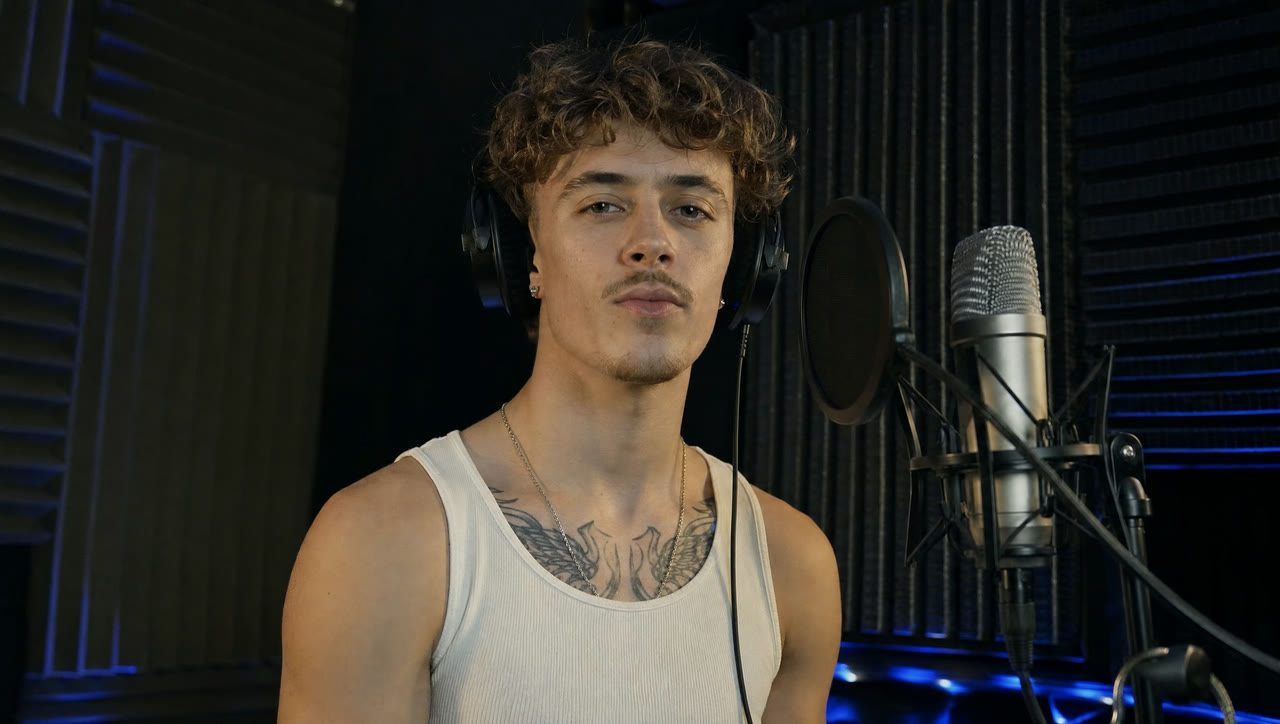
W tym premierowym demo Kling jedynym wejściem jest pierwsza klatka z młodym mężczyzną przy mikrofonie w kabinie wokalnej. Kling 4.0 utrzymuje ujęcie przez pełne 30 sekund, a jego głos i dźwięk pomieszczenia powstają razem z obrazem, z ruchem warg dopasowanym do dźwięku.
Obraz na wideo w Kling 4.0 z jednego zdjęcia
Daj Kling 4.0 jedną pierwszą klatkę i opisz, co ma się poruszać. Kadr, twarze i kolory twojego obrazu staną się ujęciem otwierającym.
Kling opublikował to demo tylko z pierwszą klatką przedstawiającą czarodziejkę wśród czerwonych nici i starych monet. Kling 4.0 zamienił nieruchomy kadr w 15 sekund zamaszystego, szybkiego ruchu – nici smagają powietrze, monety lecą prosto w obiektyw – a jej twarz i kostium się nie zmieniają.

Natywny dźwięk w Kling 4.0 z dialogami i synchronizacją ust
Każdy klip Kling 4.0 ma ścieżkę stereo. Wpisz kwestie w cudzysłowie, a postacie je wypowiedzą, z ruchem ust dopasowanym do słów.
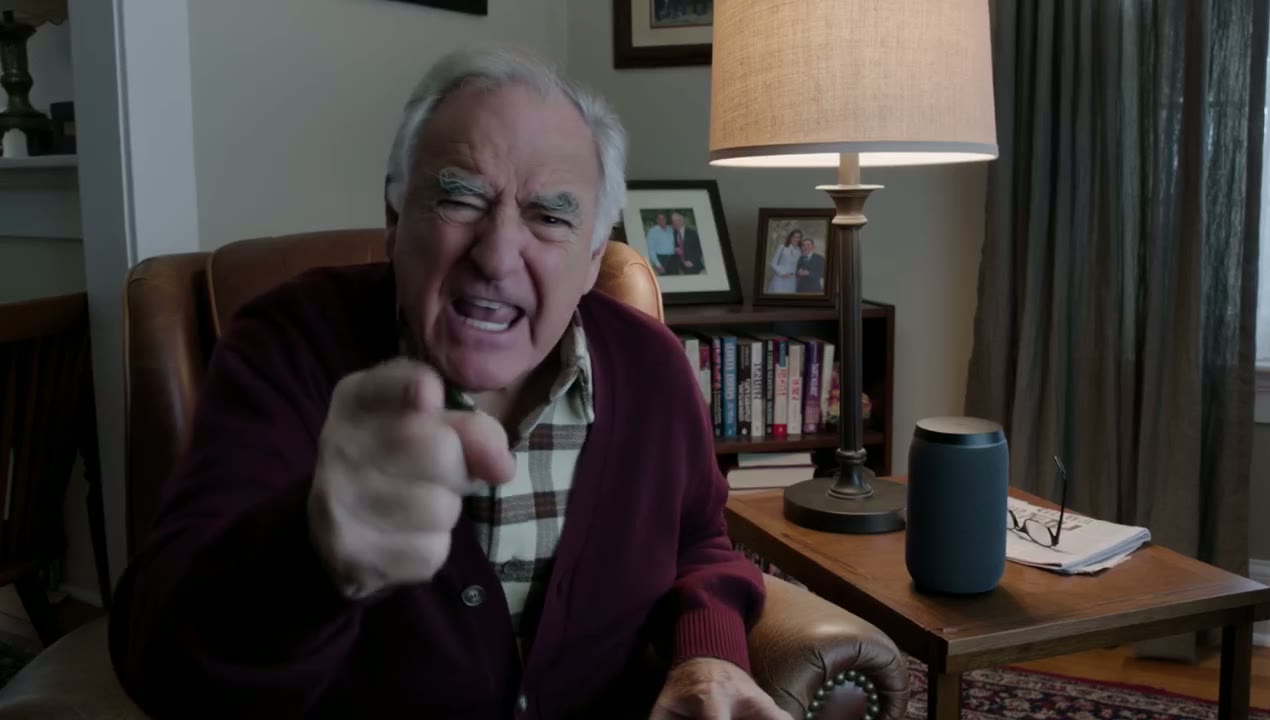
Cały prompt w demo to jedna linijka: „An old man ranting about AI.” Kling 4.0 sam dobrał bohatera, urządził salon i napisał jego tyradę.
 Kling 4.0
Prompt: An old man ranting about AI. (Kling 4.0 · 16:9 · 15s · 1080p)
Tekst na wideo w Kling 4.0 z realistycznymi ludźmi
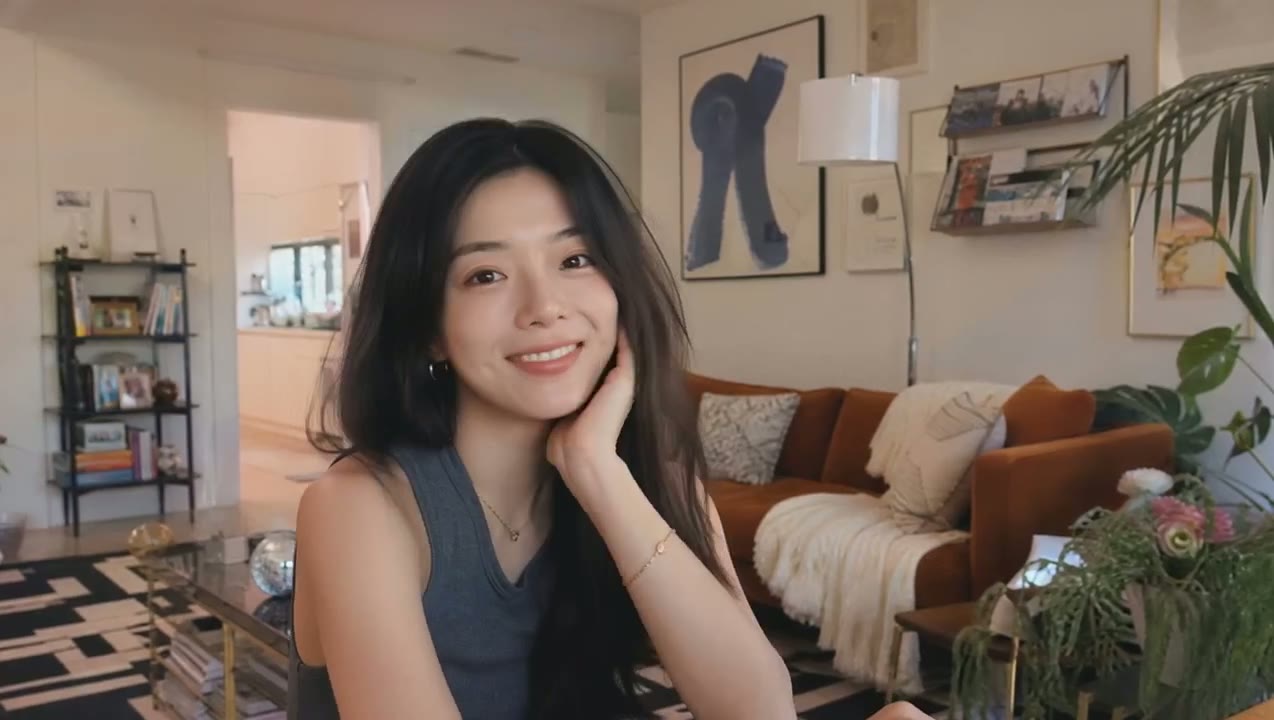
Dwa zdania wystarczą na naturalne ujęcie vloga z ręki: osobę, pokój i sposób mówienia do kamery uzupełni Kling 4.0.
Prompt w demo to dwa zdania z prośbą o pogodną vlogerkę, która się przedstawia; kadr, pokój i sposób mówienia do kamery Kling wymyślił sam.
 Kling 4.0
Prompt: A vlogger-style video in which the woman cheerfully introduces herself to the audience. Maintain a natural, authentic look and realistic image quality. (Kling 4.0 · 16:9 · 7s · 720p)
Realistyczna gra aktorska i mimika w Kling 4.0
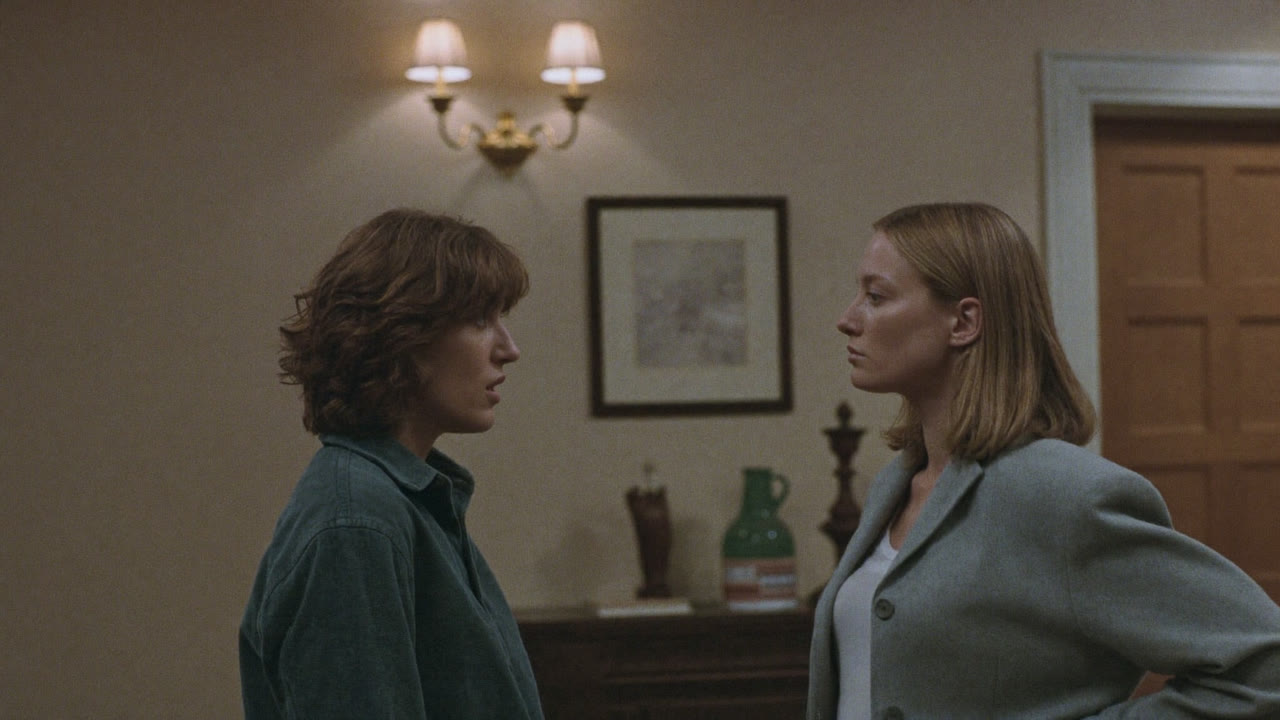
Kling 4.0 lepiej radzi sobie ze szczegółami, dzięki którym ludzie są wiarygodni: spojrzeniem zatrzymanym o chwilę za długo, wahaniem przed kwestią, zmianą postawy, gdy kłótnia przybiera inny obrót. Skóra, światło i tkaniny wyglądają naturalnie od pierwszej do ostatniej klatki.
Demo Kling zaczyna się od jednej klatki z dwiema kobietami stojącymi naprzeciw siebie w korytarzu. Wygenerowany 11-sekundowy klip rozgrywa tę konfrontację: jedna z nich odwraca się i odchodzi, a scena kończy się na czymś roztrzaskanym na podłodze.
Kontrola kamery w Kling 4.0 przy szybkiej akcji
Nazwij ruch w prompcie, a Kling 4.0 przeprowadzi go do końca: najazd na twarz, odjazd odsłaniający pokój, jazdę kamery dotrzymującą kroku biegaczowi. Wielkość planu się zmienia, cięcia wypadają czysto, a obraz nie drży i postacie nie tracą swojego wyglądu.
W tym 10-sekundowym demo premierowym dwóch zawodników taekwondo toczy sparing; kamera trzyma się blisko, unosi się do widoku z góry na matę i wraca na wysokość oczu, a każdy cios i krok pozostają ostre.
Kontrola pierwszej i ostatniej klatki w Kling 4.0
Dodaj pierwszą klatkę i, jeśli chcesz, ostatnią. Kling 4.0 uzupełni ruch pomiędzy nimi, by produkt, poza lub zakończenie trafiły dokładnie tam, gdzie trzeba.
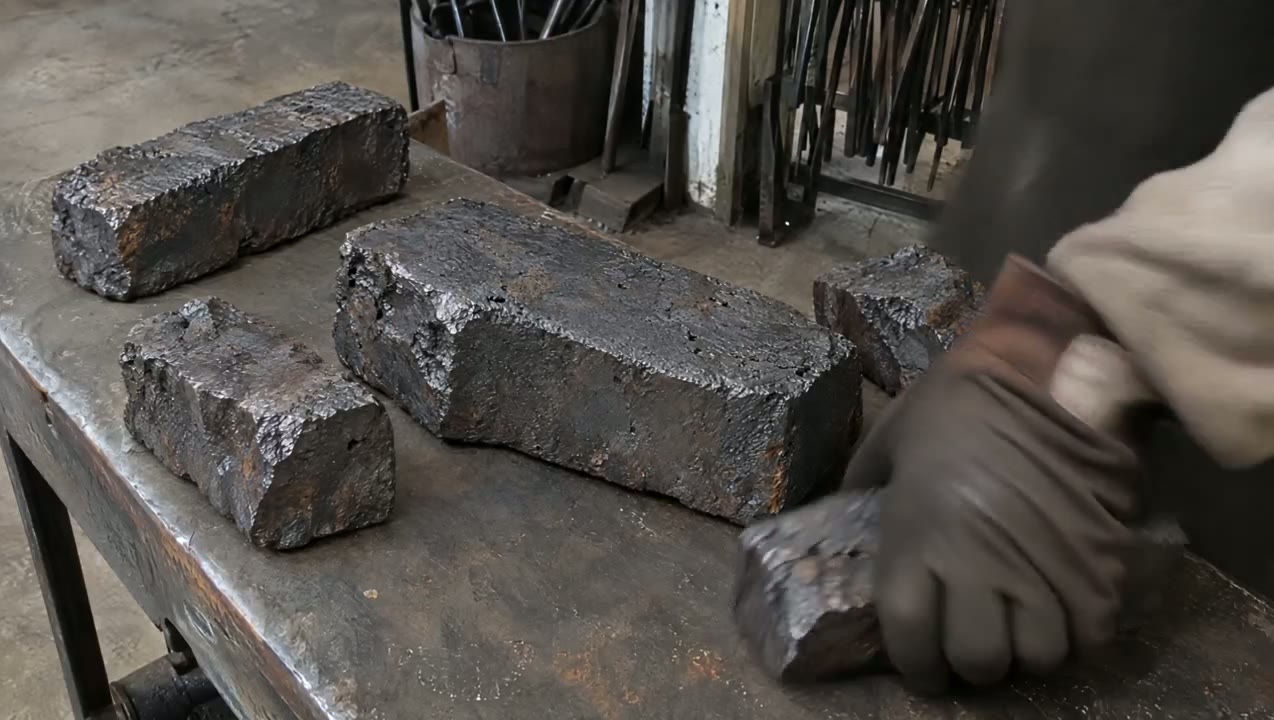
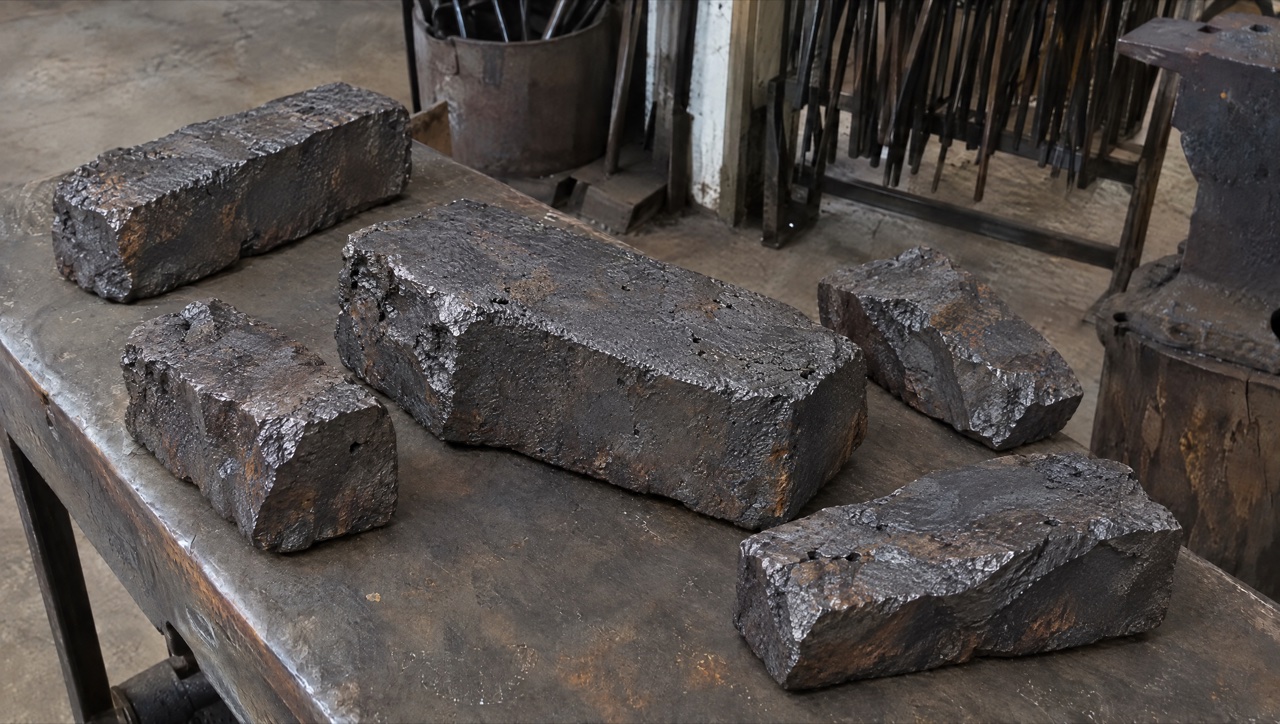
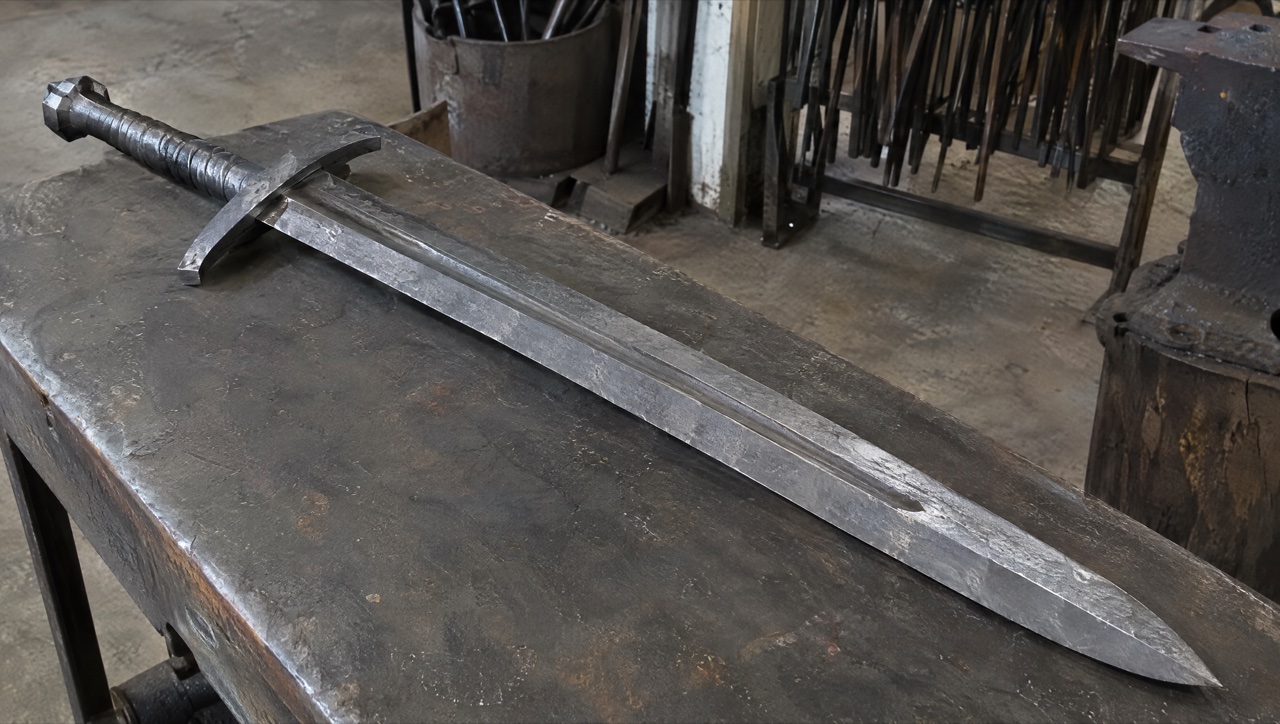
W demo pierwsza klatka pokazuje surowe bloki żelaza na stole warsztatowym, a ostatnia gotowy miecz dwuręczny na tym samym stole. Kling 4.0 wypełnił 15 sekund pomiędzy nimi sześcioma ujęciami kucia.
 Kling 4.0
Prompt: SCENE CONTEXT EXACT 1 CHARACTER — NO DUPLICATES. Interior, a worn blacksmith workshop, daytime. The same blacksmith removes the raw material, works it into a greatsword, and returns the completed sword to the original table.15 seconds, six shots. Manufacturing time is compressed through editorial cuts; individual actions retain natural weight and speed. ACTIVE REFERENCES: @Image1: exact first-frame anchor. Preserve all five iron blocks, their arrangement, the tabletop, background tools, perspective, and lighting. This image is the starting state of an active pickup shot.@Image2: exact final-frame anchor and finished-sword design. Preserve the blade silhouette, central fuller, angular curved crossguard, spiral metal grip, faceted pommel, diagonal placement, perspective, and background. This composition is reached through a visible physical placement. LOCATION MAP: The worktable fills the foreground. The tool bucket stands behind its left-center edge, the rod rack occupies the rear right, and the anvil stands at the right. The blacksmith works from the left side of the table in both endpoint shots. The camera stays on the original viewer-facing side of the table. During blade-working inserts, the tang points screen-left and the tip points screen-right. The final sword position runs from the upper-left pommel to the lower-right tip. FIRST FRAME AND SPATIAL BLOCKING: At 0.0 seconds, the frame exactly matches the raw-material reference, with five iron blocks and no hands visible. The same blacksmith immediately reaches in from the left edge. Both gloved hands approach the largest central block from opposite ends, preparing a supported two-handed lift. The blacksmith wears soot-gray sleeves, brown leather gloves, and a narrow dark strap around the right cuff. These details remain identical throughout every shot. FORMAT MODE: 15 seconds total, six shots.Hard cuts at 3.0, 5.0, 8.0, 10.0, and 11.0 seconds. Cuts compress the omitted manufacturing work and bench clearing. The opening pickup and closing placement each play as continuous physical actions.No fades, dissolves, or object-morph transitions. OPTICS: Shots 1 and 6: reference-matched elevated three-quarter framing, approximately 63° diagonal field of view and approximately 1.8 meters from the tabletop center. Exact endpoint framing takes priority over estimated optical measurements. Shots 2–5: 40° diagonal field of view, approximately 0.8 meters from the working contact point. Focus follows the hands and metal contact; the workshop background remains softly readable. Each shot holds one fixed field of view. CAMERA: A real camera operator holds the camera from the viewer-facing side of the workspace. All shots use handheld SETTLE: visible breathing sway, slight roll, and small delayed corrections. The opening camera holds its position while the iron block leaves the frame. The closing camera holds the empty tabletop composition while the sword enters, then settles into the exact final reference. The blacksmith is the only visible worker; the camera operator remains outside the image. ACTION TIMING: 0.0–3.0s — TAKE THE IRON. Start on the exact first reference; during 0.0–0.6s, the blacksmith’s matching gloved hands enter from screen-left and grip opposite ends of the largest central block. During 0.6–1.5s, the wrists brace and both hands lift the block clear of the tabletop, exposing the patch of table beneath it. During 1.5–3.0s, the blacksmith carries the supported block out through screen-left; the other four blocks remain resting on the table through the cut.3.0–5.0s — HEAT THE STOCK. Hard cut forward in time to one thick billet already glowing orange among forge coals. The same gray sleeves, brown gloves, and right-cuff strap appear at screen-left as the blacksmith holds long tongs around the billet. A short controlled pull draws the billet toward the forge mouth, with heat shimmer rising above its scaled surface.5.0–8.0s — FORGE THE BLADE. Hard cut forward to an elongated orange-hot blade blank supported on the anvil, tang left and emerging tip right. The same blacksmith braces the tang with left-hand tongs and delivers three deliberate right-hand hammer strikes along the blade flat. Each strike produces local compression, wrist recoil, and a brief scatter of dark scale.8.0–10.0s — FINISH THE METAL. Hard cut forward to a cooled blade with its fuller already formed, held by the same gloved hands against an abrasive wheel. The blacksmith makes one controlled finishing pass along the bevel. A narrow stream of sparks falls from the actual contact point as a brighter strip of metal appears.10.0–11.0s — COMPLETE THE HILT. Hard cut forward to the nearly finished sword supported on a separate assembly bench, its crossguard and spiral metal grip already fitted. The same blacksmith’s left hand braces the grip while the right hand gives the faceted pommel its final tightening turn. The completed sword now has the exact construction and finish required for the final image.11.0–15.0s — PLACE THE FINISHED SWORD.Hard cut to the original worktable, now completely clear; show its empty surface for 0.4 seconds before the same gloved hands carry the completed sword in from screen-left, one hand around the grip and the other supporting the blade flat near its balance point. From 11.4–13.8s, the blacksmith lowers the entire rigid sword diagonally, hilt toward upper-left and tip toward lower-right, easing it onto the tabletop and sliding the supporting hand free as its weight transfers to the table. From 13.8–15.0s, both hands release and withdraw through screen-left; the sword remains motionless in the exact final-reference position as the camera settles onto the final frame. PHYSICS: The raw block retains its shape and mass throughout the pickup. Both hands support it continuously; the forearms tense and the lift accelerates slowly under its weight. The anvil supports the hot blade during forging. Large changes of shape occur across editorial time jumps. The completed sword remains rigid during carrying and placement. The blade-supporting hand has visible clearance to slide free as the sword settles; the hand never passes through the blade or tabletop. Metal contact produces a short scrape and a low, heavy clink, followed by stillness. The same blacksmith clears the remaining raw stock during omitted time before the final shot. LIGHTING: The original table shots use soft daylight from upper camera-left, matching both references. Retain dark detail in the iron and protect the silver blade highlights. The forge insert uses orange coal glow from below-left as its dominant source. Return to the original neutral daylight before the sword enters the final tabletop shot. AUDIO: Quiet workshop air and distant furnace draft form the ambient bed. Opening: leather creaks, a brief iron scrape, and a restrained exertion breath as the heavy block rises.Middle: forge crackle, tong contact, three synchronized hammer impacts, abrasive scraping, and a short fitting sound.Ending: sleeve movement, glove friction against metal, a weighted sword-to-table clink, then quiet workshop ambience. The blacksmith speaks no dialogue.SFX only, no music, no score, no song, no soundtrack. CHARACTER ACTING: One consistent blacksmith performs every visible action. Soot-gray sleeves, brown leather gloves, and the dark right-cuff strap remain unchanged. Hands work deliberately: brace before lifting, maintain firm tool contact, and reduce speed before lowering the finished sword. The physical rhythm shifts from effort during the raw-block pickup to careful control during the final placement. The face and torso remain outside the crop. STYLE: Grounded workshop documentary with tactile iron, worn tools, and convincing manual labor.Soft old-photograph texture, restrained grain, and natural motion blur; no digital sharpening. Charcoal metal and muted brown surfaces dominate, with silver highlights and localized forge orange. The first and last frames preserve the supplied images’ appearance. QUALITY: Maintain consistent hands, gloves, sleeve details, metal geometry, and contact shadows. The lifted block reveals the tabletop underneath it. The closing shot visibly establishes the empty tabletop before the sword enters. Keep the full final sword readable, including its tip, guard, grip, and pommel. Avoid duplicate limbs, flickering geometry, and intersecting solid surfaces. POSITIVE CONSTRAINTS: The first frame contains exactly five iron blocks. The largest central block physically leaves the table in the same blacksmith’s two hands. The final shot begins with an empty table. The completed sword enters while visibly supported by that same blacksmith, contacts the tabletop, and remains after both hands withdraw. The last frame matches the finished-sword reference exactly. The opening pickup and final placement each remain continuous, with visible hand-object contact. Exactly one finished sword is present.No text overlays, subtitles, or music. (Kling 4.0 · 16:9 · 15s · 1080p)
Ustawienia Kling 4.0 – długość, rozdzielczość i proporcje obrazu
Kling zapowiedział więcej, niż ten serwis na razie obsługuje. Oto ustawienia, które generator faktycznie udostępnia dla Kling 4.0, więc to, co zaplanujesz, możesz naprawdę wyrenderować.
| Długość | Od 3 do 30 sekundDomyślnie 5 sekund. |
|---|---|
| Rozdzielczość | 720p lub 1080pDomyślnie 720p. |
| Proporcje | 16:9, 9:16, 1:1 lub 21:9Przy pierwszej klatce klip przyjmuje proporcje obrazu. |
| Dane wejściowe | Tekst, pierwsza klatka albo pierwsza i ostatnia klatkaTrybów wielu klatek kluczowych, referencji i edycji Kling jeszcze tu nie ma. |
| Prompt | Do 2500 znaków |
| Dźwięk | Zawsze włączonyMowa, efekty i tło dźwiękowe w stereo w każdym klipie; nie ma opcji, by go wyłączyć. |
| Kredyty | Rozliczane za sekundęStawka zależy od rozdzielczości. Generator pokazuje łączny koszt przed rozpoczęciem, a tabela cen poniżej podaje popularne długości. |
Specyfikacja i możliwości Kling 4.0
Specyfikacja pełnego modelu opublikowana przez Kling. Funkcje, które Kling oznacza jako „wkrótce”, są tu oznaczone tak samo.
| Premiera | Kling 4.0 Flash udostępniono ograniczonej grupie 28 września 2026 r. Pełny Kling 4.0 jest dostępny od 15 października 2026 r. |
|---|---|
| Tryby | Tekst na wideo, obraz na wideo, pierwsza i ostatnia klatka, wiele klatek kluczowych, Omni Reference i edycja wideo. |
| Długość klipu | Od 3 do 30 sekund w jednym generowaniu. |
| Klatki kluczowe | Do 10 obrazów jako klatki kluczowe, które ustalają stan postaci, zmiany sceny i momenty fabuły. |
| Referencje | Do 15 zasobów na generowanie: do 10 obrazów, do 5 filmów (łącznie 30 sekund) i do 7 obiektów, które mogą zawierać referencję głosu. |
| Rozdzielczość | 720p, 1080p i 4K. 10-bitowy HDR w 1080p i 4K jest oznaczony jako „wkrótce”. |
| Proporcje | 21:9, 16:9, 1:1, 9:16 i automatyczne. |
| Dźwięk | Dwukanałowe stereo z synchronizacją ruchu warg; dialogi po chińsku, angielsku, japońsku, koreańsku, hiszpańsku, portugalsku, niemiecku, francusku i w innych językach, także z regionalnymi akcentami. |
| Długość promptu | Do 8000 tokenów. |
| Przedłużanie wideo | Wielokrotne przedłużanie do 2 minut – oznaczone jako „wkrótce”. |
Zastosowania Kling 4.0
Długie ujęcia bez cięć, ujęcia z ustalonym początkiem i końcem oraz sceny dialogowe z krótkiego promptu.
- 30-sekundowe ujęcia bez cięć: Jedno długie ujęcie – przejście przez wnętrze, pościg, prezentacja produktu – bez sklejania dwóch klipów.
- Ujęcia z ustalonym początkiem i końcem: Pierwsza i ostatnia klatka ustalają, gdzie scena się zaczyna i gdzie kończy; Kling 4.0 generuje ruch pomiędzy nimi.
- Klipy z mówcą i dialogami: Prompt w jednej lub dwóch linijkach zamienia się w naturalną scenę mówioną z dźwiękiem stereo zsynchronizowanym z ruchem warg.
- Dialogi w wielu językach: Dźwięk stereo z synchronizacją ruchu warg i tekst na ekranie, który pozostaje czytelny podczas ruchu kamery.
Kling 4.0 vs Seedance 2.5, Kling 3.0, Veo 3.1 i Wan 3.0
Każda komórka poza ostatnim wierszem pochodzi z bieżących ustawień modeli w SeedVideo AI, więc tabela odpowiada temu, co generator pozwala dziś wybrać.
Chcesz zobaczyć inną wersję swojego pomysłu? Jeden generator wideo AI łączy Kling 4.0 z Seedance, Kling, Veo i Wan, więc ten sam prompt uruchomisz na innym modelu za kredyty, które już masz.
| Funkcja |  Kling 4.0 | Kling 4.0 Flash |  Seedance 2.5 | Kling 3.0 |  Veo 3.1 Fast |  Wan 3.0 |
|---|---|---|---|---|---|---|
| Najdłuższy klip | 30 s | 20 s | 30 s | 15 s | 8 s | 30 s |
| Najwyższa rozdzielczość | 1080p | 720p | 1080p | 4K | 4K | 1080p |
| Proporcje obrazu | 16:9, 9:16, 1:1, 21:9 | 16:9, 9:16, 1:1, 21:9 | 16:9, 9:16, 1:1, 4:3, 3:4, 21:9 | 16:9, 9:16, 1:1 | 16:9, 9:16 | 16:9, 9:16, 1:1, 4:3, 3:4 |
| Obrazy referencyjne | Nie | Nie | 30 | Nie | Nie | 10 |
| Filmy referencyjne | Nie | Nie | 10 | Nie | Nie | 5 |
| Edycja i wydłużanie klipu | Nie | Nie | Tak | Nie | Nie | Nie |
| Kredyty za 5 s w 720p | 24 kredytów | 14 kredytów | 31 kredytów | 13 kredytów | 15 kredytów | 12 kredytów |
| Najlepszy do | Do 30 s z dźwiękiem stereo, z tekstu lub pierwszej klatki | Szybsze i tańsze szkice 720p do 20 s | Długie klipy z wieloma ujęciami, dużą liczbą referencji i natywnym dźwiękiem | Tańsze klipy Kling do 15 s | Realistyczne krótkie ujęcia z dźwiękiem | Długie ujęcia przy mniejszym budżecie |
Kredyty to stawki z pakietów za 5-sekundowy klip w 720p; w subskrypcji sekunda kosztuje mniej.
Zalety i wady Kling 4.0
Co robi dziś dobrze w SeedVideo AI i co trzeba obejść.
Mocne strony
- Długość: Dowolna długość od 3 do 30 sekund w jednej generacji.
- Dźwięk: Każdy klip ma ścieżkę stereo, a mowa jest zsynchronizowana z ruchem warg.
- Kontrola klatek: Pierwsza klatka i opcjonalnie ostatnia wyznaczają, gdzie ujęcie się zaczyna i kończy.
- Krótkie prompty: Pomysł w jednej lub dwóch linijkach często wystarcza na naturalną, wiarygodną scenę.
Ograniczenia
- Tryby w tym serwisie: Na razie tylko tekst na wideo oraz pierwsza/ostatnia klatka; trybów wielu klatek kluczowych i referencji Kling jeszcze tu nie ma.
- Brak wersji bez dźwięku: Dźwięku nie da się wyłączyć; wycisz klip później, jeśli chcesz podłożyć własną muzykę.
- Czas renderowania: Wolniej niż większość modeli: 3-sekundowy klip testowy powstawał około trzech minut.
- Długość promptu: Kompozytor przyjmuje prompty do 2500 znaków, więc bardzo długie briefy trzeba skrócić.
Ile kosztuje Kling 4.0 i jak zacząć
Punkty wyjścia dla Kling 4.0
Wybierz punkt wyjścia poniżej, a generator otworzy się z wybranym modelem Kling 4.0.
Cena Kling 4.0 za klip
Ceny przy pakietach kredytów, pobrane z bieżących ustawień generatora. W subskrypcji sekunda wychodzi taniej.
| Rozdzielczość | 5 s | 10 s | 30 s |
|---|---|---|---|
| 720p | 24 kredytów | 47 kredytów | 141 kredytów |
| 1080p | 35 kredytów | 70 kredytów | 210 kredytów |
Jak używać Kling 4.0 w 4 krokach
- Krok 1
Wybierz Kling 4.0
Otwórz kompozytor na tej stronie albo pełny generator i wybierz Kling 4.0 z menu modeli w filtrze Kling.
- Krok 2
Opisz momenty fabuły
Zacznij od tego, co się porusza i kiedy: obiekt, akcja, kamera i moment każdego zwrotu akcji. Tutaj prompt może mieć do 2500 znaków.
- Krok 3
Dodaj pierwszą klatkę, jeśli chcesz
Prześlij pierwszą klatkę, by ujęcie zaczęło się od Twojego obrazu, i ostatnią, jeśli chcesz ustalić, gdzie się kończy.
- Krok 4
Ustaw długość i wyślij
Wybierz długość od 3 do 30 sekund, ustaw proporcje, sprawdź wycenę w kredytach i wyślij.
Przykłady promptów do Kling 4.0
Prompty opublikowane przez Kling AI razem z przykładami Kling 4.0, każdy obok klipu, który wygenerował; długi prompt z kowalem jest tu skrócony. Wczytaj dowolny do generatora i zmień temat, scenerię lub długość. Prompt z klatkami wymaga własnej pierwszej i ostatniej klatki.
Tyrada starszego pana
Tekst na wideo · 15 sAn old man ranting about AI.
Źródło: Kling AI
Wypróbuj ten promptVlogerka się wita
Tekst na wideo · 7 sA vlogger-style video in which the woman cheerfully introduces herself to the audience. Maintain a natural, authentic look and realistic image quality.
Źródło: Kling AI
Wypróbuj ten promptStarzy przyjaciele spotykają się o zmierzchu
Tekst na wideo · 7 sA continuous 7-second shot set in the UK. Two friends who have not seen each other for a long time meet at the corner of a quiet street at dusk, surrounded by a diverse crowd going about their daily lives. They smile, walk quickly toward each other, and share a warm embrace. Their facial expressions and body movements are natural. A handheld camera follows them with subtle camera shake. Soft, warm lighting with a nostalgic cinematic film look. Include natural footsteps, street ambience, background music, and English dialogue.
Źródło: Kling AI
Wypróbuj ten promptOd żelaza do miecza dwuręcznego
Pierwsza + ostatnia klatka · 15 sInterior, a worn blacksmith workshop, daytime. The same blacksmith removes the raw material, works it into a greatsword, and returns the completed sword to the original table. 15 seconds, six shots, hard cuts at 3.0, 5.0, 8.0, 10.0 and 11.0 seconds. First frame: exactly five iron blocks on the worktable, no hands visible. Last frame: the finished sword lying diagonally on the same table. 0.0–3.0s — TAKE THE IRON: both gloved hands lift the largest central block and carry it out through screen-left. 3.0–5.0s — HEAT THE STOCK: one thick billet glowing orange among forge coals. 5.0–8.0s — FORGE THE BLADE: three deliberate hammer strikes along the orange-hot blade on the anvil. 8.0–10.0s — FINISH THE METAL: one finishing pass on an abrasive wheel, sparks falling from the contact point. 10.0–11.0s — COMPLETE THE HILT: the final tightening turn of the faceted pommel. 11.0–15.0s — PLACE THE FINISHED SWORD: the empty table, then the sword carried in and lowered into the exact final position. Handheld camera, soft daylight from upper camera-left, orange coal glow in the forge shot. AUDIO: workshop air, forge crackle, three synchronized hammer impacts, a weighted sword-to-table clink. SFX only, no music. No text overlays or subtitles.
Źródło: Kling AI
Wypróbuj ten prompt
Więcej modeli wideo AI w SeedVideo AI
Najczęstsze pytania o Kling 4.0
Kiedy ukazał się Kling 4.0?
Czy Kling 4.0 jest tu darmowy?
Kling 4.0 czy Kling 4.0 Flash?
Co jeszcze nie działa?
Czym jest Kling 4.0?
Co się zmieniło względem Kling 3.0?
Czym jest Kling 4.0 Flash?
Które modele Kling działają w SeedVideo AI?
Czy SeedVideo AI jest powiązane z Kling AI lub Kuaishou?
Stwórz swoje pierwsze wideo w Kling 4.0
Prompt, pierwsza i ostatnia klatka w razie potrzeby, długość, wysyłka. Każde generowanie trafia do tej samej biblioteki zasobów co Twoje materiały z Seedance.
Otwórz generator