
First & Last Frame to VideoSet Where the Shot Starts and Ends
Attach two images below: the first one becomes the opening frame, the second the closing frame. Then describe how the camera and the subject get from one to the other. Seedance 2.5 by default; 10 more models take the pair.
Models, limits and prices read from the live generator on .
An image-to-video model starts from your picture and decides for itself where the shot ends. A first and last frame pins both ends: you choose the opening composition and the closing one, and the model fills in the camera move, the motion and the light in between. It is the tool for transitions, reveals, before-and-after shots, product turns and any clip that has to land on an exact picture.
First and last frame to video means you upload two stills, the opening shot and the closing shot, and the AI generates the motion between them. On SeedVideo AI, 11 models take the pair: Seedance 2.5, 2.0, 2.0 Fast, 2.0 Mini and 1.5 Pro, Kling 3.0, Kling O3, Veo 3.1 Fast and Pro, Wan 3.0 and MiniMax H3. Clips run 2 to 30 seconds depending on the model. A last frame costs nothing extra: you pay the model’s image-to-video rate, from 0.60 credits per second (Seedance 1.5 Pro, 480p) to 6.10 on Seedance 2.5 at 720p. Free sign-up credits run Seedance 2.0 Mini and Seedance 1.5 Pro.


A real first and last frame video: street to stand in 8 seconds
A paid user’s run on SeedVideo AI, shown unedited apart from compression. The first frame is the outside of an exhibition centre, the last frame is one stand inside the hall, and the instruction asks for one unbroken forward camera move that joins them.
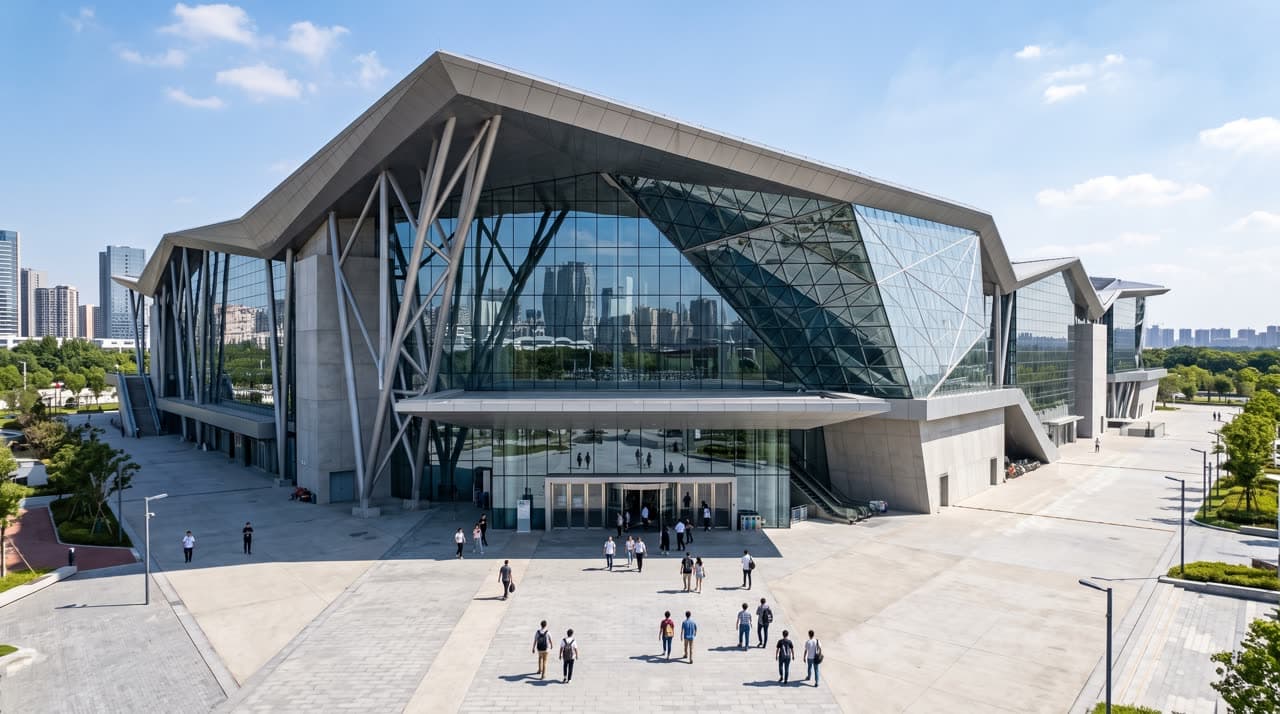
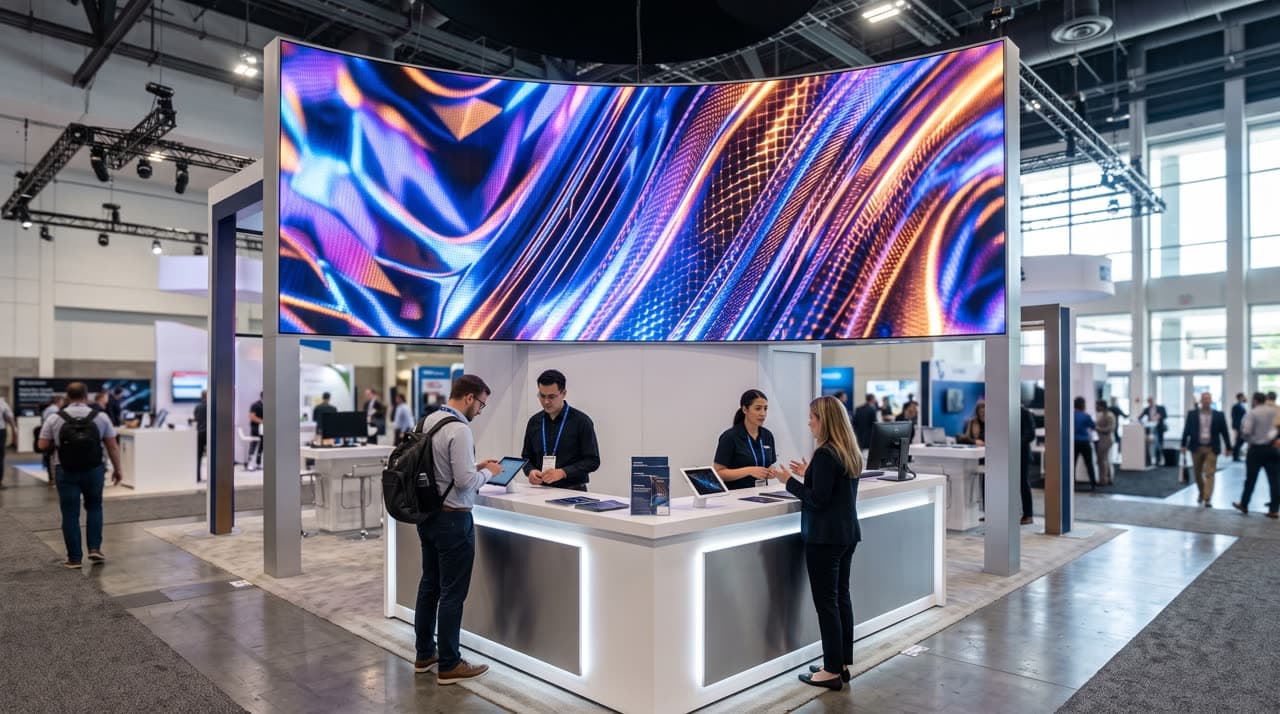
- Model: Seedance 2.5 · Inputs: first frame + last frame
- Duration: 8 seconds · Resolution: 720p · Aspect ratio: adaptive (follows the first frame)
- Audio: on · Content filter: on
- Cost: 49 credits (8 s × 6.1 credits per second at 720p, no charge for the last frame)
- Time from submit to finished video: 3 min 3 s
The instruction names the two images by role (“starting from the exterior … in the first reference image and ending at the exhibition booth shown in the second”), describes one forward move with the doors opening just before the camera reaches them, asks the model to preserve the building and the stand exactly, rules out cuts and teleporting, and ends by saying the final composition must match the last frame.
Full instruction used for this run
Cinematic continuous camera move starting from the exterior of the exhibition building shown in the first reference image and ending at the exhibition booth shown in the second reference image.

The camera smoothly flies forward toward the main entrance of the building, maintaining a steady, elegant forward motion throughout the entire shot. The building architecture, proportions, facade, materials and environment remain consistent with the first reference image.

As the camera approaches the entrance, the large entrance doors smoothly open automatically just before the camera reaches them. The camera does not stop or slow down significantly — it continues flying forward seamlessly through the open doorway into the building.

Inside, smoothly transition into the exhibition hall and continue the same forward camera movement toward the exhibition booth from the second reference image. The booth gradually becomes the main focus of the shot. Preserve the exact design, geometry, branding, colors, materials and proportions of the exhibition booth from the second reference image.

The entire shot should feel like one continuous uninterrupted camera take with natural cinematic acceleration and deceleration, realistic parallax, convincing depth and spatial continuity. No cuts, no teleportation, no sudden camera changes.

Premium architectural visualization, photorealistic, cinematic lighting, realistic reflections, physically accurate materials, subtle motion blur, smooth stabilized camera movement, high-end commercial film quality.

The camera always moves forward toward the destination. The final composition matches the second reference image, with the exhibition booth clearly visible and prominently framed.
Load both frames and this instruction into the generator to rerun it or swap in your own pictures; nothing starts until you press Generate.
How to make a video from a first and last frame
- 1
Prepare two matching stills
Use the same aspect ratio for both, ideally the same size. They can be photos, renders or AI images; the closer they are in style and light, the smoother the path between them. Seedance models take JPEG, PNG or WebP up to 30 MB, between 300 and 6,000 pixels a side.
- 2
Attach them in order
In the generator, attach two images: the first one becomes the first frame and the second one the last frame. On Seedance 1.5 Pro, Kling and Veo you can also pick “First + Last Frames” in the frame menu. A third image on a Seedance model turns the set into reference images instead.
- 3
Describe the path, not the pictures
The model already sees both frames. Tell it how to get from one to the other: the camera move, what changes on the way, the pace, and that the shot ends on the last frame.
- 4
Pick model, length and resolution, then generate
Choose one of the 11 models, the length and the resolution. The composer shows the exact credit cost before you start; failed or refused runs are not charged.
Starter instruction:
One continuous shot from the first frame to the last frame. The camera [describe the move, e.g. glides forward through the doorway] while [describe what changes]. Keep the subject, materials and light consistent, no cuts. End exactly on the composition of the last frame.
Models that support first and last frames
Catalogue credits per second of output, before plan discounts. The last frame is free: each figure is the same as that model’s image-to-video rate.
| Model | Length | Credits per second | Who can run it |
|---|---|---|---|
| Seedance 2.5 | Length:4–30 s | Credits per second:3.05 at 480p · 6.10 at 720p · 15.10 at 1080p | Every plan, every credit pack |
| Seedance 2.0 | Length:4–15 s | Credits per second:2 at 480p · 4 at 720p · 10 at 1080p | Every plan, every credit pack |
| Seedance 2.0 Fast | Length:4–15 s | Credits per second:1.74 at 480p · 3.75 at 720p | Every plan, every credit pack |
| Seedance 2.0 Mini | Length:4–15 s | Credits per second:1.16 at 480p · 2.50 at 720p | Free credits, every plan, every credit pack |
| Seedance 1.5 Pro | Length:4–12 s | Credits per second:0.60 at 480p · 1.20 at 720p · 2.60 at 1080p | Free credits, every plan, every credit pack |
| Kling 3.0 | Length:4–15 s | Credits per second:2.50 at 720p · 4 at 1080p | Every plan, Creator pack and up |
| Kling O3 | Length:4–15 s | Credits per second:2.50 at 720p · 4 at 1080p | Every plan, Creator pack and up |
| Veo 3.1 Fast | Length:4, 6 or 8 s | Credits per second:3 at 720p · 3 at 1080p · 10 at 4K | Every plan, Creator pack and up |
| Veo 3.1 Pro | Length:4, 6 or 8 s | Credits per second:8 at 720p · 8 at 1080p | Every plan, no credit pack |
| Wan 3.0 | Length:2–30 s | Credits per second:1.20 at 480p · 2.40 at 720p · 4.80 at 1080p | Every plan, every credit pack |
| MiniMax H3Also runs on a last frame alone | Length:5–15 s | Credits per second:4.55 at 2K | Pro and Premium plans, every credit pack |
Resolution is also capped by plan: 720p on free credits and, for Seedance, on Lite; 1080p for Seedance on Pro, Premium and credit packs; 1080p for other models on Lite, 2K on Pro and 4K on Premium where the model offers it.
What a first and last frame video costs on each plan
Credits the generator charges on each plan today (plan discounts included, as a new subscriber), and the dollar value of those credits at the plan’s price per credit. Taxes not included. Failed or refused runs are not charged.
| Plan | Seedance 2.0 Mini, 4 s, 480p | Seedance 2.5, 8 s, 720p (the example above) | Kling 3.0, 5 s, 1080p |
|---|---|---|---|
| Free sign-up credits$0 · 5 credits once | Seedance 2.0 Mini, 4 s, 480pFree (5 of 5 credits) | Seedance 2.5, 8 s, 720p (the example above)Not on this plan | Kling 3.0, 5 s, 1080pNot on this plan |
| Lite, monthly$14.90/mo · 100 credits/mo | Seedance 2.0 Mini, 4 s, 480p$0.75 (5 credits) | Seedance 2.5, 8 s, 720p (the example above)$6.56 (44 credits) | Kling 3.0, 5 s, 1080p$2.68 (18 credits) |
| Lite, billed yearly$13/mo · 100 credits/mo | Seedance 2.0 Mini, 4 s, 480p$0.65 (5 credits) | Seedance 2.5, 8 s, 720p (the example above)$5.72 (44 credits) | Kling 3.0, 5 s, 1080p$2.34 (18 credits) |
| Pro, monthly$29/mo · 200 credits/mo | Seedance 2.0 Mini, 4 s, 480p$0.58 (4 credits) | Seedance 2.5, 8 s, 720p (the example above)$4.93 (34 credits) | Kling 3.0, 5 s, 1080p$2.03 (14 credits) |
| Pro, billed yearly$14.50/mo · 200 credits/mo | Seedance 2.0 Mini, 4 s, 480p$0.29 (4 credits) | Seedance 2.5, 8 s, 720p (the example above)$2.47 (34 credits) | Kling 3.0, 5 s, 1080p$1.01 (14 credits) |
| Premium, monthly$149/mo · 1,300 credits/mo | Seedance 2.0 Mini, 4 s, 480p$0.34 (3 credits) | Seedance 2.5, 8 s, 720p (the example above)$3.78 (33 credits) | Kling 3.0, 5 s, 1080p$1.60 (14 credits) |
| Premium, billed yearly$99/mo · 1,300 credits/mo | Seedance 2.0 Mini, 4 s, 480p$0.23 (3 credits) | Seedance 2.5, 8 s, 720p (the example above)$2.51 (33 credits) | Kling 3.0, 5 s, 1080p$1.07 (14 credits) |
| Starter credit pack$29.90 one-time · 200 credits | Seedance 2.0 Mini, 4 s, 480p$0.75 (5 credits) | Seedance 2.5, 8 s, 720p (the example above)$7.33 (49 credits) | Kling 3.0, 5 s, 1080pNot on this plan |
| Creator credit pack$49.90 one-time · 375 credits | Seedance 2.0 Mini, 4 s, 480p$0.67 (5 credits) | Seedance 2.5, 8 s, 720p (the example above)$6.52 (49 credits) | Kling 3.0, 5 s, 1080p$2.66 (20 credits) |
“Not on this plan” means the plan cannot run that model or resolution: free credits cover the entry models only, Lite and free credits stop Seedance at 720p, and Kling needs a subscription or a Creator pack and up. See pricing for every plan and pack.
First and last frame specs
- Models
- Seedance 2.5, 2.0, 2.0 Fast, 2.0 Mini and 1.5 Pro; Kling 3.0 and Kling O3; Veo 3.1 Fast and Pro; Wan 3.0; MiniMax H3
- Inputs
- Two images, first frame then last frame, plus a text instruction. Seedance 2.x: JPEG, PNG or WebP up to 30 MB; Kling: JPEG or PNG up to 10 MB; Wan 3.0: up to 20 MB
- Last frame on its own
- MiniMax H3 only. Every other model needs a first frame before it takes a last frame
- Length
- 2–30 s on Wan 3.0, 4–30 s on Seedance 2.5, 4, 6 or 8 s on Veo 3.1, 4–15 s on most others (see the table)
- Resolution
- 480p to 4K depending on model and plan: 720p on free credits, 1080p for Seedance on Pro and Premium, up to 4K on Veo 3.1 Fast with Premium
- Aspect ratio
- On Seedance models the output follows the first frame (adaptive); use two images with the same ratio on every model
- Audio
- Seedance, Kling and Wan models generate sound by default and have an on/off switch at the same price
- Price
- The model’s normal image-to-video rate; adding the last frame is free
- Watermark
- None, on any plan or free credits
- Generation time
- Median about 2 minutes on Seedance 2.0 Mini and 2.5 minutes on Seedance 2.5 for frame-pair runs over the last 30 days
Tips for a smooth path between two frames
- Keep the two frames in one world: same subject, same light direction, same lens feel. A path the camera could really travel produces a smooth shot; two unrelated pictures produce a morph.
- Say the route in the instruction. “The camera flies forward through the open doors into the hall” gives the model a path; “transition from image 1 to image 2” leaves it guessing.
- Name what must not change (the building, the product, the logo, the face) and ask for “one continuous shot, no cuts” when you want a single take.
- Give the move enough time. A big change of place needs 8 seconds or more; a small turn of a product reads well in 4 to 5.
- For a seamless loop, use the same image as first and last frame and describe a motion that returns to its start.
- Real people’s faces and copyrighted characters can be refused under the model providers’ content rules. A refused run is not charged.
When to use another tool
- You only have the opening picture
- Image to video. One image becomes the first frame and the model decides where the shot goes.
- A character or product has to look the same across shots
- Seedance 2.5 reference images. Three or more images on a Seedance model act as references for identity and style, not as fixed frames.
- You already have the clip and it ends too early
- AI video extender. Continues an existing video from its last frame for 4 to 30 seconds on Seedance 2.5.
- The shot does not exist yet
- Text to video. Write the scene and generate it, then reuse a frame you like as the first frame of the next shot.
First and last frame to video FAQ
- What is first and last frame to video?
- It is image-to-video with two images instead of one. You upload the frame the clip should start on and the frame it should end on, write how the shot gets from one to the other, and the model generates the motion in between. Some tools call it start and end frame or keyframe video.
- Which AI video models support first and last frames?
- On SeedVideo AI, 11 models: Seedance 2.5, 2.0, 2.0 Fast, 2.0 Mini and 1.5 Pro, Kling 3.0, Kling O3, Veo 3.1 Fast, Veo 3.1 Pro, Wan 3.0 and MiniMax H3. Sora 2, Sora 2 Pro and SeeDance 1 Pro Fast take a first frame only.
- Does adding a last frame cost more?
- No. A first and last frame job costs exactly what the same model charges for image to video at that length and resolution. The table above lists the catalogue rate per second for every model; plan discounts lower it further.
- Can I use first and last frame to video for free?
- Yes, on a short clip. New accounts get free sign-up credits with no card, which run Seedance 2.0 Mini and Seedance 1.5 Pro: a 4-second 480p clip on 2.0 Mini, or on 1.5 Pro 4 to 8 seconds at 480p or 4 seconds at 720p. The other models need a plan or a credit pack. There is no watermark on any video.
- Can I upload only a last frame?
- Only on MiniMax H3, which can work backwards from a closing image. Every other model needs a first frame; the generator will not send a last frame on its own to them.
- Can I combine first and last frames with reference images?
- Not in the same run. On the Seedance models, two images are a first and last frame; three or more become a reference group that guides identity and style without fixing the opening or closing picture.
- How long can a first and last frame video be?
- It depends on the model: up to 30 seconds on Seedance 2.5 and Wan 3.0, up to 15 on Seedance 2.0 Fast and Mini, Kling 3.0, Kling O3 and MiniMax H3, up to 12 on Seedance 2.0 and 1.5 Pro, and 4, 6 or 8 seconds on Veo 3.1.
- Why does my video morph instead of moving?
- The two frames are too far apart for a believable path, or the instruction does not describe one. Use frames from the same scene and lighting, describe the camera route and what changes, and give a large move 8 seconds or more.
SeedVideo AI is an independent platform and is not affiliated with ByteDance, Kuaishou, Google, Alibaba, MiniMax or the other model providers named here. The example above is a customer’s generation on SeedVideo AI.