Seedance 2.5 vs Kling 3.0: Which AI Video Model Is Better?

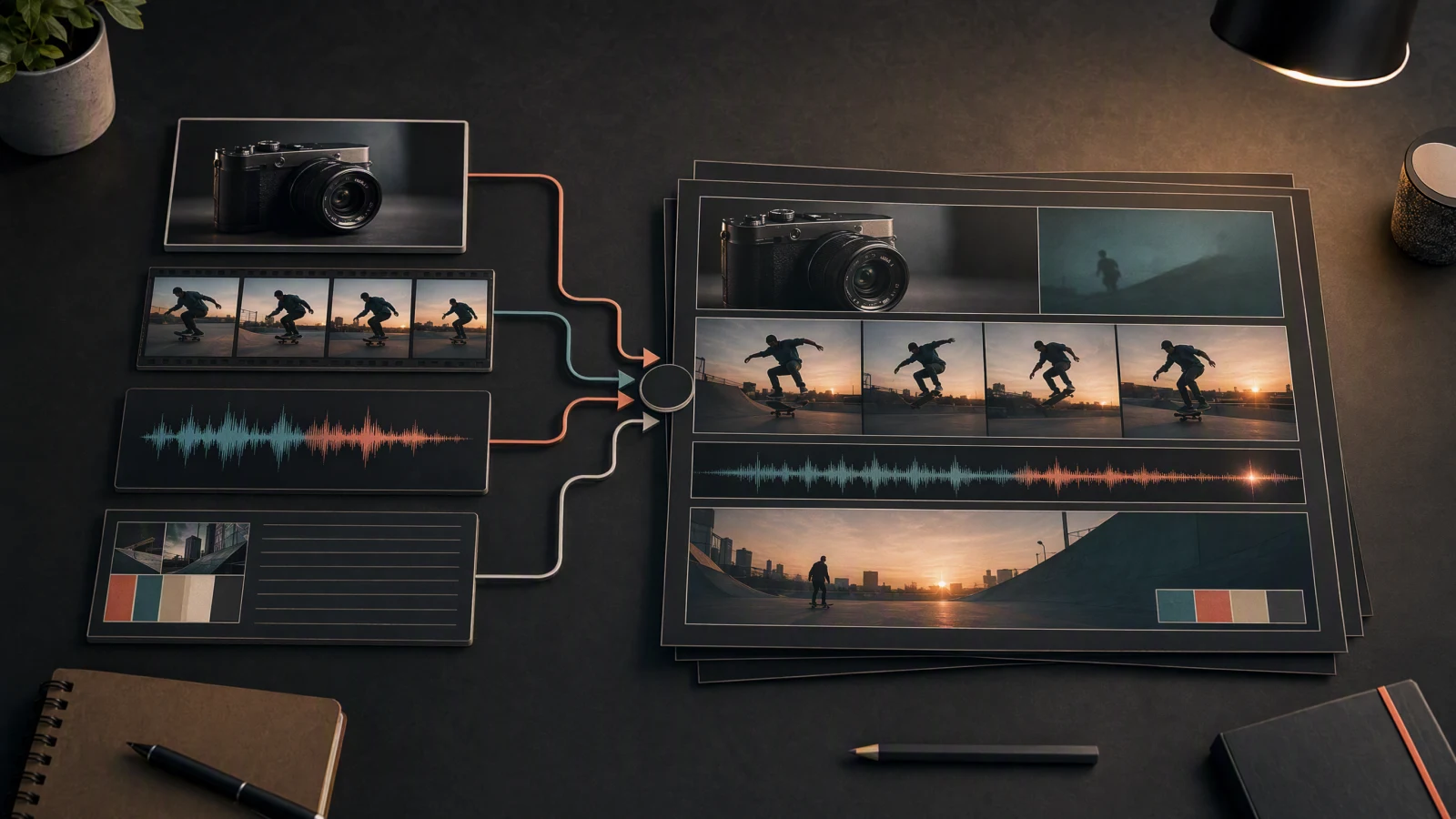
Editorial night-market comparison scene.
Seedance 2.5 and Kling VIDEO 3.0 solve different production problems. Seedance 2.5 suits a clip up to 30 seconds with many references or a localized edit. Kling VIDEO 3.0 suits multi-shot storyboarding, native dialogue audio, element binding, and controlled 3 to 15 second scenes. The official pages point to different strengths, so the useful comparison is the workflow each one supports. This article compares current product surfaces and lays out a fair test plan. Check the model selector and billing mode before promising duration, audio, resolution, or cost.
Match the model to the brief, then run the same prompt, input, ratio, duration, and scorecard on both. Seedance 2.5 has the broader announced input and editing range. Kling VIDEO 3.0 has the clearer native audio, multi-shot, element reference, and per-second credit rules. Start with Seedance for a longer reference-led clip and Kling 3.0 for a storyboarded scene with audio or recurring characters.
TL;DR
- Best starting point for a long, reference-led sequence: Seedance 2.5, when the current platform exposes the model and its reference controls.
- Best starting point for a multi-shot scene with native audio: Kling VIDEO 3.0, when the 3 to 15 second range fits the brief.
- Best for element binding and recurring characters: Kling VIDEO 3.0, whose guide documents element references and 3 or more character coreference.
- Best for current budgeting: SeedVideo AI uses plan credits; Kling 3.0 publishes resolution, audio, and voice-control rates per second. Use approved-clip cost as the budgeting metric.
- Best evidence: current official pages and source screenshots. The visuals below document capabilities and pricing.
Quick answer
For several references, a longer sequence, or a localized revision, check the Seedance 2.5 model page and the live selector. For a storyboarded 3 to 15 second scene with dialogue, sound effects, elements, or named characters, read the Kling VIDEO 3.0 Model User Guide. For hands-on Seedance work, use the AI text-to-video generator and record the model and controls shown.
Seedance 2.5 vs Kling 3.0 at a glance
| Decision factor | Seedance 2.5 | Kling VIDEO 3.0 | What the evidence supports |
|---|---|---|---|
| Main fit | Longer, reference-led clips and localized revisions | Storyboarded 3 to 15 second scenes with native audio | Workflow distinction |
| Published duration signal | Up to 30 seconds on the current Seedance model page | Flexible 3 to 15 seconds in the current VIDEO 3.0 guide | Confirm the live selector before promising a duration |
| Reference inputs | Text, images, video, and audio; the page describes up to 50 assets | Element references, start frame plus references, and multi-image or video element inputs | Both have control, but the control is shaped differently |
| Story structure | Prompt-led longer clip and localized editing | Multi-Shot and custom multi-shot storyboard generation | Kling documents the more explicit shot structure |
| Audio | Audio can be part of the multimodal workflow | Native audio, voice control, multilingual speech, and dialect support | Kling has the clearer built-in audio surface |
| Current price signal | SeedVideo AI plan and credit pages | Kling 3.0 per-second rates by resolution and audio mode | Keep version, date, and billing mode beside every number |
| Best first question | Can the platform expose the references and duration you need? | Can the storyboard, audio, and elements pass your hard checks? | Access comes before preference |
What Seedance 2.5 officially shows
The current Seedance 2.5 model page describes a reference-led workflow. It lists clips up to 30 seconds, up to 50 multimodal references, text, image, video, and audio inputs, plus localized editing. It also lists 480p and 720p MP4 or MOV output. Availability depends on the account and interface.

SeedVideo AI model page poster for the Seedance 2.5 launch promo. Source: Seedance 2.5 model page. Captured 2026-08-07, Asia/Shanghai.
The examples show intended range. A same-input comparison needs its own run.

Official Seedance 2.5 product-ad example showing a product-photo use case. Source: Seedance 2.5 model page. Captured 2026-08-07, Asia/Shanghai.
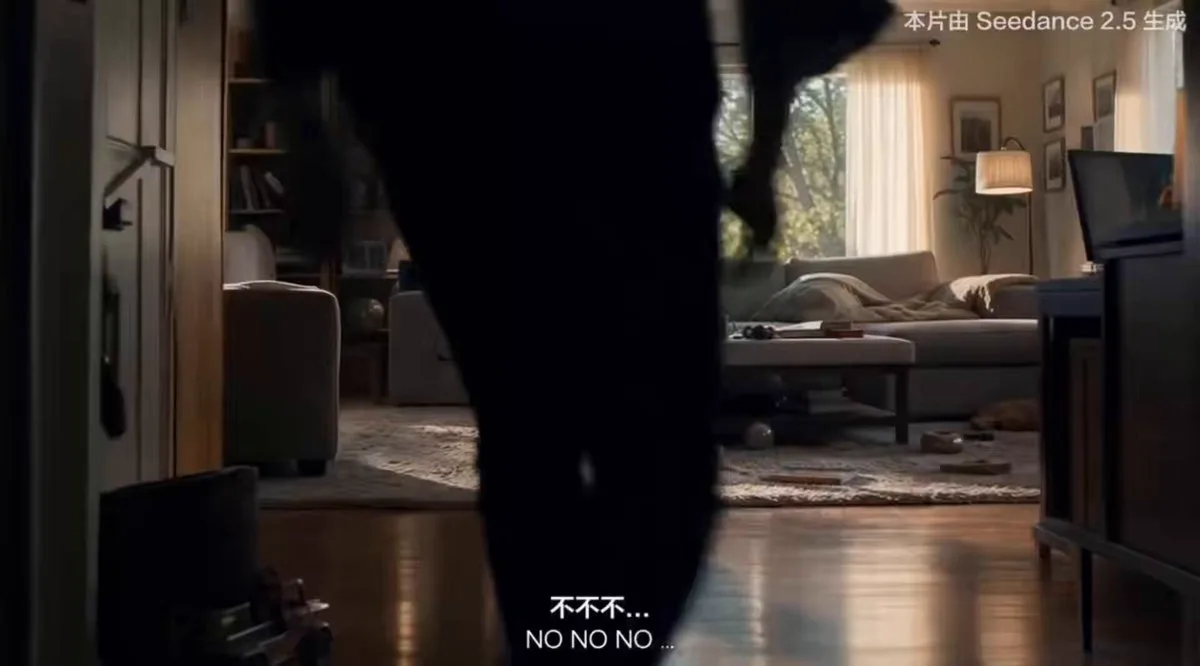
Official Seedance 2.5 cinematic story example. Source: Seedance 2.5 model page. Captured 2026-08-07, Asia/Shanghai.

Official Seedance 2.5 creator sample poster showing a longer scene. Source: Seedance 2.5 model page. Captured 2026-08-07, Asia/Shanghai.

Official Seedance 2.5 single-prompt travel example. It helps show the kind of everyday scene the page uses to explain scene flow. Source: Seedance 2.5 model page. Captured 2026-08-07, Asia/Shanghai.

Official Seedance 2.5 music-led animation example for audio-aware planning. Source: Seedance 2.5 model page. Captured 2026-08-07, Asia/Shanghai.
What Kling VIDEO 3.0 officially shows
Kling's current guide describes VIDEO 3.0 as an upgrade from 2.6. It keeps text-to-video, image-to-video, start and end frames, and native audio, then adds Multi-Shot, custom multi-shot storyboards, element references, 3 or more character coreference, multilingual speech, dialect support, and flexible 3 to 15 second output. Kuaishou's February 2026 announcement also describes native audio, multi-shot generation, multimodal inputs and outputs, and element consistency across the 3.0 series.
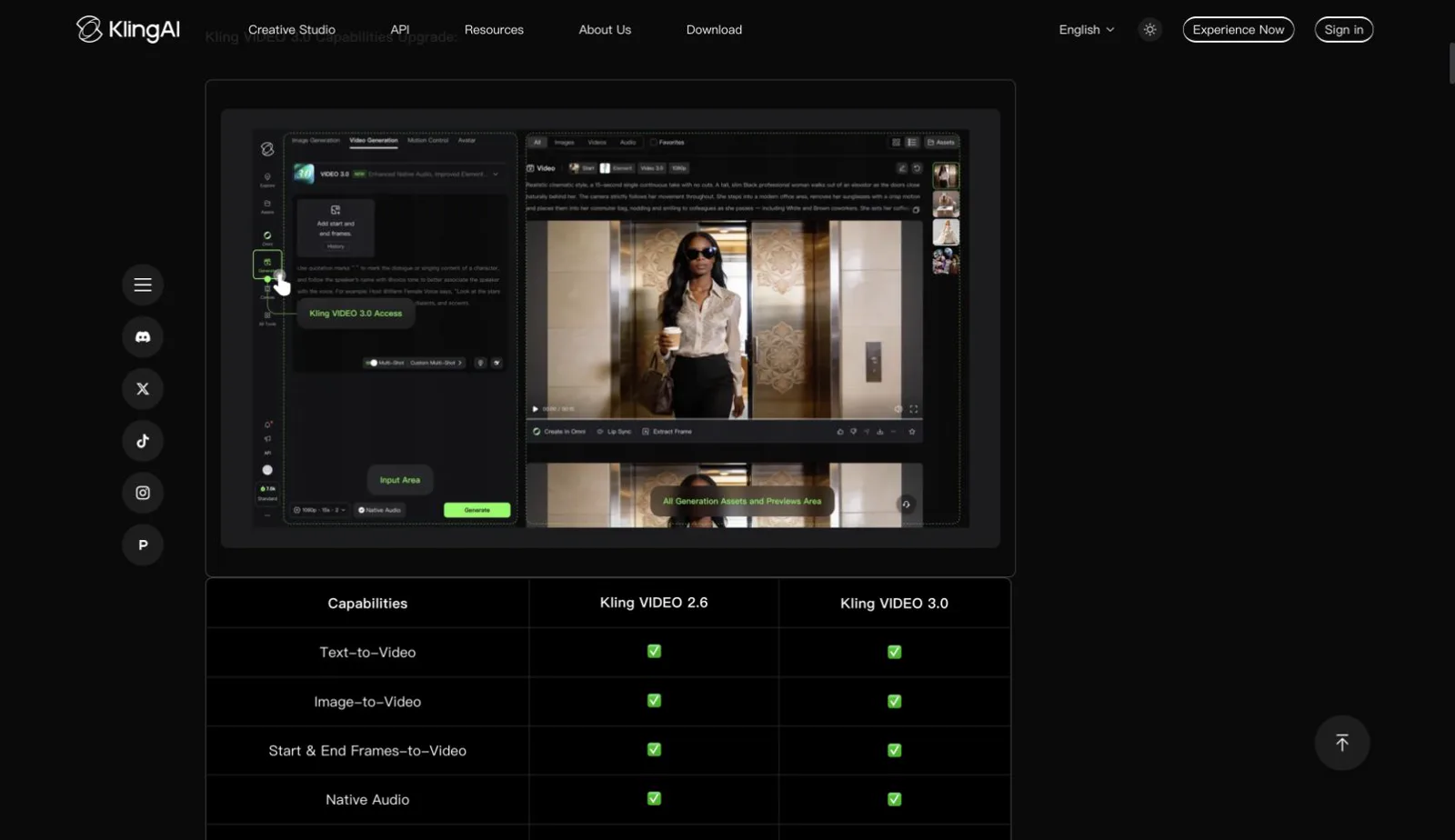
Kling VIDEO 3.0 official guide showing the current capability table and input surface. Source: Kling VIDEO 3.0 Model User Guide. Captured 2026-08-07, Asia/Shanghai.
The important change for an editor is structure. Multi-Shot describes several shots with different framing and timing, custom multi-shot shapes the storyboard, and element references bind recurring subjects. Native audio and voice controls put dialogue, ambience, and sound effects in the same request. This is a different comparison target from an older short-form claim.
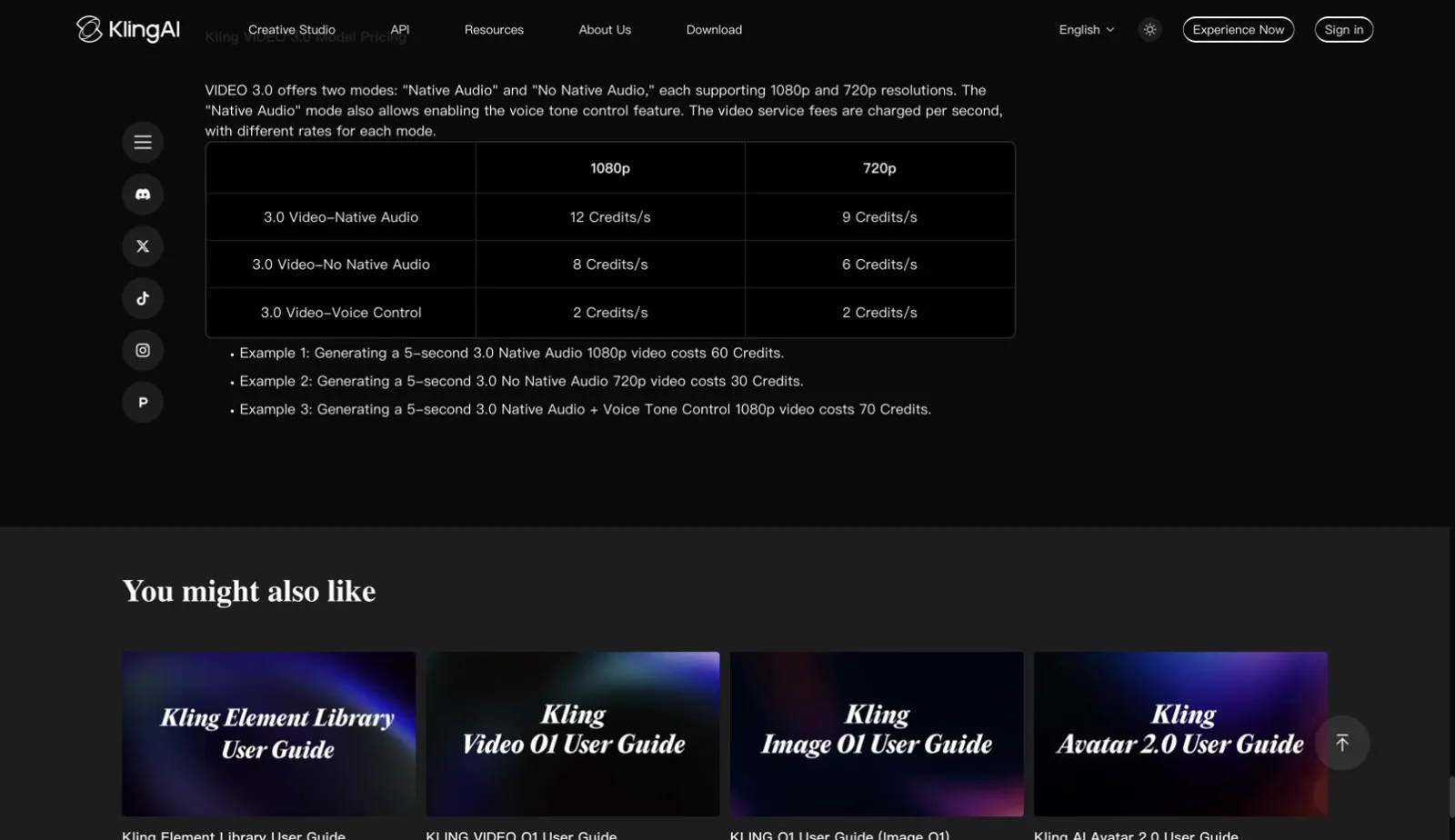
Kling VIDEO 3.0 official pricing table for native audio, no native audio, and voice control by resolution. Source: Kling VIDEO 3.0 Model User Guide. Captured 2026-08-07, Asia/Shanghai. Use the live guide for current rates.
The guide lists 1080p native audio at 12 credits per second and 720p native audio at 9 credits per second. Without native audio, the rates are 8 credits per second at 1080p and 6 credits per second at 720p. Voice control adds 2 credits per second. A five-second 1080p native-audio clip is shown as 60 credits before plan terms. Confirm the live account page before purchasing.
Feature differences that matter in practice
Duration and continuity
Seedance 2.5 has the clearer long-clip signal: up to 30 seconds on the current model page. That matters when one brief needs a hook, motion, product proof, and a final hold. The live interface determines the duration available to each account. Verify the selected model and duration control before planning a longer delivery.
Kling VIDEO 3.0 is documented for 3 to 15 seconds. The range is shorter, but Multi-Shot makes the output a compact sequence rather than one unbroken move. That fits a three-shot social hook, dialogue beat, or product reveal.
Reference control
The Seedance page describes text, image, video, and audio references, with up to 50 assets in the announced model surface. That suits a brief where identity, product, movement, environment, and rhythm each need a reference. Test the current interface before relying on the headline limit.
Kling 3.0 uses element references and binding for recurring subjects, including a start frame plus element references and multi-image or video inputs. That suits a character or product returning across shots. Score identity, label spelling, object count, and continuity.
Motion, shots, and audio
Seedance's examples emphasize longer scene flow and timed direction. Kling 3.0's guide combines shot planning with native audio, multilingual speech, dialects, and voice control. Score order, lip sync, words, ambience, and transitions rather than assuming they pass.
Editing and revision
Seedance 2.5 includes localized editing in its announced workflow. If exposed, it can help with a local change. Kling 3.0's strongest controls are generation-time structure, elements, and audio. Check each platform's controls separately.
Pricing and access: keep the date beside the number
Prices can mean a subscription, credit pack, or per-second model rate.
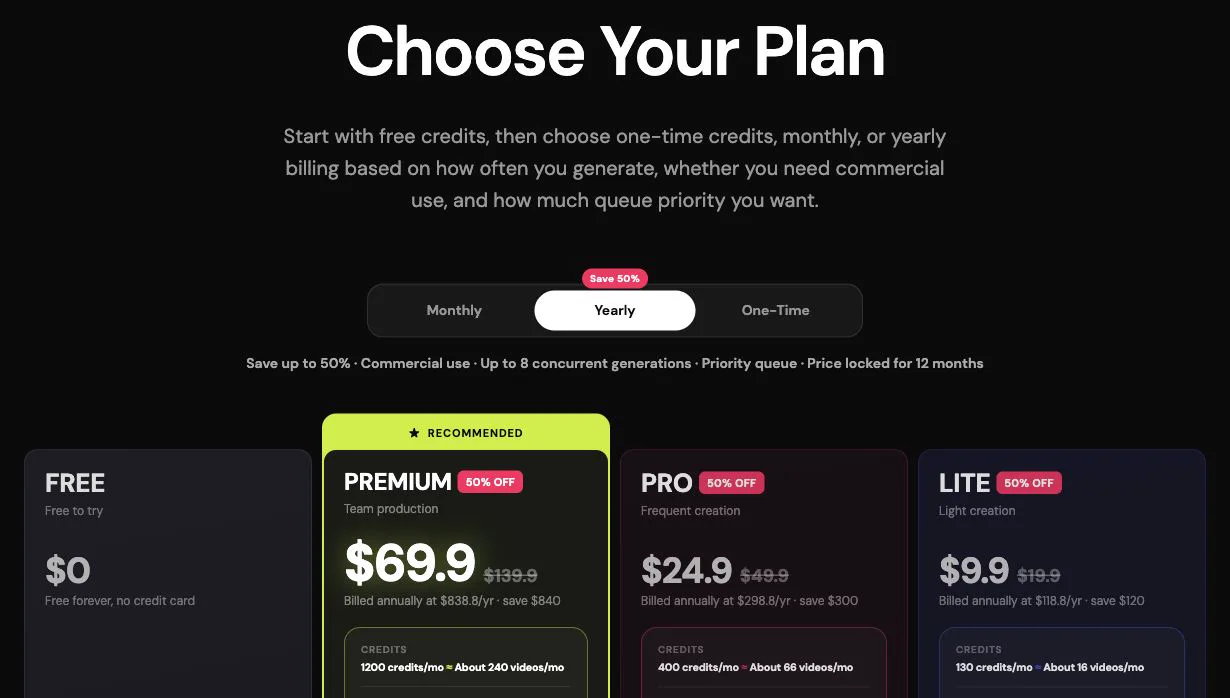
SeedVideo AI pricing page with the yearly view selected. Currency: USD. Billing cycle shown: yearly, with monthly equivalent and annual total. Source: SeedVideo AI pricing. Captured 2026-08-07, Asia/Shanghai. The page currently lists Seedance 2.5 access on its plan cards and different output tiers by plan.
The captured SeedVideo AI yearly view shows Free at $0, Lite at $9.90 per month equivalent, Pro at $24.90, and Premium at $69.90, with 130, 400, and 1,200 monthly credits on the paid tiers shown. Check live checkout terms for taxes, credit validity, and commercial rights.
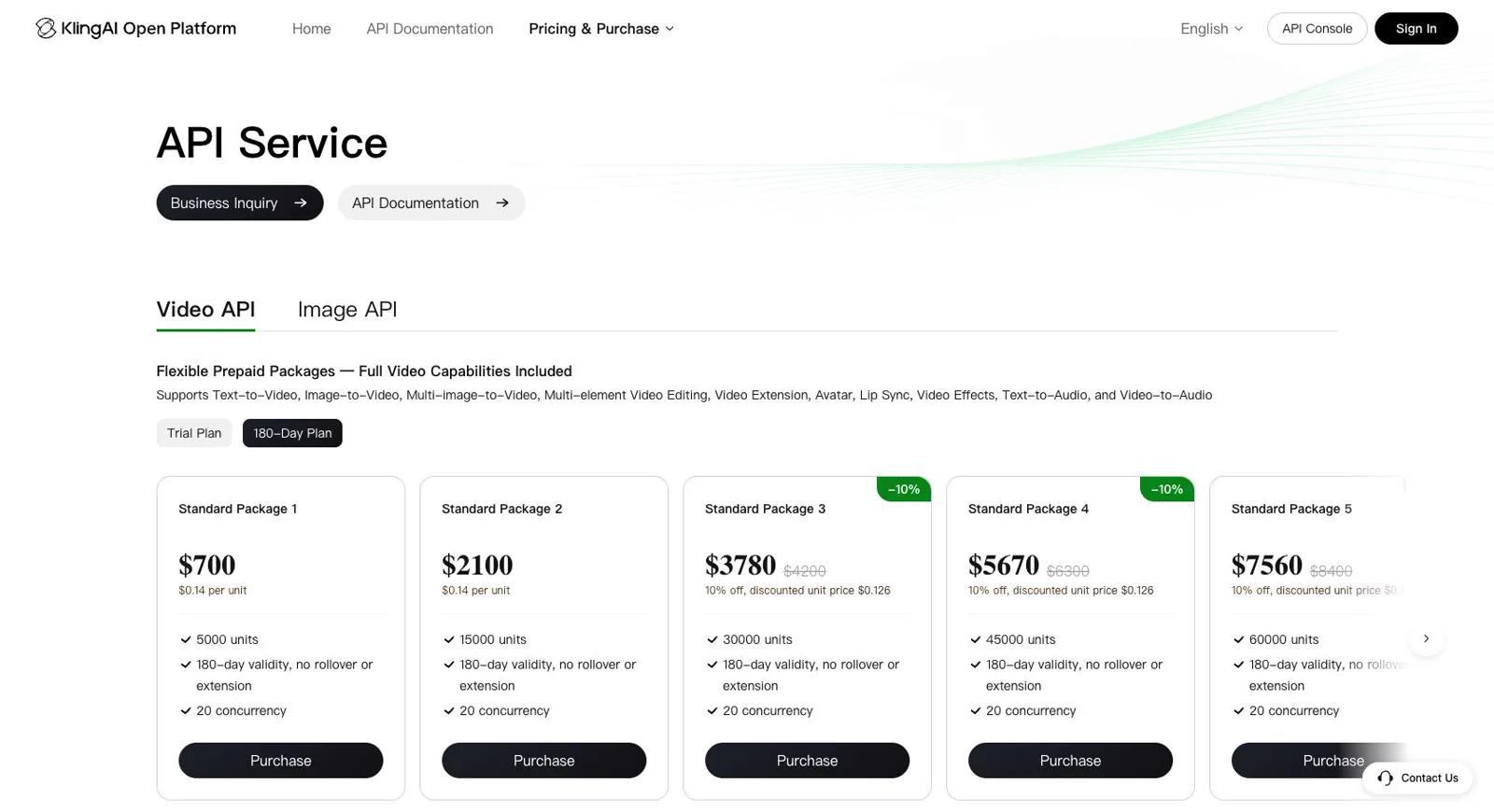
Kling AI pricing surface showing current Video 3.0 access and plan controls. Currency and plan terms can vary by account and region. Source: Kling AI pricing plans. Captured 2026-08-07, Asia/Shanghai. Check the account page for the current plan, watermark, export, and credit terms.
For Kling 3.0, the official guide gives this simple planning table:
| Kling VIDEO 3.0 mode | 1080p | 720p |
|---|---|---|
| Native audio | 12 credits/s | 9 credits/s |
| No native audio | 8 credits/s | 6 credits/s |
| Voice control add-on | +2 credits/s | +2 credits/s |
The guide puts a five-second native-audio 1080p clip at 60 credits, a no-audio 720p clip at 30, and native audio with voice control at 70 for 1080p. These are planning examples. Check the Kling 3.0 credit guide and live account page on purchase day.
Calculate cost per approved clip. Include retries, failures, resolution, duration, audio mode, queue time, and plan rights. A lower per-second number can still cost more when takes fail hard checks.
Best for and not best for
| Model | Best for | Not best for |
|---|---|---|
| Seedance 2.5 | Longer reference-heavy clips, multimodal input, multi-beat structure, and localized revisions when exposed | A 2.5-specific workflow when the selector is unavailable; decisions based only on example clips |
| Kling VIDEO 3.0 | Multi-shot storyboards, native audio, element binding, recurring characters, and controlled 3 to 15 second scenes | A 30-second single-clip brief; budgets based on a stale launch price or an unverified plan |
| Both together | Teams that keep prompts, inputs, settings, shot count, and scoring identical | Any comparison that selects one model's best take against the other's first take |
Illustrative use-case scene showing a creator comparing two finished options.
How to try the right model for your brief
The interface matters because it tells you what you can actually control. The screenshots below document a current SeedVideo AI workflow surface.
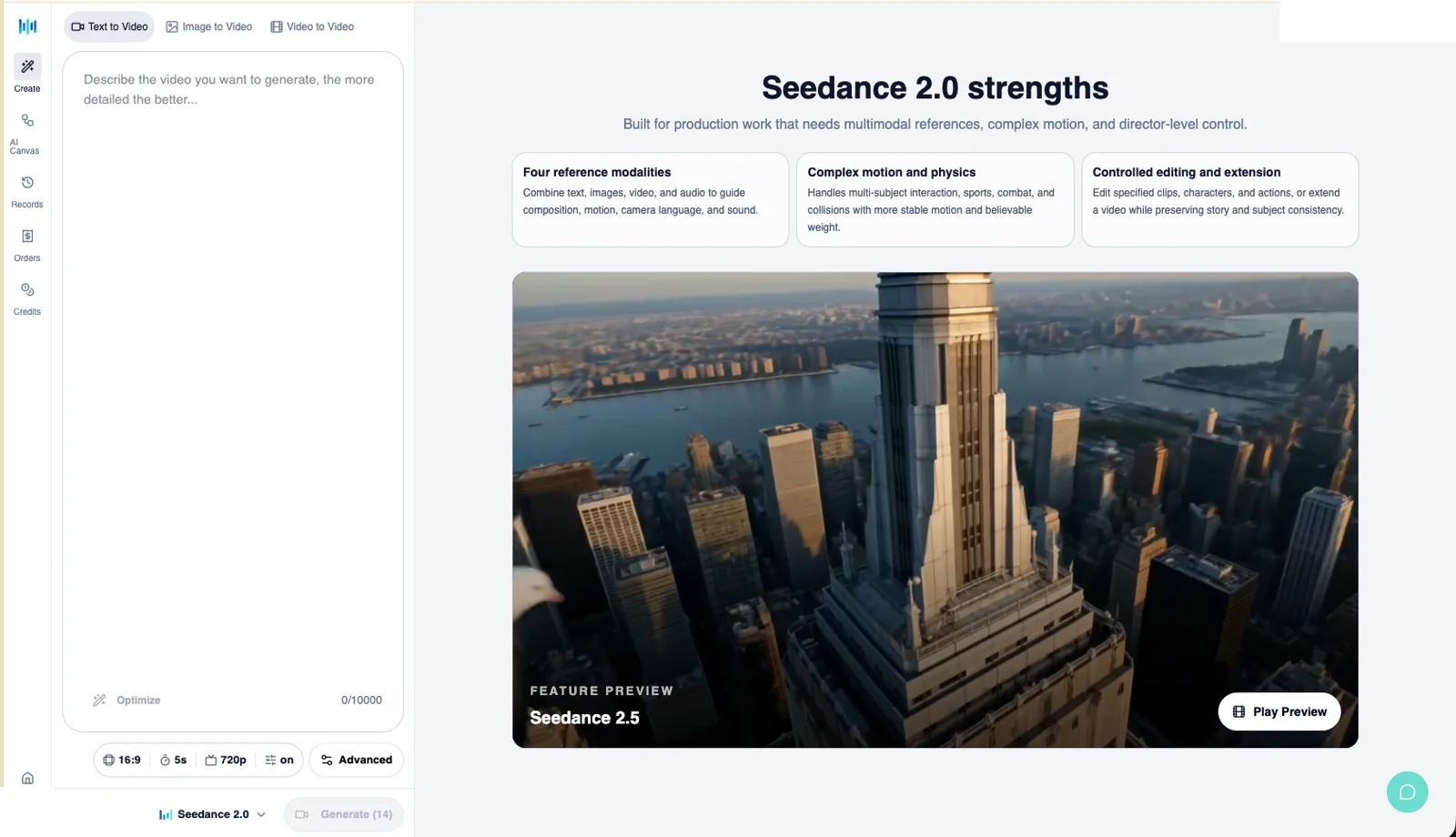
SeedVideo AI Text to Video interface with the prompt box, ratio, duration, quality, advanced controls, and model selector visible. The selector shown is Seedance 2.0, so this image explains the workflow rather than proving Seedance 2.5 access. Source: supplied SeedVideo AI interface screenshot. Checked 2026-08-07, Asia/Shanghai.
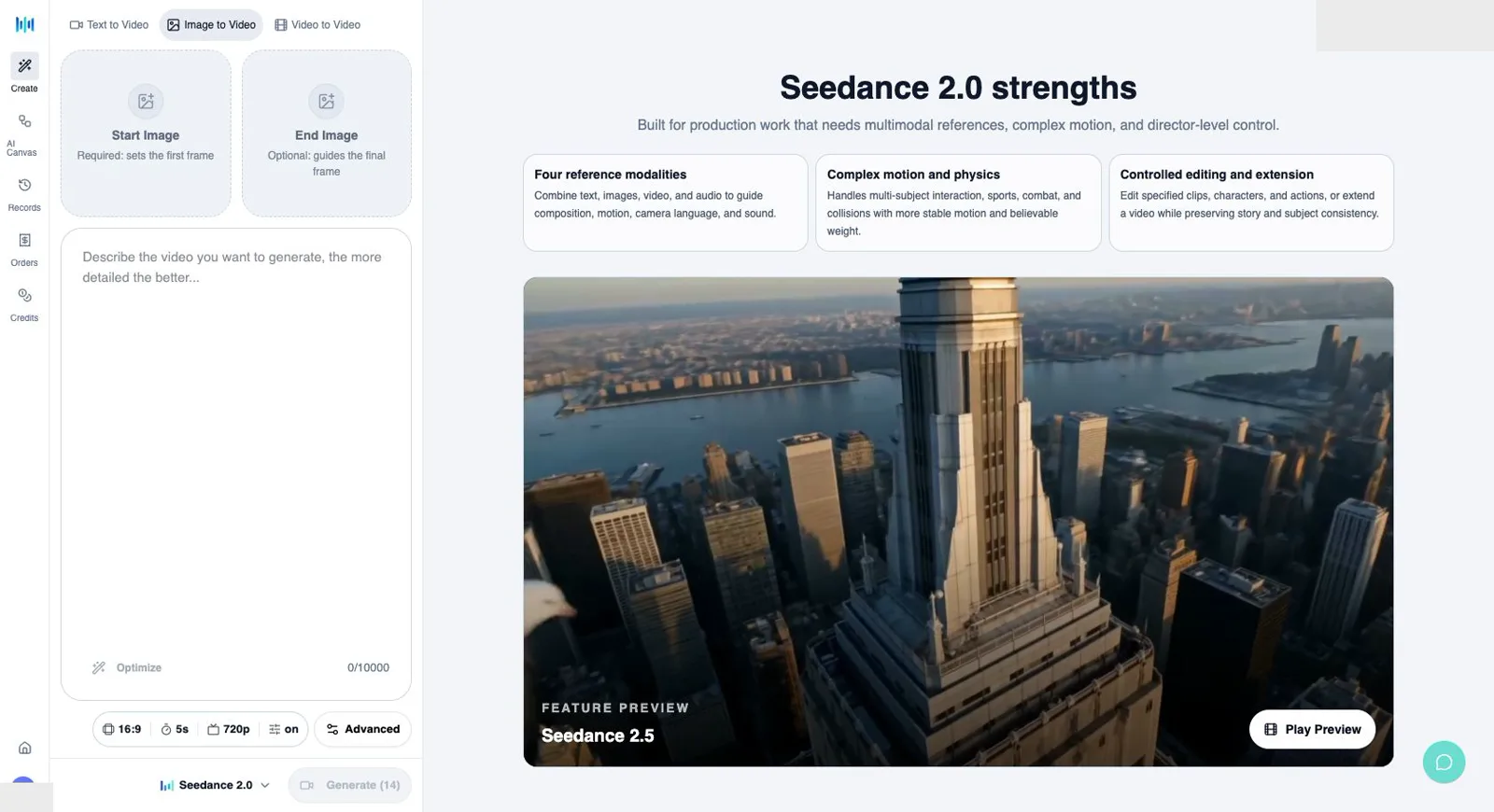
Current SeedVideo AI Image to Video surface with Start Image, End Image, prompt, ratio, duration, quality, and model controls. The selector shown is Seedance 2.0. Source: SeedVideo AI image-to-video surface. Checked 2026-08-07, Asia/Shanghai.
Use this setup before comparing models:
- Write one brief with one subject, one action, one camera path, and one final state.
- Prepare the same source image and element references at the same crop and resolution.
- Lock ratio, shot count, duration, quality, and audio before starting.
- Run the same number of attempts and retain failures.
- Score object count, identity, action order, camera path, dialogue, background, and final frame before style.
If the brief starts as text, try the AI text-to-video generator and record the model label. If it starts from an image, animate a reference image. Kling users should also record Multi-Shot, native audio, element references, and the resolution rate.
A fair comparison workflow
1. Freeze the input
Use one uncropped source image and the same reference pack for both runs. Keep inputs unchanged after seeing either output. Record dimensions, crop, reference roles, and text or logos that must remain stable.
2. Freeze the prompt and shot plan
Use the same action, camera, lighting, preservation, and negative constraints. For Kling 3.0, express shot breaks in the storyboard field if available. Give both models the same storyboard treatment.
For a multi-shot test, keep the shot plan explicit:
Shot 1, wide establishing view of a cobalt-blue bottle on a warm-gray plinth in a quiet studio. Shot 2, slow clockwise camera move as one orange sphere rolls once toward the bottle. Shot 3, close view of the label while the sphere stops. Keep one bottle, one sphere, label spelling, geometry, lighting, and shadows unchanged. Add restrained room tone only if native audio is enabled.
3. Score hard constraints first
Give each output a pass or fail for hard constraints. Score motion, dialogue, sound, and style only after object count, identity, shot order, and final frame pass.
4. Track the real cost
Record credits, elapsed time, failures, retries, usable seconds, and audio mode. Use approved-clip cost as the comparison metric. A five-second Kling rate and a 30-second Seedance capability are different units.
5. Keep claims narrow
If you run three matched attempts, report those three attempts. Keep conclusions within the tested sample and source types separately labeled.
Common mistakes
- Calling a launch price current without checking the current plan or credit page.
- Treating an official example as a same-prompt benchmark.
- Comparing a per-second Kling 3.0 rate with a Seedance maximum-duration headline as if they were the same metric.
- Giving one model a storyboard, native audio, or element references while denying the other model equivalent inputs.
- Choosing a winner from style alone while ignoring object count, identity, dialogue, shot order, or the ending.
FAQ
Is Seedance 2.5 better than Kling 3.0?
There is no universal winner. Seedance 2.5 has the broader long-clip and multimodal-reference workflow. Kling VIDEO 3.0 has the clearer multi-shot, native-audio, element-reference, and per-second credit surface. Pick the controls that fit the brief, then verify with the same inputs.
Which model is better for image-to-video?
Start with Kling 3.0 when one image needs a controlled 3 to 15 second scene, native audio, a storyboard, or recurring elements. Start with Seedance 2.5 when several references, a longer clip, or localized editing matter. Score label spelling, identity, object count, shot order, movement, and shadows.
Which one is cheaper?
The answer depends on plan, resolution, duration, audio mode, and retries. SeedVideo AI uses plan credits. Kling 3.0 lists 6 to 12 credits per second for main 720p and 1080p modes, with voice control adding 2 credits per second. Compare approved clips under the plan you can buy.
Can I use both models in one workflow?
Yes. One model can provide a longer reference-led base while the other provides a storyboarded audio scene. Keep source, prompt, shot plan, settings, and scorecard aligned, and label every result by model and version.
What should I test before paying?
Confirm the model selector, duration, resolution, native-audio behavior, element references, watermark rules, commercial terms, and credit cost. Use the current free or trial allowance for a small test before committing credits.
Bottom line
Seedance 2.5 is the better starting point for a longer, reference-led plan when its controls are available. Kling VIDEO 3.0 is the better first check for a 3 to 15 second multi-shot scene with native audio, element binding, or recurring characters. This article uses current Kling VIDEO 3.0 documentation. Validate the chosen controls with the same inputs before committing.
For the practical next step, open the video generator, note the model label and available controls, then use the Seedance 2.5 setup guide and Seedance 2.5 prompt guide to build a repeatable brief. Choose the model that passes your must-have checks at a cost you can defend.