To use Seedance, open a platform that runs the model, pick Seedance 2.5 or Seedance 2.0 in its model menu, write a prompt, add an image or reference clip if you have one, set the length and resolution, and press Generate. There is no Seedance app to download and no version you can run on your own computer (is Seedance open source? covers why). ByteDance offers the model in Dreamina and CapCut and sells API access through BytePlus ModelArk, and independent platforms such as Runway, Higgsfield, ElevenLabs, fal and SeedVideo AI offer it in their own tools. Seedance 2.5 is the current version and makes clips up to 30 seconds; Seedance 2.0 stops at 15 seconds and costs less per second.
Last verified: November 20, 2026. Platform facts come from each company's own pages, linked where they are used. Figures on speed, failures and habits come from 10,893 Seedance jobs run on SeedVideo AI between October 20 and November 18, 2026; 3,940 of them are no-login trial runs, and where a figure covers signed-in users only, it says so.
Seedance access at a glance
| Question | Short answer |
|---|---|
| How do I use Seedance? | Pick a platform, choose the version, write a prompt, add images or clips if needed, set length and resolution, generate, then review the whole clip |
| Where can I use Seedance 2.5? | Dreamina, CapCut (rolling out by region), the BytePlus and Volcengine APIs, fal, Replicate, Runway (Pro and Max plans, and its API), Higgsfield, OpenArt and SeedVideo AI |
| Where can I use Seedance 2.0? | The same places, plus ElevenLabs and every paid Runway plan |
| Does ElevenLabs have Seedance 2.0? | Yes, inside ElevenCreative on paid plans |
| Is Seedance 2.0 available in the USA? | Yes. CapCut added the US on April 7, 2026 |
| Which version should I pick? | 2.5 for clips over 15 seconds, reference videos and edits; 2.0 Mini for cheap tests |
| Is it free? | Only in small amounts: daily credits on Dreamina, 5 free credits on SeedVideo AI |
| How long does a clip take? | A median of 3 to 5 minutes in our data |
| How often does a job fail? | 15.6% of all jobs in our data, mostly content checks; 11.3% of first jobs |
How do you use Seedance 2.0 or 2.5?
You use both versions the same way: choose an input mode, write a short brief, set the format, generate one short test, and review the full clip before changing anything. The steps below use the SeedVideo AI workspace, and the same order works on any platform that offers the model. A first run usually works: of the 3,303 signed-in users who made their first video with a Seedance model in our window, 88.7% got a finished clip from that first job.
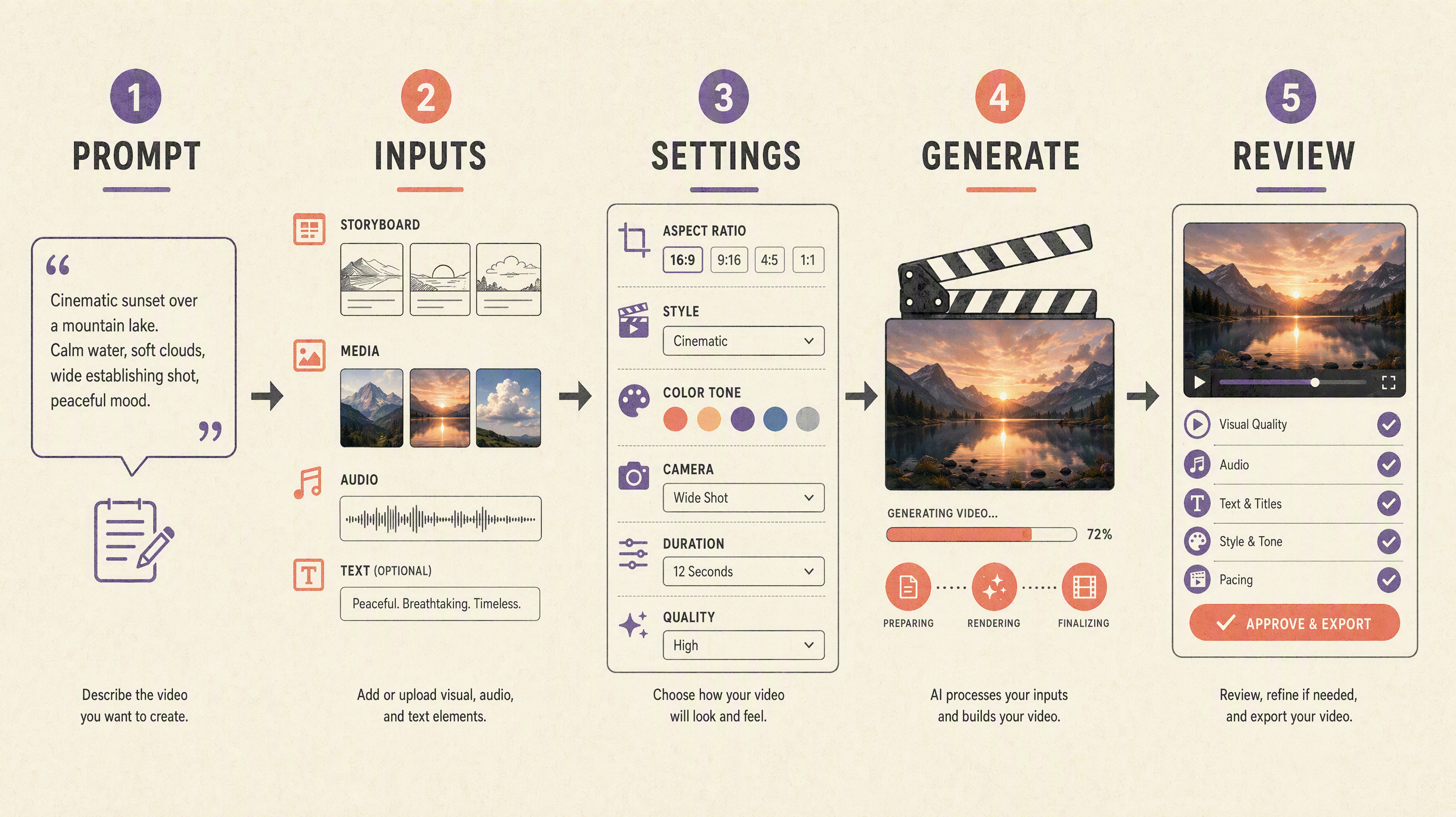
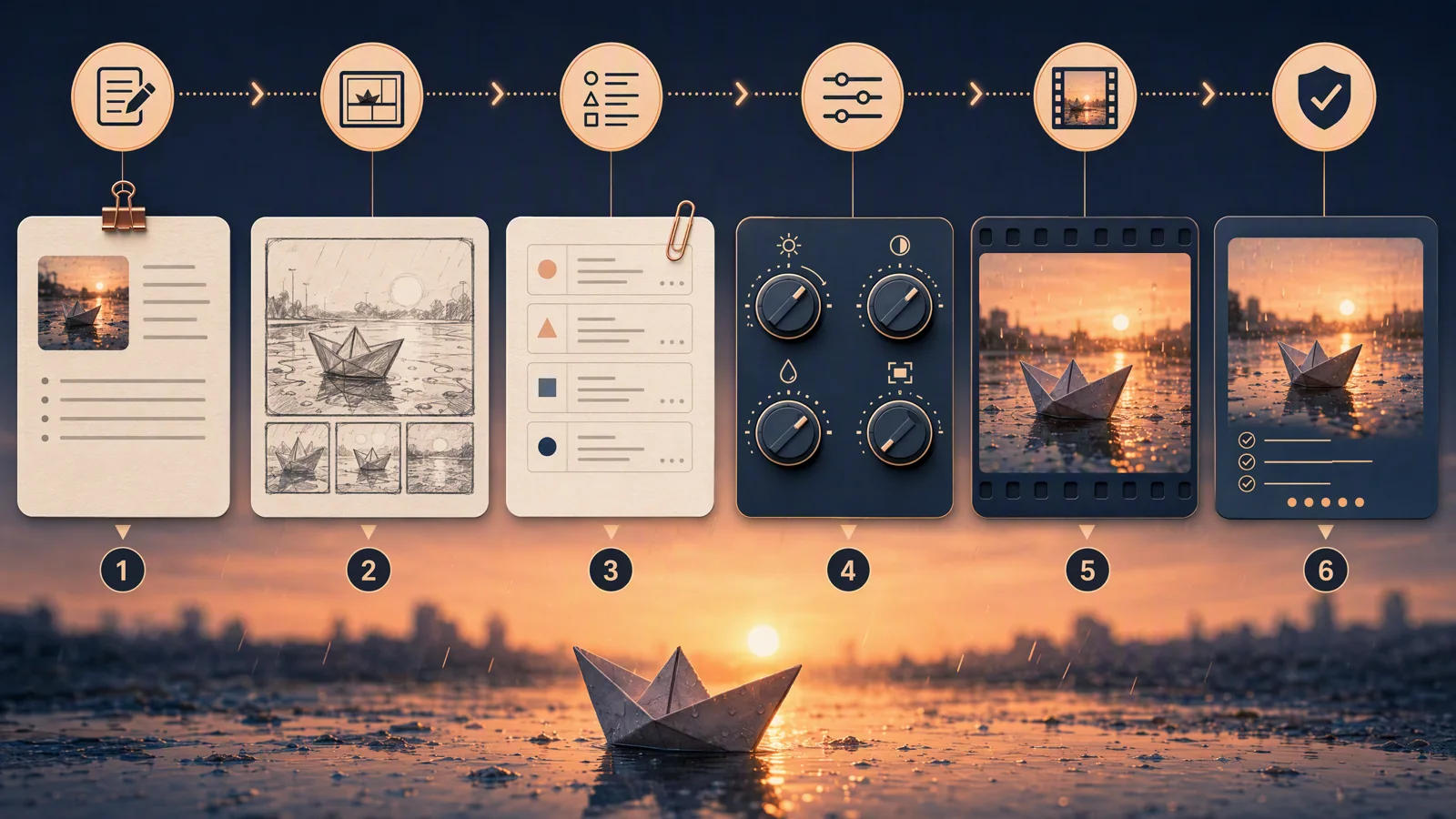
The workflow in five stages: prepare the brief, assign inputs, choose settings, generate, and review the complete clip.
Step 1: Choose the mode from what you already have
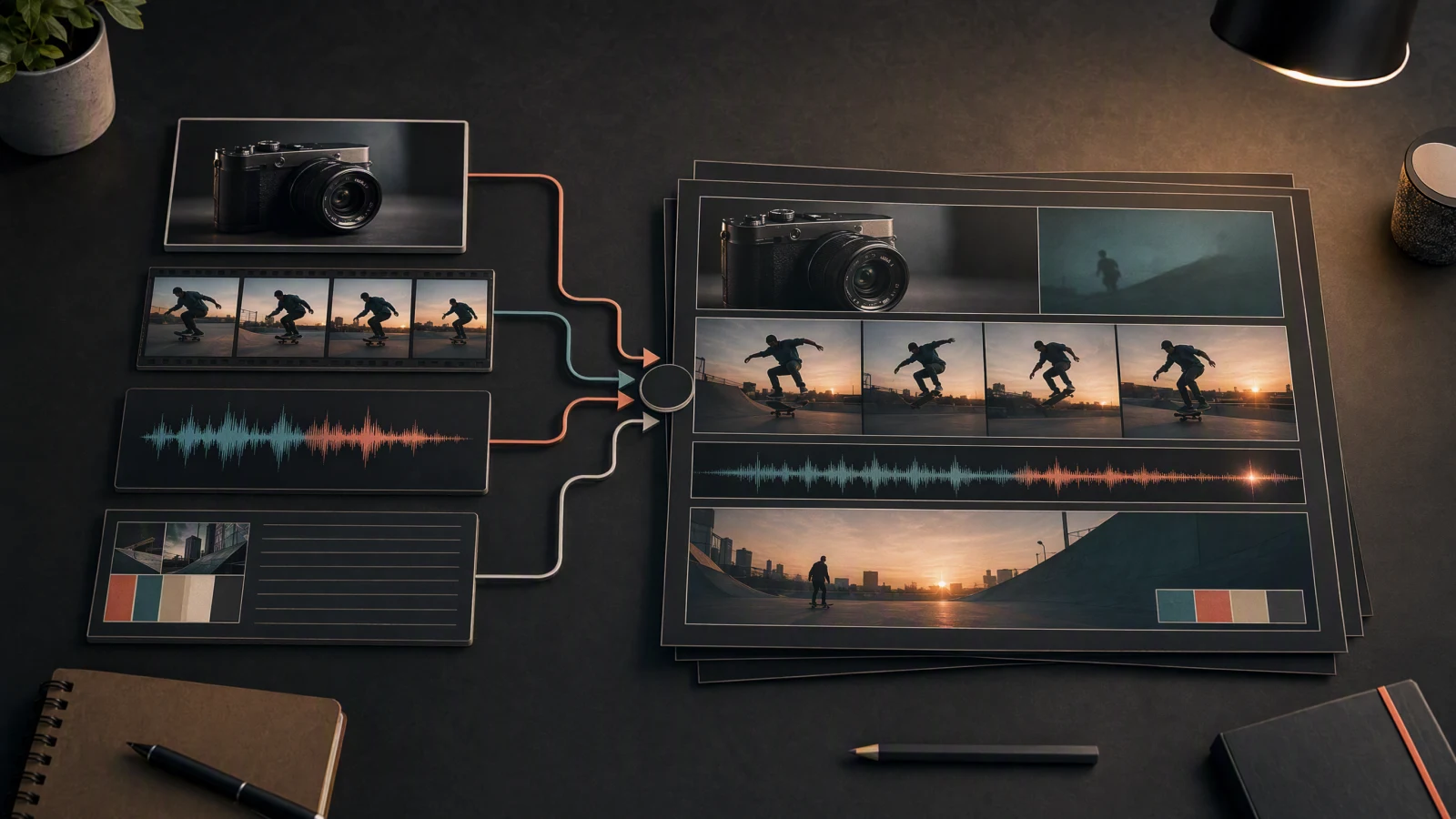
Pick the mode by asking what must stay the same: the subject, the opening image, the ending composition, or the movement from a reference clip.
| Mode | Start with | Best for | Not best for |
|---|---|---|---|
| Text to Video | A written scene brief | New concepts, atmosphere, camera tests | Exact product or character identity |
| Image to Video | One source image | Product motion, portrait motion, composition control | A precisely controlled ending frame |
| First/Last Frame | Opening and ending images | Planned transitions and ending composition | Projects without suitable source images |
| Reference to Video | Images or video clips with named roles | Identity, movement, rhythm, and style guidance | A quick first test with no asset plan |
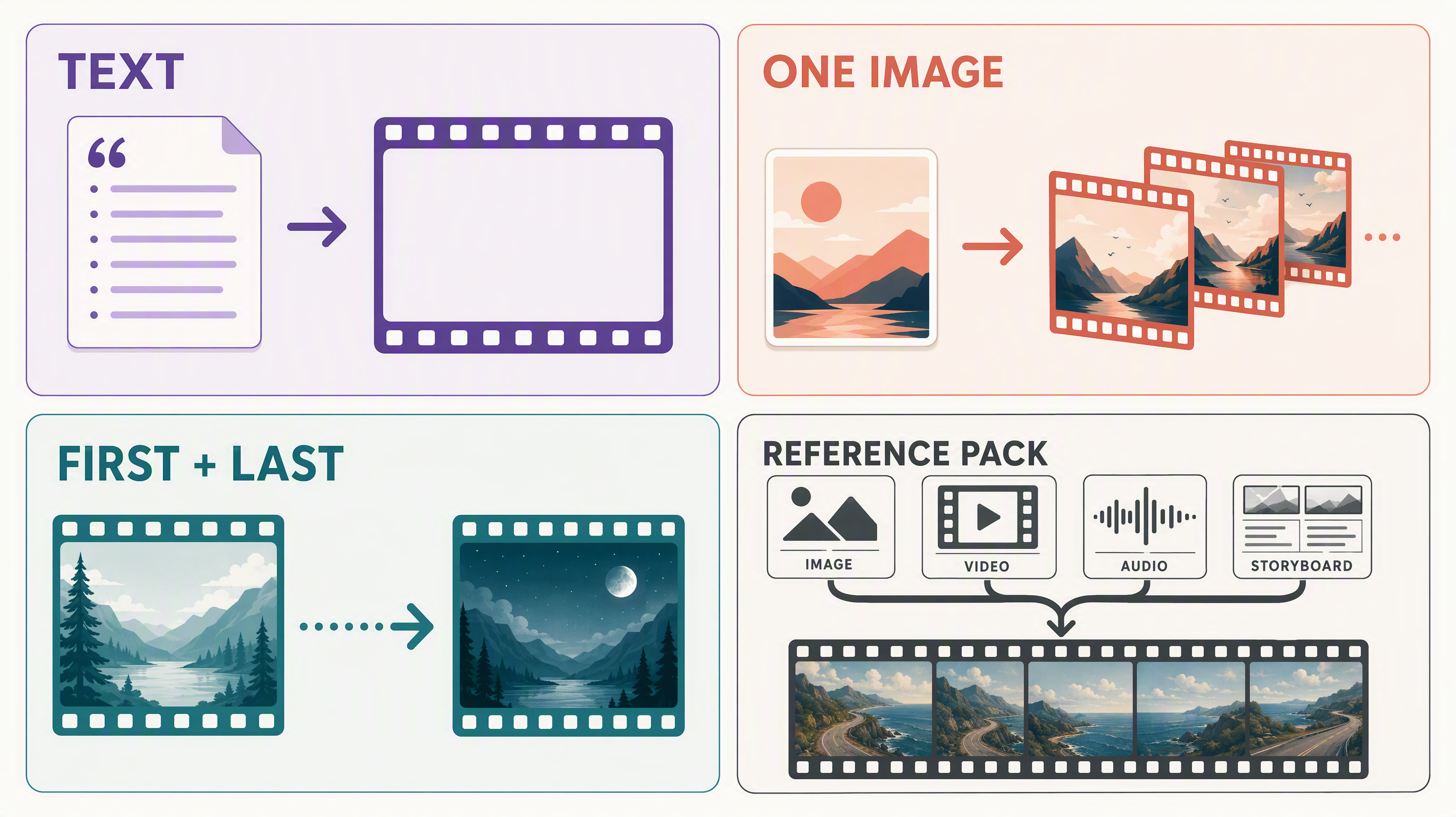
Choose the simplest input path that can preserve the subject, composition, or movement your project needs.
Most people do not start from text alone. In our data 42.9% of Seedance jobs start from a first or last frame image, 34.1% from text only, 15.0% from reference images and 7.9% from a reference video. If you have a usable picture, start there: the model keeps what it is given better than what it has to invent.
Step 2: Write the brief
A usable brief separates decisions that are easy to blur together. Write six short lines before opening the generator:
- Subject: who or what must remain recognizable?
- Action: what changes on screen?
- Camera: where does the camera start, move, and stop?
- Pace: which beat happens first, and how long should the final hold last?
- Sound: should the result follow dialogue, ambience, music, or no audio direction?
- Fixed details: what must not change, such as color, clothing, packaging, or background layout?
A compact text-to-video brief might read:
A red ceramic mug sits on a plain wooden table in soft morning light. The camera begins in a locked wide shot and moves forward slowly. Steam rises naturally. Keep the mug shape and table layout fixed. End on a clean close-up with no text, people, or logos.
Avoid stacking several actions into the first attempt. A simple clip gives you a clean baseline. Add another beat only after the subject and camera movement hold together.
Step 3: Add inputs, each with one job
Add only the inputs that have a clear job. For a one-image project, upload the cleanest source image and state what may move. For first and last frames, make sure the subject scale and camera angle can transition plausibly. For a reference pack, name the purpose of every asset in plain language: identity, product detail, camera motion, or ending composition.
Do not upload five style images and expect the model to decide which one wins. Remove duplicates. If two references conflict, say which detail has priority. Every upload is also one more thing the content check looks at. This is how often a first try fails on Seedance 2.0 Mini, by what the job started from. Each signed-in user is counted once per input type, so heavy users do not skew it.
| First try started from | Users | Failed |
|---|---|---|
| Text only | 1,244 | 6.8% |
| A first or last frame image | 1,642 | 12.3% |
| Reference images | 445 | 10.3% |
| A reference video | 148 | 26.4% |
A reference video is the riskiest input on either version: on Seedance 2.5 the first try with one fails 23.3% of the time (60 users). Counting every job, repeats included, the figures are 9.8% for text only, 15.7% for a frame image, 20.6% for reference images and 30.6% for a reference video.
Step 4: Pick the version, length, resolution and aspect ratio
Set the delivery format before you describe framing. A vertical 9:16 clip and a horizontal 16:9 clip need different subject scale and camera space. These are the settings each version offers on SeedVideo AI; other platforms expose their own ranges.
| Setting on SeedVideo AI | Seedance 2.5 | Seedance 2.0 |
|---|---|---|
| Clip length | 4 to 30 seconds | 4 to 15 seconds |
| Resolution | 480p, 720p, 1080p, 4K | 480p, 720p, 1080p, 4K |
| References in the browser | Up to 30 images and 10 videos | Up to 9 images and 3 videos |
| Edit or extend an existing clip | Yes | No |
| Draft mode (480p preview, then upgrade the keeper) | Yes | No |
| Lighter tiers | Seedance 2.5 Flash (480p and 720p, no draft mode) | Seedance 2.0 Fast, Seedance 2.0 Mini |
Resolution also depends on the plan: on SeedVideo AI the Lite plan stops at 720p for Seedance, 1080p needs Pro, Premium or a credit pack, and 4K needs Premium or a credit pack.
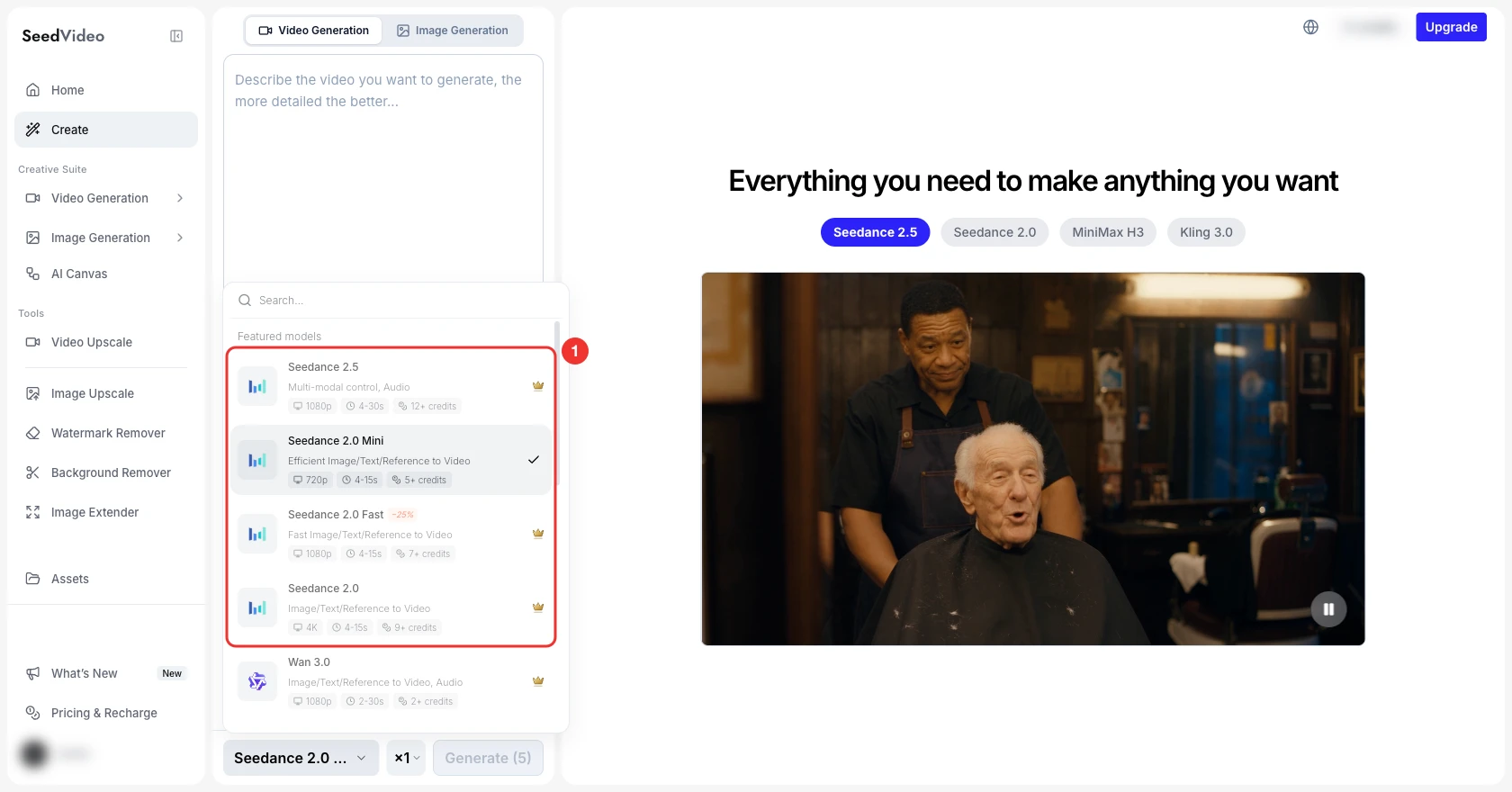
The model menu in the SeedVideo AI workspace, captured on November 19, 2026. Box 1 marks the Seedance models. Seedance 2.5 has gained a 4K option since this capture.
For a first test, choose the shortest useful duration and a low resolution. Nearly everyone does: of 3,303 first jobs by signed-in users, 94% ran on Seedance 2.0 Mini, 97% were five seconds or shorter and 98% were 480p, partly because the 5 free credits cover exactly that. Across all jobs, 67% are 16:9, 13% are 9:16, and 94% leave generated audio switched on.
Step 5: Generate, wait, and review the whole clip
Confirm the selected model, inputs, aspect ratio and duration, then press Generate. Expect a wait of a few minutes (the measured times are further down) and do not submit the same prompt again while a job is still processing.
Watch the result from the first frame through the final hold. A good opening can hide a broken ending, so do not judge from a poster frame or a short preview loop.
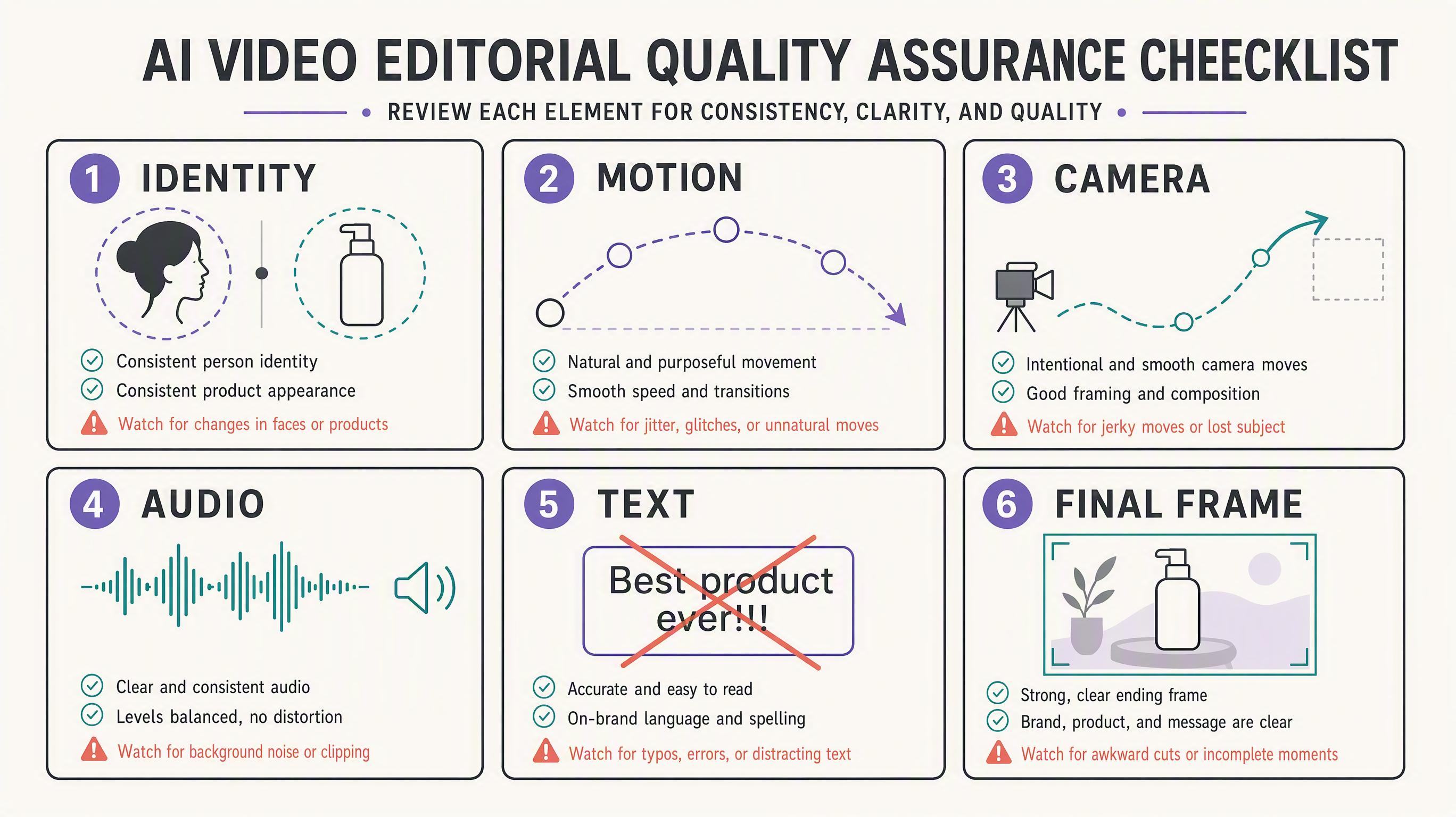
Review the whole clip for identity, motion, camera behavior, sound, accidental text, and the final frame.
| Check | What to look for | First revision |
|---|---|---|
| Identity | Face, product shape, clothing, colors | Strengthen one source image or one fixed-detail line |
| Motion | Direction, weight, contact, continuity | Simplify the action or remove a competing movement |
| Camera | Start position, path, speed, stop point | Use one camera move and name the final framing |
| Audio | Timing, unwanted music, unclear speech | Shorten the audio direction or remove it for the next test |
| Unwanted text | Random captions, labels, warped packaging | Request no added text and supply a cleaner product image |
| Final frame | Composition, subject position, usable hold | Describe the ending explicitly or add a last frame |
If something drifts, change one variable and run it again. Changing the prompt, the image and the settings together tells you nothing about which change helped.
Where can you use Seedance 2.0 and 2.5?
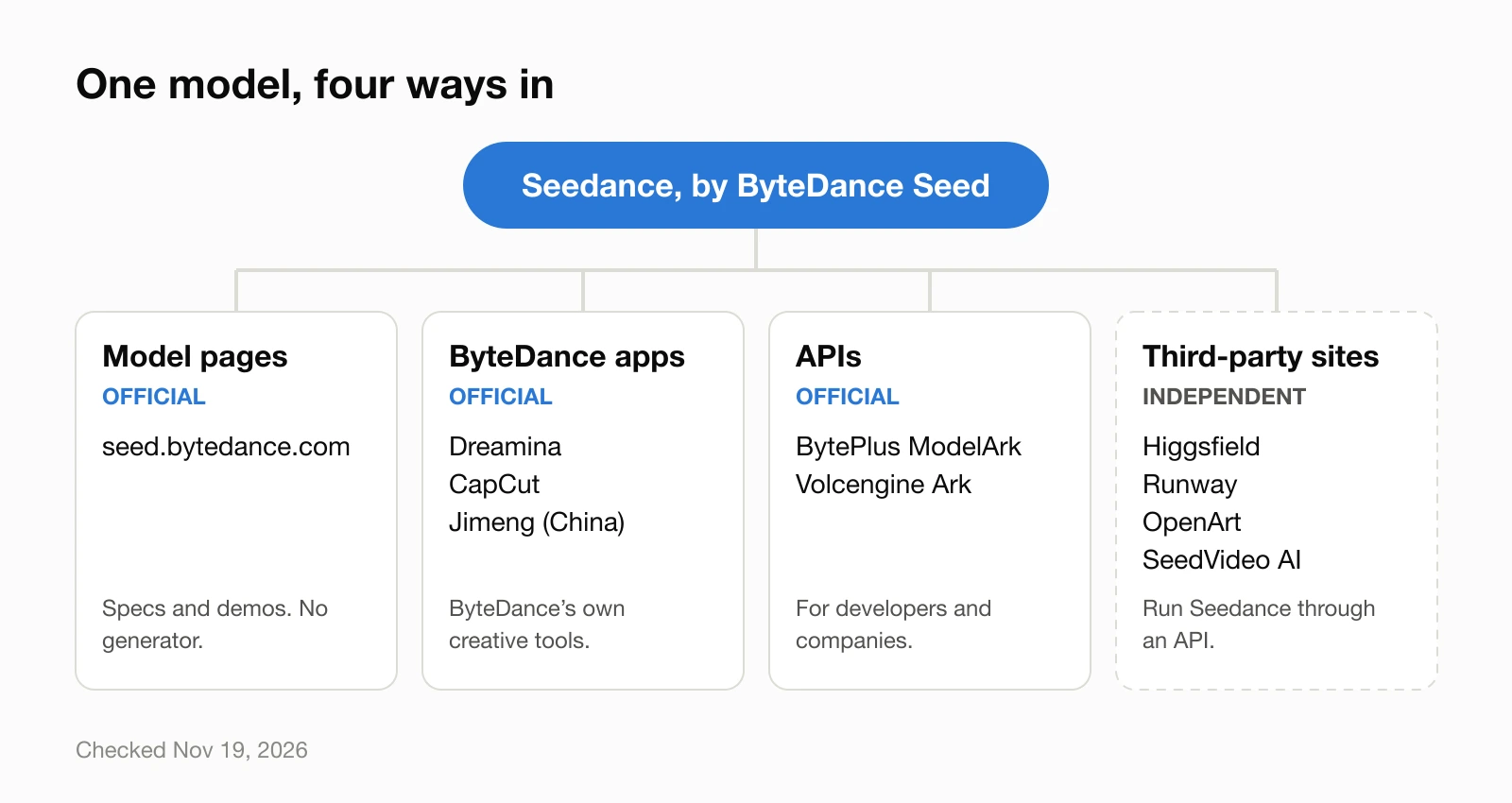
You can use Seedance in four kinds of places: ByteDance's own apps, ByteDance's official APIs, API marketplaces, and independent creative platforms. Only the first two belong to ByteDance. Every row below was checked against the platform's own page on November 20, 2026.
| Platform | Kind | Seedance 2.5 | Seedance 2.0 | What to know |
|---|---|---|---|---|
| Dreamina | ByteDance app | Yes | Yes | ByteDance's own creative suite. Its 2.5 page calls the model live worldwide and says free daily credits can be used to test it |
| CapCut | ByteDance app | Rolling out by region | Yes | The July 31, 2026 announcement covers subscriber accounts of people over 16 in Europe, Asia, the Middle East and South America. 2.0 reached the US on April 7, 2026 |
| Jimeng AI, Doubao Pro | ByteDance apps, mainland China | Yes | Not confirmed from an official page | Both are named as rollout platforms in ByteDance's Seedance 2.5 launch post |
| BytePlus ModelArk | Official API | Yes, since August 6, 2026 | Yes | For developers and companies in supported markets. BytePlus states that it is not available in the United States |
| Volcengine Ark | Official API, mainland China | Yes | Yes | Enabling the 2.0 and 2.5 models needs a 200 yuan account balance or a resource pack |
| fal | API marketplace | Yes | Yes | Text, image and reference endpoints for 2.5 hosted in the United States. Seedance 2.0 is listed at $0.3034 per second at 720p |
| Replicate | API marketplace | Yes | Yes | Playground and API for 2.5, 2.0, 2.0 Fast and 2.0 Mini |
| Runway | Independent platform | Yes | Yes | 2.0 is in the Runway app on paid and Enterprise plans, and Runway describes it as available worldwide. Its pricing page names 2.5 on the Pro and Max plans, and 2.5 is on Runway's developer API at $0.30 per second for 720p |
| Higgsfield | Independent platform | Yes | Yes | Offers 2.5, 2.5 Edit, 2.0, 2.0 Fast and 2.0 Mini. Its help page says 2.5 is not included in the Starter and Basic plans |
| ElevenLabs | Independent platform | Flash, Video Edit and 4K variants listed | Yes | 2.0 runs inside ElevenCreative on paid plans, next to ElevenLabs' voice and music tools |
| OpenArt | Independent platform | Yes | Yes | Lists both versions in its video model menu |
| SeedVideo AI | Independent platform | Yes | Yes | This site. Browser workspace with 2.5, 2.5 Flash, 2.0, 2.0 Fast and 2.0 Mini on one credit balance. Not affiliated with ByteDance |
Three points that the table cannot show.
The same model has different limits on each site. ElevenLabs lists up to 9 reference images, 3 video clips and 3 audio clips for Seedance 2.0. Higgsfield lists up to 30 images, 10 video clips and 10 audio files for 2.5. On SeedVideo AI the browser composer takes 30 images and 10 videos for 2.5, and audio references go through the API. Check the limits of the platform you are on before planning a shot around them.
Which site is official? A page on a bytedance.com domain is official, and so are Dreamina, CapCut and the BytePlus and Volcengine APIs. seed.bytedance.com holds the model pages and demos but no generator. Any other site, including this one, is an independent platform whatever its domain name suggests. Seedance vs Dreamina explains how the accounts and credits differ.
An app listing is not the same as access for your account. CapCut's rollouts are staged by country and by subscription, so check the model menu in your own signed-in account before you plan around it.
How do you get access to Seedance 2.0 or 2.5?
You get access by creating an account on a platform that carries the version you want. There is no separate Seedance account, installer or licence to apply for. What differs is what each route asks of you and what it charges. The table compares the four kinds of route on the points that decide the choice, using one example of each. Every cell comes from the platform's own page on November 20, 2026, or, for SeedVideo AI, from its live settings; "not published" means the page did not say.
| Dreamina and CapCut (official apps) | BytePlus ModelArk (official API) | Runway (independent tool) | SeedVideo AI (independent tool) | |
|---|---|---|---|---|
| Seedance versions | 2.5, 2.0, 2.0 Fast, 2.0 Mini on Dreamina; CapCut by region | 2.5 and the 2.0 series | 2.0 on every paid plan; 2.5 on Pro and Max and on the API | 2.5, 2.5 Flash, 2.0, 2.0 Fast, 2.0 Mini in one model menu |
| First run without an account | No | No | No | Yes, on most devices: one 4-second 480p Seedance 2.0 Mini clip |
| Free use of Seedance 2.5 | Yes: 120 free credits a day on Dreamina can be spent on 2.5 | Not published | Not published. 2.5 is named on the Pro and Max plans; the free plan has 125 one-time credits for unnamed models | No. Free credits do not run 2.5 |
| Regional limits | Dreamina says worldwide, with prices and eligibility by market; CapCut rolls out by region | Not available in the United States | 2.0 described as available worldwide | None on generation |
| How you pay | Subscription (US Basic: $15 a month for 1,575 credits). Buying credits without a plan: not published | Usage-based, by tokens or resource packs | Subscription ($15 to $95 a month), extra credits from 1,000; the API is prepaid per second | Subscription ($14.90 to $149 a month) or one-time credit packs from $29.90 |
| Longest 2.5 clip and top resolution | 30 seconds (180 in a beta long-video mode), 4K | 30 seconds; resolution not stated in the launch note | 30 seconds and 4K on the API | 30 seconds, 4K (1080p from the Pro plan, 4K on Premium or credit packs) |
| References per 2.5 clip | Up to 50 | Not stated in the launch note | Up to 50 | 30 images and 10 videos in the browser; audio through the API |
| Other models on the same account | 10 image and video models in its unlimited plan, not named on the page | Other ModelArk models | Runway's own models and Kling 4.0 | Kling 4.0, Kling 3.0, Veo 3.1, Wan 3.0, MiniMax H3 and image models |
| Code needed | No | Yes | No in the app | No; an API is optional |
Read plainly, each route wins on something different.
- To test Seedance 2.5 without paying, use Dreamina. Its daily free credits can be spent on 2.5. SeedVideo AI's free credits cannot.
- To build Seedance into a product, use an API. BytePlus is the official API but is not offered in the United States, where fal, Replicate and Runway's API fill that gap.
- For clips past 30 seconds or more than 40 reference files, use Dreamina. It lists a 180-second beta mode and up to 50 references.
- SeedVideo AI fits four cases. You want to see one clip before creating any account. You want to pay once with a credit pack and not hold a subscription. You want to move between the five Seedance tiers and other video models on one credit balance. Or you are in a country where the official apps have not reached your account, since generation here is not limited by country.
To start on SeedVideo AI, open the Seedance 2.5 page or the Seedance 2.0 page, sign in, and check the model named in the menu before you generate. The pricing page lists the plans, and Seedance Credits Explained works out how many clips each plan makes.
Does ElevenLabs have Seedance 2.0?
Yes. ElevenLabs offers Seedance 2.0 inside ElevenCreative, its image and video workspace. Its Seedance 2.0 page says the model is available on every paid plan and not on the free plan, and that a generation accepts up to 9 reference images, 3 video clips and 3 audio clips. The reason to use it there is the audio side: the page pairs the model with ElevenLabs' own speech, lip-sync, music and sound-effect tools.
ElevenLabs' video page also lists Seedance 2.5 Flash, Seedance 2.5 Video Edit and Seedance 2.5 4K among its video models, and states that video generation requires a paid plan.
Is Seedance 2.0 available in the USA?
Yes. CapCut's newsroom page for Seedance 2.0 records the expansion to the US on April 7, 2026, after a rollout that began in March 2026 with paid users in Indonesia, the Philippines, Thailand, Vietnam, Malaysia, Brazil and Mexico and reached Japan on March 31. Outside ByteDance's apps, Runway describes Seedance 2.0 as available worldwide.
Seedance 2.5 in the US is less clear-cut, and the official pages do not fully agree.
| Route in the US | Seedance 2.0 | Seedance 2.5 |
|---|---|---|
| CapCut | Yes, since April 7, 2026 | The July 31, 2026 rollout list names Europe, Asia, the Middle East and South America, not the US |
| Dreamina | Listed in Dreamina's US price schedule | Dreamina calls 2.5 live worldwide, and its pricing page dated October 27, 2026 lists a US price for a plan that covers 2.5, while noting that a listed market does not guarantee every account qualifies |
| BytePlus ModelArk | No. BytePlus is not available in the US | No |
| fal (API) | Listed, billed per second | Yes, on endpoints hosted in the United States |
| Independent platforms | Runway states worldwide availability. SeedVideo AI does not restrict generation by country | SeedVideo AI does not restrict generation by country. Higgsfield and OpenArt mention no regional limit on their Seedance pages |
Two limits are worth knowing wherever you are. CapCut's initial rollout restricted making videos from images or videos that contain real faces, and ByteDance's safeguards against generating protected characters and brands travel with the model: in our data they are the top reason a job fails. In mainland China the routes are different: Jimeng AI and Doubao Pro for creators, Volcengine Ark for developers.
Should you use Seedance 2.5 or Seedance 2.0?
Use Seedance 2.5 when the clip needs more than 15 seconds, a reference video, or an edit of existing footage, and use Seedance 2.0 or its Mini tier when a short clip will do. On SeedVideo AI, 2.5 costs about 3 credits per second at 480p, 6 at 720p, 18 at 1080p and 29 at 4K at credit-pack rates, and Seedance 2.0 costs less per second at every resolution.
| If you want to | Use | Why |
|---|---|---|
| Test an idea cheaply | Seedance 2.0 Mini, 480p, 4 or 5 seconds | The cheapest setting: 5 credits for 4 seconds on SeedVideo AI, done in about two and a half minutes when signed in |
| Tell a sequence longer than 15 seconds | Seedance 2.5 | The only version that makes up to 30 seconds in one generation |
| Borrow framing and camera moves from a reference video | Seedance 2.5 | It reads reference videos for camera language, and takes more of them |
| Edit or extend a clip you already have | Seedance 2.5 | Edit and extend are 2.5 routes |
| Keep a character or product consistent in a short clip on a budget | Seedance 2.0 | Reference images at a lower rate per second |
| Run the 2.5 routes at a lower rate | Seedance 2.5 Flash | Same input modes as 2.5, at 480p and 720p only |
The newest version is not the one people use most. Of the 10,893 jobs we counted, 76.8% ran on Seedance 2.0 Mini, 15.5% on Seedance 2.5, 5.3% on Seedance 2.0 and 1.0% on Seedance 2.0 Fast. That overstates Mini, because 3,940 of those jobs are no-login trial runs that can only use Mini. What people choose once they have a choice shows up when you compare a signed-in user's first job with their sixth job onward. Each user counts once, so a few heavy users do not set the figures.
| First job (3,303 users) | Sixth job onward (159 users) | |
|---|---|---|
| On Seedance 2.0 Mini | 94% | 38% |
| On Seedance 2.5 | 3% | 47% |
| On Seedance 2.0 | under 1% | 10% |
| Uses reference images or a reference video | 17% | 55% |
| Text only | 35% | 13% |
| Five seconds or shorter | 97% | 28% |
| Longer than 15 seconds | under 1% | 14% |
| Rendered at 480p | 98% | 57% |
| Rendered at 720p | 2% | 35% |
| Rendered at 1080p or 4K | under 1% | 8% |
| Median prompt length | 64 words | 123 words |
Three habits separate experienced users from first-timers. They move to Seedance 2.5, which takes about half of their jobs. They bring references to more than half of their jobs and write prompts about twice as long. And they still render most jobs at 480p: the low resolution is where they iterate, and 1080p or 4K is kept for the take worth finishing. If you want the background before choosing, What Is Seedance? explains what Seedance 2.0 and Seedance 2.5 each are and who makes them.
Can you use Seedance 2.5 or 2.0 for free?
Only in small amounts. No platform we checked offers open-ended free Seedance 2.5; what exists is a daily or sign-up allowance that covers a few seconds of video.
- Dreamina gives free users 120 credits per day, according to its credits FAQ dated October 27, 2026, and its Seedance 2.5 page says those credits can be used to test 2.5. Its US price schedule lists Seedance 2.5 at 37 credits per second at 720p and Seedance 2.0 Mini at 5, so the same allowance goes about seven times further on Mini.
- SeedVideo AI gives 5 free credits, enough for one 4-second 480p Seedance 2.0 Mini clip with sound. On most devices you can spend them before creating an account, and signing up keeps whatever is left. The no-login run waits in a short queue first: in our window those runs took a median of 3 min 57 s (3,374 finished runs), against 2 min 25 s for signed-in Mini jobs. Free credits do not run Seedance 2.5 or full Seedance 2.0: those need a plan or a credit pack, and the cheapest 2.5 run is a 4-second 480p clip at 12 credits.
- Runway and ElevenLabs put Seedance behind paid plans, and Higgsfield leaves Seedance 2.5 out of its Starter and Basic plans.
If a page promises free unlimited Seedance with no login, read its terms before planning a project around it. Check whether it is a one-time trial or a slow queue, which version it really runs, and whether downloads carry a watermark.
How do you prompt Seedance 2.0 and 2.5?
Write the prompt as plain sentences that name the subject, the action, the camera move, the light and the sound, then add what must not change. The median prompt in our data is 64 words, far longer than the one-line prompts most tutorials show, and length is not only a matter of quality. One-line prompts are also refused more often.
| Prompt length | Jobs | Failed |
|---|---|---|
| 1 to 15 words | 477 | 26.8% |
| 16 to 40 words | 403 | 16.6% |
| 41 to 80 words | 567 | 12.7% |
| 81 to 150 words | 709 | 10.7% |
| More than 150 words | 1,613 | 12.0% |
These are the 3,769 jobs by signed-in users whose prompt is written in Latin script, where words can be counted. The pattern holds when each user is counted once on their first job: 20.1% of prompts of 15 words or fewer fail, against 7.6% of prompts longer than 80 words. Length itself is probably not the cause; what a short prompt goes with is. On text-only jobs, the finished clip is blocked 12.9% of the time when the prompt has 15 words or fewer and 5.1% when it is longer: the less you specify, the more the model fills in, and the output check judges what it filled in. On jobs that start from a picture, a one-line prompt mostly travels with an upload that gets flagged (18.6% of those jobs, against 4.5% with longer prompts). Either way, a prompt of 40 words or more sits in the lower-failure range.
| Part of the prompt | What to write |
|---|---|
| Subject and setting | Who or what is on screen, and where |
| Action | One action, in the order it happens |
| Camera | Where it starts, how it moves, where it stops |
| Light and mood | The light source and the tone |
| Sound | Dialogue in quotes, ambience, music, or none |
| Fixed details | What must stay unchanged, and what must not appear |
Here is what a first attempt looks like. We ran this prompt once on Seedance 2.5 on October 14, 2026, at 480p and 4 seconds, with no retries and no edits.
A traveler sits beside a train window as cliffs and blue sea pass outside, sunlight flickers across the face, and the traveler looks up from a notebook; intimate medium close-up, camera fixed inside the carriage, natural reflections, calm cinematic travel diary, consistent face and hands.
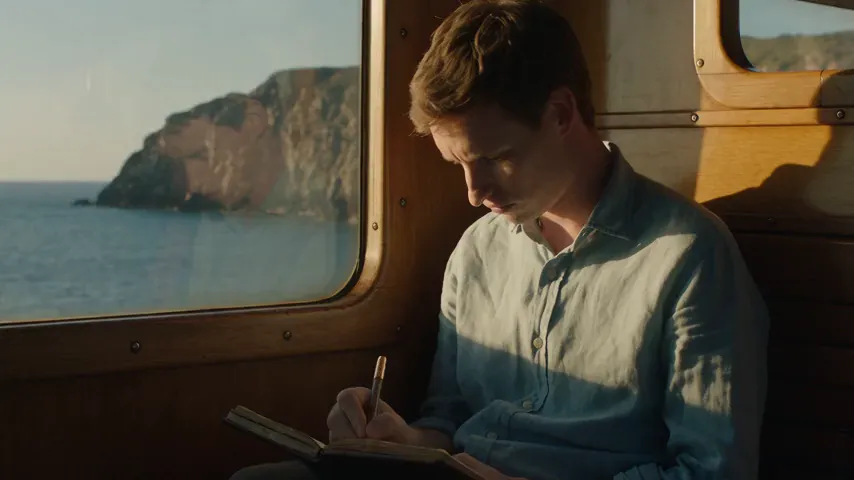
Seedance 2.5, text only, 16:9, 480p, 4 seconds, generated in 2 min 18 s. Followed: the notebook, the look up, sunlight across the face, the fixed camera, a consistent face and hands. Missed: the cliffs barely move, so the train reads as parked.
The second example shows one of the most common misses. The prompt asks for a label that stays readable but never says what the label reads, so the model fills it with made-up lettering.
A frosted glass skincare bottle stands on pale travertine as a thin ribbon of water flows around its base; slow macro orbit, soft morning side light, clean cream background, premium beauty commercial, controlled highlights, bottle shape and label remain unchanged and readable, no hands.

Seedance 2.5, text only, 16:9, 480p, 4 seconds, generated in 2 min 29 s. Followed: the bottle, the travertine, the cream background, the side light, no hands. Missed: the water sits still, the camera does not orbit, and the label is invented text.
Four habits follow from tests like these:
- Give it the thing instead of describing it. A label that exists in an uploaded image survives; a sign the model has to invent does not. For a product, start from Image to Video.
- Treat numbers as hints. "A 20-degree turn" and "one blink" are read as "a turn" and "some blinking". Describe the end state instead of the amount.
- Name each reference. In reference mode, say what every file controls, for example @Image 1 for the character and @Video 1 for the camera move.
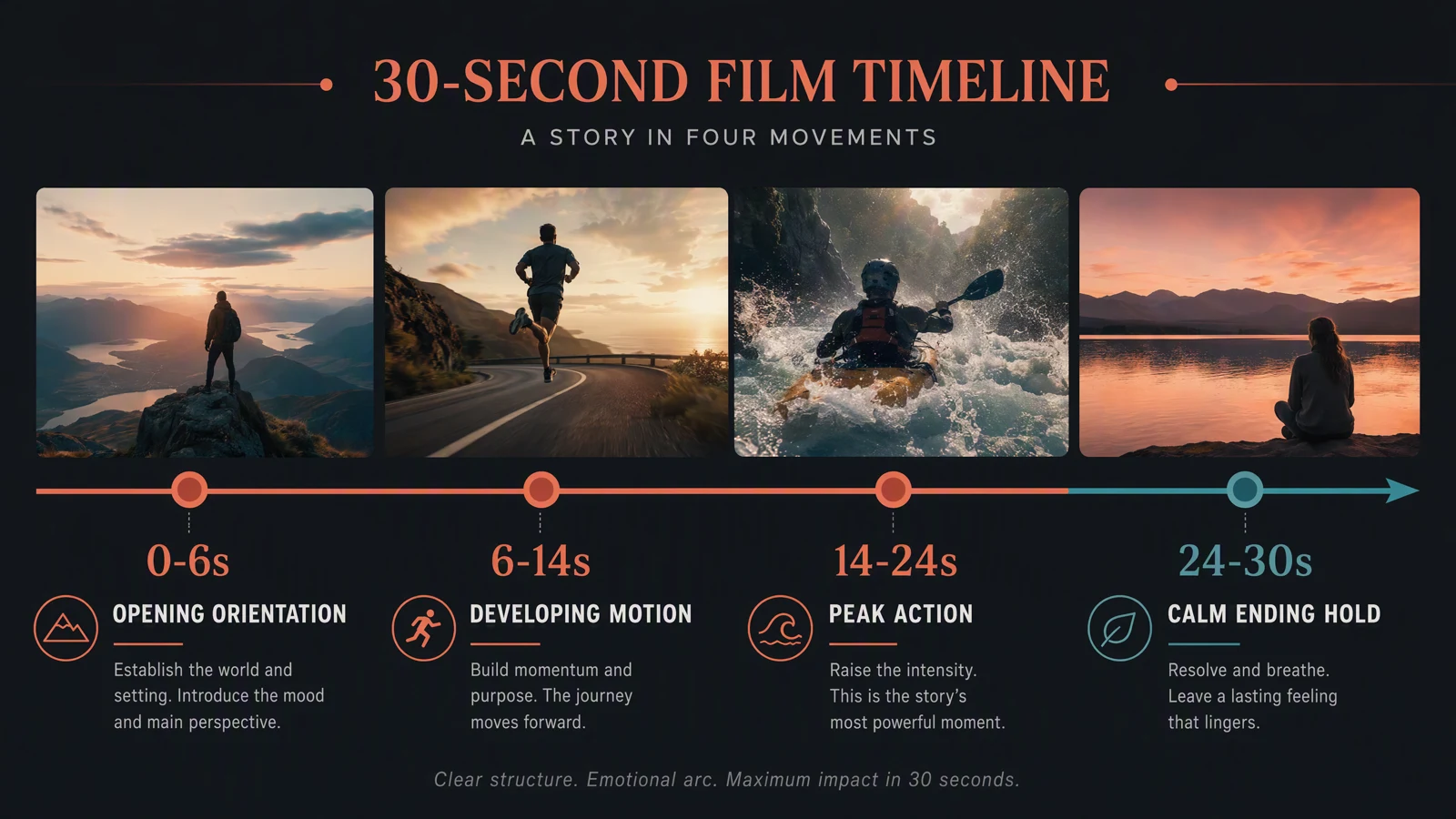
- Match the number of beats to the length. A 5-second clip holds one action. A 15-second Seedance 2.0 clip holds two or three. A 30-second Seedance 2.5 clip can carry a hook, an action, a turn and a closing hold, and timestamps help keep them in order.
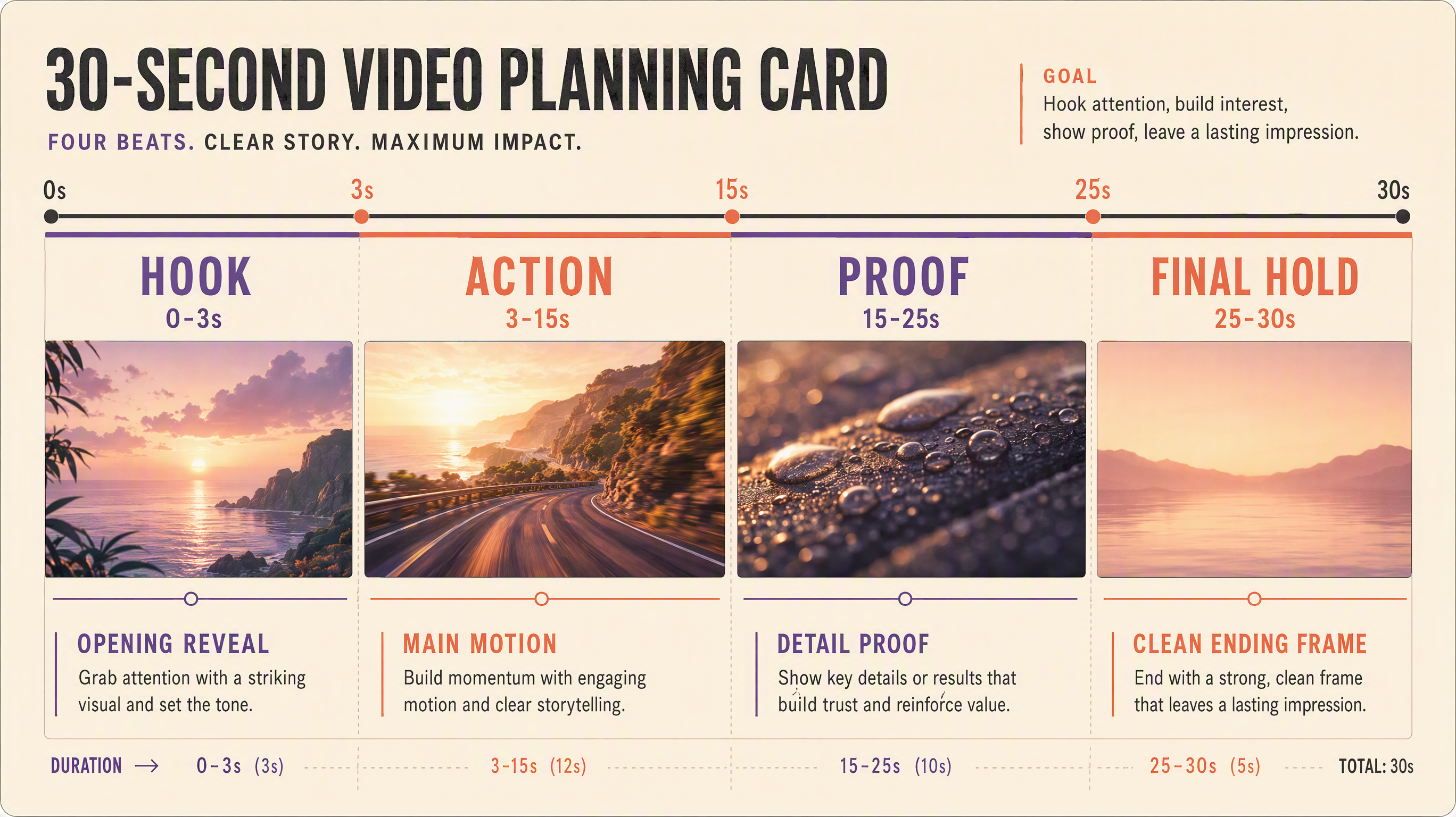
A longer brief can be divided into four readable beats: hook, action, proof, and a final hold.
The full guides go further: the Seedance 2.5 prompt guide has 36 prompts and 12 full 30-second examples, the Seedance 2.0 prompt guide covers the 15-second format, and timestamp prompts shows how to control a long clip second by second. All 50 prompts from our test set, with the 10 we rendered, are in AI video prompt examples.
How long does a Seedance video take?
A Seedance clip takes a median of 3 to 5 minutes from pressing Generate to a finished file, depending on the version. These are our measurements for jobs that completed on SeedVideo AI between October 20 and November 18, 2026, leaving out draft previews and jobs queued on purpose under the Unlimited plan.
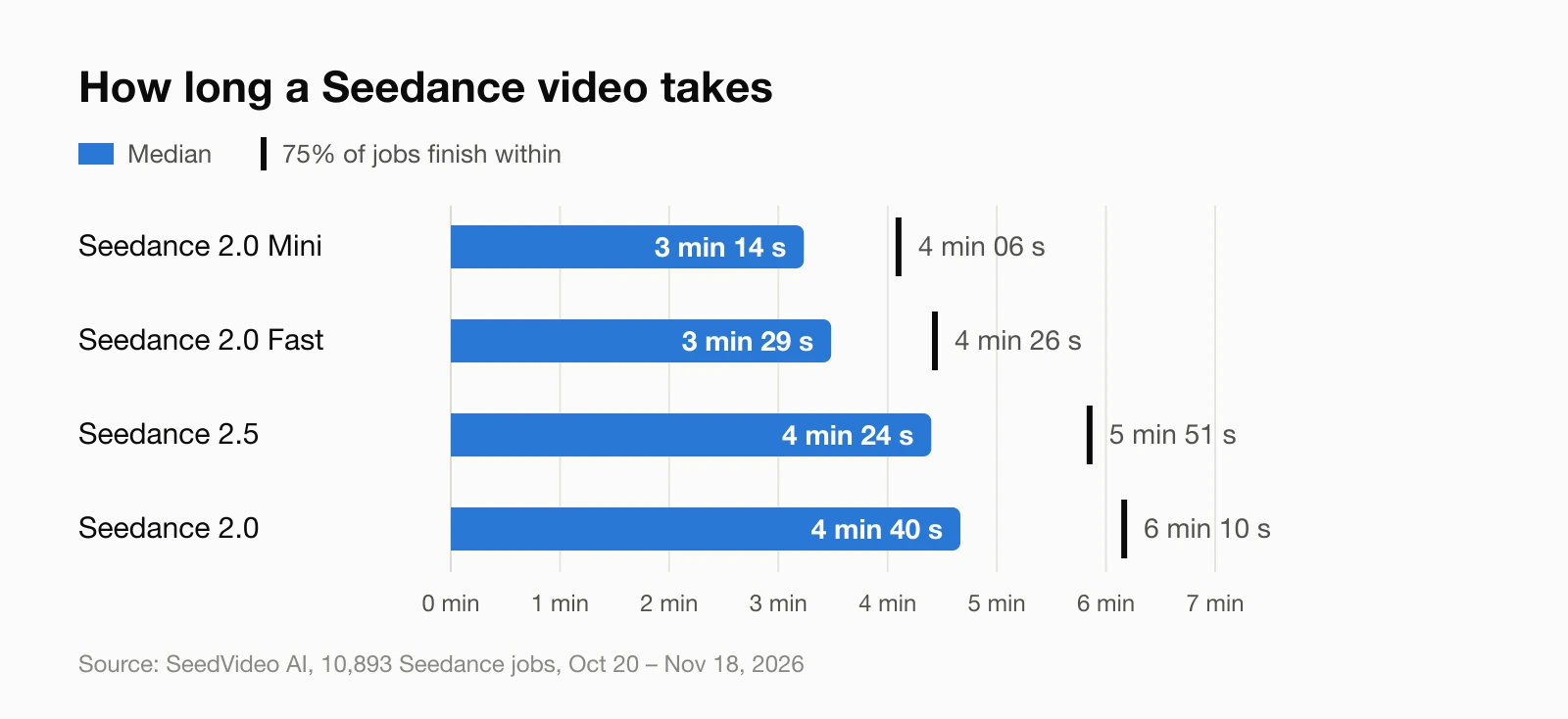
| Model | Finished jobs | Median | 75% finish within |
|---|---|---|---|
| Seedance 2.0 Mini | 7,228 | 3 min 14 s | 4 min 06 s |
| Seedance 2.0 Fast | 99 | 3 min 29 s | 4 min 26 s |
| Seedance 2.5 | 1,101 | 4 min 24 s | 5 min 51 s |
| Seedance 2.0 | 368 | 4 min 40 s | 6 min 10 s |
Length matters less than people expect. On Seedance 2.5 a clip of five seconds or less takes a median of 3 min 31 s and a 16-to-30-second clip takes 5 min 27 s, so up to six times the footage costs about 55% more waiting. How long Seedance 2.5 takes splits the timing further by resolution.
Two details change what to expect. The Seedance 2.0 Mini figure mixes two groups: signed-in jobs finish in a median of 2 min 25 s (3,854 jobs, three in four within 2 min 57 s), while no-login trial runs take 3 min 57 s because they queue first. And the time of day barely matters. Grouped by the hour a job was submitted, the median for signed-in Mini jobs stays between 2 min 15 s and 2 min 48 s across all 24 hours, so there is no off-peak hour worth waiting for.
What does Seedance refuse, and what should you do?
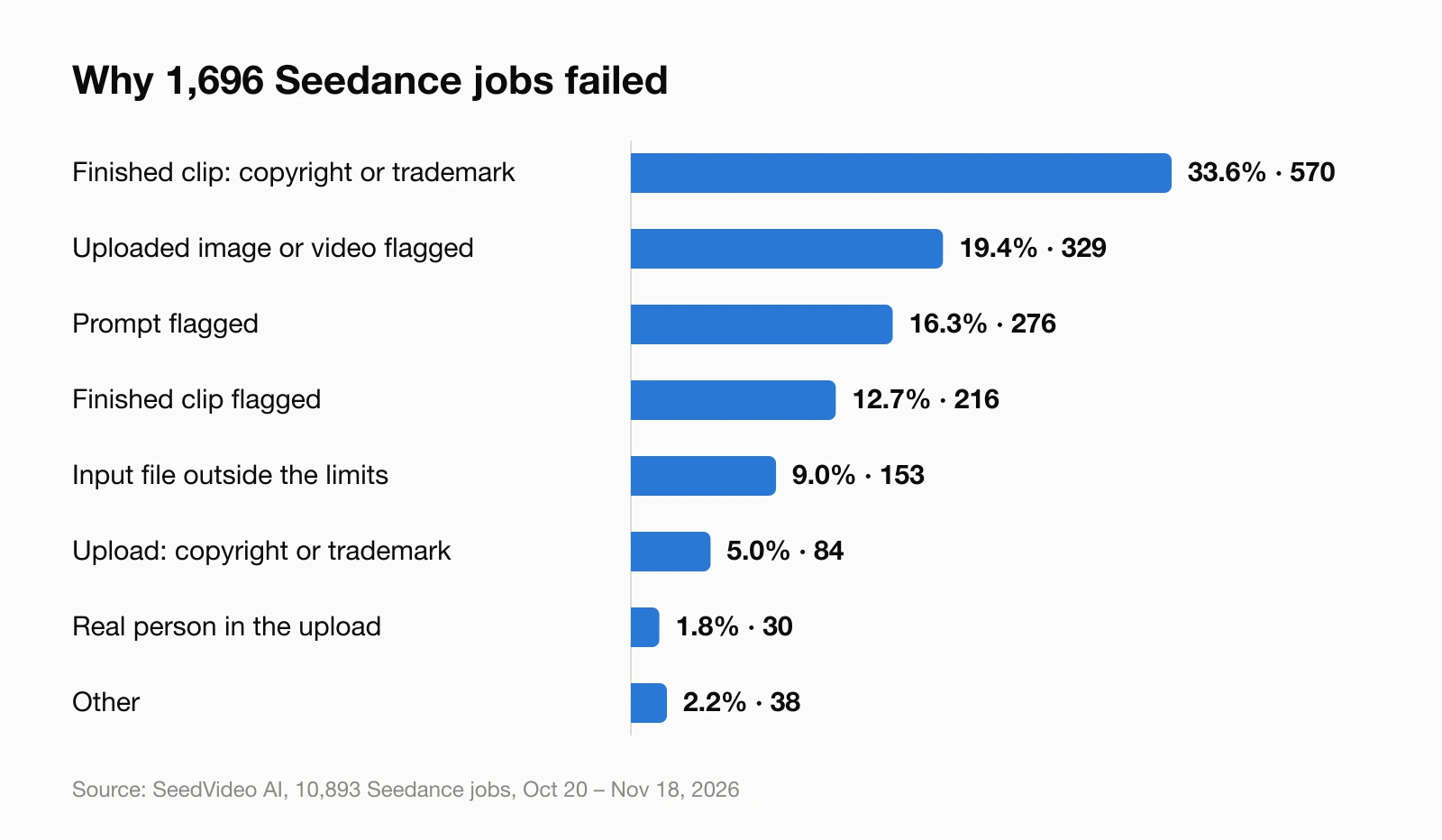
Seedance refuses about one job in seven, and almost always because of a content check, not a technical fault. Of the 10,893 jobs we counted, 1,696 failed (15.6%), and nearly nine in ten of those failures were content checks.
| Why the job failed | Share of failures | What to do |
|---|---|---|
| Finished clip looked like copyrighted or trademarked content | 33.6% | Remove brand names, logos and franchise characters from the prompt and describe the look instead |
| Uploaded image or video flagged by moderation | 19.4% | Try a different source file |
| Prompt flagged by moderation | 16.3% | Reword the flagged idea in neutral terms |
| Finished clip flagged by moderation | 12.7% | Reword and run again |
| Input file outside the limits (size, length, format, frame rate) | 9.0% | Re-export the file inside the platform's limits |
| Uploaded media contained copyrighted or trademarked content | 5.0% | Crop or replace the logo or character |
| Real person detected in the upload | 1.8% | Use a different image, or one you have the right to use |
Two things are worth knowing before your first refusal. Almost half of failures (46.3%) happen after the wait: the prompt was accepted, the clip was rendered, and the result was then withheld by a check on the finished video. And whether a retry works depends on where the job was stopped. We followed each signed-in user's first content refusal in the window, 374 users in all. Two in three (67.6%) tried again within 30 minutes. The very next attempt produced a finished clip 33.6% of the time, and 39.9% of those who retried had a clip within the half hour.
| Where the first refusal happened | Users who retried | Next attempt finished |
|---|---|---|
| The finished clip was blocked | 133 | 48.1% |
| The prompt was flagged | 32 | 21.9% |
| An uploaded image or video was flagged | 88 | 15.9% |
So the three cases call for different moves. When the finished clip was blocked, run it again: the output differs each time, and even an unchanged prompt got through on the next try 41.8% of the time (55 users), an edited one 52.6% (78 users). When an upload was flagged, running it again rarely helps; change the file. When the prompt was flagged, rewrite the flagged idea instead of resubmitting it. The patterns that trigger blocks are in why Seedance blocks a prompt.
Three first-project workflows
A text-led scene
Start with one subject and one camera move. Generate a short version. If the subject is stable, add the second beat. This is the fastest way to learn whether the prompt is asking for too much.
A product image animation
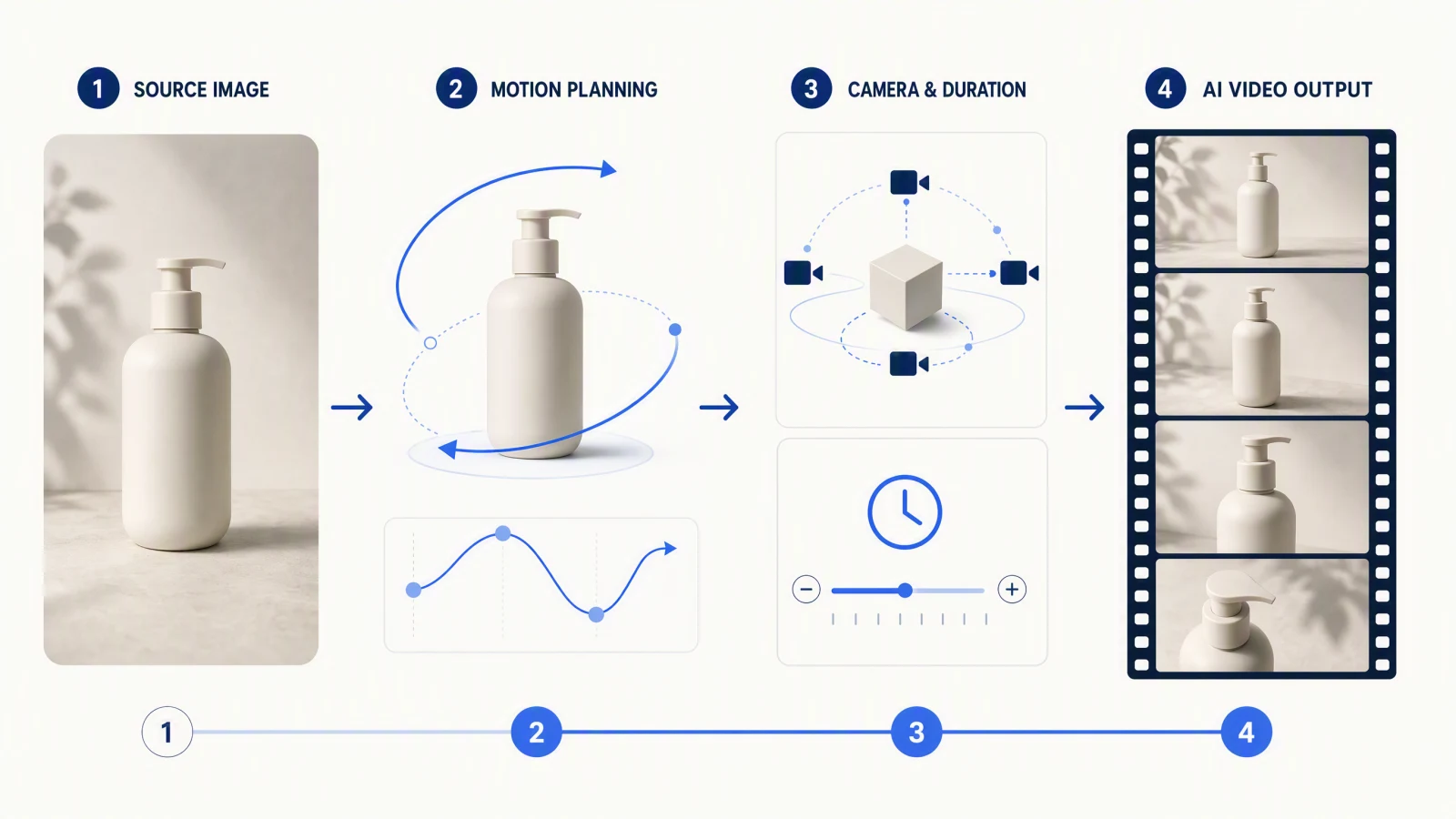
Use a clean product image with enough space around the object. Ask for one motion, such as a slow turn or a push-in. Lock packaging colors and label placement. Review for warped edges and accidental text before adding a lifestyle scene. The image-to-video guide walks through this route.
A reference-led action
Assign one image to identity and one short clip to movement. State which reference controls each part. Keep the background simple for the first version. Add rhythm or style references only after the main action reads correctly. The reference-to-video guide covers the setup.
Common problems and fixes
The model is listed, but generation does not start
Check that the version you want is the one selected, wait for a clear task state, and avoid submitting the same prompt repeatedly. If a version is greyed out or opens an upgrade window, your plan does not include it on that platform.
The character changes between shots
Reduce the number of style references. Keep one identity image, repeat the same clothing and facial details, and shorten the sequence. Change only the shot that drifted.
The camera ignores the prompt
Replace a list of camera terms with one path: "start wide, move forward slowly, stop at a chest-up frame." Conflicting directions often produce random movement.
The ending feels abrupt
Describe the final composition and ask for a short hold. If the mode supports a last frame, provide one that matches the subject scale and lighting of the opening.
The product label is distorted
Use a larger, cleaner source image and reduce object rotation. Plan to add critical typography during editing rather than asking a generated frame to reproduce small text perfectly.
Rights checklist before you publish
- Use assets you own, license, or have permission to use.
- Get consent before using a real person's likeness or voice.
- Do not imitate a public figure or copyrighted character without authorization.
- Review product claims, logos, labels, and accidental text before publishing.
- Check the terms of the platform you used for commercial use and export rights. They differ by platform and by plan.
FAQ
How do I use Seedance?
Open a platform that offers it, select Seedance 2.5 or 2.0 in the model menu, write a prompt, optionally add an image or reference clip, choose length and resolution, and generate. Start with a short, low-resolution test and review the full clip before revising.
Is there a Seedance app or official Seedance website?
There is no app called Seedance, and nothing to download or run locally; is Seedance open source? has the details. ByteDance publishes the model on seed.bytedance.com and offers it in Dreamina and CapCut. Other sites that run Seedance, including SeedVideo AI, are independent platforms.
Where can I use Seedance 2.0?
In Dreamina and CapCut, through the BytePlus and Volcengine APIs, on fal and Replicate, and on independent platforms including Runway, Higgsfield, ElevenLabs, OpenArt and SeedVideo AI.
Where can I use Seedance 2.5?
In Dreamina, in CapCut where the rollout has reached your region, through BytePlus ModelArk, Volcengine Ark, fal and Replicate, and on Runway, Higgsfield, OpenArt and SeedVideo AI.
How do I get Seedance 2.0 without a subscription?
Use a pay-as-you-go route. fal and Runway's API bill per second of video, and SeedVideo AI sells one-time credit packs that do not renew.
Can I use Seedance 2.5 for free?
Briefly. Dreamina says its free daily credits can be used to test 2.5, and they cover a few seconds. On SeedVideo AI the free credits run Seedance 2.0 Mini, and Seedance 2.5 needs a plan or a credit pack.
Does Seedance 2.5 support text to video?
Yes. Choose Text to Video, then start with one subject, one action, one camera move, and a defined ending.
Can I animate one image?
Yes. Use Image to Video and state what may move and what must stay fixed. Keep the first camera move simple.
What is first and last frame mode for?
It helps when both the opening and ending composition matter. The two images should have compatible subject scale and camera angle.
When should I use reference mode?
Use it when several assets have distinct jobs, such as identity, movement and final composition, and name the job of each one in the prompt.
How long should my first test be?
Four or five seconds. It is the cheapest length, it finishes in about two and a half minutes on Seedance 2.0 Mini when you are signed in, and it is what 97% of first jobs in our data use.
Sources and how we checked
Platform availability, plan rules and prices were read from each company's own pages on November 20, 2026: ByteDance Seed's Seedance 2.5 and Seedance 2.0 model pages and launch posts, the CapCut newsroom, Dreamina's model, pricing and FAQ pages, the BytePlus blog, Volcengine's documentation, and the Seedance pages of fal, Replicate, Runway, Higgsfield, ElevenLabs and OpenArt. Rollouts and prices change, so treat this as a dated snapshot and confirm in your own account. Where an official source did not state something, such as Seedance 2.5 on CapCut in the US, we say so and do not fill the gap from third-party reports.
The usage figures cover every Seedance video job created on SeedVideo AI from October 20 to November 18, 2026 that reached a final state: 10,893 jobs from 4,452 users across Seedance 1.0 Pro Fast, 1.5 Pro, 2.0, 2.0 Fast, 2.0 Mini and 2.5. Timing runs from job creation to completion. Where a figure is limited to signed-in users, it leaves out the 3,940 no-login trial runs, which share one settings preset and cannot be told apart by visitor, and API jobs where noted: first jobs and sixth-job-onward habits cover 6,746 jobs from the workspace and site pages, and a user's first job means their first video on the site. Per-user figures count each user once. They describe one platform, not a ByteDance benchmark, and the wider breakdown is in What Is Seedance?. The two sample clips are our own first-attempt renders from October 14, 2026. SeedVideo AI settings and credit costs are the live values on November 20, 2026.
Ready to try it? Open the Seedance 2.5 model page, or start with a 4-second test on Seedance 2.0 Mini.