SeedVideo AI

Nano Banana Free:Turn Ideas Into Finished Images

Generate and edit images with text, guide results with multiple references, and choose output options up to 4K. Try Nano Banana online for free!

Model family

What Is Nano Banana?

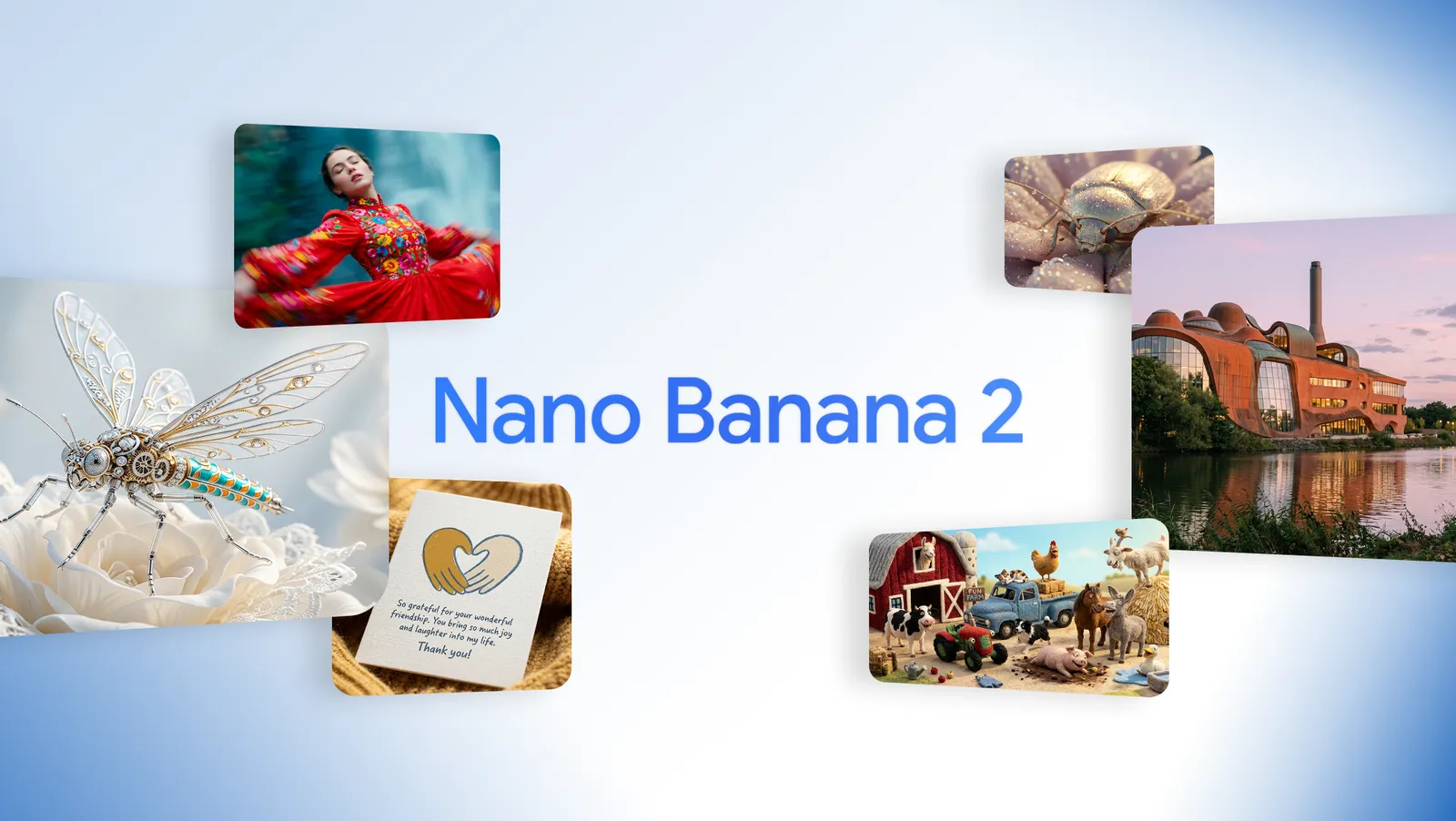
Nano Banana is Google's name for Gemini native image generation. Nano Banana 2 is the fast, versatile option for everyday generation and editing, while Nano Banana Pro is designed for complex professional visuals that need deeper reasoning and tighter creative control.

Google official Nano Banana 2 launch collage with a dancer, jeweled insect, handwritten card, beetle, sculptural building, and toy farm scene

Choose the Right Nano Banana Model

Use Nano Banana 2 when speed, broad format support, and efficient iteration matter most. Choose Nano Banana Pro for demanding layouts, product mockups, localized text, brand-sensitive work, and other briefs where precision matters more than turnaround time.
Creation modes

Create Images with Nano Banana on Seedance.io

Move from a written idea or visual reference to a usable image without rebuilding your setup for every revision. Select a model, choose a supported format, and generate from the same focused workspace.

Creation modes01

Generate Images from Text

Describe the subject, action, setting, composition, lighting, mood, and intended use. Nano Banana turns that brief into a new visual for a campaign, product concept, story frame, or design draft.

Creation modes02

Edit an Existing Image with a Prompt

Upload an image and explain what should change. Add or remove an element, adjust a color treatment, replace the setting, or reshape the style while naming the details you want the model to preserve.

Creation modes03

Combine Multiple Reference Images

Use references to define people, products, objects, and visual direction more clearly than text alone. The current Seedance.io Nano Banana workflows accept up to 14 images for one generation.

Creation modes04

Choose Nano Banana 2 or Pro

Start with Nano Banana 2 for fast general-purpose work and broad aspect-ratio choices. Switch to Nano Banana Pro when a complex composition, polished mockup, dense graphic, or text-led asset needs more deliberate reasoning.

Creative control

Keep the Details That Make an Image Useful

A finished image needs more than visual impact. It also needs the right format, readable information, recognizable subjects, and a revision brief that protects decisions already approved.

01

Build Text into the Composition

Include exact copy, language, hierarchy, placement, and type direction when creating posters, menus, infographics, packaging, or ads. Google highlights improved international text rendering in Nano Banana 2 and precision text work in Nano Banana Pro, but every public-facing result still needs a spelling and layout check.

02

Guide Subjects with References

Reuse clear references for a person, character, product, object, or visual identity. Explain which traits are essential and compare each output with the source before treating consistency as approved.

03

Match the Final Channel

Choose a supported aspect ratio and resolution before generating. Nano Banana 2 includes 0.5K, 1K, 2K, and 4K choices in the current workspace; Nano Banana Pro supports 1K, 2K, and 4K.

Creative workflows

Use Nano Banana Across Everyday and Professional Work

Pick the model around the acceptance criteria for the asset, then write the prompt around the channel where the image will actually appear.

01

Marketing graphics and social posts

Create launch concepts, channel-specific graphics, event visuals, and ad directions with the intended crop, headline space, focal subject, and brand mood built into the brief.

02

Product scenes and mockups

Place a product or logo reference into a lifestyle, studio, packaging, or campaign context. Use Pro for the most demanding brand-sensitive mockups, then verify labels, proportions, and product details before release.

03

Infographics and visual explanations

Organize facts into diagrams, educational graphics, menus, and data-led visuals. Keep source material explicit and review every number, label, and claim even when using a model with grounding capabilities.

04

Storyboards and image-to-video frames

Turn a script or scene description into a visual reference, then carry the selected result into image-to-video as a starting frame, character guide, product shot, or art-direction anchor.

Four-step workflow

How to Use Nano Banana on Seedance.io

Set the goal, give the model enough visual context, and judge each output against the real use case. One clear revision is easier to control than a long list of competing changes.

  1. Step 1

    Choose Nano Banana 2 or Pro

    Use Nano Banana 2 for fast, flexible creation and Nano Banana Pro for the most complex design, mockup, text, or composition work.

  2. Step 2

    Write a Prompt or Add References

    Describe the subject, setting, composition, visual treatment, and intended use. Upload references when a person, product, object, palette, or layout needs a concrete guide.

  3. Step 3

    Select the Format and Generate

    Choose a supported aspect ratio and output size, then generate one image. Check the result for hierarchy, subject fidelity, text, factual details, and fit for the final channel.

  4. Step 4

    Refine or Continue into Video

    Make a focused edit, download the finished image, or use it as a reference and starting frame in the wider Seedance.io video workflow.

Visual examples

Nano Banana Image Showcase

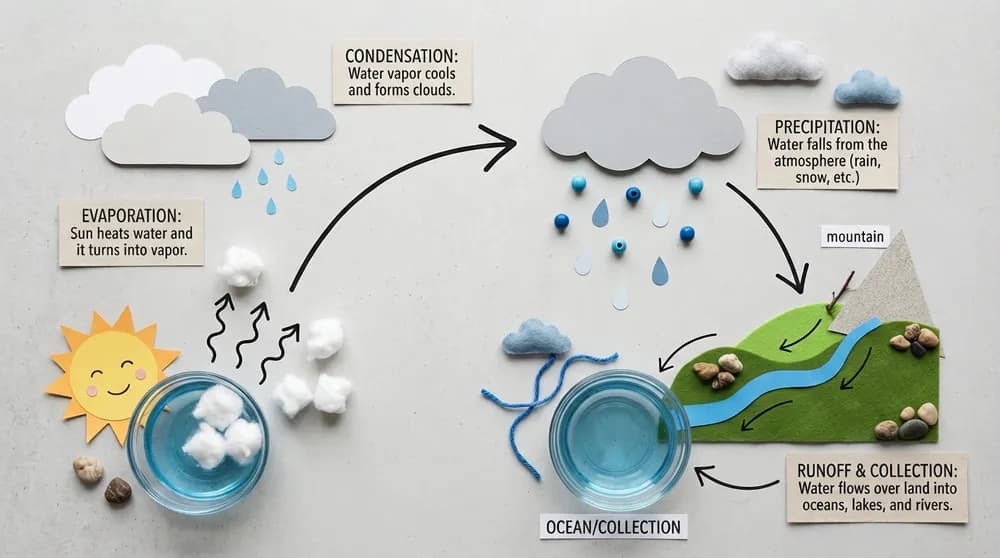
This official Nano Banana 2 example turns the water cycle into a tactile classroom infographic with labeled stages for evaporation, condensation, precipitation, runoff, and collection. Review every label and fact before using generated educational material.

Google official Nano Banana 2 water-cycle infographic with labeled evaporation, condensation, precipitation, runoff, and collection steps
Google official Nano Banana 2 example · water-cycle infographic with labeled steps
Google · Nano Banana 2
Start Creating

Prompt guide

How to Write Better Nano Banana Prompts

Treat the prompt as a compact creative brief. State the outcome and priorities clearly, then use references and protected details to remove ambiguity.

Prompt 01

Define the Subject, Scene, and Composition

Start with the main subject and action. Add the environment, camera distance, perspective, lighting, mood, and placement of important elements. Reserve negative space when the final design needs copy or controls around the image.

Prompt 02

Write Exact Text and Design Constraints

Put required wording in quotation marks and specify its language, hierarchy, location, and visual treatment. Keep essential copy concise, and ask for a clear information structure instead of a long list of decorative adjectives.

Prompt 03

Name What Changes and What Stays

For image editing, identify the target, requested change, and protected details. For example: replace only the background with a warm studio wall; keep the bottle, logo, camera angle, crop, shadows, and label text unchanged.

Model comparison

Nano Banana Compared with Other AI Image Models

Choose by workflow, not by a universal quality ranking. Use the same prompt, references, aspect ratio, and review criteria when comparing models for a real project.

01

Nano Banana 2 vs Nano Banana Pro

Nano Banana 2 is the efficient generalist: fast, flexible, and suited to high-volume iteration. Nano Banana Pro is the premium option for complex graphic design, high-fidelity product mockups, accurate text, advanced localization, and precision control.

02

Nano Banana vs GPT Image 2

Both families support generation and editing from text and images. Test Nano Banana when Gemini reasoning, broad reference workflows, 4K choices, or supported Search grounding matter; test GPT Image 2 when high-fidelity inputs, flexible sizing, transparent output, or OpenAI-native workflows matter.

03

Nano Banana vs Seedream 5.0

Both offer multiple variants for different creative priorities. Compare Nano Banana for Gemini-native reasoning, text rendering, and broad reference composition; compare Seedream 5.0 when its Pro or Lite controls, batch behavior, and output options better match the production brief.

At a glance

Nano Banana Model Comparison Chart

This chart summarizes current workflow differences. Model versions, product controls, availability, and provider limits can change, so verify the linked primary sources before a production rollout.

Nano Banana 2

Developer
Google
Supported inputs
Text and image
Editing and references
Fast generation and editing, multiple references, improved multilingual text, and Search grounding in supported Gemini workflows
Public output options
0.5K, 1K, 2K, and 4K on Seedance.io
Primary access
Seedance.io and Gemini API
Google Gemini 3.1 Flash Image

Nano Banana Pro

Developer
Google
Supported inputs
Text and image
Editing and references
Reasoning-led generation and editing for complex layouts, mockups, text, localization, and precision creative control
Public output options
1K, 2K, and 4K on Seedance.io
Primary access
Seedance.io and Gemini API
Google Gemini 3 Pro Image

GPT Image 2

Developer
OpenAI
Supported inputs
Text and image
Editing and references
Generation, editing, high-fidelity image inputs, and supported multi-turn OpenAI workflows
Public output options
Flexible output sizes within the current model and product limits
Primary access
Seedance.io and supported OpenAI APIs
OpenAI GPT Image 2

Seedream 5.0

Developer
ByteDance
Supported inputs
Text and image
Editing and references
Pro and Lite generation and editing paths with variant-specific controls and reference behavior
Public output options
Variant-specific options up to 4K on Seedance.io
Primary access
Seedance.io and supported provider APIs
ByteDance Seed models

Google states that images generated by its native Gemini image models include an invisible SynthID watermark. Seedance.io does not add a visible platform watermark to the downloaded image. Always review text, identities, brand details, and factual claims before use.

Primary sources

Start with starter credits

Try Nano Banana with Free Trial Credits

Choose Nano Banana 2 or Pro, generate the first image from a prompt or reference, and see which variant reaches an approved result with less correction. New users receive starter credits after signing up; further use follows the current Seedance.io credit rules.

Start Creating

FAQ

Frequently Asked Questions About Nano Banana

Quick answers about the model family, variants, access, output sizes, references, API use, watermarks, and commercial work.

Nano Banana is Google's name for Gemini native image generation. The Seedance.io family page currently supports Nano Banana 2, based on Gemini 3.1 Flash Image, and Nano Banana Pro, based on Gemini 3 Pro Image.

Nano Banana 2 balances speed, quality, broad formats, and efficient iteration. Nano Banana Pro is intended for the most complex professional generation and editing tasks, including demanding graphic design, product mockups, localized text, and precision creative control.

Seedance.io is free to try with limited starter credits for new users. It is not an unlimited free service; additional generations use credits under the current account and pricing rules shown in the product.

Seedance.io does not add a visible platform watermark to the downloaded result. Google states that images generated by its native Gemini image models include SynthID, an invisible digital watermark designed to identify AI-generated content.

In the current Seedance.io workspace, Nano Banana 2 offers 0.5K, 1K, 2K, and 4K, while Nano Banana Pro offers 1K, 2K, and 4K. Supported aspect ratios differ slightly between the two models and are shown in the generator.

The current Seedance.io policy accepts up to 14 reference images for Nano Banana 2 and Nano Banana Pro. Google documents different recommended mixes for objects, characters, and style references, so use the clearest and most relevant set instead of uploading duplicates.

Yes. Google documents stable Gemini API model codes for Gemini 3.1 Flash Image and Gemini 3 Pro Image. Seedance.io provides these models through its own image workspace; direct Gemini API parameters, tools, quotas, and billing should be checked in the current Google documentation.

Commercial use depends on the current service terms and policies, your rights to every input, and any brand, privacy, advertising, or industry rules that apply. Review those requirements and verify the finished asset before publishing or selling it.

Connected workflow

Why Create with Nano Banana on Seedance.io?

Keep model selection, reference uploads, format controls, generation, and the next video step close together so a useful visual does not lose its direction during handoff.

01

Switch Between Speed and Precision

Start with Nano Banana 2 for rapid exploration, then choose Nano Banana Pro when the brief needs a more deliberate composition, text treatment, or production-ready mockup.

02

Use One Focused Image Workspace

Keep prompts, references, aspect ratios, resolution choices, credit estimates, and output review in the same generation flow.

03

Carry the Approved Image into Motion

Use a selected result as the first frame, visual reference, storyboard panel, product shot, or art-direction guide in a connected image-to-video workflow.

Nano Banana · 2 and Pro

Create Your Next Image with Nano Banana

Choose the model that fits the brief, add a prompt or references, and turn the strongest result into a finished asset or the start of your next video.

Start Now
Nano Banana Free: 4K AI Image Generator | No Watermark Added