Looking for a Runway alternative does not automatically mean Runway is the wrong tool. It means your workflow may need a different balance of model access, generation speed, editing depth, and production complexity. SeedVideo AI is a practical alternative for creators and marketing teams that want a focused place to generate and compare AI video outputs across multiple leading models. Runway remains a strong choice when built-in editing, audio tools, custom workflows, and a broader creative suite are central to the job. The right decision is therefore not “Which platform wins?” but “Which workflow removes the most friction for this project?” This guide compares Runway vs SeedVideo AI without assuming one platform is best for everyone. It explains what each is best for, where each may be a poor fit, how to run a fair test, and how to migrate prompts without disrupting active production. Product capabilities can change, so confirm current model availability and plan terms before committing.
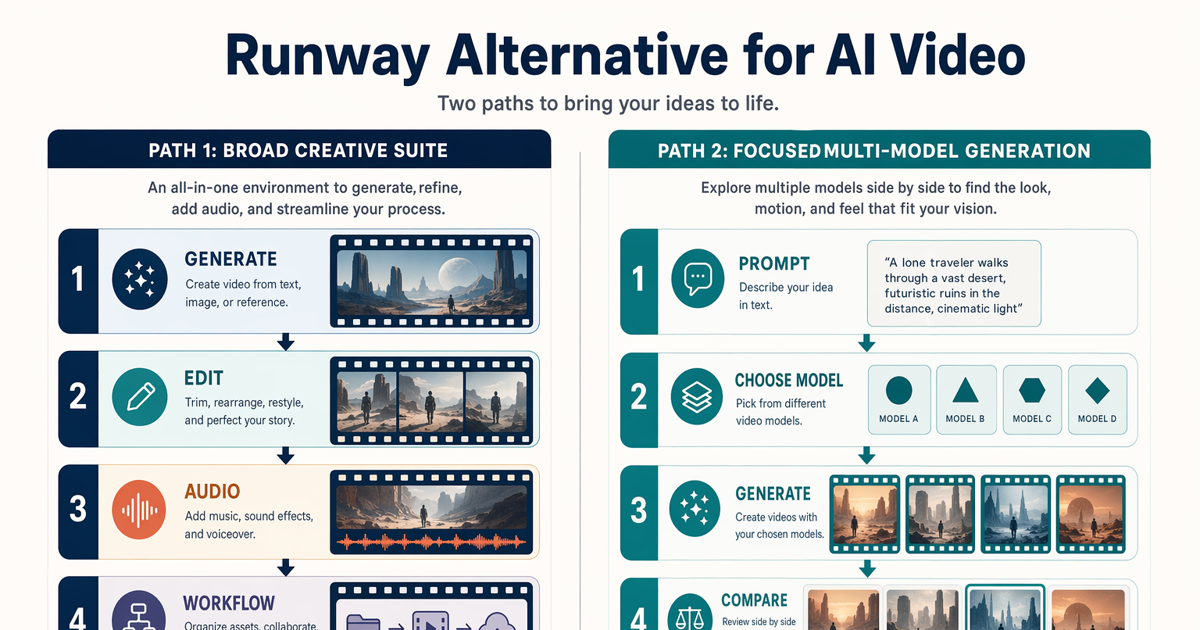
Compare a broad creative suite with a focused multi-model generation workflow.
TL;DR
- Choose SeedVideo AI when you want a focused AI video generation workflow, access to multiple leading video models, and a practical way to test text-to-video or image-to-video ideas.
- Choose Runway when you need a broader creative environment with generation, editing, audio, specialized apps, and custom node-based workflows in one platform.
- Do not choose by a single demo clip. Test the same brief, references, aspect ratio, and evaluation criteria across several outputs.
- Check current terms. Model availability, credits, output settings, and pricing can change.
Quick Answer
SeedVideo AI is the better Runway alternative for users whose main job is generating video and comparing model behavior without adopting a larger creative suite. It is especially relevant for prompt testing, reference-led clips, marketing concepts, and teams that want a straightforward path from brief to generated output.
Runway may still be better for creators who want generation and post-generation work in one environment. Its current product includes image, video, audio, editing, agent-based creation, specialized apps, and custom workflows. That broader scope can be valuable for complex production, although it may be more than a generation-focused user needs.
Best for SeedVideo AI: focused multi-model generation, text-to-video tests, image-to-video experiments, and rapid creative comparisons.
Not best for SeedVideo AI: teams that require a deep built-in editing and workflow-automation ecosystem.
Best for Runway: end-to-end creative production, in-platform editing, custom workflows, and specialized video transformation tasks.
Not best for Runway: users who only need a focused generation path and do not expect to use the broader suite.
Why Users Look for a Runway Alternative
Most searches for a Runway AI alternative come from a workflow mismatch, not a simple quality verdict. Common reasons include:
- The team wants to compare several model families. A single prompt can behave differently across models, so model choice becomes part of creative direction.
- Generation is the main task. Some users do not need an extensive editing or automation environment for every project.
- A reference image matters more than a large toolset. Product, character, and campaign work often starts with an approved still.
- The team needs a repeatable evaluation method. A clear test matrix is more useful than switching platforms after one disappointing result.
- The existing workflow has become difficult to explain. If collaborators cannot reproduce the steps, the process needs simplification or better documentation.
These are valid reasons to test an alternative, but they do not prove that a new tool will perform better. Define the problem before changing platforms.
What to Compare in an AI Video Generator
Do not begin with a generic “quality” score. Quality depends on the brief. A product demo needs reference accuracy; a cinematic shot needs motion and continuity; a social clip needs fast iteration and the right format.
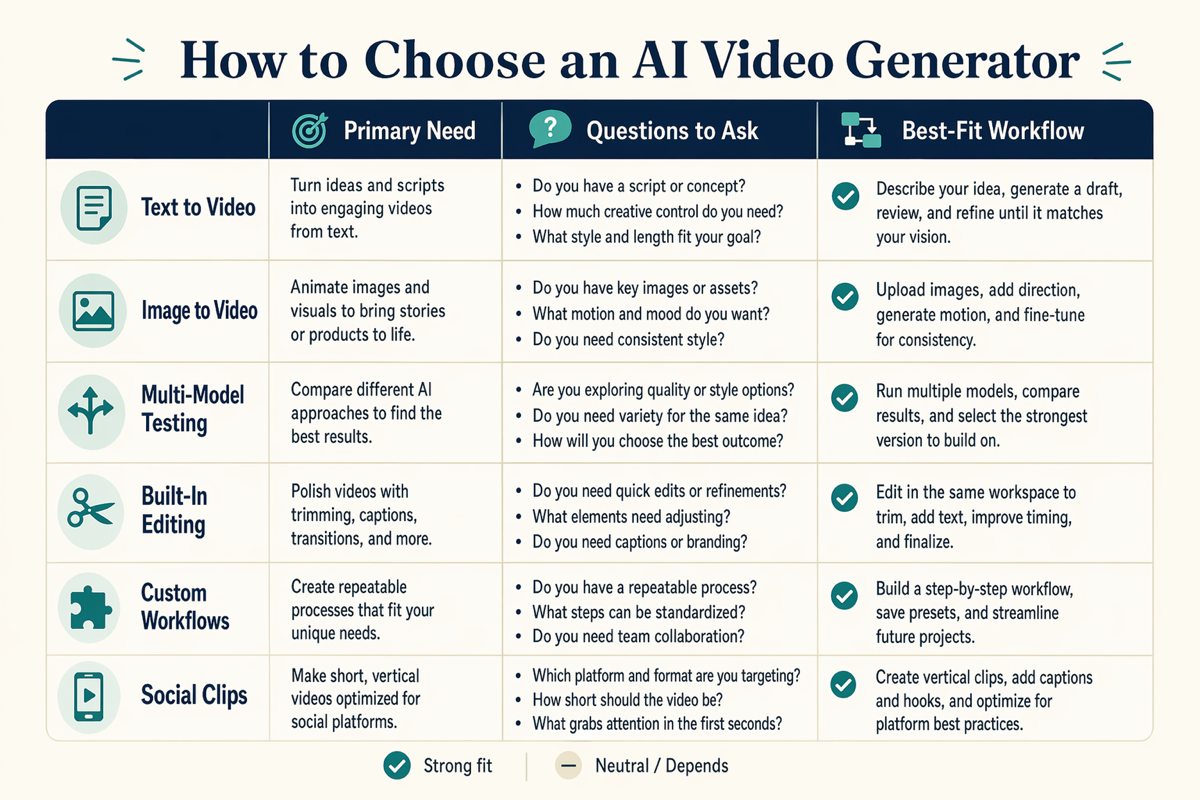
A simple matrix for comparing AI video generation tools by workflow need.
| Criterion | What to test | Why it matters |
|---|---|---|
| Input workflow | Text, image, video, and available reference controls | Your source material determines which workflow is practical |
| Model access | Current models available for your account and region | Model availability can change and may differ by plan |
| Prompt adherence | Subject, action, camera, lighting, and constraints | A visually strong clip can still fail the brief |
| Motion quality | Smoothness, pacing, physics, and camera behavior | Motion failures are expensive to repair later |
| Consistency | Subject, product, wardrobe, and scene continuity | Repeated visual identity matters across a sequence |
| Editing depth | Trimming, transformation, audio, captions, and finishing | Built-in editing can reduce handoffs to other tools |
| Workflow repeatability | Presets, reusable steps, collaboration, and documentation | Teams need results they can reproduce |
| Cost per accepted output | Total credits or spend divided by usable clips | Sticker price alone does not show production efficiency |
For prompt testing, use the same underlying creative brief rather than forcing identical platform-specific syntax. The Text to Video Prompt Guide provides a reusable subject-action-camera-style structure that is easy to adapt.
SeedVideo AI vs Runway: Practical Comparison
As of this guide's publication, Runway's official product page presents a broad toolkit spanning generation, editing, audio, specialized apps, agent-based creation, and custom node workflows. SeedVideo AI presents a focused video-generation workspace with access to multiple leading AI video models and text-, image-, and video-led creation paths. Those product directions suggest different best-fit workflows.
| Decision area | SeedVideo AI | Runway |
|---|---|---|
| Primary orientation | Focused multi-model AI video generation | Broad AI creative suite |
| Useful starting point | Choose a video workflow and model, then generate | Choose a model, app, editor, agent, or custom workflow |
| Strong fit | Comparing generation approaches and producing video from prompts or references | Combining generation with editing, audio, transformation, and workflow tools |
| Potential mismatch | Not the first choice when deep built-in post-production is mandatory | May be broader than needed for a generation-only task |
| Evaluation advice | Compare models using the same brief and acceptance criteria | Test whether suite-level tools replace meaningful external steps |
| Pricing and access | Confirm current plan, credits, models, and output terms | Confirm current plan, credits, models, and output terms |
This is not a claim that every SeedVideo AI output will outperform every Runway output. Models, settings, inputs, and random variation all affect results. For a wider market view, see Best AI Video Generators in 2026.
Best Use Cases for SeedVideo AI
1. Marketing concept tests
Create several short interpretations of the same campaign idea, then compare message clarity, visual style, and motion before investing in a full edit.
2. Reference-led product clips
Start with an approved product image and test controlled camera or environmental motion. Reference accuracy should be an explicit acceptance criterion.
3. Creator reels and social variations
Generate a base concept, then test vertical framing, hooks, pacing, and visual treatments. Keep platform-specific text and captions in a separate finishing step when that gives you more control.
4. Cinematic scene exploration
Use short shots to evaluate mood, composition, movement, and continuity before assembling a longer sequence. The goal is not to generate an entire film in one prompt; it is to validate one shot at a time.
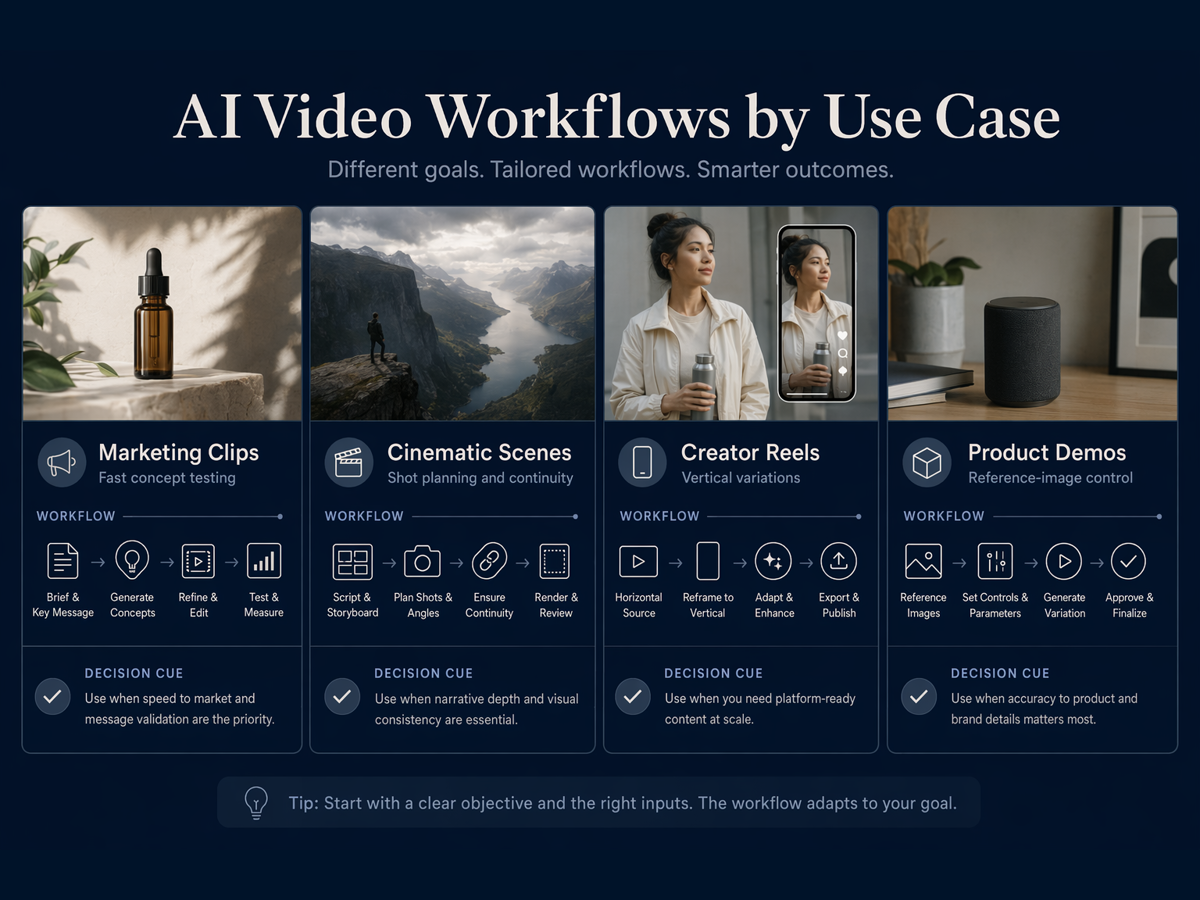
Different AI video tools fit different production needs.
If your project starts from a still image, the Image to Video AI Guide explains how to separate image composition from motion direction.
When Runway May Still Be Better
Runway may be the better choice when the value of its broader suite is concrete rather than hypothetical. Examples include:
- You expect to generate, transform, edit, and add audio without leaving the platform.
- Your team uses specialized apps for tasks such as object removal, relighting, performance mapping, or product-shot transformation.
- You need custom node-based workflows that connect several models and intermediate steps.
- You want agent-assisted creation or multi-shot tooling as part of the same production environment.
- The cost of moving assets between separate tools is higher than the benefit of a more focused generator.
These capabilities are described on Runway's current product page, but availability and account requirements can change. Verify the exact feature you need before planning a migration in either direction.
Migration Workflow: Test Before You Switch
A safe migration is a controlled experiment, not a platform-wide replacement.
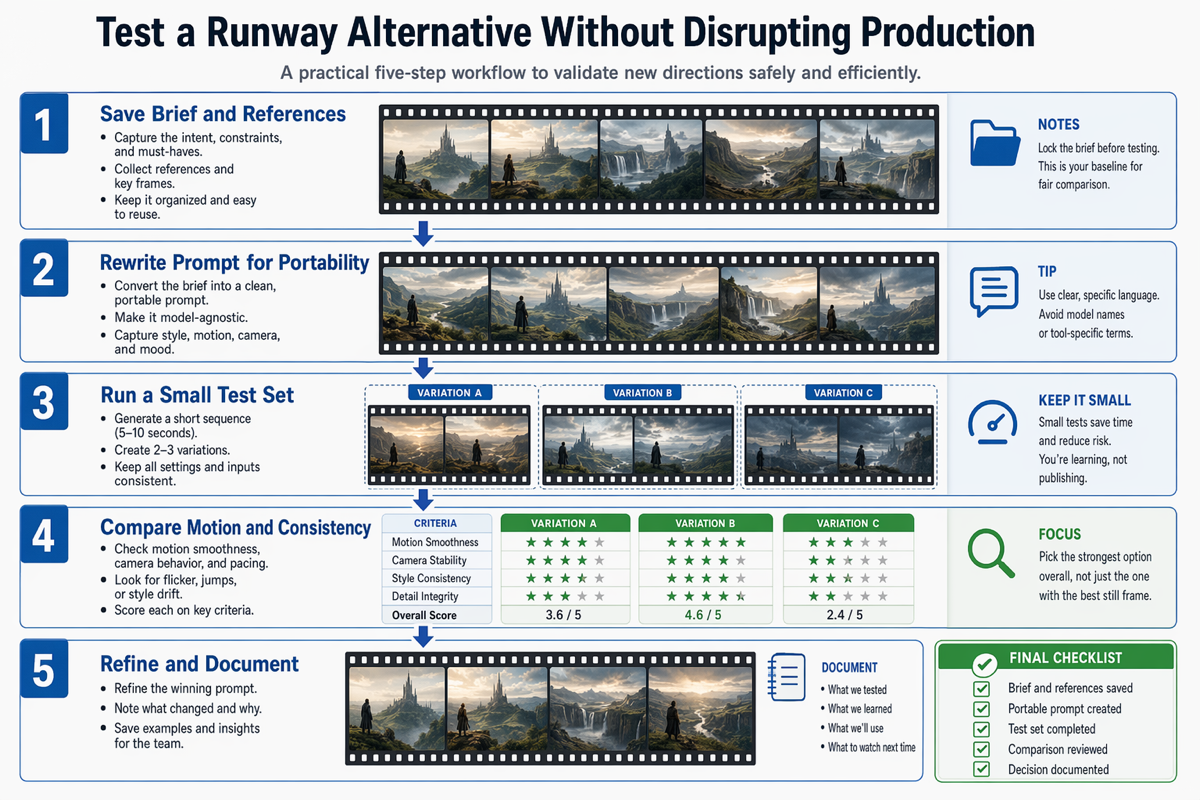
A practical workflow for testing another AI video generator without disrupting production.
Step 1: Save the brief and references
Record the goal, audience, shot type, subject, action, camera direction, visual style, aspect ratio, duration target, and non-negotiable details. Save the exact reference assets used in the current workflow.
Step 2: Rewrite the prompt for portability
Remove model-specific commands that another system may not understand. Preserve the creative intent in plain language. A portable prompt describes the scene and constraints before platform syntax.
Step 3: Run a small test set
Generate two or three variations of one short shot in SeedVideo AI. Do not migrate an entire campaign yet. Keep inputs and acceptance criteria consistent.
Step 4: Compare accepted-output quality
Review motion smoothness, prompt adherence, subject consistency, camera behavior, artifacts, and the number of attempts required to reach a usable result. Compare production effort, not just the best frame.
Step 5: Refine and document
Save the winning prompt, settings, reference files, observed failure modes, and finishing steps. If the alternative improves the workflow, expand the test gradually. If it does not, keep Runway for that use case.
FAQ
What is the best Runway alternative for AI video generation?
The best alternative depends on the job. SeedVideo AI is a practical option for focused multi-model video generation and prompt or reference testing. Runway may remain the better fit when built-in editing, audio, specialized apps, and custom workflows are essential.
Is SeedVideo AI better than Runway?
Not for every user or project. SeedVideo AI is better suited to some generation-focused workflows, while Runway offers a broader creative suite. Test both with the same brief and judge the number of usable outputs, workflow time, and finishing requirements.
Can I use SeedVideo AI for text-to-video and image-to-video?
Yes. SeedVideo AI currently presents text-to-video and image-to-video workflows, along with access to multiple AI video models. Check the live workspace for current model availability and settings.
Does Runway offer more than video generation?
Yes. Runway's current official product materials describe image, video, audio, editing, specialized apps, agents, and custom workflows. That broader toolkit is one of its main strengths.
How should I compare AI video costs?
Calculate cost per accepted output, not only cost per generation or monthly plan price. Include failed attempts, credit usage, editing time, asset transfers, and any external tools needed to finish the clip.
Will my Runway prompts work unchanged in another tool?
The creative brief usually transfers better than exact syntax. Rewrite prompts in model-agnostic language, preserve references and constraints, then adapt only the settings required by the new platform.
Choose the Workflow That Fits the Work
A useful Runway alternative should remove a specific production bottleneck. Choose SeedVideo AI when focused multi-model video generation and fast comparison are the priority. Choose Runway when its broader editing, audio, app, and workflow ecosystem will replace real steps in your pipeline.
Start with one controlled shot, measure accepted-output quality, and document the result. You can try SeedVideo AI now, or review the Best AI Video Generators in 2026 before deciding which workflow to test first.