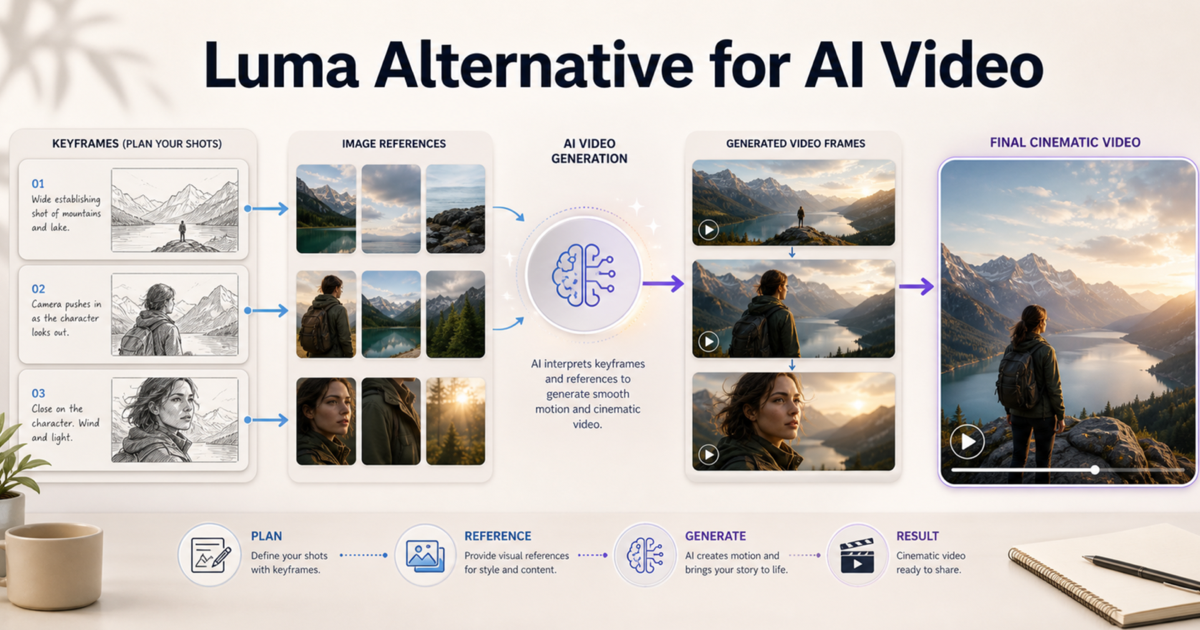
A good Luma alternative is not always a tool that copies Luma feature for feature. If your work depends on exact multi-keyframe direction inside one clip, Luma can still be a strong fit. But if your real goal is to plan a directed shot, start from image references, test camera motion, and iterate without building a complex production setup, a simpler image-to-video workflow can be faster. SeedVideo AI is useful in that scenario because it lets you work from the shot brief first: choose a strong source image, define the motion, compare generation routes, and refine the result in one creative flow. This guide explains how to evaluate a Luma AI alternative without false claims, when a Luma Ray alternative makes sense, and how to test keyframe-style planning, image references, motion clarity, and consistency before you commit to a workflow.
Compare AI video tools by direction, reference control, and workflow fit.
TL;DR
- Choose Luma when you specifically need explicit multi-keyframe direction inside a single clip.
- Choose a simpler Luma alternative when you mostly need image-to-video iteration, reference-led shots, and faster workflow testing.
- SeedVideo AI is best evaluated as a practical multi-model workspace, not as a one-to-one clone of Luma Ray.
- Test any Luma AI alternative with the same first frame, motion plan, camera path, and ending goal.
- Do not compare only the best render. Compare how quickly you can get a repeatable, usable shot.
Quick Answer
The best Luma alternative for many creators is the workflow that gives enough direction without making every shot feel like a technical setup. Luma is strong when keyframes are the core requirement. SeedVideo AI is a better fit when you want to turn a source image, product visual, character reference, or storyboard frame into a usable video shot while staying flexible about model choice.
Use SeedVideo AI if you care about:
| Need | What to test | Why it matters |
|---|---|---|
| Image-to-video speed | Can you turn one image into several usable motion drafts? | Faster drafts help you find the right direction sooner. |
| Reference use | Does the subject, style, or product survive generation? | A beautiful clip is not enough if the reference drifts. |
| Camera motion | Can you describe a clean push-in, pan, orbit, or reveal? | Directed camera language matters more than vague cinematic words. |
| Iteration | Can you refine from the best draft without starting over mentally? | Practical workflows depend on repeatable improvement. |
| Use case fit | Does the tool fit ads, social clips, product shots, or concept work? | The best tool depends on the job, not the most advanced demo. |
For a wider model-selection view, start with Best AI Video Generators in 2026. For source-image workflows, read the Image to Video AI Guide.
Why Creators Look for a Luma Alternative
Creators usually search for a Luma alternative after one of three moments. First, they like the idea of keyframes but do not need a heavy frame-by-frame setup for every social or marketing clip. Second, they want to animate product photos, portraits, concept art, or campaign references without spending the whole session tuning one model. Third, they need a workflow that is easier for a team to repeat.
That does not make Luma weak. Luma's current Ray pages emphasize cinematic direction, multi-keyframe control, motion transfer, video modification, reframe workflows, and production-oriented output formats. Its API documentation also shows image-to-video with start and end keyframes. Those are real strengths for creators who know exactly which frames need to hold and change.
The alternative question is narrower: what if your shot does not need that much precision? In that case, you may be better served by a workflow that starts with reference clarity, motion intent, and fast review cycles.
Luma vs SeedVideo AI: What to Compare
Do not compare Luma and SeedVideo AI as if they were the same type of product. Luma is often chosen for directed generation and keyframe-heavy control. SeedVideo AI is better treated as a creative workspace for testing video generation workflows, especially when you want to compare image-to-video, text-to-video, and model fit from one starting point.
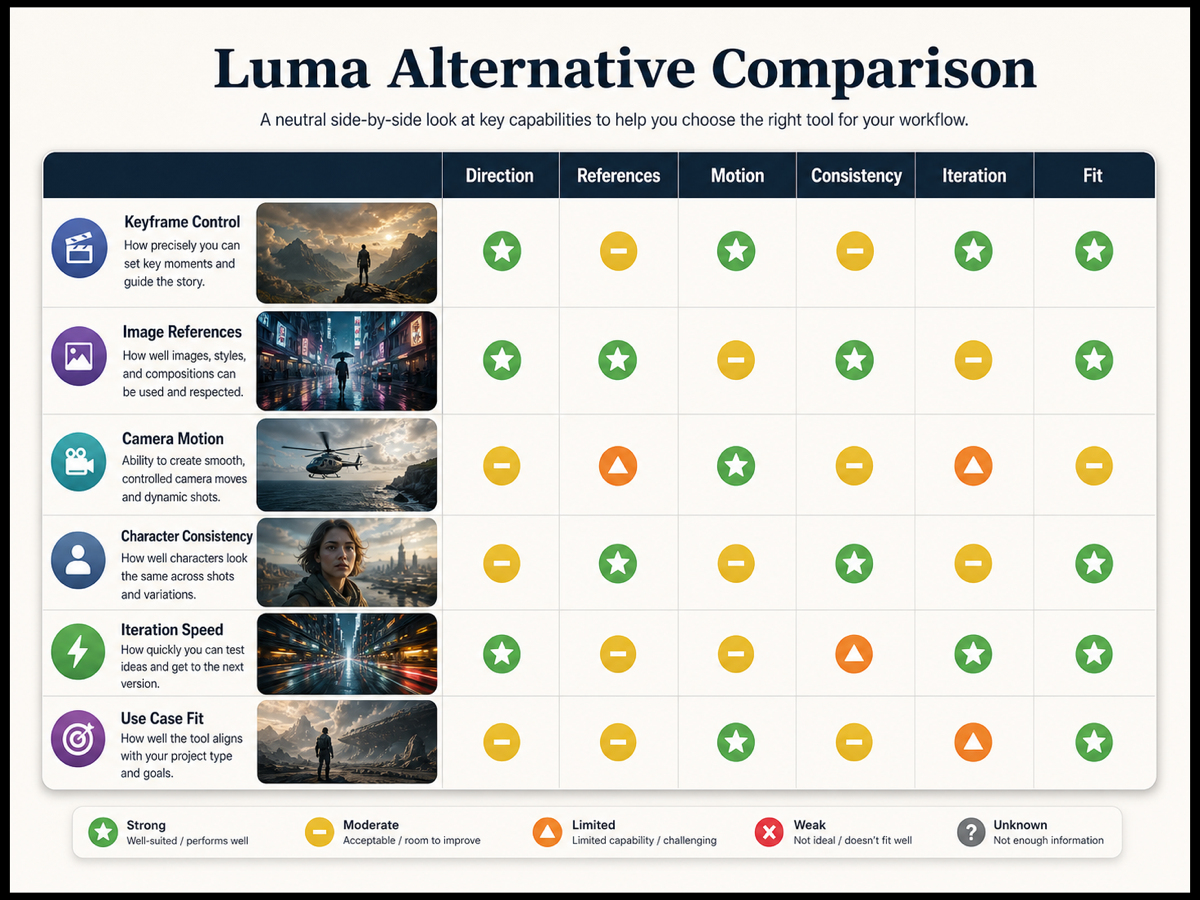
Match the tool to the type of shot you need to direct.
| Comparison area | Luma fit | SeedVideo AI fit | Best for | Not best for |
|---|---|---|---|---|
| Explicit keyframes | Strong when you need keyframe-level direction. | Better for keyframe-style planning than exact Luma-style keyframe control. | Planned cinematic transitions and controlled shot endpoints. | Users who only need a quick product clip. |
| Image references | Strong when reference frames are central to the clip. | Useful for source-image testing and visual prompt iteration. | Product visuals, character references, style frames. | Multi-shot continuity without review. |
| Camera motion | Good for directed cinematic movement. | Good when you describe a clear camera move and compare outputs. | Push-ins, pans, reveals, orbit-style ideas. | Vague prompts such as "make it cinematic." |
| Character consistency | Depends on reference quality and workflow. | Best tested with the same reference image across drafts. | Simple creator tests and repeatable review. | Long narrative scenes with many identity changes. |
| Iteration speed | Strong for precise work, but precision can add setup time. | Strong when you want fast model and prompt exploration. | Marketers, creators, founders, and content teams. | Teams that require exact frame-locked control. |
If character stability is the main goal, pair this article with Character Consistency in AI Video.
Keyframe-Style Planning Without Overcomplication
You do not need to claim that every Luma alternative has identical keyframe controls. A more honest approach is to use keyframe-style planning: define the visual start, the intended end, the subject behavior, and the camera path before generation. This gives the model a clearer job even when the interface is simpler.
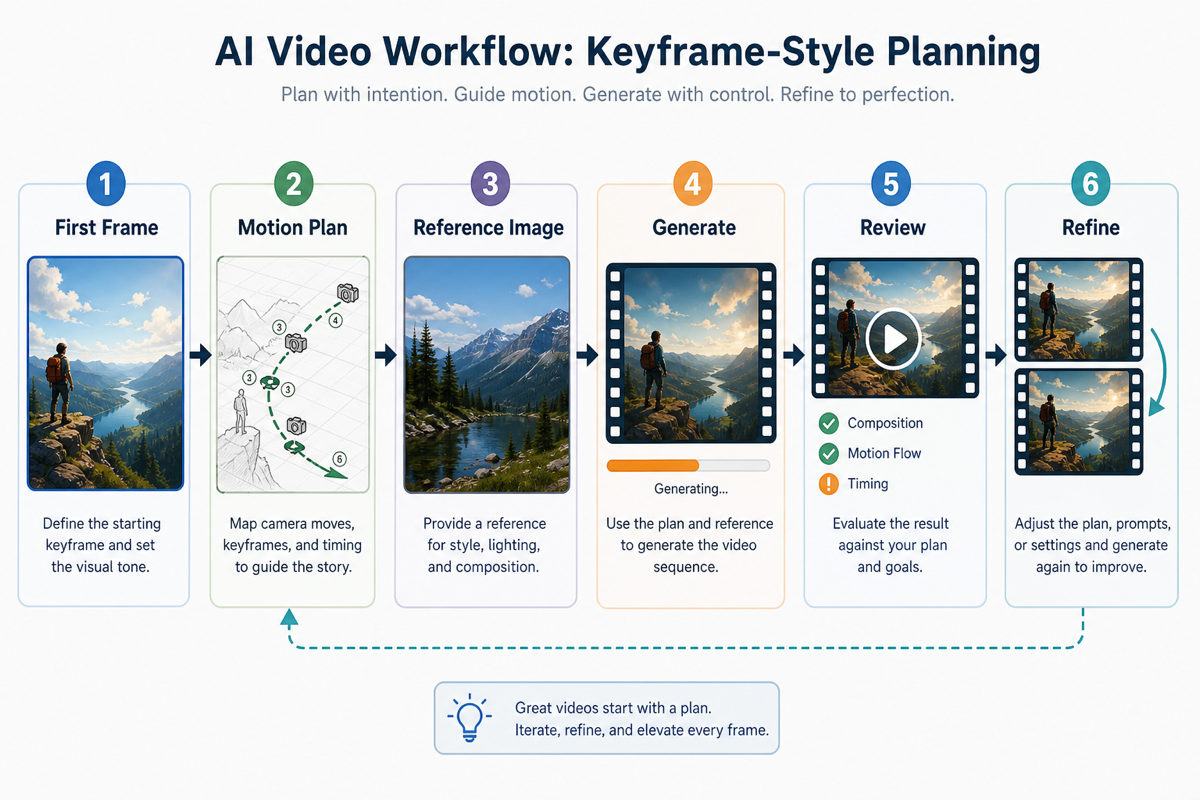
You can plan keyframe-style direction even when using a simpler image-to-video workflow.
Try this planning workflow:
| Step | Planning question | Example direction |
|---|---|---|
| 1. First frame | What should the viewer see immediately? | A product on a desk, centered, soft side light. |
| 2. Ending goal | What should change by the final second? | Camera pushes closer and reveals texture detail. |
| 3. Subject motion | What moves, and what must stay stable? | Product stays sharp while background light shifts. |
| 4. Camera path | What is the single camera move? | Slow push-in, gentle pan, orbit, crane reveal. |
| 5. Reference lock | Which visual details must survive? | Color, silhouette, face, logo-free packaging, outfit. |
| 6. Review rule | What makes the draft usable? | Stable subject, clear motion, no unwanted scene change. |
This is where a keyframe AI video generator mindset helps even if you are using an image to video alternative. Planning prevents the prompt from becoming a wish list.
Image-to-Video Workflow
For many creators, the practical Luma Ray alternative workflow is image-first. Start with one strong still image, define one motion idea, generate short drafts, then refine the best version.
Use this workflow inside SeedVideo AI when the source visual matters:
- Choose one clean source image with a readable subject, lighting direction, and background.
- Write a motion brief in four parts: subject action, camera movement, scene behavior, and style.
- Keep the first generation short and focused. Avoid multiple scene changes in one request.
- Generate several drafts from the same source image instead of judging only one output.
- Compare stability, motion clarity, and reference fidelity.
- Refine the strongest draft by changing one variable at a time.
A good image-to-video prompt is specific but not overloaded:
| Prompt part | Good instruction | Weak instruction |
|---|---|---|
| Subject | The jacket fabric moves gently in wind. | Make it dynamic. |
| Camera | Slow push-in from medium shot to close-up. | Cinematic camera. |
| Scene | Warm sunset light, shallow depth, stable background. | Beautiful lighting. |
| Constraint | Keep the face and outfit consistent. | Make it high quality. |
The goal is not to beat Luma at Luma's strongest use case. The goal is to decide whether your project actually needs exact keyframe control or simply a reliable reference-led video workflow.
Use Cases
SeedVideo AI is a useful Luma alternative when the project is practical, repeatable, and image-led.
| Use case | Why SeedVideo AI can fit | What to watch |
|---|---|---|
| Product clips | Start from product photos and test controlled motion. | Avoid false UI or unsupported feature claims in the visual. |
| Social ads | Generate several short motion directions quickly. | Do not overbuild a complex keyframe plan for a 5-second hook. |
| Creator storyboards | Turn a planned frame into a motion draft. | Keep the shot narrow before trying a sequence. |
| Character reference tests | Reuse the same visual reference and compare drift. | One good frame does not prove long-form consistency. |
| Pitch visuals | Explore mood, motion, and framing before production. | Do not present AI drafts as final footage without review. |
Luma remains a better fit when the client expects explicit keyframe direction, high-control video modification, or a production pipeline built around Luma-specific tools. A neutral comparison should make that clear.
Testing Checklist
Before switching tools, test the same shot brief across candidates. This avoids the common mistake of comparing one lucky render from one tool against a weak prompt in another.
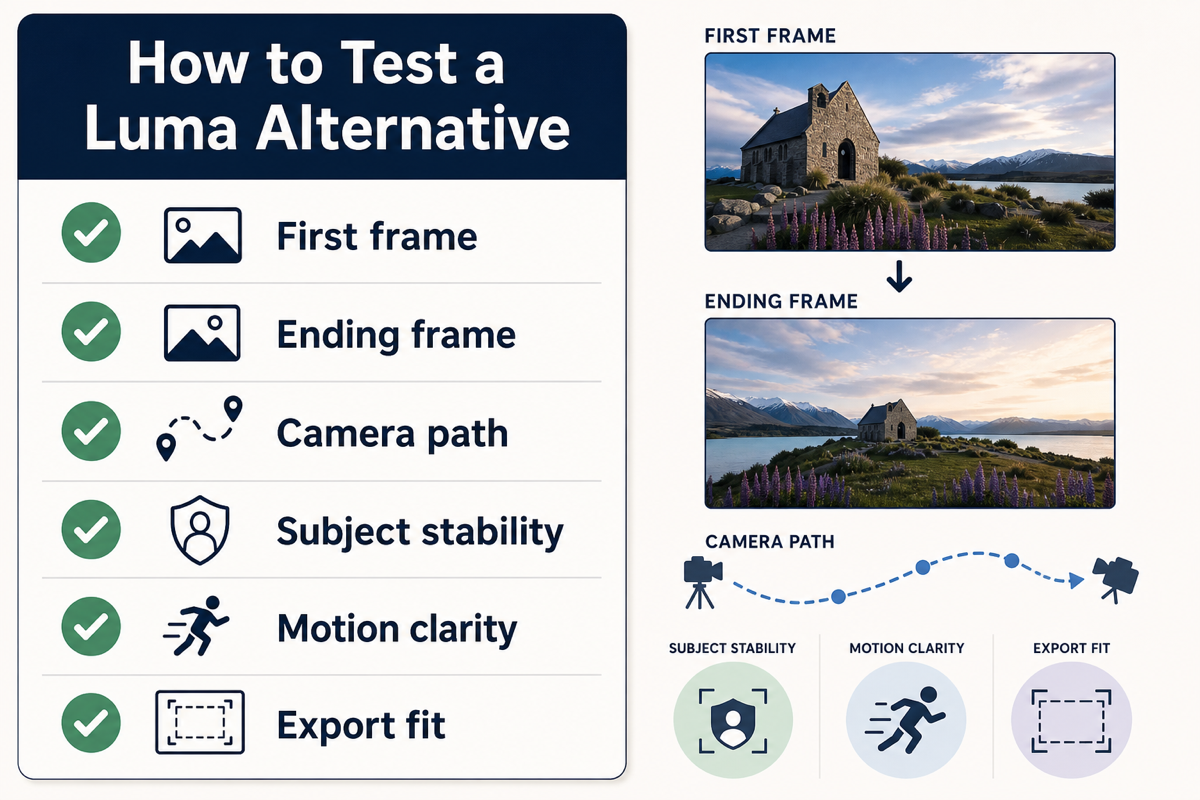
Test direction and consistency, not just the first impressive render.
| Test | Pass condition | Fail signal |
|---|---|---|
| First frame | The source image, subject, or opening composition is respected. | The model invents a different subject. |
| Ending frame | The shot lands near the intended visual goal. | Motion drifts into an unrelated scene. |
| Camera path | The move is readable and smooth. | Camera motion fights the subject. |
| Subject stability | Face, product, or object identity stays recognizable. | Shape, color, or identity changes without reason. |
| Motion clarity | The movement supports the story. | The clip looks active but directionless. |
| Export fit | Aspect ratio, quality, and duration fit the channel. | The result needs heavy repair before use. |
Run this checklist before you decide whether a Luma AI alternative is good enough for your workflow.
FAQ
What is the best Luma alternative?
The best Luma alternative depends on the job. If you need explicit keyframe control, Luma may still be the better fit. If you need a simpler image-to-video workflow, SeedVideo AI can be a practical alternative because it helps you test references, motion prompts, and model fit from one workspace.
Is SeedVideo AI a one-to-one Luma Ray alternative?
No. It should not be described as a one-to-one clone of Luma Ray. Treat SeedVideo AI as a workflow alternative for creators who want image-to-video testing, motion planning, and flexible generation without depending on one exact keyframe tool.
What should I test first when comparing Luma alternatives?
Start with one source image, one intended camera move, and one ending goal. Then compare subject stability, motion clarity, and iteration speed. Do not judge only the most impressive output.
Do I need keyframes for every AI video shot?
No. Keyframes are helpful when the start, middle, or end of a shot must land precisely. For many social clips, product visuals, or concept drafts, a clear image-to-video prompt and a review checklist may be enough.
What is the safest way to compare tools?
Use the same source image, same prompt structure, same duration target, and same review criteria. This gives you a fairer comparison than testing each tool with a different brief.
Can a Luma alternative handle character consistency?
It can help, but you still need to test it. Use a clean reference image, avoid overcomplicated motion, generate several drafts, and compare identity drift. For deeper guidance, read Character Consistency in AI Video.
When should I stay with Luma?
Stay with Luma when your workflow is built around explicit keyframe direction, precise video modification, or Luma-specific production features. Use SeedVideo AI when you want a faster way to explore image-to-video and multi-model shot generation.
Conclusion
A Luma alternative should be judged by workflow fit, not hype. If you need exact keyframe-level direction, Luma deserves serious consideration. If you mostly need to turn images, references, and shot ideas into usable motion drafts, SeedVideo AI gives you a simpler way to test the creative path before committing to a tool. Start with one shot, define the first frame and camera path, compare drafts with the checklist above, and then build the workflow that actually produces repeatable videos.