Most stores do not need one AI tool. They need five small ones, each removing a different bottleneck: product imagery, video, copy, support, and retention. Photoroom is the cheapest way to fix product photos at scale. SeedVideo AI is the cheapest way to turn those photos into 1080P ad clips that come with commercial rights. Klaviyo and Tidio both have free tiers you can genuinely run a store on for months, not week-long trials wearing a free-tier badge.
Last verified: 2026-09-18. All prices are the vendor's own published figures on that date, in USD.
TL;DR
- Best for product imagery: Photoroom, at $12.99/mo billed monthly or $7.50/mo billed yearly. The Shopify integration starts at the Max tier, not the entry one.
- Best for product video: SeedVideo AI, at $14.9/mo for Lite and $29/mo for Pro. Pro is the first tier that gives you 1080P and commercial use on either billing term.
- Best free tier: Klaviyo, with 250 active profiles and 500 email sends a month, indefinitely. Tidio comes second at 50 conversations a month plus 50 lifetime Lyro AI conversations.
- Best for ad creative at volume: Creatify, at $39/mo for Starter and $99/mo for Pro, built around 1,500 AI actors and an ad library you can clone from a URL.
- The expensive mistake: buying a $69/mo copywriting seat before you have fixed your product photos. Imagery moves conversion. Copy rarely does at small scale.
Quick Answer
The tools worth paying for in 2026 sort into five jobs. Photoroom and Canva handle imagery: background removal, relighting, layout. SeedVideo AI, Runway and Creatify turn stills into motion at very different price points. Jasper and Copy.ai are the standalone copy options, though Shopify Sidekick already ships with your store plan and costs nothing extra. Tidio's Lyro and Intercom's Fin both bill support by resolved conversation instead of by seat. Klaviyo's free tier carries a small store a surprisingly long way. Start with imagery and video, because those two change what a shopper sees before they decide anything.

Image prompt: A cinematic ecommerce product commercial still frame: a matte sage-green ceramic coffee mug standing on a pale travertine stone ledge, a thin curl of steam rising from the rim, soft low morning sunlight raking in from the left and casting one long warm shadow across the stone, a blurred folded linen napkin and a dried eucalyptus sprig set back in the frame, shallow depth of field, 50mm lens, warm neutral color grade, premium editorial product photography.
The shortlist at a glance
| Tool | Ecommerce job | Starting paid price (monthly billing) | Free tier | Commercial use |
|---|---|---|---|---|
| Photoroom | Product photos, backgrounds, AI fashion models | $12.99 per month | Yes, free account | Not stated on the pricing page |
| Canva | Layout, banners, social crops | US$144 per year (Pro) | Yes, with up to 20 Standard or Premium AI uses | Included with plan |
| Shopify Sidekick | Product copy and photo cleanup inside the store | Included with your Shopify plan | Included with your Shopify plan | Included with plan |
| SeedVideo AI | Product photo to ad video, 1080P | $14.9 per month (Lite) | Yes, 5 credits at signup | Pro and Premium on both billing terms; also yearly plans and one-time packs |
| Runway | Video generation and 4K upscaling | $15 per month (Standard) | Yes, 125 one-time credits | Not stated on the pricing page |
| Creatify | UGC-style ad creative with AI actors | $39 per month (Starter) | Not listed | Not stated on the pricing page |
| Jasper | Long-form and brand-voice copy | $69 per month per seat | No, 7-day trial only | Included with plan |
| Copy.ai | Chat and workflow copy | $29 per month (Chat, 5 seats) | Not listed | Included with plan |
| Tidio (Lyro) | AI support agent and live chat | $24.17 per month (Starter, annual) | Yes, 50 conversations a month | Included with plan |
| Intercom (Fin) | AI support agent on a full helpdesk | $29 per seat per month (annual) | No | Included with plan |
| Gorgias | Ecommerce helpdesk with AI Agent | Priced by ticket volume, no single published figure | No | Included with plan |
| Klaviyo | Email and SMS retention | Free up to 250 profiles, then by profile count | Yes, 250 profiles and 500 sends a month | Included with plan |
Two caveats on that table. Several of these vendors put no licensing language on the pricing page at all, so "not stated" means exactly that: check the terms before you run the output as paid media. And annual billing moves the numbers a lot. On the verification date, Photoroom, Runway and SeedVideo AI were all running annual discounts. The monthly figure is the honest comparison point, because it is the one that does not expire.
Product imagery: fix this before anything else
Photoroom sells one thing well. It takes a phone photo of a product and makes it look like it was shot in a studio. Background removal, AI backgrounds with relighting, AI fashion models and an AI Product Fixer all sit on the entry tier.
The tier boundaries matter more than the headline price. Pro at $12.99 a month gives you 8,000 AI credits and 1,000 exports, but it excludes the Video Generator and caps you below 4K. Max at $34.99 a month is where the Video Generator and the Shopify integration appear. Ultra at $99 a month is the first tier with 4K video and image resolution. If you are budgeting from the pricing page alone, you will probably underestimate what you need by one tier.
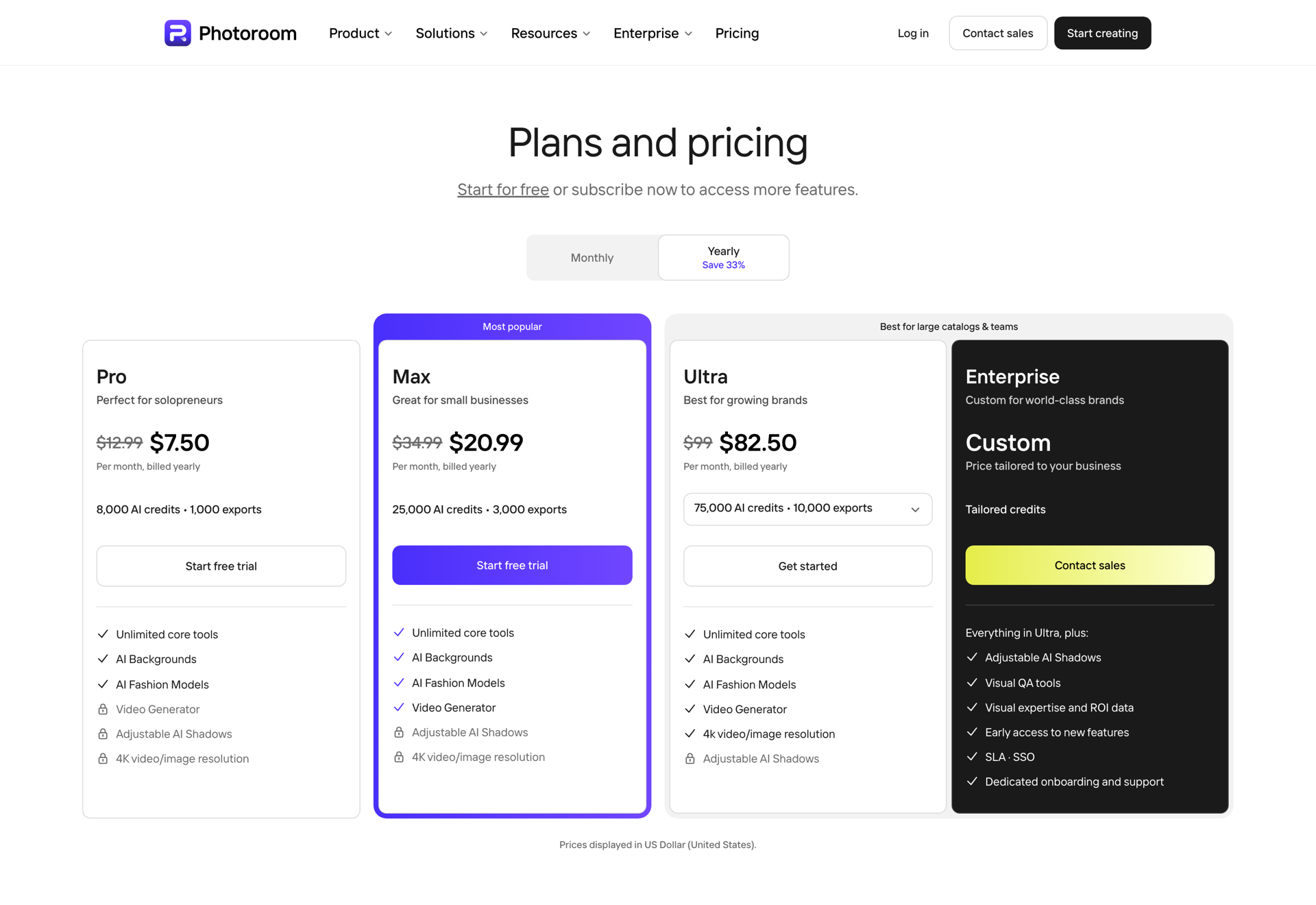
Photoroom pricing page, captured 2026-09-18, with yearly billing selected.
Best for: catalogs with dozens or hundreds of SKUs shot on a phone, where inconsistent backgrounds and shadows are the whole problem.
Not for: anyone who needs 4K assets or video on a small budget. Both sit two tiers up.
Canva
Canva is the layout layer, not the photography layer. The free plan is usable on its own and now includes up to 20 Standard or Premium AI uses. Pro is US$144 a year for one person, Business is US$250 a year per person, and an AI Pass add-on exists if you burn through the allowance.
Best for: turning finished assets into banners, ad sizes and social crops without a designer.
Not for: the initial product-photo cleanup. Photoroom does that better and cheaper.
Shopify Sidekick
If you are already on Shopify, Sidekick is included with your plan. Features and usage limits vary by tier, but there is no separate line item. It writes product descriptions and cleans up photos inside the admin. It is not the strongest tool in any single category here, and it is the only one that costs you nothing extra and already lives where your catalog does.
Best for: stores that want the 80% result with zero new subscriptions.
Not for: brand-level creative work, or anything that needs to leave the Shopify admin.
Product video: where the conversion lift actually comes from
Static product photos are table stakes now. Motion is what separates listings, and this is the category where prices diverge most sharply.
SeedVideo AI
SeedVideo AI runs the official Seedance models alongside Kling, Veo, Sora and MiniMax on one credit balance. For ecommerce the mode that matters is image-to-video: you hand it a product photo you already own, and it adds camera movement, light behaviour and subject motion.
New accounts get 5 credits at signup with no card. Lite is $14.9 a month billed monthly for 100 credits, roughly 12 videos, capped at 720P on the Seedance models, one generation at a time. Pro is $29 a month billed monthly for 200 credits, roughly 33 videos, 1080P, four concurrent generations. Premium is $149 a month for 1,300 credits with 30-day credit validity.
One detail is worth reading twice before you buy. Lite on monthly billing does not include commercial use. Commercial rights are included on Pro, on Premium, on yearly subscriptions and on one-time credit packs. If the output is going into a paid ad, Pro is your floor.
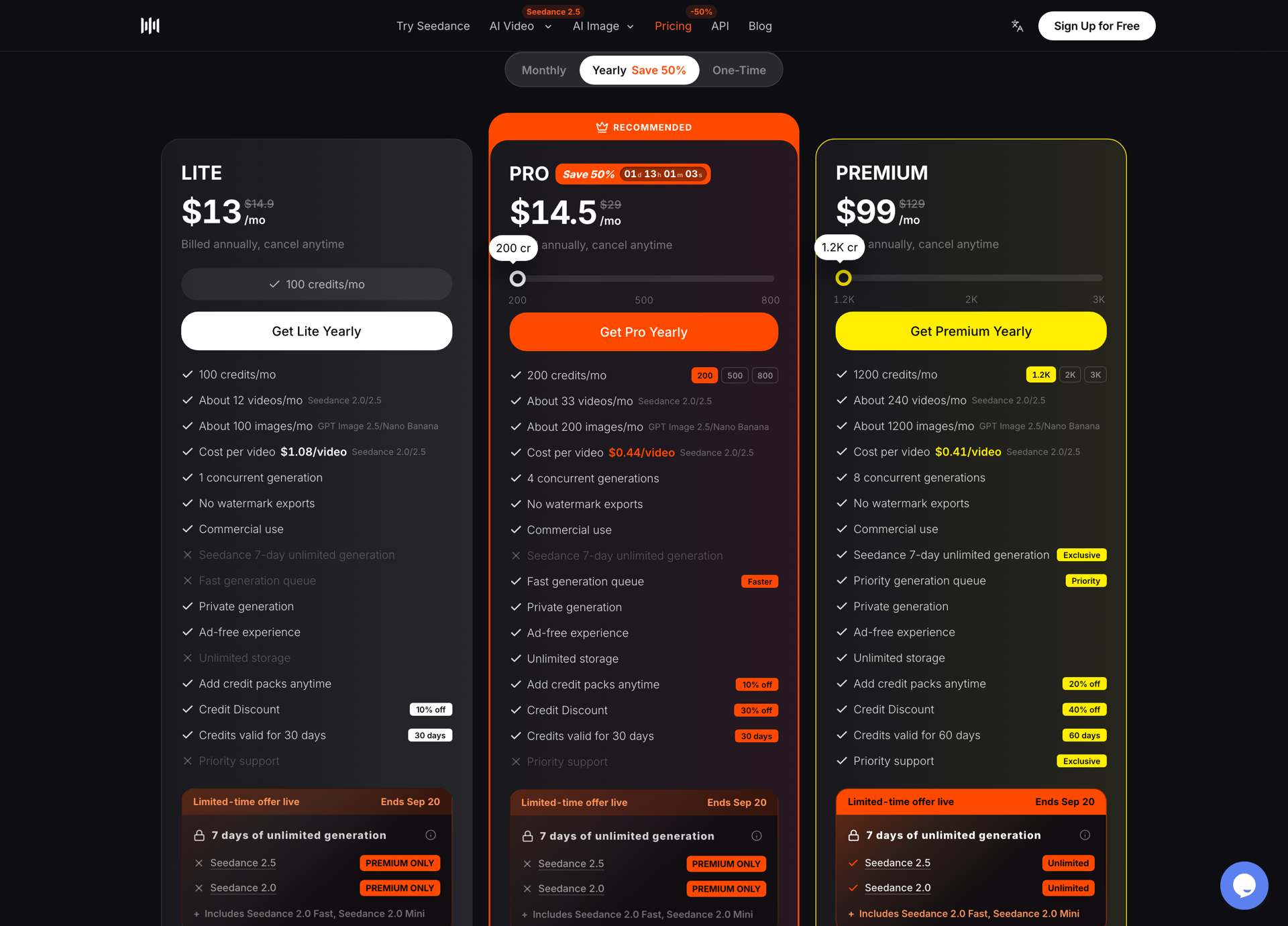
SeedVideo AI pricing page, captured 2026-09-18, with yearly billing selected during a limited-time offer.
Start on the AI image-to-video generator, animate a source image from your existing catalog, and check whether motion moves your click-through before you commit to a plan. Current tier boundaries are on the SeedVideo AI pricing page.
Best for: turning an existing product photo library into 1080P ad clips at the lowest cost per video on this list.
Not for: teams that need built-in avatar actors or an ad-template library. That is Creatify's territory.
Runway
Runway is the broader creative suite. Free gives you 125 one-time credits and 5GB of storage. Standard is $15 a month for 625 credits, no watermarks, 4K upscaling and five parallel generations. Pro is $35 a month for 2,250 credits and unlimited 4K upscaling. Max is $95 a month for 9,500 credits, with unused credits rolling over for one month.
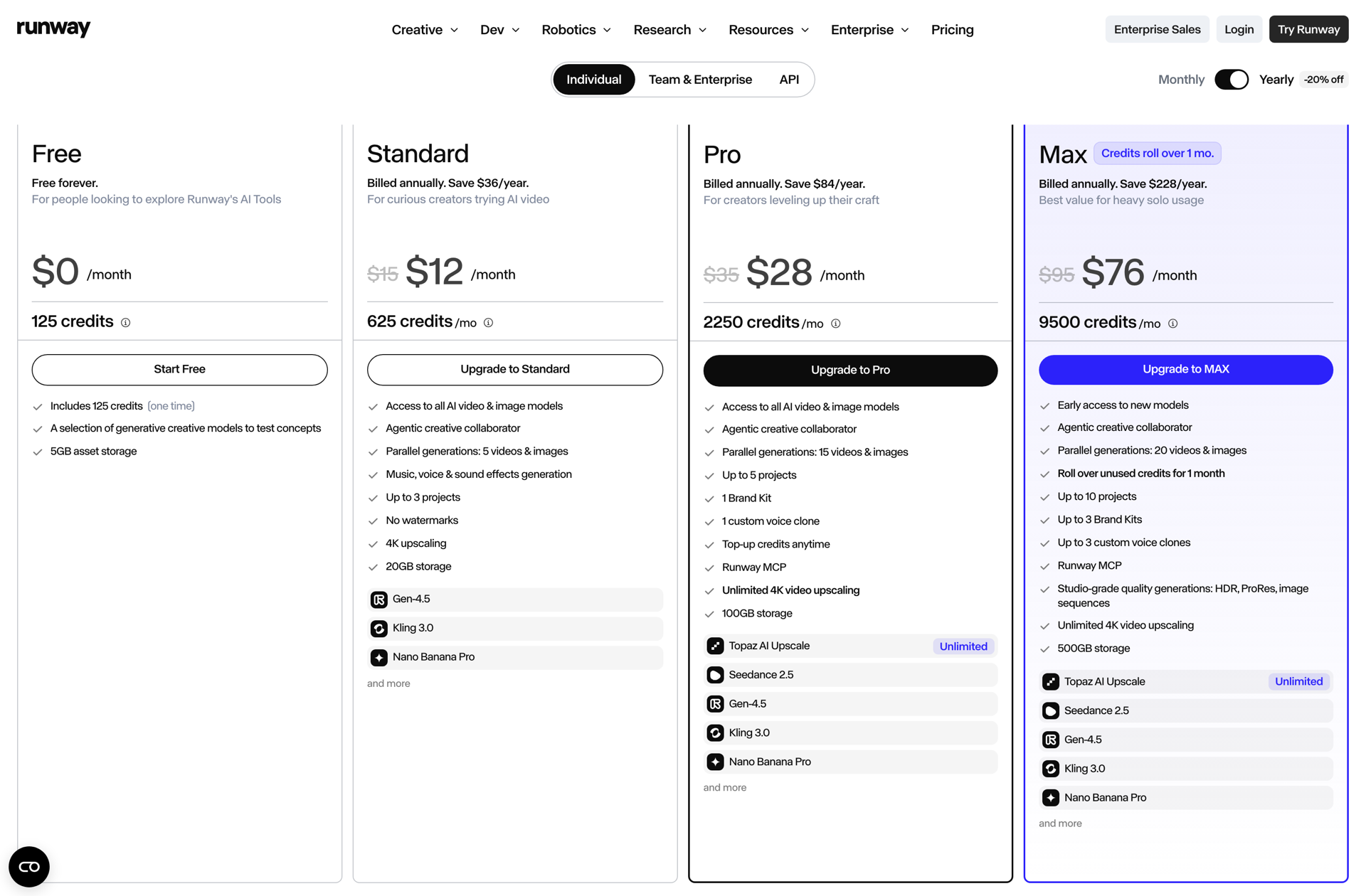
Runway pricing page, captured 2026-09-18, with annual billing selected.
Best for: brands that want one tool covering video, editing, upscaling and voice, and will use enough of it to justify the credit burn.
Not for: single-purpose product video work, where you pay for capability you never touch.
Creatify
Creatify is built for ad creative rather than general video. Starter is $39 a month for 100 credits. Pro is $99 a month for 300 credits and unlocks 1,500 realistic AI actors, three custom avatars, AdFlow with 500+ templates, 75+ languages, a competitor ad tracker across Meta's library, and the ability to clone an ad from a URL.
Best for: performance marketers shipping many UGC-style variants a week and testing against competitor creative.
Not for: a small shop with ten products. The per-credit economics only work at volume.
If you want the mechanics rather than the shortlist, the AI product video generator walkthrough covers turning a single catalog photo into a finished ad clip, and the best AI video generators for social media ads comparison goes deeper on the ad-platform side.
Copy and listings
Jasper
Pro is $69 a month per seat billed monthly, or $59 billed annually, for a single seat with two Brand Voices, five Knowledge assets and three Audiences. There is a 7-day trial and no free tier. Business is custom-priced on a 12-month commitment.
Best for: brands with a real voice guide and enough volume to keep one writer's seat busy.
Not for: a store under a hundred SKUs. Sidekick or Copy.ai will cover you for a fraction of that.
Copy.ai
Chat is $29 a month billed monthly, or $24 billed annually at $288 a year, with five seats and unlimited words in chat across OpenAI, Anthropic and Gemini models. The next tier is Growth at $1,000 a month. There is nothing in between, which makes Copy.ai either very cheap or very expensive depending on which side of that gap you land on.
Best for: small teams that want five seats on one affordable plan.
Not for: anyone who needs workflow automation but cannot justify a jump to $1,000 a month.
Customer service: pay per resolution, not per seat
This category has quietly restructured itself. All three of these now bill AI resolution separately from human seats, which is better news for seasonal stores than it sounds.
Tidio and Lyro
The free plan gives you 50 billable conversations a month, 10 seats, and your first 50 Lyro AI conversations free for the lifetime of the account. Starter is $24.17 a month on annual billing for 100 conversations. Growth starts at $49.17 for 250. Lyro as an add-on starts at $32.50 a month for 50 AI conversations. A Lyro conversation is billed once even if the agent replies a dozen times.
Best for: small stores that want to try AI support without a seat commitment.
Not for: high-volume support, where per-conversation pricing overtakes a flat helpdesk.
Intercom and Fin
Essential is $29 per seat per month on annual billing, Advanced $85, Expert $132. Fin is $0.99 per outcome and bills once per conversation regardless of how many questions it answers. Fin can also run standalone on your existing helpdesk with no seats at all, subject to a minimum monthly commitment.
Best for: teams already on a helpdesk who want to bolt on AI resolution without migrating.
Not for: stores with unpredictable ticket spikes, where $0.99 per outcome compounds fast.
Gorgias
Gorgias prices the helpdesk by ticket volume, from 50 to 5,000 tickets a month, and states explicitly that it is never per agent. The AI Agent bills only when it resolves a conversation. Voice and SMS are add-ons that scale with usage. The public pricing page does not print a starting dollar figure, so you will need to run its plan builder against your own volume.
Best for: ecommerce teams with many part-time agents, where per-seat pricing is the actual problem.
Not for: anyone who wants a published price before talking to a vendor.
Retention: Klaviyo
Klaviyo's free tier covers up to 250 active profiles and 500 email sends a month, plus $5 of mobile messages and $5 of Composer usage monthly. Paid pricing scales with your profile count rather than a fixed plan ladder.
Best for: early stores. You can run flows for months before you pay anything.
Not for: budgeting certainty. Cost rises with list size, so a successful acquisition campaign also raises your bill.
A workflow that connects them
These tools only earn their subscriptions if they hand off to each other. For a small catalog, the sequence looks like this.
| Step | Tool | Output |
|---|---|---|
| 1. Clean the source photo | Photoroom | Consistent background, shadow and lighting |
| 2. Animate the still | SeedVideo AI, image-to-video | A 1080P clip with camera movement |
| 3. Cut the ad sizes | Canva | 9:16, 1:1 and 16:9 variants |
| 4. Write the hooks | Copy.ai or Sidekick | Three headline variants per clip |
| 5. Route the replies | Tidio Lyro | AI handles the first response |
| 6. Retarget | Klaviyo | Flow triggered by the ad click |
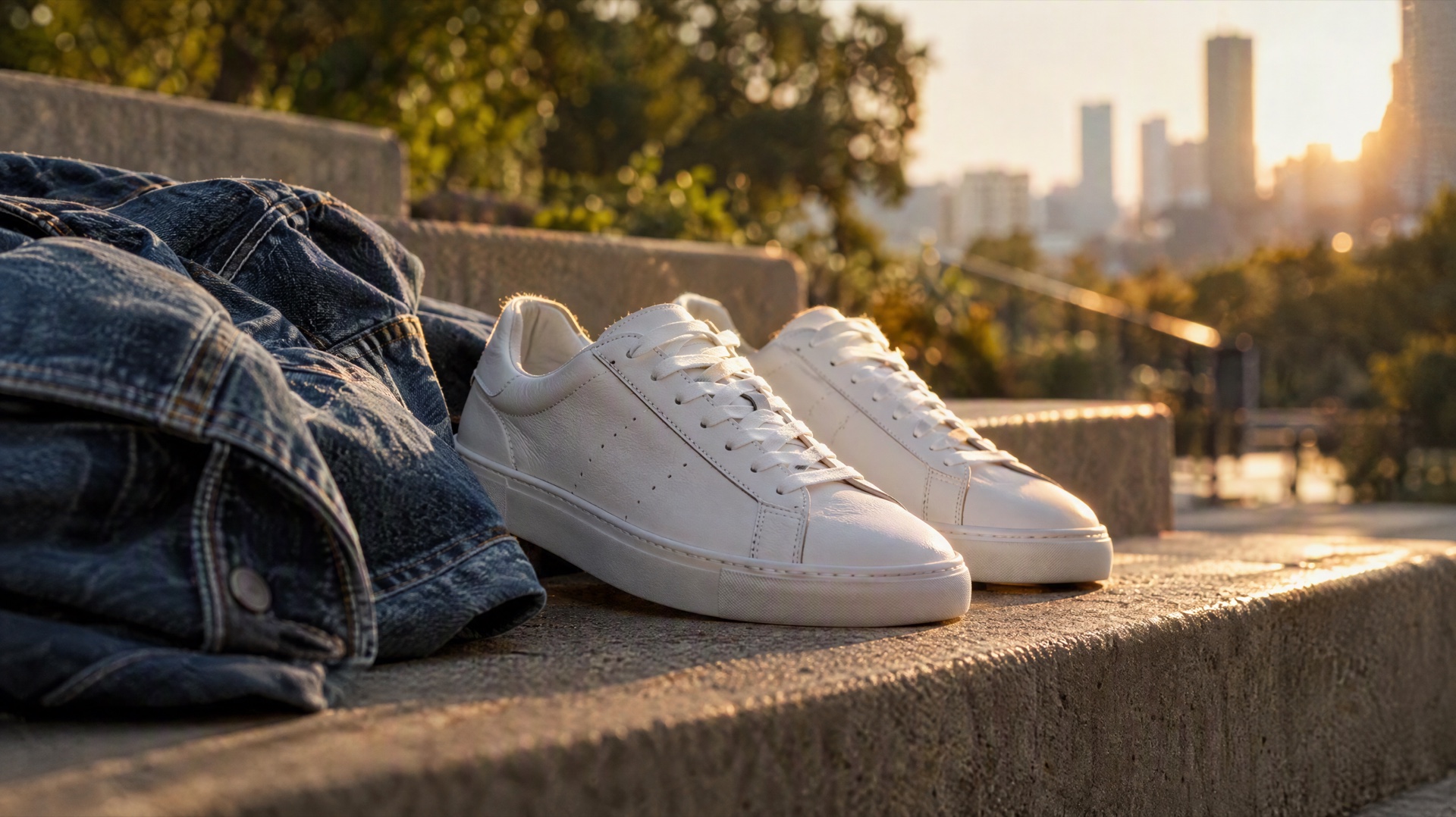
Video prompt: A finished lifestyle ad video frame: a pair of clean white leather sneakers resting on sunlit concrete steps next to a loosely rolled indigo denim jacket, late afternoon golden light, soft rim light tracing the shoe edges, blurred city greenery far in the background, slow handheld push-in from a low angle, 35mm lens, shallow depth of field, natural fine film grain, contemporary streetwear campaign look.
Step 2 is the one most stores skip, and it is the one that changes the ad. The generator opens at 16:9, 5 seconds and 720p. Switch the mode tab to Image, upload the cleaned photo, then raise the resolution before you generate. You can animate a source image from the same screen, or create a video from a prompt when you need a background plate rather than a product shot.
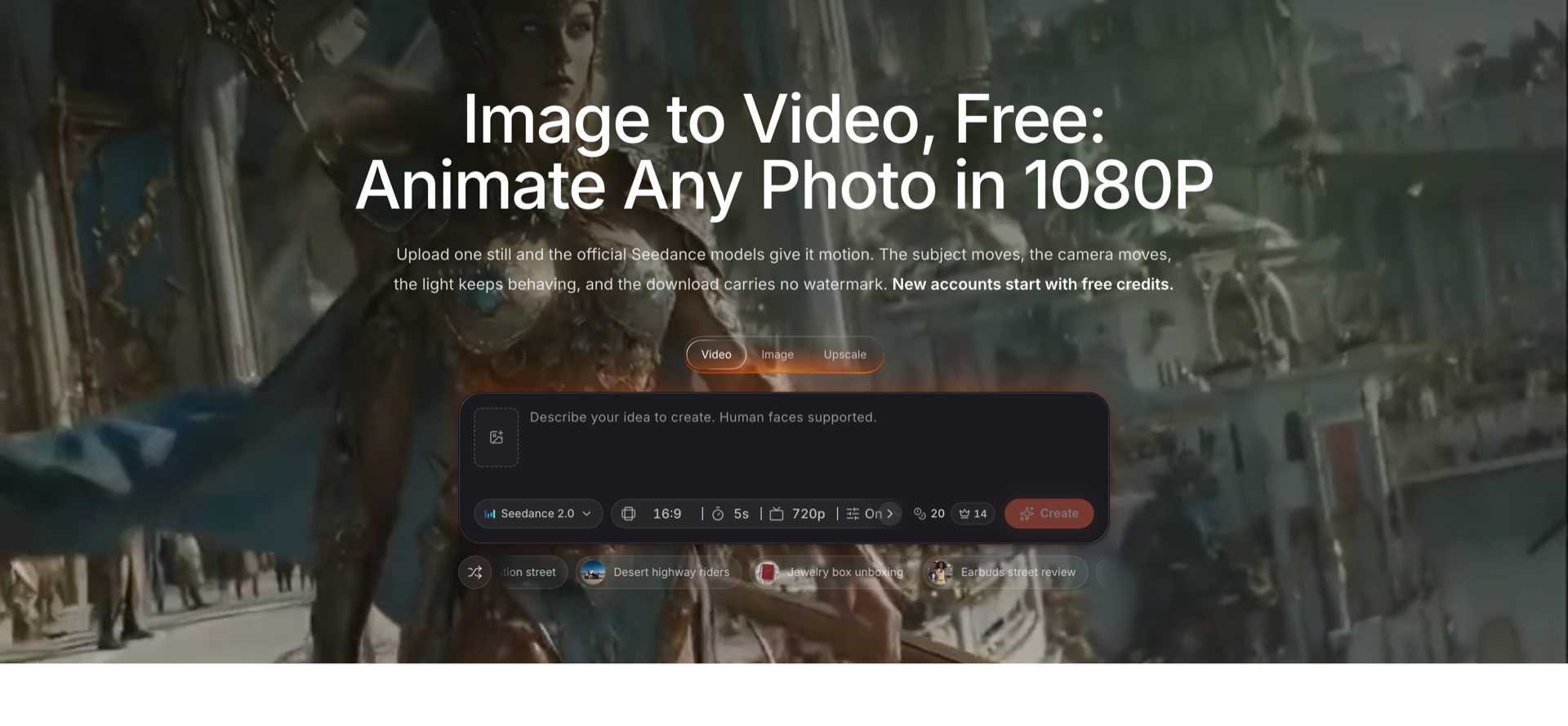
SeedVideo AI image-to-video generator, captured 2026-09-18, with the model, aspect ratio, duration and resolution controls visible.
For a deeper pass on prompt structure and reference handling, the Seedance 2.5 image-to-video workflow guide walks through the settings this screen exposes.
Three budgets, three stacks
Solo store, under $50 a month. Photoroom Pro at $12.99, SeedVideo AI Pro at $29 for commercial rights and 1080P, plus Canva Free, Klaviyo Free and Tidio Free. That is $41.99 a month covering imagery, video, layout, email and support.
Small team, around $200 a month. Photoroom Max at $34.99 for the Shopify integration, SeedVideo AI Pro at $29, Copy.ai Chat at $29 for five seats, Tidio Starter at $24.17 plus Lyro at $32.50, and Klaviyo paid at your profile count. You get team seats and a support agent that actually resolves things.
Scaling brand, $400 and up. Photoroom Ultra at $99 for 4K, Creatify Pro at $99 for ad variants at volume, Runway Standard at $15 for upscaling and editing, Jasper Pro at $69 for brand voice, and Intercom Advanced at $85 per seat plus Fin at $0.99 per outcome. This stack only makes sense once creative volume, rather than creative quality, is your constraint.
FAQ
What is the best AI tool for ecommerce in 2026?
There is no single best tool, because the five jobs are genuinely different. For product imagery, Photoroom at $12.99 a month is the strongest value. For product video, SeedVideo AI at $29 a month for Pro is the cheapest tier that includes both 1080P and commercial use. For retention, Klaviyo's free tier covers 250 profiles. Most stores should buy imagery and video first and leave copy and analytics until later.
Which AI ecommerce tools have a real free tier?
Klaviyo is free up to 250 active profiles and 500 email sends a month. Tidio is free for 50 conversations a month with 50 lifetime Lyro AI conversations. Canva Free includes up to 20 Standard or Premium AI uses. Runway Free gives 125 one-time credits. SeedVideo AI gives new accounts 5 credits at signup with no card. Jasper and Copy.ai do not list a free plan.
Can I use AI-generated product videos in paid ads?
It depends on the plan, not the tool. On SeedVideo AI, commercial use is included on Pro, on Premium, on yearly subscriptions and on one-time credit packs, but Lite on monthly billing does not include it. Photoroom, Runway and Creatify state no licensing terms on their pricing pages, so check their terms before running output as paid media.
How much should a small store budget for AI tools each month?
Around $40 to $50 covers a workable stack: Photoroom Pro at $12.99 for imagery, SeedVideo AI Pro at $29 for commercial-use video, and the free tiers of Canva, Klaviyo and Tidio for layout, email and support. That is enough to produce studio-grade photos and 1080P ad clips without hiring a designer or a videographer.
Is it better to pay per seat or per AI resolution for customer support?
Per resolution usually wins for ecommerce, because ticket volume is seasonal and seat count is not. Intercom's Fin is $0.99 per outcome and bills once per conversation. Gorgias prices the helpdesk by ticket volume rather than per agent. Tidio bills a Lyro conversation once regardless of how many replies the agent sends. If your peak month runs four times your quiet month, per-resolution pricing tracks that. Seats do not.
What is the difference between an AI product video tool and a general AI video generator?
A general generator like Runway optimises for creative range across editing, upscaling and voice. A product video tool optimises for one path: take an existing catalog photo, keep the product accurate, add motion. SeedVideo AI's image-to-video mode and Creatify's ad templates both sit in the second group. When the product has to look exactly like the product, start there rather than with a text prompt.
Where to start this week
Pick your two worst-performing product listings. Run their photos through a background cleanup, animate the cleaned stills into 5-second clips, and put both versions into the same ad set. That single test will tell you more about whether AI tooling is worth the subscription than any comparison table, this one included. When you are ready to run it, the AI image-to-video generator starts new accounts with free credits, so the experiment costs you an afternoon instead of a budget line.