How to Make a 30-Second Video with Seedance 2.5
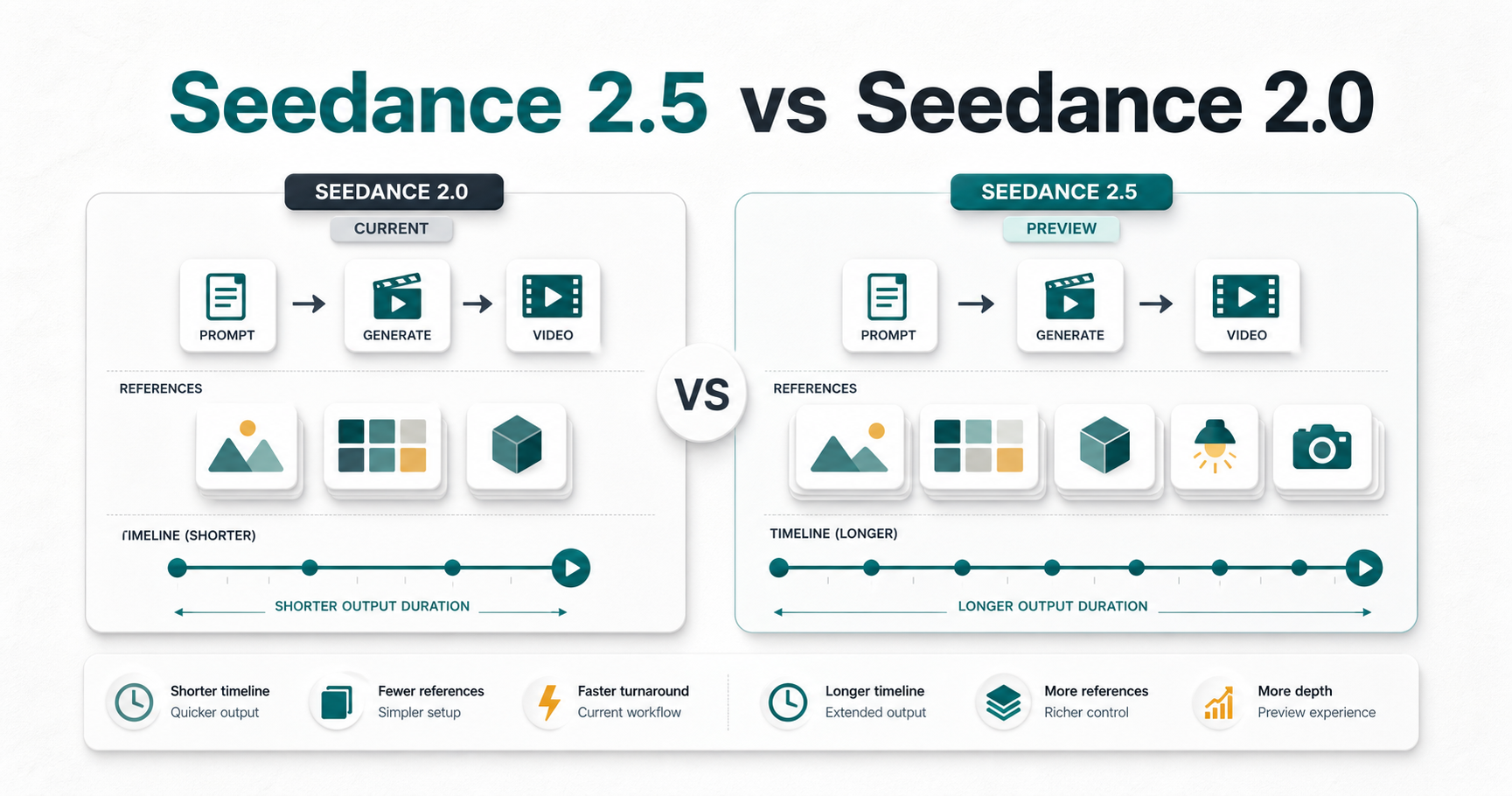
Seedance 2.5 can generate up to 30 seconds at the model and API level, but the duration available to you depends on the SeedVideo AI surface you use. On August 5, 2026, the logged-in web generator exposed a 4 to 15 second duration slider for Seedance 2.5. The public API documentation listed 4 to 30 seconds at 480p or 720p, subject to the account plan. That means you have two practical routes: request one 30-second clip through an eligible API workflow, or plan two 15-second web clips around one shared beat sheet and join them in an editor. In either case, do not treat 30 seconds as one long description. Divide it into timed beats, give the camera one clear job per beat, repeat continuity rules, and reserve the last six seconds for the result or final hold.
TL;DR
- Seedance 2.5 officially supports output up to 30 seconds.
- The SeedVideo AI web generator we checked currently offered 4 to 15 seconds, not a 30-second web option.
- For a 30-second deliverable, use an eligible 30-second API request or build two planned 15-second clips.
- Start with four beats: 0 to 6 seconds, 6 to 14 seconds, 14 to 24 seconds, and 24 to 30 seconds.
- Review timing, subject identity, camera path, physical motion, audio, and the ending separately.
Quick Answer
Yes, Seedance 2.5 supports 30-second video generation. The current SeedVideo AI API documentation allows a 4 to 30 second duration for Seedance 2.5, while the logged-in web interface checked on August 5, 2026 showed a 4 to 15 second slider. If the web interface is your only route, write one 30-second beat sheet first, then split it into two clips with a planned continuity bridge near the 15-second mark.
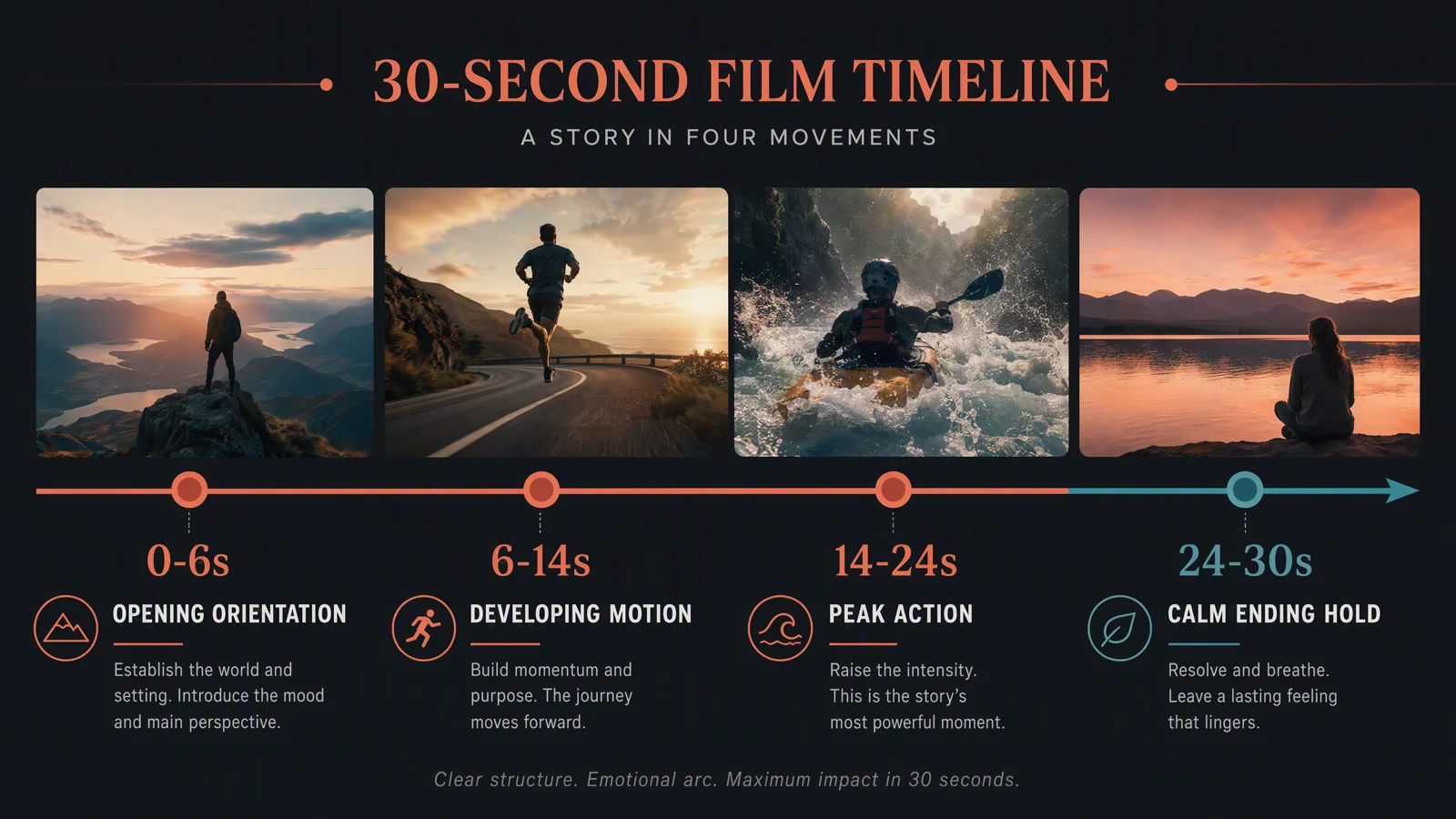
A 30-second plan works best when every time block has one visible job.
Does Seedance 2.5 support 30 seconds here?
The answer changes with the product surface.
| Surface | Duration shown or documented | What to do |
|---|---|---|
| Seedance 2.5 model capability | Up to 30 seconds | Plan a complete four-beat arc |
| SeedVideo AI API | 4 to 30 seconds | Request 30 seconds if your account supports the selected combination |
| SeedVideo AI web generator checked on August 5, 2026 | 4 to 15 seconds | Generate two planned 15-second clips for a 30-second deliverable |
The API documentation also lists 480p and 720p for Seedance 2.5. It says unsupported model, duration, or resolution combinations are rejected before task creation. The web interface can change independently, so read the active duration control before spending credits.
This distinction matters because a model capability is not the same as a setting currently exposed in every interface. A page that says "up to 30 seconds" does not guarantee that a 30-second button appears in the web generator for every account.
When 30 seconds helps, and when it does not
Thirty seconds helps when the viewer needs a setup, a visible change, and a resolved ending. It fits product demonstrations, compact stories, dialogue scenes with one turn, and one-take camera moves that need time to develop.
Use a shorter clip when the idea has only one action. A six-second texture shot, a ten-second reaction, or a twelve-second product move often looks better than a stretched 30-second sequence. Extra time increases the number of frames in which identity, direction, physics, or pacing can drift.
| Use 30 seconds when | Prefer a shorter clip when |
|---|---|
| The story needs four distinct beats | One action communicates the full idea |
| A product needs context, demonstration, and a final hold | The viewer only needs one visual proof |
| Camera movement must reveal new information over time | The camera move is the entire idea |
| Dialogue contains a setup and one meaningful response | One line or reaction is enough |
| You can define what must remain fixed throughout | The prompt depends on many uncontrolled changes |
Four timeline structures
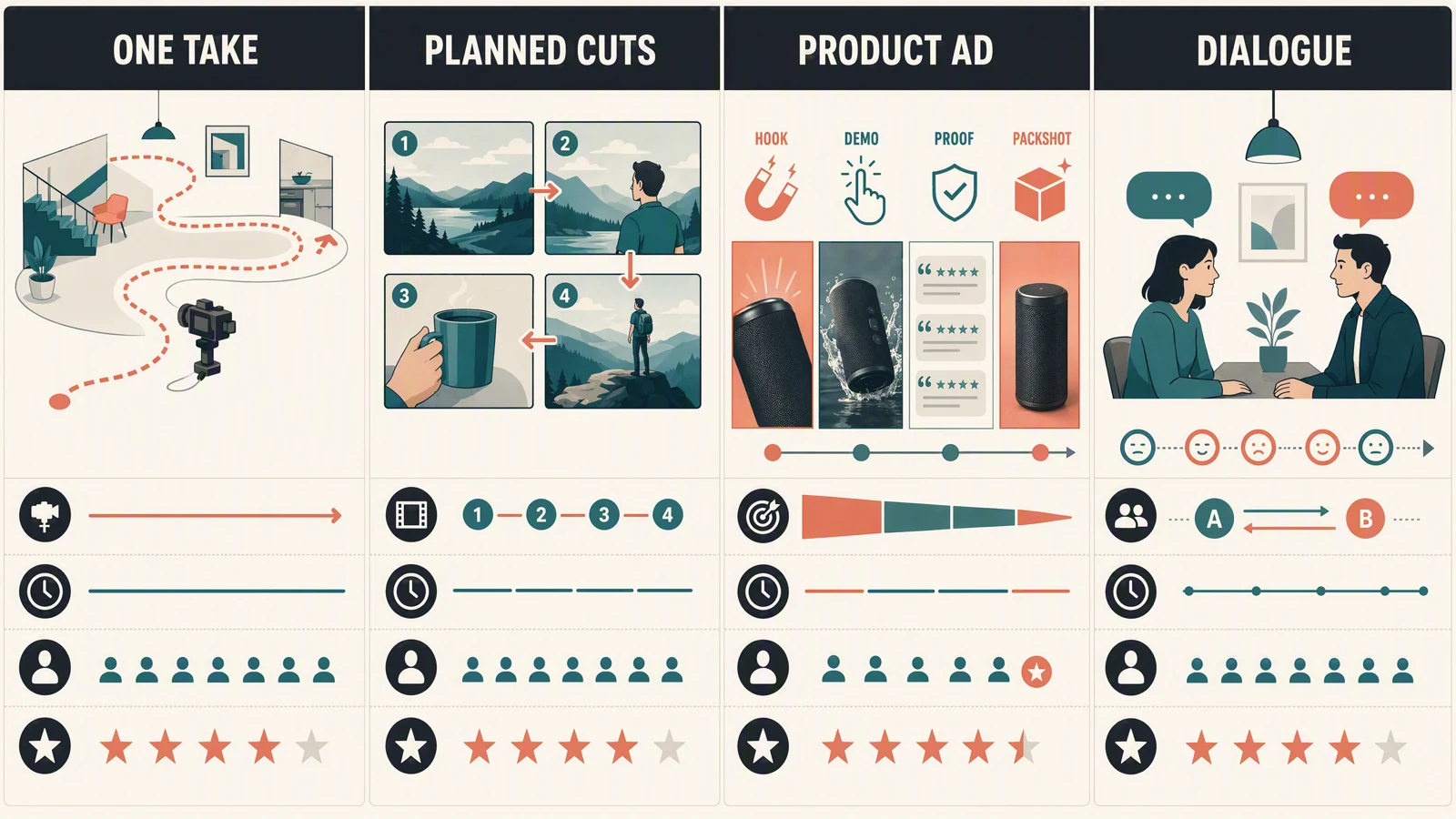
Choose a structure before writing shot details. Mixing all four usually produces a confused timeline.
| Structure | Best for | 0 to 6s | 6 to 14s | 14 to 24s | 24 to 30s | Not best for |
|---|---|---|---|---|---|---|
| One take | A continuous reveal or physical journey | Establish subject and direction | Begin the camera path | Deliver the main reveal | Ease into a stable ending | Large location changes or unrelated actions |
| Planned cuts | A compact story with clear coverage | Opening wide shot | Action and first cut | Detail, proof, or reaction | Resolution and final frame | Prompts that do not define transitions |
| Product ad | One benefit shown visually | Hook and context | Product enters use | Demonstrate the benefit | Clean product hold or CTA space | Feature lists with no visible action |
| Dialogue scene | Two speakers and one emotional turn | Place both speakers | First line and listening reaction | Response and change | Quiet reaction or closing image | Long scripts, crowd scenes, or many speakers |
One take asks the model to protect one continuous camera path. Planned cuts ask it to change coverage without losing subject identity. Product ads need a stable pack or object identity. Dialogue scenes need clear speaker order, eyelines, and room for reactions.
Build a 30-second beat sheet
Start with the timeline before you write style words.
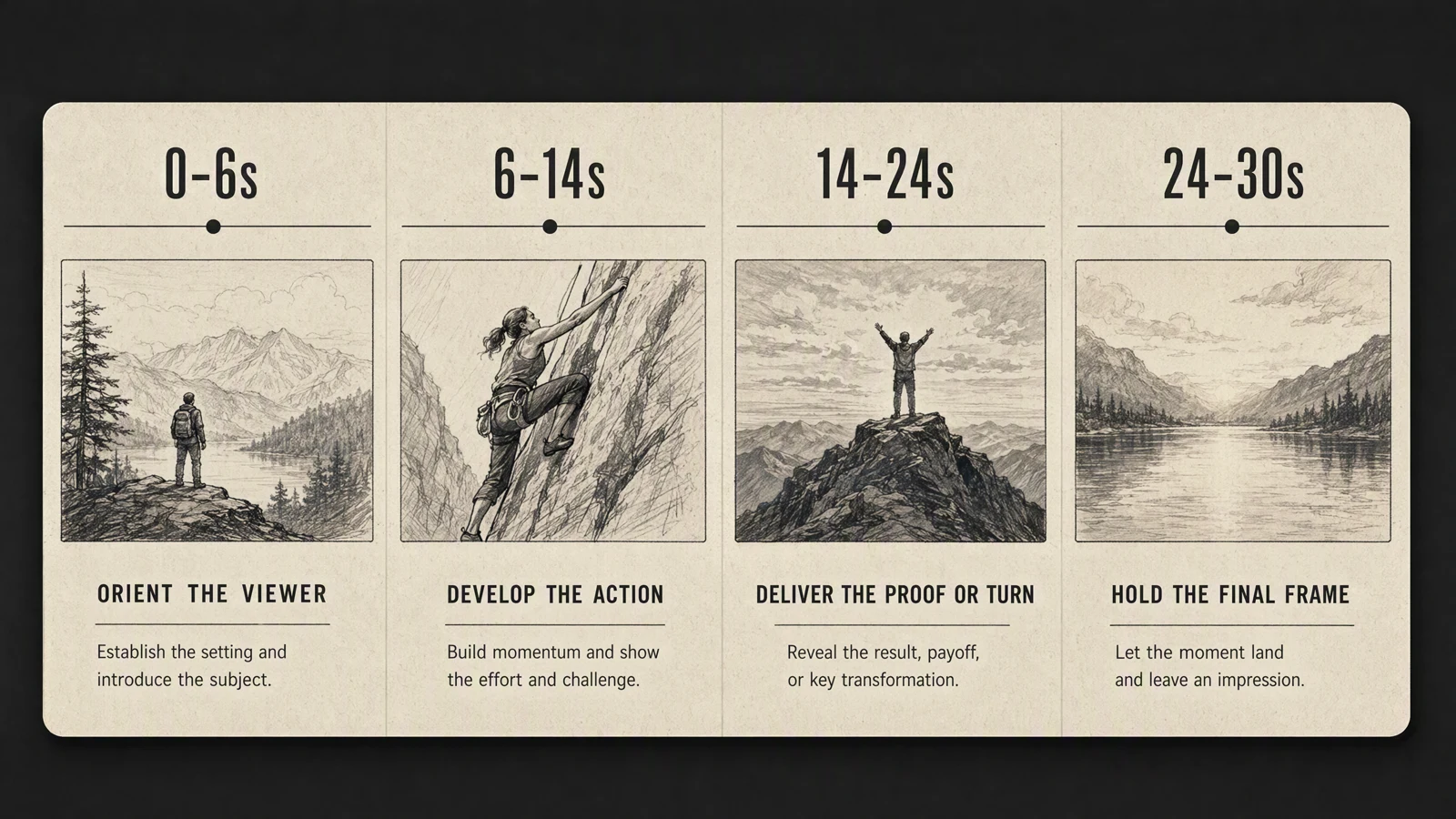
The four blocks are uneven on purpose. Development and proof usually need more time than the opening.
| Time | Beat | Required visible change | Continuity rule | Review question |
|---|---|---|---|---|
| 0 to 6s | Orient | Show who or what matters, where it is, and the initial direction | Lock subject, wardrobe or object details, light direction, and screen direction | Can a viewer understand the scene without narration? |
| 6 to 14s | Develop | Start the main action or camera move | Repeat the subject and camera path | Does the action progress rather than restart? |
| 14 to 24s | Prove or turn | Show the result, obstacle, reveal, or reply | Keep scale, environment, and movement logic stable | Is this the strongest visual evidence in the clip? |
| 24 to 30s | Resolve | Slow down and hold the intended final frame | Freeze unnecessary changes and protect the final composition | Does the ending feel deliberate rather than cut off? |
Write one sentence for each row. If a row contains three unrelated actions, simplify it. A beat is a change the viewer can see, not a paragraph of mood.
If you need two 15-second web clips
Keep the same 30-second beat sheet, then split it with overlap:
- Clip A covers 0 to 15 seconds and ends on a clear position, direction, and camera height.
- Clip B starts from that same position and repeats the subject description, environment, light, and movement direction.
- Plan a one-second overlap around the join. Give the editor enough matching motion to hide the cut.
- Do not ask clip B to remember clip A. Restate every continuity rule it needs.
If possible, use the last usable frame from clip A as the start frame for clip B. If you stay with text only, make the bridge simple: a door closing, a subject passing behind a foreground object, a whip pan, or a short locked-off hold.
Write timing and camera instructions
A useful long prompt separates subject, action, camera, timing, audio, and fixed details.
Use this order:
- State the duration and structure.
- Define the subject with a few stable physical details.
- Write each timed beat with one main action.
- Name the camera position and movement for each beat.
- Add sound direction only where timing matters.
- Finish with a short list of details that must not change.
Here is a reusable one-take template:
30-second continuous one take with no cuts. [Subject] in [environment]. 0 to 6 seconds: [opening position and action], camera [shot size and movement]. 6 to 14 seconds: [development], camera continues [path]. 14 to 24 seconds: [main reveal or proof], camera [new but compatible movement]. 24 to 30 seconds: [resolution and final hold]. Keep [identity, clothing or object design, direction, lighting, scale, and environment] consistent. Natural [relevant physical motion]. Audio: [ambience, cue, or dialogue timing]. No text or logos.
Try this prompt in SeedVideo AI
Avoid stacking incompatible camera directions. "Slow dolly forward, fast orbit, handheld shake, crane up, and locked frame" is not one camera plan. Choose a dominant move and one small adjustment.
For more prompt patterns, use the Seedance 2.5 prompt guide. If you need a broader text-led workflow, see the Seedance 2.5 text-to-video guide.
Generate and review the full clip
Open SeedVideo AI and select Seedance 2.5. Check the active duration range before finalizing the beat sheet. Choose the aspect ratio for the delivery channel, then keep that framing decision fixed through revisions.
Review the result in two passes.
During the first pass, watch without pausing. Ask whether the scene has a clear beginning, development, payoff, and ending. If the pacing feels wrong, adjust the beat lengths before changing visual style.
During the second pass, inspect each problem separately:
- Timing: did the main action begin and finish in the intended block?
- Subject: did shape, color, face, clothing, or product details change?
- Camera: did the path stay readable, or did it jump direction?
- Physics: did weight, water, fabric, contact, and momentum behave plausibly?
- Audio: did ambience, speech, and visual events line up?
- Ending: did the final frame hold long enough to read?
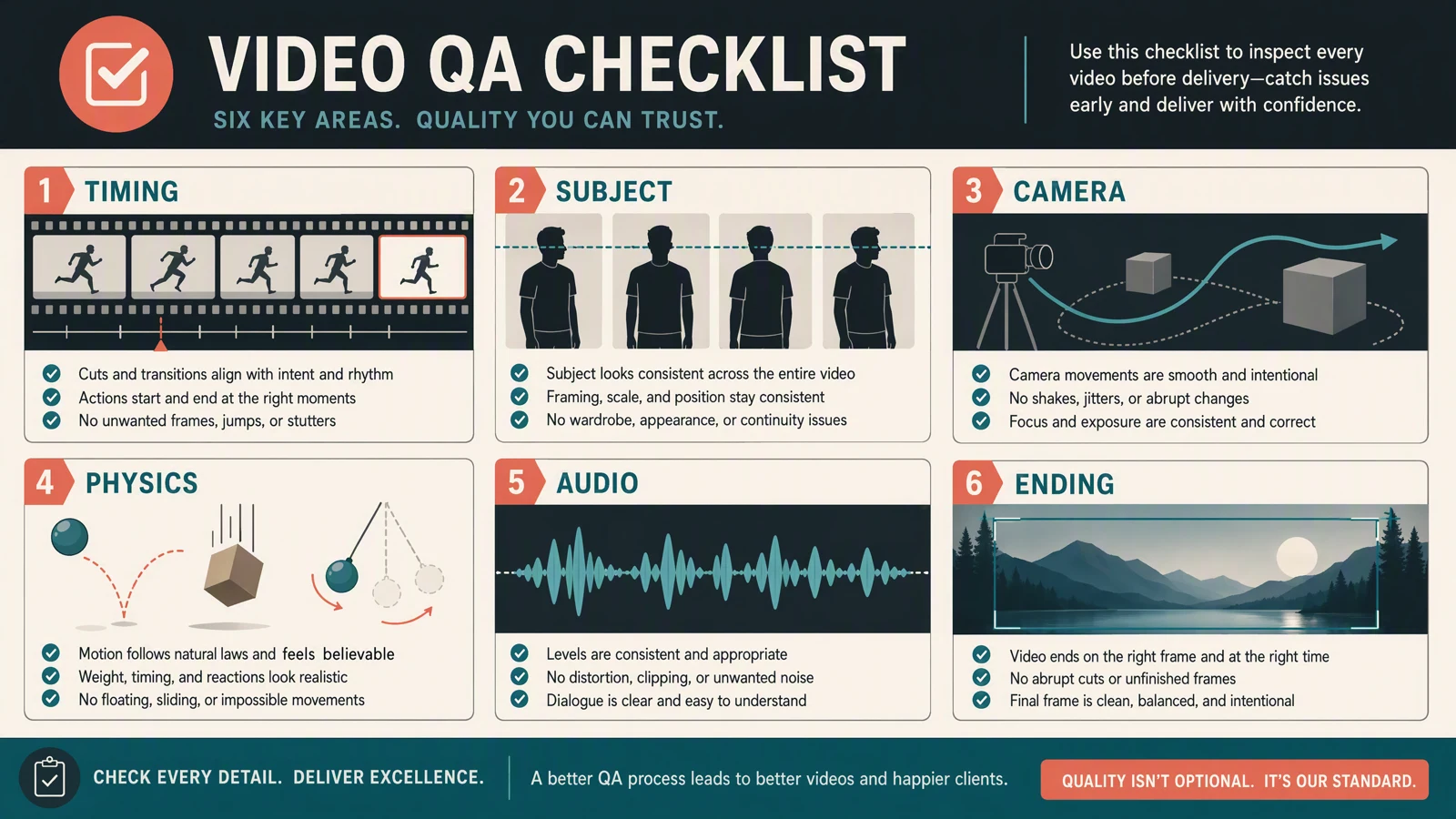
Review one failure class at a time. A single vague "make it better" revision gives the model no useful priority.
Long-shot stress test
We checked the current SeedVideo AI web workflow with one safe original scene: a matte red paper boat moving through a narrow greenhouse water channel in a continuous shot. The interface allowed a maximum of 15 seconds, so the hands-on result tests the longest web duration currently exposed, not a native 30-second web option.
The prompt used four timed instructions:
- 0 to 4 seconds: establish the boat entering from the left.
- 4 to 9 seconds: track parallel to the same boat.
- 9 to 13 seconds: lower the camera as the boat rounds a bend.
- 13 to 15 seconds: move ahead and hold the final frame.
The locked details were the boat's matte red color, shape, scale, travel direction, lighting, and environment. The review covered timing, the camera path, water motion, subject continuity, audio, and the ending.
The completed file was a 15.069-second, 1280 by 720 MP4 at 24 frames per second with a stereo audio track. The scene stayed inside one greenhouse, retained the red color and forward travel direction, and used a continuous camera move. Water reflections and the small wake remained plausible, while the last frame gave the subject a clear centered finish. The weakest point was subject identity: the familiar folded paper-boat shape gradually became a diamond-like origami form. The requested parallel tracking and final move ahead were also followed loosely rather than literally. The result passed environment continuity, camera smoothness, basic water motion, and a readable ending. It was only a partial pass for beat timing and failed the stricter shape-consistency check. A focused revision should repeat the exact folded hull shape in every beat and simplify the camera plan.
This is one controlled check, not a general success-rate claim. Longer scenes become harder as subjects, cuts, dialogue, and reference assets increase. Use the result to understand the review method, not to predict every prompt.
Common failure patterns
The first beat consumes half the clip
The opening description is too elaborate or lacks a deadline. Give the establishing shot a clear end time and start the main action earlier.
The subject restarts instead of progressing
Each beat describes the subject as if it were a new scene. Repeat the same direction and state: still walking right, still holding the blue case, still wearing the gray coat.
The camera teleports
The prompt changes shot size and direction without a transition. Add the connecting move or use a planned cut. Do not hide a cut inside one-take language.
Objects change near the end
The prompt spends all its detail on the opening. Repeat the object identity and final composition in the last beat.
The action is physically plausible at first, then drifts
Reduce simultaneous motion. Lock the subject action first, then ask for secondary motion such as fabric, leaves, or particles.
The ending feels accidental
Reserve the last four to six seconds for resolution. State what stops, what continues, and what the camera holds.
Shorten, split, or retry?
| Problem | Best next move | Reason |
|---|---|---|
| The idea has one strong action | Shorten | More duration adds drift without adding meaning |
| The web interface stops at 15 seconds | Split into two planned clips | The limit belongs to the current surface, not the beat sheet |
| The first half works and the second half fails | Split near the successful transition | Preserve the good section and reduce the model's continuity burden |
| Timing is wrong but identity is stable | Retry with revised beat lengths | The structure, not the subject definition, needs repair |
| Identity changes across every beat | Add or improve references, then retry | Text repetition alone is not protecting the subject |
| Camera direction flips unexpectedly | Simplify to one dominant move | Competing movement instructions are fighting each other |
| Final frame is weak | Rewrite only the last beat | A focused ending instruction is cheaper to reason about than a full prompt rewrite |
FAQ
Can Seedance 2.5 generate a full 30-second clip?
Yes. The model and current SeedVideo AI API documentation support up to 30 seconds. The web interface checked on August 5, 2026 exposed 4 to 15 seconds, so confirm the surface you are using.
Why can I only select 15 seconds in the web generator?
Product surfaces can expose a smaller range than the model supports. In the current web check, the Seedance 2.5 slider had a minimum of 4 seconds and a maximum of 15 seconds.
How do I make 30 seconds if the web interface stops at 15?
Plan the full 30 seconds first, then generate two 15-second clips with a shared transition. Repeat subject, environment, camera, light, and movement rules in the second prompt.
Can I request 30 seconds through the API?
The current SeedVideo AI model documentation lists Seedance 2.5 durations from 4 to 30 seconds at 480p or 720p. Your account plan determines which combinations are accepted.
Is one take better than planned cuts?
Neither is universally better. One take is useful for a continuous reveal or movement path. Planned cuts are better when the story needs different coverage, locations, or points of view.
How many beats should a 30-second prompt have?
Four is a practical default: orientation, development, proof or turn, and resolution. Use fewer when the action is simple. Add more only when each beat has a clear visual purpose.
Should I include exact timestamps?
Yes, when order and pacing matter. Time blocks help separate actions and give the final hold a protected place in the prompt.
How long should the final frame hold?
Allow roughly four to six seconds when the viewer needs to read a product, reaction, result, or CTA space. A story ending can be shorter if the final movement is already clear.
When should I abandon 30 seconds and generate a shorter clip?
Shorten when the idea has one action, when continuity failures repeat after focused revisions, or when the last half adds no new information.
Sources and methodology
Capability claims were checked against the official Dreamina Seedance 2.5 page, the official Dreamina Seedance 2.5 prompt guide, the SeedVideo AI Seedance 2.5 page, and the SeedVideo AI model documentation. Interface limits came from a logged-in web check on August 5, 2026. The hands-on section reports one controlled generation only and does not estimate a general success rate.
Build your 30-second plan
Start with the four-beat timeline, choose the route that actually exposes your required duration, and test the simplest version before adding more subjects or references. Open Seedance 2.5 on SeedVideo AI when your beat sheet is ready.