Best Sora Alternatives in 2026: Free AI Video Generators Compared
The best Sora alternative in 2026 depends on the job. Seedance 2.5 is the strongest fit here for longer, reference-led work inside a multi-model workspace. Runway suits creators who need editing tools. Pika is the low-cost paid entry for short experiments now that its Basic plan lists no monthly credits. Veo 3.1 adds native audio, Kling 3.0 covers creator and API workflows, Luma supports cinematic iteration, and Wan offers direct API pricing.
Sora's web and app experiences ended on April 26, 2026, and OpenAI says the Sora API will end on September 24, 2026. That makes access and migration just as important as output features. Prices, free credits, model availability, and commercial terms can change, so confirm the exact checkout or API endpoint before committing production work.
Last verified: 2026-09-23. SeedVideo AI plan facts come from the live pricing configuration; competitor figures were checked on official pages and are stated as of September 2026.
Looking for where to go after the Sora API shutdown? Start with our Sora alternative guide, then come back here for the full price, free-access, and licensing comparison across seven tools.
TL;DR
- Best all-in-one option for reference-heavy work: Seedance 2.5 through SeedVideo AI.
- Best recurring free allowance in this comparison: Google Flow, the consumer surface for Veo, with 50 credits per day as of September 2026; every output carries a SynthID mark. Pika Basic no longer includes monthly credits.
- Best for an editing-centered workspace: Runway, which combines Gen-4.5 with image, video, audio, upscale, and editing tools.
- Best for native audio and Google Cloud deployment: Veo 3.1.
- Best for direct developer billing: Kling 3.0, Luma, and Wan each publish API or credit-based rates.
Quick Answer
If you want one practical replacement for Sora, choose by input and delivery needs. Use Seedance 2.5 for longer multimodal video planning, Runway when editing and asset management matter, Pika for low-cost short experiments, Veo 3.1 when synchronized audio is central, Kling 3.0 for broad creator and API modes, Luma for cinematic iteration and video modification, or Wan when your team wants straightforward API deployment.
| Tool | Current starting price | Free access | Highest relevant published output | Longest relevant published duration | Commercial-use signal |
|---|---|---|---|---|---|
| Seedance 2.5 on SeedVideo AI | Lite $14.90 monthly or $13 per month billed yearly (100 credits); Pro $29 or $14.50 yearly (200 credits); Premium $149 or $99 yearly (1,300 credits) | Free plan: 5 sign-up credits for entry-tier models only (not Seedance 2.5, Kling, or Veo), up to 720p, non-commercial; no watermark on any plan | 480p, 720p, and 1080p; Seedance 2.5 is capped at 720p on Free and Lite and 1080p on Pro and Premium | Up to 30 seconds | Pro, Premium, yearly plans, and credit packs include commercial use; Lite monthly and the Free plan do not |
| Runway Gen-4.5 | Free; Standard $15 monthly or $12 per month billed yearly | 125 one-time credits | 720p generation, with 4K upscaling on paid plans | 2 to 10 seconds | Standard removes watermarks; project rights remain subject to current terms |
| Google Veo 3.1 | Usage pricing depends on the Google Cloud or Google product surface | Google Flow includes 50 credits per day as of September 2026, with SynthID on all outputs; no universal free production tier is published across surfaces | Up to 4K on current Google generative media surfaces | 4, 6, or 8 seconds | Vertex AI production use follows Google Cloud terms |
| Kling 3.0 | API from $0.084 per second for 720p without native audio; prepaid API packages start at $700 | No free API quota is stated on the public API price page; the creator app's Basic tier is non-commercial and watermark removal is paid, as of September 2026 | 4K is listed for eligible Kling 3.0 API modes | Mode-specific; confirm in the current creator or API surface | Paid API use follows Kling's paid-service terms |
| Pika 2.5 | Basic $0; Standard $10 monthly | Basic lists 0 monthly credits as of September 2026; no watermark on any tier | 1080p on paid tiers | 10 seconds for standard text/image generation; Pikaframes offers longer ranges | Pricing page states commercial use and no-watermark downloads |
| Luma Dream Machine | Lite $9.99 monthly; Plus $29.99 monthly | No free plan listed as of September 2026 | Up to 1080p generation, with higher-end output workflows by mode | Common generation blocks are 5 or 10 seconds; some modify workflows extend further | Plus and higher tiers include commercial rights; Lite is non-commercial |
| Wan via Alibaba Cloud | Wan 2.7 starts at $0.10 per second for 720p in Singapore | Eligible new Model Studio users receive 50 output seconds for 90 days | 1080p | 2 to 15 seconds for Wan 2.7 | Governed by Alibaba Cloud service terms and deployment region |
Image prompt: Editorial cinematic still of a small creative team in a bright professional post-production studio reviewing four distinct scenes on large monitors: a realistic landscape, a product close-up, a character performance, and a stylized animation. Natural daylight, soft studio lighting, neutral modern colors, believable human proportions, detailed film-production environment, wide 16:9 composition, clean editorial finish and uncluttered screens.
Why people need a Sora alternative now
OpenAI's current discontinuation notice changes the question. Sora is no longer an active web or app destination, and teams using its API have a dated migration deadline. A useful alternative therefore needs more than a similar text box. It needs a reachable product surface, clear billing, the right input modes, and terms that fit the way the result will be delivered.
Each vendor exposes different models, resolutions, durations, audio modes, and queues. This comparison focuses on the facts a buyer can check before spending: access, image-to-video support, reference control, audio, duration, pricing, and licensing signals.
1. Seedance 2.5: best for longer, reference-led production
Seedance 2.5 is the most direct choice for teams that want to plan a fuller sequence rather than stitch together several very short clips. The current model page lists up to 30-second generation and a reference package of up to 30 images, 10 videos, and 10 audio files. Those inputs can carry separate jobs such as identity, product appearance, location, camera motion, pacing, and sound direction.
SeedVideo AI places Seedance beside other video models in one workspace. The current text-to-video interface exposes Seedance 2.5 with aspect ratio, duration, resolution, audio, and advanced controls. You can open the Seedance 2.5 text-to-video workspace and check the available settings before using credits.
Plan facts as of the last verification: Lite costs $14.90 per month, or $13 per month billed yearly, and includes 100 credits; Pro is $29, or $14.50 yearly, with 200 credits; Premium is $149, or $99 yearly, with 1,300 credits. A five-second Seedance 2.5 clip charges 14 / 11 / 9 credits at 480p on Lite / Pro / Premium, 28 / 22 / 19 at 720p, and 68 / 53 / 46 at 1080p. Seedance 2.5 output is capped at 720p on Free and Lite and 1080p on Pro and Premium, with 1 / 1 / 4 / 8 concurrent generations on Free / Lite / Pro / Premium. Premium also includes a one-time seven-day window of unlimited Seedance 2.5 and 2.0 generation, up to 1080p and 10 seconds per clip; it is a one-off benefit, not a standing perk.
The Free plan grants 5 sign-up credits for entry-tier models only, so Seedance 2.5 itself needs a paid plan; free output is capped at 720p and is non-commercial. No plan, including Free, adds a watermark.
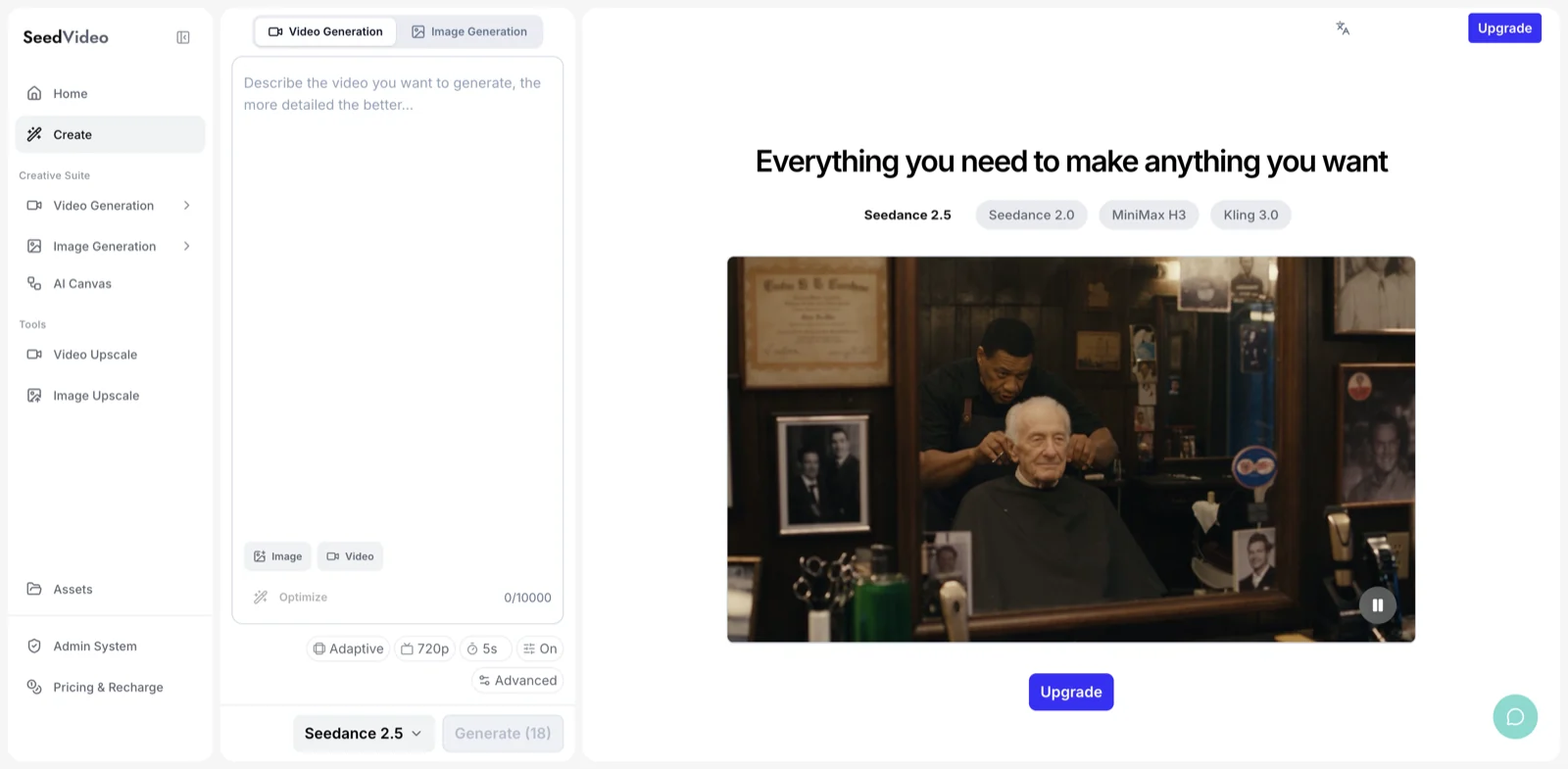
Current SeedVideo AI generator with Seedance 2.5 selected, showing the prompt area, input controls, 720p setting, five-second duration, audio toggle, and model showcase.
Best for: product ads, AI UGC, longer story beats, and teams that need several reference types in one plan.
Not best for: buyers who only want the lowest published cost for a basic five-second clip. Seedance 2.5 uses more credits than lightweight short-form models, and the best plan depends on how often you use its longer duration and reference controls.
2. Runway Gen-4.5: best for an editing-centered workspace
Runway fits teams that treat generation as one step in a larger edit. Its Creative plans combine Gen-4.5 with other video models, image and audio tools, storage, upscaling, and editing. Gen-4.5 supports text-to-video and image-to-video, 720p output, several aspect ratios, and durations from two to ten seconds. The published rate is 12 credits per generated second.
The Free plan includes 125 one-time credits. Standard includes 625 monthly credits and costs $15 month to month or $12 per month when billed yearly. Runway's allocation table translates the annual credit pool into 125 five-second Gen-4.5 videos on Standard.
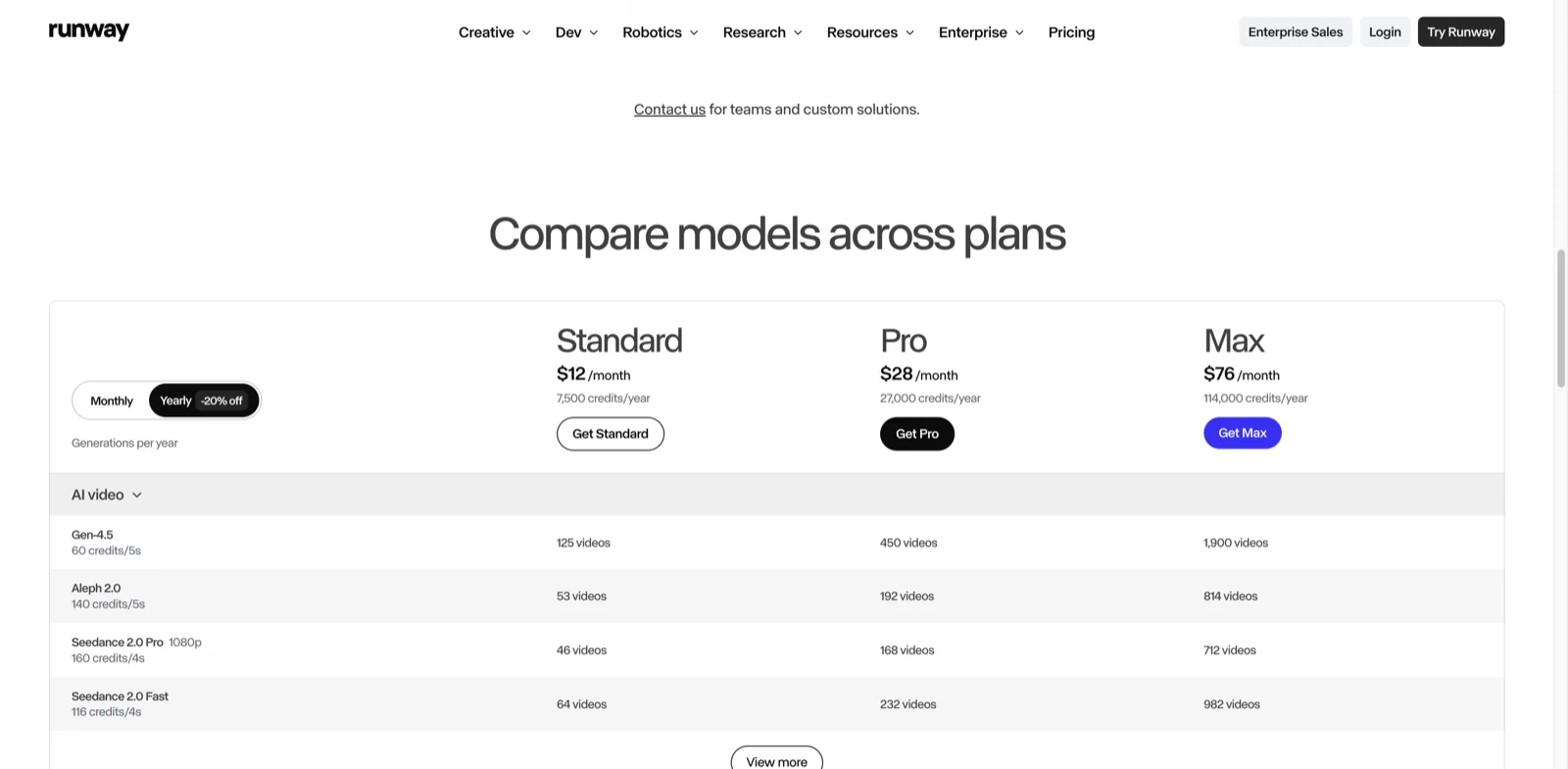
Runway pricing page captured on August 31, 2026, showing annual-equivalent plan prices, yearly credit totals, and Gen-4.5 usage.
Best for: creators who want generation, editing, upscale, storage, and several current models in one production workspace.
Not best for: a high-volume team expecting the entry plan to cover repeated experimentation. Runway describes Standard as a light exploratory plan, and 625 credits can disappear quickly at 12 credits per second.
3. Google Veo 3.1: best for native audio and Google Cloud workflows
Google's current Veo family covers text-to-video and image-to-video with synchronized speech or sound effects. The current generative media page lists landscape and portrait output, 720p, 1080p, and 4K options, plus four, six, or eight-second durations. The family includes Veo 3.1, Veo 3.1 Fast, and Veo 3.1 Lite, so the right version depends on whether fidelity, speed, or cost matters most.
Veo makes particular sense for a company that already runs media workloads in Google Cloud. Consumer access, enterprise access, and Vertex AI billing are separate products, so confirm the surface, region, quota type, audio setting, and commercial terms before budgeting.
Best for: short cinematic clips where native audio, Google Cloud governance, or multiple performance tiers matter.
Not best for: creators who want one subscription that covers every surface. Google Flow gives 50 credits per day as of September 2026, but all outputs carry SynthID, and Google publishes enterprise and Vertex AI access and pricing separately by product surface.
For a narrower comparison of these workflows, read the Veo alternative guide.
4. Kling 3.0: best for broad creator modes and a published API rate
Kling's current site presents Video 3.0 and Video 3.0 Omni with multimodal instruction parsing, multi-scene control, and native audio options. Its official API price page is unusually specific. Kling 3.0 without native audio starts at $0.084 per second for 720p, $0.112 for 1080p, and $0.42 for 4K. Native audio raises the 720p rate to $0.126 per second. Kling 3.0 Turbo and Omni use separate rates.
Prepaid API packages start at $700 for 5,000 units and expire after 180 days. Creator-app memberships use separate pricing; as of September 2026 the free Basic tier is non-commercial and watermark removal is a paid feature.
Best for: teams that want Kling-specific image-to-video, native audio, Omni workflows, or published per-second API billing.
Not best for: someone looking for a small free API trial or a low-commitment developer package. The public API pricing starts with a substantial prepaid purchase.
See the Seedance 2.5 and Kling 3.0 comparison for a feature-by-feature breakdown.
5. Pika 2.5: best for a recurring free allowance and short experiments
Pika's free offer has shrunk. As of September 2026 the Basic plan lists 0 monthly credits, so the recurring free allowance that once set Pika apart is gone and paid use starts at Standard. No Pika tier adds a watermark. Standard costs $10 per month, includes 700 credits, and unlocks all listed resolutions plus Pika's extended effects and editing tools.
Pika also publishes model costs. A five-second Pika 2.5 text-to-video or image-to-video clip uses 12 credits at 480p, 20 at 720p, or 40 at 1080p. Ten-second clips use twice those amounts.
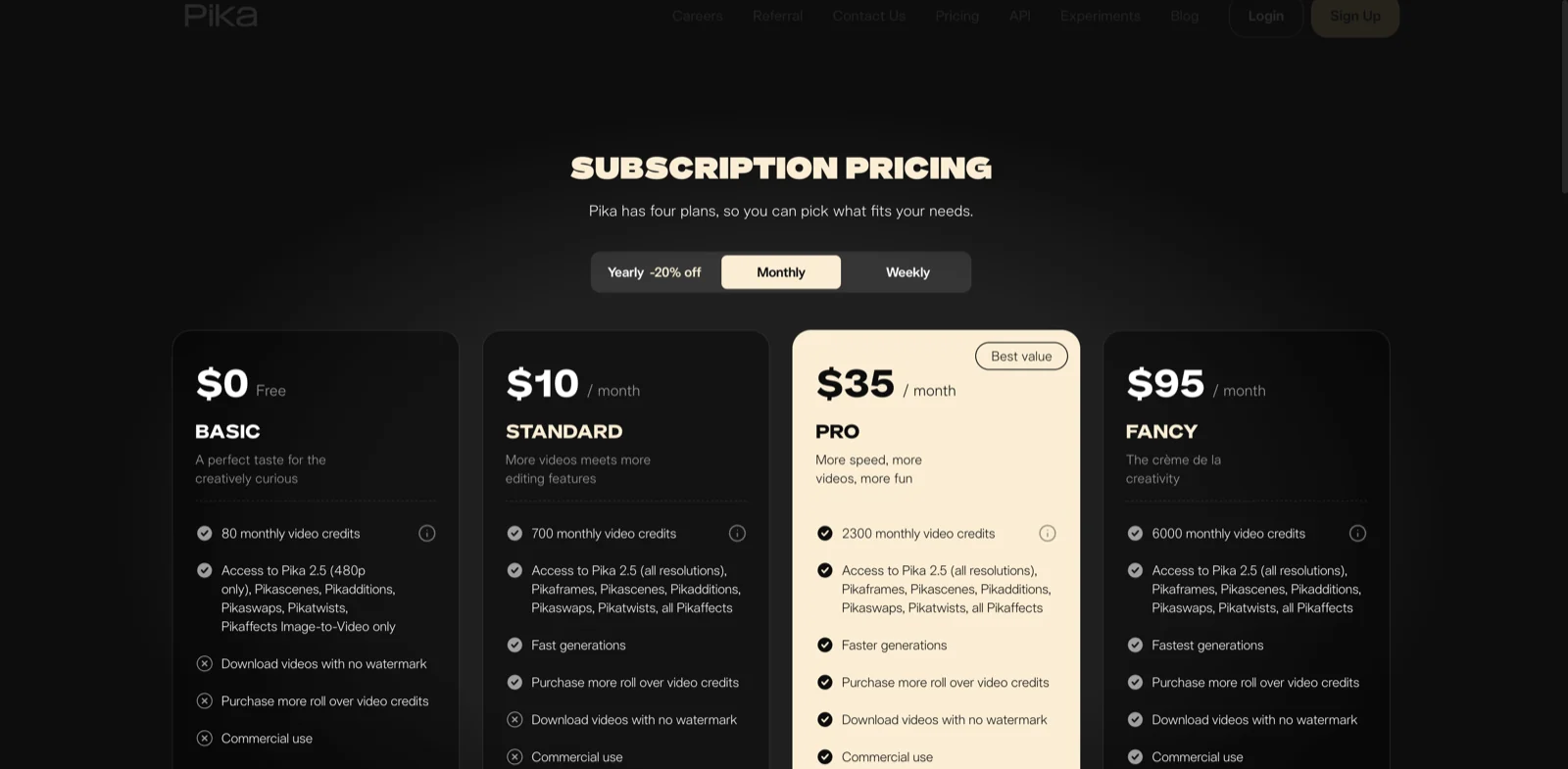
Pika pricing page captured on August 31, 2026, showing the monthly Basic, Standard, Pro, and Fancy plans. Basic has since dropped its monthly credits; see the current figures above.
Best for: short social concepts, image-led experiments, effects, and creators who want a low-cost paid entry point with no watermark.
Not best for: longer narrative sequences that need a large multimodal reference package or a broader post-production workspace.
6. Luma Dream Machine: best for cinematic iteration and video modification
Luma's current product range combines Ray video generation with modify, reframe, and higher-end output workflows. Ray3.14 supports native 1080p generation, while the current pricing surface also lists newer Ray3.2 rates. The exact model matters: credit use changes sharply by resolution, duration, HDR, and whether the task is generation or video modification.
As of September 2026, Luma's pricing page lists no free plan, so evaluation starts at a paid tier. Lite starts at $9.99 per month and remains non-commercial. Plus costs $29.99 per month, includes 10,000 credits, removes watermarks, and includes commercial rights. Dream Machine subscriptions and API credits are separate.
Best for: filmmakers and designers who expect to iterate, modify footage, reframe shots, or use HDR-oriented workflows.
Not best for: a buyer comparing plans by monthly price alone. Luma's credit cost changes substantially across model, resolution, duration, and output format.
7. Wan through Alibaba Cloud: best for direct API deployment
Wan is the most developer-oriented choice in this list. Alibaba Cloud documents Wan 3.0 with text, image, video, audio, file, and web-link inputs, adaptive framing, and generation up to 30 seconds on supported modes. Availability and pricing vary by region.
For an international baseline with clear numbers, Wan 2.7 in Singapore supports 720p and 1080p, two to fifteen-second duration, and audio-aware text-to-video. The published rate is $0.10 per output second at 720p and $0.15 at 1080p. Eligible new Model Studio users receive a 50-second quota valid for 90 days. Console previews carry an AI-generated watermark, while the API watermark parameter defaults to false.
Best for: developers who want regional endpoints, per-second billing, and a direct API rather than a bundled creative subscription.
Not best for: nontechnical creators who want a polished timeline editor, media library, and consumer onboarding included with the generation price.
How to choose without wasting credits
Start with the output you actually need. Write down the input type, aspect ratio, duration, resolution, audio requirement, number of reference assets, and delivery rights. A five-second silent concept and a 30-second product story should not use the same shortlist.
Compare one representative task:
- Pick a prompt and source image you are allowed to use.
- Fix the aspect ratio, duration, and resolution.
- Decide whether audio must be generated with the video.
- Count how many acceptable versions you need, not how many generations you can start.
- Check watermark, commercial rights, credit expiry, queue limits, and export format.
- Use a free allowance for the representative task before choosing annual billing.
If longer reference-led work is the priority, review Seedance 2.5's current model limits and the SeedVideo AI pricing terms together. The model page explains the workflow. The pricing page determines whether the chosen plan covers the required resolution, commercial use, and expected number of attempts.
Frequently asked questions
What is the best Sora alternative in 2026?
There is no single quality winner without an identical controlled test. Seedance 2.5 is a practical fit for longer multimodal reference workflows, Runway for editing-centered production, Pika for low-cost short experiments, Veo 3.1 for native audio, Kling 3.0 for creator and API modes, Luma for cinematic iteration, and Wan for direct API deployment.
Is there a free Sora alternative?
Yes, but the free offers are limited, and they changed during 2026. As of September 2026, Pika's Basic plan lists 0 monthly credits, Runway gives 125 one-time credits, Google Flow includes 50 credits per day with SynthID on every output, and Luma lists no free plan. SeedVideo AI's Free plan grants 5 sign-up credits for entry-tier models only, capped at 720p and non-commercial; Seedance 2.5, Kling, and Veo need a paid plan, but no plan adds a watermark. Free does not mean unlimited production, full resolution, or commercial rights.
Which Sora alternative supports the longest clip?
The current Seedance 2.5 page lists up to 30 seconds. Alibaba Cloud also documents up to 30 seconds for supported Wan 3.0 modes. Veo 3.1 uses four, six, or eight-second outputs, Runway Gen-4.5 uses two to ten seconds, and Pika's standard text/image generation uses five or ten seconds.
Which alternative is best for image-to-video?
Seedance 2.5 is useful when several images, videos, or audio references need separate roles. Pika offers a low-cost image-to-video entry. Kling emphasizes image-led motion and multimodal controls. Runway and Veo 3.1 also support image-to-video, while Luma combines image input with modify and reframe workflows.
Can I use free AI-generated videos commercially?
Do not assume so. Pika's pricing page states commercial use on its plans, Kling's free Basic tier is non-commercial, and Luma keeps Lite non-commercial. SeedVideo AI excludes commercial use from the Free plan and Lite monthly but includes it on Pro, Premium, yearly plans, and credit packs. Each provider's current terms, account type, source-media rights, and local law still apply.
What should a former Sora API user choose?
Choose by deployment needs. Wan, Kling, Runway, Luma, and Google Cloud all publish developer access, but their pricing units and input modes differ. Build a migration test around one real request, then verify endpoint region, async job handling, output retention, watermark behavior, safety rules, and cost before moving production traffic.
Sources and methodology
This comparison uses the OpenAI Sora discontinuation notice, Runway pricing, Runway Gen-4.5 documentation, Pika pricing, Google's current Veo overview, Kling API pricing, Luma pricing, and Alibaba Cloud video generation documentation. It compares published access and specifications so readers can shortlist tools around a real workflow.
Choose the alternative that fits the delivery
Replace Sora with the workflow that accepts your inputs, produces the required format, and gives you usable rights at a cost your retry rate can absorb. For longer, reference-led projects, start with Seedance 2.5 and compare the current controls against one representative job before buying more capacity.