Seedance 2.5 vs Veo 3.1: Which AI Video Generator Should You Use in 2026?
Seedance 2.5 and Veo 3.1 solve overlapping problems but invite different production habits. Seedance 2.5 suits projects that start with several references and need a longer sequence. Veo 3.1 fits briefs built around Google's Flow workflow, native sound, an eight-second shot, or delivery up to 4K. Neither model is the automatic winner. Ask what control the next shot needs, how long it must run, and what revisions can cost. This comparison uses current controls, documentation, and pricing pages. It does not present a paid head-to-head render test. Use the table and test plan below, then run the same brief through both tools before committing a campaign.
TL;DR
- Choose Seedance 2.5 for reference-heavy work, longer clips, and a workspace that can accept images, video, and audio guidance.
- Choose Veo 3.1 for short cinematic shots inside Flow, native audio, vertical output, or a documented path to 1080p and 4K.
- Compare total revision cost, not the price of one successful generation.
- Keep product text, exact interfaces, and legal copy as real overlays or screen recordings.
- If the job matters, use the reproducible test plan in this article instead of judging selected gallery examples.
Quick answer
For a 15 to 30-second reference-driven sequence, start with Seedance 2.5. For an eight-second cinematic shot with synchronized dialogue, ambience, or effects, Veo 3.1 is the clearer first test. Seedance 2.5 currently exposes a 4 to 30-second duration range in the SeedVideo AI workspace, with 720p and adaptive settings visible in the generator. Google's current Flow help lists Veo 3.1 Lite and Fast at 4, 6, or 8 seconds, while Quality is listed at 8 seconds. Veo also documents 16:9 and 9:16 output, extension tools, first-and-last-frame control, reference images, and higher-resolution delivery. The better purchase depends on how many usable seconds you get after revisions.
Image prompt: Cinematic editorial still of a clean production studio desk prepared for choosing an AI video workflow, with storyboard cards, reference photographs, headphones, a camera slate, and a field recorder under soft daylight and warm practical light, realistic materials, balanced widescreen composition, neutral decision-making mood, no readable text or brand marks.
Seedance 2.5 vs Veo 3.1 at a glance
| Decision point | Seedance 2.5 | Veo 3.1 |
|---|---|---|
| Best starting use | Longer, reference-led sequences | Short cinematic shots with native audio |
| Current duration evidence | 4 to 30 seconds in the SeedVideo AI workspace | 4, 6, or 8 seconds for Lite and Fast; 8 seconds for Quality in Flow |
| Input options | Text, first or last frame, and a reference workflow that can use images, video, and audio | Text, image, first and last frames, up to three reference images in documented workflows |
| Sound | Audio guidance is part of the reference workflow; current workspace has a sound control | Native generated audio is a documented Veo 3.1 feature |
| Aspect ratios | Depends on the current workspace and selected workflow | 16:9 and 9:16 are documented |
| Resolution | Current SeedVideo AI workspace shows 720p by default | 720p, 1080p, and 4K are documented for supported routes |
| Access | SeedVideo AI web generator and model page | Google Flow, Gemini, and supported API or cloud routes |
| Main planning risk | Too many references can conflict | Short shots can require more stitching and credit planning |
This compares capabilities, not results. Verify the controls you can access before quoting a client.
Where Seedance 2.5 fits
Seedance 2.5 makes sense when your brief begins with materials rather than a single sentence. A product launch may have approved stills, a pack shot, an environment reference, a motion example, and a sound cue. A character sequence may need the same clothing and face across several beats. The model's reference-oriented workflow is built for that kind of preparation.
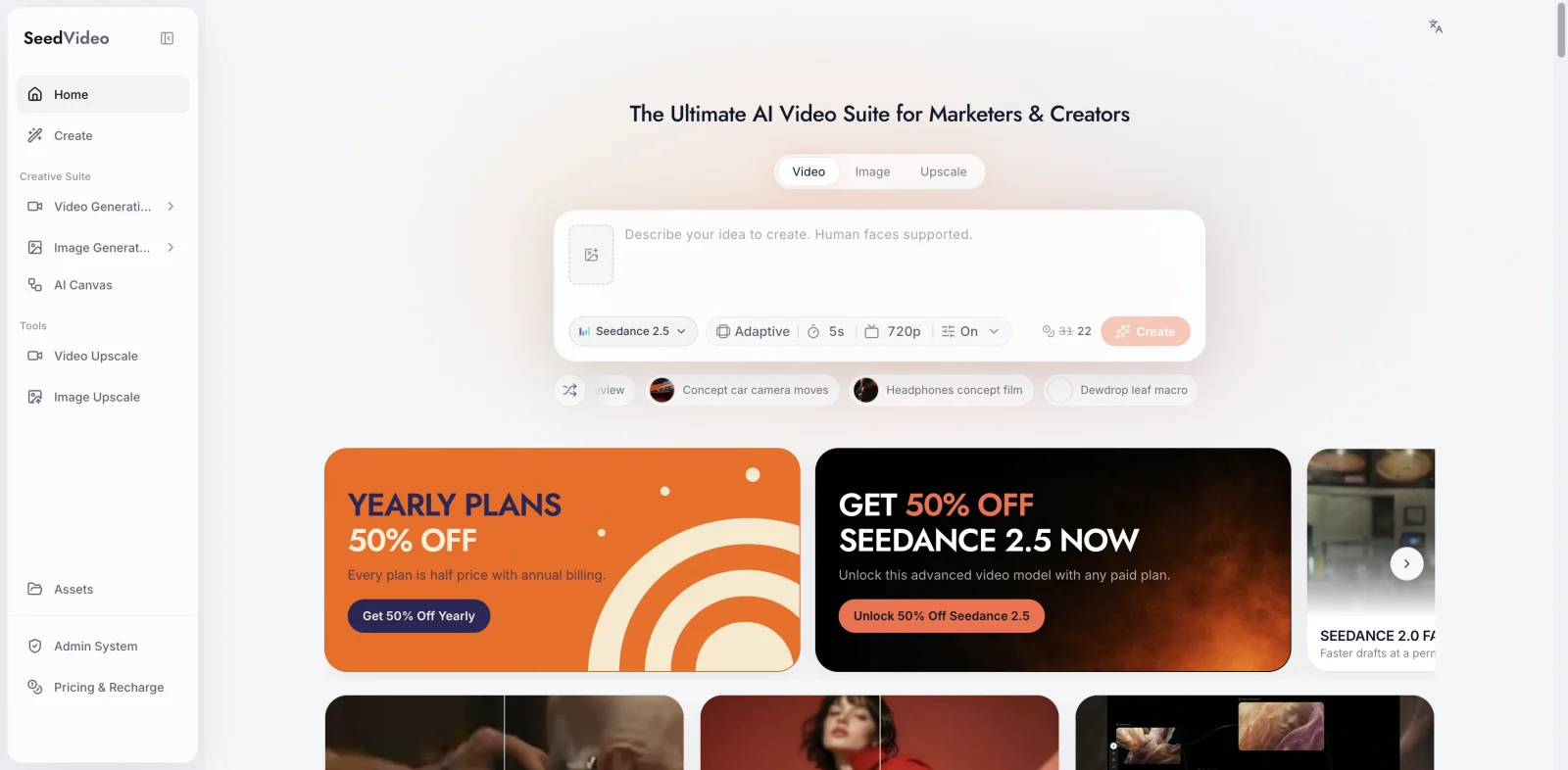
The current Seedance 2.5 generator shows image and video inputs, a 4 to 30-second duration control, adaptive framing, a 720p setting, sound, and advanced options. Those controls matter because they let a producer plan one longer beat instead of assembling every idea from separate eight-second clips. A longer maximum is not proof that every long clip will stay consistent. It simply gives you another production option.
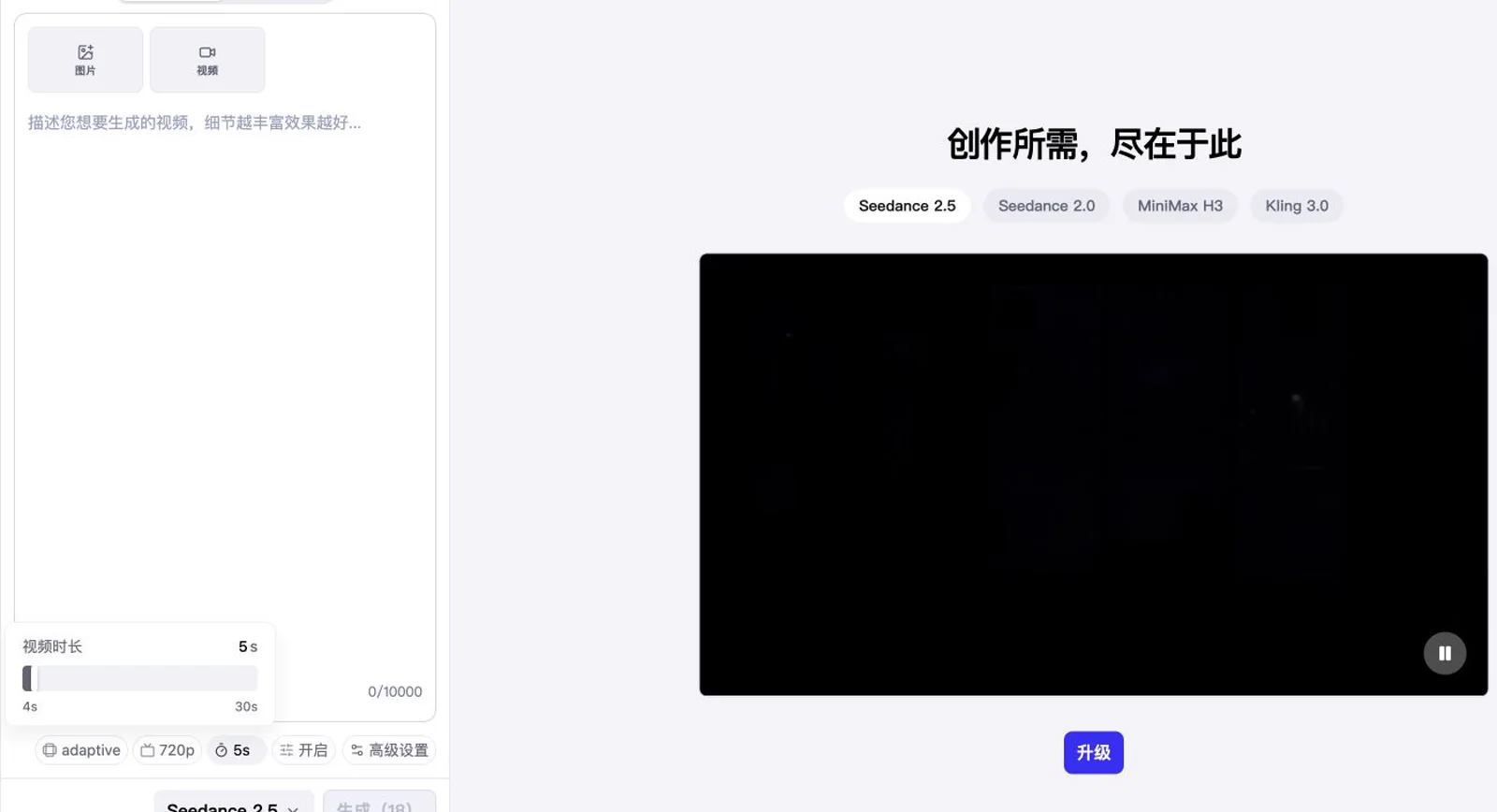
Current SeedVideo AI generator with Seedance 2.5 selected. The screenshot shows image and video inputs, adaptive framing, 720p, sound, advanced settings, and the 4 to 30-second duration range available on August 22, 2026.
Seedance 2.5 is best for
- A sequence that needs more than eight seconds before an edit.
- Product, character, or location continuity guided by several approved references.
- Teams that want to combine visual references with motion or audio guidance.
- Iterative social, demo, and narrative work inside one web workspace.
Seedance 2.5 is not the obvious first choice for
- A delivery spec that requires a documented native 4K route today.
- A vertical eight-second shot planned specifically for Google's Flow tools.
- A team that already manages its prompts, assets, approvals, and billing inside Google AI products.
If consistency is the priority, simplify the reference set before adding more material. Give each file a clear job. One image can define the product, another the setting, and a short motion reference the camera move. Conflicting lighting, lens, wardrobe, or geometry cues increase ambiguity.
Where Veo 3.1 fits
Veo 3.1 is a strong candidate for short shots that need image fidelity, motion, and sound planned together. Google documents native audio generation, text and image inputs, first-and-last-frame control, reference images, video extension, and both horizontal and vertical aspect ratios. Supported routes also list 720p, 1080p, and 4K output. That makes the model easier to place in a production brief with a strict finishing resolution or a 9:16 deliverable.
The tradeoff is duration. Flow's current credit guide lists Veo 3.1 Lite and Fast generations at 4, 6, or 8 seconds. Quality is listed at eight seconds. A 24-second scene may therefore require three or more source clips, continuity work, and an edit. That can be a good workflow when every shot deserves separate direction. It is less convenient when the scene depends on one uninterrupted performance.
Veo 3.1 is best for
- An eight-second cinematic insert with dialogue, ambience, or sound effects.
- 9:16 and 16:9 campaigns that share the same visual idea.
- Teams using Flow for shot generation, extension, and iteration.
- Delivery plans that need a documented 1080p or 4K route.
Veo 3.1 is not the obvious first choice for
- A continuous 15 to 30-second scene that you do not want to assemble from clips.
- Reference packs that depend on many images, videos, and audio files at once.
- A low-cost campaign where repeated Quality generations would consume the budget quickly.
Input control and continuity
The models describe reference control differently. Seedance 2.5 treats multiple media types as part of the creation workflow. Its public model information describes text, first and last frames, and a reference mode with generous media limits. If you start from an existing clip instead of a brief, the Seedance video to video workspace takes that source video plus a short instruction to replace an object, restyle the shot, or extend it. Veo 3.1's documented controls are narrower but precise: first and last frames, up to three reference images in supported workflows, and extension from an existing video.
For a branded object, begin with a clean product image against a simple background. Do not ask either model to invent small packaging text. Add typography during editing. For a recurring character, use one approved portrait and a full-body reference with matching wardrobe. For a camera move, describe the subject action separately from the camera action. The Seedance 2.5 prompt guide gives a practical structure for separating subject, movement, camera, setting, light, and sound.
Continuity is also an editorial problem. Lock the aspect ratio, keep the same reference set, reuse a short vocabulary for wardrobe and lighting, and save the exact prompt with every approved shot. If a sequence breaks, find the first changed variable instead of rewriting everything.
Audio: plan for the edit, not the demo reel
Veo 3.1 has a clear documented advantage in native audio generation. A prompt can ask for dialogue, room tone, effects, or music cues alongside the visual. Seedance 2.5 also exposes sound and audio-reference options in its current workflow, but the two products package and document audio differently.
Generated sound can speed up a concept pass. It does not remove audio post-production. Dialogue may need replacement, music may need a separate license, and effects may need timing changes. Keep each layer replaceable. Record regulated or product-critical wording separately.
For either model, test sound with a plain brief: one speaker, one short line, one room, and one distinct effect. A crowded prompt makes it hard to tell which element caused a failure.
Duration, resolution, and aspect ratio
Longer clips reduce edit points but give a model more time to drift. A 20-second Seedance shot can suit a slow product reveal. Three separate Veo shots may offer tighter control over a fast edit.
4K does not guarantee four times the useful detail of 1080p. Check faces, product edges, hands, thin lines, and texture after export. Make a short proof at the intended aspect ratio before producing every variation.
Use 9:16 when the composition is designed for a phone screen, not as a crop afterthought. Keep faces and products away from interface overlays. If you need horizontal and vertical versions, test both compositions early because subject scale and camera movement may need different prompts.
Current access and pricing
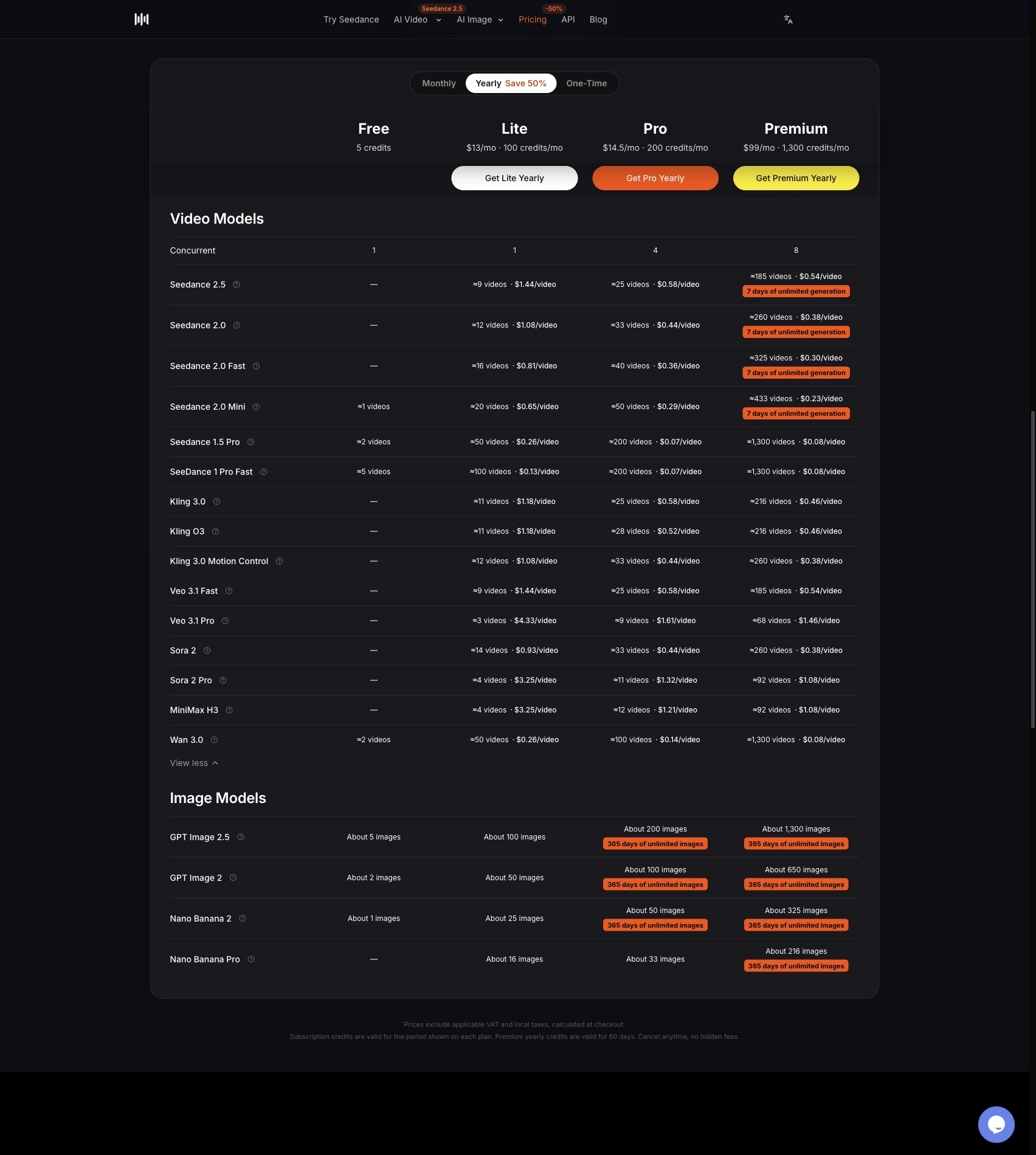
SeedVideo AI currently offers a free entry point and paid annual plans. The pricing page visible on August 22, 2026 lists Lite at $9.90 per month when billed annually, Pro at $24.90, and Premium at $69.90. The page shows 130, 400, and 1,200 monthly credits for those plans. Seedance 2.5 is listed at 8 credits on Lite, 6 on Pro, and 5 on Premium under the displayed discounts. Prices, credits, and commercial-use terms can change, so check the current pricing page before purchase.
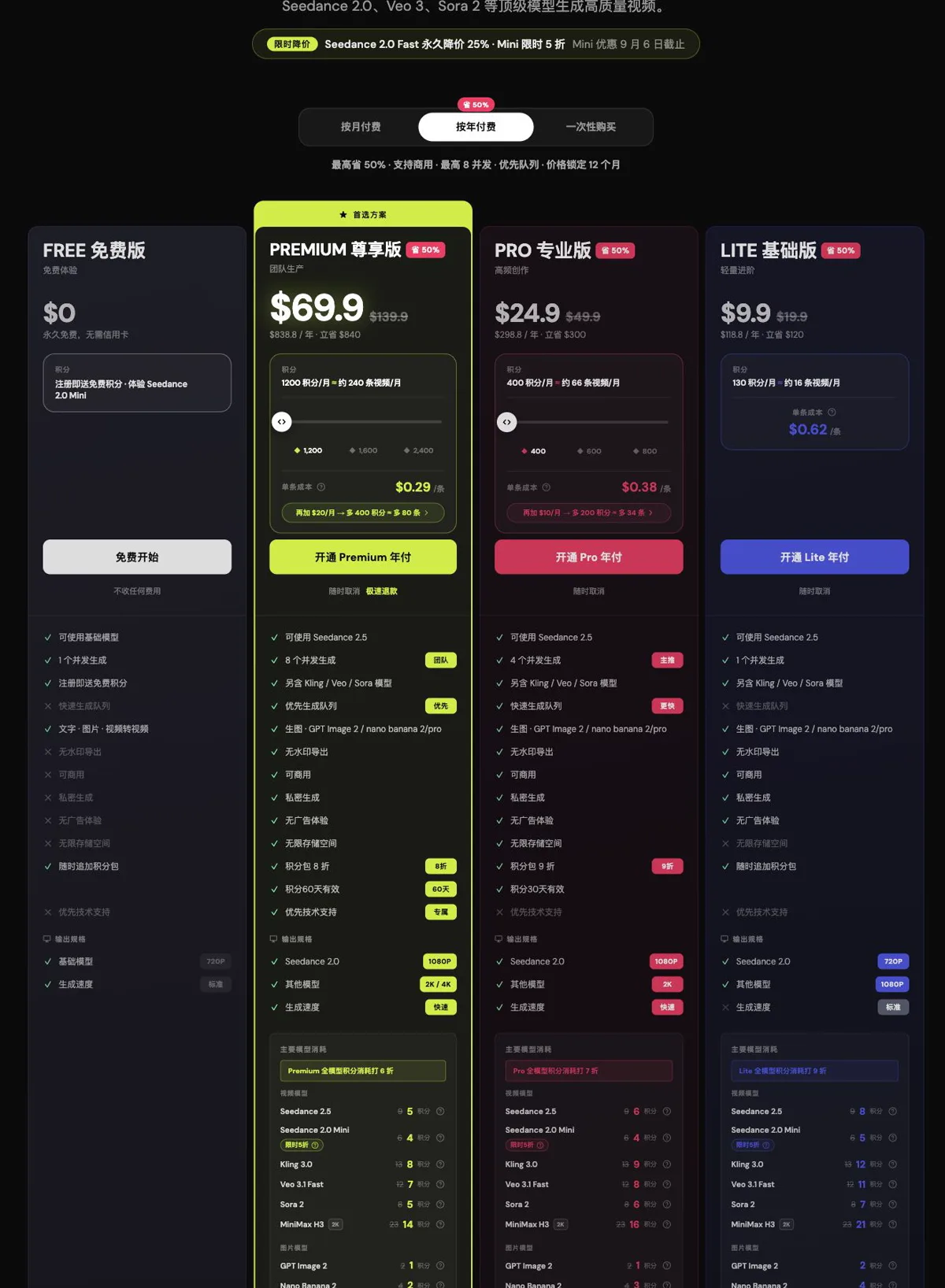
SeedVideo AI annual-plan pricing shown on August 22, 2026. The screenshot records the plan prices, monthly credit allocations, and displayed Seedance 2.5 credit cost for each paid tier.
Google's Flow help currently says accounts without a Google AI subscription receive 50 credits per day. For non-Ultra subscribers, the table lists Veo 3.1 Lite at 10 credits, Fast at 20, and Quality at 100 per generation. Ultra subscribers are shown lower Lite and Fast costs, while Quality remains 100. One request can create more than one generation, so confirm the generation count before judging cost.
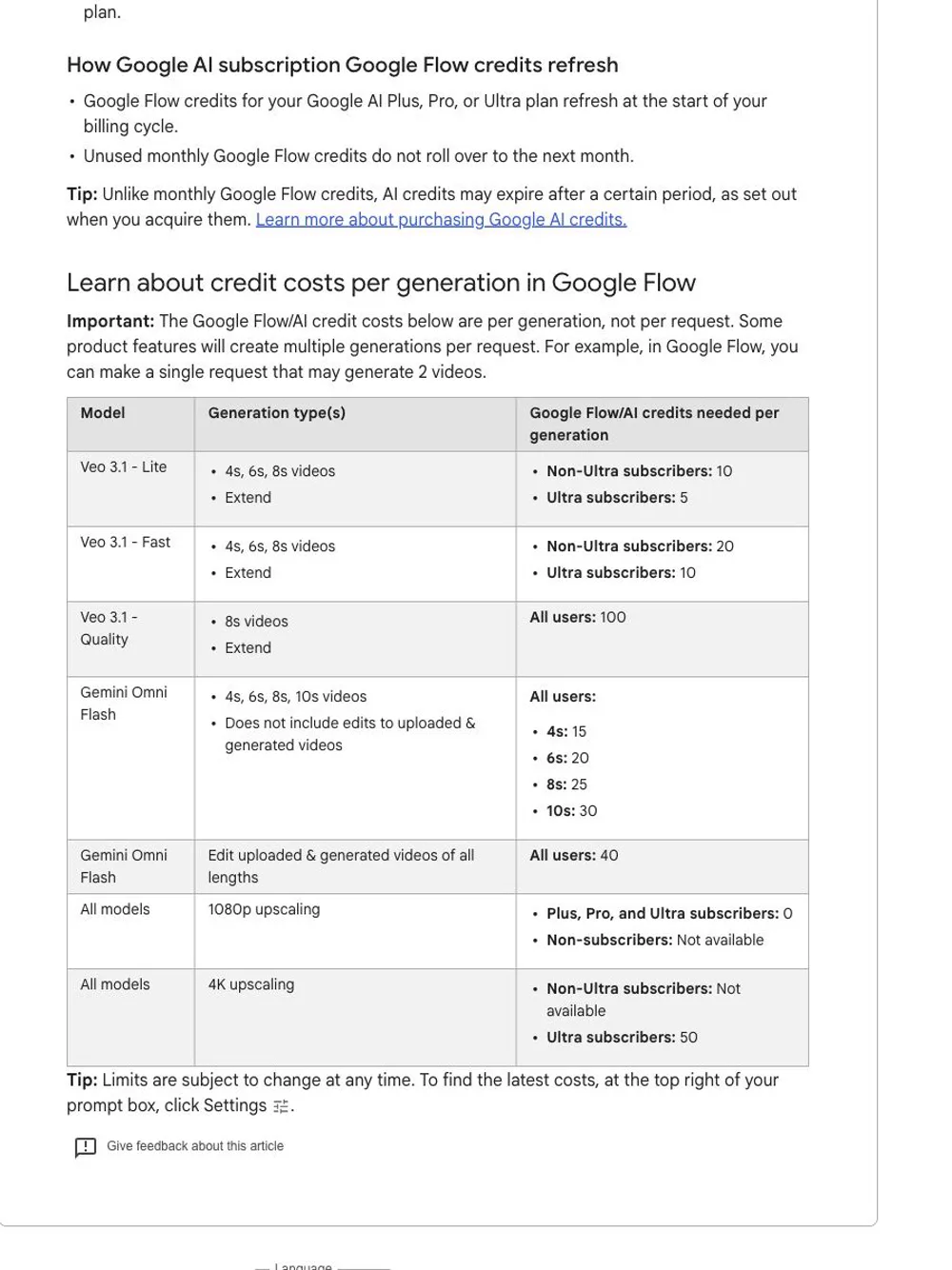
Google Flow credit costs shown on August 22, 2026. The table lists supported durations and the credits charged per generation for Veo 3.1 Lite, Fast, and Quality.
Google Cloud also publishes per-second API pricing, which is useful for programmatic planning but is not the same as a Flow subscription credit. Keep browser credits and API billing in separate budget sheets.
Compare cost per approved shot
A generation price is only the beginning. Track how many attempts reach review, how many survive the edit, and how much manual repair each one needs. A cheaper render that takes six attempts may cost more than an expensive render accepted on the second try.
Use this simple worksheet:
| Metric | What to record |
|---|---|
| Generation cost | Credits or dollars consumed for every attempt |
| Approval rate | Approved shots divided by total generated shots |
| Repair time | Minutes spent on cleanup, retiming, audio, and overlays |
| Usable seconds | Final approved seconds after trimming |
| Effective cost | Generation spend plus editing labor per approved second |
Record failed attempts too. They reveal whether the problem came from prompt ambiguity, reference conflict, duration, or the model itself.
A reproducible Seedance 2.5 vs Veo 3.1 test
This article does not claim a winner because no paid same-condition test was authorized. You can run one with a small, auditable brief.
- Choose one eight-second concept so both models can use the same duration.
- Prepare one original 16:9 reference image without small text or logos.
- Write a prompt with one subject action, one camera move, one lighting state, and one sound cue.
- Use the closest standard quality mode available in each product. Record the exact setting.
- Generate three attempts per model. Do not change the prompt between attempts.
- Score identity, geometry, motion, camera accuracy, lighting, sound timing, and artifact count on a five-point scale.
- Ask two reviewers to score files without model names.
- Record credits, waiting time, export resolution, and repair minutes.
- Repeat once with a 9:16 brief if vertical delivery matters.
Do not combine the scores into one vague quality number. A product shot may value geometry above sound. A dialogue scene may reverse those weights. Publish the rubric with any conclusion so another team can reproduce the choice.
Which one should you choose?
Choose Seedance 2.5 when the project benefits from longer clips and a broad reference pack. It is a practical first test for product continuity, recurring characters, music-video planning, explainers, and scenes that should breathe beyond eight seconds.
Choose Veo 3.1 when an eight-second shot, native audio, vertical delivery, Flow integration, or a documented high-resolution route is central to the brief. It is also easier to budget when your team already understands Google AI credits and keeps projects inside that toolset.
If both descriptions fit, do not decide from a gallery. Run the same eight-second brief, blind the files, and compare effective cost per approved shot. The right model is the one that removes work from your actual edit.
For another reference-led comparison, read the Seedance 2.5 vs Kling 2.5 guide. For Veo-specific prompt structure, use the Veo 3.1 prompt guide.
FAQ
Is Seedance 2.5 better than Veo 3.1?
There is no evidence-based universal winner. Seedance 2.5 offers a longer current duration range and a broad reference workflow. Veo 3.1 documents native audio, vertical output, and supported 1080p and 4K routes. Test the task you need to ship.
Which model is better for longer videos?
Seedance 2.5 is the clearer starting point for a continuous clip longer than eight seconds because the current workspace exposes 4 to 30 seconds. Long duration can still introduce drift, so review the full clip before building a campaign around it.
Which model is better for audio?
Veo 3.1 has the clearest official documentation for native generated audio. Seedance 2.5 also supports sound controls and audio references in its current workflow. Final dialogue, music rights, and effects should still be handled as editable layers.
Can Veo 3.1 generate vertical video?
Google documents both 16:9 and 9:16 aspect ratios for Veo 3.1 in supported workflows. Confirm the route and model mode you plan to use because product surfaces can expose different settings.
Can Seedance 2.5 make a 30-second video?
The current SeedVideo AI generator exposes a 4 to 30-second duration range for Seedance 2.5. That is a control limit, not a promise that every 30-second result will maintain perfect consistency.
Which option is cheaper?
It depends on the plan, mode, number of outputs per request, and approval rate. Compare total credits and editing time per usable second. Browser subscription credits should not be mixed with API per-second pricing.
Start with the smallest useful test
Open Seedance 2.5, choose one approved reference, and make a short proof before expanding the shot list. If the same brief also suits Veo 3.1, run it there with matching duration and review criteria. Save every setting and failed attempt. That record will tell you more than a polished gallery.