Seedance 2.5 vs Wan 2.2: Which AI Video Generator Should You Use in 2026?
Seedance 2.5 and Wan 2.2 solve different production problems. Choose Seedance 2.5 if you want a hosted workspace, longer clips, multimodal references, and a creator-friendly path from prompt to export. Choose Wan 2.2 if you need downloadable weights, local deployment, ComfyUI or Diffusers integration, and control over the inference stack. Wan 2.2 remains useful as an open model family, although Alibaba Cloud now recommends newer Wan 2.7 endpoints for its hosted service. That distinction matters: comparing Seedance 2.5 with local Wan 2.2 is a workflow decision, while comparing their hosted prices is a service decision. The choice also changes who owns setup, maintenance, and day-to-day iteration. This guide uses current product pages, official documentation, and the Wan repository. It does not turn curated samples into average-quality claims.
TL;DR
- Seedance 2.5 is the simpler choice for creators who want browser access, up to 30-second clips, and a large package of image, video, and audio references.
- Wan 2.2 is the stronger fit for developers who need open weights, Apache 2.0 licensing, local control, or a custom ComfyUI and Diffusers pipeline.
- Seedance pricing is credit and plan based. Wan 2.2 weights can be downloaded without a model fee, but local GPU time, storage, setup, and maintenance still cost money.
- Alibaba Cloud still lists Wan 2.2 endpoints, but Wan 2.7 is the recommended hosted generation line in its current documentation.
- There is no universal quality winner without the same prompts, inputs, duration, resolution, and repeated runs.
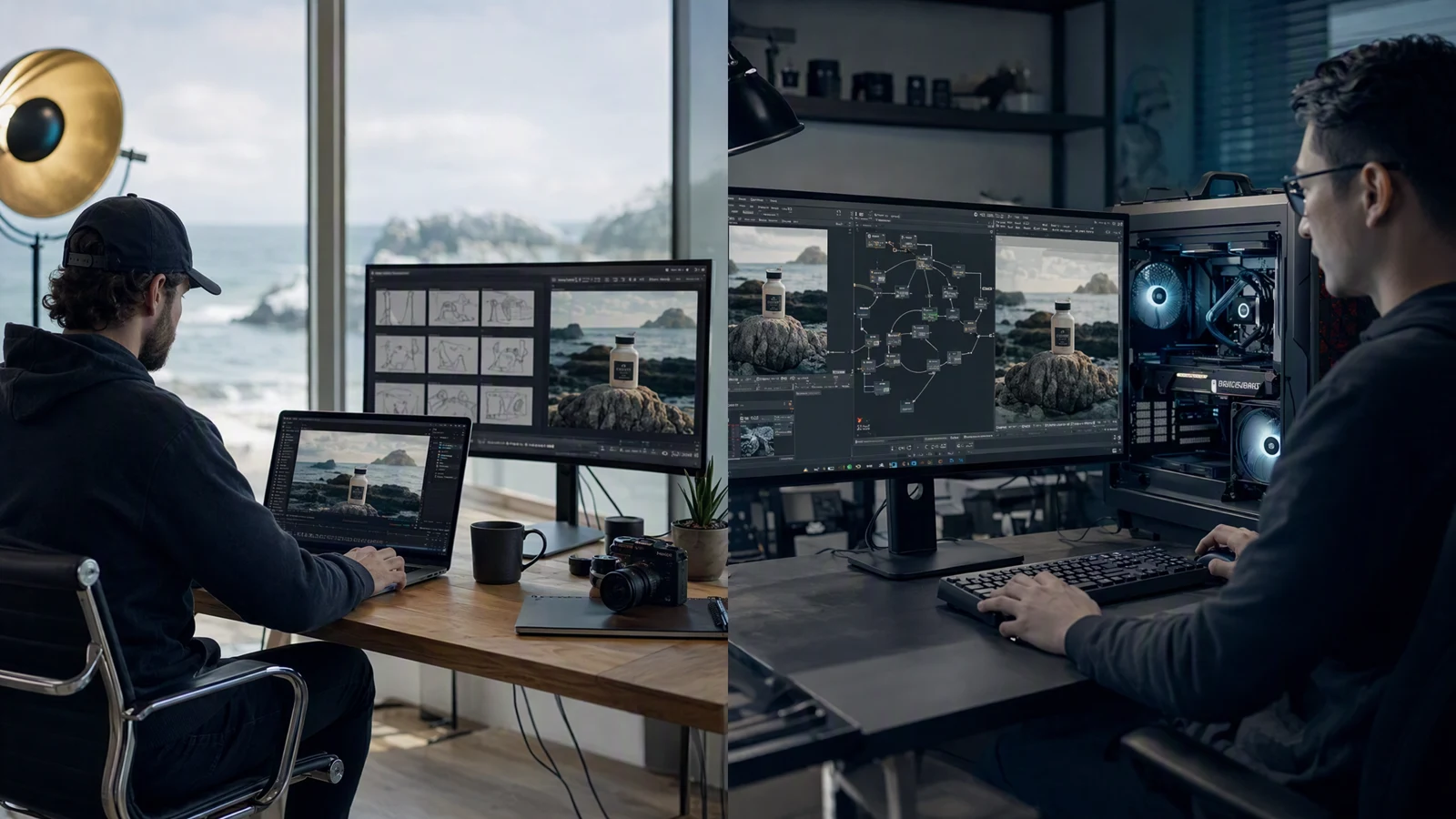
Image prompt: A neutral cinematic split-environment scene showing a freelance filmmaker using a cloud creative workspace on the left and a developer operating a local GPU workstation on the right, both building the same fictional coastal product film, realistic adults, natural skin texture, soft daylight and practical studio lighting, balanced 16:9 documentary composition, polished editorial photography, no logos or text.
Quick answer
For most solo creators, marketers, and small production teams, try Seedance 2.5 in a hosted workspace when speed of setup matters more than infrastructure control. You can plan a longer sequence, attach multiple references, and work without provisioning a high-memory GPU.
Wan 2.2 makes more sense when the model itself must live inside your stack. The official repository provides text-to-video, image-to-video, combined text-image-to-video, speech-to-video, and character animation variants. Its 5B TI2V checkpoint can run with 24 GB of VRAM using offloading, while the A14B text and image models call for at least 80 GB of VRAM in the repository's single-GPU examples.
Looking for the newer Alibaba release instead? Wan 3.0 runs here with 30-second output and native audio: see the Wan 3.0 model page and the Wan 3.0 vs Seedance 2.5 comparison.
Seedance 2.5 vs Wan 2.2 at a glance
| Decision point | Seedance 2.5 | Wan 2.2 open models |
|---|---|---|
| Main access | Hosted web workflow and API | Downloadable weights, local or cloud infrastructure |
| Best for | Creators, marketing teams, reference-led production | Developers, research teams, custom pipelines |
| Inputs | Text, images, video, and audio references | Separate T2V, I2V, TI2V, S2V, and Animate checkpoints |
| Published duration | Up to 30 seconds | Common repository examples produce 5-second clips; the exact limit depends on checkpoint and implementation |
| Published output | 480p or 720p on the current Seedance 2.5 surface | 480p and 720p for A14B; TI2V-5B supports 720p at 24 fps |
| Local hardware | None required by the user | 24 GB VRAM for TI2V-5B with offloading; at least 80 GB for A14B examples |
| License and rights | Commercial use depends on the selected SeedVideo AI plan | Apache 2.0 model license; users remain responsible for lawful use |
| Cost structure | Free signup credits, subscriptions, and credit packs | No model download fee; hardware and operations are separate |
The comparison has two different Wan 2.2 products
Wan 2.2 appears in two forms that should not be mixed.
The open model family lives in the official Wan2.2 GitHub repository. You download checkpoints, choose an inference framework, manage dependencies, and pay for the machines that run them. The repository is the relevant source for checkpoint types, VRAM requirements, resolution, integrations, and the Apache 2.0 license.
Alibaba Cloud Model Studio is a hosted API service. Its current documentation recommends Wan 2.7 for general text-to-video and image-to-video work, while legacy Wan 2.2 endpoints remain listed for specific tasks. Hosted API pricing does not describe the cost of running the open checkpoint on your own machine.
Read the comparison in those two layers. Seedance 2.5 is a finished cloud workflow. Wan 2.2 can be a model component, a local application, or a hosted legacy endpoint.
Access and setup
Seedance 2.5: start with the creative job
Seedance 2.5 keeps infrastructure behind the product. Open the model page, choose a generation mode, add references, define output settings, and generate. The current Seedance 2.5 model surface presents text-to-video controls, 720p output, aspect ratio selection, audio direction, and Seedance 2.5 as the active model.
The difference shows up in the first hour. A marketer can work on the shot list and source assets instead of package versions, CUDA compatibility, checkpoint downloads, or VRAM management. The Seedance 2.5 image-to-video workflow is a useful next step when a product photo, character image, or storyboard frame should anchor the motion.
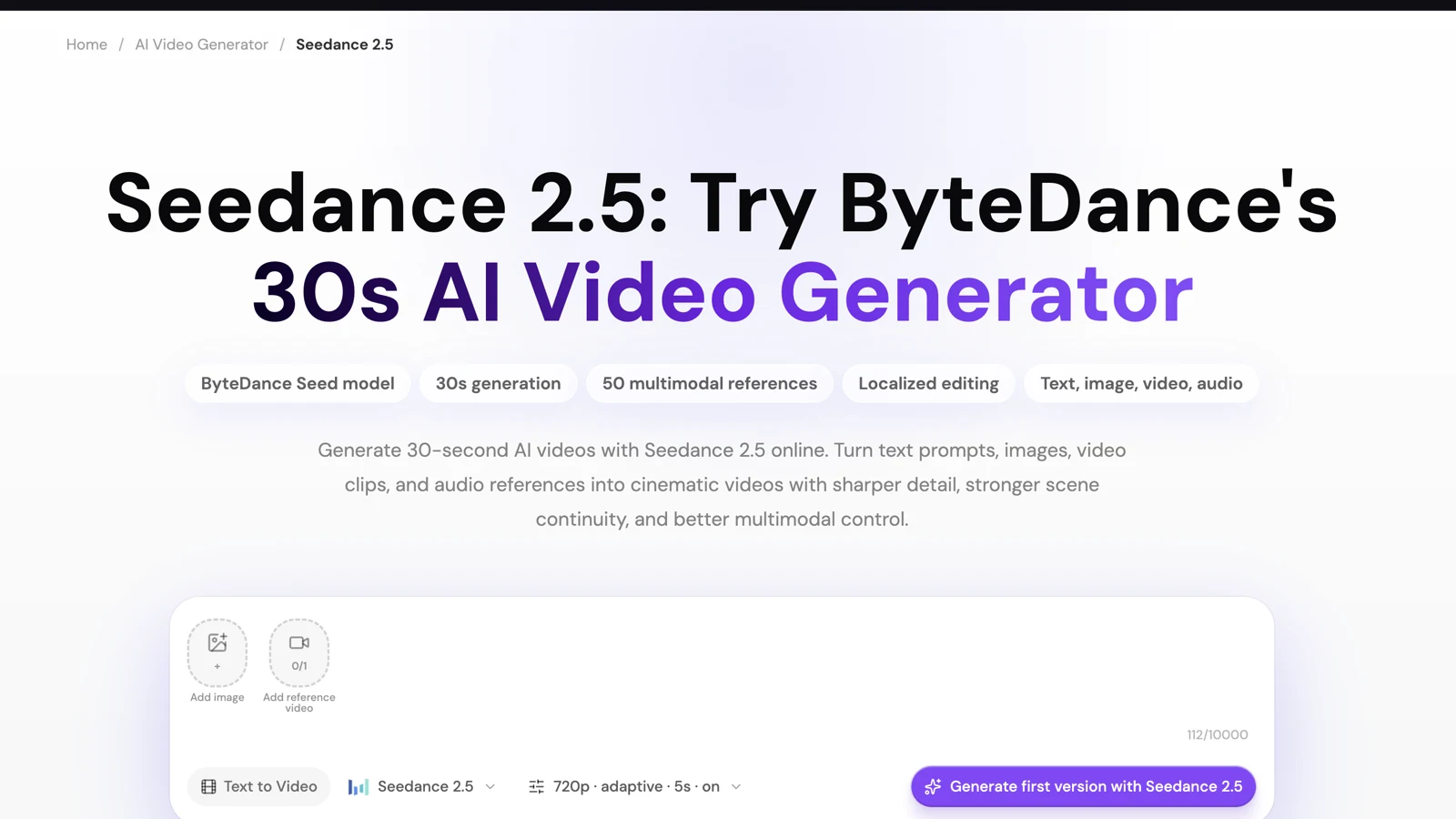
Current Seedance 2.5 model page showing the 30-second positioning, multimodal reference controls, 720p setting, and text-to-video workspace.
Wan 2.2: start with the deployment
Wan 2.2 gives you more control because you assemble more of the system. The repository supports native inference, multi-GPU execution, ComfyUI, and Diffusers integrations. You choose the checkpoint before building the workflow:
| Wan 2.2 checkpoint | Practical role | Official resolution note |
|---|---|---|
| T2V-A14B | Text-to-video with a Mixture-of-Experts design | 480p and 720p |
| I2V-A14B | Image-to-video | 480p and 720p |
| TI2V-5B | Combined text-to-video and image-to-video | 720p at 24 fps |
| S2V-14B | Speech-driven video | 480p and 720p |
| Animate-14B | Character animation and replacement | Task-specific output |
That flexibility comes with engineering work. Teams need a reproducible environment, model storage, GPU capacity, queue management, monitoring, and a policy for updates.
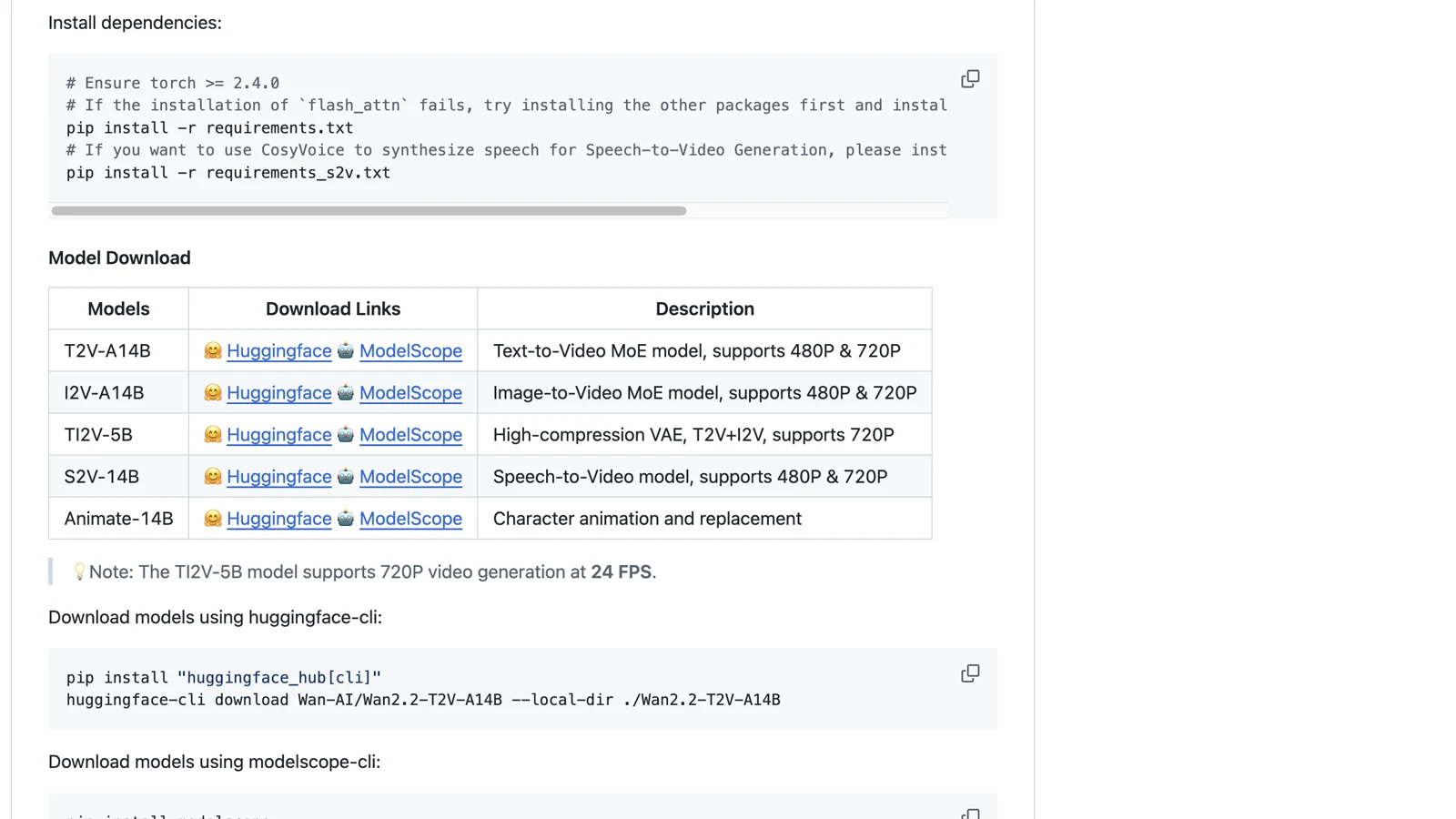
Official Wan 2.2 repository table listing T2V-A14B, I2V-A14B, TI2V-5B, S2V-14B, and Animate-14B checkpoints.
Inputs, control, and motion planning
Seedance 2.5 accepts a broad reference package in one job: up to 30 images, 10 videos, and 10 audio files on the current documented surface. Its maximum output is 30 seconds. This is useful when identity, product appearance, environment, camera movement, and rhythm need separate references.
The larger input budget does not remove the need for clear direction. Give every reference one job. Use one image for the subject, another for the environment, a short clip for camera movement, and audio for timing. A crowded reference pack with conflicting roles can make the prompt harder to interpret.
Wan 2.2 distributes control across checkpoints and tools. TI2V-5B covers both text and image inputs. I2V-A14B follows the source image's aspect ratio. S2V adds speech-driven motion. Animate focuses on character motion and replacement. In a node workflow, developers can expose seeds, samplers, schedulers, frame counts, guidance values, LoRA adapters, and post-processing stages, depending on the integration.
Seedance is more convenient when the references are creative inputs. Wan is more flexible when the inference controls themselves are part of the product.
Duration, resolution, and hardware
Seedance 2.5 publishes a 4 to 30-second duration range and 480p or 720p output. The current model page is designed around complete short sequences rather than one isolated action. A 30-second ad can include a hook, a product movement, a proof moment, and a final hold, although longer prompts still need clear timing.
Wan 2.2's open repository centers its common examples on short clips. TI2V-5B generates 720p at 24 fps, and the repository says an unoptimized 5-second clip can finish in under nine minutes on a consumer GPU. That is a checkpoint-specific repository claim, not a guarantee for every machine or prompt.
Hardware is the largest dividing line:
| Local setup | What the official Wan repository says | Planning implication |
|---|---|---|
| TI2V-5B with offloading | At least 24 GB VRAM, with RTX 4090 given as an example | Accessible to a high-end single-GPU workstation |
| T2V-A14B or I2V-A14B | At least 80 GB VRAM in the single-GPU examples | Usually a data-center GPU or multi-GPU plan |
| Seedance 2.5 hosted use | No local GPU requirement | Budget credits and queue time instead of hardware |
If the team already owns suitable hardware and has machine-learning operations experience, local inference can make sense. If not, buying a workstation just to avoid a hosted credit system can create more cost and slower delivery.
Pricing and commercial use
Seedance 2.5 pricing
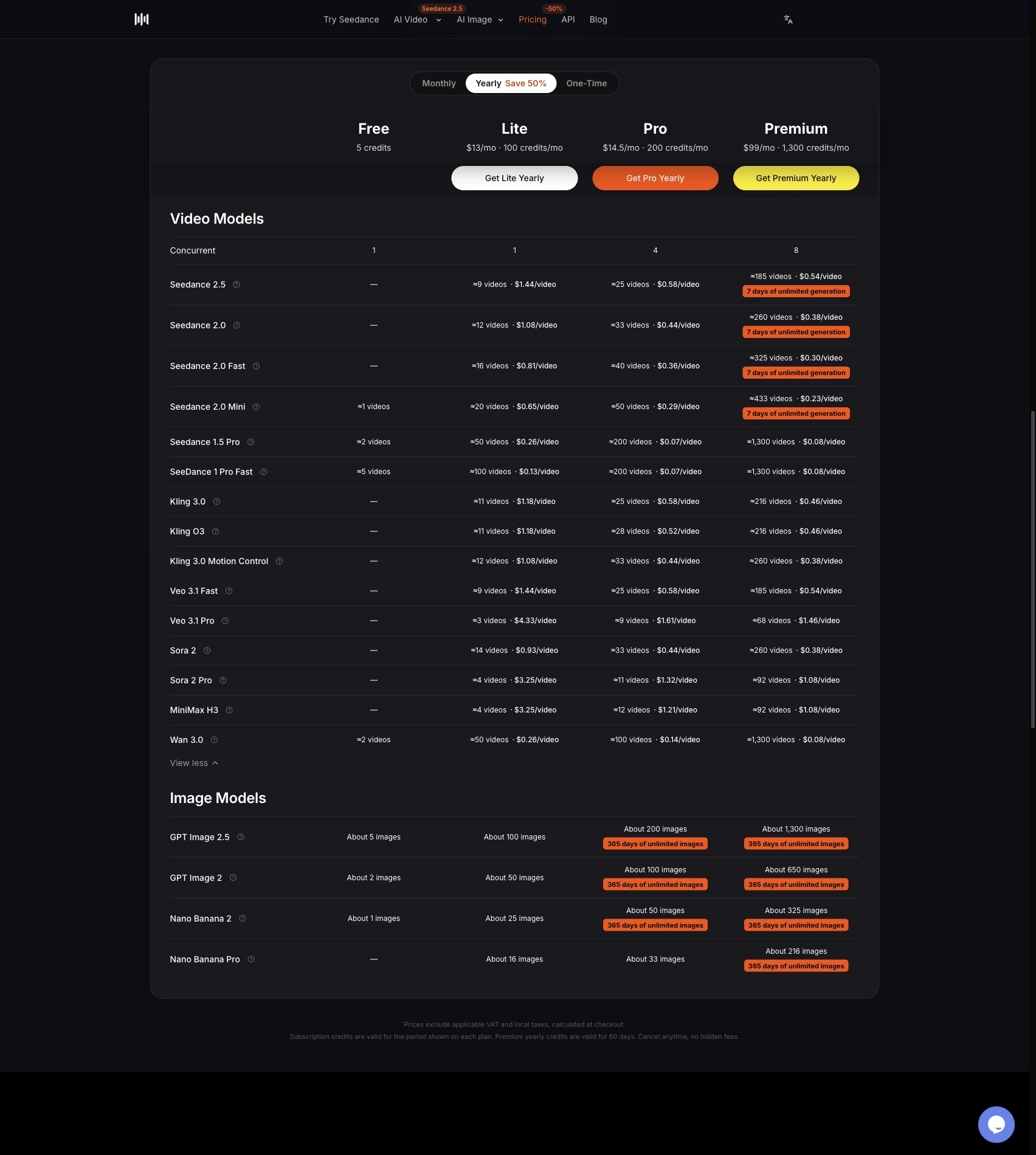
SeedVideo AI currently offers free signup credits, yearly subscriptions, monthly plans, and one-time credit packs. The pricing page shows a $0 free tier. At publication, the yearly selector displays Lite at $9.90 per month billed annually, Pro at $24.90, and Premium at $69.90. The number of credits charged per job depends on the model, duration, resolution, and plan discount.
Commercial use is plan-specific. The current pricing FAQ includes commercial use with Pro, Premium, yearly subscriptions, and one-time packs. Lite monthly does not include it. Check the checkout terms for the exact plan before using an output in client work or paid campaigns.
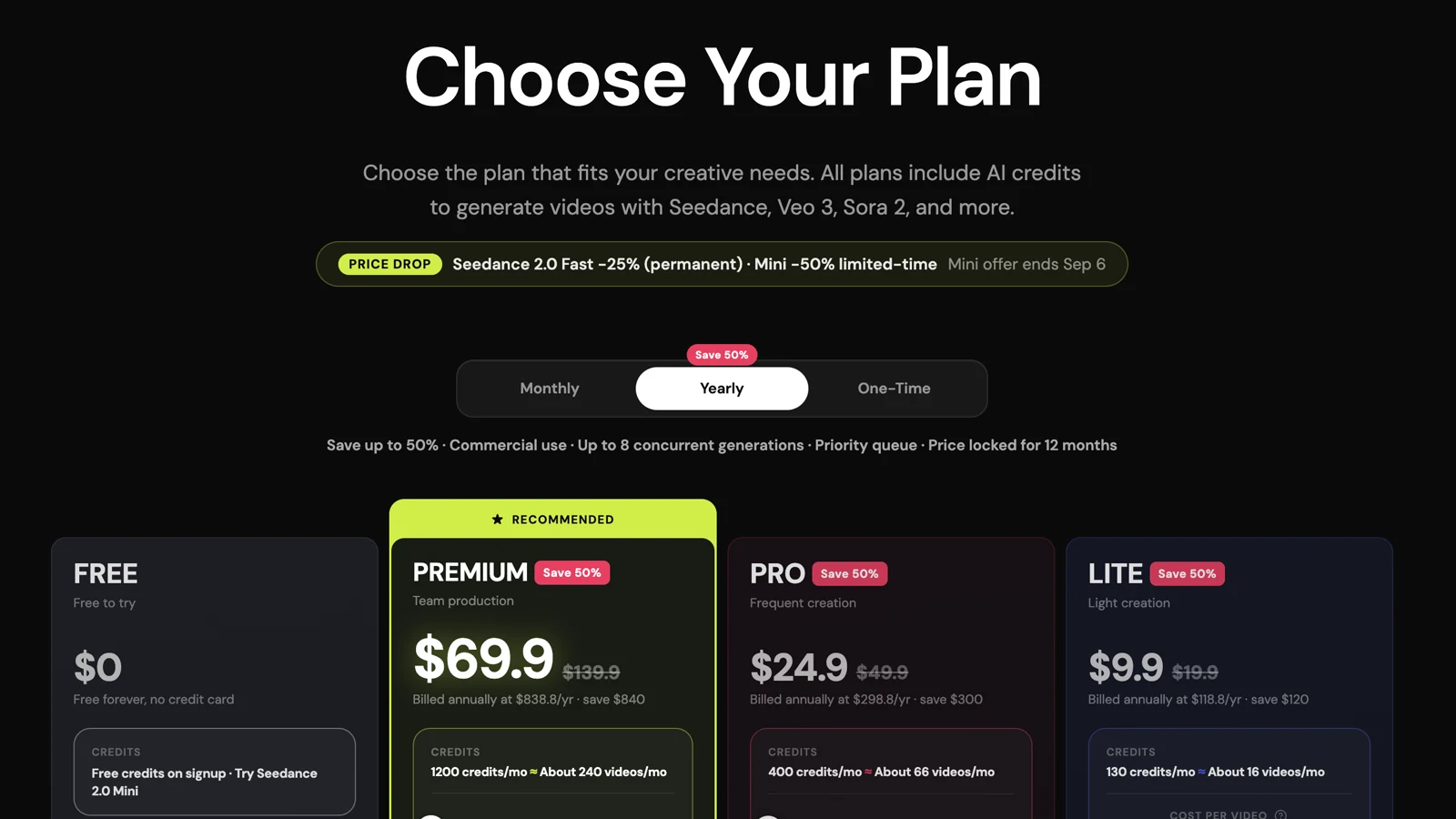
SeedVideo AI pricing page showing the free tier and current yearly Lite, Pro, and Premium prices.
Wan 2.2 pricing
Downloading the Wan 2.2 model weights does not carry a per-generation model fee. Local cost comes from GPU purchase or rental, electricity, storage, engineering time, and maintenance. This makes "free" a poor estimate for a production deployment.
The Wan 2.2 repository licenses the models under Apache 2.0 and says it claims no rights over generated content. Users still have to follow the license and applicable law.
Alibaba Cloud pricing is separate. Its current international table lists wan2.2-t2v-plus at $0.02 per second for 480p and $0.10 per second for 1080p, with a 50-second free quota valid for 90 days after activation or release conditions. The same table lists current Wan 2.7 text-to-video at $0.10 per second for 720p and $0.15 for 1080p. Region and deployment scope affect availability.
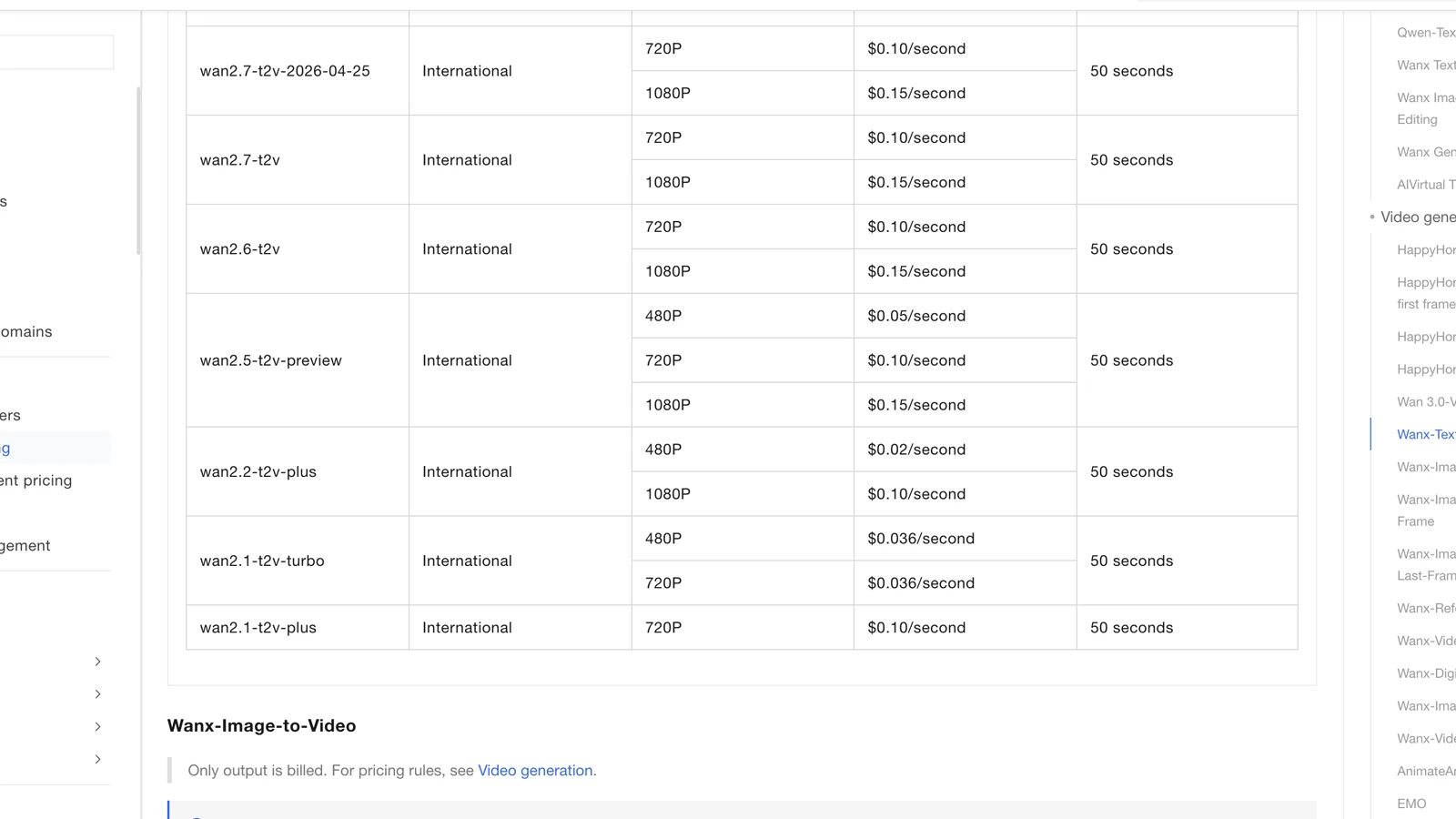
Alibaba Cloud Model Studio pricing table showing hosted Wan 2.2, Wan 2.6, and Wan 2.7 text-to-video rates and free quota.
Best for and not best for
Choose Seedance 2.5 when
- The team wants to create in a browser without maintaining model infrastructure.
- A project needs longer clips and many image, video, or audio references in one workflow.
- Marketers and editors need a shared, understandable interface.
- Delivery speed matters more than access to weights and low-level inference settings.
Seedance 2.5 is a weaker fit when your product must run offline, the model weights must stay inside your environment, or engineers need to modify the inference graph at a low level.
Choose Wan 2.2 when
- The team needs downloadable weights and a permissive model license.
- Developers already use ComfyUI, Diffusers, or a managed GPU stack.
- The model needs to sit inside a custom application, research system, or private deployment.
- Engineers want direct control over checkpoints, sampling, adapters, and post-processing.
Wan 2.2 is a weaker fit when the user expects a ready-made creator workspace, the team lacks GPU operations experience, or a 24 GB to 80 GB VRAM requirement would slow the project.
A fair same-condition test protocol
Use a controlled test before choosing either system for an important production job. The Seedance 2.5 and Kling comparison uses the same decision principle: define what stays constant before judging outputs.
- Pick three tasks: text-to-video motion, image-to-video identity, and a shot with a clear camera move.
- Use the same prompt meaning, source image, aspect ratio, and closest shared duration and resolution.
- Run each task three times. One lucky sample is not enough.
- Record prompt adherence, subject stability, motion continuity, temporal artifacts, visual detail, usable duration, generation time, and total cost.
- Judge outputs blind if possible, then compare setup time and revision effort separately.
Keep model quality and workflow cost in separate columns. A beautiful clip that takes a day to reproduce may be wrong for social production. A fast clip with weak identity control may be wrong for a product campaign.
Final recommendation
Seedance 2.5 is the practical default for creators who want a hosted path from prompt and references to a finished short video. Wan 2.2 is the better foundation for developers who need open weights and control over deployment.
The version detail changes the cloud comparison. Wan 2.2 remains relevant as an open model family and as a legacy hosted endpoint, but Alibaba Cloud's current general video documentation recommends Wan 2.7. If you want the current hosted Wan service, compare Seedance 2.5 with Wan 2.7. If you want to own the model stack, Seedance 2.5 vs Wan 2.2 is still the useful decision.
Ready to make a reference-led clip without configuring a local GPU stack? Open the Seedance 2.5 workspace, prepare one clear job for each reference, and start with a five-second proof before expanding the sequence.
FAQ
Is Wan 2.2 still current in 2026?
Wan 2.2 remains available as an open model family and in several hosted legacy endpoints. Alibaba Cloud now recommends newer Wan 2.7 models for general hosted text-to-video and image-to-video generation.
Is Wan 2.2 free to use?
The official checkpoints can be downloaded under Apache 2.0 without a per-generation model fee. Running them still requires suitable GPU hardware or cloud compute, storage, engineering work, and maintenance.
Can Wan 2.2 run on an RTX 4090?
The official repository says TI2V-5B can run with at least 24 GB of VRAM using offloading and cites the RTX 4090 as an example. The A14B text and image models use examples that call for at least 80 GB.
How long can Seedance 2.5 videos be?
The current Seedance 2.5 documentation supports 4 to 30-second output. The model page positions it for longer reference-led clips with planned timing.
Which model is better for commercial use?
Wan 2.2 uses an Apache 2.0 model license, while SeedVideo AI commercial rights depend on the plan. The better option depends on your deployment, output policy, client contract, and local law.
Does Seedance 2.5 support audio references?
Yes. The current documentation allows up to 10 audio references alongside up to 30 images and 10 video references.
How should I compare output quality?
Use the same prompt meaning, inputs, aspect ratio, duration, and resolution. Run several generations per task and score prompt adherence, motion, identity, artifacts, usable duration, time, and cost.