Pika vs Seedance 2.5: Social Effects or Controlled AI Video?
Pika and Seedance 2.5 suit different production jobs. Pick Pika when the idea starts with a fast social effect, a short transformation, or a playful edit such as replacing an object in an existing clip. Pick Seedance 2.5 when you need a longer scene, several references, deliberate camera direction, or a more controlled narrative workflow. That is a workflow recommendation, not a claim that one model has better image quality. We did not run a paid same-prompt benchmark for this comparison. Current official pages also leave a few gaps: Pika's older FAQ conflicts with its current pricing page, while Seedance's model page advertises inputs and editing controls that are not all exposed in the current SeedVideo AI generator. Use the task matrix below, then run the same-input test before committing a campaign or film sequence.

Current official Pika and Seedance 2.5 product surfaces, captured on August 26, 2026.
TL;DR
- Choose Pika for five-second social transformations, effect-led posts, and quick object changes.
- Choose Seedance 2.5 for planned scenes, reference-heavy work, longer timing, and shot-by-shot narrative control.
- Pika's free plan is clearer: 80 monthly credits, Pika 2.5 at 480p, with a watermark and no commercial use.
- SeedVideo AI offers a free account, but its current pricing card does not promise free Seedance 2.5 generation. The generator marks Seedance 2.5 as an upgrade.
- Neither product earns a quality winner here because no paid same-input test was authorized.
Quick Answer
| Your job | Better starting point | Why |
|---|---|---|
| A five-second meme transformation | Pika | Pikaffects is built around quick, recognizable transformations. |
| Replace or add an object in a clip | Pika | Pikaswaps and Pikadditions provide task-specific editing paths. |
| Build a 20 to 30-second narrative scene | Seedance 2.5 | The current Seedance page and generator expose timing up to 30 seconds. |
| Guide a scene with several references | Seedance 2.5 | The model page describes text, image, video, and audio references with large reference limits. |
| Test an idea at no cost | Pika for a clearly documented 480p trial | Pika states the free allowance and its restrictions. SeedVideo AI's free card currently covers basic models, not a guaranteed 2.5 run. |
| Deliver commercial work | Check the paid plan before generating | Pika limits commercial use to Pro and Fancy. SeedVideo AI plan rules vary by tier and billing option. |
If your brief already includes a shot list, recurring character, camera path, or several reference assets, open the Seedance 2.5 model workspace. If the brief is simply "make this photo melt" or "swap the cup for a toy," Pika is the more direct first test.
What each product asks you to do
Pika's home page opens with one compact prompt box. You can type an idea, attach an image, keep the default five-second duration, choose Pika 2.5, and generate. That surface encourages quick iteration. The product then offers named tools for more specific jobs: Pikaframes, Pikascenes, Pikadditions, Pikaswaps, Pikatwists, Pikaffects, and Pikaformance.
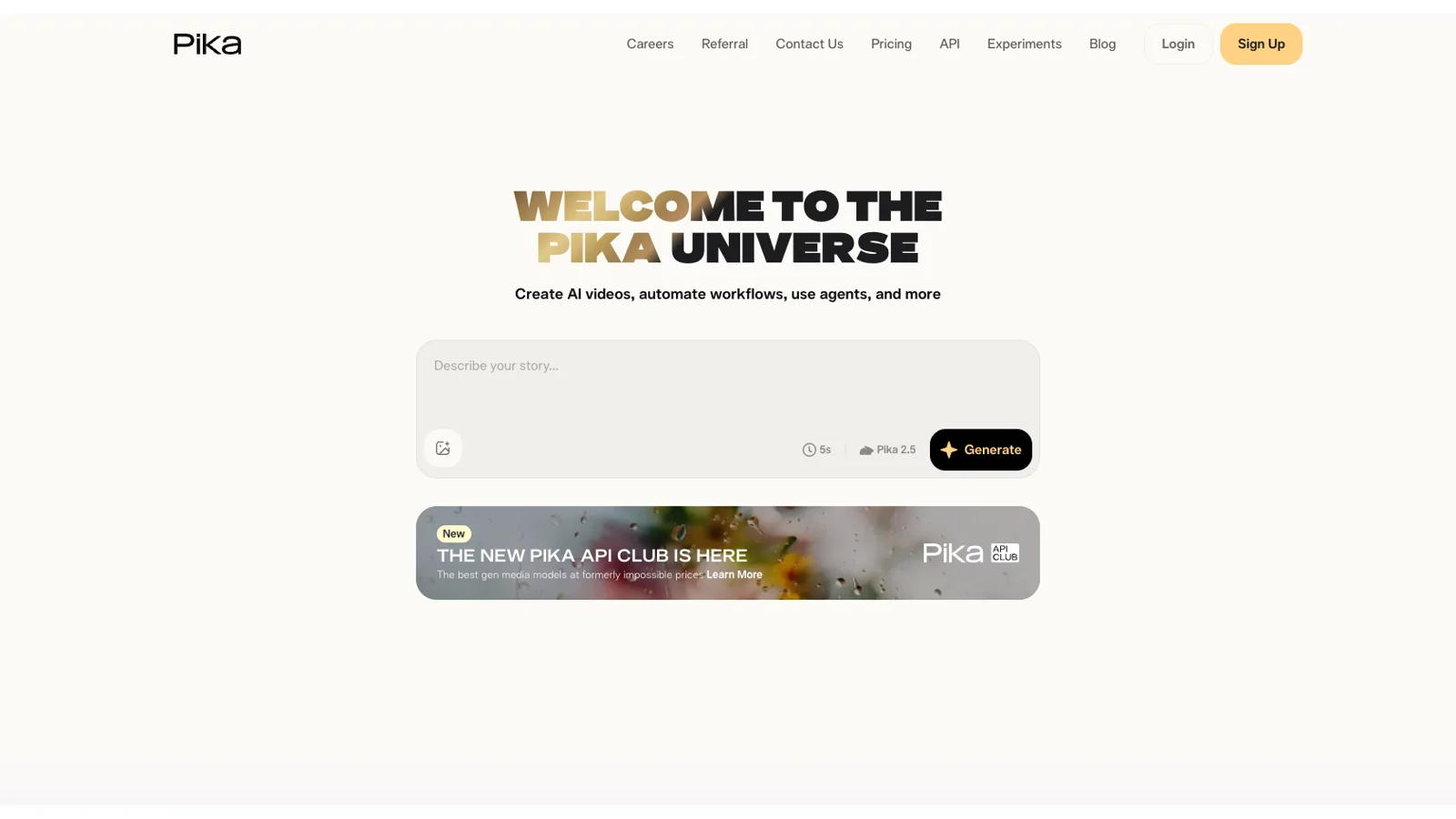
Pika's current home generator shows image attachment, a five-second default, Pika 2.5, and Generate.
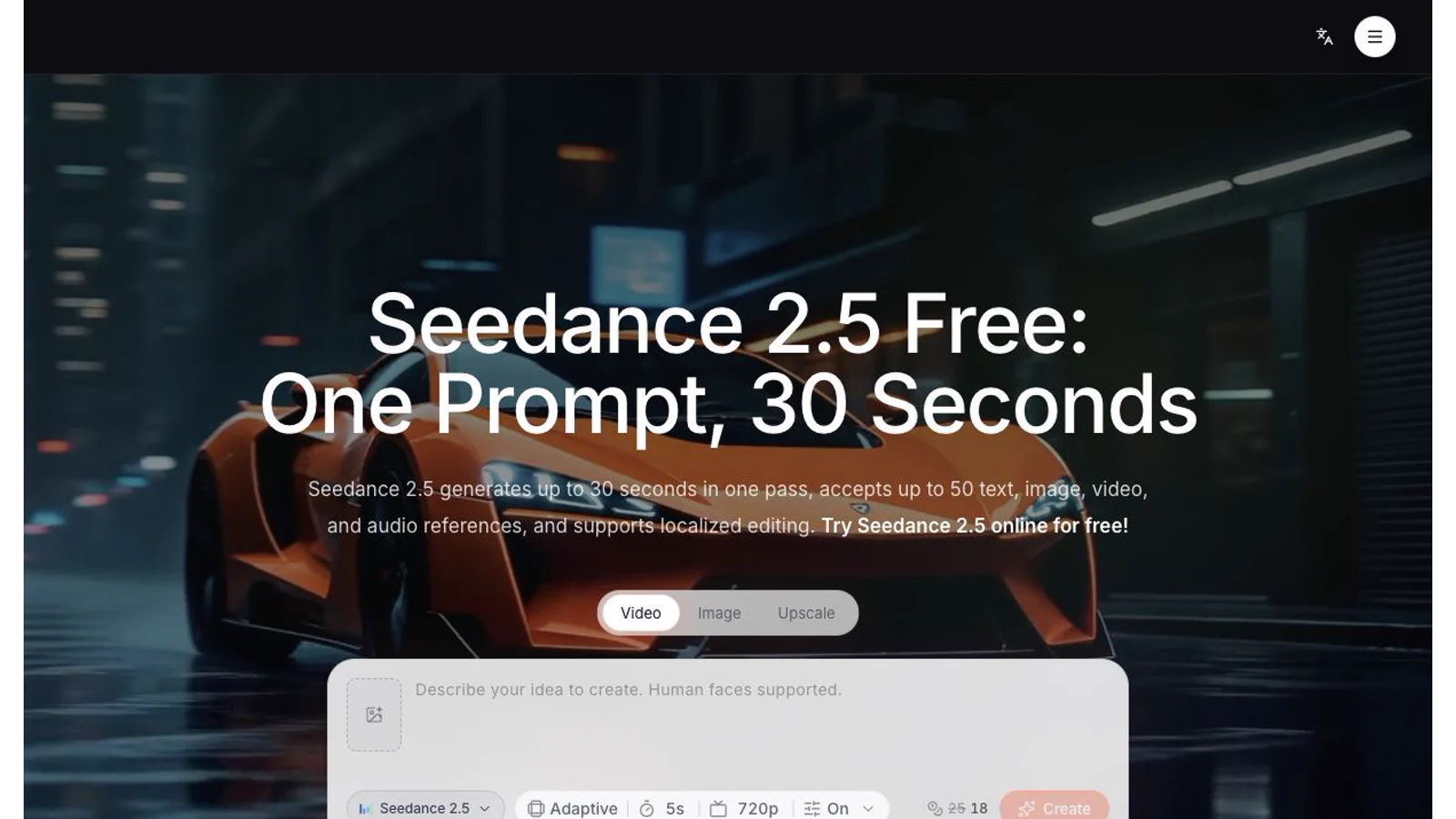
Seedance 2.5 starts from a broader production brief. Its model page describes text, image, video, and audio references, up to 30 images, 10 videos, and 10 audio files, plus localized editing. The live SeedVideo AI generator currently exposes image and video attachment, aspect ratio, duration, resolution, sound effects, and a permissive-content control. We did not find separate audio-reference or localized-editing controls in that live generator. Treat those model-page capabilities as documented model scope, then confirm availability in your chosen access point.

The current Seedance 2.5 model page combines a model-specific entry point with duration and reference guidance.
The difference is practical. Pika organizes several common social edits as named actions. Seedance asks you to describe a scene and control the supporting references and settings. One feels like a fast effects kit; the other feels closer to a shot-building workspace.
Social effects: where Pika is the cleaner fit
Pika's current home page promotes Pikaffects with examples such as Squish, Melt, and Cake-ify. The pricing table lists two five-second Pikaffects paths: image-to-video at 15 credits and video-to-video at 18 credits. The image route is available on the free plan; the video route requires a paid plan.
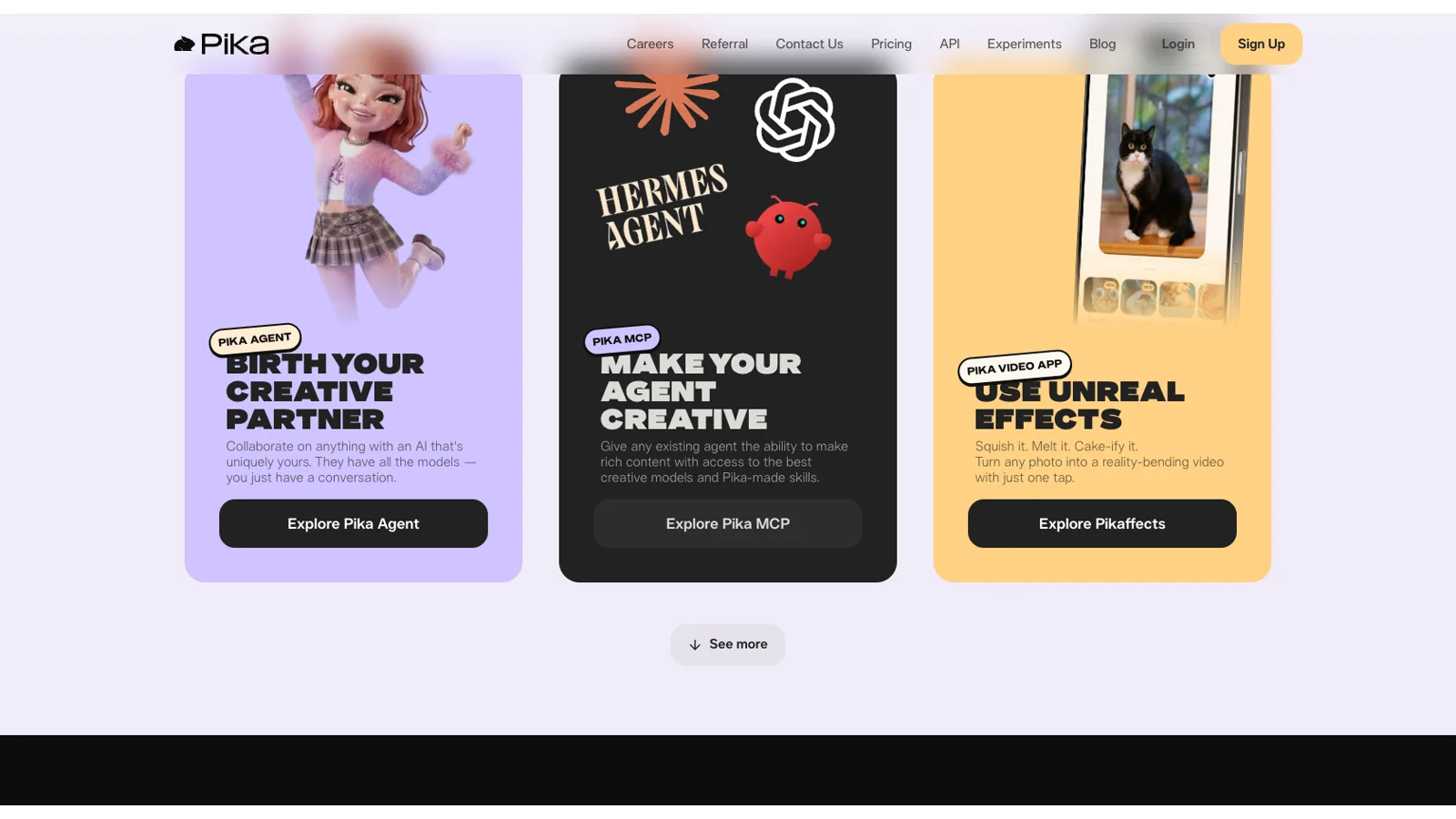
Pika's official home page presents Pikaffects as a one-tap route for short social transformations.
This matters when recognition is part of the idea. A viewer understands "melt," "squish," or "cake" before the clip starts. You spend less time defining the transformation and more time choosing the source image and timing the post.
Pikaswaps also gives Pika a direct route for replacement edits. Pika's FAQ describes a workflow with a source video, a text instruction, and a reference image. Pikadditions adds an object, while Pikatwists changes an action. The FAQ pages for these editing features still refer to Pika 2.2, so use them as workflow descriptions rather than proof that every control is unchanged in Pika 2.5.
Pika is best for:
- short posts where the effect is the concept;
- fast visual jokes, transformations, and shareable reveals;
- creators who want a named editing action instead of a long motion brief;
- a clearly documented free 480p trial.
Pika is not the best starting point for a 20-second scene with several planned beats, a large reference pack, or a workflow that depends on one continuous camera path. Pikaframes can reach 25 seconds, but Pika's standard text-to-video and image-to-video rows are built around five or 10 seconds.
Controlled narrative: where Seedance 2.5 fits
Seedance 2.5 is easier to justify when the clip has internal structure. A 30-second scene can carry an entrance, an interaction, a turn, and an ending without splitting every beat into a separate generation. Its model page also frames references as production controls, not just upload options.
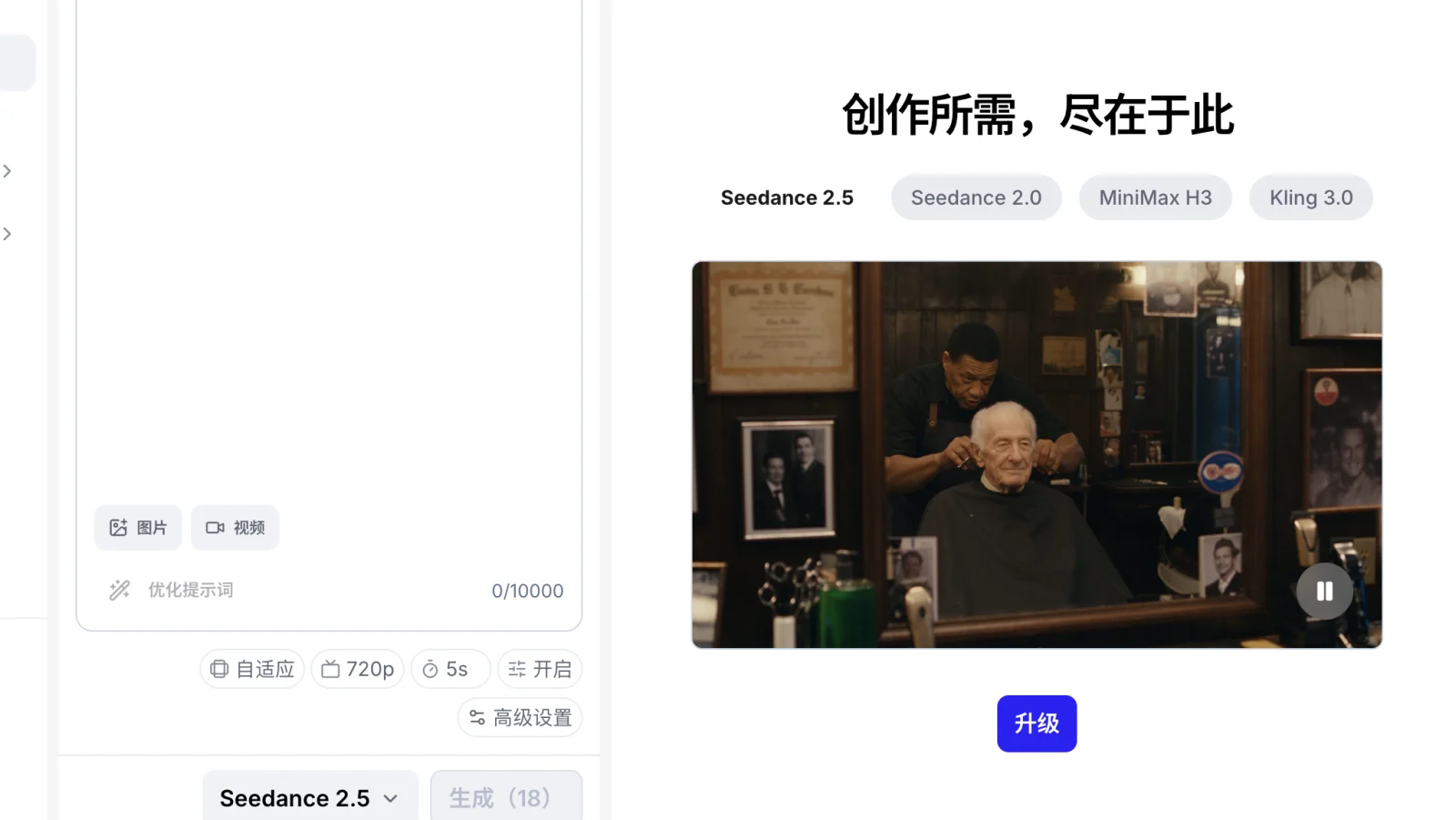
The live generator supports durations from four to 30 seconds. It lists 16:9, 9:16, 1:1, 4:3, 3:4, 21:9, and adaptive aspect ratios. Its resolution menu includes 480p, 720p, and 1080p. A separate model-parameters block still says 480p or 720p, default 720p MP4, with MP4 or MOV support. Because those two current surfaces disagree, check the chosen resolution and output format inside the generator before you budget the final render.
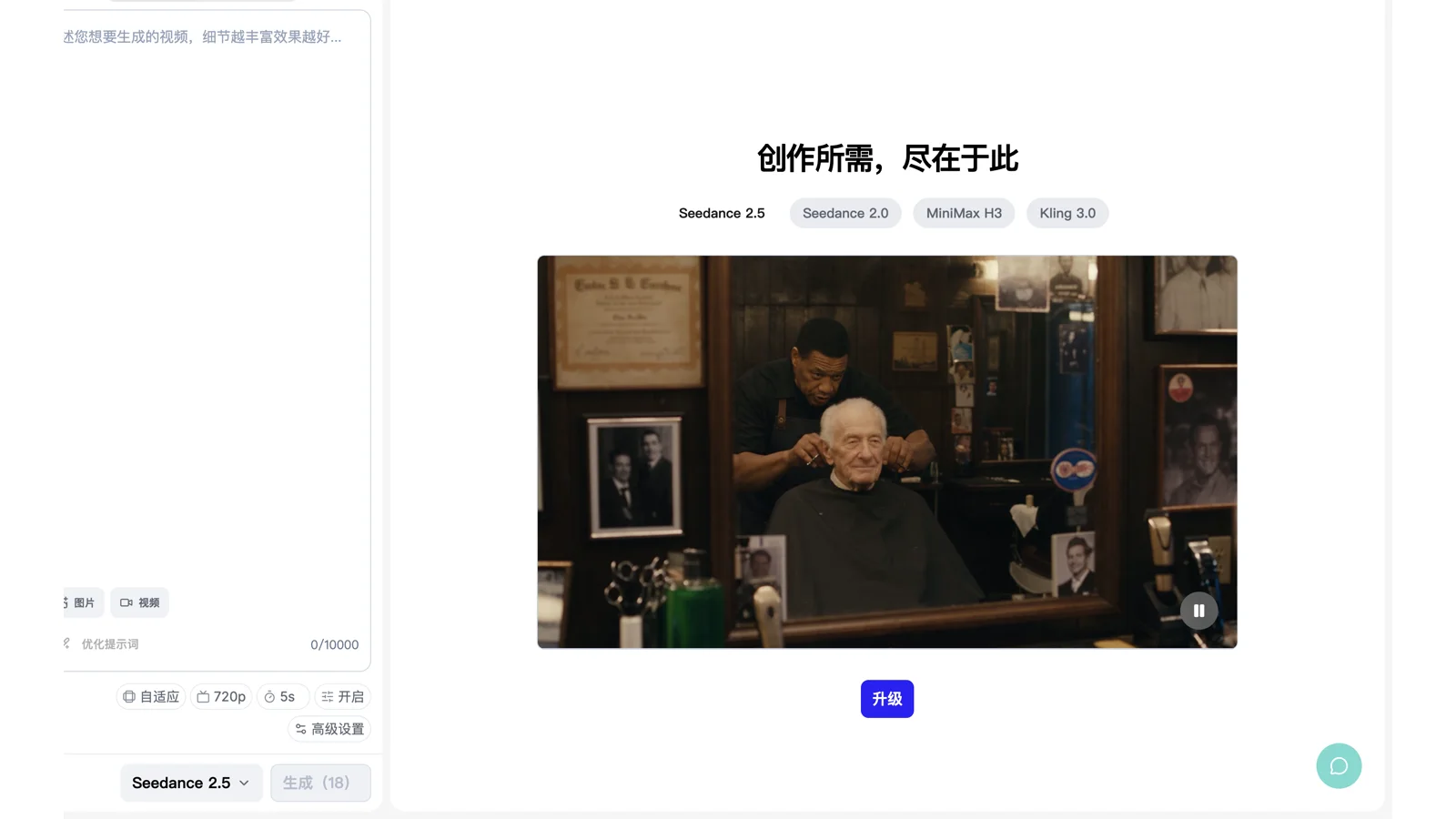
The current SeedVideo AI generator shows Seedance 2.5, aspect ratio, 720p, five seconds, advanced settings, and an upgrade requirement.
A useful Seedance workflow is:
- Write the scene goal in one sentence. State what must change between the first and last frame.
- Break the scene into beats. Assign a rough time range to each action.
- Prepare only the references that have a job: character, location, prop, motion, or sound direction.
- Write camera movement and subject movement separately.
- Generate a short proof before using the full duration.
- Review identity, geography, motion, continuity, and the last frame. Change one variable at a time.
The repeatable Seedance production workflow expands that method into briefs, shot queues, naming, review, and delivery. For prompt construction, the Seedance 2.5 cinematic prompt examples show how to separate subject, action, camera, light, sound, and constraints.
Seedance 2.5 is best for:
- scenes with several timed beats;
- reference-led character, place, or product work;
- directors who want explicit camera and motion language;
- a longer shot that would be awkward to rebuild from several effect clips.
It is not the cleanest choice for a single preset joke when Pika already has a named effect for that exact transformation. It also is not a guaranteed free test on SeedVideo AI today: the free plan advertises signup credits and basic models, while the Seedance 2.5 generator shows an upgrade gate.
Inputs, references, and editing compared
| Area | Pika | Seedance 2.5 |
|---|---|---|
| Basic generation | Text and image on the home generator; pricing also lists video and audio-driven tools | Model page describes text, image, video, and audio references |
| Standard duration | Five or 10 seconds for text-to-video and image-to-video | Four to 30 seconds in the current generator |
| Longer route | Pikaframes up to 25 seconds | One scene up to 30 seconds |
| Reference approach | Named tools such as Pikascenes, Pikaswaps, and Pikadditions | Model page states up to 30 images, 10 videos, and 10 audio files |
| Local editing | Pikaswaps, Pikadditions, and Pikatwists have task-specific FAQ workflows | Model page lists localized editing, but the current SeedVideo AI UI did not expose a separate control |
| Resolution | 480p, 720p, and 1080p by plan and feature | Generator shows 480p, 720p, and 1080p; model parameters still show 480p or 720p |
Do not turn this table into a quality score. More references can help a controlled brief, but a crowded pack can also create conflicts. A named effect can reduce setup time, but it may be the wrong visual language for a restrained film scene.
Pricing, free use, downloads, and commercial rights
Pika's current monthly plans are easy to compare. Basic costs $0 with 80 monthly video credits and Pika 2.5 at 480p. Standard costs $10 with 700 credits. Pro costs $35 with 2,300 credits. Fancy costs $95 with 6,000 credits. Annual billing currently shows $8, $28, and $76 per month for Standard, Pro, and Fancy. Weekly plans are also available.
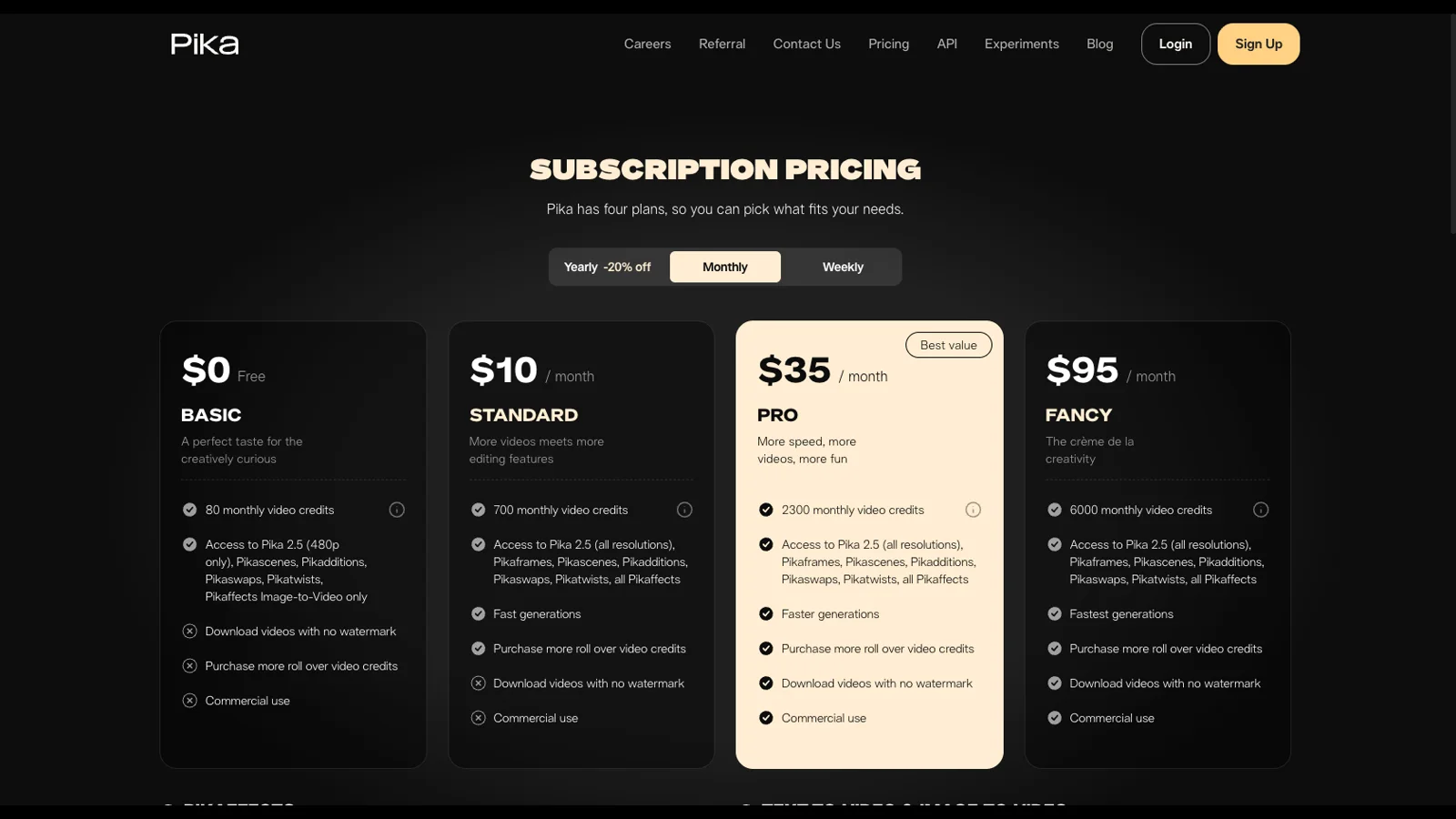
Pika's current monthly price cards show credits, resolution access, watermark rules, and commercial-use eligibility.
Basic and Standard do not include watermark-free downloads or commercial use. Pro and Fancy include both. Pika's terms say users retain rights in inputs and outputs, and Pika transfers any output rights it obtains to the user. The same terms warn that an output may not qualify for copyright protection. They also grant Pika broad permission to use inputs, outputs, and interactions to operate, improve, and train its services. Teams handling confidential material should read that clause before uploading references.
SeedVideo AI's current annual promotion lists Lite at $9.90 per month with 130 credits, Pro at $24.90 with 400 credits, and Premium at $69.90 with 1,200 credits. The crossed-out monthly equivalents are $19.90, $49.90, and $139.90. These are platform credits across supported models, so do not compare one credit with one Pika credit as if they buy the same output.

SeedVideo AI's current annual price cards show the free tier and promotional Lite, Pro, and Premium rates.
The current SeedVideo AI rules vary by plan and billing option. The free plan does not include watermark-free output or commercial use. Lite annual, Pro, Premium, and one-time credit packs support commercial use; Lite monthly does not. SeedVideo AI's terms state that users retain ownership of generated content. Check the live SeedVideo AI pricing page before a commercial batch because promotions, credit costs, and plan conditions can change.
A same-input test you can reproduce
Use the same source and success criteria. Do not try to force each product through a feature it does not have.
| Test | Shared input | Pika route | Seedance route | Pass condition |
|---|---|---|---|---|
| Social transformation | One clean portrait or product photo | Closest Pikaffect | Image-to-video with the transformation written explicitly | Transformation reads in the first second and the subject remains recognizable |
| Object replacement | Five-second clip plus reference object | Pikaswaps | Video or image reference workflow available in your access point | The intended object changes without damaging hands, face, or background |
| Narrative control | One character image and a four-beat scene brief | Standard generation or Pikaframes | 20 to 30-second Seedance 2.5 scene | All four beats appear in order and the ending lands cleanly |
| Vertical post | Same subject, action, and 9:16 framing | 9:16 output where available | 9:16 in the Seedance generator | Subject stays inside safe areas and the camera move remains readable |
Before generating, save the exact prompt, source files, plan, resolution, duration, and date. Afterward, score only observable items: instruction coverage, identity stability, object integrity, camera path, temporal order, first frame, last frame, audio behavior, watermark, and download format. Run at least three attempts per route if the decision affects paid production. One curated example is not an average.
Decision checklist
Choose Pika when most answers are yes:
- Is the clip built around a recognizable effect or replacement?
- Does five or 10 seconds cover the idea?
- Do you want a named tool that reduces prompt setup?
- Can your plan cover the required watermark and commercial rights?
Choose Seedance 2.5 when most answers are yes:
- Does the scene need several timed actions?
- Are character, place, product, camera, or audio references part of the brief?
- Would a 20 to 30-second generation simplify continuity?
- Are you prepared to verify which documented controls are available in the current access point?
For a wider shortlist, compare the workflows in our best AI video generators guide. If you already know Pika's effect-first approach is too narrow for the project, the Pika alternatives guide helps map other tools to specific jobs.
FAQ
Is Seedance 2.5 better than Pika?
There is no evidence for an absolute winner here. Pika is the cleaner starting point for named social effects and short replacement edits. Seedance 2.5 is the cleaner starting point for longer, reference-led narrative scenes. Run the same-input test for quality claims.
Is Pika free?
Pika's current Basic plan includes 80 monthly video credits and Pika 2.5 at 480p. It does not include watermark-free downloads or commercial use.
Can I use Pika videos commercially?
Pika's current price cards include commercial use on Pro and Fancy, not Basic or Standard. Review the live plan and terms before delivery.
Can I use Seedance 2.5 for free on SeedVideo AI?
Do not assume so from the model-page headline. SeedVideo AI has a free account and signup credits, but its current free pricing card points to basic models, and the Seedance 2.5 generator shows an upgrade gate.
Which is better for consistent characters?
Seedance 2.5 provides a more reference-heavy documented workflow, so it is the stronger first candidate for a planned character sequence. That does not prove better output consistency. Test the same character, wardrobe, setting, and camera brief in both products.
Build the workflow around the job
The shortest decision is also the most useful: choose Pika for effect-first social clips; choose Seedance 2.5 for reference-first scenes with deliberate timing and camera direction. Then verify the choice with your own source material. To start a controlled scene, open the Seedance 2.5 model page, keep the first proof short, and expand only after the references and motion hold together.