Higgsfield vs Seedance 2.5: Which AI Video Tool Should You Use in 2026?
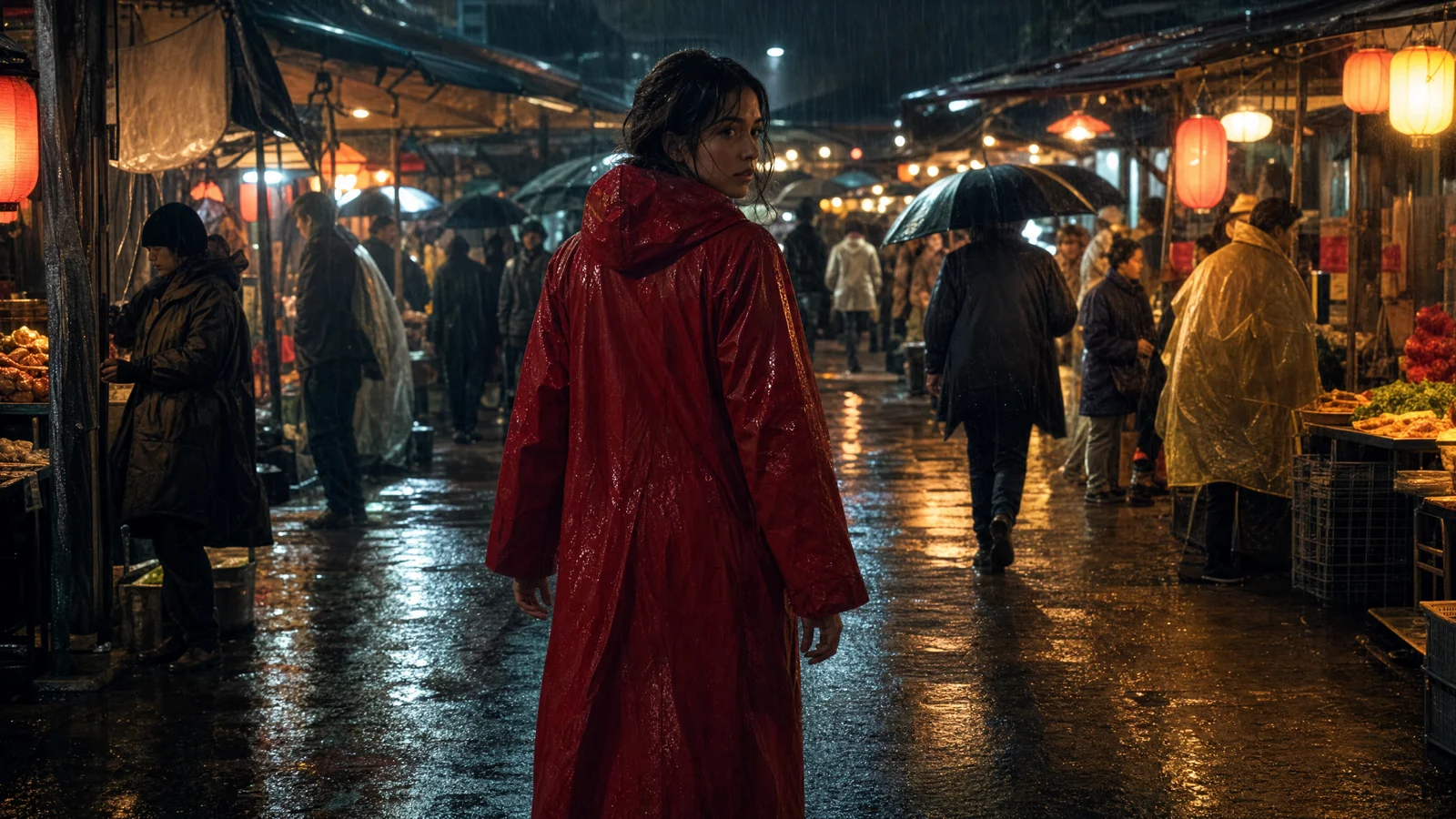
Video prompt: A woman in a vivid red raincoat walks through a rain-soaked night market. Begin wide, crane down gently, then follow from behind as she turns toward camera. Keep the lantern light, crowd depth, wet fabric, reflections, face, and hands coherent. Cinematic realism, restrained film grain, 16:9.
Choose Higgsfield when you want a broad creative workspace with camera presets, genre controls, casting, editing, assets, and many video models in one account. Choose Seedance 2.5 on SeedVideo AI when your priority is a focused route to clips up to 30 seconds, large multimodal reference packs, extension, and localized edits. For most reference-heavy narrative shots, Seedance 2.5 is the cleaner starting point; for campaign production across several tools, Higgsfield is more complete.
That verdict needs one important qualification: Higgsfield is a platform, while Seedance 2.5 is a video model. Higgsfield itself lists Seedance models, including Seedance 2.5 on eligible plans. The practical choice is often where to run the model and which surrounding workflow you need, not a simple model-versus-model contest.
Last verified: September 7, 2026. Prices and plan promotions below are a dated snapshot. Recheck the linked pricing pages before buying credits.
Higgsfield vs Seedance 2.5 at a glance
| Tool or access route | What it is | Current starting paid price | Free layer | Maximum resolution | Maximum duration | Commercial use |
|---|---|---|---|---|---|---|
| Higgsfield | Multi-model creative platform | $19/month, billed annually | Limited use | Model-dependent; paid workflows list up to 4K | Model-dependent; native DoP entries currently list 3-second clips | Allowed under current terms, subject to rights and model-specific rules |
| Seedance 2.5 on SeedVideo AI | Focused hosted access to one video model | $9.90/month, billed annually during the displayed sale | 5 signup credits, but the plan table does not include Seedance 2.5 on Free | Model page documents 480p/720p; Pro and Premium advertise 1080p access | Up to 30 seconds | Included on paid plans, subject to rights and service terms |
Higgsfield, best for: creators who want directing controls, campaign tools, assets, and multiple models under one roof. Not for: buyers who expect every model to share one duration, resolution, queue, or credit rate.
Seedance 2.5 on SeedVideo AI, best for: long, reference-heavy shots and a direct model workflow with visible per-plan credit costs. Not for: teams that need a full multi-model production suite or a 4K-specific delivery path.
What are you actually comparing?
Higgsfield describes itself as a creative suite covering image, video, audio, editing, a cinematic production workspace, marketing tools, assets, and access through its website and other interfaces. Its current video workbench exposes Create Video, Edit Video, and Motion Control. On SeedVideo AI, the comparable tool is Kling 2.6 Motion Control, which moves a character image with a reference video. Its Cinema Studio 4.0 adds genres, camera choices, tempo, cast, project briefs, color treatment, and model switching.
Seedance 2.5 is narrower. It is the model behind a text, image, video, and audio reference workflow. SeedVideo AI’s Seedance 2.5 page presents a focused generator with aspect ratio, duration, resolution, sound, and reference controls. Its published capabilities include generation up to 30 seconds, as many as 50 references, extension, and editing of a selected part of the timeline.
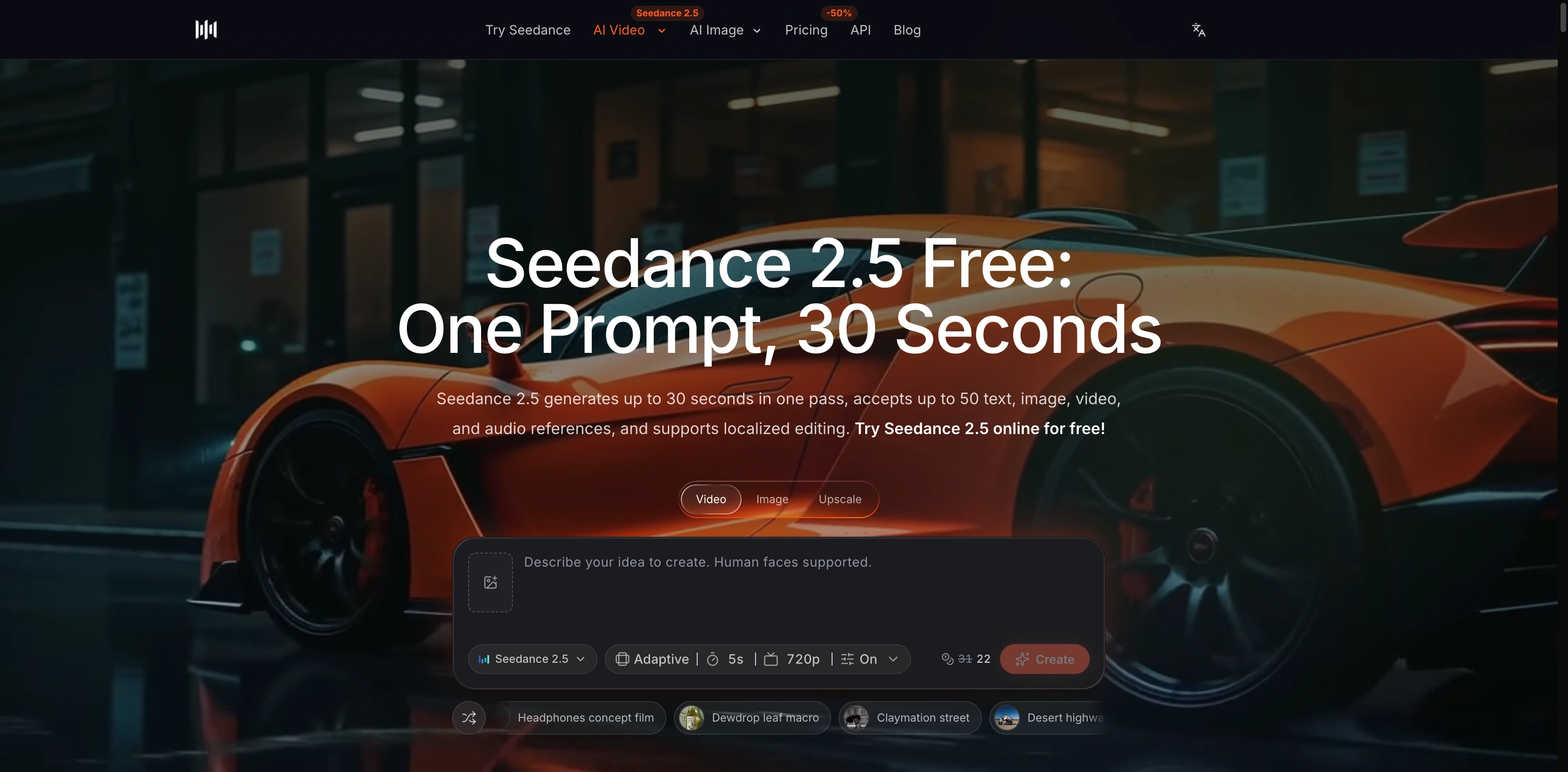
SeedVideo AI’s current Seedance 2.5 model page shows a focused generation panel and its published 30-second and reference capabilities.
This difference changes the buying question. If your work starts with “Which model should render this shot?”, compare models under matched settings. If it starts with “How do we brief, cast, direct, revise, organize, and deliver a campaign?”, compare platforms and the tools around the render step.
Camera control and shot direction
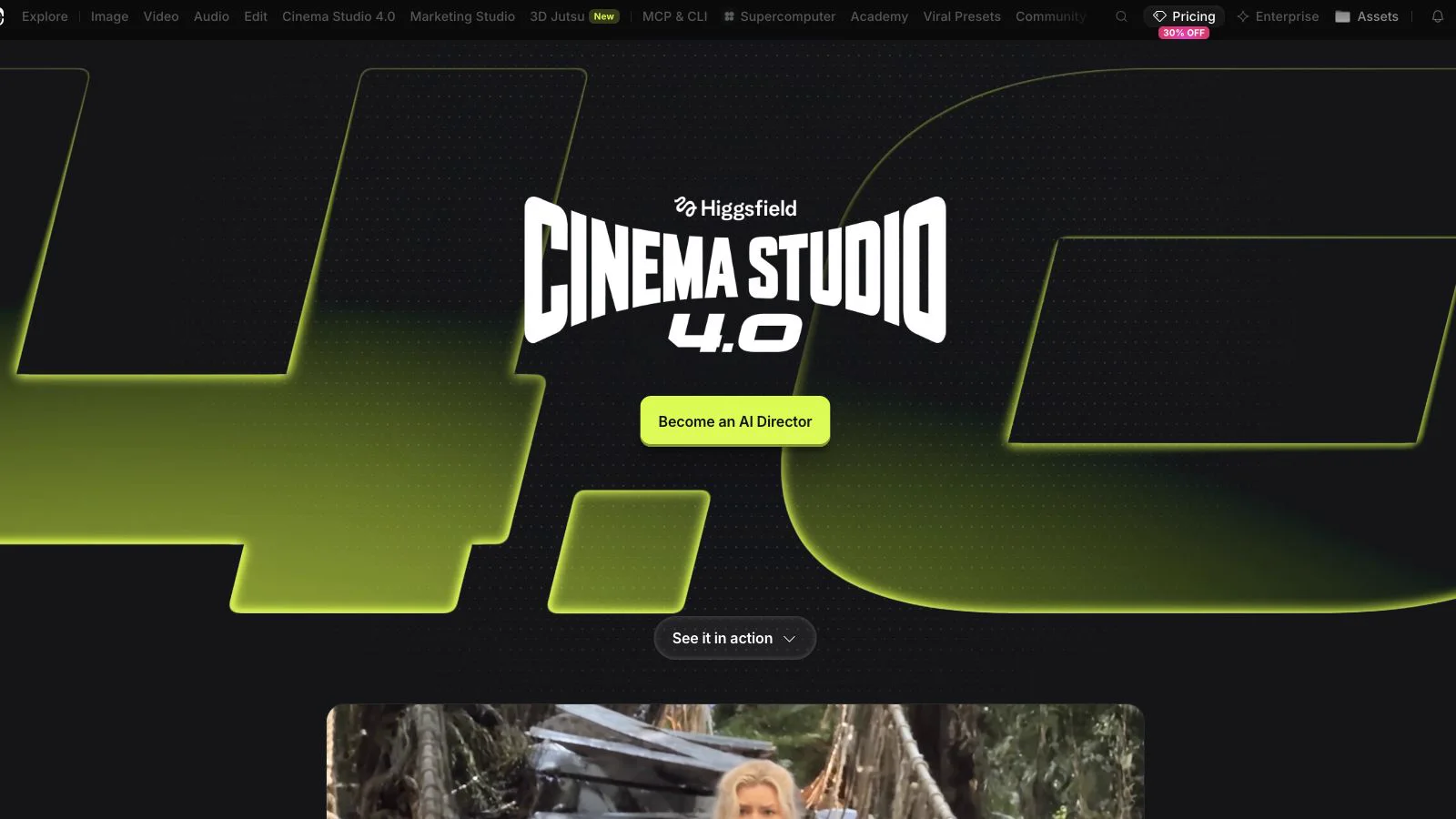
Higgsfield’s current Cinema Studio 4.0 page presents its director-oriented workspace and production controls.
Higgsfield makes camera language visible. Cinema Studio currently lists static, handheld, zoom, and pan controls, and it lets creators stack camera tags in sequence. It also exposes six genre starting points, including Action, Epic, Drama, Comedy, and Horror, plus a general mode. Tempo is a separate control. This is useful when a team prefers to choose from a vocabulary rather than encode every decision in prose.
Seedance 2.5 puts more of the direction inside the prompt and reference set. A prompt can specify framing, camera path, subject action, timing, environment, and audio intent, while visual references anchor appearance. The model page also describes localized editing, which matters when the shot mostly works but one region or moment needs correction.
Neither interface proves that a difficult camera move will succeed. A visible “pan” control and a written “crane down” instruction are inputs, not quality results. Use the same shot brief and score the rendered path, subject stability, background drift, and usable duration.
Motion, continuity, and reference handling
Seedance 2.5 has the clearer specification for reference-heavy work. Its current page lists up to 30 images, 10 videos, and 10 audio files within a 50-reference ceiling. That gives a production team room to separate character, wardrobe, prop, location, motion, and sound references. The 30-second maximum also reduces the number of boundaries that must be stitched for a longer beat.
Higgsfield Cinema Studio also advertises up to 50 references per generation. Those can come from uploads, Elements, previous takes, or liked assets, with eligibility checked by the product. The benefit is organizational: references live beside the brief, cast, genre, camera plan, and prior work. Actual limits still depend on the chosen model and interface.
For character continuity, count failures rather than admiring one strong frame. Check face shape, hair, wardrobe details, accessories, left-right placement, and prop geometry at the beginning, middle, and end. For motion, check foot contact, hand-object contact, occlusion recovery, camera acceleration, and whether the background changes when the subject crosses it.
Audio is not one platform-wide promise
Seedance 2.5 accepts audio references and SeedVideo AI exposes a sound control in the current generator. That supports workflows where rhythm, ambience, speech timing, or sound cues are part of the brief. Confirm the selected settings before generation because sound options can change credit cost and output behavior.
Higgsfield includes audio tools and hosts multiple video models, but a suite-level audio menu does not mean every video model produces the same native audio. Check the selected model card and generation controls. If audio matters, compare both routes with the same script, language, timing, and acceptance rules; then inspect synchronization, intelligibility, ambience continuity, and unwanted artifacts.
Workflow and usability
Higgsfield is the denser environment. The current product navigation includes image, video, audio, editing, Cinema Studio 4.0, Marketing Studio, 3D tools, assets, and additional interfaces. Cinema Studio adds project briefs, subfolders, casting, color treatment, and collaboration. For a studio running many campaign formats, that consolidation can save handoffs.
The tradeoff is more decision surface. Model choice, plan eligibility, unlimited promotions, interface, queues, and credit rates can vary. Higgsfield states that some unlimited offers apply only on its website, not across every interface, and that speed can change during heavy traffic.
SeedVideo AI is easier to read as a single-model route. The AI video generator centers the prompt and output settings. The Seedance 2.5 model page explains references, duration, ratios, and edits in one place. That focus is helpful when the team already has its own storyboards, asset library, review system, and editor.
Current pricing and free access
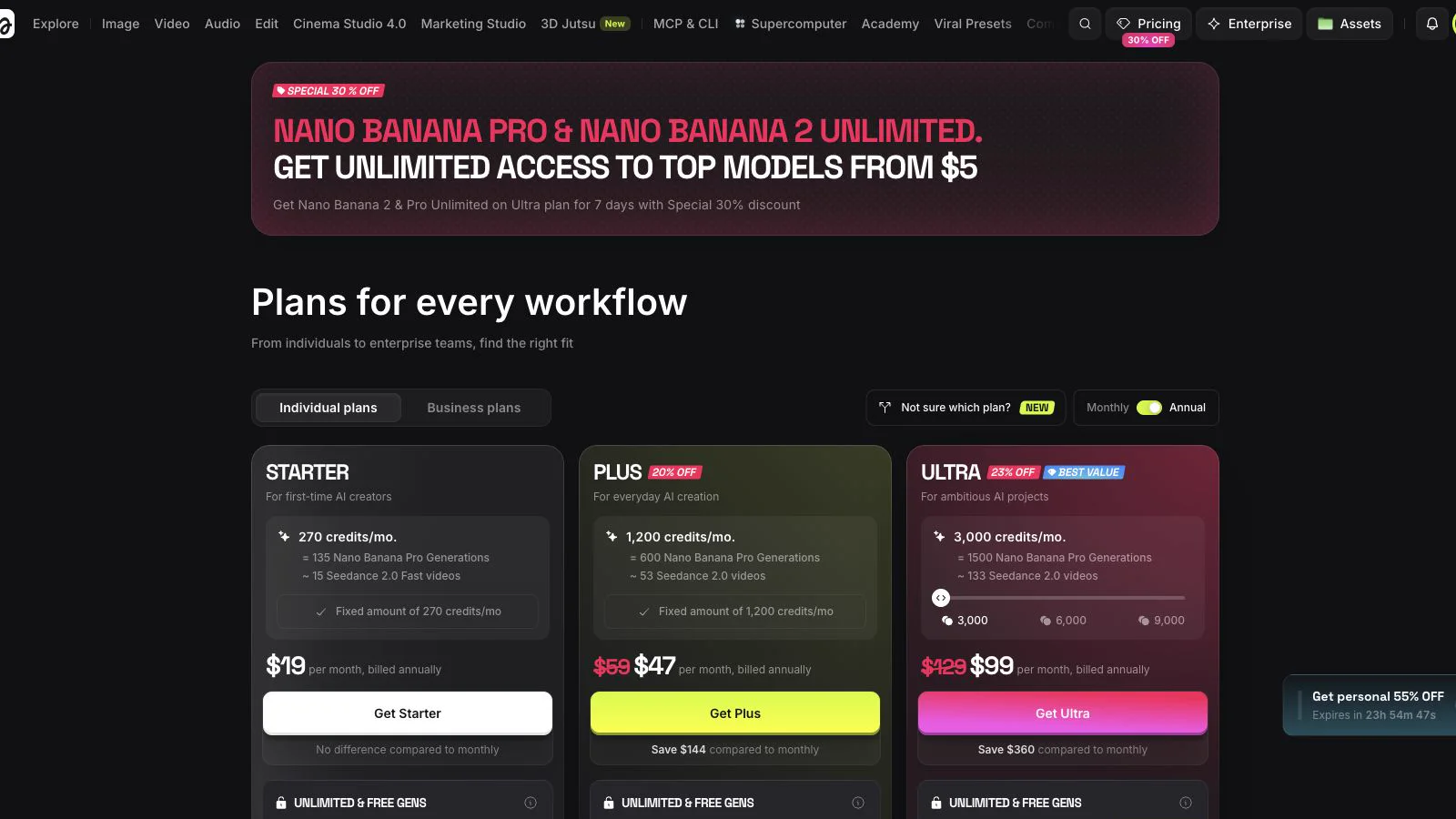
Higgsfield’s annual pricing page showed Starter at $19, Plus at $47, and Ultra at $99 per month on September 7, 2026.
Higgsfield’s current annual view lists Starter at $19 per month with 270 monthly credits, Plus at $47 with 1,200, and Ultra at $99 with 3,000 at the selected level. A limited Free tier is also listed. The page places Seedance 2.5 access on Plus and above, while Starter lists a smaller model selection. It also advertises time-limited unlimited-generation offers for selected models. Read the model list and fair-use details before treating “unlimited” as a universal plan feature.
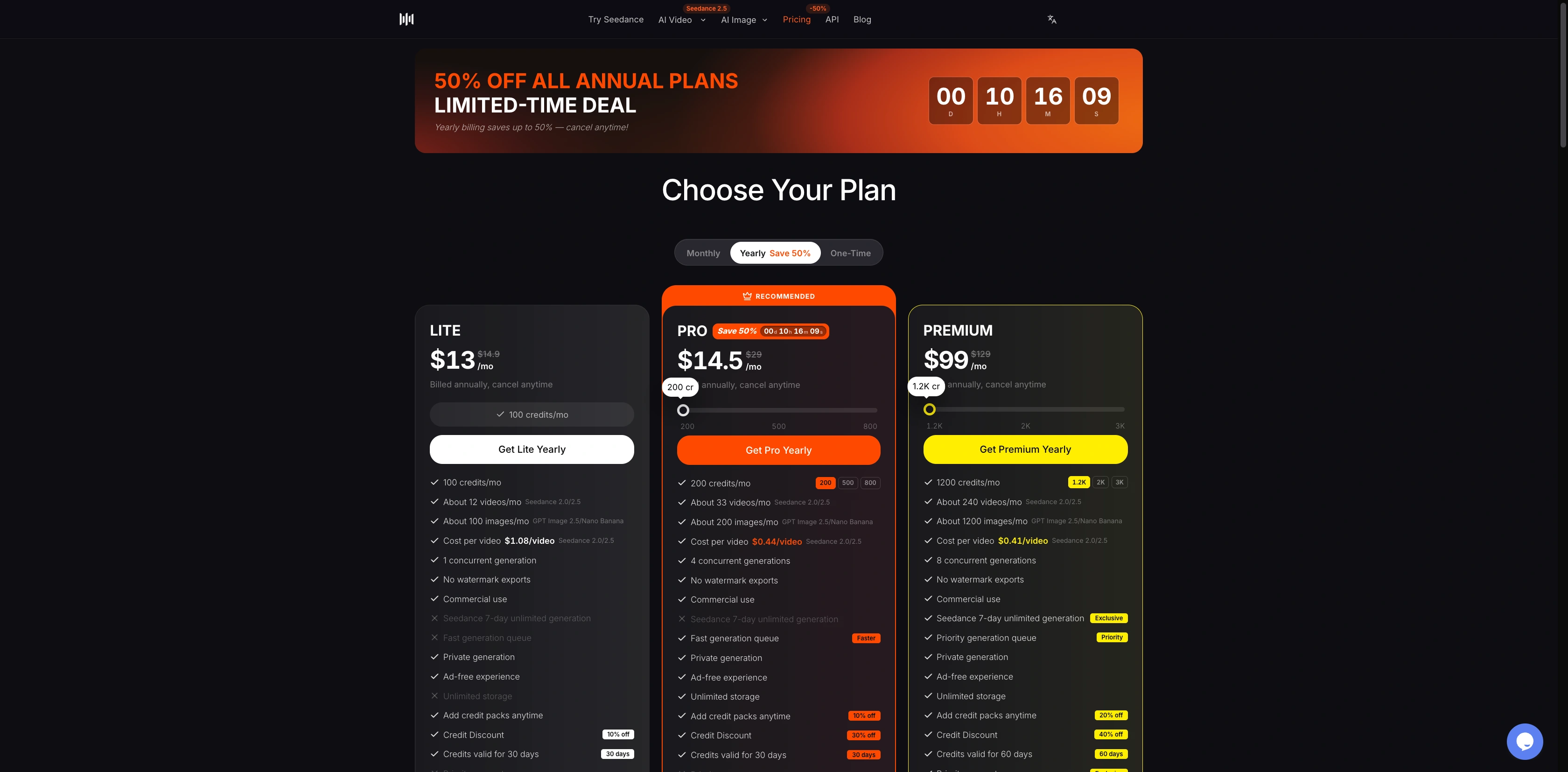
SeedVideo AI's annual pricing page, captured on September 13, 2026. The September 7 promotion described below is a past offer. Check the current page before purchasing.
SeedVideo AI pricing currently lists 5 signup credits on Free. Its plan table does not show Seedance 2.5 access on Free. During the displayed annual sale, Lite is $9.90 per month with 130 credits and 720p Seedance 2.5 access; Pro is $24.90 with 400 credits, up to 1080p access, and four concurrent jobs; Premium is $69.90 with 1,200 credits, up to 1080p access, and eight concurrent jobs. The table lists a Seedance 2.5 cost of 8 credits on Lite, 6 on Pro, and 5 on Premium.
Do not compare subscription prices alone. Estimate the cost of an approved second:
total plan or credit spend ÷ seconds that pass review
Include retries, rejected generations, upscaling, sound settings, and any external editing. A cheaper first render can cost more if continuity failures force several reruns.
Which is better for common jobs?
Social ads and product campaigns
Higgsfield is a strong fit when the work includes concepting, preset camera moves, casting, product assets, variant production, and campaign organization. Marketing Studio and Cinema Studio reduce the number of separate surfaces a creative team must manage. Confirm that the model and plan you want are available in the exact interface you intend to use.
Seedance 2.5 fits ads that need a consistent hero product, actor, location, soundtrack, and longer continuous action. Its large reference allowance and common vertical, square, and widescreen ratios suit platform variants. A focused route also makes it easier to document one model’s cost per approved variation. Our character consistency comparison shows how Seedance 2.5 holds a recurring actor across five shot types.
Narrative scenes and music-driven sequences
Seedance 2.5 has a clear advantage when a single beat needs more than 15 seconds or when many visual, motion, and audio references must work together. Extension and localized editing can help preserve a strong take while changing a smaller section. Both run from an uploaded source clip in the Seedance video to video workspace, so a swapped prop or a restyled background does not force a full regeneration. The Seedance 2.5 video editing guide covers the prompt verbs that trigger an edit versus an extension.
Higgsfield is attractive when the director wants explicit genre, camera, pacing, cast, grading, and project controls before choosing a model. It can also be the better home for a sequence that moves among different renderers. The final render quality still depends on the chosen model and the shot.
Bulk generation
For volume, model access and queue rules matter as much as headline credits. Higgsfield Plus and Ultra advertise broad model access and paid parallel generation, while some unlimited offers have interface and traffic conditions. SeedVideo AI publishes simple concurrency tiers of one, four, and eight for Lite, Pro, and Premium. Run a small batch and record median queue time, generation time, failure rate, and cost per approved output before scaling. For cost per clip on Runway, Kling, Hailuo, Luma, and SeedVideo AI plans, see the AI video generator pricing comparison.
A fair matched test you can run
Video prompt: In a crowded night market during heavy rain, track behind an adult woman in a red raincoat for five seconds as she walks forward and turns toward camera. Preserve her face, coat, hands, lantern positions, wet reflections, and crowd depth. Gentle crane-down movement, realistic motion, 16:9, 720p.
Use a five-second version of the prompt above. Choose the same 16:9 ratio and 720p output on both routes. Supply the same starting image if both selected modes accept it. Keep sound either enabled on both with the same audio brief or disabled on both. Do not change the wording after seeing the first output.
Generate three attempts per route and record every attempt. Score each clip from 0 to 2 on:
| Criterion | 0 | 1 | 2 |
|---|---|---|---|
| Subject identity | Breaks clearly | Minor drift | Stable throughout |
| Camera path | Wrong or erratic | Partly follows brief | Follows the full move |
| Human motion | Major artifacts | Small artifacts | Natural contact and gait |
| Environment | Layout changes | Limited drift | Stable market and lights |
| Prompt completion | Misses the action | Partial action | Walk and turn both land |
Then report first-pass success, average score, approved seconds, total credits, wall-clock time, and number of manual fixes. This article does not publish a quality winner because no matched output set was created under those conditions.
Commercial-use boundaries
Higgsfield’s current terms say it does not claim ownership of inputs or outputs and does not restrict commercial use. Exported output rights survive cancellation and can be transferred or sublicensed to clients. The same terms say outputs may be non-unique, users remain responsible for input rights, and third-party model policies may apply. They also require disclosure of AI use where applicable.
SeedVideo AI’s current paid plans list commercial use, while its terms say users retain ownership of generated content. You are still responsible for rights involving people, likenesses, brands, music, voices, images, and other assets. For client work, keep a record of the plan, selected model, terms date, source permissions, and approval chain.
Final decision
Pick Higgsfield if the surrounding production system is the main value: explicit directing controls, campaign tooling, organized references, cast, assets, editing, and access to multiple models. It is especially useful when a team wants to explore several render routes without leaving one creative environment. If you want several render routes in one account but not the full production suite, Yovid is a simpler option: Seedance 2.5, Kling 3.0, Veo 3.1, and other video models share one credit balance in a browser workspace (Yovid shares an owner with SeedVideo AI).
Pick Seedance 2.5 on SeedVideo AI if the render brief is already defined and the priorities are longer clips, a large mixed reference set, continuation, localized edits, and transparent per-plan Seedance credit rates. It is the more direct route for testing the model itself.
If quality decides the purchase, use the matched test above. For more model-level context, compare MiniMax H3 with Seedance 2.5 and review Seedance 2.5 versus Kling 3.0. When you are ready, open the Seedance 2.5 workspace and price the same three-shot batch on the plan you would actually use.
Frequently asked questions
Is Higgsfield a video model?
No. Higgsfield is a creative platform that hosts multiple tools and models. Seedance 2.5 is one video model and is also listed inside eligible Higgsfield plans.
Can I use Seedance 2.5 through Higgsfield?
Higgsfield’s current pricing page lists Seedance 2.5 access on Plus and higher plans. Availability, resolution, credits, and interface rules can change, so confirm the model card before purchasing.
Which option is cheaper?
SeedVideo AI currently has the lower starting paid plan for Seedance 2.5 access. A fair cost comparison must include available resolution, retries, concurrency, queue time, and approved output seconds.
Can I use Seedance 2.5 for free?
SeedVideo AI currently provides 5 signup credits, but its plan comparison does not include Seedance 2.5 on Free. Higgsfield lists limited free use, while its current pricing table places Seedance 2.5 on paid tiers.
Which option supports longer videos?
Seedance 2.5 documents generation up to 30 seconds. Higgsfield duration depends on the selected model; its native DoP pricing entries currently show three-second clips, while hosted models have their own limits.
Can I use the outputs commercially?
Both services currently provide routes for commercial use. You must still follow the selected plan and model terms and hold the necessary rights to people, brands, music, voices, images, and other inputs.