OpenAI's Sora API closes on September 24, 2026, so a migration plan needs more than a replacement model name. Sora and Seedance 2.5 use different duration controls, frame specifications, prompt habits, reference inputs, and billing units. The practical route is to freeze your Sora settings, translate each prompt into a shot brief, calculate Seedance credits from the requested duration and resolution, then review a small set of representative jobs before moving a full queue. This guide maps the current published specifications and prices without pretending the two systems are API compatible. It also corrects an easy mistake: Seedance 2.5 currently supports 480p, 720p, and 1080p in the live product, not only 720p. Use the tables below as a migration worksheet, then check the live Seedance 2.5 model page before you lock a production preset.
Specifications and prices checked September 20, 2026. Provider settings can change, so confirm them again before a large batch.
Looking for where to go after the Sora API shutdown? Start with our Sora alternative guide, then come back here for the setting-by-setting Sora to Seedance 2.5 migration.
TL;DR
- Sora accepts 4, 8, or 12 second durations. Seedance 2.5 accepts 4 to 30 seconds, so keep the original length first and extend only after the look is stable.
- Map Sora's pixel sizes to an aspect ratio plus resolution. For example, 1280x720 becomes 16:9 at 720p.
- Rewrite poetic Sora prompts as production briefs: subject, action, setting, camera, timing, sound, then constraints.
- Seedance 2.5 can use up to 50 references across images, video, and audio. Name each reference in the prompt instead of assuming the model will infer its job.
- Do not convert Sora dollars into Seedance credits as if they were the same currency. Compare both against one fixed deliverable.
- A five-second 720p Seedance 2.5 job currently shows 31 base credits in the live generator. Plan discounts may reduce the credits charged.
Quick Answer
For a safe Sora-to-Seedance migration, reproduce the same output contract before trying to improve it. Keep duration, aspect ratio, resolution, audio requirement, and reference assets fixed. Convert the prompt into explicit shot instructions, then estimate Seedance base credits with duration × 6.1 at 720p or duration × 15.1 at 1080p, rounded to the nearest whole credit. Compare that figure with Sora's published per-second price. The request and response formats are different, so treat this as a workflow migration rather than a base-URL change.

SeedVideo AI generator captured in English on September 20, 2026. The five-second 720p configuration shows 31 base credits and 22 credits on the active discounted plan.
Confirm the deadline before changing anything
OpenAI's help center says the Sora web and app experiences ended on April 26, 2026. The Sora API, Videos API, sora-2, sora-2-pro, and their dated snapshots close on September 24, 2026. The deprecations table does not name a replacement. If you still have content in Sora, export it through the sunset page before the final export window closes.
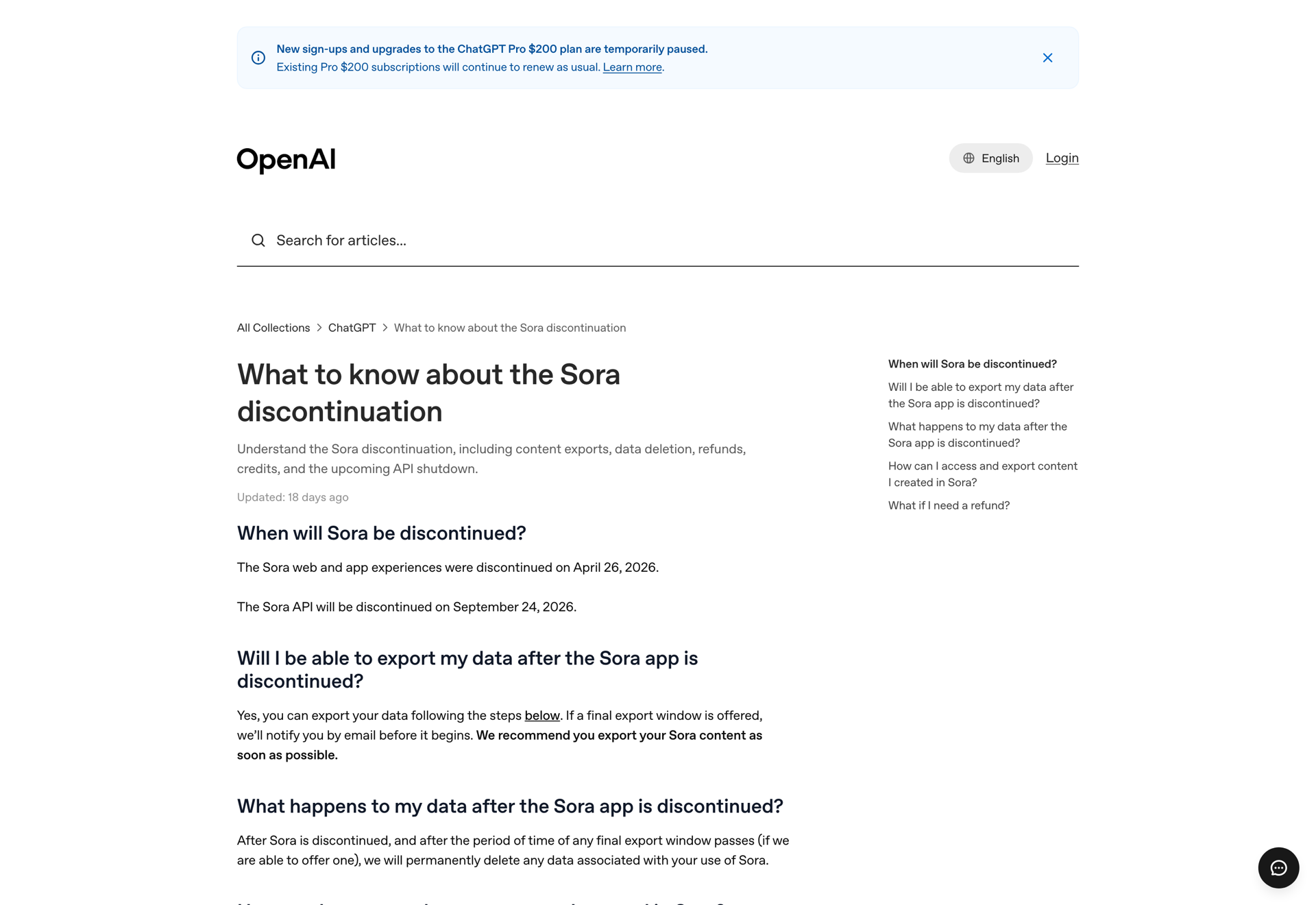
OpenAI help center captured September 19, 2026, confirming the April 26 app closure, the September 24 API closure, and the export process.
The separate Sora API shutdown guide covers the deadline and alternative providers. This article starts one step later: you have chosen Seedance 2.5 and need to move real jobs without losing their intent.
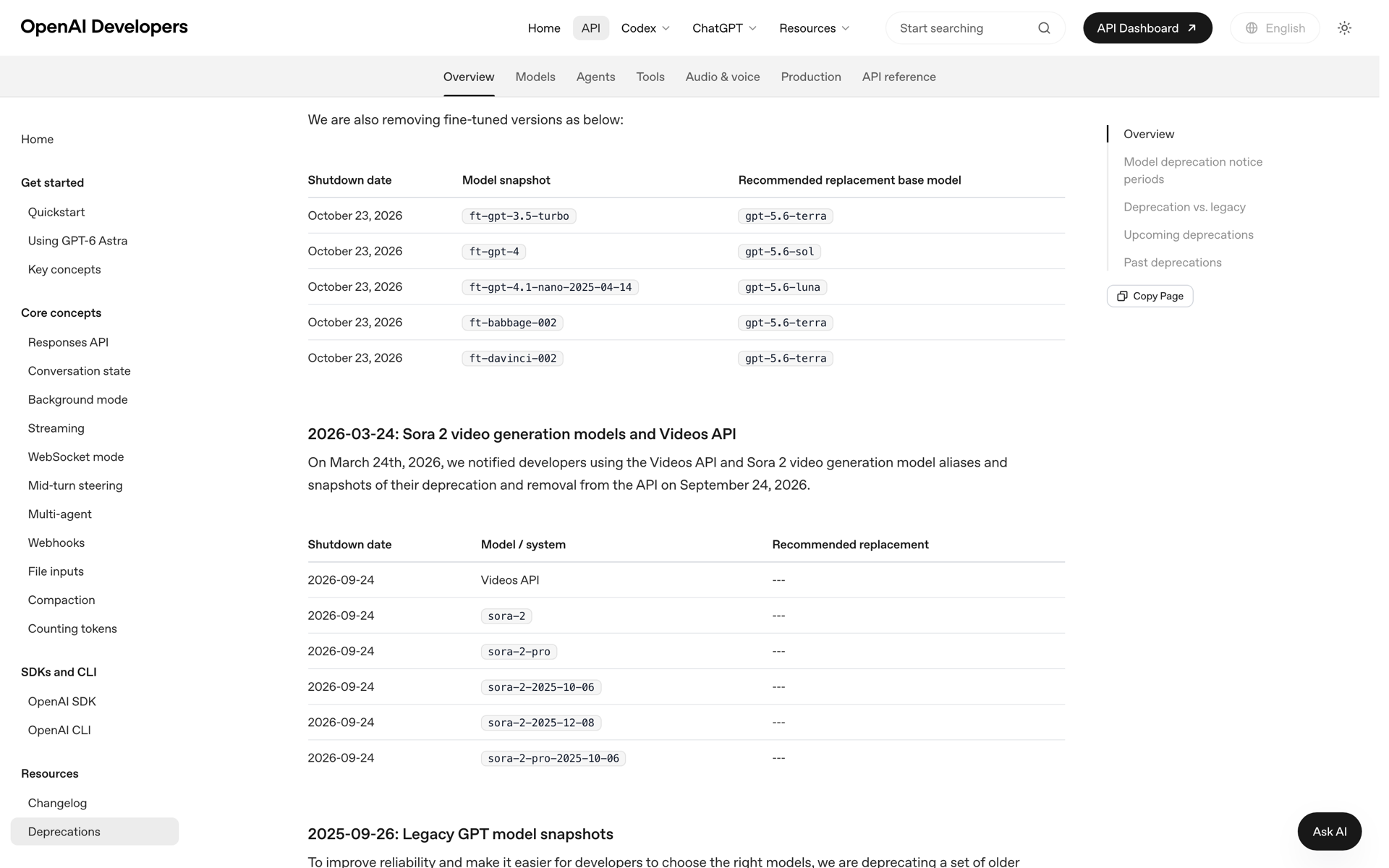
OpenAI's deprecations table captured September 19, 2026. The Sora rows show no recommended replacement.
Sora and Seedance 2.5 specification map
Use the Sora request as the source record. Do not start by picking whatever Seedance setting looks newest. Write down the old value, apply the closest match, and record any deliberate change.
| Setting | Sora 2 / Sora 2 Pro | Seedance 2.5 | Migration rule |
|---|---|---|---|
| Duration | 4, 8, or 12 seconds | 4 to 30 seconds | Keep 4, 8, or 12 seconds for the first pass. Longer output changes timing and cost. |
| Landscape | 1280x720; Pro also lists 1792x1024 and 1920x1080 | 16:9, 4:3, or 21:9 at 480p, 720p, or 1080p | Map pixel size to the nearest aspect ratio, then set resolution separately. |
| Portrait | 720x1280; Pro also lists 1024x1792 and 1080x1920 | 9:16 or 3:4 at 480p, 720p, or 1080p | Use 9:16 for vertical social video. Use 3:4 only when the composition needs the wider frame. |
| Square | No square size in the current Sora Videos API list | 1:1 | Reframe intentionally. Do not crop a migrated landscape prompt by accident. |
| Audio | Synchronized audio supported | Audio switch available in the current generator | Preserve dialogue and sound instructions, then confirm the chosen workflow keeps audio enabled. |
| References | Text plus an optional image reference in the Videos API | Up to 50 image, video, and audio references on the model page | Assign a job to every asset and refer to it by name in the prompt. |
| API shape | OpenAI Videos API | Seedance create-and-poll workflow | Rewrite request construction, status polling, errors, and result parsing. |
The live Seedance 2.5 workspace exposes duration, aspect ratio, resolution, audio, and credit estimate together. That makes it useful for checking a migration preset before you encode the same choices in an integration.
Pixel size to aspect ratio examples
| Old Sora size | Seedance setting | What to inspect |
|---|---|---|
| 1280x720 | 16:9, 720p | Subject scale and safe areas should remain close. |
| 720x1280 | 9:16, 720p | Check headroom, captions, and objects near the side edges. |
| 1792x1024 | 16:9, 1080p | The ratio is close rather than identical, so inspect edge composition. |
| 1024x1792 | 9:16, 1080p | Expect a small framing change at the top and bottom. |
| 1920x1080 | 16:9, 1080p | This is the cleanest Sora 2 Pro mapping. |
Convert Sora prompts into Seedance shot briefs
Sora prompts often read like compact cinematic prose. That can work in Seedance too, but reference-heavy jobs become more reliable when the prompt tells each asset what to do. A useful order is:
- State the subject and the single visible action.
- Set the location, time, and lighting.
- Describe framing and camera movement.
- Give the beat order or timestamps when timing matters.
- Add dialogue, ambient sound, or music direction.
- Finish with continuity and exclusion constraints.
This is a writing conversion, not a promise that two models will render the same frames. Keep the first Seedance version close to the Sora prompt so differences are easy to diagnose.
Example 1: text-only cinematic shot
Sora-style prompt:
A woman in a red coat walks through a rainy Tokyo alley at night, neon reflections, cinematic, slow camera move, moody atmosphere.
Try this prompt in SeedVideo AI
Seedance 2.5 version:
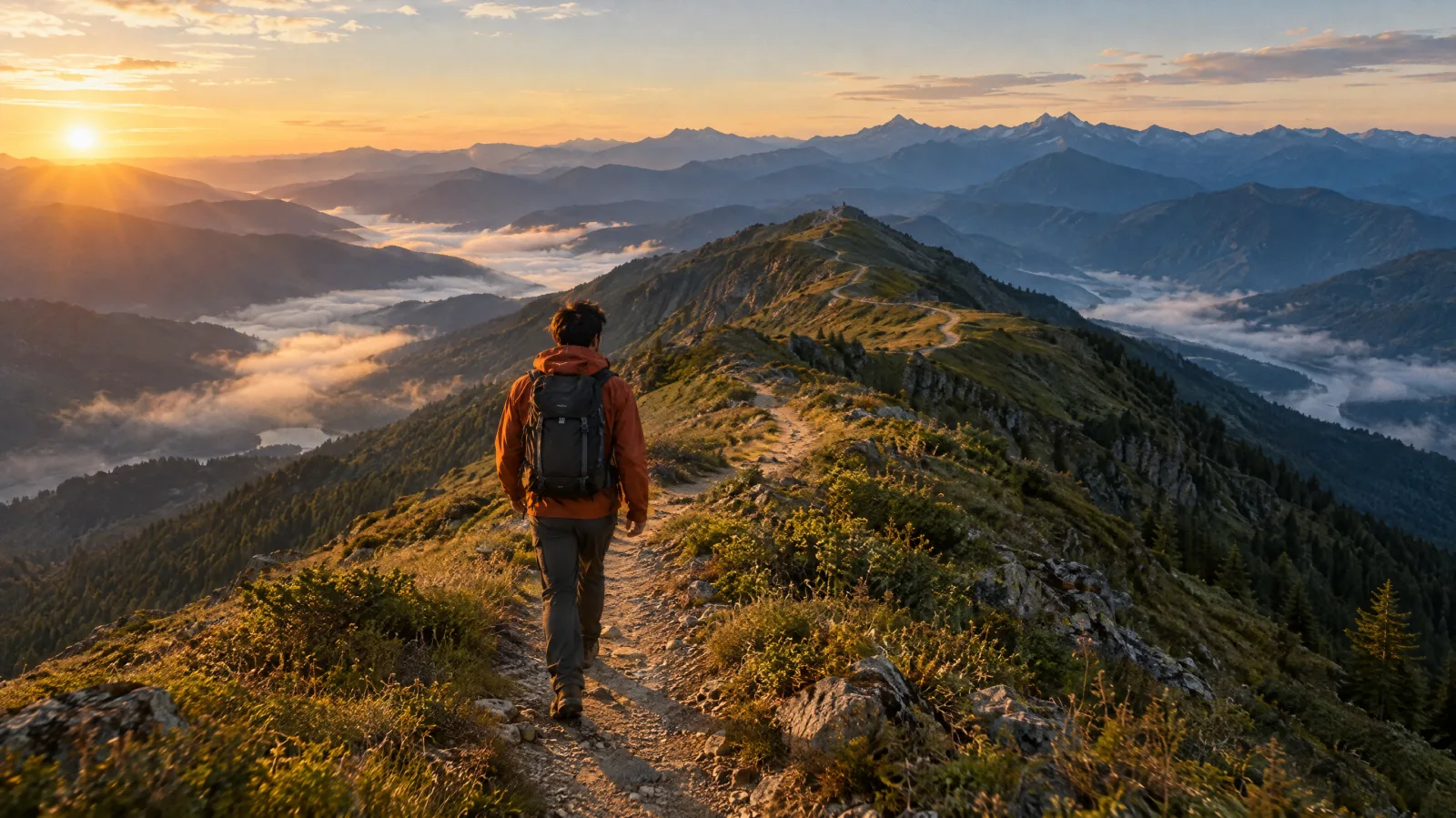
Five-second single shot. A woman in a matte red knee-length coat walks away from camera through a narrow Tokyo alley at night. Wet pavement reflects cyan shop lights and warm paper lanterns. Start in a medium rear shot at waist height. Track forward slowly at her walking speed with no cuts. Light rain remains visible against the dark storefronts. Natural footsteps and light rain ambience, no music. Keep the coat color, hairstyle, and walking direction consistent for the full shot. No signs changing shape and no extra pedestrians crossing the foreground.
Try this prompt in SeedVideo AI
What changed: the mood remains, but the camera, timing, sound, and continuity are now explicit.
Example 2: image-led product shot
Sora-style prompt:
Use this sneaker image and make a premium product commercial with dramatic lighting and a rotating camera.
Try this prompt in SeedVideo AI
Seedance 2.5 version:
Use @image1 as the exact product reference. Keep the sneaker's silhouette, sole pattern, laces, logo placement, and colors unchanged. Place it on a dark gray plinth in a clean studio. Over eight seconds, orbit the camera 120 degrees from front-left to rear-right while the product stays still. A narrow softbox reflection moves across the upper, followed by a brief rim light on the sole. 16:9 composition, 720p, no text, no hands, no duplicate shoes, and no redesign of branded details.
Try this prompt in SeedVideo AI
The phrase "premium product commercial" did not specify what should move or which product details must survive. The converted prompt does both.
Example 3: video and audio references
Sora-style prompt:
Match this reference video and add the supplied music. Make the character enter the room and sit at the desk.
Try this prompt in SeedVideo AI
Seedance 2.5 version:
Use @video1 for the room layout, lens height, and slow handheld camera behavior. Use @image1 for the character's face, clothing, and hairstyle. Use @audio1 as the music track, starting from its first beat. Twelve-second shot. At 0-3 seconds, the empty room follows @video1's framing. At 3-7 seconds, the character enters through the left doorway and crosses behind the chair. At 7-12 seconds, they sit at the desk and look toward the window. Preserve the desk, doorway, and window positions from @video1. Keep the same person and outfit throughout. Do not cut, zoom, or add dialogue.
Try this prompt in SeedVideo AI
The numbered references remove a common ambiguity: whether a clip supplies motion, set design, character identity, or all three.
Example 4: localized edit instead of a full rerun
If only one element needs changing, say what stays locked:
Keep the full composition, camera path, character, wardrobe, lighting, and timing from @video1. Replace only the paper coffee cup on the desk with the blue ceramic mug from @image1. The mug must remain fixed in the same position and scale for the full clip. Preserve all other objects and the original audio.
Try this prompt in SeedVideo AI
This format gives the editing request a narrow boundary. It also makes review quicker because there is one intended difference.
Cost mapping without false currency conversion
OpenAI bills Sora in US dollars per generated second. Seedance 2.5 shows a credit estimate based on duration, resolution, input media, and plan discount. One Sora dollar does not equal a fixed number of Seedance credits. Compare the cost of the same deliverable instead.
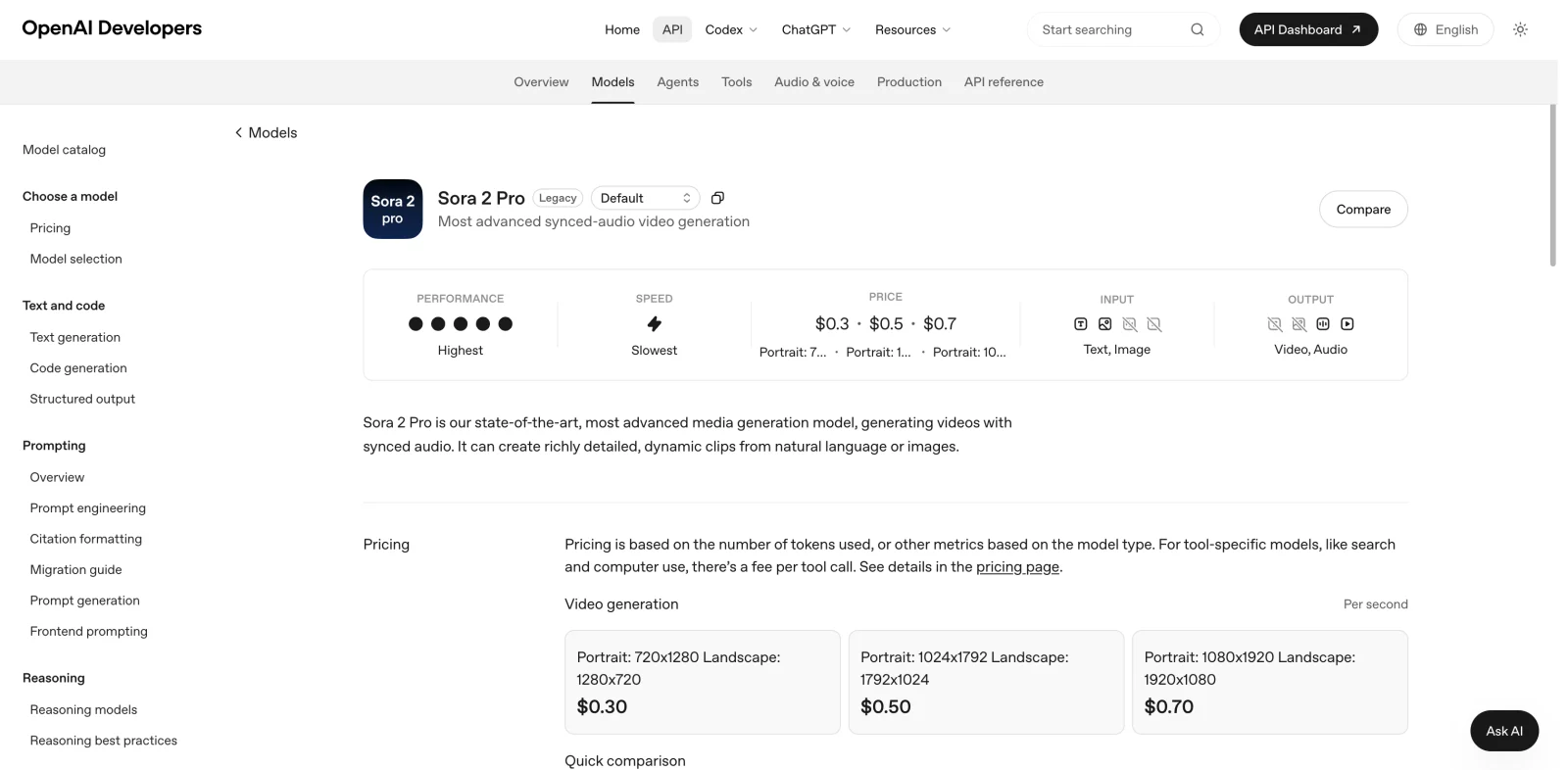
OpenAI's Sora 2 Pro model page captured September 20, 2026, listing $0.30, $0.50, and $0.70 per second by output size.
Sora published cost for common lengths
| Duration | Sora 2, 720p at $0.10/s | Sora 2 Pro, 720p at $0.30/s | Pro, 1024p at $0.50/s | Pro, 1080p at $0.70/s |
|---|---|---|---|---|
| 4 seconds | $0.40 | $1.20 | $2.00 | $2.80 |
| 8 seconds | $0.80 | $2.40 | $4.00 | $5.60 |
| 12 seconds | $1.20 | $3.60 | $6.00 | $8.40 |
Seedance 2.5 base-credit worksheet
The current live configuration uses about 6.1 base credits per output second at 720p and 15.1 at 1080p. The interface rounds the job total to a whole credit. Input video, some feature settings, and future price changes can alter the estimate, so the number shown before generation is the final check.
| Duration | 720p base credits | 1080p base credits |
|---|---|---|
| 4 seconds | 24 | 60 |
| 5 seconds | 31 | 76 |
| 8 seconds | 49 | 121 |
| 10 seconds | 61 | 151 |
| 12 seconds | 73 | 181 |
| 15 seconds | 92 | 227 |
| 30 seconds | 183 | 453 |
For a plan discount, use rounded base credits × (1 - discount), then round the result the same way the live estimator does. The captured five-second 720p example shows the practical result: 31 base credits becomes 22 credits on a plan with a 30 percent video discount.
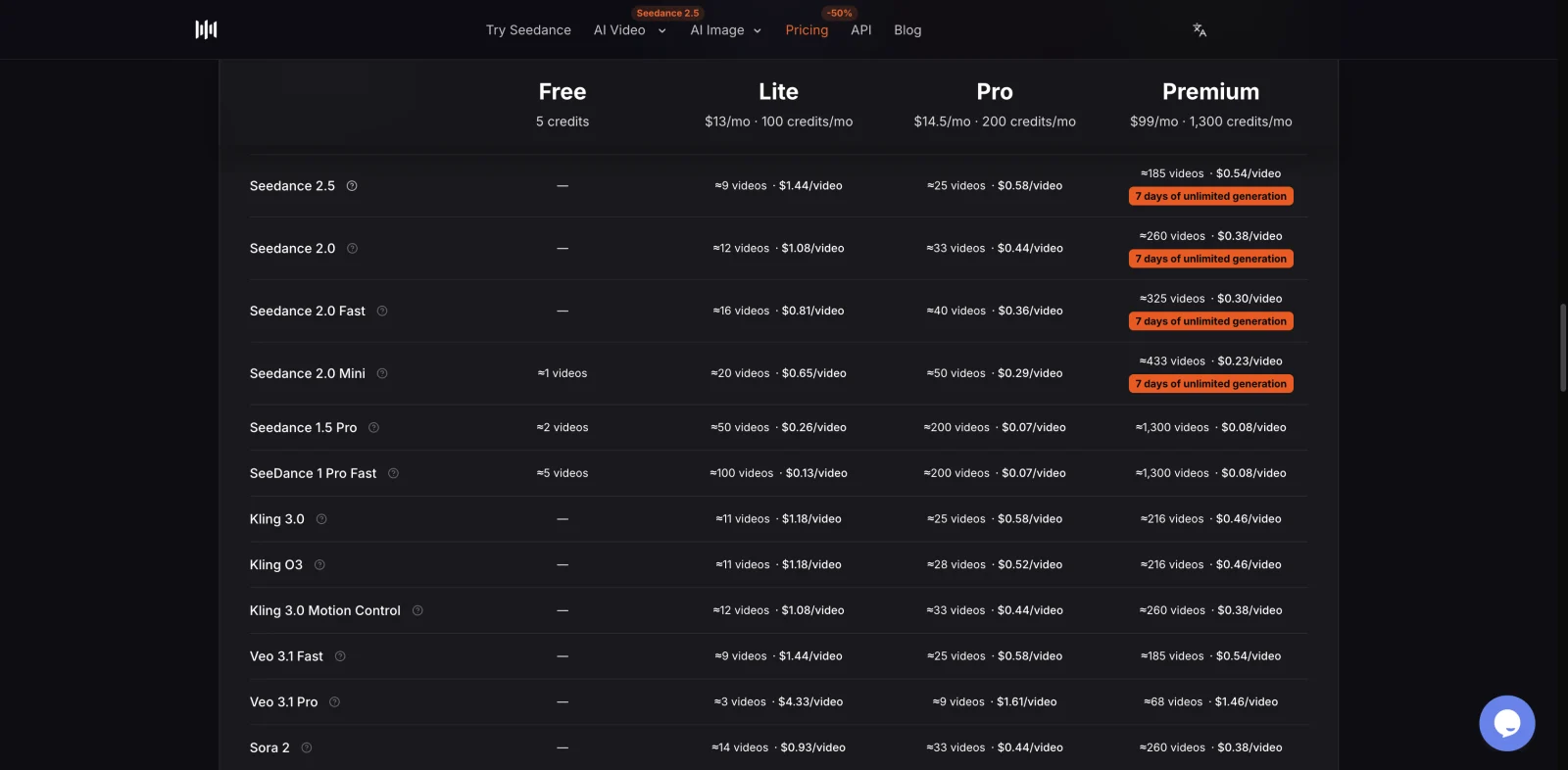
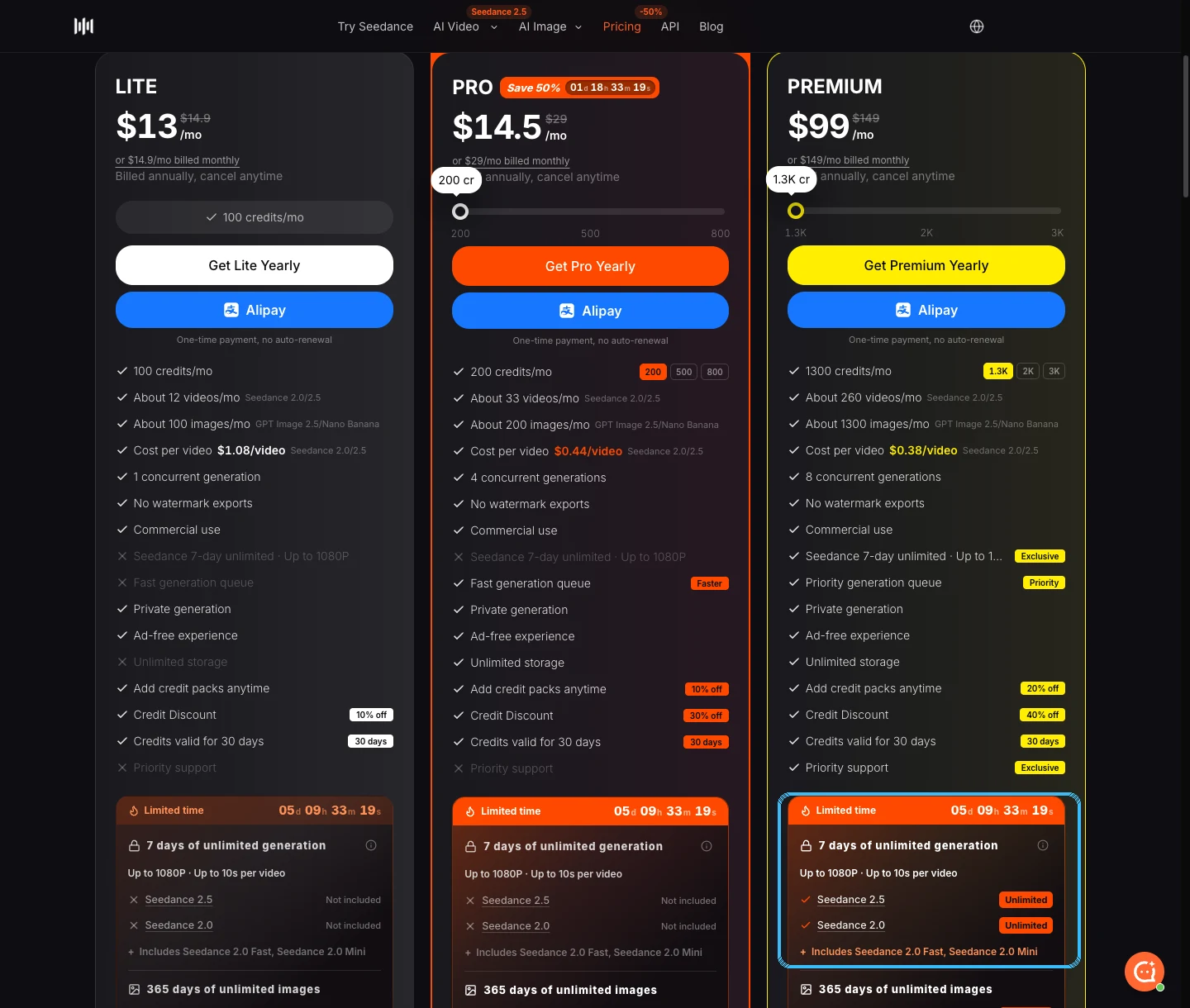
SeedVideo AI pricing table captured in English on September 20, 2026. Plan credits, discounts, and per-video estimates are shown together.
Use the live SeedVideo AI pricing page to translate credits into the subscription that fits your volume. The AI video pricing comparison is useful when you also need to compare other providers on one deliverable.
Migration checklist
- [ ] Export Sora assets and save the original prompt, model, duration, size, reference input, and audio requirement beside each job.
- [ ] Group jobs by output contract, such as 8-second vertical social clip or 12-second 1080p landscape shot.
- [ ] Map pixel sizes to a Seedance aspect ratio and resolution with the specification table.
- [ ] Rewrite prompts as shot briefs. Name every reference and state which traits it controls.
- [ ] Keep the first migrated duration equal to 4, 8, or 12 seconds. Do not extend the shot during the same comparison.
- [ ] Calculate both Sora dollars and Seedance credits for the same duration and resolution.
- [ ] Confirm the final credit estimate in the generator before submitting a large queue.
- [ ] Review identity, geometry, camera motion, timing, audio, and text separately.
- [ ] Log differences by preset. Fix one variable at a time instead of rewriting the whole prompt after every result.
- [ ] Update request building, polling, timeout, error, and result handling before the September 24 shutdown.
FAQ
Can I reuse a Sora prompt in Seedance 2.5 unchanged?
You can use it as a starting point, but a direct copy leaves too much unstated for reference-heavy work. Add duration, aspect ratio, resolution, shot timing, camera movement, sound, continuity rules, and the job of every reference asset. Keep the creative intent and make the production instructions explicit.
What Seedance 2.5 setting matches Sora's 1280x720 output?
Choose 16:9 at 720p. For Sora's 720x1280 portrait output, choose 9:16 at 720p. Sora 2 Pro's 1920x1080 maps directly to 16:9 at 1080p. The 1792x1024 and 1024x1792 options are close to 16:9 and 9:16 rather than exact matches, so inspect edge framing.
Does Seedance 2.5 support 1080p?
Yes. The current live Seedance 2.5 configuration offers 480p, 720p, and 1080p. Plan access may vary, so confirm the resolution in your account before finalizing a preset.
How many references can Seedance 2.5 use?
The current model page states up to 50 references across images, video, and audio. More references do not automatically improve a result. Use only assets with a clear purpose and tell the prompt whether each one controls identity, setting, motion, composition, or sound.
How do I convert Sora API price into Seedance credits?
Do not use a direct currency exchange. Price one defined deliverable in both systems. Sora uses a published dollar rate per output second. Seedance uses credits whose effective dollar value depends on the plan, discount, and settings. At the current base rate, multiply seconds by about 6.1 for 720p or 15.1 for 1080p, round to a whole credit, then check the live estimate.
Is Seedance 2.5 API compatible with OpenAI's Videos API?
No. The model settings, request body, task polling, errors, and result format differ. Preserve your internal job schema if it is useful, but write a new provider adapter and test its timeout and failure paths before switching traffic.
Move one representative queue before the deadline
Start with one job from each preset you actually use, not one polished demo. The aim is to expose framing, timing, audio, and cost differences while the original Sora settings are still available for comparison. Open the Seedance 2.5 model page, reproduce the old output contract, and run through the checklist before moving scheduled work.