SeedVideo AI

Adobe Firefly AI Image and Video Generator

Adobe Firefly is Adobe’s creative AI app: its own commercially safe Firefly models next to partner models such as Veo 3.1, Kling 3.0, Runway Gen-4.5 and Nano Banana, plus sound effects, Boards and a video editor, with credits shared across Photoshop and Premiere. Its public reviews fault errors, “Slow down” limits and credits spent on failed runs. SeedVideo AI is built for video: Seedance 2.5 next to Kling, Veo, Sora, Wan and MiniMax, video on free sign-up credits, one-time credit packs and no watermark on paid exports. Try SeedVideo AI For Free Now!

Seedance 2.5 and 2.010+ top AI modelsNo watermark4K HDFast generation

Quick answer

Is Adobe Firefly worth it?

Adobe Firefly is Adobe’s legitimate generative AI app, introduced in March 2023, for images, video, audio and vectors on the web, iPhone and Android. It runs Adobe’s commercially safe Firefly models, trained on licensed and public domain content, plus partner models such as Veo 3.1, Kling 3.0, Runway Gen-4.5, Luma Ray3.14, Nano Banana and GPT Image. Free users get daily generations; paid plans run from Firefly Standard at $9.99 a month for 2,000 credits to Premium at $199.99 for 50,000, and credits do not roll over. Trustpilot rates firefly.adobe.com 1.8 from 28 reviews. SeedVideo AI is video-first, with Seedance 2.5 and one-time credit packs.

Nora

NoraEditor at SeedVideo AI

Adobe Firefly facts checked on from adobe.com/products/firefly, its plans page, its generative credits FAQ and Adobe’s subscription terms.

Run by
Adobe Inc. of San Jose, California; outside North America and Japan the contract is with Adobe Systems Software Ireland Limited
User ratings
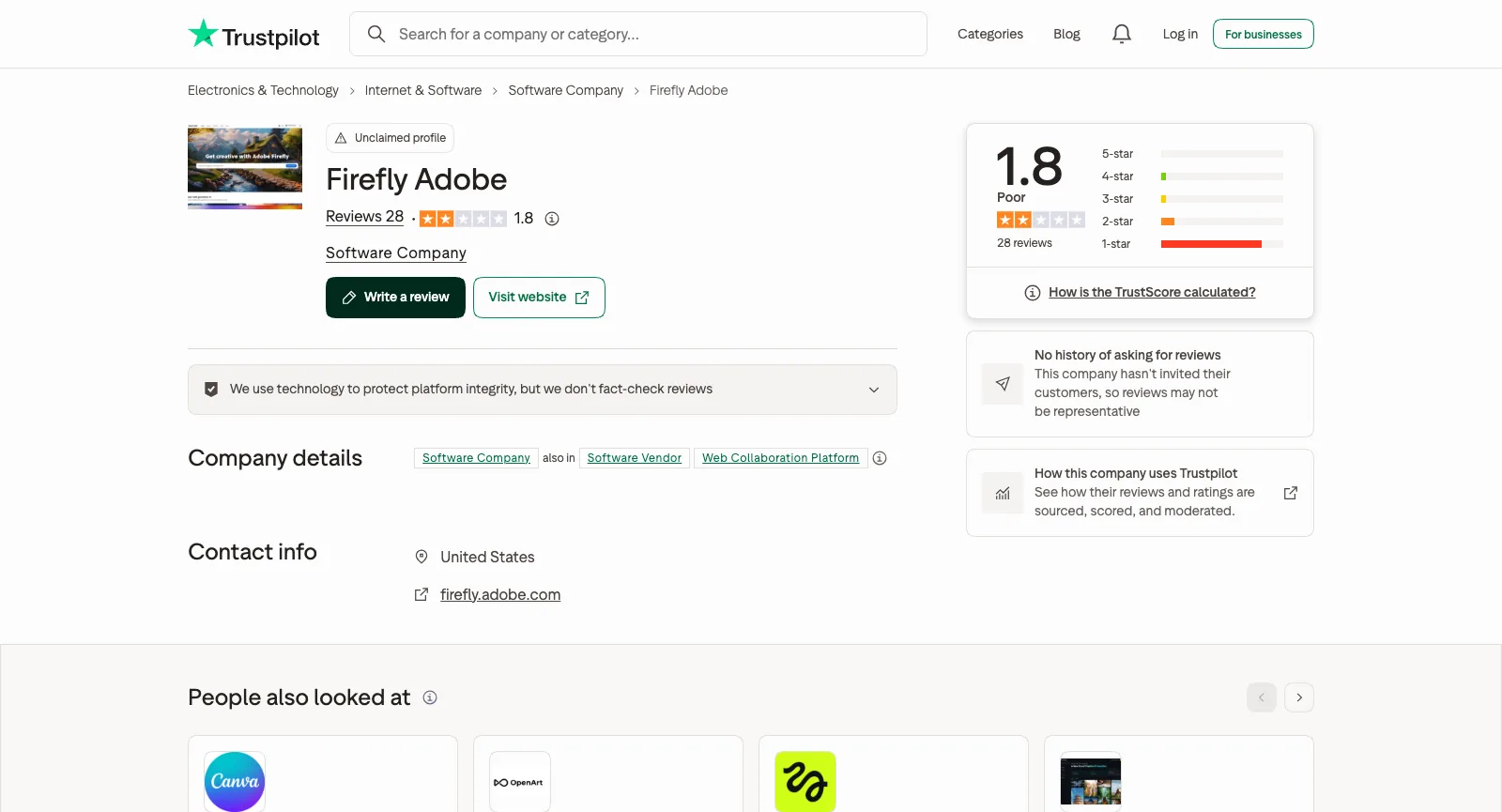
Trustpilot 1.8 (28 reviews, unclaimed firefly.adobe.com profile); US App Store 4.7 (11K ratings)
Free use
Free daily generations across image, video and audio, with models such as Nano Banana and Luma Ray3.14; limits refresh every day
Paid plans from
Firefly Standard $9.99/mo, $8.49/mo on an annual plan or $83.99/yr prepaid, for 2,000 credits a month
Refunds
Full refund within 14 days of first purchase for most plans; annual plans charge a fee or give no refund after that

Key Features of Adobe Firefly

Firefly started in 2023 as a family of image models inside Adobe’s apps and is now a standalone app that mixes Adobe’s own models with partner models from Google, OpenAI, Kling, Runway, Luma and others. These are the parts most people come for, and where SeedVideo AI fits next to each.

Generate Video: Firefly Video, Veo 3.1, Kling 3.0 and Runway

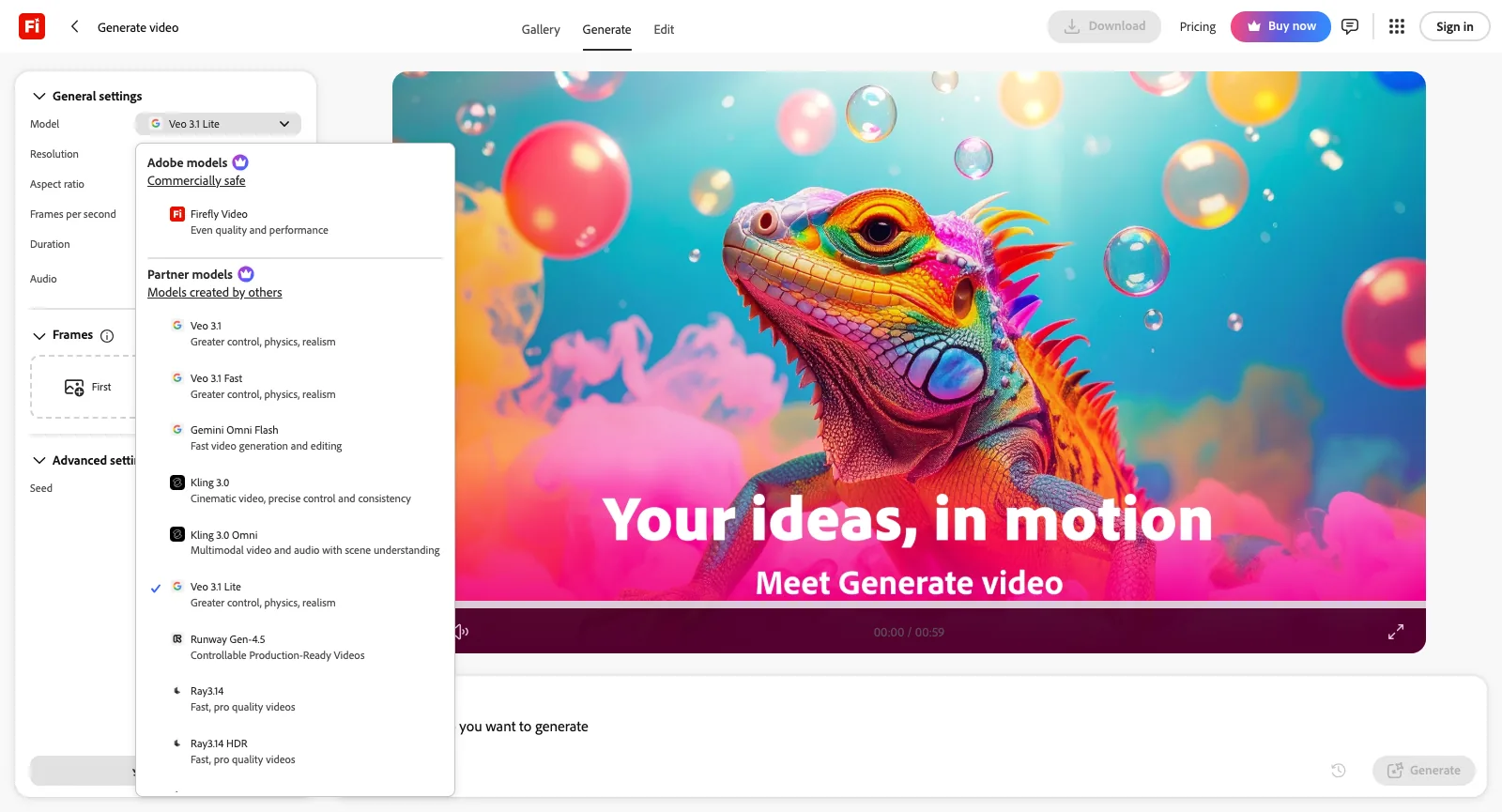
On the check date the logged-out Generate video menu listed Adobe’s own Firefly Video model, marked commercially safe, and partner models: Veo 3.1, Veo 3.1 Fast and Veo 3.1 Lite, Gemini Omni Flash, Kling 3.0, Kling 3.0 Omni and Kling 2.5 Turbo, Runway Gen-4.5 and Luma’s Ray3.14, Ray3.14 HDR, Ray3, Ray3 HDR and Ray2. The default Veo 3.1 Lite offered 720p or 1080p, 16:9 or 9:16, 4 to 8 seconds, an audio switch and first and last frames.

Adobe’s partner models help page also lists ByteDance’s Seedance 2.0 for Firefly, limited to individual plans; it did not appear in the logged-out menu. Every video spends generative credits: the Firefly Video model uses 20, 50 or 100 credits per second at 540p, 720p or 1080p, and Seedance 2.0 uses 40, 90 or 180 per second at 480p, 720p or 1080p.

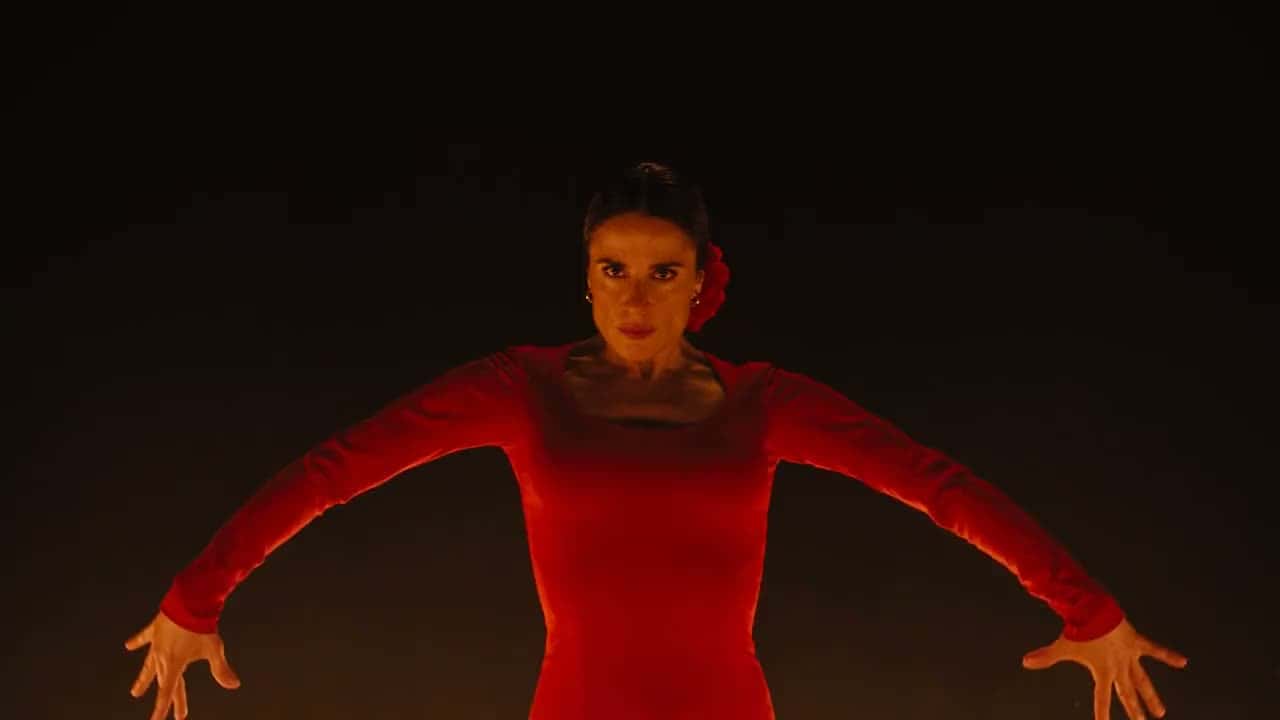
Frame from a Seedance 2.5 video made on SeedVideo AI

On SeedVideo AI

SeedVideo AI is built around video: Seedance 2.5 and 2.0 next to Kling 3.0, Veo 3.1, Wan 3.0 and MiniMax H3, with the credit cost shown before every run.

Try Seedance 2.5
Adobe Firefly Generate video, logged out, with the Model menu open: Firefly Video under Adobe models, then Veo 3.1, Veo 3.1 Fast, Gemini Omni Flash, Kling 3.0, Kling 3.0 Omni, Veo 3.1 Lite, Runway Gen-4.5, Ray3.14 and Ray3.14 HDR under partner models
Screenshot of firefly.adobe.com/generate/video, taken logged out on Oct 21, 2026.

Generate Image with Firefly Image 5, Nano Banana and GPT Image

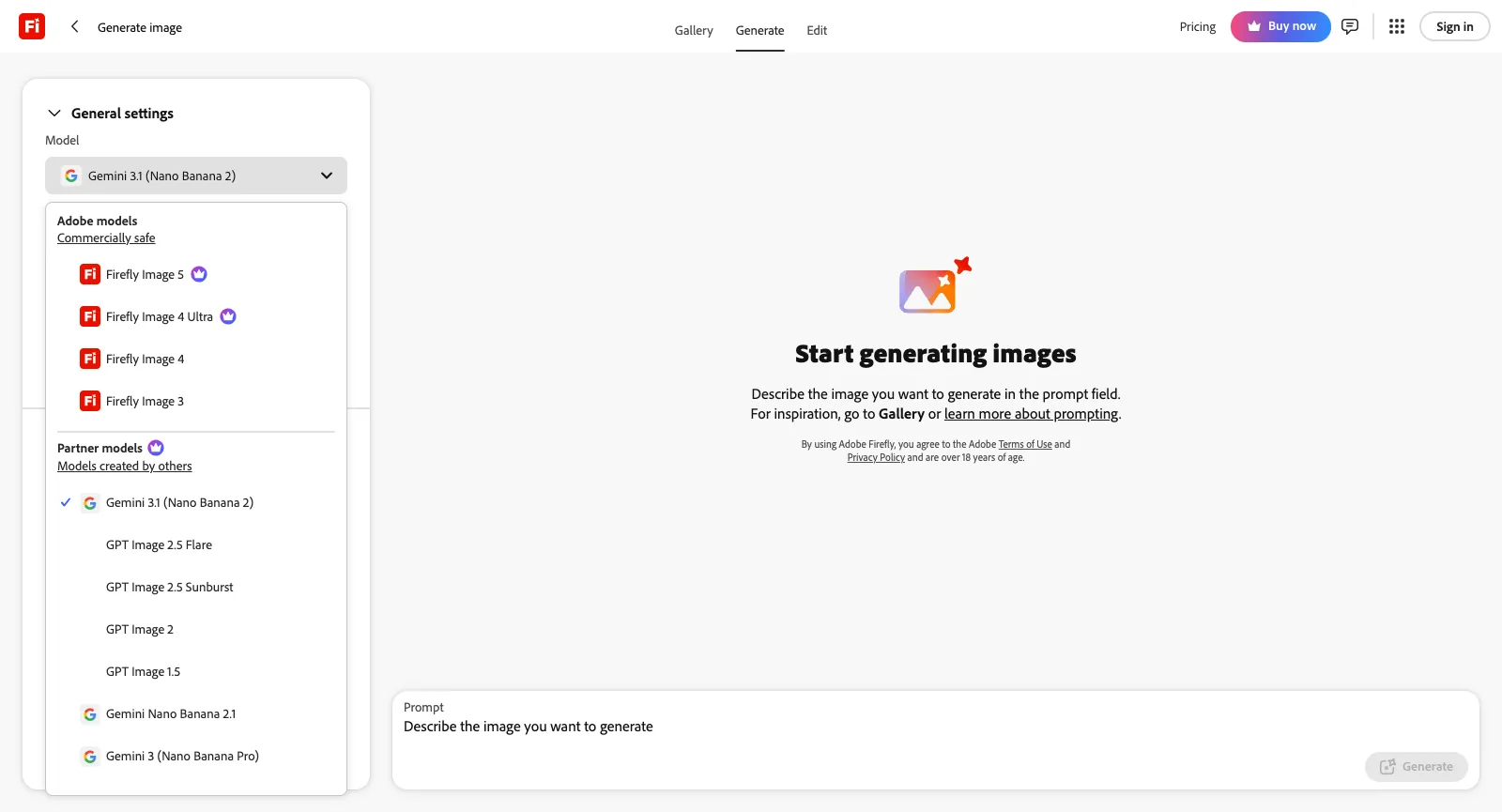
The Generate image menu offered Adobe’s Firefly Image 5, Image 4 Ultra, Image 4 and Image 3, then partner models: Gemini 3.1 (Nano Banana 2) as the default, GPT Image 2.5 Flare and Sunburst, GPT Image 2 and 1.5, Nano Banana 2.1 and Nano Banana Pro, FLUX.2 [pro], FLUX.1 Kontext and FLUX1.1, Runway Gen-4 Image and HUMAIN Image 1.

Settings include Auto and 14 aspect ratios from 8:1 to 1:8, 512 to 4K resolution, up to 6 reference images and an option to let Google Search inform the result. All paid plans include unlimited standard generations on Firefly Image 3 and 4; partner models spend credits, from 5 to 80 per image on Adobe’s list.

Image made with GPT Image 2.5

On SeedVideo AI

SeedVideo AI’s image generator runs GPT Image 2.5, Nano Banana 2.1 and Seedream 5.0, and Pro and Premium include 365 days of unlimited images on supported image models.

Try the image generator
Adobe Firefly Generate image, logged out, with the Model menu open: Firefly Image 5, Image 4 Ultra, Image 4 and Image 3 under Adobe models, and Gemini 3.1 (Nano Banana 2), GPT Image 2.5 Flare and Sunburst, GPT Image 2 and 1.5 and Nano Banana Pro under partner models
Screenshot of firefly.adobe.com/generate/image, taken logged out on Oct 21, 2026.

One Prompt Box for Images, Video and Edits

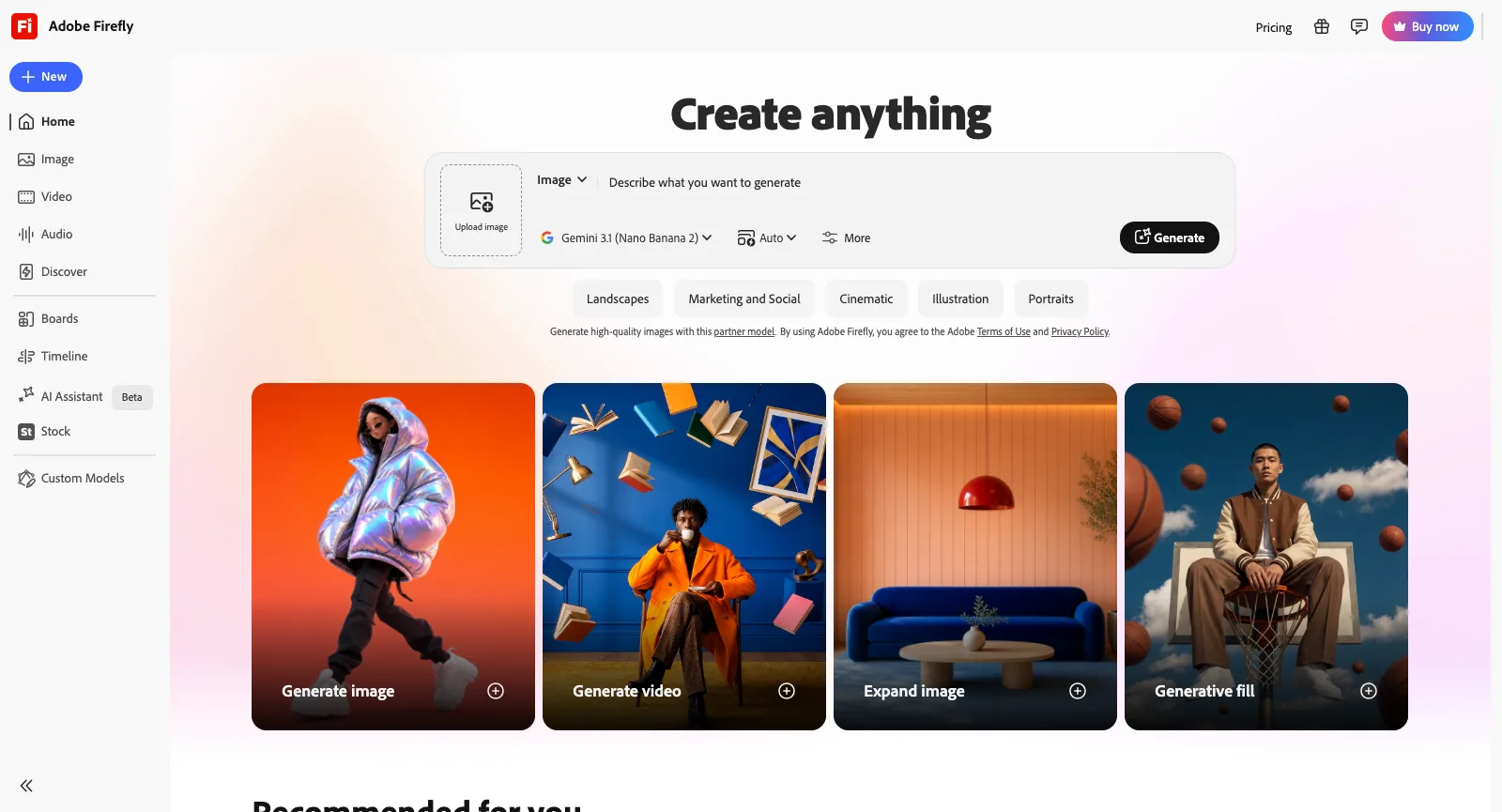
Firefly’s home page opens on a Create anything box that switches between image and video, takes an uploaded image and a model, and suggests prompt styles such as Landscapes, Marketing and Social and Cinematic. Below it sit Generate image, Generate video, Expand image and Generative fill, and quick actions to upscale, remove objects, cartoonize, edit with a prompt or turn an image into a video.

Adobe says Firefly accepts prompts in more than 100 languages and that it has been used to generate over 18 billion assets. Creations sync between the web and the iPhone and Android apps, and can be opened in Photoshop, Premiere or Adobe Express.

Image-to-video example frame

On SeedVideo AI

Finished an image? On SeedVideo AI, upload it as the first frame and describe the motion; Seedance 2.5 also takes image, video and audio references.

Image to video
Adobe Firefly home page, logged out: Create anything prompt box with Image mode and Gemini 3.1 (Nano Banana 2) selected, style chips, and Generate image, Generate video, Expand image and Generative fill cards
Screenshot of firefly.adobe.com, taken logged out on Oct 21, 2026.

Firefly Video Editor, Prompt to Edit and Upscale Video

Adobe’s video generator page describes the Firefly AI video editor as a place to trim and reorder clips, swap models mid-edit, regenerate or extend any segment and add voiceovers, music and sound effects; the app lists it as Timeline, and Adobe’s help center marks the video editor as beta.

By Adobe’s partner models page, Prompt to Edit Video can run on Kling 3.0 Omni, and Upscale Video uses Topaz Astra at 5 to 20 credits per second.

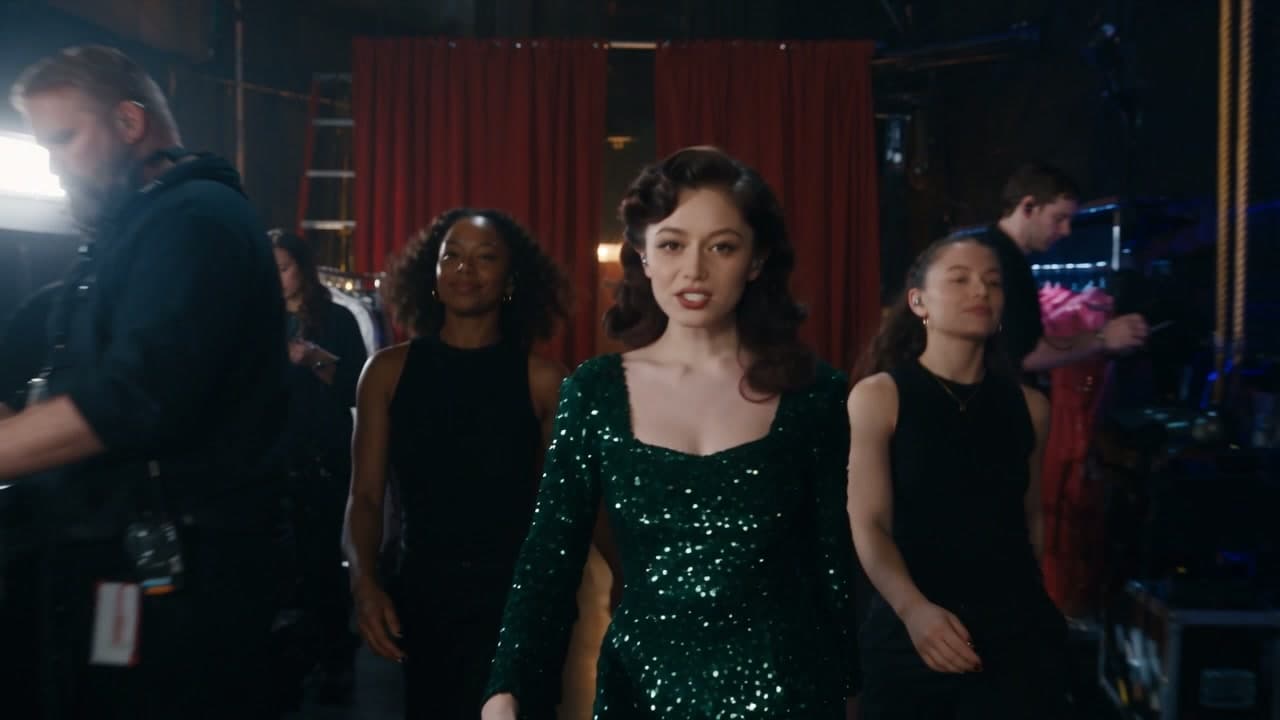
Frame from a Seedance 2.5 clip made on SeedVideo AI

On SeedVideo AI

On SeedVideo AI, Seedance video to video replaces a person, swaps an object, changes the background or extends the shot in a clip you upload.

Video to video

Sound Effects, Speech, Music and Translation

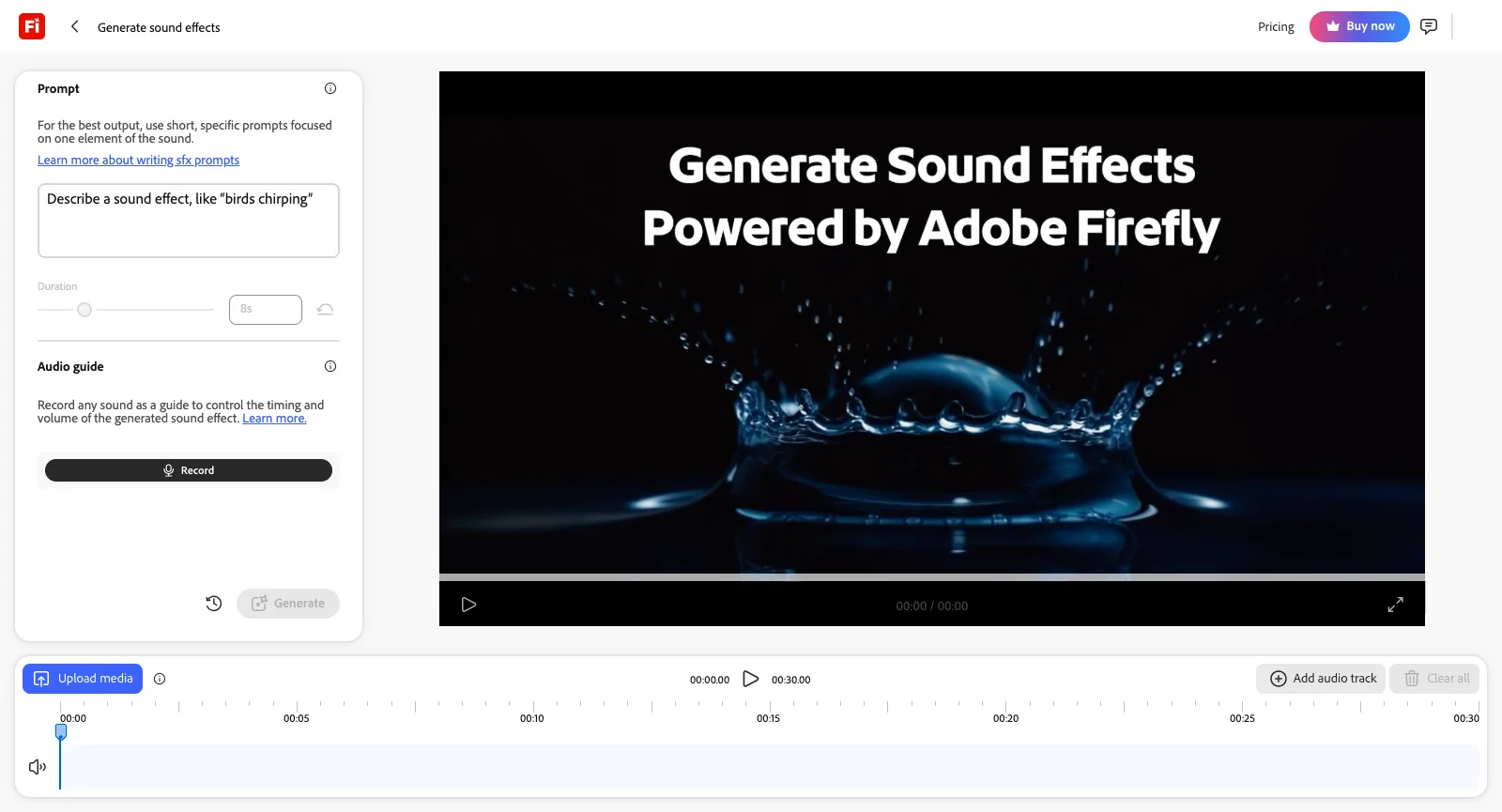
The Audio section offers Generate speech, Generate sound effects, Generate music, Enhance speech and Translate audio. Generate sound effects takes a short prompt, a duration and an optional voice recording that sets the timing, and lays results on a 30-second timeline over an uploaded clip; logged out it offered 10 complimentary generations.

Adobe says translation covers more than 20 languages and keeps the original speaker’s voice. On paid plans sound effects cost 10 credits per generation, music 20 credits per minute and translation 5 credits per second, which is why the plans page counts up to 200 sound effects or 6 minutes of translation on Standard.

Adobe Firefly Generate sound effects workspace, logged out: prompt box, duration slider, Audio guide with a Record button, a preview player and an audio timeline with Upload media and Add audio track
Screenshot of firefly.adobe.com, Audio, Generate sound effects, taken logged out on Oct 21, 2026.

Firefly Boards for Mood Boards and Storyboards

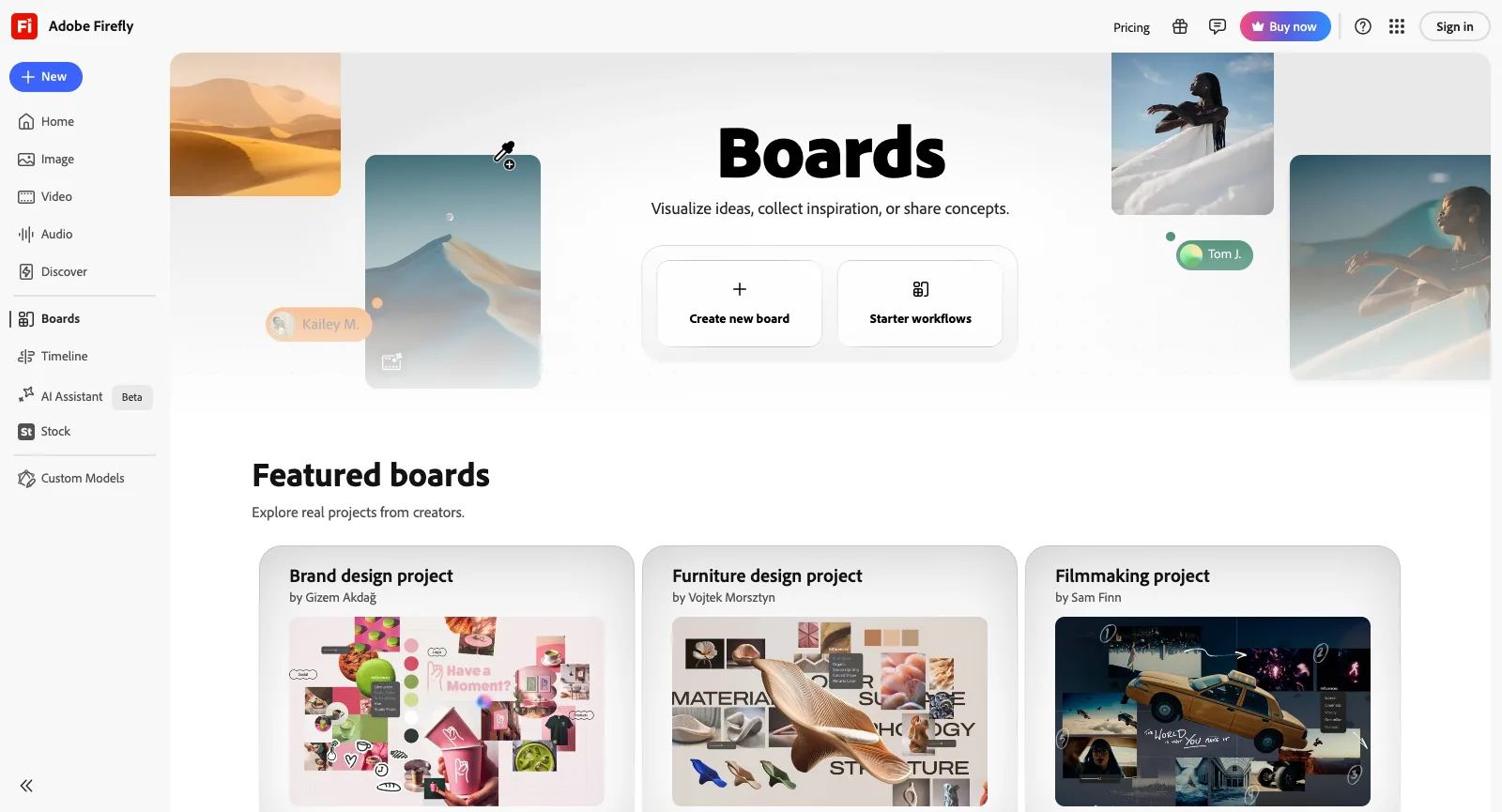
Boards is Firefly’s shared canvas: start a new board or a starter workflow, drop in references, generate images and videos in place, and arrange them as mood boards, storyboards or brand concepts. Adobe suggests running the same prompt through several models and labeling each result by model for stakeholders.

Every paid plan includes unlimited access to Boards, though the generations inside a board still spend credits by model; the logged-out Boards page showed featured brand, furniture and filmmaking projects.

Frame from a Seedance showcase video on SeedVideo AI

On SeedVideo AI

Exploring ideas for a video? Seedance 2.5 on SeedVideo AI follows camera moves written into the prompt, and the showcase shows tested examples.

Browse the showcase
Adobe Firefly Boards page, logged out: Create new board and Starter workflows, with featured boards for a brand design project, a furniture design project and a filmmaking project
Screenshot of firefly.adobe.com/boards, taken logged out on Oct 21, 2026.

Commercially Safe Models and Content Credentials

Adobe says its Firefly models are trained on licensed content such as Adobe Stock and on public domain content whose copyright has expired, never on subscribers’ personal content, and calls their outputs safe for commercial use; eligible enterprise customers can add IP indemnification. Outputs carry Content Credentials that record that AI was used.

Partner models are not made by Adobe: you must confirm you are 18 or older to use them, and Adobe says you are responsible for judging whether their output suits your project. Generative credits work across Photoshop, Illustrator, Premiere, Lightroom and Adobe Express too.

Adobe Firefly Product Positioning and Background

Firefly is made by Adobe Inc., the San Jose, California company behind Photoshop, Premiere and Acrobat, which has been making software since 1982. Adobe introduced Firefly on March 21, 2023 as a family of creative generative AI models, first for images and text effects, with plans to build it into Creative Cloud, Adobe Express and its business clouds. Under its General Terms of Use, effective October 3, 2025, North American users contract with Adobe Inc. under California law, users outside North America and Japan with Adobe Systems Software Ireland Limited under Irish law, and Japanese users with Adobe KK.

Adobe positions Firefly as the commercially safe choice for brands and creative teams, and as a single place to use other labs’ models: Google’s Veo and Nano Banana, OpenAI’s GPT Image, Kling, Runway, Luma, Black Forest Labs’ FLUX, ElevenLabs and Topaz. Its standalone plans add Photoshop on the web and mobile and Adobe Express Premium from Firefly Pro up.

SeedVideo AI is an independent platform built around Seedance video, with Kling, Veo, Sora, Wan and MiniMax as options and a smaller set of image models, published credit prices and one-time credit packs.

Who Uses Adobe Firefly: Real-World Use Cases

Firefly is built around these groups. If you already work in Adobe’s apps or need commercially safe output for a brand, it fits naturally; if you mostly make AI video and want Seedance, a video-first generator may suit you better.

Marketers and brand teams

Make campaign visuals, social graphics and localized versions with models trained on licensed content, then finish them in Adobe Express.

Photographers and designers

Fix, expand and clean up photos with Generative Fill, Expand, Remove Object and Upscale, and open the result in Photoshop.

Video editors

Generate B-roll, atmospheric layers and sound effects, and extend or edit clips that go on to Premiere.

Social and YouTube creators

Turn a prompt or a photo into short clips, thumbnails and covers from the web or the iPhone and Android apps.

Art directors

Collect references and compare several models side by side on Firefly Boards before a shoot or a pitch.

Localization teams

Translate video and audio into more than 20 languages while keeping the original speaker’s voice.

Adobe Firefly Reviews: What Real Users Say

Firefly’s own Trustpilot profile, for firefly.adobe.com, is unclaimed and rated 1.8 from 28 reviews: 23 one-star, one four-star and none five-star. Adobe’s claimed main profile, which covers all its products, is rated 1.1 from 7,541. We read all 28 Firefly reviews and the 25 reviews a search for Firefly finds on Adobe’s main profile, in every language, and the 50 most recent US App Store reviews of the iPhone app; of those 50, 12 gave four or five stars and 33 gave one or two, many of them about a “Slow down” message. App Store reviews have no permalinks, so the themes below link only to Trustpilot reviews; one review can count toward several themes.

US App Store

4.7 / 5

11K ratings. Adobe Firefly AI Video & Photo for iPhone, by Adobe Inc., released June 2025

View source

Trustpilot (firefly.adobe.com)

1.8 / 5

28 reviews. Unclaimed profile; no replies to its 24 negative reviews

View source

Trustpilot (www.adobe.com)

1.1 / 5

7,541 reviews. Claimed profile for all of Adobe, not only Firefly

View source
Firefly Adobe on Trustpilot, logged out: unclaimed profile, 1.8 TrustScore from 28 reviews, mostly one-star, and no history of asking for reviews
Screenshot of trustpilot.com/review/firefly.adobe.com, taken logged out on Oct 21, 2026.

What users like

  1. 01

    Good at editing still images

    A four-star reviewer who edits product photos calls Firefly one of the best tools for removing flaws and enhancing still images, though not for complex scenes. Recent five-star App Store reviews praise its image quality and artistic styles.

  2. 02

    Useful inside the wider Adobe toolkit

    A long-time Adobe customer who uses Firefly next to Photoshop, Premiere and Express says Adobe is getting surprisingly competitive in generative AI, and a small-business owner on Creative Cloud used Firefly to record the greetings for a business phone line.

What users complain about

  1. 01

    Errors and “Slow down” limits that block generating

    The most common complaint: generations that end in “Something went wrong” or “try again later”, a Pro Plus trial that could not run any partner model, and, across recent App Store reviews, a “Slow down” security limit shown on the first generation of the day.

    What SeedVideo AI does

    Credit runs use the standard channel, not the unlimited queue; a Premium unlimited run waiting in the free queue can switch to credits and start now, and a run that fails releases its credits.

  2. 02

    Credits spent on failed or unusable results

    Reviewers say credits went on videos that never generated and on results that ignored the prompt, one counting 6 of 10 trial generations as unusable at 400 credits each, and a long-time Photoshop user asks for a preview before credits are taken.

    What SeedVideo AI does

    A failed run releases its credits, and the cost of every clip shows before it runs; a finished video you are unhappy with is still charged. One-time pack credits last 180 to 365 days.

  3. 03

    Credits that reset every month

    Subscribers ask for unused credits to carry over instead of resetting each month, and say a single image is slow and takes a lot of credits.

    What SeedVideo AI does

    One-time packs from $29.90 add credits without a subscription, and pack credits last 180 to 365 days.

  4. 04

    Cancelling and charges after cancelling

    On both profiles, trial and Firefly Standard subscribers describe cancel buttons that never worked and charges that continued after a confirmed cancellation, and one notes that access ended at once instead of at the end of the month.

    What SeedVideo AI does

    Support is one address, support@seeddance.io, listed in the site footer, and refunds follow one published rule: new purchases within 3 days, if none of that purchase’s credits were used, minus payment fees of up to 4% + $1.50; renewals are non-refundable.

  5. 05

    “Free” that turns out to need a plan

    Reviewers who came for the advertised free video generator say it asked for a subscription before generating, or that the free result was too poor to justify a monthly plan.

    What SeedVideo AI does

    Free sign-up credits need no card and run entry models such as Seedance 2.0 Mini at up to 720p; every model shows its credit cost before you generate.

Ratings and reviews were read on Oct 21, 2026. The firefly.adobe.com profile is unclaimed and Trustpilot shows no history of Adobe asking for reviews there; the www.adobe.com profile covers every Adobe product. The App Store rating is for the US store only. Reviews are summarized, not quoted; open each link for the full text.

Adobe Firefly Pricing and Plans in 2026

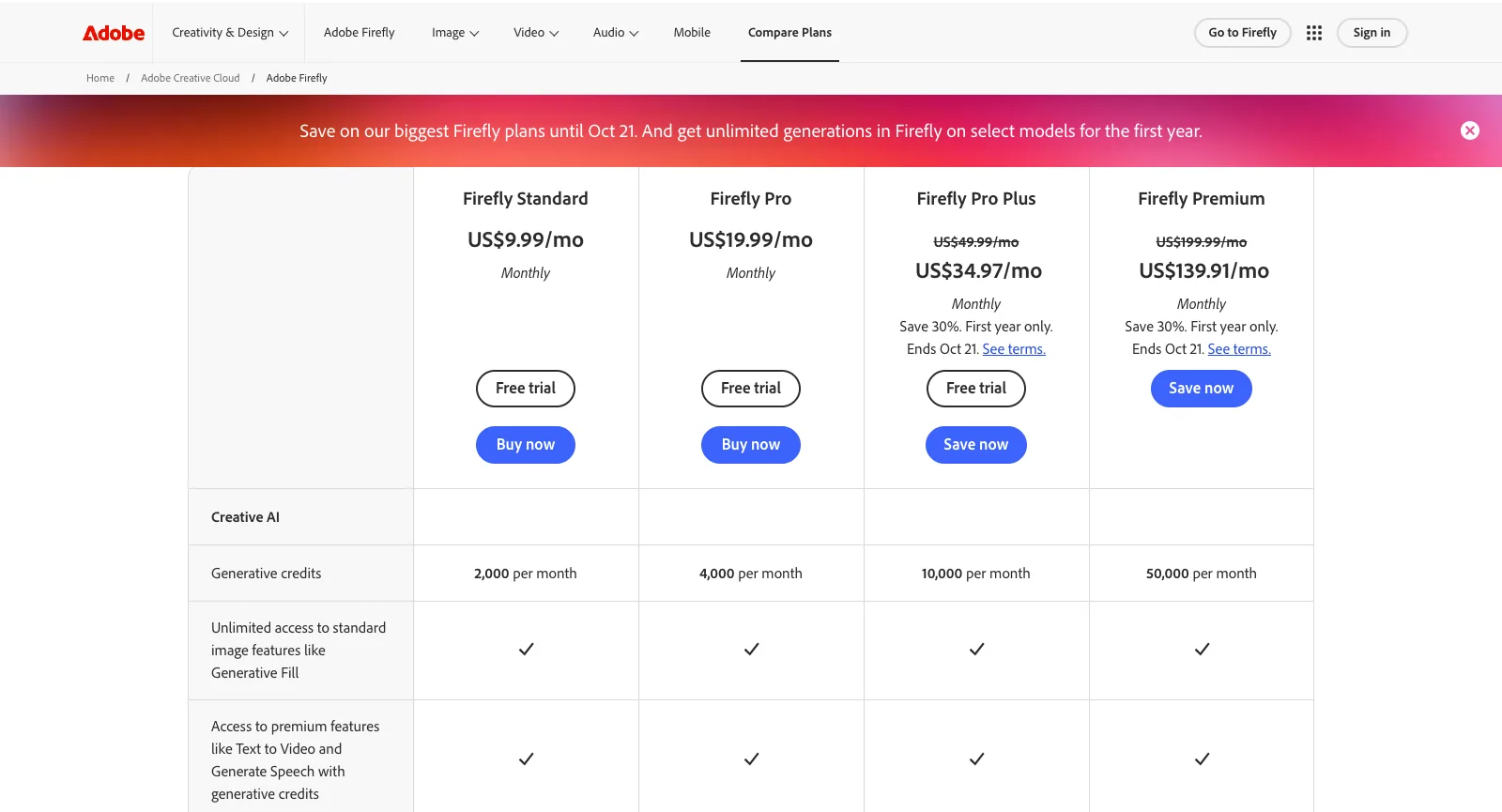
Firefly sells four plans, each billed monthly, on an annual plan paid monthly or prepaid for a year, plus monthly credit add-ons, on top of a free tier. Each plan is a monthly credit allowance that does not roll over, with unlimited standard image features; video, audio and partner models spend credits at their own rates. Here is how the plans line up with SeedVideo AI.

Adobe Compare Firefly plans page, US: Firefly Standard US$9.99/mo, Firefly Pro US$19.99/mo, Firefly Pro Plus and Firefly Premium with a 30% first-year offer ending Oct 21, and 2,000, 4,000, 10,000 and 50,000 generative credits per month
Screenshot of adobe.com/products/firefly/plans.html, taken logged out on Oct 21, 2026.
Free planAdobe FireflyFree daily generations across image, video and audio, with models such as Nano Banana and Luma Ray3.14; limits refresh every daySeedVideo AIFree sign-up credits with no card; entry models such as Seedance 2.0 Mini, up to 720p
Entry planAdobe FireflyFirefly Standard: $9.99/mo, $8.49/mo on an annual plan or $83.99/yr prepaid. 2,000 credits/mo, unlimited standard image features, up to 20 five-second videosSeedVideo AILite: $14.90/mo, or $13/mo billed yearly. 100 credits/mo, Seedance 2.5 at up to 720p (other models up to 1080p); commercial use on yearly billing only
Mid planAdobe FireflyFirefly Pro: $19.99/mo, $16.99/mo on an annual plan or $167.99/yr prepaid. 4,000 credits/mo, Photoshop on web and mobile and Adobe Express PremiumSeedVideo AIPro: $29/mo, or $14.50/mo billed yearly. 200 credits/mo, up to 2K, commercial use
Top plansAdobe FireflyFirefly Pro Plus: $49.99/mo, $41.99/mo annual or $419.99/yr, 10,000 credits. Firefly Premium: $199.99/mo, $169.99/mo annual or $1,679.99/yr, 50,000 credits and unlimited Firefly Video modelSeedVideo AIPremium: $149/mo, or $99/mo billed yearly. 1,300 credits/mo, 4K output, Motion Control
Seedance 2.5Adobe FireflyNot offered. Adobe lists Seedance 2.0 for individual plans at 40, 90 or 180 credits per second for 480p, 720p or 1080pSeedVideo AIIncluded from Lite up: clips up to 30 seconds with synchronized audio and image, video and audio references; 720p on Lite, 1080p from Pro and on credit packs
Unlimited videoAdobe FireflyPremium: unlimited Firefly Video model. A first-year offer adds Kling 2.5 Turbo on Pro Plus and Veo 3.1 Fast and Kling 3.0 on Premium, on the web app and mobile app onlySeedVideo AIPremium: 7 days of unlimited Seedance 2.5 and 2.0 video (up to 1080p, up to 10 s per clip, free queue), once per account
Unlimited imagesAdobe FireflyEvery paid plan: standard features such as Firefly Image 3 and 4, Generative Fill and Expand. The first-year offer adds partner image models from Pro, such as Nano Banana 2 and FLUX.2 ProSeedVideo AIPro and Premium: 365 days of unlimited images on supported image models
Buying credits without a planAdobe FireflyNo: credit add-ons are monthly subscriptions, from $9.99 a month for 2,000 credits to $199.99 for 50,000SeedVideo AIOne-time credit packs with no subscription, from $29.90 (200 credits) to $999 (8,000 credits), commercial use included
RefundsAdobe FireflyFull refund within 14 days of first purchase for most plans. After that, monthly plans cancel with no fee, annual plans paid monthly charge 50% of the remaining commitment, and prepaid annual plans are not refunded (US terms)SeedVideo AINew purchases within 3 days if none of that purchase’s credits have been used; renewals are non-refundable; payment fees of up to 4% + $1.50 are deducted

Adobe Firefly prices were read on adobe.com/products/firefly/plans.html, in Adobe’s checkout plan picker and in its US subscription terms on Oct 21, 2026 and are US prices before tax. On the check date Pro Plus and Premium had a 30% first-year offer for first-time US subscribers, $34.97 and $139.91 a month with a 12-month commitment, ending Oct 21, 2026; Adobe can change its unlimited first-year models at any time. SeedVideo AI prices match our pricing page.

Adobe Firefly vs SeedVideo AI vs Higgsfield: Feature Comparison

Three different starting points: Adobe Firefly as a creative suite’s AI app with commercially safe models and many partner models, SeedVideo AI as a Seedance-first video generator, and Higgsfield as a multi-model suite with its own cinematic tools.

Core approachAdobe FireflyAdobe’s creative AI app: commercially safe Firefly models plus partner models, Boards, a video editor and credits shared with Creative CloudSeedVideo AISeedance-first video generator with Kling, Veo, Wan and MiniMax as optionsHiggsfieldMulti-model platform with Cinema Studio, Genjutsu, AI Influencer and an agent
Seedance 2.5Adobe FireflyNot offered; Adobe’s help page lists Seedance 2.0 for individual plansSeedVideo AIFrom Lite: up to 30 s with audio, 720p on Lite, 1080p from ProHiggsfieldFrom Plus; Starter has Seedance 2.0 Fast and 2.0 Mini only
Other video modelsAdobe FireflyFirefly Video, Veo 3.1, Kling 3.0 and 3.0 Omni, Runway Gen-4.5, Luma Ray3.14, Gemini Omni FlashSeedVideo AIKling 3.0, Veo 3.1, Wan 3.0, MiniMax H3HiggsfieldKling, Sora, Veo, Wan, Hailuo, Grok and its own
Unlimited videoAdobe FireflyPremium: unlimited Firefly Video model; first-year offer adds Veo 3.1 Fast and Kling 3.0SeedVideo AIPremium: 7 days of unlimited Seedance 2.5 and 2.0, once per accountHiggsfield7-day Kling 3.0 and Wan 3.0 on Plus and Ultra; Seedance 2.5 on business plans
Credits without a subscriptionAdobe FireflyNo: credit add-ons are monthly plans from $9.99 for 2,000 creditsSeedVideo AIYes: one-time packs from $29.90, valid 180 to 365 daysHiggsfieldNo: packs for subscribers only, valid 90 days
Refund windowAdobe Firefly14 days from first purchase for most plans (US terms)SeedVideo AI3 days for new purchases, if none of their credits were used; renewals non-refundableHiggsfield7 days, first purchase only, no credits used

Adobe Firefly facts were read on its official plans, product, help and terms pages on Oct 21, 2026, Higgsfield facts on Oct 14, 2026.

Why Creators Switch from Adobe Firefly to SeedVideo AI

Most people who move want Seedance video, or want to pay for video credits once instead of every month.

  1. 01

    Seedance 2.5 in the same generator

    Lite ($13/month billed yearly) already includes Seedance 2.5, Kling, Veo and Sora, with Seedance 2.5 at 1080p from Pro and on credit packs. Firefly lists no Seedance 2.5; its Seedance 2.0 costs 180 credits per second at 1080p, so one 10-second clip would use 1,800 of Firefly Standard’s 2,000 monthly credits.

  2. 02

    Credits without a subscription

    One-time credit packs from $29.90 need no plan and show the cost before every run. Firefly’s credit add-ons are monthly subscriptions, and plan credits reset every month without rolling over.

  3. 03

    A week of unlimited Seedance on Premium

    Premium ($99/month billed yearly) includes 7 days of unlimited Seedance 2.5 and 2.0 once per account, up to 11 ten-second 720p clips, and a failed run never costs credits. Firefly Premium’s unlimited video is the Firefly Video model, plus Veo 3.1 Fast and Kling 3.0 in the first year, at $199.99 a month.

Stay with Adobe Firefly if…

  • You need models trained on licensed content, with Content Credentials, for brand or client work.
  • You already work in Photoshop, Premiere, Illustrator or Express and want one credit balance across them.
  • You want sound effects, speech, music and video translation next to image and video generation.

Explore More Adobe Firefly Alternatives

Eight more platforms worth a look. Starting prices are the cheapest paid plan each official pricing page showed on Oct 13, 2026, before tax; they buy different amounts of generation, so use them to shortlist, not to rank.

Higgsfield

Multi-model platform with in-house tools (Cinema Studio, AI Influencer, Ads Studio, Soul images), team plans and published per-5-second credit rates for Kling 3.0 and Seedance 2.0.

Good fit: Creators who want Higgsfield’s own tools, or Kling 3.0 at its low published rate (about 7 credits per 5 seconds at 720p).

Not ideal: Seedance on the entry plan: Starter includes only Seedance 2.0 Fast and 2.0 Mini.

Starts at: Starter, $19/mo billed monthly or yearly, 270 credits/mo. The free tier is listed as “Limited use”.

Full Higgsfield comparisonOfficial pricing

Pollo AI

Aggregator with a very large model menu plus its own Pollo models, ready-made video and image apps, Agent and Marketing Studio, MCP, API and mobile apps.

Good fit: People who want the widest choice of models; its current 60% subscriber discount undercuts SeedVideo AI’s Seedance prices on most plans.

Not ideal: Buying credits without a subscription; unused subscription credits do not roll over.

Starts at: Lite, $15/mo or $12/mo billed yearly, 400 credits/mo.

Full Pollo AI comparisonOfficial pricing

Runway

Creative suite built on Runway’s own models (Gen-4.5, Aleph, Act-Two) with music, voice and sound-effect generation, 4K upscaling and third-party models such as Seedance and Kling.

Good fit: Editing-heavy projects that need more than generation.

Not ideal: High clip volume on the entry plan: Runway says Standard’s 625 credits cover about 52 seconds of Gen-4.5.

Starts at: Standard, $15/mo or $12/mo billed yearly, 625 credits/mo. Free plan with 125 one-time credits.

Official pricing

Kling AI

The official home of the Kling models, including Kling 3.0 and 3.0 Omni with synchronized audio, Motion Control, native 4K video and an API platform.

Good fit: People who only use Kling and want it first-party.

Not ideal: Seedance users: Seedance is not offered on its pricing or home page.

Starts at: Standard, $6.99 for the first month, then $8.80/mo, or $79.20 billed yearly; 660 credits/mo.

Official pricing

Hailuo AI (MiniMax)

MiniMax’s own video app for its Hailuo and MiniMax H3 models, with Omni Reference (up to 12 reference images) and Hailuo Agent; paid plans also list Veo 3.1 and Sora 2.

Good fit: Creators who prefer MiniMax’s own models and pricing per second.

Not ideal: Seedance users: Seedance is not listed on its pricing page, and the free trial covers Hailuo models only.

Starts at: Standard, $10.50/mo (sale price on the check date) or $8.40/mo billed yearly, 1,000 credits/mo.

Official pricing

Luma Dream Machine

Luma’s Ray3.2 video and Uni-1 image models with Luma Agents and connectors such as Figma and Frame.io; its credit table also lists Seedance 2.5, 2.0 and 2.0 Mini.

Good fit: Teams that want Ray3.2 and agent workflows in their design tools.

Not ideal: Trying things cheaply: the pricing page has no free plan and paid plans start at $25/mo.

Starts at: Plus, $30/mo or $25/mo billed yearly, 10,000 credits/mo, commercial use.

Official pricing

PixVerse

PixVerse’s own V6 model with native audio, the R2 real-time model, Agent, Canvas, Lip Sync and an API. Seedance 2.5 and 2.0 appear only on the Pro plan and above.

Good fit: Quick social clips, with daily free credits (60 to start, then 30 a day, up to 540p).

Not ideal: Seedance on a budget: Standard covers PixVerse models only and tops out at 720p.

Starts at: Standard, $10/mo or $8/mo billed yearly, 1,200 credits every 30 days plus 60 a day.

Official pricing

Vidu

Vidu’s own Q4 and Q3 models and the real-time Vidu S, with Reference to Video, Vidu Agent and an API platform.

Good fit: Reference-to-video work on Vidu’s own models; Q4 at 540p costs 2 credits a second on paid plans.

Not ideal: Seedance users: Seedance is not offered on its pricing page.

Starts at: Standard, $10/mo or $8.25/mo billed yearly, 800 credits/mo.

Official pricing

Frequently Asked Questions

Answers about Adobe Firefly, checked on Oct 21, 2026.

What is Adobe Firefly used for?
Adobe Firefly is used to generate and edit images, video and audio with AI: Firefly Image 5 or partner models such as Nano Banana and GPT Image for pictures, the Firefly Video model, Veo 3.1, Kling 3.0 or Runway Gen-4.5 for clips, plus sound effects, speech, music and video translation. Results open in Photoshop, Premiere and Adobe Express, and Boards collects them into mood boards and storyboards.
Is Adobe Firefly free?
Partly. Without a plan you get free daily generations across image, video and audio on models such as Nano Banana and Luma Ray3.14, and the limits refresh every day. More needs a paid plan: Firefly Standard costs $9.99 a month, $8.49 a month on an annual plan or $83.99 a year prepaid, for 2,000 credits a month that do not roll over.
Is Adobe Firefly safe for commercial use?
Adobe says outputs from its own Firefly models are safe for commercial use, because they are trained on licensed content such as Adobe Stock and on public domain content, and they carry Content Credentials. Partner models such as Veo, Kling or GPT Image are not made by Adobe, and Adobe says you are responsible for judging whether their output suits your project.
Does Adobe Firefly offer refunds?
For most plans, Adobe gives a full refund if you cancel within 14 days of your first purchase. After that, under its US terms, a monthly plan cancels with no fee and stays active to the end of the billing period, an annual plan paid monthly charges 50% of the remaining commitment, and a prepaid annual plan is not refunded. Failed generations usually return their credits within minutes, or up to 24 hours for video.
Does Adobe Firefly have Seedance?
Adobe’s partner models help page lists Seedance 2.0 and Seedance 2.0 Fast for Firefly, limited to individual plans, at 40, 90 or 180 credits per second for 480p, 720p or 1080p Seedance 2.0. It did not appear in the logged-out Generate video menu on Oct 21, 2026, and Firefly lists no Seedance 2.5.
What is the best Adobe Firefly alternative for video?
For Seedance video without a subscription, SeedVideo AI: Seedance 2.5 at up to 1080p, one-time credit packs from $29.90, no watermark on paid exports, and Kling, Veo, Sora, Wan and MiniMax in the same generator. If you want a cinematic toolset on top, Higgsfield is the closest multi-model option.
Is SeedVideo AI affiliated with Adobe?
No. SeedVideo AI is an independent platform that runs Seedance and other models. Adobe, Firefly and Seedance are trademarks of their owners and are named here only to review and compare products.

Your next Seedance videoStarts with one prompt

Sign up free with no card and test on the sign-up credits. The credit cost shows before every run.