

Kling 4.0 Free: 30 Seconds with Sound
Kling 4.0 generates up to 30 seconds with stereo audio and lip-sync in one pass, from a text prompt or from a first and last frame. Try Kling 4.0 online for free!
Seedance 2.5
Up to 30s clips with image, video and audio references.
Kling 4.0 Flash
Kling 4.0's fast tier: 720p clips with sound for fewer credits.
Wan 3.0
Up to 30s clips with native audio and lip-synced dialogue.
GPT Image 2.6
Generate and edit images with OpenAI's newest model.

GPT Image 2.5
Generate and edit images from 1 credit.
Nano Banana 2.1
Google's image model: sharper detail and cleaner text.
Seedream 5.5
Edit one image round after round; transparent PNG output.
Seedance 2.0
Multi-shot cinematic video with native audio and lip sync.
Kling 4.0 AI Video Examples
Kling 4.0 Features at a Glance
- 30-Second Kling 4.0 Videos in One Generation: Kling 4.0 renders 3 to 30 seconds per run, so one prompt can carry a whole beat, from setup to payoff, with the sound generated alongside the picture.
- Kling 4.0 Image to Video From a Single Still: Give Kling 4.0 one first frame and describe what should move. The framing, faces and colours of your image become the opening shot.
- Kling 4.0 Native Audio With Dialogue and Lip Sync: Every Kling 4.0 clip comes back with a stereo soundtrack. Put the lines in quotes and the characters speak them, mouths moving with the words.
- Kling 4.0 Text to Video With Lifelike People: Two sentences are enough for a natural, handheld vlog shot: Kling 4.0 fills in the person, the room and the way she talks to camera.
- Realistic Acting and Expressions in Kling 4.0: Glances, pauses and small changes of expression read clearly, so a scene plays like a performance.
- Kling 4.0 Camera Control for Fast Action: Push-ins, pull-backs, pans, tracking and orbit shots stay smooth, even in fast scenes.
- Kling 4.0 First and Last Frame Control: Add a first frame and, if you like, a last frame. Kling 4.0 fills in the motion between them, so a product, a pose or an ending lands exactly where you need it.
- Kling 4.0 Settings for Length, Resolution and Aspect Ratio: Length, resolution, aspect ratio, inputs and prompt limits as the generator offers them today.
- Kling 4.0 Specs and Capabilities: Kling’s own published specs for the full model. Items Kling marks as coming soon are labelled that way.
30-Second Kling 4.0 Videos in One Generation
Kling 4.0 renders 3 to 30 seconds per run, so one prompt can carry a whole beat, from setup to payoff, with the sound generated alongside the picture.
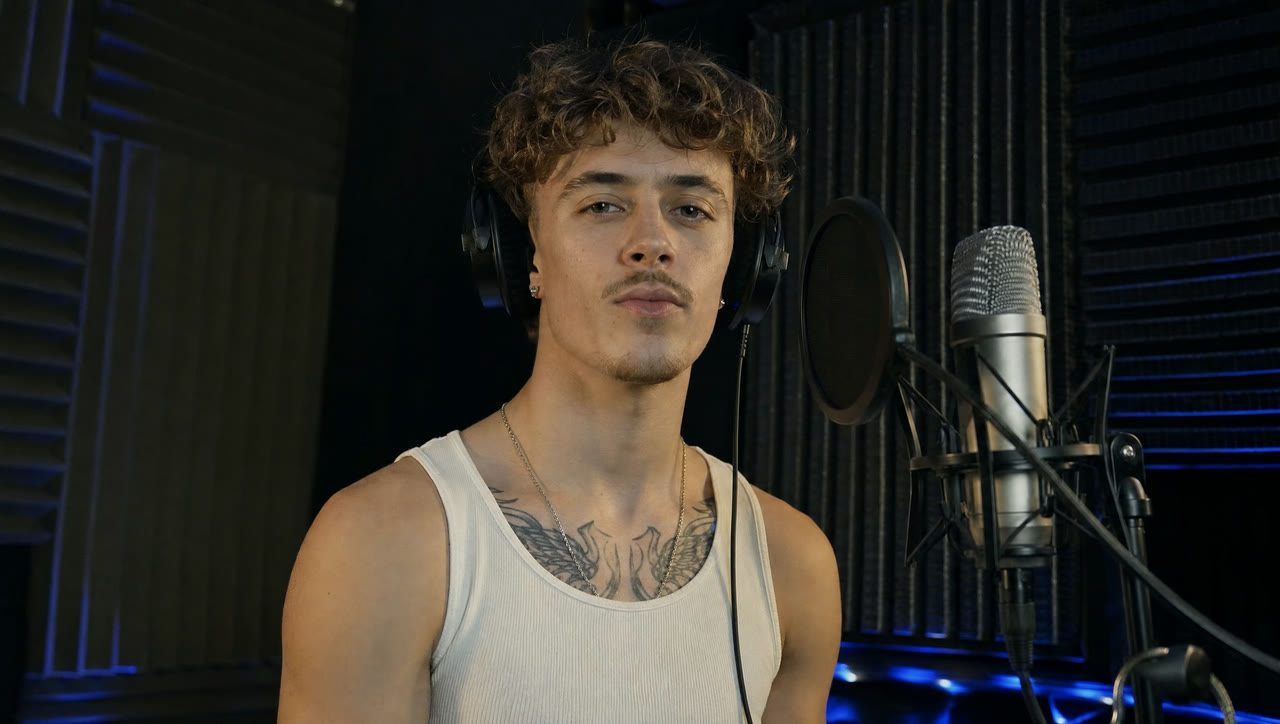
In this release demo from Kling the only input is a start frame of a young man at a microphone in a vocal booth. Kling 4.0 holds the shot for the full 30 seconds, with his voice and the room sound generated alongside and his lips matched to the audio.
Kling 4.0 Image to Video From a Single Still
Give Kling 4.0 one first frame and describe what should move. The framing, faces and colours of your image become the opening shot.
Kling published this demo with only its start frame: a sorceress among red threads and old coins. Kling 4.0 turned the still into 15 seconds of big, fast motion, threads whipping and coins flying at the lens, while her face and costume stay the same.

Kling 4.0 Native Audio With Dialogue and Lip Sync
Every Kling 4.0 clip comes back with a stereo soundtrack. Put the lines in quotes and the characters speak them, mouths moving with the words.
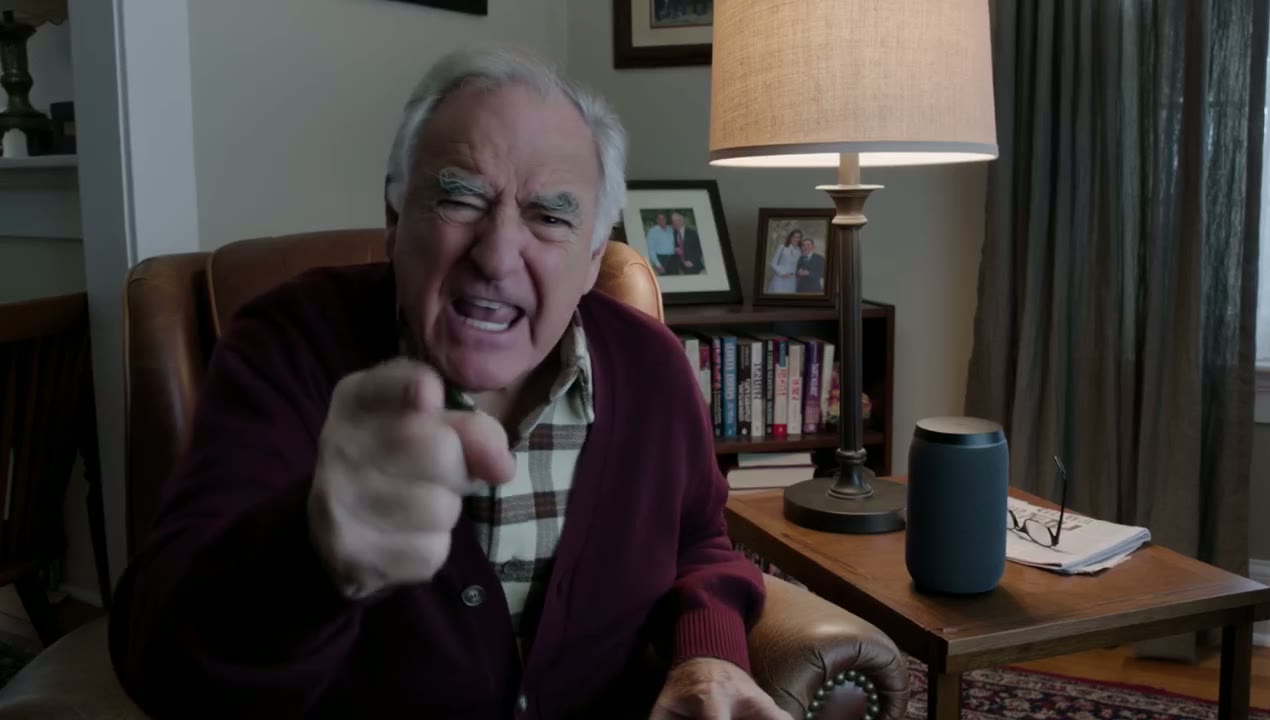
The whole prompt in the demo is one line, “An old man ranting about AI.” Kling 4.0 cast the man, dressed the living room and wrote the rant itself.
 Kling 4.0
Prompt: An old man ranting about AI. (Kling 4.0 · 16:9 · 15s · 1080p)
Kling 4.0 Text to Video With Lifelike People
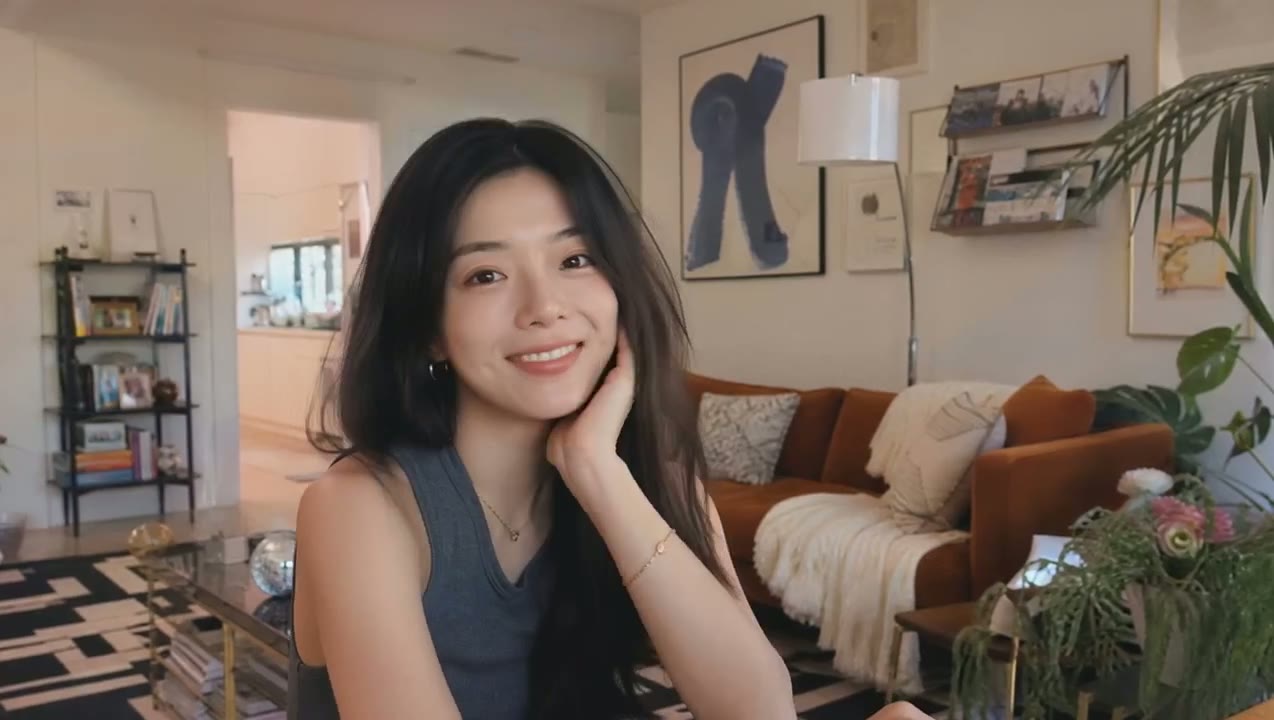
Two sentences are enough for a natural, handheld vlog shot: Kling 4.0 fills in the person, the room and the way she talks to camera.
The demo prompt is two sentences asking for a cheerful vlogger who introduces herself; the framing, the room and the way she talks to camera are all Kling’s.
 Kling 4.0
Prompt: A vlogger-style video in which the woman cheerfully introduces herself to the audience. Maintain a natural, authentic look and realistic image quality. (Kling 4.0 · 16:9 · 7s · 720p)
Realistic Acting and Expressions in Kling 4.0
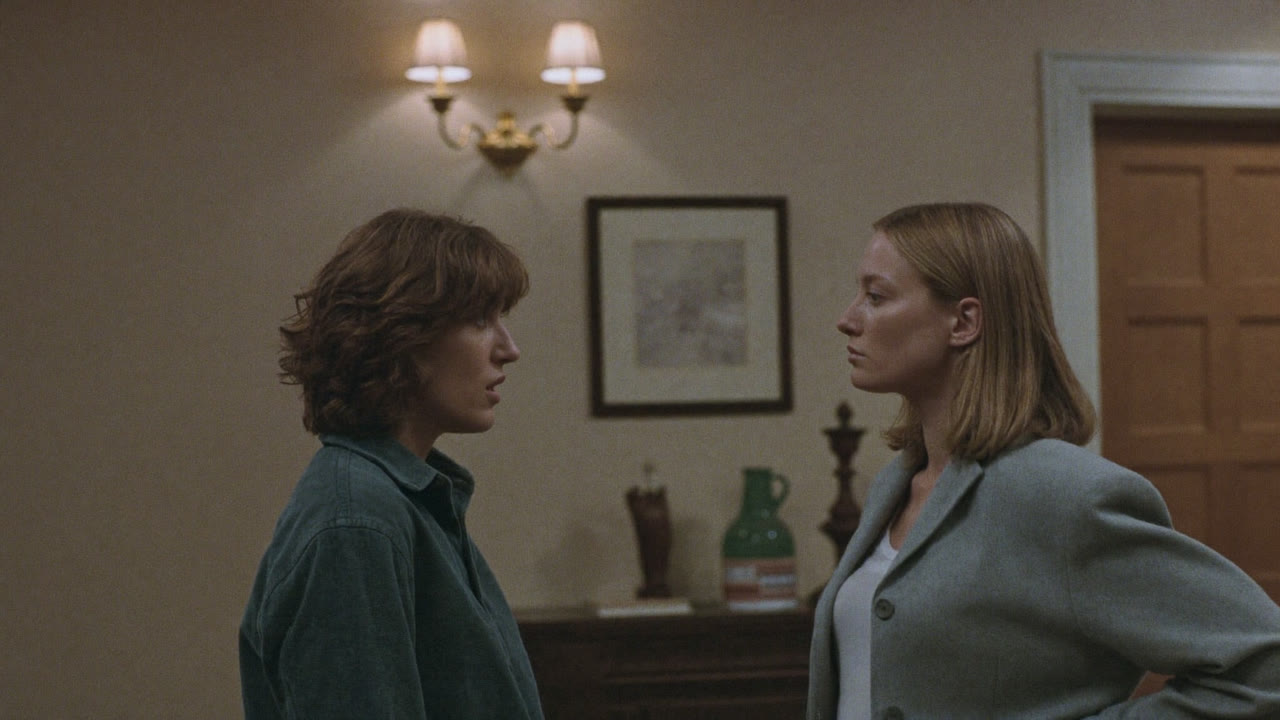
Kling 4.0 is better at the details that make people believable: a look held a beat too long, a hesitation before a line, the shift in posture when an argument turns. Skin, light and fabric stay natural from the first frame to the last.
Kling’s demo starts from a single frame of two women facing off in a hallway. The 11-second result plays out the confrontation: one of them turns and walks away, and the scene ends on something smashed on the floor.
Kling 4.0 Camera Control for Fast Action
Name the move in your prompt and Kling 4.0 carries it through: a push-in on a face, a pull-back that reveals the room, a tracking shot that keeps pace with a runner. Shot sizes change and cuts land without the picture wobbling or the characters drifting off-model.
In this 10-second release demo two taekwondo fighters spar while the camera stays in close, rises to an overhead view of the mat and drops back to eye level, with every strike and step still sharp.
Kling 4.0 First and Last Frame Control
Add a first frame and, if you like, a last frame. Kling 4.0 fills in the motion between them, so a product, a pose or an ending lands exactly where you need it.
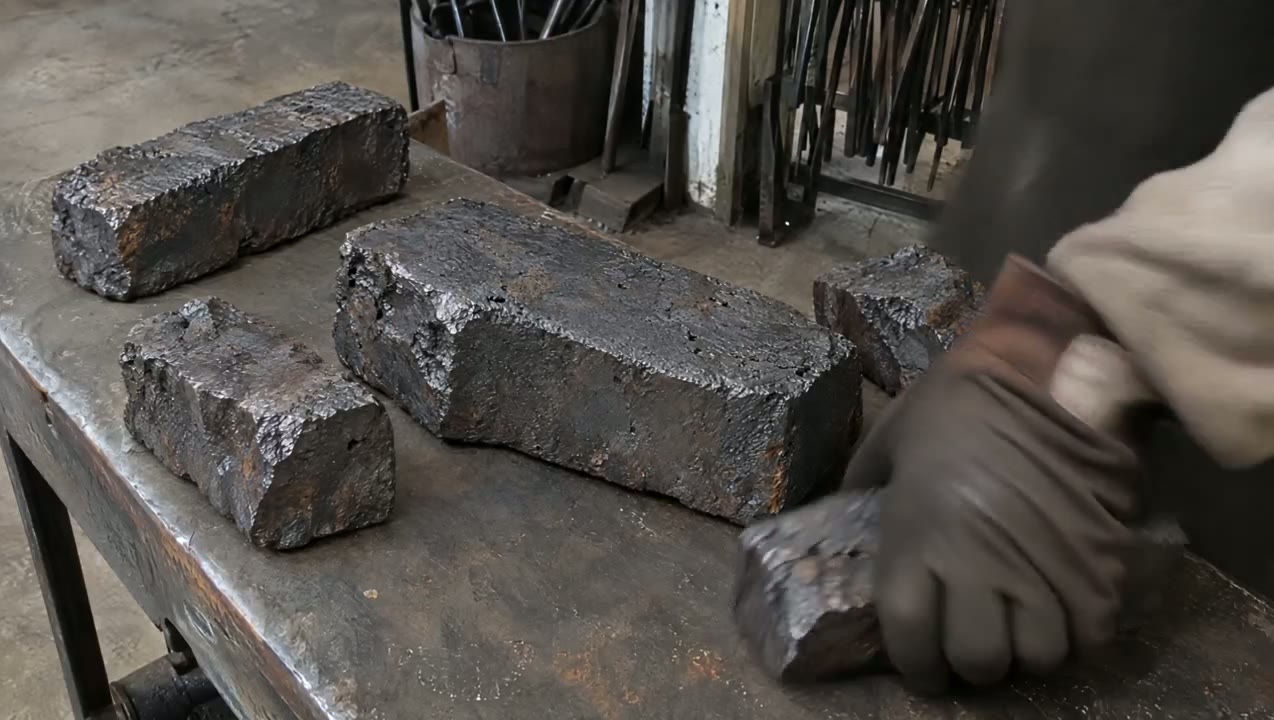
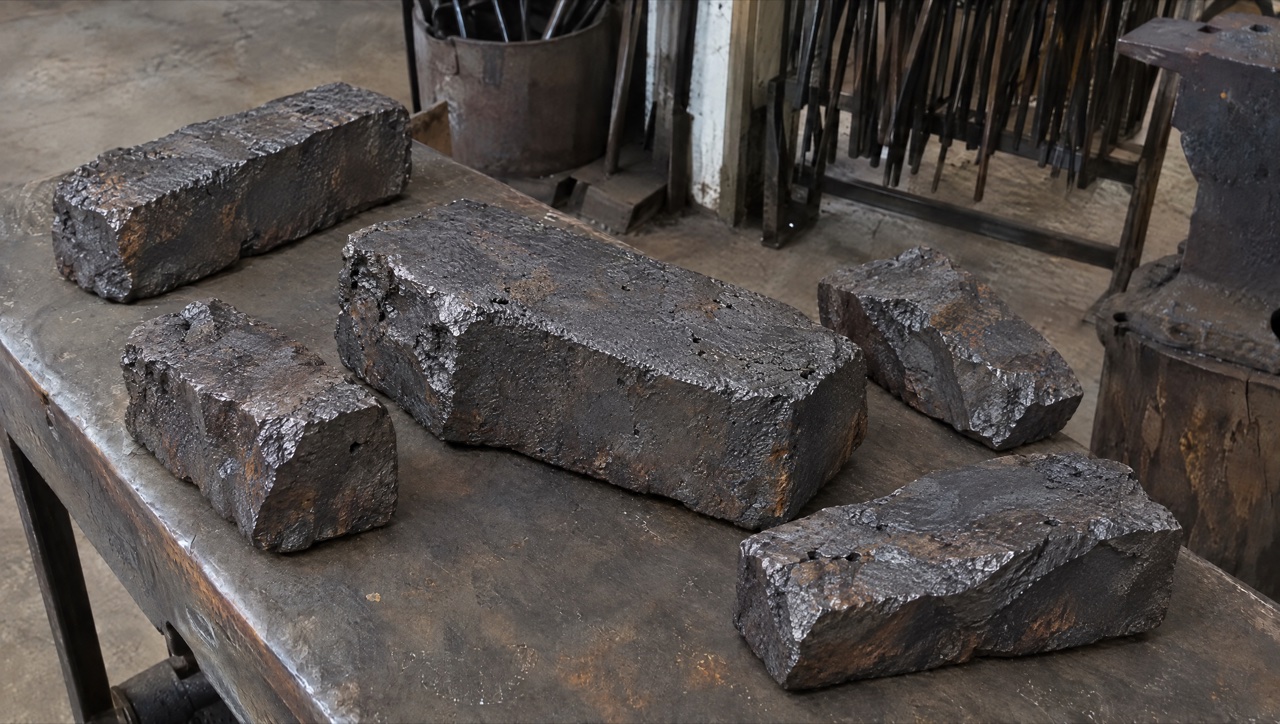
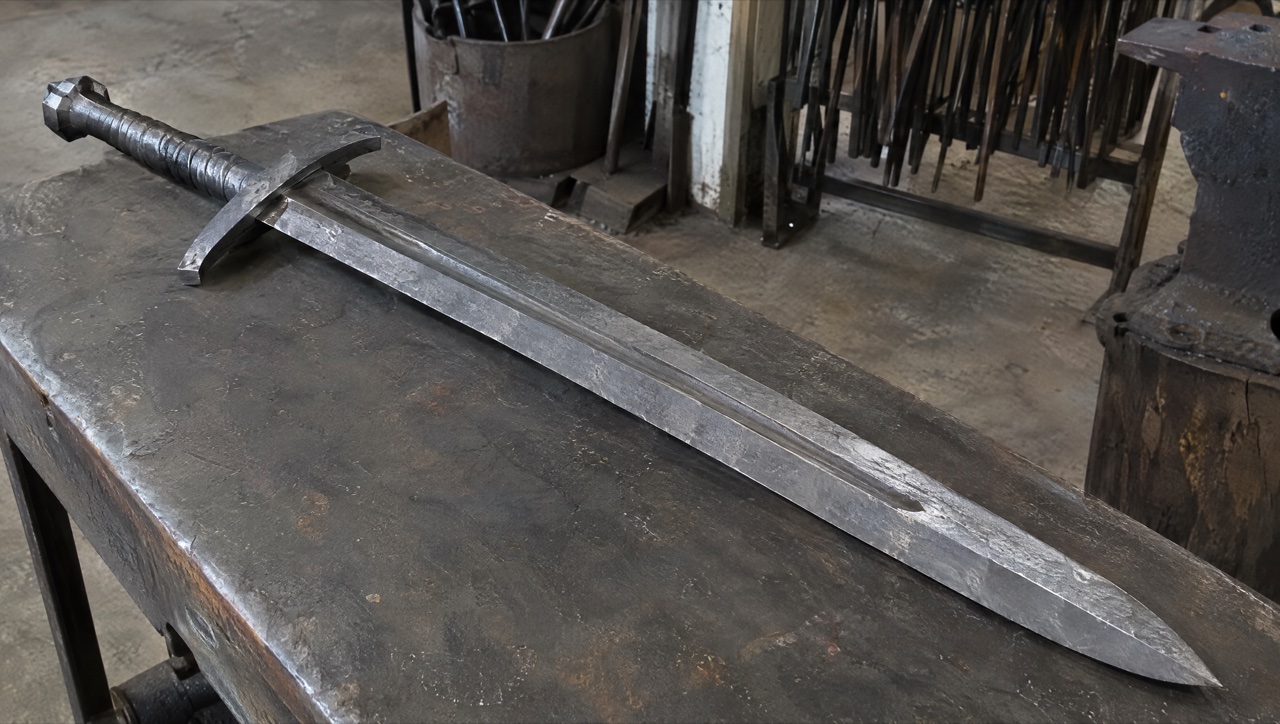
In the demo the first frame shows raw iron blocks on a workbench and the last frame a finished greatsword on the same bench. Kling 4.0 filled the 15 seconds between with six shots of forging.
 Kling 4.0
Prompt: SCENE CONTEXT EXACT 1 CHARACTER — NO DUPLICATES. Interior, a worn blacksmith workshop, daytime. The same blacksmith removes the raw material, works it into a greatsword, and returns the completed sword to the original table.15 seconds, six shots. Manufacturing time is compressed through editorial cuts; individual actions retain natural weight and speed. ACTIVE REFERENCES: @Image1: exact first-frame anchor. Preserve all five iron blocks, their arrangement, the tabletop, background tools, perspective, and lighting. This image is the starting state of an active pickup shot.@Image2: exact final-frame anchor and finished-sword design. Preserve the blade silhouette, central fuller, angular curved crossguard, spiral metal grip, faceted pommel, diagonal placement, perspective, and background. This composition is reached through a visible physical placement. LOCATION MAP: The worktable fills the foreground. The tool bucket stands behind its left-center edge, the rod rack occupies the rear right, and the anvil stands at the right. The blacksmith works from the left side of the table in both endpoint shots. The camera stays on the original viewer-facing side of the table. During blade-working inserts, the tang points screen-left and the tip points screen-right. The final sword position runs from the upper-left pommel to the lower-right tip. FIRST FRAME AND SPATIAL BLOCKING: At 0.0 seconds, the frame exactly matches the raw-material reference, with five iron blocks and no hands visible. The same blacksmith immediately reaches in from the left edge. Both gloved hands approach the largest central block from opposite ends, preparing a supported two-handed lift. The blacksmith wears soot-gray sleeves, brown leather gloves, and a narrow dark strap around the right cuff. These details remain identical throughout every shot. FORMAT MODE: 15 seconds total, six shots.Hard cuts at 3.0, 5.0, 8.0, 10.0, and 11.0 seconds. Cuts compress the omitted manufacturing work and bench clearing. The opening pickup and closing placement each play as continuous physical actions.No fades, dissolves, or object-morph transitions. OPTICS: Shots 1 and 6: reference-matched elevated three-quarter framing, approximately 63° diagonal field of view and approximately 1.8 meters from the tabletop center. Exact endpoint framing takes priority over estimated optical measurements. Shots 2–5: 40° diagonal field of view, approximately 0.8 meters from the working contact point. Focus follows the hands and metal contact; the workshop background remains softly readable. Each shot holds one fixed field of view. CAMERA: A real camera operator holds the camera from the viewer-facing side of the workspace. All shots use handheld SETTLE: visible breathing sway, slight roll, and small delayed corrections. The opening camera holds its position while the iron block leaves the frame. The closing camera holds the empty tabletop composition while the sword enters, then settles into the exact final reference. The blacksmith is the only visible worker; the camera operator remains outside the image. ACTION TIMING: 0.0–3.0s — TAKE THE IRON. Start on the exact first reference; during 0.0–0.6s, the blacksmith’s matching gloved hands enter from screen-left and grip opposite ends of the largest central block. During 0.6–1.5s, the wrists brace and both hands lift the block clear of the tabletop, exposing the patch of table beneath it. During 1.5–3.0s, the blacksmith carries the supported block out through screen-left; the other four blocks remain resting on the table through the cut.3.0–5.0s — HEAT THE STOCK. Hard cut forward in time to one thick billet already glowing orange among forge coals. The same gray sleeves, brown gloves, and right-cuff strap appear at screen-left as the blacksmith holds long tongs around the billet. A short controlled pull draws the billet toward the forge mouth, with heat shimmer rising above its scaled surface.5.0–8.0s — FORGE THE BLADE. Hard cut forward to an elongated orange-hot blade blank supported on the anvil, tang left and emerging tip right. The same blacksmith braces the tang with left-hand tongs and delivers three deliberate right-hand hammer strikes along the blade flat. Each strike produces local compression, wrist recoil, and a brief scatter of dark scale.8.0–10.0s — FINISH THE METAL. Hard cut forward to a cooled blade with its fuller already formed, held by the same gloved hands against an abrasive wheel. The blacksmith makes one controlled finishing pass along the bevel. A narrow stream of sparks falls from the actual contact point as a brighter strip of metal appears.10.0–11.0s — COMPLETE THE HILT. Hard cut forward to the nearly finished sword supported on a separate assembly bench, its crossguard and spiral metal grip already fitted. The same blacksmith’s left hand braces the grip while the right hand gives the faceted pommel its final tightening turn. The completed sword now has the exact construction and finish required for the final image.11.0–15.0s — PLACE THE FINISHED SWORD.Hard cut to the original worktable, now completely clear; show its empty surface for 0.4 seconds before the same gloved hands carry the completed sword in from screen-left, one hand around the grip and the other supporting the blade flat near its balance point. From 11.4–13.8s, the blacksmith lowers the entire rigid sword diagonally, hilt toward upper-left and tip toward lower-right, easing it onto the tabletop and sliding the supporting hand free as its weight transfers to the table. From 13.8–15.0s, both hands release and withdraw through screen-left; the sword remains motionless in the exact final-reference position as the camera settles onto the final frame. PHYSICS: The raw block retains its shape and mass throughout the pickup. Both hands support it continuously; the forearms tense and the lift accelerates slowly under its weight. The anvil supports the hot blade during forging. Large changes of shape occur across editorial time jumps. The completed sword remains rigid during carrying and placement. The blade-supporting hand has visible clearance to slide free as the sword settles; the hand never passes through the blade or tabletop. Metal contact produces a short scrape and a low, heavy clink, followed by stillness. The same blacksmith clears the remaining raw stock during omitted time before the final shot. LIGHTING: The original table shots use soft daylight from upper camera-left, matching both references. Retain dark detail in the iron and protect the silver blade highlights. The forge insert uses orange coal glow from below-left as its dominant source. Return to the original neutral daylight before the sword enters the final tabletop shot. AUDIO: Quiet workshop air and distant furnace draft form the ambient bed. Opening: leather creaks, a brief iron scrape, and a restrained exertion breath as the heavy block rises.Middle: forge crackle, tong contact, three synchronized hammer impacts, abrasive scraping, and a short fitting sound.Ending: sleeve movement, glove friction against metal, a weighted sword-to-table clink, then quiet workshop ambience. The blacksmith speaks no dialogue.SFX only, no music, no score, no song, no soundtrack. CHARACTER ACTING: One consistent blacksmith performs every visible action. Soot-gray sleeves, brown leather gloves, and the dark right-cuff strap remain unchanged. Hands work deliberately: brace before lifting, maintain firm tool contact, and reduce speed before lowering the finished sword. The physical rhythm shifts from effort during the raw-block pickup to careful control during the final placement. The face and torso remain outside the crop. STYLE: Grounded workshop documentary with tactile iron, worn tools, and convincing manual labor.Soft old-photograph texture, restrained grain, and natural motion blur; no digital sharpening. Charcoal metal and muted brown surfaces dominate, with silver highlights and localized forge orange. The first and last frames preserve the supplied images’ appearance. QUALITY: Maintain consistent hands, gloves, sleeve details, metal geometry, and contact shadows. The lifted block reveals the tabletop underneath it. The closing shot visibly establishes the empty tabletop before the sword enters. Keep the full final sword readable, including its tip, guard, grip, and pommel. Avoid duplicate limbs, flickering geometry, and intersecting solid surfaces. POSITIVE CONSTRAINTS: The first frame contains exactly five iron blocks. The largest central block physically leaves the table in the same blacksmith’s two hands. The final shot begins with an empty table. The completed sword enters while visibly supported by that same blacksmith, contacts the tabletop, and remains after both hands withdraw. The last frame matches the finished-sword reference exactly. The opening pickup and final placement each remain continuous, with visible hand-object contact. Exactly one finished sword is present.No text overlays, subtitles, or music. (Kling 4.0 · 16:9 · 15s · 1080p)
Kling 4.0 Settings for Length, Resolution and Aspect Ratio
Kling has announced more than this site runs so far. These are the settings the generator actually gives you for Kling 4.0, so what you plan is what you can render.
| Length | 3 to 30 seconds5 seconds by default. |
|---|---|
| Resolution | 720p or 1080p720p by default. |
| Aspect ratio | 16:9, 9:16, 1:1 or 21:9With a start frame, the clip takes the shape of your image. |
| Inputs | Text, a start frame, or a start and end frameKling’s multi-keyframe, reference and edit modes are not available here yet. |
| Prompt | Up to 2,500 characters |
| Sound | Always onStereo speech, effects and ambience in every clip; there is no switch to turn it off. |
| Credits | Charged per secondThe rate depends on resolution. The generator shows the total before you start, and the price table below lists common lengths. |
Kling 4.0 Specs and Capabilities
Kling’s own published specs for the full model. Items Kling marks as coming soon are labelled that way.
| Release | Kling 4.0 Flash opened to a limited group on September 28, 2026. The full Kling 4.0 became available on October 15, 2026. |
|---|---|
| Modes | Text to video, image to video, first and last frames, multi-keyframes, Omni Reference and video editing. |
| Clip length | 3 to 30 seconds in a single generation. |
| Keyframes | Up to 10 keyframe images to pin character states, scene changes and story beats. |
| References | Up to 15 assets per generation: up to 10 images, up to 5 videos (30 seconds combined), and up to 7 subjects, which can carry a voice reference. |
| Resolution | 720p, 1080p and 4K. 10-bit HDR at 1080p and 4K is marked coming soon. |
| Aspect ratios | 21:9, 16:9, 1:1, 9:16 and auto. |
| Audio | Two-channel stereo with lip-sync; dialogue in Chinese, English, Japanese, Korean, Spanish, Portuguese, German, French and more, including regional accents. |
| Prompt length | Up to 8,000 tokens. |
| Video extension | Repeated extension up to 2 minutes — marked coming soon. |
Kling 4.0 Use Cases
Long single takes, shots pinned at both ends, and dialogue scenes from a short prompt.
- Single 30-second takes: A long one-shot — a walk-through, a chase, a product reveal — without stitching two clips together.
- Shots pinned at both ends: A first and a last frame fix where the scene starts and where it lands; Kling 4.0 fills in the motion between.
- Talking-head and dialogue clips: A one- or two-line prompt becomes a natural speaking scene with lip-synced stereo sound.
- Multilingual dialogue: Stereo audio with lip-sync and on-screen text that stays legible as the camera moves.
Kling 4.0 vs Seedance 2.5, Kling 3.0, Veo 3.1 and Wan 3.0
Every cell except the last row comes from the models’ live settings on SeedVideo AI, so the table matches what the generator lets you pick today.
Want a second take on the same idea? The AI video generator keeps Kling 4.0 next to Seedance, Kling, Veo and Wan, so you can rerun a prompt on another model with the credits you already have.
| Feature |  Kling 4.0 | Kling 4.0 Flash |  Seedance 2.5 | Kling 3.0 |  Veo 3.1 Fast |  Wan 3.0 |
|---|---|---|---|---|---|---|
| Longest clip | 30 s | 20 s | 30 s | 15 s | 8 s | 30 s |
| Top resolution | 1080p | 720p | 1080p | 4K | 4K | 1080p |
| Aspect ratios | 16:9, 9:16, 1:1, 21:9 | 16:9, 9:16, 1:1, 21:9 | 16:9, 9:16, 1:1, 4:3, 3:4, 21:9 | 16:9, 9:16, 1:1 | 16:9, 9:16 | 16:9, 9:16, 1:1, 4:3, 3:4 |
| Reference images | No | No | 30 | No | No | 10 |
| Reference videos | No | No | 10 | No | No | 5 |
| Edit and extend a clip | No | No | Yes | No | No | No |
| Credits for 5 s at 720p | 24 credits | 14 credits | 31 credits | 13 credits | 15 credits | 12 credits |
| Best for | Up to 30 s with stereo sound, from text or a first frame | Faster, cheaper 720p drafts up to 20 s | Long multi-shot clips with many references and native sound | Cheaper Kling clips up to 15 s | Realistic short shots with sound | Long takes on a lower budget |
Credits are credit-pack rates for a 5-second 720p clip; subscriptions cost less per second.
Kling 4.0 Pros and Cons
What it does well on SeedVideo AI today, and what to work around.
Strengths
- Length: Anything from 3 to 30 seconds in one generation.
- Sound: Every clip comes back with a stereo track, speech lip-synced to the picture.
- Frame control: A first frame, plus an optional last frame, pins where the shot starts and ends.
- Short prompts: A one- or two-line idea is often enough for a natural, believable scene.
Limits
- Modes on this site: Text to video and first/last frame only for now; Kling’s multi-keyframe and reference modes are not available here yet.
- No silent option: Sound cannot be switched off; mute the clip afterwards if you plan to score it.
- Render time: Slower than most models: a 3-second test clip took about three minutes.
- Prompt length: The composer takes prompts up to 2,500 characters, so very long briefs need trimming.
What Kling 4.0 Costs and How You Can Start
Starting points for Kling 4.0
Pick a starting point below and the generator opens with Kling 4.0 selected.
Kling 4.0 price per clip
Credit-pack prices, pulled from the generator’s current settings. Subscriptions cost less per second.
| Resolution | 5 s | 10 s | 30 s |
|---|---|---|---|
| 720p | 24 credits | 47 credits | 141 credits |
| 1080p | 35 credits | 70 credits | 210 credits |
How to Use Kling 4.0 in 4 Steps
- Step 1
Select Kling 4.0
Open the composer on this page, or the full generator, and pick Kling 4.0 from the model menu under the Kling filter.
- Step 2
Write the story beats
Lead with what moves and when: the subject, the action, the camera, and the moment each beat lands. Prompts can run to 2,500 characters here.
- Step 3
Add a first frame if you want one
Upload a first frame to start the shot from your image, and a last frame if you want to fix where it ends.
- Step 4
Set length, then submit
Choose anything from 3 to 30 seconds, pick the aspect ratio, check the credit quote, and submit.
Kling 4.0 Prompt Examples
Prompts Kling AI published with its Kling 4.0 examples, each beside the clip it produced; the long blacksmith prompt is shortened here. Load one into the generator, then change the subject, the setting or the length. The frame prompt needs your own start and end frame.
A vlogger says hello
Text to video · 7 sA vlogger-style video in which the woman cheerfully introduces herself to the audience. Maintain a natural, authentic look and realistic image quality.
Source: Kling AI
Try this promptOld friends meet at dusk
Text to video · 7 sA continuous 7-second shot set in the UK. Two friends who have not seen each other for a long time meet at the corner of a quiet street at dusk, surrounded by a diverse crowd going about their daily lives. They smile, walk quickly toward each other, and share a warm embrace. Their facial expressions and body movements are natural. A handheld camera follows them with subtle camera shake. Soft, warm lighting with a nostalgic cinematic film look. Include natural footsteps, street ambience, background music, and English dialogue.
Source: Kling AI
Try this promptIron into a greatsword
Start + end frame · 15 sInterior, a worn blacksmith workshop, daytime. The same blacksmith removes the raw material, works it into a greatsword, and returns the completed sword to the original table. 15 seconds, six shots, hard cuts at 3.0, 5.0, 8.0, 10.0 and 11.0 seconds. First frame: exactly five iron blocks on the worktable, no hands visible. Last frame: the finished sword lying diagonally on the same table. 0.0–3.0s — TAKE THE IRON: both gloved hands lift the largest central block and carry it out through screen-left. 3.0–5.0s — HEAT THE STOCK: one thick billet glowing orange among forge coals. 5.0–8.0s — FORGE THE BLADE: three deliberate hammer strikes along the orange-hot blade on the anvil. 8.0–10.0s — FINISH THE METAL: one finishing pass on an abrasive wheel, sparks falling from the contact point. 10.0–11.0s — COMPLETE THE HILT: the final tightening turn of the faceted pommel. 11.0–15.0s — PLACE THE FINISHED SWORD: the empty table, then the sword carried in and lowered into the exact final position. Handheld camera, soft daylight from upper camera-left, orange coal glow in the forge shot. AUDIO: workshop air, forge crackle, three synchronized hammer impacts, a weighted sword-to-table clink. SFX only, no music. No text overlays or subtitles.
Source: Kling AI
Try this prompt
More Video Models on SeedVideo AI
Kling AI Guides and Comparisons
Comparisons and how-tos from the SeedVideo AI blog.
Kling 4.0 FAQ
When did Kling 4.0 come out?
Is Kling 4.0 free here?
Kling 4.0 or Kling 4.0 Flash?
What is not live yet?
What is Kling 4.0?
What changed from Kling 3.0?
What is Kling 4.0 Flash?
Which Kling models run on SeedVideo AI?
Is SeedVideo AI affiliated with Kling AI or Kuaishou?
Make Your First Kling 4.0 Video
Prompt, frames, length, submit. Every generation lands in the same asset library as your Seedance work.
Open the generator