On November 1, 2026, six of the seven AI video generators compared here state commercial-use rights for paid options, while free tiers split sharply. Runway is the exception on Free: its terms do not restrict commercial use on any plan, although free exports carry a watermark. Kling AI, Pika, PixVerse, Luma Dream Machine and SeedVideo AI reserve commercial rights for paid options. Google Flow needs a Google AI plan, and Google does not claim ownership of outputs.
Last verified: November 1, 2026

Image prompt: Premium skincare commercial still, frosted glass serum bottle with a gold dropper on a wet slab of pale travertine, one water droplet sliding down the glass, soft morning window light from the left, eucalyptus leaves blurred behind, shallow depth of field, photorealistic 16:9 frame.
TL;DR
- Free plan and commercial use: only Runway's terms allow it on Free. Kling AI Basic, Pika Free, PixVerse Basic and Luma Free are personal or non-commercial, and SeedVideo AI does not include commercial use on Free.
- Cheapest paid entry: PixVerse credit packs start at $5, Kling AI Standard and Pika Starter list $10 per month, and SeedVideo AI's Starter credit pack is $29.9 one-time.
- No watermark is not a license. Pika Free exports have no watermark and still exclude the commercial license.
- Rights follow the clip, not the account. Luma states that clips made on Free keep their personal-use limit after you upgrade. PixVerse and Kling AI tie commercial use to paid status as well.
- No tool here requires on-screen credit. Runway says so explicitly; the other pages checked do not state a credit requirement.
Quick Answer
You can sell AI videos, use them in ads, and deliver them to clients when two conditions hold. First, the clip was generated while your account was on a plan that grants commercial use. Second, nothing inside the clip infringes someone else's rights: a logo you do not own, a real person's likeness, a copyrighted character, or licensed music. A plan license covers the first condition only. For the second, you need permission for every input you upload.
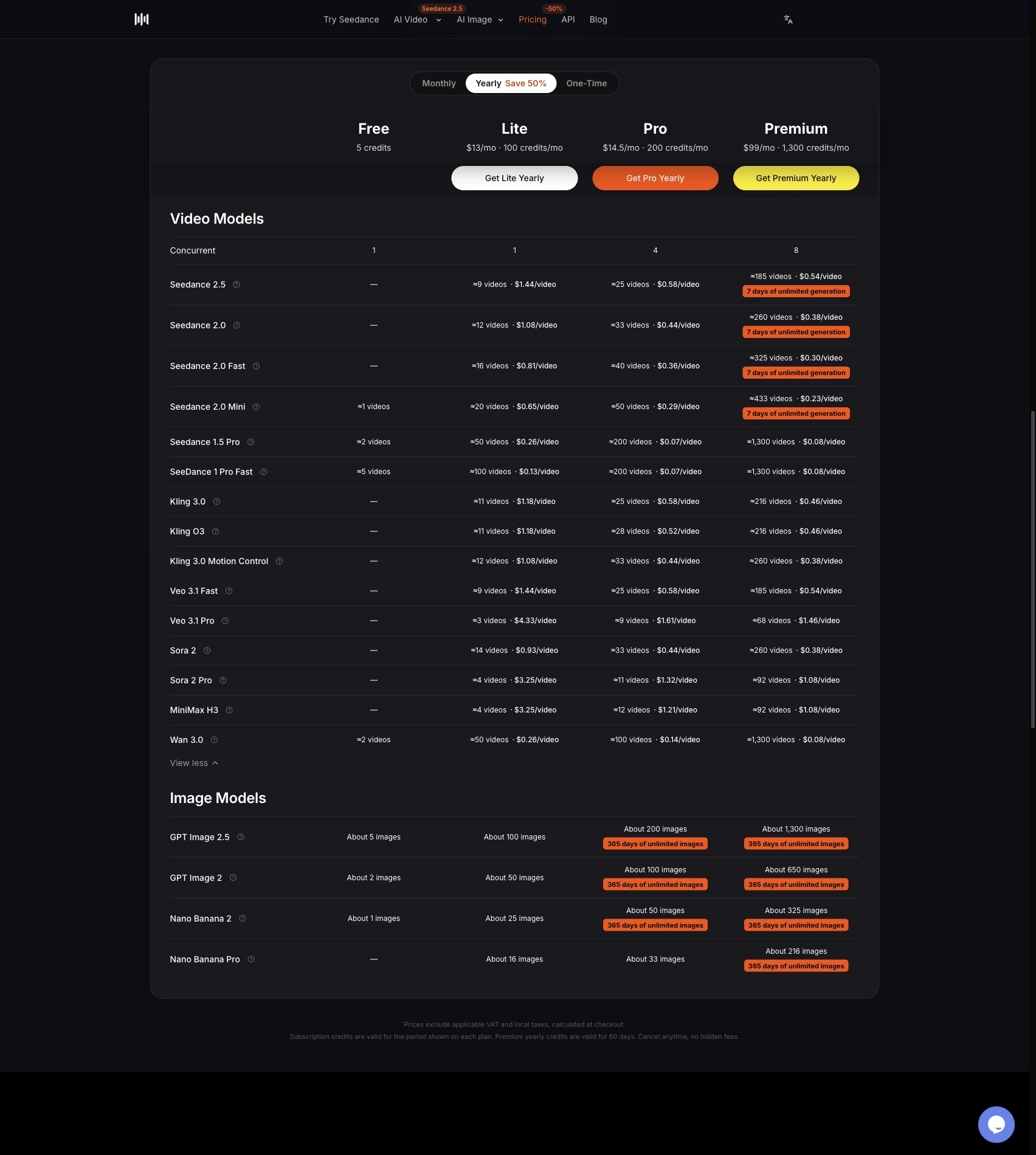
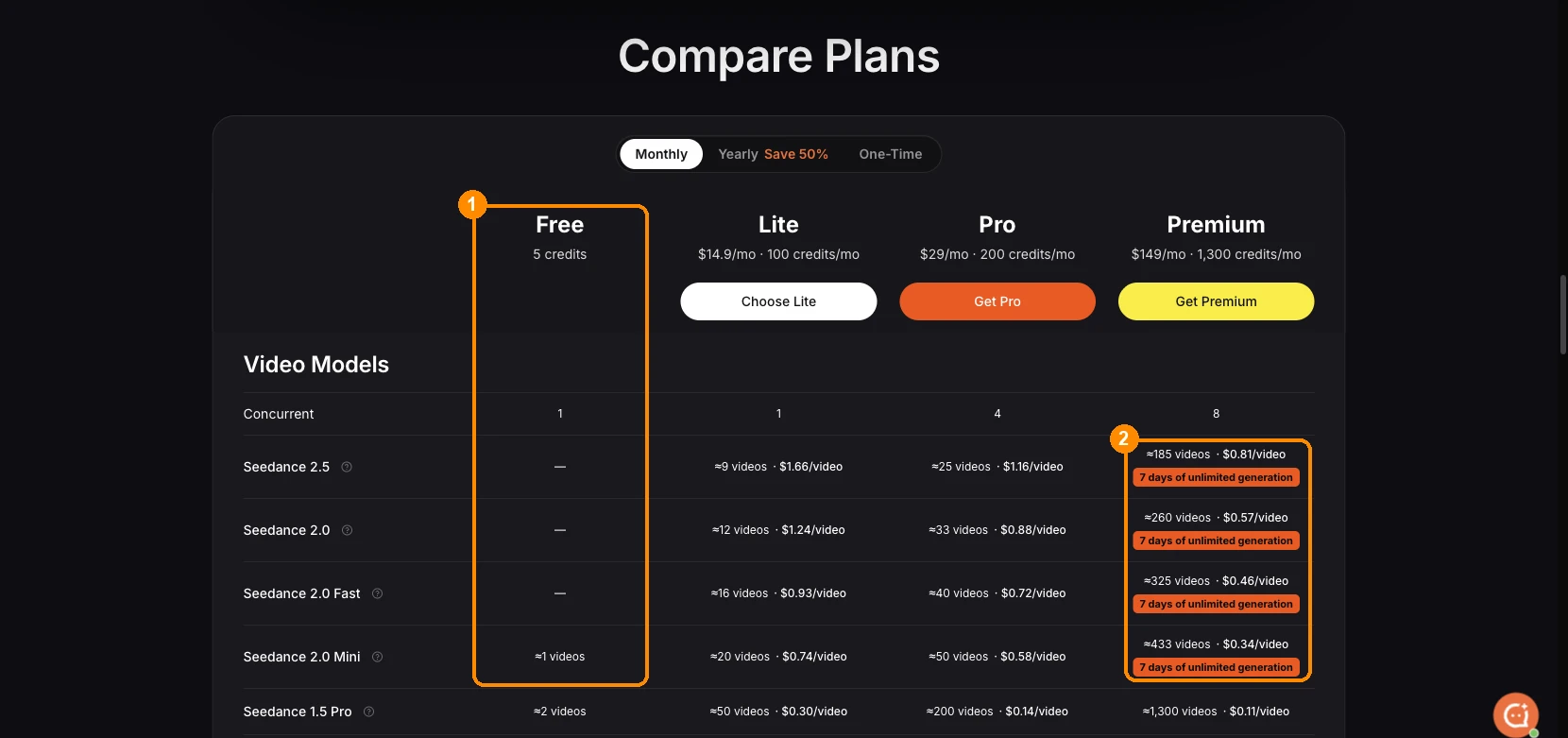
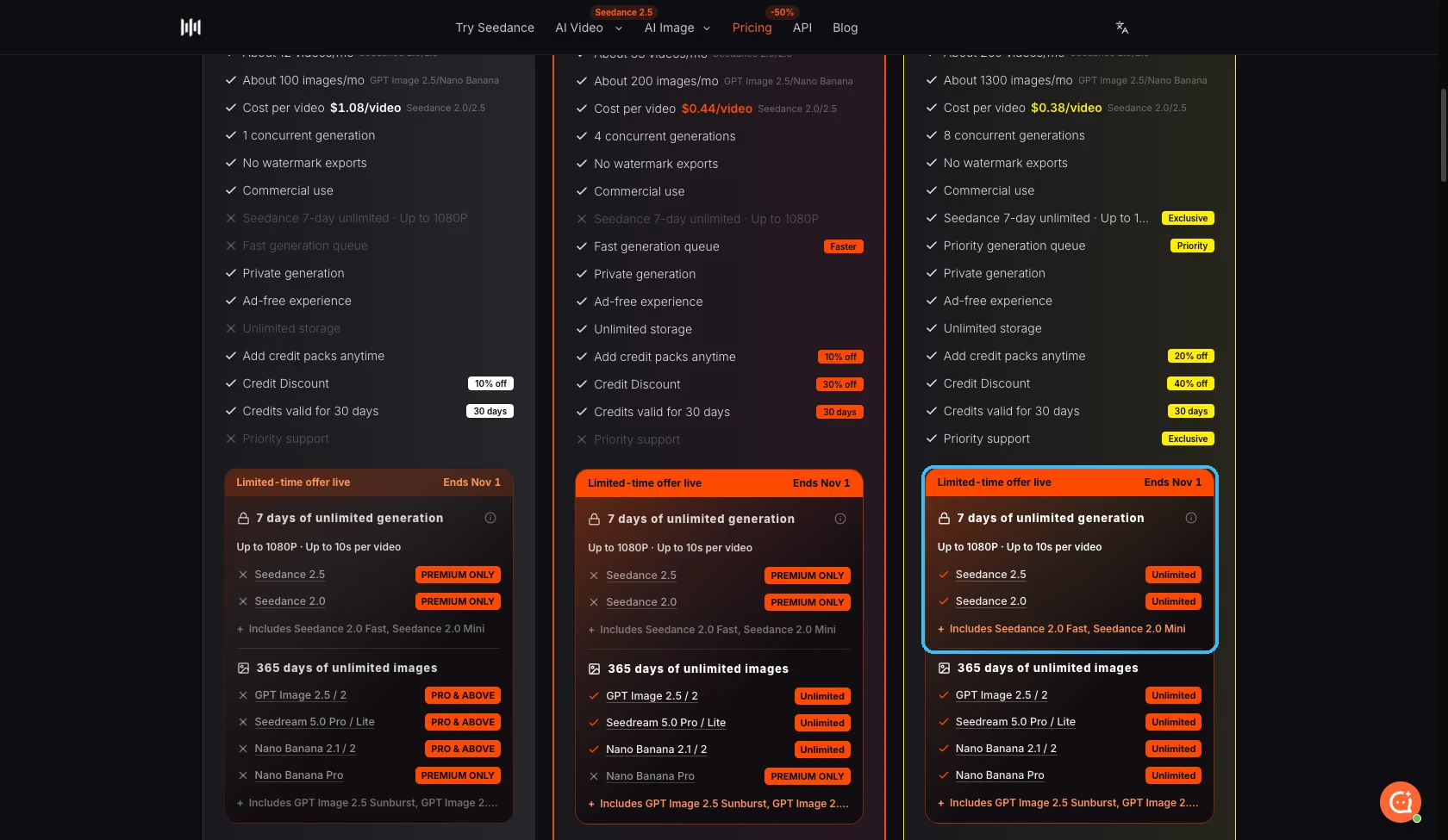
If you want commercial rights on SeedVideo AI, the SeedVideo AI pricing page lists commercial use on Pro, Premium, yearly plans and one-time credit packs. Lite billed monthly is the one paid option without it. The full rules are on the SeedVideo AI terms of service, which state that you retain ownership of your generated content.
AI video commercial use by tool (November 2026)
| Tool | Free tier: commercial use | Paid tier: commercial use | Watermark | Attribution required | Lowest paid option with commercial use |
|---|---|---|---|---|---|
| SeedVideo AI | Not included | Lite yearly, Pro, Premium and one-time credit packs; Lite monthly excluded | No added watermark on Free or paid exports | None stated | Starter credit pack, $29.9 one-time |
| Runway | Allowed; terms do not restrict commercial use | Allowed on every plan | Free exports watermarked; "No watermarks" listed from Standard | Not required | Free; Standard $15/month removes the watermark |
| Kling AI | Not included on Basic | Standard, Pro, Premier, Ultra+ | Brand watermark removal on paid plans only | None stated | Standard, $10/month |
| Pika | No commercial license | Starter, Creator, Fancy | No watermark on any plan, including Free | None stated | Starter, $10/month |
| PixVerse | Non-commercial | Subscriptions and credit packs, for PixVerse models only | Watermark-free on paid plans only | None stated | Credit pack from $5 |
| Luma Dream Machine | Personal use only | Plus and higher | Free clips keep a watermark; paid clips have none | None stated | Plus, $30/month |
| Google Flow | Access needs Google AI Plus, Pro, Ultra or a qualifying Workspace plan | Google does not claim ownership; use is governed by Google's Terms of Service | Invisible SynthID on every output; visible watermark is a user toggle | None stated | Google AI Plus |
Prices are list prices billed monthly unless noted, before first-month offers and taxes. For a side-by-side of the credit cost behind these plans, see the AI video tool price comparison. More pricing and plan data lives in the pricing data hub.
Tool-by-tool license notes
SeedVideo AI
Best for: creators who want commercial rights without a subscription, via a one-time credit pack. Not for: client or ad work on the Free plan or on Lite billed monthly.
New accounts get free sign-up credits to test entry models, and Free exports carry no added platform watermark. Commercial use starts with a paid option. The pricing FAQ lists Pro, Premium, yearly subscription plans and one-time credit packs; the Starter pack is $29.9 for 200 credits valid for 180 days. Pro costs $29 per month billed monthly. The terms say you keep ownership of what you generate and prohibit reselling access to the service itself.
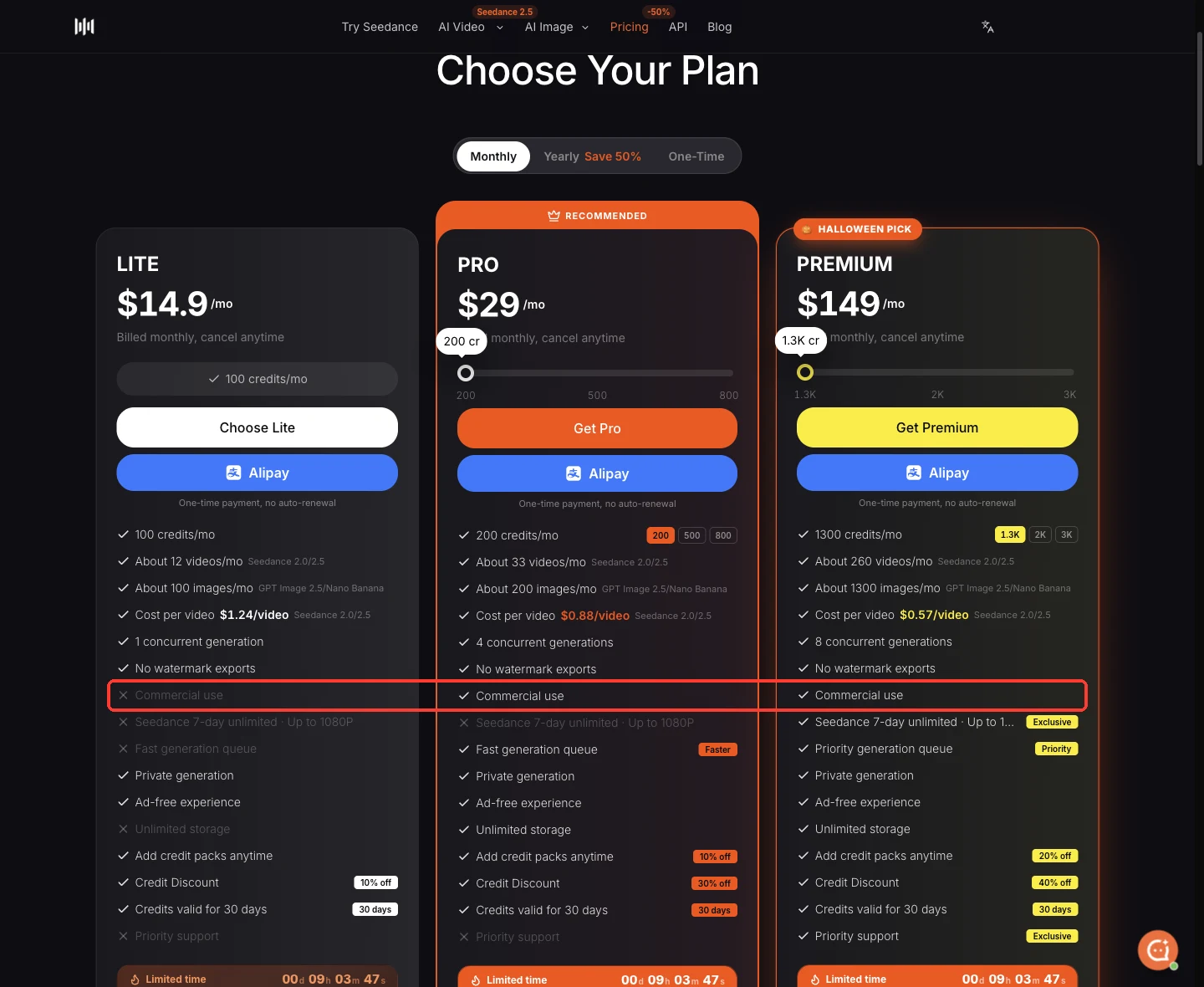
SeedVideo AI pricing page, monthly billing, November 1, 2026. The highlighted row shows which plans include commercial use.
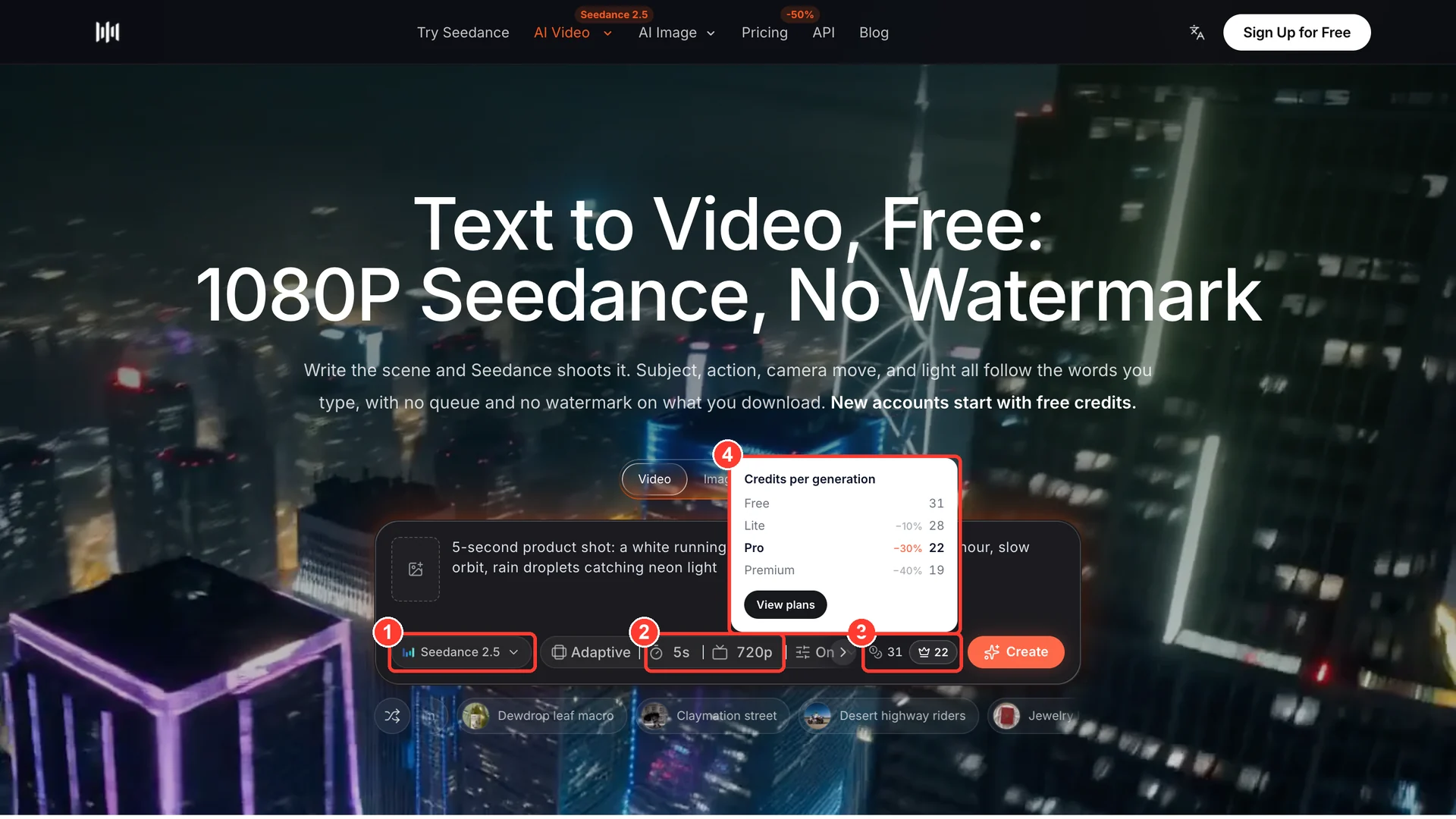
When you are ready to produce a client clip, open the AI text-to-video generator on a commercial-eligible plan, or animate a source image such as an approved product photo.
Runway
Best for: teams that need commercial clearance even while testing on Free. Not for: watermark-free delivery on the Free plan.
Runway's terms of use, last updated October 23, 2026, say the company "does not restrict your commercial use of your Outputs" and does not claim ownership of them. Its help center adds that you do not have to credit Runway. The pricing page lists "No watermarks" from Standard ($15 per month, or $12 per month billed yearly); Free includes 125 one-time credits. The terms also bar using outputs to build competing products.
Kling AI
Best for: paid subscribers who want commercial use and 1080p/4K output from $10 per month. Not for: anything commercial on Basic.
Kling AI's membership page marks "Generated content is for commercial use" and "Brand watermark removal" as excluded on Basic ($0) and included on Standard, Pro, Premier and Ultra+. Its FAQ says paid subscribers may use generated content commercially, provided it is not used to develop products that compete with Kling AI. The same FAQ asks you to check portrait rights, trademarks, advertising rules and AI-content labeling before commercial use.
Pika
Best for: a low-cost commercial license at $10 per month. Not for: treating watermark-free Free exports as cleared for business use.
The Pika pricing comparison shows "No watermark: Yes" on every plan, but "Commercial license: No" on Free. Pika's terms of service limit use to personal, noncommercial purposes unless your plan expressly permits commercial use. Pika does not claim ownership of outputs and warns that outputs "might not qualify for copyright".
PixVerse
Best for: occasional commercial clips paid for with a small credit pack. Not for: commercial use of third-party models inside PixVerse, or work made on Basic.
PixVerse's terms of service, updated October 29, 2026, limit outputs to non-commercial use unless they were generated while you used paid services, including subscriptions and credit packs. That commercial allowance covers PixVerse's own models only; clips from third-party models follow that model provider's rules. The subscription page excludes watermark-free exports on Basic. Standard costs $10 per month, and credit packs start at $5.
Luma Dream Machine
Best for: paid creators who want commercial rights that stay with each clip after cancelling. Not for: upgrading later to clear clips made on Free.
Luma's licensing guide says content generated on Free is for personal use only and keeps a watermark that cannot be removed even if you upgrade. Paid generations include commercial rights without a watermark, and those rights stay with each asset after you cancel. The Luma pricing page lists commercial use on Plus at $30 per month ($25 billed yearly), with Pro and Ultra building on Plus.
Google Flow (Veo)
Best for: people who already pay for Google AI Pro or Ultra and want Veo clips. Not for: projects that need a clip with no embedded AI watermark of any kind.
The Google Flow help center says Flow requires a Google AI Plus, Pro or Ultra subscription or a qualifying Workspace plan. On commercial use it points to Google's Terms of Service, under which Google "won't claim ownership" of content you generate. Every output carries an invisible SynthID watermark. A visible watermark is controlled by a toggle and is applied automatically in India, South Korea and Vietnam unless you are on the Google One AI Ultra 20x plan.
Three commercial scenarios, checked against the license
Scenario 1: delivering videos to a client

Image prompt: Promotional frame for a neighborhood coffee roaster, barista's hands pouring latte art into a speckled ceramic cup on a walnut counter, steam rising, paper bags of coffee beans softly out of focus, warm golden-hour window light, slight handheld documentary feel, photorealistic 16:9.
Client work is the most common case, and the license sits with the account that generated the clip. Generate every deliverable on a commercial-eligible plan, then keep a short record for each project: plan name, generation date, and a saved copy of the terms you relied on. Ask the client for written permission before uploading their logo, product photos or staff faces. If a client later questions rights, that record answers the question faster than a screenshot of a pricing page taken months later.
A prompt that keeps the brand assets out of the model and leaves room for the client's logo in editing:
Slow push-in on a barista pouring latte art into a speckled ceramic cup on a walnut counter, steam rising, warm golden-hour light from the café window, paper bags of coffee beans softly blurred behind, handheld documentary feel, 5 seconds, no on-screen text
Scenario 2: running paid ads
A paid ad needs three things: a commercial license, a clean frame, and compliance with the ad platform. A free-tier watermark will usually block the first two. Google Flow clips still contain SynthID after you hide the visible mark, which is fine for most ads but matters if a buyer requires unmarked footage. Many ad platforms and marketplaces ask advertisers to disclose realistic AI-generated content, and Kling AI's own FAQ lists AI-content labeling among the checks before commercial use. Check the ad platform's current rules before launch.
Product commercial shot, frosted glass serum bottle with a gold dropper on wet travertine stone, single water droplet sliding down the glass, slow orbit camera move, soft morning window light, eucalyptus leaves blurred in the background, clean blank label, 6 seconds
Scenario 3: reselling clips as stock footage, templates or merch

Image prompt: Stock-footage style aerial frame, slow drone shot over a winding mountain road through autumn forest at sunrise, low mist in the valleys, a single red car on the road, orange and gold foliage, soft directional sunlight, wide cinematic 16:9 composition.
Resale is where licenses leave the most gaps. A commercial license lets you sell the clip, but it does not give you exclusivity: Pika's terms note that several users may generate similar or identical outputs. Copyright protection for purely AI-generated footage is limited in the United States, where the U.S. Copyright Office protects only the human-authored parts of a work. Stock marketplaces also set their own rules for AI-generated submissions. Two further limits apply: PixVerse's commercial allowance excludes third-party models, and Runway and Kling AI both prohibit using outputs to build competing AI products.
Slow aerial drone shot over a winding mountain road through autumn forest at sunrise, low mist drifting through the valleys, a single red car driving along the curve, warm orange and gold foliage, smooth forward camera glide, 8 seconds
Commercial use checklist before you publish
| Step | What to check | Where to find it |
|---|---|---|
| 1 | The clip was generated on a plan that includes commercial use | Plan page or account billing at the generation date |
| 2 | The model used is covered by that plan | Terms of service (PixVerse limits it to its own models) |
| 3 | No watermark remains, if the placement requires a clean frame | The exported file |
| 4 | You have rights to every input: logos, product photos, faces, voices, music | Client contract or written permission |
| 5 | The destination platform's AI disclosure rules are met | Ad platform or marketplace policy |
| 6 | You saved the terms version you relied on | A dated PDF or screenshot in the project folder |
If free generation is still the priority, the comparison of free AI video generators with no watermark covers credit limits on each free tier. To estimate how far a commercial-eligible plan goes, read how Seedance credits are spent per clip.
FAQ
Can I sell AI videos made on a free plan?
On Runway, yes: its terms do not restrict commercial use on any plan, though Free exports are watermarked. On Kling AI Basic, Pika Free, PixVerse Basic and Luma Free, no. SeedVideo AI does not include commercial use on Free.
Does upgrading make my old free clips commercial?
Not on Luma, which says clips made on Free keep their personal-use limit after an upgrade. PixVerse ties commercial use to clips generated while you used paid services, and Kling AI grants it to paid subscribers. The safe approach is to regenerate any clip you plan to sell after upgrading.
Do I need to credit the AI tool in a commercial video?
Runway states that no credit is required. None of the other pricing pages, terms or help articles checked for this comparison require on-screen credit for outputs. Ad platforms may still require an AI disclosure label.
Do I own the copyright to an AI-generated video?
SeedVideo AI, Runway, Pika and PixVerse do not claim ownership of your outputs, and Google says it won't claim ownership either. Whether the clip itself is protected by copyright depends on local law; in the United States, only the human-authored parts of a work are protected.
Which SeedVideo AI plans include commercial use?
Pro, Premium, yearly subscription plans and one-time credit packs. Lite billed monthly and the Free plan do not include it.
Is a watermark-free export the same as a commercial license?
No. Pika Free exports have no watermark and still exclude the commercial license. Check the license line, not the watermark line.
Disclaimer
This comparison summarizes public pricing pages, terms of service and help articles as checked on November 1, 2026. It is general information, not legal advice. Terms change often, and enterprise agreements can override them, so confirm the current terms before a high-value project.
Start a commercial-ready project
Pick the option that matches how often you produce: a one-time credit pack for an occasional client job, or a subscription for monthly work. Compare them on the SeedVideo AI plans and commercial-use options, then create a video from a prompt and keep the record of plan and date with every delivery.