
Seedance 2.0 Fast: Quicker, Cheaper Seedance 2.0
Seedance 2.0 Fast makes 4 to 15 second clips with sound from text, frames or references, finishes sooner than Seedance 2.0 and costs fewer credits per second. Generate with Seedance 2.0 Fast below.
Seedance 2.5
Up to 30s clips with image, video and audio references.
Kling 4.0
Kuaishou's newest model: 3–30s clips at up to 1080p.
Kling 4.0 Flash
Kling 4.0's fast tier: 720p clips with sound for fewer credits.
Wan 3.0
Up to 30s clips with native audio and lip-synced dialogue.
GPT Image 2.6
Generate and edit images with OpenAI's newest model.

GPT Image 2.5
Generate and edit images from 1 credit.
Nano Banana 2.1
Google's image model: sharper detail and cleaner text.

Seedream 5.5
Edit one image round after round; transparent PNG output.
Seedance 2.0
Multi-shot cinematic video with native audio and lip sync.
Seedance 2.0 Video Examples From the Standard Model
Seedance 2.0 Fast Features at a Glance
- Seedance 2.0 Fast Image to Video From a Start Frame: Bring a still to life, or fix both the opening and the closing frame and let the prompt fill the gap.
- Seedance 2.0 Fast Multi-Shot Scenes With Native Sound: Several cuts and the soundtrack arrive together, in one clip of up to 15 seconds.
- Seedance 2.0 Fast Reference Images for Characters and Casts: Up to 9 pictures and 3 short clips, each tagged in the prompt, keep faces, costumes and products steady.
- Seedance 2.0 Fast Generation Speed vs Seedance 2.0: Close to half the wait of Seedance 2.0 at 720p, and about a third less at 480p.
- Seedance 2.0 Fast Settings for Length, Resolution and Ratio: Length, resolution, frame shape, inputs and prompt size, as the generator offers them today.
- Seedance 2.0 Fast Specs and Model Details: Model version, inputs, limits, sound and who can use it, in one table.
Seedance 2.0 Fast Image to Video From a Start Frame
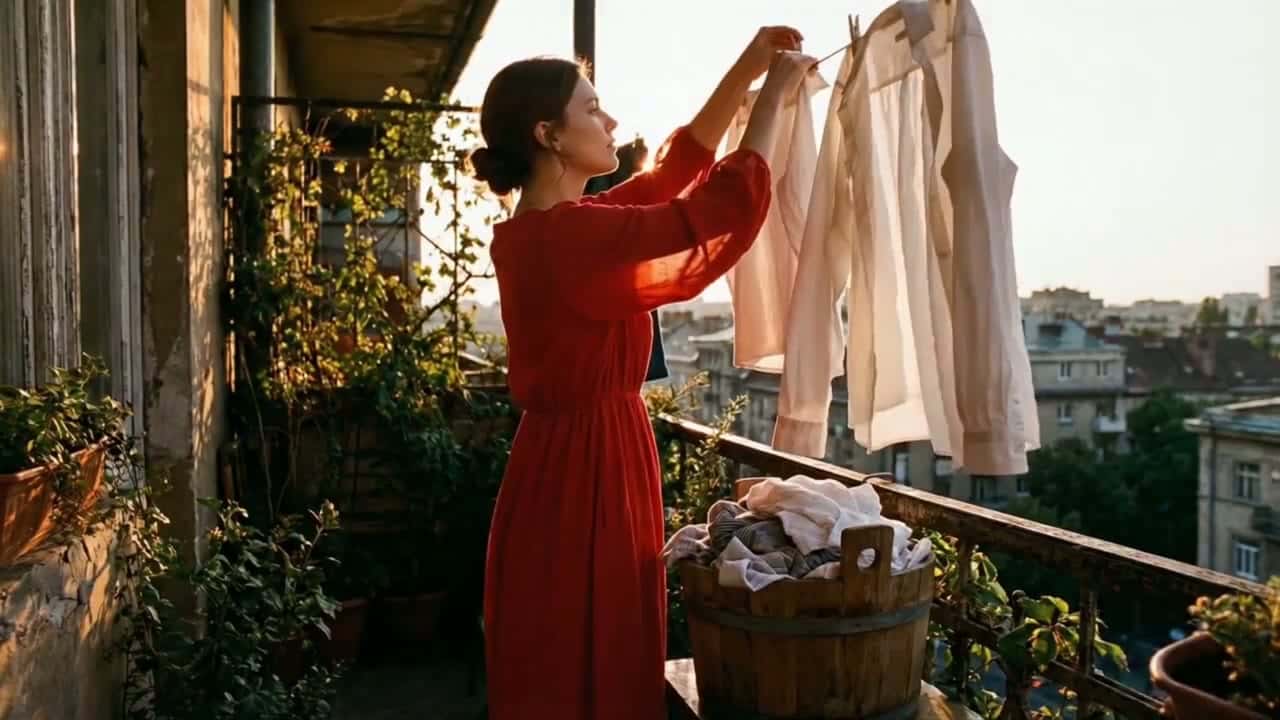
Upload a start frame and Seedance 2.0 Fast moves it the way your prompt says; add an end frame when the shot must finish on a particular picture. Once a frame is attached, the generator renders at 480p or 720p. If the still needs 1080p or 4K, run it on Seedance 2.0 instead.
ByteDance published the clip here with its Seedance 2.0 launch: one start frame plus the single sentence below, rendered by the standard model. There is no Fast version of this shot; Fast accepts the same frame-and-prompt pair.
Prompt: A girl hangs laundry gracefully. After finishing, she takes another piece of clothing from the bucket and shakes it vigorously.
Seedance 2.0 Fast Multi-Shot Scenes With Native Sound
Describe the scene shot by shot and Seedance 2.0 Fast cuts between the shots inside a single generation, with voices, effects and music produced in the same pass. Sound starts switched on; turn it off if you would rather add your own score.
This 12-second family argument is a Seedance 2.0 clip from ByteDance’s prompt guide, where it stands as the corrected take of a scene in which one character briefly appeared twice. ByteDance did not publish the prompt behind it.
Seedance 2.0 Fast Reference Images for Characters and Casts
Add as many as 9 reference pictures and 3 short reference videos, then point to each in the prompt (@Image 1, @Video 2) and say what it governs: a face, an outfit, a product, a camera move. Images are free to add; a reference clip’s own seconds are billed along with the output’s.
Crowds are the hard case. ByteDance’s Seedance 2.0 prompt guide reports that eight separate character references produced a ninth person, and that arranging the eight into two images first, then animating those, fixed it. The tavern feast here is that Seedance 2.0 result.
Seedance 2.0 Fast Generation Speed vs Seedance 2.0
Median time from submitting a job to a finished clip on SeedVideo AI, counting only runs that did not sit in a queue (September 17–27, 2026). At 1080p the two models finish in about the same time, so the gain there is the lower rate, not the wait.
| 480p | 3 min 10 s (median)Seedance 2.0 needs 4 min 50 s. |
|---|---|
| 720p | 3 min 40 s (median)Seedance 2.0 needs roughly 7 minutes. |
| 1080p | 13 min 30 s (median)Seedance 2.0 needs roughly 14 minutes. |
Seedance 2.0 Fast Settings for Length, Resolution and Ratio
These are the options the generator gives you for Seedance 2.0 Fast right now, so anything you plan from this table will render.
| Length | 4 to 15 seconds5 seconds unless you change it. |
|---|---|
| Resolution | 1080p, 720p or 480pFrom a start or end frame, 720p or 480p; 720p is preselected. |
| Aspect ratio | 21:9, 16:9, 4:3, 1:1, 3:4, 9:16 or adaptiveAdaptive takes its shape from the prompt or the start frame. |
| Inputs | Text, a start frame, a start and end frame, or reference files |
| References | Nine images and three video clips at mostClips of 2 to 15 seconds, MP4 or MOV, 50 MB at most. |
| Prompt | 10,000 characters at most |
| Sound | On unless you turn it offSpeech, effects and music come from the same generation. |
| Credits | Charged per second of videoHigher resolutions cost more per second, and a reference clip’s seconds are added. The generator shows the total before you start; the credit table below lists common lengths. |
| Plans | Lite, Pro, Premium and every credit packNot on the free plan. Lite renders up to 720p. |
Seedance 2.0 Fast Specs and Model Details
ByteDance describes Fast as an accelerated variant of Seedance 2.0, built for quicker turnaround. This is how it runs on SeedVideo AI. For clips longer than 15 seconds, or to edit and extend a finished video, see Seedance 2.5 for 30-second video.
| Model | ByteDance's Seedance 2.0 Fast (Volcano Engine version doubao-seedance-2-0-fast-260128), the speed-tuned variant of Seedance 2.0. |
|---|---|
| Inputs | Text, a first frame, first and last frames, reference images, or reference videos. |
| Clip length | 4 to 15 seconds per generation; 5 seconds by default. |
| Resolution | 480p, 720p or 1080p from text or references. From a first frame (or first and last frames): 480p or 720p. |
| Aspect ratios | 16:9, 9:16, 1:1, 4:3, 3:4, 21:9 and adaptive. |
| Sound | Voice, effects and music generated in the same pass; on by default and can be switched off. |
| References | Up to 9 reference images and up to 3 reference videos (MP4 or MOV, 2 to 15 seconds each, up to 50 MB). |
| Who can use it | Every paid plan (Lite, Pro, Premium) and every one-time credit pack. Not the free plan. |
Seedance 2.0 Fast Use Cases
Anything where you want several takes quickly before committing credits to a final render.
- Drafts before the final render: Try a prompt three or four times at 480p or 720p, then render the keeper on Seedance 2.0 or 2.5.
- Vertical social clips with sound: 9:16 clips up to 15 seconds with dialogue, effects or music generated alongside the picture.
- Product shots from reference images: Up to 9 photos of a product, outfit or character carried into a new shot at up to 1080p.
- Animating a storyboard frame: Start from a first frame, or a first and last frame, and get the motion in between at 720p.
How Seedance 2.0 Fast Compares With Seedance 2.0, 2.5, 2.0 Mini and Kling 4.0
Every cell except the last row comes from the models’ live settings on SeedVideo AI, so the table matches what the generator lets you pick today.
Seedance 2.0 Fast runs inside SeedVideo AI’s free AI video generator, next to Kling, Veo and Wan, on one credit balance.
| Feature |  Seedance 2.0 Fast | Seedance 2.0 | Seedance 2.5 | Seedance 2.0 Mini |  Kling 4.0 |
|---|---|---|---|---|---|
| Longest clip | 15 s | 15 s | 30 s | 15 s | 30 s |
| Top resolution | 1080p | 4K | 1080p | 720p | 1080p |
| Aspect ratios | 16:9, 9:16, 1:1, 4:3, 3:4, 21:9 | 16:9, 9:16, 1:1, 4:3, 3:4, 21:9 | 16:9, 9:16, 1:1, 4:3, 3:4, 21:9 | 16:9, 9:16, 1:1, 4:3, 3:4, 21:9 | 16:9, 9:16, 1:1, 21:9 |
| Reference images | 9 | 9 | 30 | 9 | No |
| Reference videos | 3 | 3 | 10 | 3 | No |
| Edit and extend a clip | No | No | Yes | No | No |
| Credits for 5 s at 720p | 19 credits | 20 credits | 31 credits | 13 credits | 24 credits |
| Best for | Quick drafts with every Seedance 2.0 input | 4K renders, and 1080p from a start frame | Long multi-shot clips with many references and native sound | The lowest Seedance rate, free plan included | Up to 30 s with stereo sound, from text or a first frame |
Credits are credit-pack rates for a 5-second 720p clip; subscriptions cost less per second.
Seedance 2.0 Fast Pros and Cons
Where the quicker tier pays off on SeedVideo AI, and when another model fits better.
Strengths
- Wait: About half the median wait of Seedance 2.0 for a 720p clip.
- Inputs: Everything Seedance 2.0 takes: text, start and end frames, 9 images and 3 clips.
- Cost: Cheaper per second than Seedance 2.0 at every resolution the two share.
- Sound: Dialogue, effects and music arrive with the picture, at no extra charge.
Limits
- Resolution: No 4K, and a start frame caps the render at 720p.
- Clip length: Each clip ends at 15 seconds, and a finished video cannot be edited or extended here; Seedance 2.5 does both.
- Access: Needs a paid plan or a credit pack, and Lite stops at 720p.
- Examples: ByteDance has published no clips made with Fast itself, so the ones on this page are Seedance 2.0’s.
What Seedance 2.0 Fast Costs and How You Can Start
Starting points for Seedance 2.0 Fast
Pick a starting point below and the generator opens with Seedance 2.0 Fast selected.
- Text to video
- Image to video (first frame)
- First and last frame
- Reference to video (9 images + 3 clips)
- Video to video
- Sound generated with the picture
Seedance 2.0 Fast price per clip
Credit-pack prices, pulled from the generator’s current settings. Subscriptions cost less per second.
| Resolution | 5 s | 10 s | 15 s |
|---|---|---|---|
| 480p | 9 credits | 17 credits | 26 credits |
| 720p | 19 credits | 38 credits | 56 credits |
| 1080p | 42 credits | 85 credits | 127 credits |
Seedance 2.0 Fast Tutorial in 4 Steps
- Step 1
Select Seedance 2.0 Fast
The composer on this page has it preselected. In the full generator, pick "Seedance 2.0 Fast" from the model menu.
- Step 2
Write the shot
Describe the subject, the action, the camera and the sound. Prompts can run to 10,000 characters.
- Step 3
Add a frame or references (optional)
A first frame, a first and last frame pair, up to 9 reference images, or up to 3 reference videos of 2 to 15 seconds.
- Step 4
Set length and resolution, then submit
Choose 4 to 15 seconds, 480p to 1080p and the aspect ratio, check the credit quote, and submit.
Explore More AI Video Models
Seedance 2.0 Guides and Comparisons
How-tos and comparisons from the SeedVideo AI blog.
Seedance 2.0 Fast FAQ
How much does Seedance 2.0 Fast cost per second?
How much faster is it than Seedance 2.0?
What are the limits?
Which plans include it?
What is Seedance 2.0 Fast?
Seedance 2.0 Fast vs Seedance 2.0: which should I use?
Seedance 2.0 Fast vs Seedance 2.0 Mini?
Seedance 2.0 Fast vs Seedance 2.5?
Can I use reference images and reference videos?
Is Seedance 2.0 Fast included in Seedance unlimited?
Can I use Seedance 2.0 Fast for free?
Is SeedVideo AI affiliated with ByteDance?
Make Your First Seedance 2.0 Fast Video
Prompt, optional frames or references, length, resolution, submit. The credit quote shows before you generate.
Open the generator