Last verified: October 22, 2026. For anime-style video, the most dependable picks today are Seedance 2.5 and Kling 4.0 for long scenes (up to 30 seconds per generation), Vidu Q4 and PixVerse V6 for short stylized clips (16 and 15 seconds), and Midjourney's video tool with a niji-style still for illustrators. None of the seven tools below has an anime switch you can rely on everywhere, so the style comes mostly from your prompt and your starting image.
That last point decides most results. Anime clips hold together best when you animate a finished anime still instead of asking a model to invent the look from text alone. The table compares how each tool controls style, whether it animates your own image, how long one generation can run, and what you can do for free.
| Tool | How you control the anime style | Image-to-video | Longest single generation | Free access | Entry price | Verified |
|---|---|---|---|---|---|---|
| Seedance 2.5 | Prompt plus up to 30 reference images | First frame, first and last frame | 30 seconds (4 to 30 s), up to 1080p | SeedVideo AI: 5 sign-up credits for Seedance 2.0 Mini; Seedance 2.5 needs a plan or credit pack | SeedVideo AI Lite: $14.90/month, 100 credits | Oct 22, 2026 |
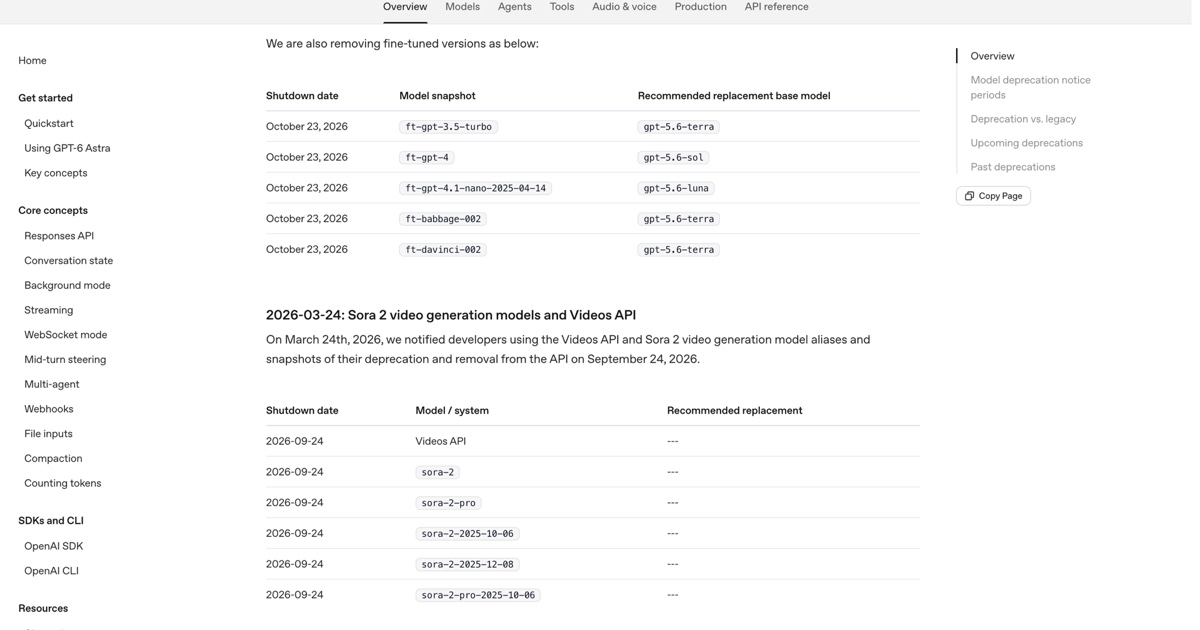
| Kling 4.0 | Prompt plus Omni Reference (up to 15 assets) | First frame, first and last frame, up to 10 keyframes | 30 seconds (3 to 30 s), up to 4K | Free Basic plan; daily credits are listed as a subscriber benefit | Standard: $6.99 first month, then $8.80/month | Oct 22, 2026 |
| Vidu Q4 (preview) | Prompt plus up to 15 reference images | Yes | 16 seconds (3 to 16 s), up to 4K | Free plan with bonus credits; Q4 at 540p | Standard: $99/year ($8.25/month) | Oct 22, 2026 |
| PixVerse V6 | Prompt; app style presets include anime | First frame, first and last frame | 15 seconds (1 to 15 s), up to 1080p | 60 credits once, then 30 per day, up to 540p | Standard: $8/month billed yearly | Oct 22, 2026 |
| MiniMax Hailuo (H3, 2.3) | Prompt; Hailuo 2.3 announced stronger anime rendering | First frame, first and last frame | H3: 15 seconds, 768P or 2K | One-time trial credits for Hailuo models | Standard: $10.50/month on Oct 22 | Oct 22, 2026 |
| Midjourney Video (with niji) | The first frame sets the style | Image-to-video only | 5 seconds, extendable to 21 seconds, 480p or 720p | No free trial on the website | Basic: $10/month (SD video only) | Oct 22, 2026 |
| Wan 3.0 | Prompt plus style reference images | First frame, first and last frame | 30 seconds (2 to 30 s), up to 1080p | Model Studio: 30 free seconds for new users | API: $0.05 to $0.20 per second | Oct 22, 2026 |
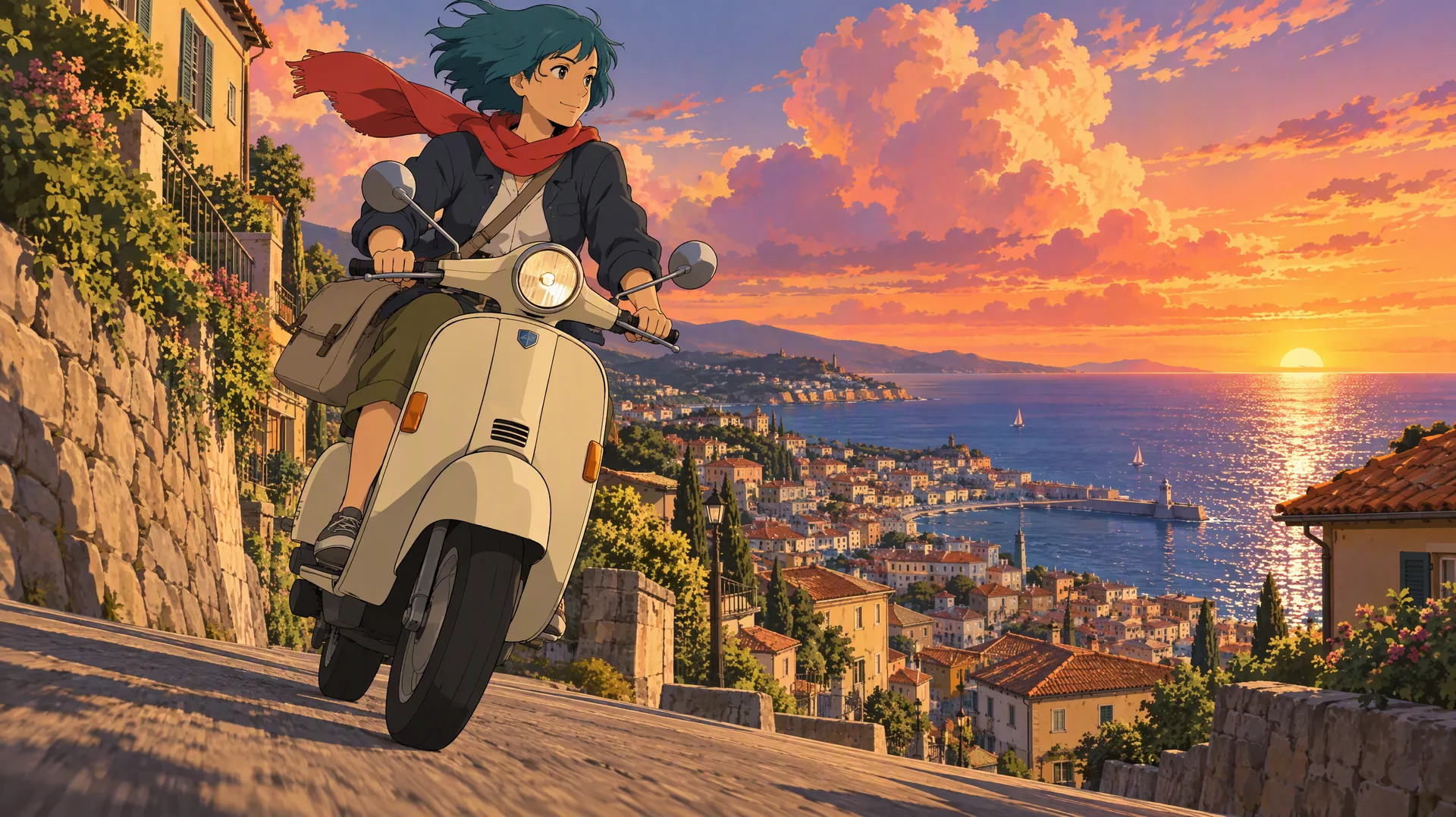
Image prompt: Original anime key visual. A young adult woman courier with short teal hair, a red scarf, and a canvas messenger bag rides a cream scooter down a steep seaside town street at sunset, cel-shaded 2D look with clean line art and hard-edged shadows, towering orange and pink clouds, low-angle three-quarter view, wide 16:9 frame.
TL;DR
- For a full anime scene in one pass, use Seedance 2.5 or Kling 4.0. Both generate up to 30 seconds.
- For short, highly stylized 2D clips, try Vidu Q4 (up to 16 seconds) or PixVerse V6 (up to 15 seconds). PixVerse also has the clearest free allowance: 30 credits a day.
- If you already make anime stills in Midjourney's niji model, animate them in Midjourney. Expect 5-second clips that you extend to 21 seconds.
- Hailuo and Wan 3.0 are solid budget options, but their official pages do not list an anime mode, so you steer the style yourself.
- The single biggest quality lever is the input: start from a clean anime still and describe motion, not style.
Quick Answer
The best AI video generator for anime depends on clip length. For 20 to 30 second scenes with dialogue or a camera move, Seedance 2.5 and Kling 4.0 lead because they render the whole scene in one pass and accept character references, which helps one character and one art style hold for the full clip. For 5 to 15 second loops, edits, and social clips, Vidu Q4 and PixVerse V6 are faster and cheaper to iterate on. For photo to anime video, first turn the photo into an anime illustration with an image model, then animate that still.
To try the image-first method, open the AI image-to-video generator on SeedVideo AI, upload an anime still as the first frame, and describe only the motion.
How this comparison was checked
Every number in the table comes from the provider's own documentation, model page, or pricing page, opened on October 22, 2026. "Longest single generation" means the length of one request before any extension. Free allowances change often, so the table lists only amounts the providers publish; where a provider gives no number, the table says so.
The ranking reflects documented features and workflow fit for anime projects. It is not a side-by-side quality score. For a recorded comparison of how models hold one face and outfit across shots, see the character consistency comparison.
1. Seedance 2.5: best for 30-second anime scenes with many references
Best for: story beats, dialogue scenes, and music-video sections where one character has to stay on model for the full clip. Not for: free experiments, because Seedance 2.5 needs a paid plan or credit pack on SeedVideo AI.
Seedance 2.5 accepts durations from 4 to 30 seconds and outputs 480p, 720p, or 1080p, according to its BytePlus ModelArk documentation. Image-to-video works from a first frame or from a first and last frame. Reference mode accepts up to 30 images, 10 videos, and 10 audio clips in one request, which is useful for anime work: you can pass a character sheet, an outfit turnaround, and a background plate together. There is no anime preset; the look comes from your references and your prompt.
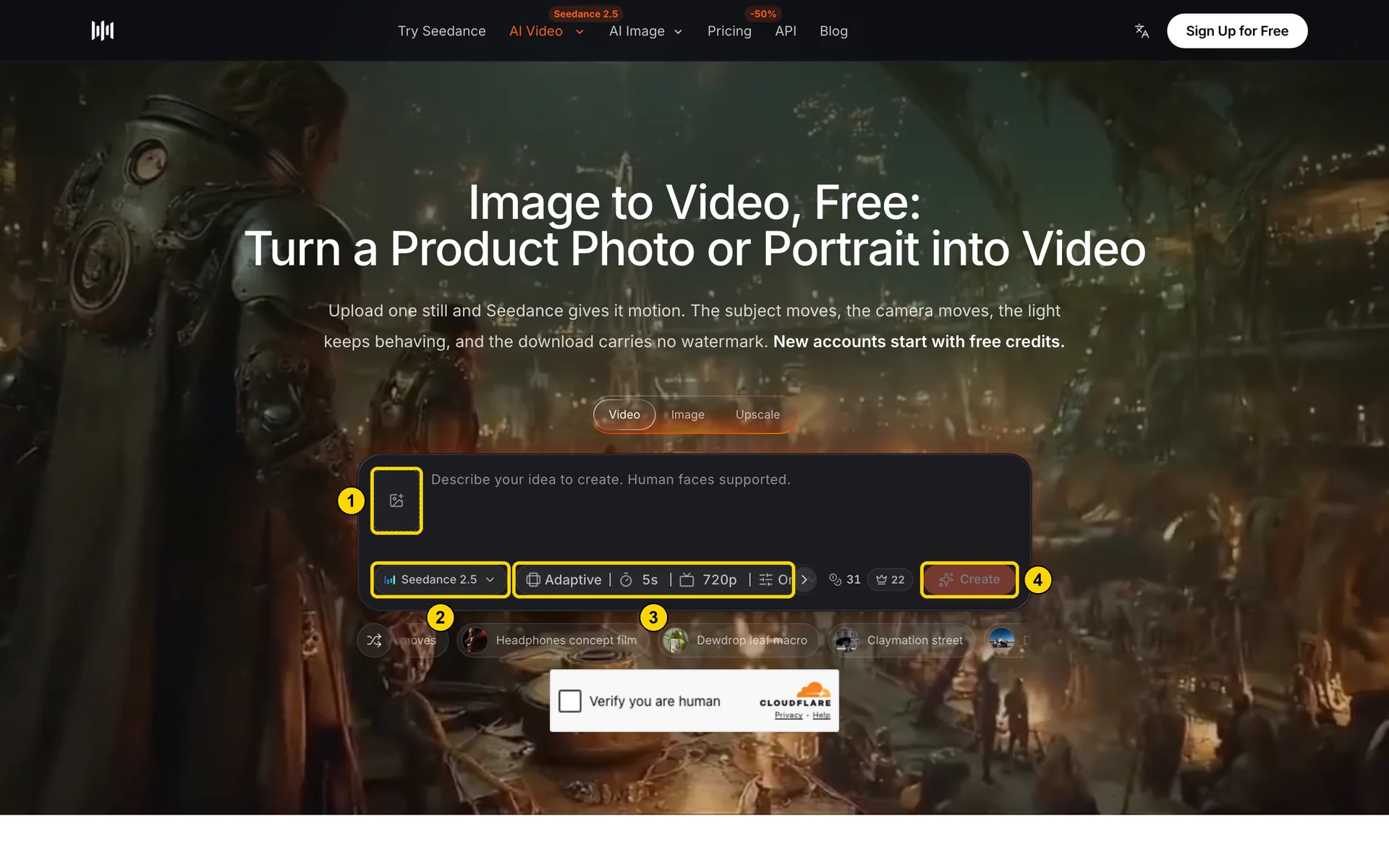
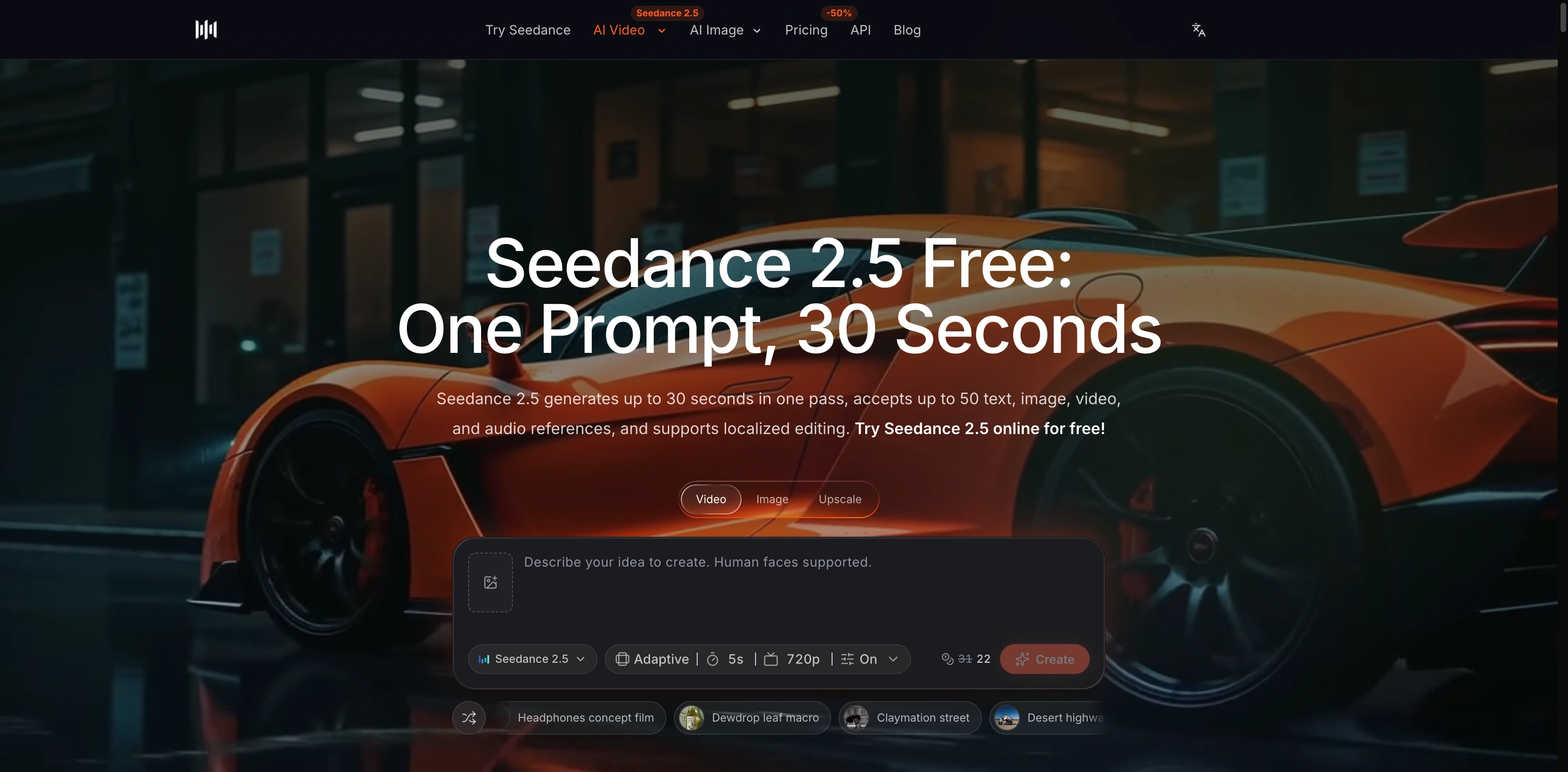
SeedVideo AI image-to-video page, October 22, 2026: (1) add your anime still as the first frame, (2) Seedance 2.5 is selected, (3) aspect ratio, duration, and resolution, (4) Create.
On SeedVideo AI, a 5-second 720p Seedance 2.5 clip showed 31 credits on October 22, or 22 credits at the Pro rate. Plans start at $14.90 per month for Lite (100 credits, Seedance 2.5 up to 720p), $29 for Pro (200 credits, up to 1080p), and $149 for Premium (1,300 credits). New accounts get 5 free credits, which cover a short Seedance 2.0 Mini draft. The Seedance 2.5 model workspace lists current per-second costs. For motion wording that keeps a still image steady, the Seedance 2.5 image-to-video prompts collection has ready-made examples.
2. Kling 4.0: best for multi-shot anime sequences you plan with keyframes
Best for: 20 to 30 second sequences with planned cuts, recurring characters, and 4K delivery. Not for: free users who need watermark-free 1080p output.
Kling 4.0 became available to all users on Kling's site in October 2026. Kling's user guide says it generates up to 30 seconds in a single generation, at 720p, 1080p, or 4K, and lists "animation" among the visual styles it supports. Its Keyframes entry accepts a first frame, a first and last frame, or up to 10 keyframes along the timeline, and Omni Reference takes up to 15 reference assets, including up to 7 elements. That keyframe control suits anime storyboards: you can pin the pose for each beat and let the model fill the motion in between.
Kling's free Basic plan exists, but its membership page now lists daily login credits as a subscriber benefit, and 1080p, 4K, and watermark-free downloads sit on paid tiers. Standard costs $6.99 for the first month and $8.80 per month after that, with 660 credits. SeedVideo AI's model picker carries Kling 3.0 (4 to 15 seconds, up to 4K) rather than 4.0.
3. Vidu Q4: best for short 2D-animation clips at high resolution
Best for: 5 to 16 second stylized clips, character loops, and 2K or 4K exports. Not for: scenes that must run longer than 16 seconds in one take.
ShengShu's Vidu added Vidu Q4 as a preview model on October 7, 2026. The Q4 page lists 3 to 16 second image-to-video generations at up to 4K, and the API update notes allow up to 15 reference images. Vidu's pricing page promotes "Smooth 2D Animation" as a feature, and the company runs a dedicated AI animation generator page. Vidu's current API does not expose a separate anime style parameter, so describe the style in the prompt and lean on a clean anime first frame.
The free plan includes bonus credits for signing up and logging in, though Vidu does not publish the amounts, and free generations with Q4 run at 540p. Standard costs $99 per year, about $8.25 a month, with 800 credits a month.
4. PixVerse V6: best free option for daily anime experiments
Best for: testing many short anime ideas on a free account, plus anime restyles of existing footage. Not for: clips longer than 15 seconds or watermark-free free output.
PixVerse V6 generates 1 to 15 seconds at up to 1080p, with image-to-video and first-and-last-frame modes. A PixVerse blog post from September 2026 says the app includes anime, cinematic, and 3D style presets. The developer API no longer has a style parameter on text-to-video, but its separate Video Restyle tool can turn an existing clip into an anime look from a prompt or a preset.
PixVerse publishes the most concrete free allowance in this list: 60 credits on your first visit, then 30 credits a day, at up to 540p, with a watermark. The Standard plan costs $8 per month billed yearly.
5. MiniMax Hailuo: best for stylized short clips with strong motion
Best for: energetic 6 to 15 second clips such as fight beats, hair and cloth motion, and quick reaction shots. Not for: projects that need a documented anime preset or clips over 15 seconds.
MiniMax H3, released July 31, 2026, generates 4 to 15 seconds at 768P or 2K, with text, image, first-and-last-frame, and reference inputs. MiniMax's announcement for the older Hailuo 2.3 specifically mentions improved anime, illustration, ink-wash, and game-CG styles; Hailuo 2.3 runs 6 or 10 seconds at 768p and 6 seconds at 1080p. The H3 announcement does not mention anime, so test both on your style before committing.
The Hailuo web app offers one-time trial credits for its Hailuo models without stating the amount. On October 22 the Standard plan was listed at $10.50 per month, down from $14.99. The MiniMax H3 option in SeedVideo AI's picker shows 5 to 15 seconds at up to 2K.
6. Midjourney Video with niji: best for illustrators who already have anime stills
Best for: artists who create anime key frames in Midjourney's niji model and want short motion loops of them. Not for: text-to-video, long scenes, or 1080p output.
Midjourney's video tool is image-to-video only: you give it a first frame and an optional motion prompt. Each clip is 5 seconds, and you can extend it by 4 seconds at a time, up to four times, for a maximum of 21 seconds. Output is 480p in SD mode, and 720p in HD mode on the Standard plan or higher in Fast mode. The niji·journey team publishes its own guide to making videos from a niji still, and notes that the motion follows the style of the first frame. There is no free trial on the website. Basic costs $10 per month and creates SD video only.
7. Wan 3.0: best per-second price for long anime drafts
Best for: developers and teams who want 30-second drafts at a low per-second API price. Not for: creators who want a ready anime preset or a web app with a large free allowance.
Alibaba's Wan 3.0 generates 2 to 30 seconds at 480p, 720p, or 1080p, with first-frame, first-and-last-frame, and reference modes, including style reference images and style transfer in its editing mode. Its official documentation does not mention anime specifically, so the style depends on your references. Alibaba Cloud Model Studio pricing is $0.05 per second at 480p, $0.10 at 720p, and $0.20 at 1080p, and new users get 30 free seconds in the Singapore region for 90 days. Wan 3.0 is also in SeedVideo AI's picker with a 2 to 30 second range.
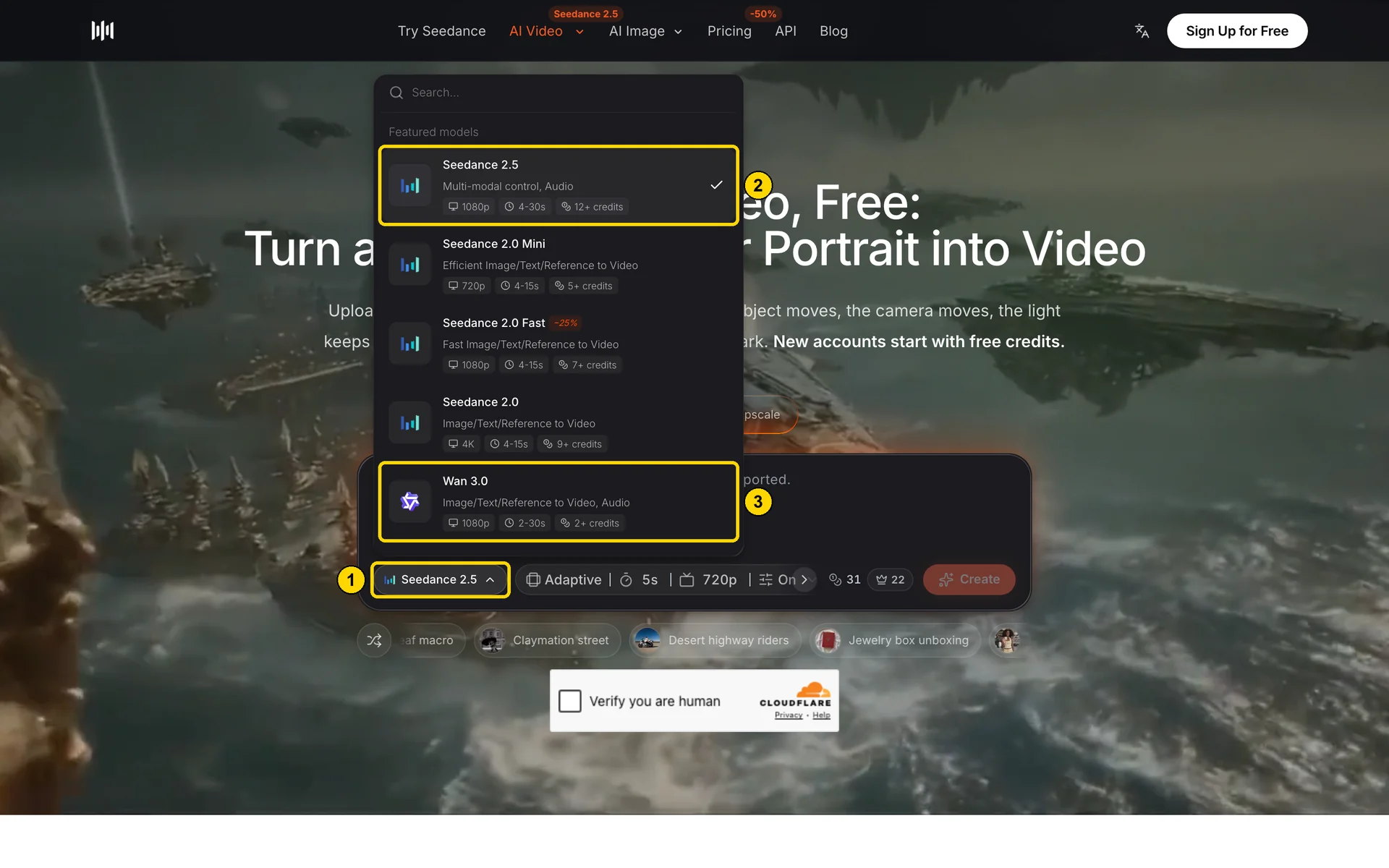
SeedVideo AI model picker, October 22, 2026: (1) the model selector, (2) Seedance 2.5 shows 4-30s at up to 1080p, (3) Wan 3.0 shows 2-30s.
Anime style prompt vocabulary
Name the drawing technique, the line, the shading, and the light. Avoid naming living artists or studios, and use original characters rather than existing ones. Each prompt below describes motion for one of the stills in this article, so you can upload the still as a first frame and paste the matching prompt.
Cel-shaded TV anime
Flat color fills, two-tone hard shadows, and thin, even line art. Keep motion simple and readable: a turn of the head, a coat moving in the wind, rain falling at a steady angle.
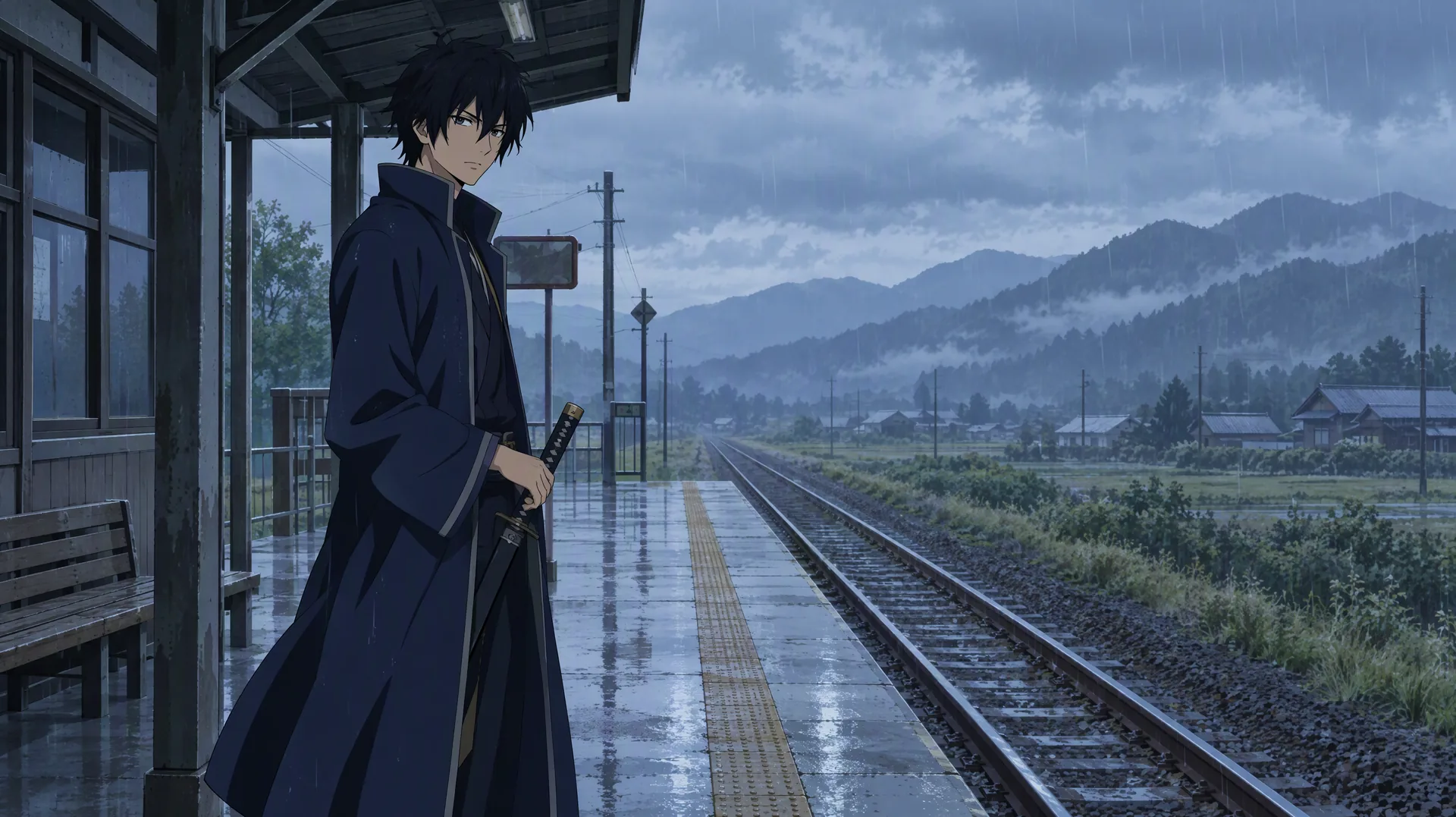
Image prompt: Original cel-shaded TV anime frame. A young adult swordsman with messy black hair and a long navy coat stands on an empty rural train platform in light rain, one hand on a sheathed sword, flat color fills, two-tone hard shadows, thin line art, soft blue-gray overcast light, medium shot at eye level, wide 16:9 frame.
Cel-shaded 2D anime, 8 seconds, locked-off medium shot. The swordsman in the long navy coat slowly turns his head toward the camera as steady rain falls on the empty train platform, the coat hem moving gently in the wind. Flat colors, hard two-tone shadows, thin consistent line art. Keep his face, hair, and coat unchanged. Audio: soft rain and distant train bell.
Painterly anime illustration
Visible brushstrokes, soft blended shading, and warm light. Motion should be gentle, because large movements break the painted texture.
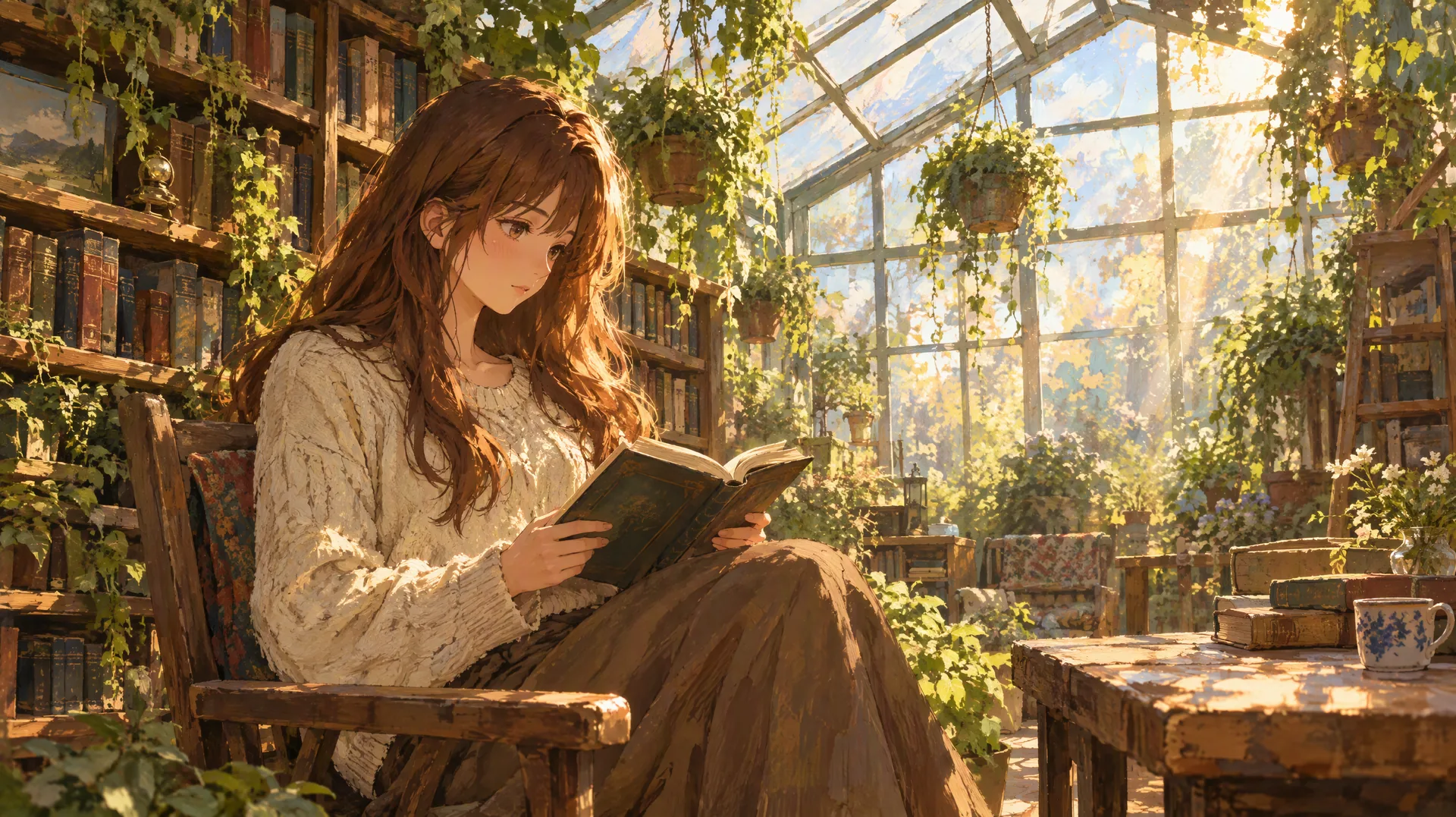
Image prompt: Original painterly anime illustration with visible brushstroke texture. A young adult woman with long chestnut hair in a cream knit sweater reads inside a sunlit glass greenhouse filled with hanging plants and wooden bookshelves, warm afternoon sunbeams, glowing dust in the air, gentle rim light, medium-wide shot, wide 16:9 frame.
Painterly anime illustration style, 10 seconds, slow push-in. The woman in the cream sweater turns one page of her book and looks up with a small smile, dust particles drifting through warm sunbeams in the glass greenhouse, hanging plants swaying slightly. Keep the brushstroke texture and soft shading stable in every frame. Audio: quiet page turn and birdsong.
1990s retro anime
Hand-painted backgrounds, thick ink outlines, slightly faded colors, and film grain. Neon and rain reflections suit this look, and short, deliberate camera moves keep it authentic.
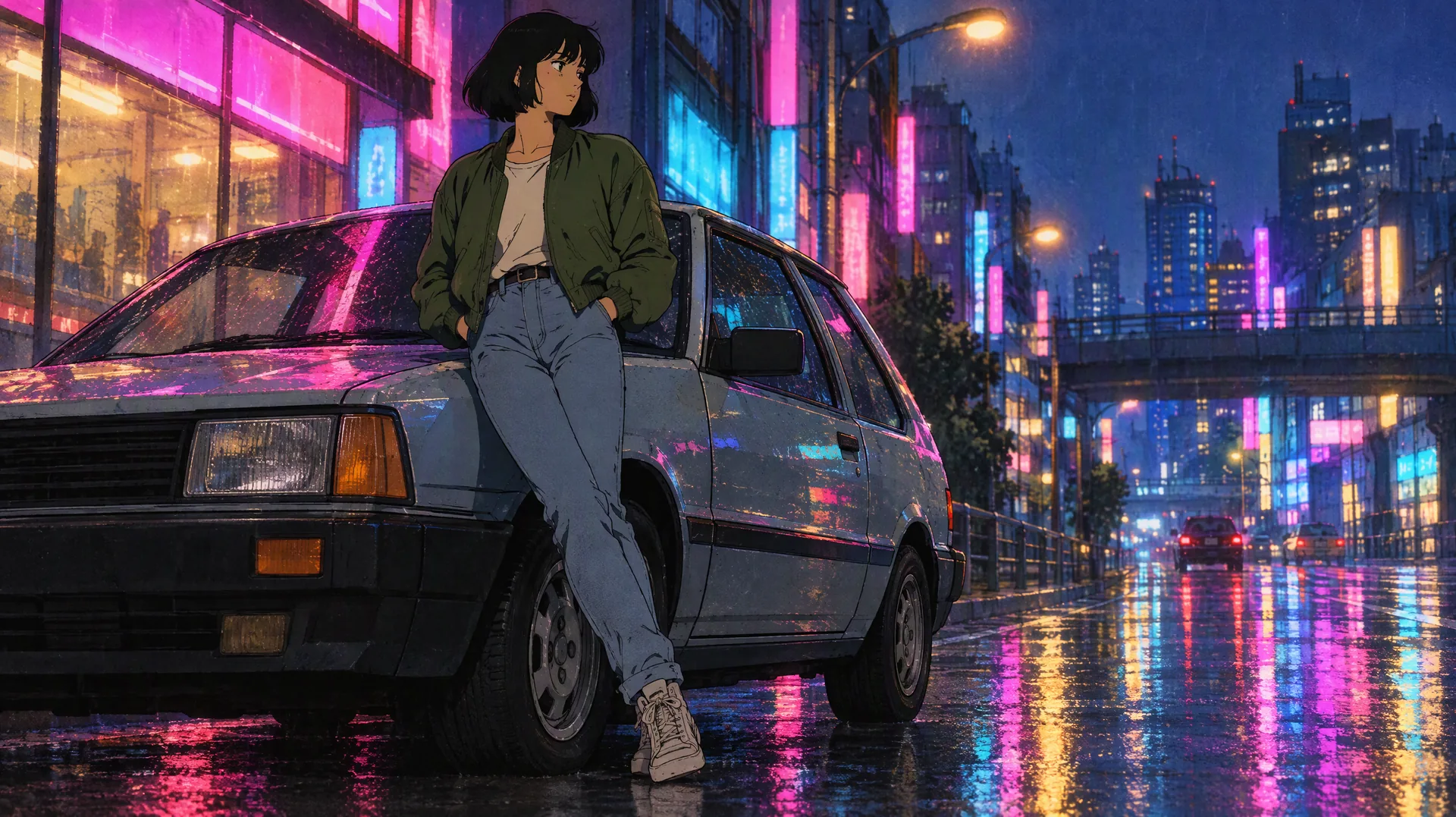
Image prompt: Original 1990s hand-painted cel anime frame. A young adult woman with a short bob and a green bomber jacket leans on a boxy vintage hatchback on a rain-soaked city street at night, magenta and cyan neon reflections on wet asphalt, faded film colors, soft grain, thick ink outlines, low-angle medium shot, wide 16:9 frame.
1990s retro cel anime look with soft film grain, 8 seconds, slow sideways dolly. The woman in the green bomber jacket leans on the vintage hatchback, glances down the street, and pushes her hair behind her ear while neon reflections ripple on the wet road and a car passes in the background. Keep thick ink outlines and faded colors. Audio: rain and distant traffic.
Photo to anime video: a three-step workflow
Most "photo to anime video" requests work better in two stages than in one. Video models are good at motion and weak at changing the whole art style while they animate.
| Step | What to do | Tip |
|---|---|---|
| 1. Make the anime still | Turn the photo into an anime illustration with an image model, or draw the frame yourself | Use only photos of people who agreed to it, and keep the composition simple |
| 2. Animate the still | Upload it as the first frame in an image-to-video tool | Describe motion, camera, and sound; repeat the details that must not change |
| 3. Extend or cut | Use the last frame of one clip as the first frame of the next | Keep the same style words in every prompt so shading and line weight match |
On SeedVideo AI, the AI image generator handles step 1 with models such as GPT Image 2, Nano Banana, and Seedream 5.0, and the image-to-video page handles step 2.
Copyright and style boundaries
Style vocabulary such as "cel-shaded" or "1990s anime" describes a technique, and that is the safe way to prompt. Prompts that name a living illustrator or a specific studio ask the model to imitate someone's work, and existing anime characters belong to their rights holders. Build your own characters, write a short character sheet for them, and reuse that sheet across clips. Check each platform's terms for commercial use; on SeedVideo AI, commercial use is included on the Pro and Premium plans.
FAQ
What is the best AI video generator for anime?
For full scenes, Seedance 2.5 and Kling 4.0 lead, with up to 30 seconds per generation as of October 22, 2026. For short stylized clips, Vidu Q4 and PixVerse V6 are quicker to iterate on. The best results in every tool come from animating a finished anime still rather than generating the style from text.
Which AI anime video generator is free?
PixVerse publishes the clearest free allowance: 60 credits on the first visit and 30 credits a day, at up to 540p with a watermark. Vidu and Hailuo give bonus or trial credits without publishing amounts, and SeedVideo AI gives new accounts 5 credits for a short Seedance 2.0 Mini draft. Midjourney has no free trial on its website.
Can AI turn a photo into an anime video?
Yes, and a two-step method works best. Convert the photo into an anime illustration with an image model, then upload that illustration as the first frame in an image-to-video tool and describe the motion. Only use photos of people who have given permission.
How long can an AI anime video be?
One generation reaches 30 seconds in Seedance 2.5, Kling 4.0, and Wan 3.0, 16 seconds in Vidu Q4, and 15 seconds in PixVerse V6 and MiniMax H3. Midjourney clips start at 5 seconds and extend to 21 seconds. Longer pieces are built by chaining clips from their last frames.
Is there an AI video generator with an anime style preset?
PixVerse says its app includes anime, cinematic, and 3D style presets, and its Video Restyle tool can convert existing footage to an anime look. Kling lists animation among the styles Kling 4.0 supports. The other tools here rely on your prompt and reference images.
Is it legal to make anime videos with AI in the style of a famous artist?
Describing a general technique, such as cel shading or a 1990s look, is the safer route. Naming a living artist or studio to copy their style, or using existing characters, can raise copyright and platform-policy problems. Original characters and descriptive style words avoid both.
Start from one anime still
Pick the tool by clip length, then spend your effort on the first frame. Make or choose one clean anime still, upload it to the image-to-video generator on SeedVideo AI, and test a short draft before you commit to 30 seconds. Plan prices are on the SeedVideo AI pricing page, and more head-to-head guides are in the model comparisons category.