Last verified: October 15, 2026. Two widely available models generate a full 30 seconds in one request: Seedance 2.5 (4 to 30 seconds, up to 1080p) and Wan 3.0 (up to 30 seconds, up to 1080p). LTX-2.5 Fast reaches 20 seconds. Kling 3.0, Grok Imagine Video 1.5, and MiniMax H3 stop at 15 seconds, Runway Gen-4.5 at 10, and Veo 3.1 at 8. Anything longer depends on extension or editing.
The two numbers behave differently. A 30-second single generation keeps one camera path, one light setup, and one character performance inside the same model pass. An extended or stitched video can run for minutes, but every join is a place where identity, direction, or sound can drift. The table below separates those two numbers, so you can pick a tool by the length you actually need.
| Tool | Longest single generation | Extension or continuation | Highest resolution | Reference inputs | Price signal | Verified |
|---|---|---|---|---|---|---|
| Seedance 2.5 | 30 seconds (4 to 30 s) | Multi-round extension, forward or backward | 1080p | Up to 30 images, 10 videos, 10 audio files | SeedVideo AI: 183 credits for 30 s at 720p (credit-pack rate); plans from $14.90/month | Oct 15, 2026 |
| Wan 3.0 | 30 seconds | Video extension | 1080p | Text, images, video, audio, documents | Alibaba Cloud API: $0.10/s at 720p, $0.20/s at 1080p | Oct 15, 2026 |
| LTX-2.5 Fast | 20 seconds at 720p or 1080p (24/25 fps) | Extend endpoint adds 2 to 20 s per call | 4K (up to 10 s) | Start and last frame, audio-to-video | API: $0.09/s at 720p, $0.13/s at 1080p | Oct 15, 2026 |
| Kling 3.0 | 15 seconds (3 to 15 s) | 4 to 5 s per extension, up to 3 minutes total | Native 4K mode | Start and end frames, Element references | Standard: $6.99 first month, then $8.80/month (660 credits) | Oct 15, 2026 |
| Veo 3.1 | 8 seconds (4, 6, or 8 s) | 7 s per extension, up to 20 times, 148 s total (720p) | 4K (8 s clips) | Up to 3 reference images | Gemini API: $0.40/s Standard; $0.10/s Fast at 720p | Oct 15, 2026 |
| Grok Imagine Video 1.5 | 15 seconds (1 to 15 s) | Separate model adds 2 to 10 s to a 2 to 15 s clip, capped at 720p | 1080p | Up to 14 images, 3 voice references | API: $0.14/s at 720p, $0.25/s at 1080p | Oct 15, 2026 |
| MiniMax H3 | 15 seconds (4 to 15 s) | First and last frame control for chaining | 2K | Text, image, video, audio references | API: $0.08/s at 768P, $0.13/s at 2K | Oct 15, 2026 |
| Runway Gen-4.5 | 10 seconds (2 to 10 s) | Not documented for Gen-4.5 | 720p | Text and image | Standard plan required: $15/month, 625 credits = 52 s of Gen-4.5 | Oct 15, 2026 |

Video prompt: 30-second continuous one take with no cuts. A hiker in a rust-orange jacket walks away from the camera along a narrow mountain ridge trail at golden hour, layered blue ranges and valley mist ahead, camera following at shoulder height with a wide lens, low sun from the left, slow push-in and final hold on the horizon.
TL;DR
- For one 30-second take, use Seedance 2.5 or Wan 3.0. Both accept 30 seconds in a single request and output up to 1080p.
- For open weights and self-hosting, LTX-2.5 Fast runs up to 20 seconds per generation.
- To grow one starting clip into minutes of footage, use Kling 3.0 (extensions up to 3 minutes) or Veo 3.1 (extensions up to 148 seconds at 720p).
- For short, high-detail shots you plan to edit together, MiniMax H3 (2K, 15 seconds) and Runway Gen-4.5 (10 seconds) fit well.
- Sora is no longer an option. OpenAI discontinued the Sora app on April 26, 2026 and the Sora API on September 24, 2026.
Quick Answer
If you want the longest single AI video generation available today, choose between Seedance 2.5 and Wan 3.0. Both reach 30 seconds. Seedance 2.5 is the stronger pick when the clip needs many references (up to 30 images, 10 videos, and 10 audio files) and timestamp-level edits. Wan 3.0 is the cheaper per-second option on its official API. For finished pieces longer than 30 seconds, no current model renders a minute or more in one pass. You either extend a generated clip (Kling, Veo, LTX) or plan several 15 to 30 second shots and cut them together.
You can try the 30-second setting directly in the Seedance 2.5 model workspace on SeedVideo AI, where the duration slider runs from 4 to 30 seconds.
How these length limits were checked
Each number in this article comes from the provider's own documentation, model page, or pricing page, checked on October 15, 2026. "Longest single generation" means the length of one request's output before any extension, edit, or stitching. Extension numbers are listed separately because extended footage is generated in steps.
SeedVideo AI's duration ranges and credit costs come from its public generator on the same date. The ranking describes documented limits and workflow fit, not a side-by-side quality score. For identity and reference behavior, see the recorded test in our character consistency comparison.
1. Seedance 2.5: best for a complete 30-second scene in one request
Best for: ads, short story beats, product demos, and dialogue scenes that need a full arc with heavy reference control. Not for: native 4K delivery, or projects that need several minutes from a single request.
Seedance 2.5 accepts any duration from 4 to 30 seconds. The model documentation on BytePlus ModelArk states that the limit doubled from 15 seconds in the Seedance 2.0 series to 30 seconds, and that one request can accept up to 50 reference assets: 30 images, 10 videos, and 10 audio files. Output resolutions are 480p, 720p, and 1080p, with 1080p in 10-bit color. The same documentation describes multi-round extension, both forward and backward, plus timestamp-based editing of an existing clip.
On SeedVideo AI, the generator shows the full 4 to 30 second range for Seedance 2.5. At 30 seconds and 720p with sound on, the cost shown on October 15 was 183 credits at the credit-pack rate and 128 credits at the Pro rate. Pack base rates are about 3 credits per second at 480p, 6 at 720p, and 15 at 1080p. Plans start at $14.90 per month for Lite (100 credits, capped at 720p), $29 for Pro (200 credits), and $149 for Premium (1,300 credits). Lite's monthly credits do not cover one 30-second 720p clip, so Pro or a credit pack is the practical starting point for long takes.
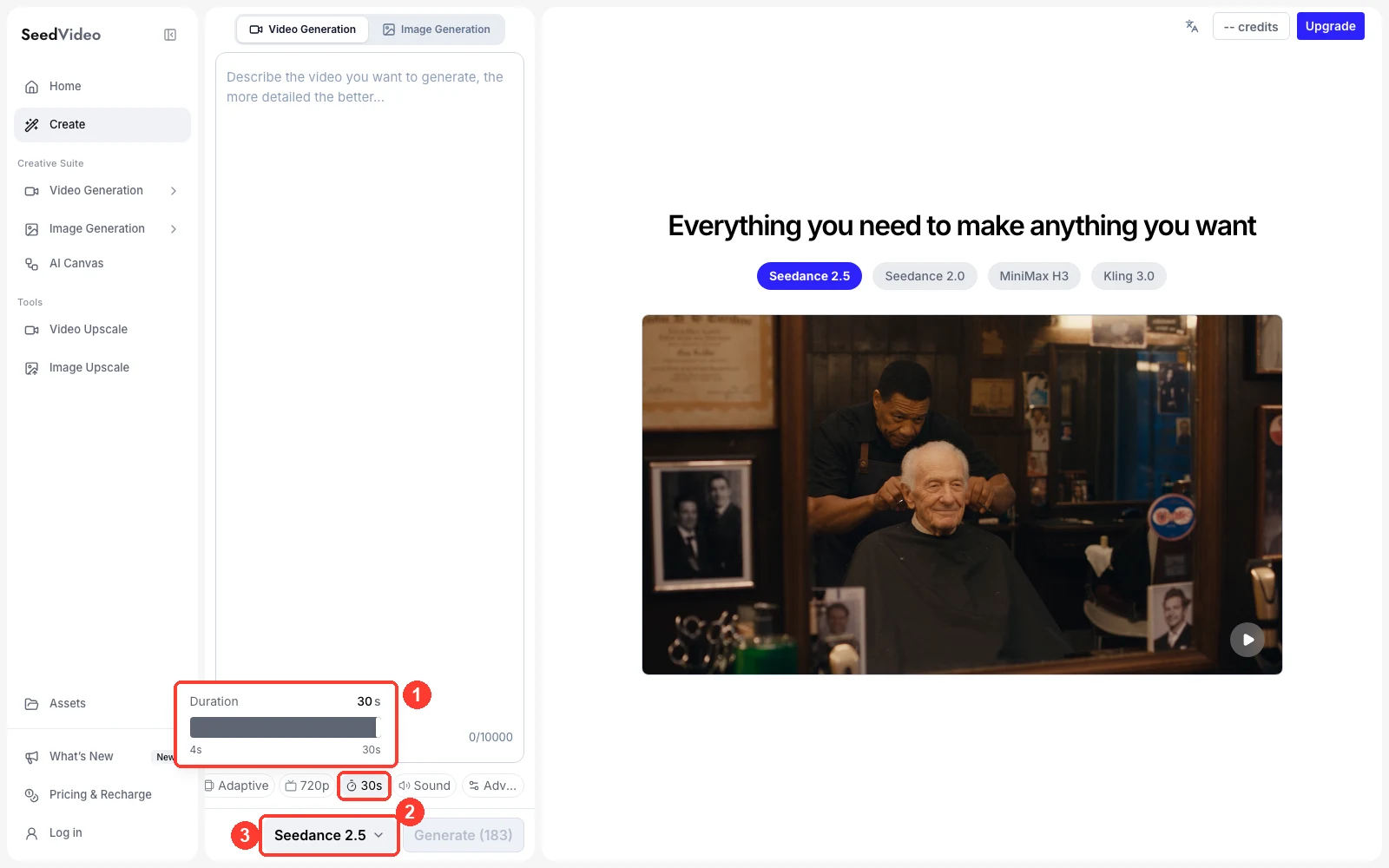
SeedVideo AI generator, October 15, 2026: (1) the duration slider runs from 4 s to 30 s, (2) 30 s is selected, (3) Seedance 2.5 is the active model.
To write a prompt for that slider, open the AI text-to-video generator, pick Seedance 2.5, and set the duration before you paste the prompt. A 30-second prompt needs timed beats rather than one long description. The Seedance 2.5 30-second video guide breaks the clip into four beats (0 to 6, 6 to 14, 14 to 24, and 24 to 30 seconds) and gives a quality checklist for each.
2. Wan 3.0: best per-second price for 30-second drafts
Best for: fast iteration on long drafts, document-to-video or slide-to-video work, and teams already on Alibaba Cloud. Not for: projects that need a 50-asset reference pack or 10-bit 1080p output.
Alibaba's Wan 3.0 generates up to 30 seconds in a single generation, with a smart duration option that suggests a length based on the prompt, plus video extension. It takes text, images, audio, video, and documents as input and outputs 480p, 720p, or 1080p. On Alibaba Cloud Model Studio, pricing is $0.05 per second at 480p, $0.10 at 720p, and $0.20 at 1080p, which puts a full 30-second 1080p generation at $6.00 and a 30-second 480p draft at $1.50.
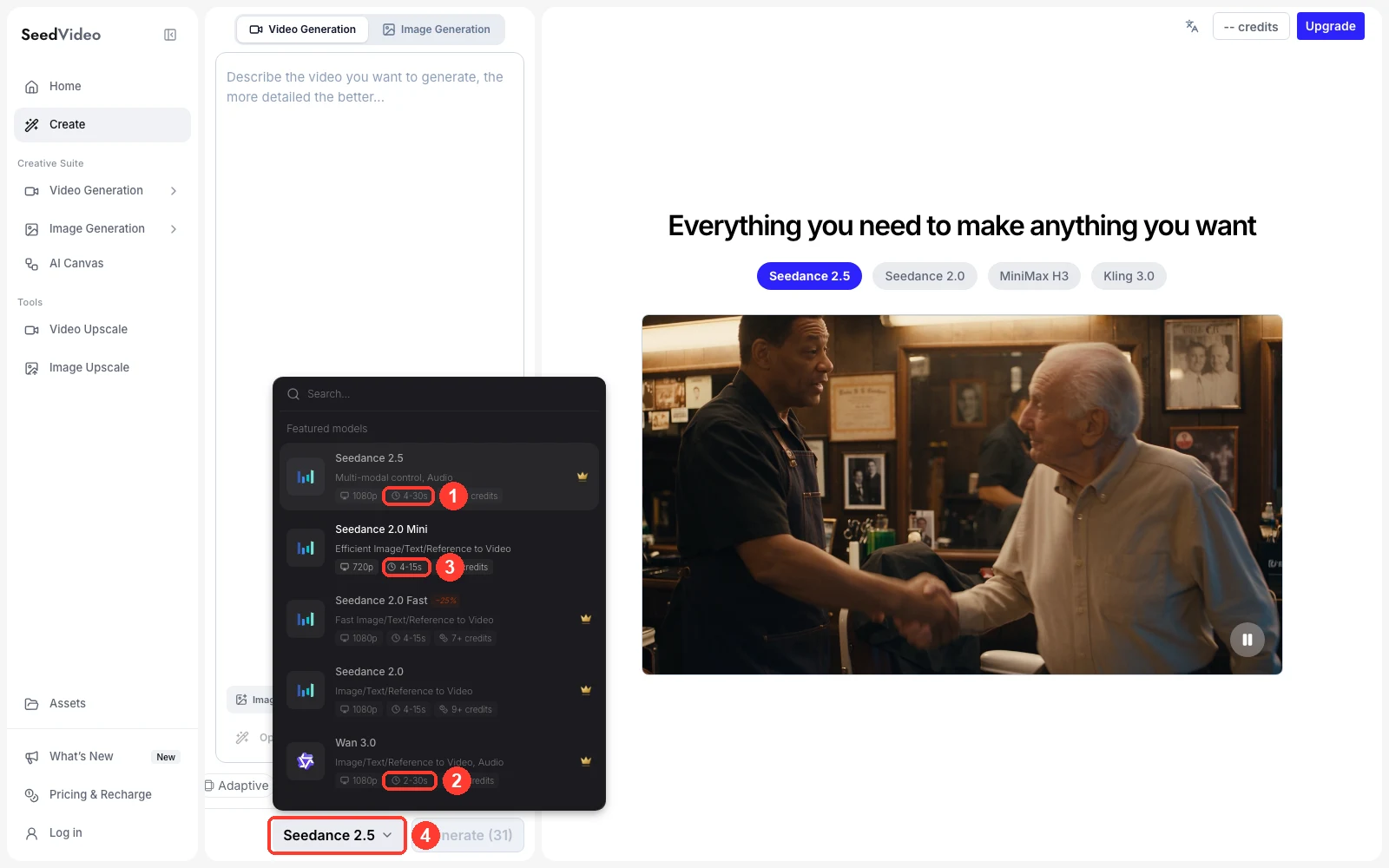
SeedVideo AI model picker, October 15, 2026: (1) Seedance 2.5 shows 4-30s, (2) Wan 3.0 shows 2-30s, (3) Seedance 2.0 Mini shows 4-15s for comparison, (4) the model selector.
Wan 3.0 is also available in the SeedVideo AI picker with a 2 to 30 second range at up to 1080p. The Wan 3.0 model page lists its inputs and credit costs, and the Wan 3.0 vs Seedance 2.5 comparison covers where each model holds up better on longer scenes.
3. LTX-2.5: best open-weights option for 20-second clips
Best for: developers who want to self-host, fine-tune, or run long generations on their own GPUs. Not for: a 30-second single pass, or high frame rates at full length.
LTX-2.5 is an open-weights video model from Lightricks. Its API documentation lists durations of 6 to 20 seconds for the Fast variant at 720p and 1080p at 24 or 25 fps. At 48 or 50 fps, 1440p, and 4K, the limit drops to 10 seconds, and the Pro variant tops out at 10 seconds. A separate extend endpoint adds 2 to 20 seconds per call, using up to 20 seconds of the input clip as context. API pricing for LTX-2.5 Fast is $0.09 per second at 720p and $0.13 at 1080p. LTX states that the weights are free to use for companies under $10 million in annual recurring revenue.
4. Kling 3.0: best for extending one clip toward minutes
Best for: multi-shot sequences, recurring characters, and creators who grow one clip step by step. Not for: a single uninterrupted 30-second take.
Kling 3.0 generates 3 to 15 seconds per request, with Multi-Shot and Custom Multi-Shot controls for planning cuts inside that window. Kling's extension guide says a generated video can be extended by 4 to 5 seconds at a time, across multiple continuations, up to 3 minutes in total. The Kling API also documents a native 4K mode. The Standard plan costs $6.99 for the first month and $8.80 per month after that, with 660 credits. A 5-second Kling 3.0 clip at 1080p with native audio costs 60 credits.
Kling has also announced Kling 4.0. Its feature page says Kling 4.0 Flash generates up to 20 seconds at up to 720p in a limited rollout, and that the full Kling 4.0, with up to 30 seconds per pass and extension up to 2 minutes, is "coming soon this October." Until the full model is generally available, plan around Kling 3.0's 15-second limit.
5. Veo 3.1: best for a short base clip you can chain to 148 seconds
Best for: realistic 8-second shots with sound that you may grow into a longer sequence. Not for: a long take at 1080p or 4K.
Google's Veo 3.1 generates 4, 6, or 8 second clips, and 1080p or 4K output requires the 8-second length. Through the Gemini API, a Veo-generated clip can be extended by 7 seconds at a time, up to 20 times, for a combined video of up to 148 seconds. Extension is limited to 720p, and you can only extend clips generated or referenced in the last two days. Veo 3.1 accepts up to 3 reference images. Gemini API pricing is $0.40 per second for Veo 3.1 Standard at 720p and 1080p, $0.10 per second for Veo 3.1 Fast at 720p, and $0.05 per second for Veo 3.1 Lite at 720p. In Google Flow, extension also works on 8-second clips, and Flow runs it with Veo 3.1 Lite. If you are weighing Veo against Seedance for one specific project, the Seedance 2.5 vs Veo 3.1 comparison goes deeper.
6. Grok Imagine Video 1.5: best for 15-second clips driven by many references
Best for: reference-heavy 15-second clips with lip-synced speech. Not for: long takes, or extended footage above 720p.
xAI's Grok Imagine Video 1.5 generates 1 to 15 seconds at up to 1080p with native audio. Its reference mode accepts up to 14 images and 3 voice references, at up to 15 seconds and 720p. Extension runs on a separate model, grok-imagine-video, which adds 2 to 10 seconds to a 2 to 15 second source clip and caps the output at 720p. The longest extended result is therefore 25 seconds. API pricing for Video 1.5 is $0.14 per second at 720p and $0.25 at 1080p.
7. MiniMax H3 and Runway Gen-4.5: strong short shots, not long takes
MiniMax H3 is best for: 2K detail in clips up to 15 seconds. Not for: anything that has to run past 15 seconds in one piece. The MiniMax API lists 4 to 15 seconds at 768P or 2K, with text, image, video, and audio references, at $0.08 per second for 768P and $0.13 for 2K. The MiniMax H3 vs Seedance 2.5 comparison explains the trade-off between H3's resolution and Seedance's length.
Runway Gen-4.5 is best for: polished 2 to 10 second shots inside Runway's editing tools. Not for: long single takes. Gen-4.5 outputs 720p, requires the Standard plan or higher, and costs 12 credits per second. Standard is $15 per month, or $12 per month billed annually, and its 625 monthly credits cover 52 seconds of Gen-4.5.
For a wider price view across these tools, the AI video tool price comparison tracks plan prices and per-video costs.
One long take or several stitched clips?
A single 30-second generation and a 30-second edit of three 10-second clips behave differently on screen, so choose the method before you choose the tool.
| Situation | Better choice | Why |
|---|---|---|
| One continuous camera move or reveal | One long take (Seedance 2.5, Wan 3.0) | No join to hide; light, scale, and direction stay in one pass |
| Dialogue with two speakers and one reaction | One long take | Speaker order and eyelines stay inside one generation |
| A story with location changes | Stitched clips | Each shot gets its own prompt and its own retry |
| A 60 to 180 second piece | Extension (Kling, Veo) or stitched clips | No current model renders that length in one request |
| Maximum detail per frame | Short clips at 2K or 4K | High resolutions usually come with shorter limits |
| Tight budget, many drafts | Low-resolution long drafts, then upgrade the keeper | 480p drafts cost a fraction of 1080p finals |
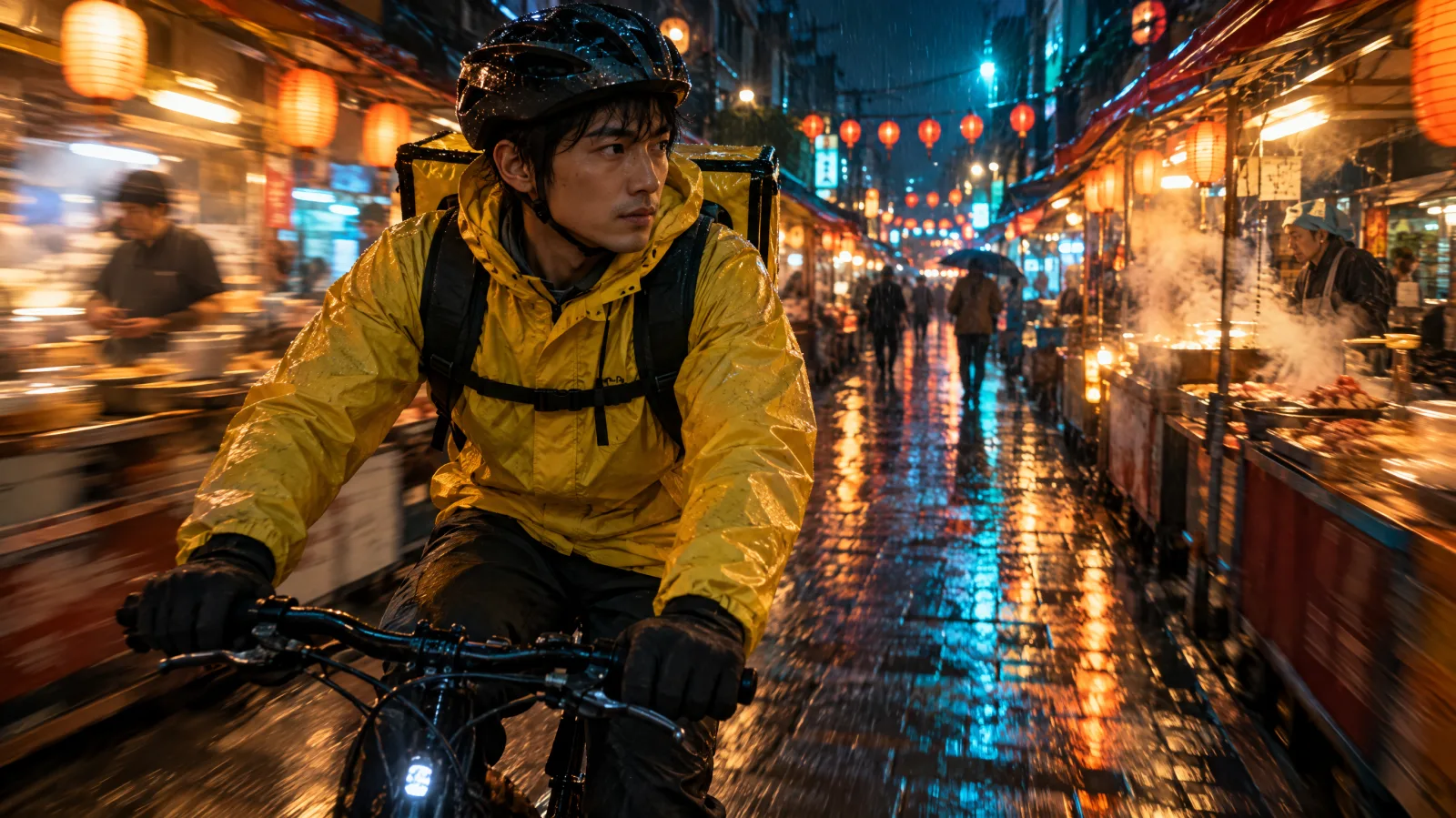
Video prompt: 20-second tracking shot with no cuts. A courier in a yellow rain jacket rides a bicycle through a narrow night market after rain, lanterns and steaming stalls passing in soft motion blur, wet cobblestones reflecting orange and teal light, camera tracking alongside at handlebar height with a 35mm lens.
Long takes fail in predictable ways: the subject's clothing changes partway through, the camera reverses direction, or the action finishes early and the last seconds drift. Stitched clips fail at the joins: a jacket changes color between shots, or the light flips sides. When you stitch, end each clip on a clear, stable frame and use it as the start frame of the next one. The AI image-to-video generator accepts that last frame as the starting image, which keeps the hand-off consistent.
Two long-take prompts you can adapt
Write a long prompt as a timeline. Give each block of seconds one visible change, name the camera move, and repeat the details that must not change.
30-second continuous one take with no cuts. A hiker in a rust-orange jacket walks away from the camera along a narrow mountain ridge trail at golden hour. 0 to 6 seconds: wide shot from behind at shoulder height, the trail leading toward layered blue mountain ranges. 6 to 18 seconds: the camera follows at walking pace while thin mist drifts through the valleys below. 18 to 26 seconds: the hiker reaches a rocky viewpoint and stops, low sun from the left casting long shadows. 26 to 30 seconds: slow push-in and steady hold on the silhouette against the horizon. Keep the jacket color, backpack, light direction, and walking direction consistent. Audio: wind and footsteps on gravel, no music.
20-second tracking shot with no cuts. A courier in a yellow rain jacket rides a bicycle through a narrow night market street after rain. 0 to 5 seconds: the camera tracks alongside at handlebar height as lanterns and steaming food stalls pass in soft motion blur. 5 to 14 seconds: the rider weaves past a vendor and rings the bell, wet cobblestones reflecting orange and teal light. 14 to 20 seconds: the rider slows beside a noodle stall and glances back toward the camera. Keep the jacket, bicycle, and riding direction consistent. Audio: rain drips, sizzling food, distant chatter.
A practical workflow for 30 to 60 second videos
| Step | What to do | Tool tip |
|---|---|---|
| 1. Fix the length | Decide whether the piece is one take (up to 30 s) or a sequence of shots | Pick Seedance 2.5 or Wan 3.0 for one take |
| 2. Write the beat sheet | Split the time into 3 to 5 blocks, each with one visible change | Reserve the last 4 to 6 seconds for a clean ending |
| 3. Draft cheaply | Generate at 480p or 720p first | Seedance 2.5 pack rates: about 3 credits/s at 480p, 6 at 720p |
| 4. Review the full length | Check identity, wardrobe, light direction, and the final frame | Reject drafts that drift after the midpoint |
| 5. Upgrade or extend | Re-render the keeper at 1080p, or extend it if you need more time | Extension adds seconds in steps, so review each join |
| 6. Cut and mix | Join clips on matching motion, then balance audio across joins | End each clip on a stable frame |
FAQ
What is the best AI video generator for long videos?
For one continuous generation, Seedance 2.5 and Wan 3.0 lead with 30 seconds per request as of October 15, 2026. Seedance 2.5 is the better fit for reference-heavy scenes; Wan 3.0 is cheaper per second on its official API. For results longer than 30 seconds, Kling 3.0 and Veo 3.1 offer the longest documented extension chains.
Which AI video generator can make a 30-second video in one go?
Seedance 2.5 (4 to 30 seconds) and Wan 3.0 (up to 30 seconds) both generate 30 seconds in a single request. Kling has announced 30-second single passes for the full Kling 4.0, but on October 15, 2026 only Kling 4.0 Flash, with up to 20 seconds at 720p, was in a limited rollout.
What is the AI video length limit for Veo 3.1 and Kling 3.0?
Veo 3.1 generates 4, 6, or 8 seconds per request and can be extended 7 seconds at a time, up to 148 seconds in total at 720p. Kling 3.0 generates 3 to 15 seconds per request, and Kling's extension guide allows 4 to 5 second continuations up to 3 minutes in total.
Can AI generate a 1-minute video in one pass?
Not with the tools in this comparison. The longest documented single generation is 30 seconds. A one-minute video needs either extension (Kling, Veo, LTX) or two or more planned clips edited together.
Is a 30-second generation better than stitching three 10-second clips?
It is better when the scene is one continuous action, camera move, or conversation, because there are no joins to hide. Stitching is better when the story changes location, or when you want to retry one shot without regenerating the whole sequence.
Is Sora still an option for long AI videos?
No. OpenAI discontinued the Sora web and app experiences on April 26, 2026 and the Sora API on September 24, 2026. Former Sora users who need longer clips can compare the 30-second options above.
Start with the length you need
If your idea is one scene with a beginning, a middle, and a clear ending, generate it as a single 30-second take. If it is a sequence, plan the shots first and choose a tool for each one. To test a full 30-second take, open the Seedance 2.5 generator on SeedVideo AI, set the duration to 30 seconds, and start with a 480p or 720p draft. More head-to-head guides are collected in the model comparisons category.