Seedance 2.5 vs Runway for Product and Brand Videos
For product videos, Seedance 2.5 is the clearer fit when the brief needs a long, reference-led sequence with a defined product image, motion example, audio direction, and final packshot. Runway is the clearer fit when the team needs a broader creative workspace, shared projects, and model choice around an editing-heavy process. Neither product page proves that one model produces better footage from the same asset. Treat the choice as a workflow decision, then run a controlled test before committing a campaign budget.
Last verified: September 10, 2026.

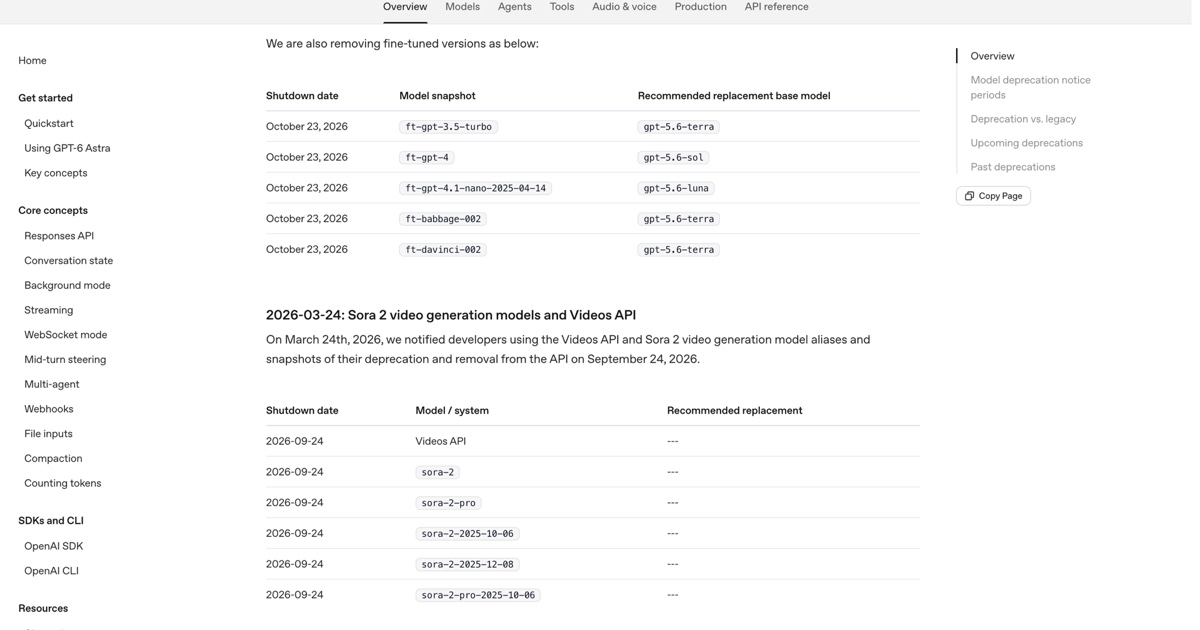
Current Seedance 2.5 model page screenshot showing the 30-second product-video entry point and model controls.
TL;DR
- Pick Seedance 2.5 for a reference-led product sequence. Its current model page documents up to 30 seconds, up to 30 image references, 10 video references, 10 audio references, and localized editing.
- Pick Runway when shared workspaces, projects, an agentic creative suite, and access to a changing model catalog matter more than one long reference package.
- Compare cost as a working budget. SeedVideo AI lists plan-level credits and output tiers. Runway prices monthly credits and model-specific consumption. A raw subscription price does not predict final campaign cost.
- Keep commercial claims separate from output claims. SeedVideo AI's paid plan cards list commercial use. Runway says creators retain rights to their generations, subject to its terms and the rights in the assets supplied.
- Do not name a quality winner without the same product asset, the same shot list, and a review that checks labels, material, proportions, and legal claims.
Quick Answer
A brand producing a 20 to 30 second launch film from a product pack, an approved motion reference, a sound cue, and a required final frame should start with the Seedance 2.5 model workflow. It gives the creative lead a place to assign each reference a job before the first generation. A team that already manages multiple campaigns in a shared workspace, needs collaborators to work inside projects, or chooses models per edit should evaluate Runway Creative first. Runway's current pricing page lists its free, Standard, Pro, and Max plans, while its workspace guide explains the Team and Enterprise paths.
The practical dividing line is simple. Seedance 2.5 puts the brief into one multimodal generation plan. Runway puts generation inside a wider creative suite. Product quality still depends on the source asset, the prompt, the chosen model, and review discipline.
| Product-video decision | Seedance 2.5 | Runway Creative | What the buyer should verify |
|---|---|---|---|
| Long-form planning | Up to 30 seconds in one pass on the current model page | Duration depends on the selected Runway model and credit rate | Whether the planned story fits one sequence or needs edits and versions |
| Product references | Up to 30 images, 10 videos, and 10 audio references | Inputs and controls vary by selected model and workflow | Which asset locks product shape, which one drives motion, and which one sets sound or style |
| Editing | Current page describes localized editing | Creative suite positions generation and editing in one workspace | The exact edit control required for the campaign |
| Team work | Build the reference pack and review outside or alongside the generation flow | Shared workspaces, projects, members, and pooled credit rules on Team | Who needs to edit, approve, and access the asset library |
| Current entry price | Free entry plus paid plan cards. Annual cards shown at $13, $14.50, and $99 per month when checked | Free with 125 one-time credits. Annual-billed Standard, Pro, and Max shown at $12, $28, and $76 per month | Model rate, top-ups, storage, seats, and revision volume |
| Commercial boundary | Paid cards list commercial use; the service terms govern use | Runway says creators retain rights to generations and may use them commercially, subject to terms | Rights to product images, trademarks, music, people, and claims |
Start with the product asset, not the model name
The product shot is the part a customer will inspect. A bottle must keep its label placement. A shoe cannot change sole thickness between a close-up and a lifestyle frame. A skin-care jar needs the same cap, print, finish, and proportion after the camera moves. These are brand controls, not an aesthetic preference.
Build a source packet before opening either tool. Include the approved hero still, a close label crop, color values or a color-managed reference, the required final packshot, and any legal text that must remain outside generated footage. If motion matters, add one short rights-cleared reference clip and label its job. It can govern a turntable move or a slow push-in. It should not silently become the source for product identity, setting, and style at once.
For a detailed prep sequence, use this AI product video guide. The useful outcome is a small, inspectable packet rather than a loose folder of inspiration. It makes later feedback specific. A reviewer can say the cap material drifted during the orbit, or the final frame lost the approved logo clearance. Those notes lead to a next version. "Make it more premium" does not.
Where Seedance 2.5 fits a brand brief
Seedance 2.5 is designed around a larger multimodal reference plan. Its current model page states that the workflow can combine a text prompt with up to 30 image references, 10 video references, and 10 audio references. It also states a maximum duration of 30 seconds and describes targeted localized editing. In practice that editing runs through the Seedance video to video workspace, where an approved take can have the product swapped, the background restyled, or the shot extended without regenerating the whole beat. Those figures make it suitable for a product story that needs continuity across more than a short isolated beat.
The reference count does not mean a team should fill every slot. More references add more possible conflicts. Use a clear division of labor instead. One image can anchor the product. A second can lock the finish and label. A video can provide the camera path. An audio reference can define beat timing. The prompt should spell out the elements that stay fixed and name one change at a time.
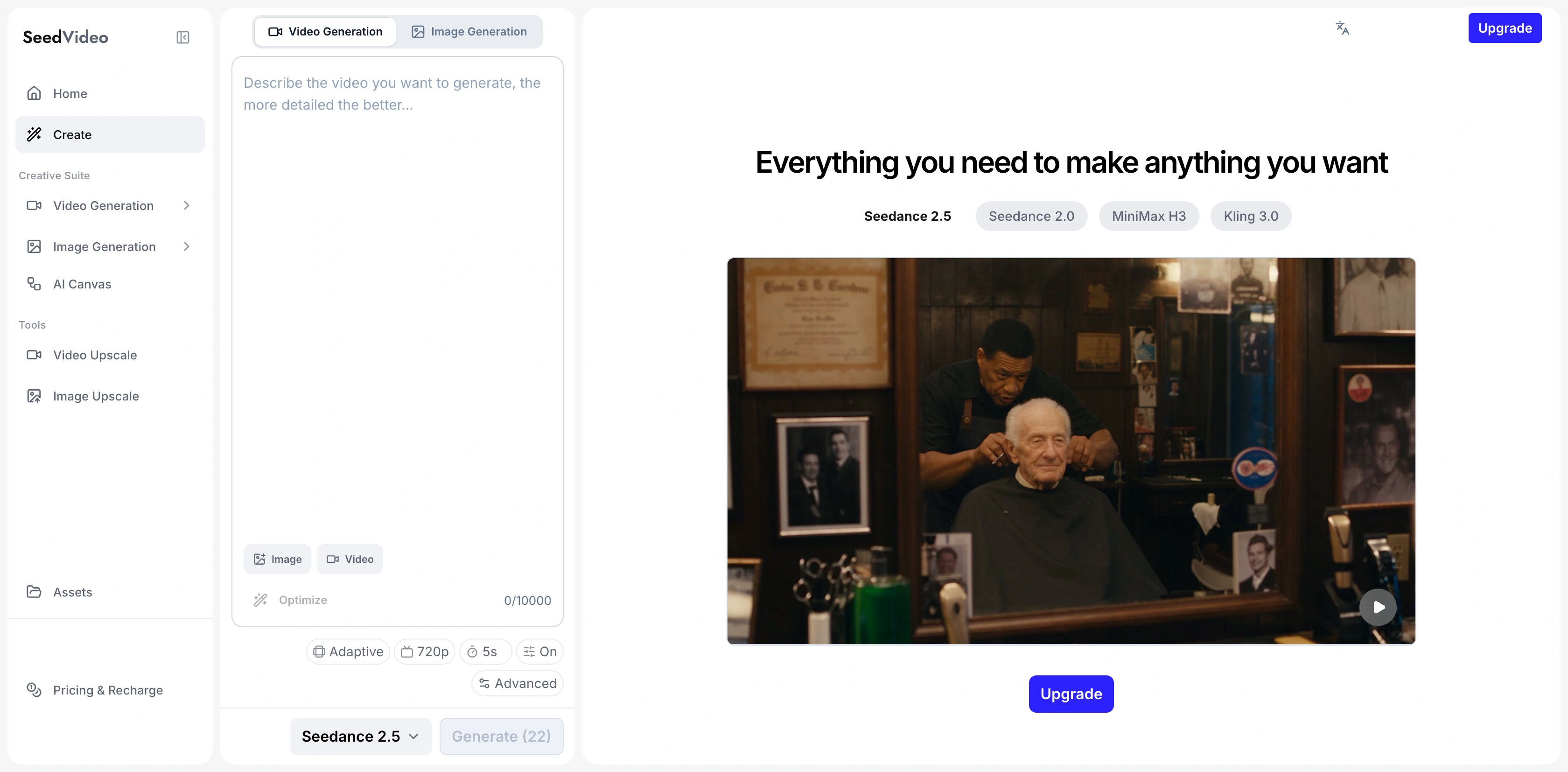
Current Seedance 2.5 generator screenshot showing the prompt field, aspect ratio, resolution, duration, and model picker.
An ecommerce launch sequence can use this structure.
| Beat | Source material | Generation instruction | Review point |
|---|---|---|---|
| 0 to 3 seconds | Hero product still | Establish the product on a clean set | Label, silhouette, and color |
| 3 to 10 seconds | Motion reference | Follow one controlled orbit or push-in | Product proportions and camera speed |
| 10 to 20 seconds | Lifestyle reference and audio cue | Show the one use moment that proves the product benefit | Hands, contact points, and claim support |
| 20 to 30 seconds | Approved packshot | Return to the hero angle and hold space for an editor-added end card | Final product match and safe logo clearance |
This is a production outline, not a claim that the model will preserve every detail automatically. Review the output against the source packet. If the product drifts, reduce competing visual references before adding more descriptive language. If the move drifts, isolate the motion reference and simplify the camera instruction.
The product demo video workflow is useful when a team needs to turn that review logic into a repeatable shot list. It also helps separate what belongs in generated footage from text, price, warranty, and legal copy that should be composited later by the editor.
Where Runway fits a brand workflow
Runway's current site describes Creative as a cloud-based suite that generates and edits video, images, and audio in one workspace. Its current pricing page includes an agentic creative collaborator, projects, storage, parallel generations, and different levels of Brand Kit access. That framing matters when a campaign is less about one reference-rich generation and more about managing versions, models, source assets, and collaborators across a client process.
Runway's exact creative controls depend on the selected model. Its current price table lists model-level credit rates, and the available catalog can change. A brand team should therefore ask a more concrete question than "Can Runway do product video?" Ask which selected model will generate, which tool will revise, where the approved assets live, and which person can sign off on a cut.
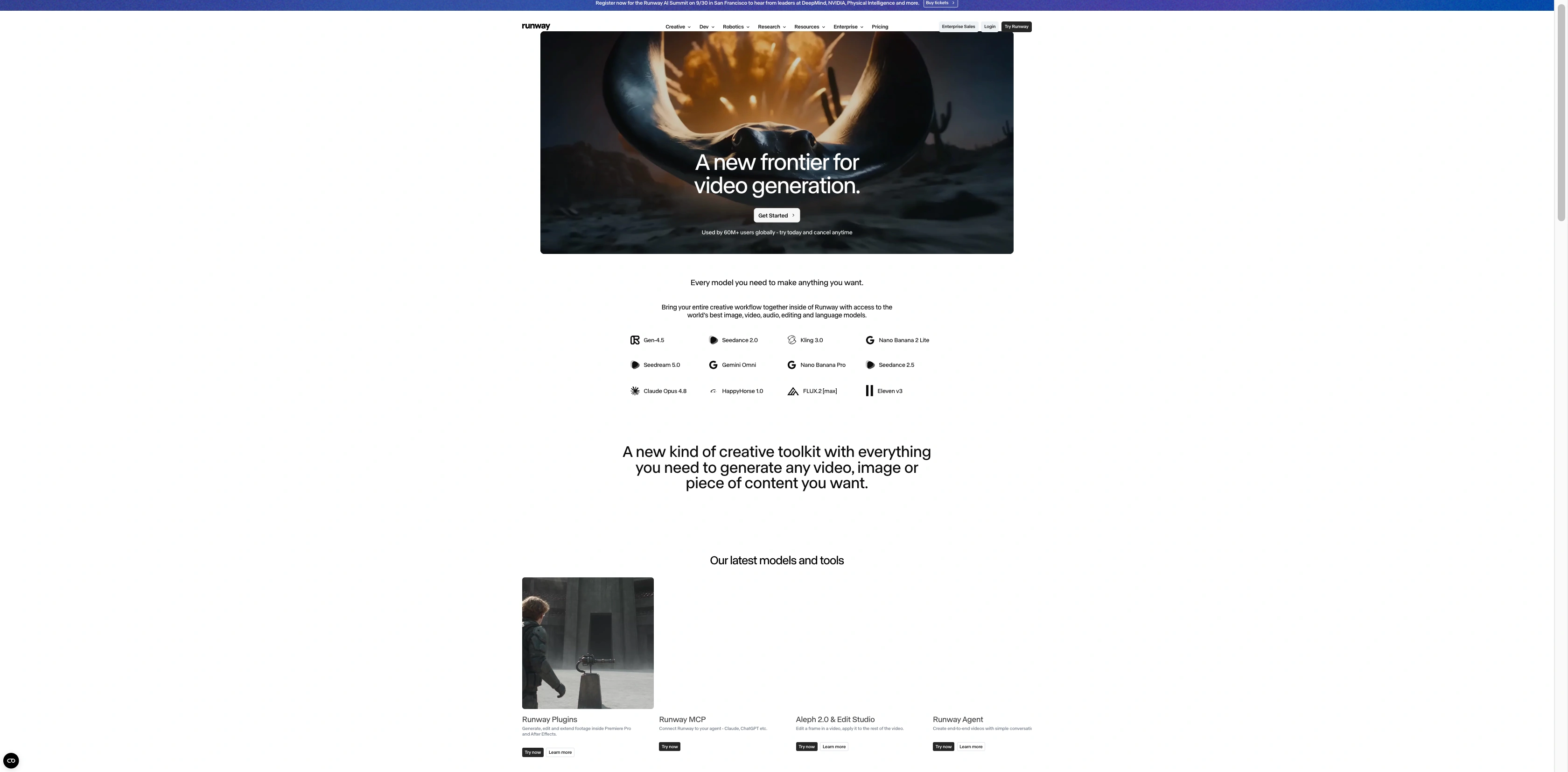
Current official Runway Creative page screenshot describing a workspace for video, image, audio, generation, and editing.
Runway's workspace documentation says Team supports two to nine generating members, with shared credits, shared project space, and member roles. That is a useful operational difference for agencies that move a campaign between a producer, editor, brand reviewer, and client approver. The team must still decide who is allowed to make model changes and who can place final exports in the shared project.
For readers evaluating a broader tool-switch, this site's Runway alternative guide covers the general choice. This page stays narrower. The relevant question here is whether your bottleneck sits in the reference-led product shot or in the approval and versioning process around it.
Price and access are planning variables
Subscription prices are easy to compare and easy to misuse. They do not include the number of approved attempts a product video will require. A campaign with a strict label, a glossy material, and a final claim-safe packshot often needs more review cycles than a loose social concept.
SeedVideo AI's current annual plan cards show Lite at $13 per month with 100 credits, Pro at $14.50 with 200 credits, and Premium at $99 with 1,300 credits. The same page lists commercial use on the paid cards. Its model page lists 480p or 720p MP4 or MOV as current Seedance 2.5 output quality, while the plan cards show higher available output tiers on paid plans. Confirm the selected model and plan in the live checkout before setting a delivery promise.
Runway's current annual-billed pricing page shows Standard at $12 per month with 625 credits, Pro at $28 with 2,250 credits, and Max at $76 with 9,500 credits. The page states that 625 credits equal 52 seconds of Gen-4.5, and its price table lists Gen-4.5 at 60 credits per five seconds. Those are planning figures for that model. They do not convert into a universal rate for all models, resolutions, or edits.
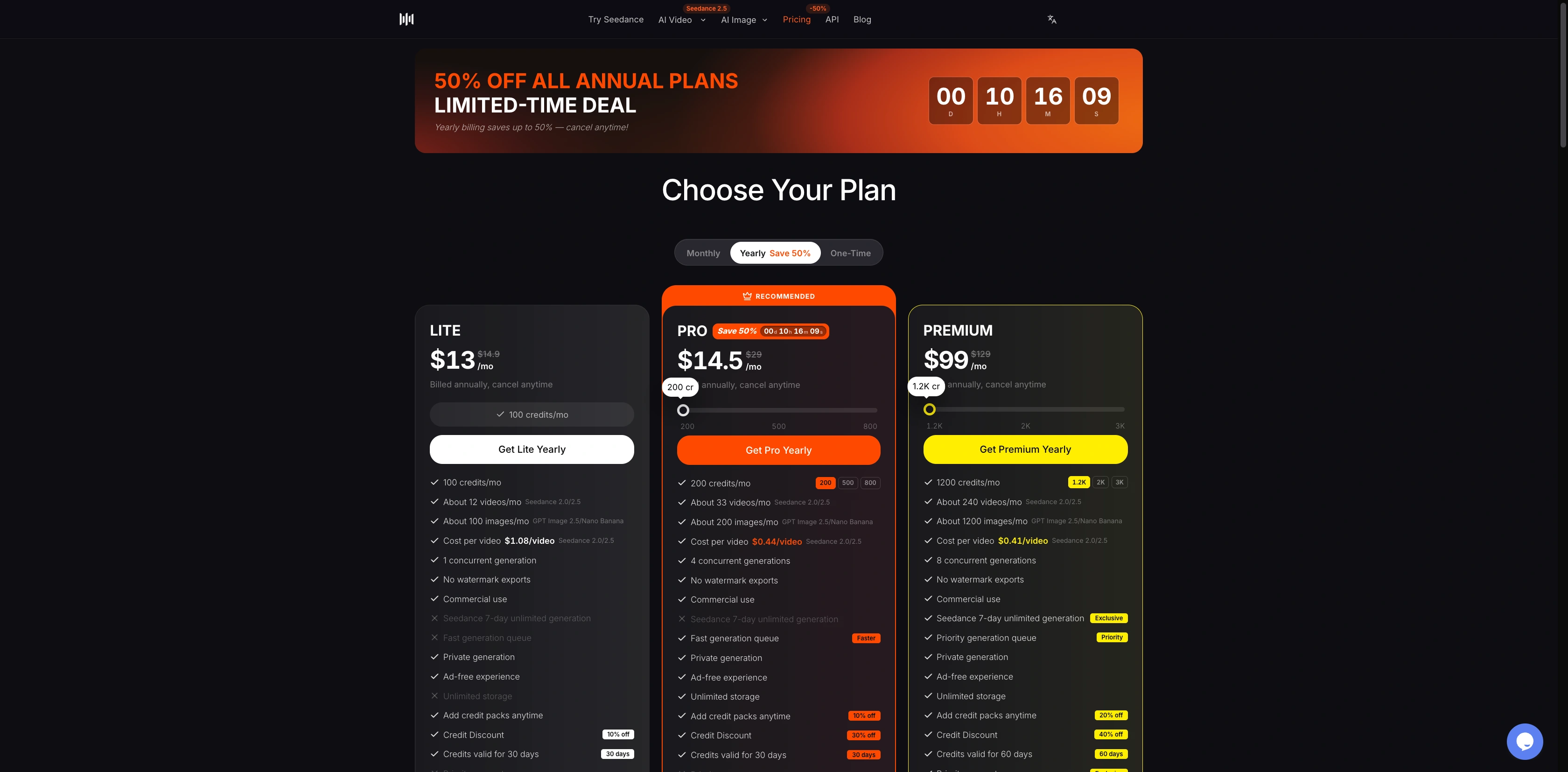
Current Seedance pricing page screenshot showing annual plan cards and their listed credit allowances.
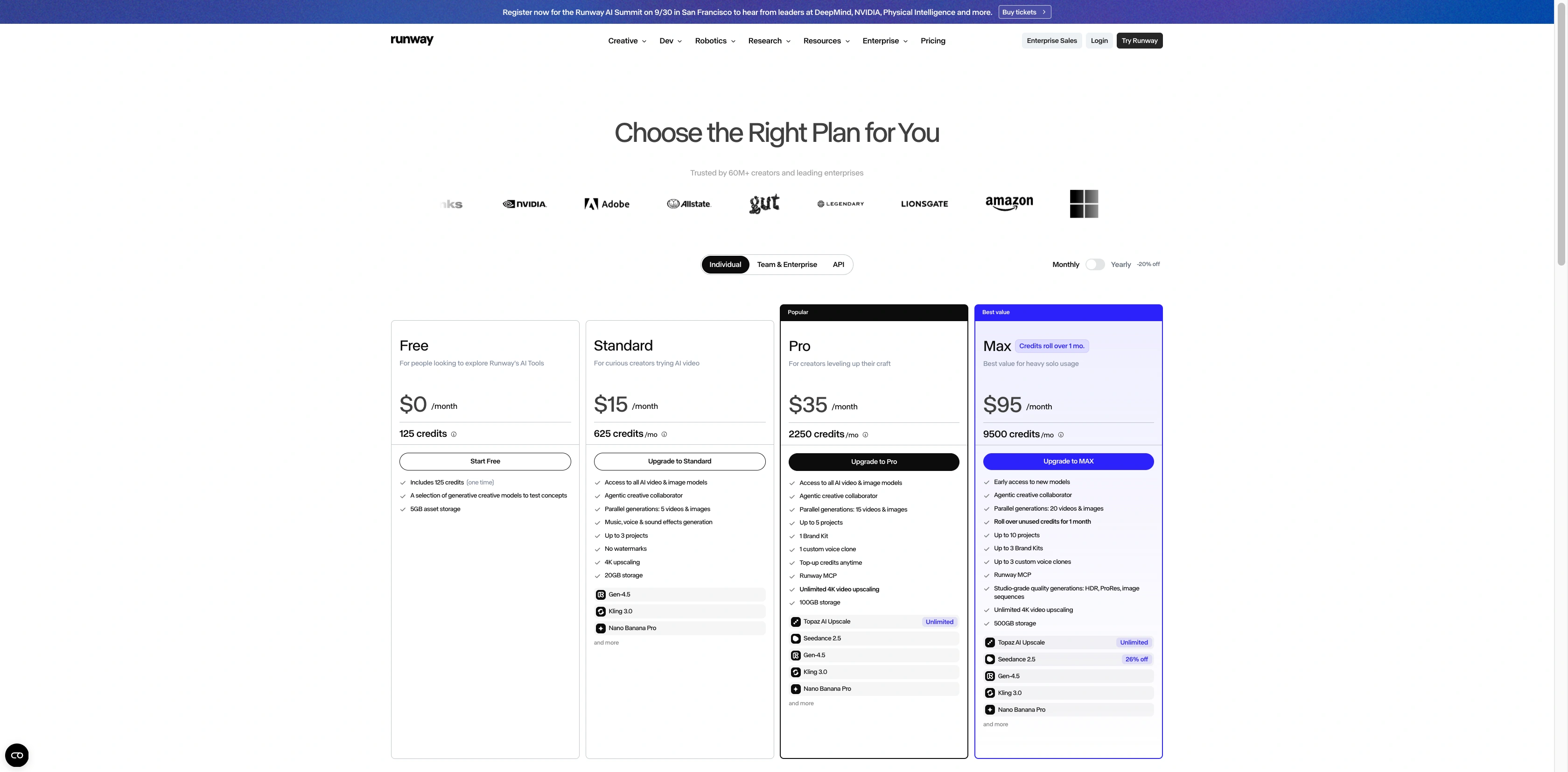
Runway's monthly pricing page, showing plan credits, projects and storage.
Use a budget sheet with three fields per deliverable. Record the model and settings, the planned number of creative attempts, and the review threshold that decides whether an attempt is usable. Then add a separate line for editing, voice, music, actor consent, product photography, and final legal review. The lower monthly price is useful only after that sheet is filled in.
Commercial use still needs an asset-rights review
Runway's commercial-use guidance says that creators retain ownership and rights to their generations and may use them without non-commercial restrictions from Runway. It points readers back to its terms. SeedVideo AI states in its terms that users retain ownership of generated content, and its paid pricing cards list commercial use. Neither statement clears a product campaign by itself.
The brand still needs rights to the original product photography, packaging art, logo, soundtrack, talent, location, and any comparative claim shown in the cut. Keep the approved final end card out of the generation prompt when it contains regulated text or precise product promises. Add it in an editing step where typography and clearance can be checked.
A fair same-asset test for the next campaign
This article does not rank image quality because no same-asset output test was run. A credible product-video test should keep the product pack, target aspect ratio, duration, shot list, and review questions stable across both workflows.
| Test condition | Keep fixed | Score separately |
|---|---|---|
| Product source | Same approved stills and close-up details | Label, shape, color, material, and logo clearance |
| Story | Same four beats and final packshot requirement | Whether each beat is readable and ordered correctly |
| Camera | Same named move and framing goal | Speed, composition, and unwanted reframing |
| Brand rules | Same prohibited claims and text treatment | Legal review effort and editor fixes |
| Budget | Same number of initial attempts | Credits spent, time to approval, and usable versions |
Have the reviewer record what they can see. "Cap angle changed after the orbit" is useful. "Feels less on-brand" is only useful when it points back to a visible rule such as color temperature, product scale, or logo space. When the campaign team has that record, it can choose based on the work it actually needs rather than a generic winner label.
Which teams should start where
Small ecommerce teams should start with Seedance 2.5 when one product story needs a strong source packet and a 20 to 30 second plan. Keep the first version narrow. One product, one camera move, one proof moment, and one final hold are enough to reveal whether the reference plan is stable.
Agencies should start with Runway when the main constraint is collaboration. A client campaign can involve several editors, private project spaces, approval roles, and a changing set of models. Runway's workspace structure gives those teams a clearer place to organize the work. The team should still lock a product reference packet before anyone starts generating.
Established brands should evaluate both workflows around their existing asset system. If reference assignments and longer continuity are the hard part, start with Seedance 2.5. If version management and team project access are the hard part, start with Runway. In either case, keep a final editor responsible for claims, typography, and export approval.
Next step
Open the Seedance 2.5 model page with the approved product pack beside it. Write the product anchors, one camera path, the one use moment, and final-frame rule before generating. If the campaign needs an agency workspace first, map the Runway project roles and credit owner before the creative review begins. That sequence gives a team a decision it can repeat for the next product launch.
FAQ
Is Seedance 2.5 or Runway better for product videos?
Choose Seedance 2.5 when a product brief depends on a larger pack of product, motion, audio, and style references across one longer sequence. Choose Runway when the work starts with a collaborative creative workspace, a project library, or model-by-model production options. A same-asset comparison is still needed to judge output quality.
Can either tool keep a product visually consistent?
Both workflows need explicit source material and a review pass. Seedance 2.5 documents up to 30 images, 10 videos, and 10 audio references. Runway offers a wider creative suite, but the usable reference and edit controls vary by model and workflow.
How long can a Seedance 2.5 product video be?
The current Seedance 2.5 model page states up to 30 seconds in one pass. Build a sequence around a hook, product proof, use moment, and final packshot instead of treating 30 seconds as a guarantee of several unrelated scenes.
Does Runway offer commercial use?
Runway says creators retain ownership of their generations and may use them without non-commercial restrictions from Runway. Its terms and the rights for source assets, logos, talent, music, and claims still apply.
Which Runway plan fits a small brand team?
Runway describes Team for two to nine generating members in one shared workspace. The current pricing and workspace rules should be checked against the team size, model choice, project count, storage, and credit use before purchase.
Can a brand use screenshots as proof that one model is better?
No. Interface and pricing screenshots establish available controls and terms on the date checked. They do not establish a quality winner. Use the same rights-cleared product asset, a fixed shot list, and a reviewer checklist for any comparative output decision.