GPT Image 2.6 is the image model OpenAI released on November 4, 2026, in two API variants: Sunburst for detail and Flare for speed. On November 10 we sent the same four prompts to GPT Image 2.5 Sunburst, 2.6 Sunburst and 2.6 Flare, then repeated one prompt six times per model to see how stable the timing is. Flare was about twice as fast as 2.5 (13 seconds against 27 at the median). Sunburst 2.6 was not faster than 2.5 in our runs. All three spelled every requested word correctly, but 2.5 added signage we never asked for. The catch is cost: at medium quality a 2.6 image uses 3.3 times the output tokens of a 2.5 one.
Last verified: 2026-11-10.
Quick Answer
| What we measured | GPT Image 2.5 Sunburst | GPT Image 2.6 Sunburst | GPT Image 2.6 Flare |
|---|---|---|---|
| Median time, same prompt run 6 times (1:1, medium, 1K) | 27 s | 30 s | 13 s |
| Fastest to slowest across all medium runs | 21–29 s (9 runs) | 25–346 s (11 runs) | 7–85 s (9 runs) |
| Output tokens for one 1:1 medium image at 1K | 439 | 1,449 | 1,449 |
| Credits for that image on SeedVideo AI | 1 | 3 | 3 |
| Spelling errors in requested text | 0 | 0 | 0 |
| Text added that the menu prompt did not ask for | 3 extra signs | None | None |
| One-instruction edit kept the rest of the image | Yes | Yes | Yes |
TL;DR
- Pick GPT Image 2.6 Flare when speed matters: its fastest image took 7 seconds and its median was 13.
- GPT Image 2.6 Sunburst followed placement instructions most closely, but its launch-week timing was uneven: three of eleven medium runs took more than two and a half minutes.
- GPT Image 2.5 is still the cheapest: 1 credit for a 1K image at low or medium, against 2 and 3 credits for 2.6.
- Flare and Sunburst used exactly the same number of output tokens at the same settings, so choosing between them changes time and behaviour, not cost.
- From high quality upward, 2.6 and 2.5 use the same tokens. The price gap is only at low and medium.
What OpenAI changed in GPT Image 2.6
OpenAI's Images 2.6 announcement says the model generates images 50% faster than before, that Flare can return a low-quality image in as little as six seconds, and that Sunburst at medium or high quality keeps characters, products and brand details more consistent across edits. It also adds three things 2.5 does not have:
- animated GIF output
- markup-guided edits, where you draw on an image to show where a change goes
- a complexity setting for how much the model plans before it draws
The model pages for GPT-Image-2.6 Sunburst and GPT-Image-2.6 Flare list the same token rates for both: $5 per 1M text input tokens, $8 per 1M image input tokens and $30 per 1M image output tokens. Those are the same rates as GPT Image 2.5.
How we ran the test
Every request went through the same API route the SeedVideo AI workspace uses, one image per request, timed from submission until the finished file was available. Queue time is therefore included, which is what you experience as a user. The four comparison prompts ran once per model at medium quality and 1K. For timing, we repeated the product prompt five more times on each model. In total we made 51 paid requests.
One run per image is a small sample. Read the image comparisons as a first look and the six-run medians as the more reliable part.
You can rerun any prompt below in the GPT Image 2.6 generator.
Speed: Flare is the real upgrade
| Product prompt, 1:1, medium, 1K | Run times in seconds | Median |
|---|---|---|
| GPT Image 2.5 Sunburst | 25, 26, 27, 28, 28, 29 | 27 s |
| GPT Image 2.6 Sunburst | 25, 27, 30, 31, 40, 51 | 30 s |
| GPT Image 2.6 Flare | 7, 10, 12, 14, 17, 65 | 13 s |
| GPT Image 2.6 Flare at low quality (5 runs) | 7, 8, 10, 15, 19 | 10 s |
Flare's fastest runs, 7 seconds at both low and medium, are close to the six seconds OpenAI quotes. Its median was about half of 2.5's. One Flare run took 65 seconds, so expect an occasional slow one.
Sunburst 2.6 did not beat 2.5 Sunburst here, and across the wider test it had the longest waits: 165, 175 and 346 seconds on three medium requests. GPT Image 2.5 finished every request in 21 to 30 seconds. We ran this six days after launch, when demand on a new model is usually at its highest, so the long tail may shrink.
Test 1: chalkboard menu with exact prices
This prompt checks whether a model writes exactly the copy you give it and nothing else.
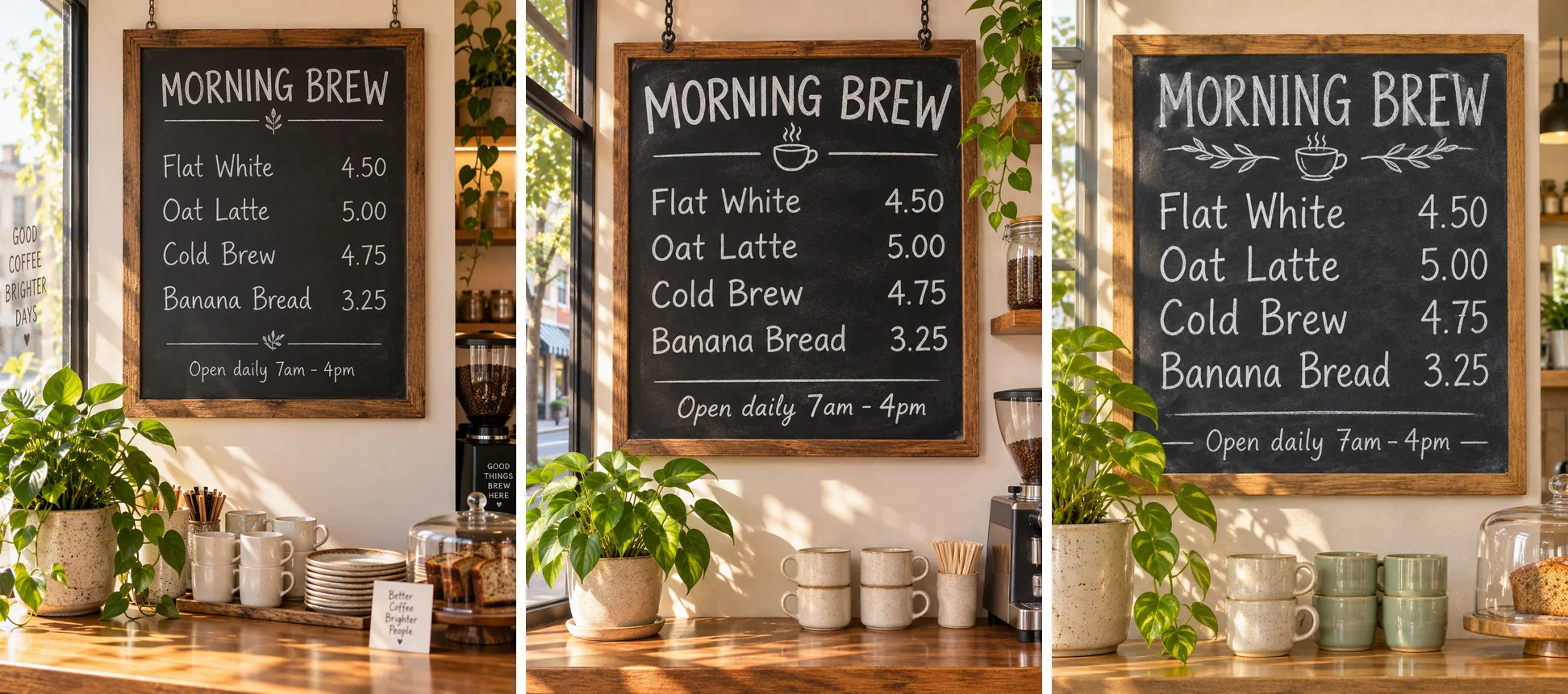
Left: GPT Image 2.5 Sunburst (25 s). Middle: GPT Image 2.6 Sunburst (346 s). Right: GPT Image 2.6 Flare (26 s).
A chalkboard menu hanging in a sunlit neighborhood coffee shop, photographed straight on. Hand-lettered white chalk text, spelled exactly: title "MORNING BREW"; then four lines with prices aligned on the right: "Flat White 4.50", "Oat Latte 5.00", "Cold Brew 4.75", "Banana Bread 3.25"; small footer "Open daily 7am - 4pm". Warm natural light, a potted plant and ceramic cups on the counter below. All text sharp, correctly spelled, and readable.
All three spelled every item and price correctly. GPT Image 2.5 Sunburst also wrote three things nobody asked for: a window decal, a card on the counter and a label on the grinder. Both 2.6 variants drew only the requested lines, plus a small coffee-cup doodle under the title. If every word on the image is approved copy, that is the difference that matters.
Test 2: five-step infographic
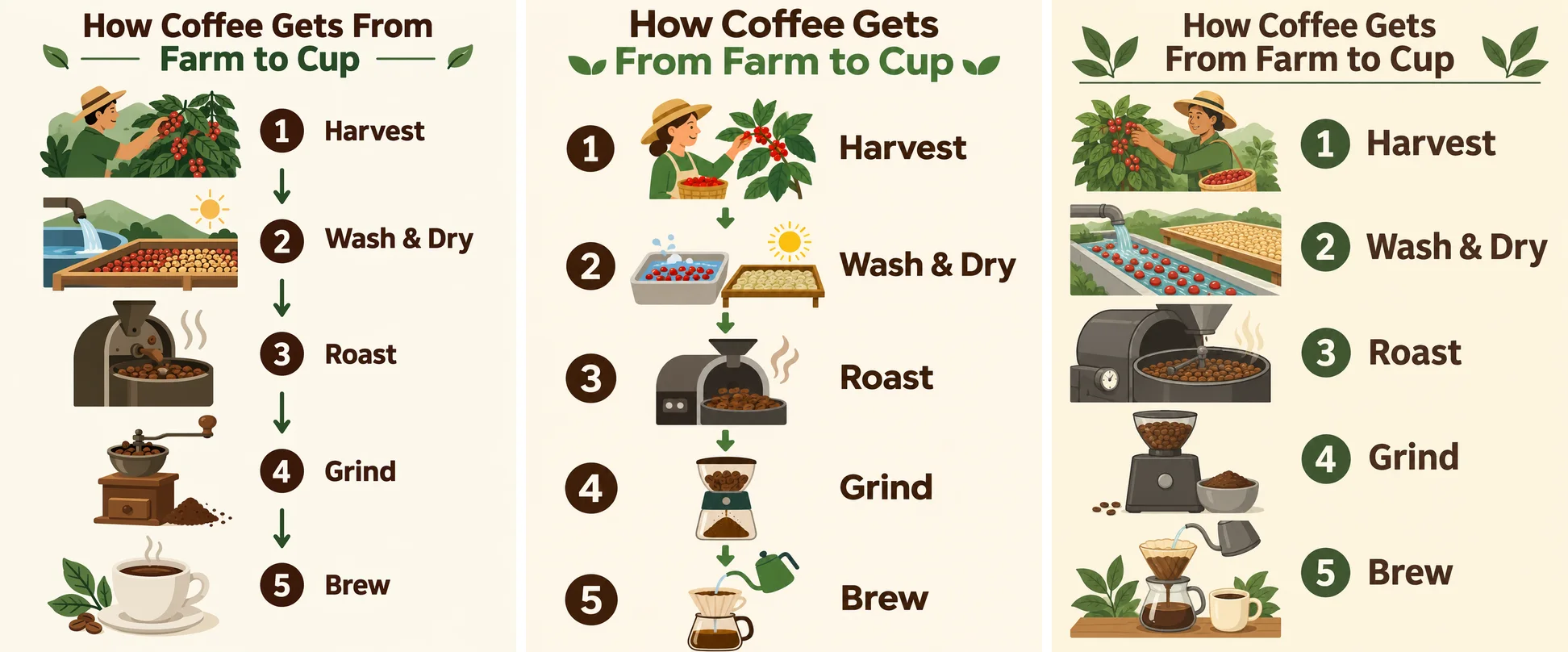
Left: GPT Image 2.5 Sunburst (25 s). Middle: GPT Image 2.6 Sunburst (165 s). Right: GPT Image 2.6 Flare (85 s).
A clean educational infographic titled "How Coffee Gets From Farm to Cup" with five numbered steps arranged top to bottom, each with a small flat illustration and a one-line label: "1 Harvest", "2 Wash & Dry", "3 Roast", "4 Grind", "5 Brew". Cream background, dark brown and green palette, modern sans-serif type, generous spacing, all labels spelled exactly as written.
The title and all five labels were correct on every model. Sunburst 2.6 linked simple icons with arrows; Flare used larger type and fuller scene illustrations; 2.5 sat between the two. We also reran Sunburst 2.6 with the new complexity setting at low and at medium. Spelling stayed perfect and the output tokens did not change (1,149 each time), so on a layout this simple, complexity made no visible difference.
Test 3: 3:1 coastal panorama
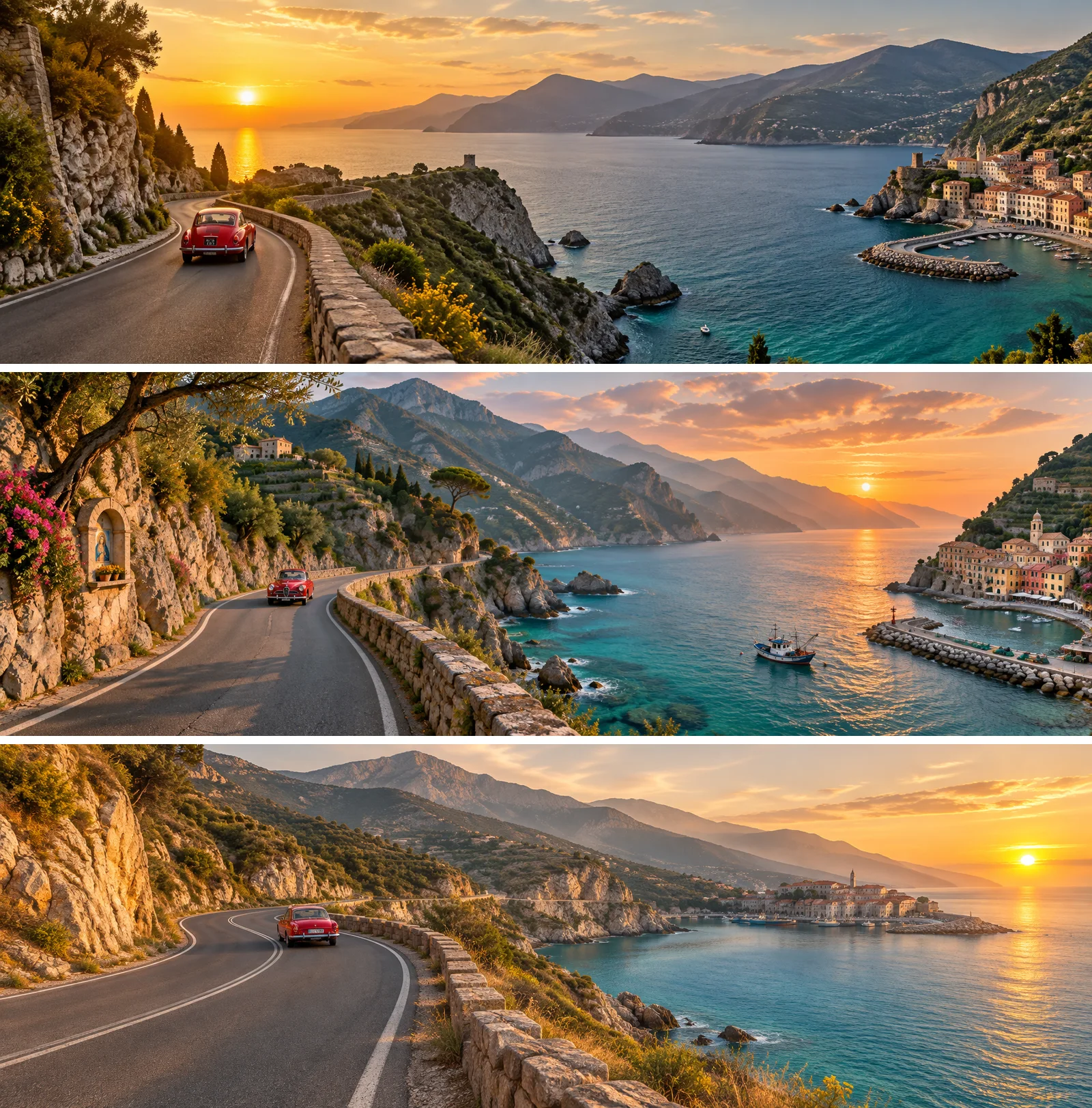
Top: GPT Image 2.5 Sunburst (21 s). Middle: GPT Image 2.6 Sunburst (55 s). Bottom: GPT Image 2.6 Flare (56 s).
An ultra-wide panoramic photograph of a coastal mountain road at golden hour: the road winds along cliffs above a turquoise sea, a single red vintage car in the middle distance, small fishing village at the far right, layered mountains fading into haze. Natural, continuous landscape with no repeated elements, realistic light, high detail.
All three returned a continuous 1776 × 592 landscape with one red car. The prompt asks for the village "at the far right". GPT Image 2.5 and Sunburst 2.6 put it there; Sunburst also added a fishing boat and a roadside shrine. Flare moved the village toward the centre and gave the right edge to the sun. If position matters, Sunburst is the safer choice.
Test 4: product shot with an embossed logo
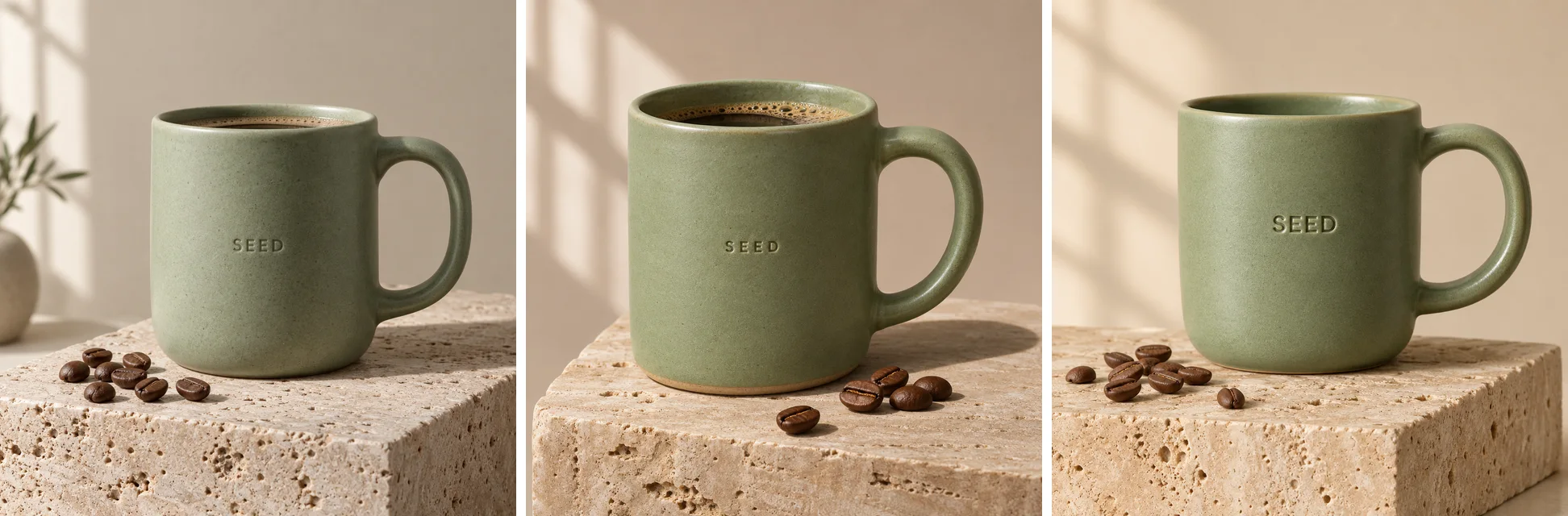
Left: GPT Image 2.5 Sunburst (26 s). Middle: GPT Image 2.6 Sunburst (31 s). Right: GPT Image 2.6 Flare (7 s).
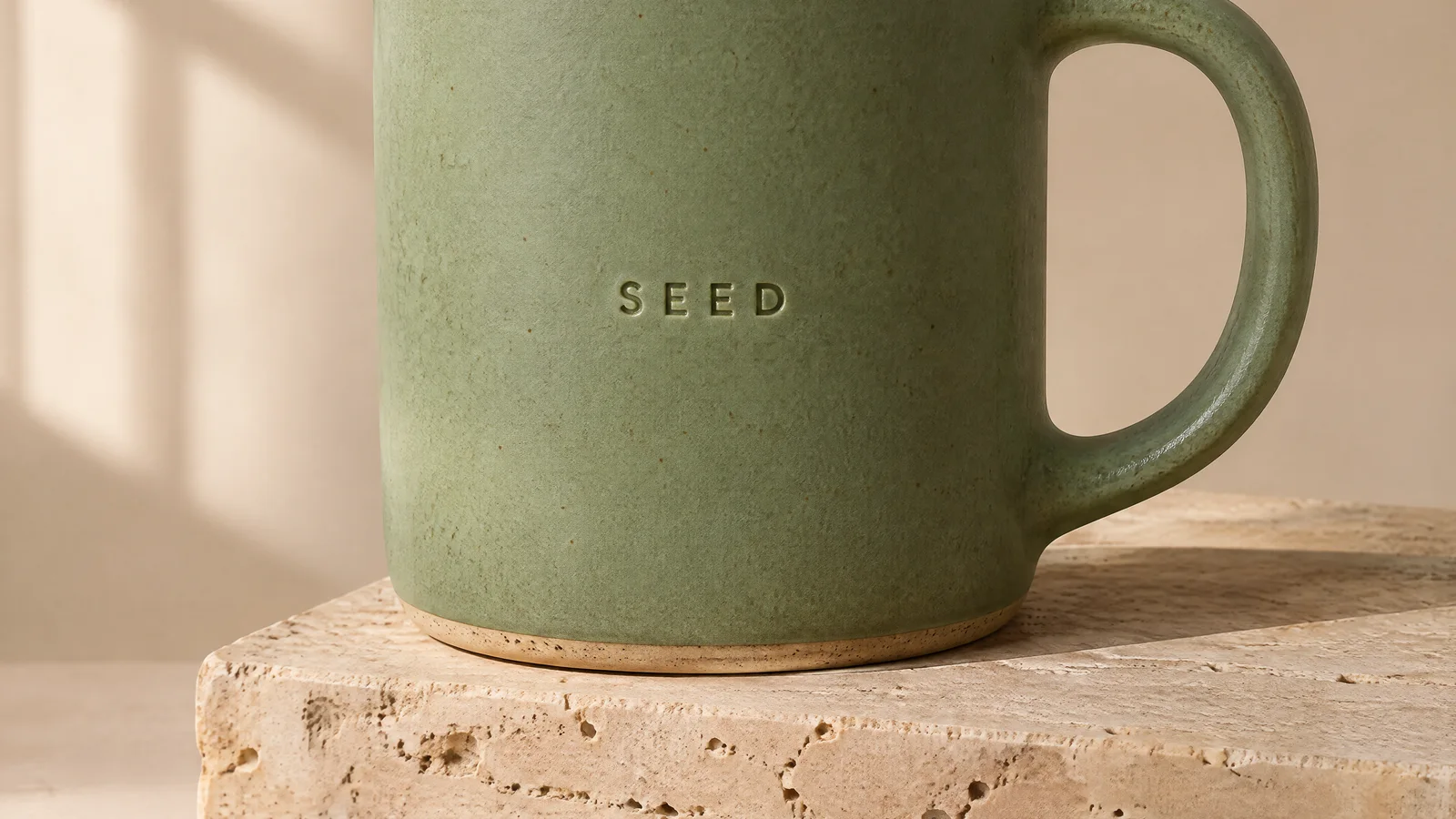
Premium studio product photograph of a matte sage-green ceramic coffee mug with a small embossed logo reading "SEED" on the side, standing on a travertine stone block, soft window light from the left, gentle shadow, a few roasted coffee beans scattered in front, minimal beige background. Photorealistic, crisp detail on the glaze texture.
The "SEED" emboss was legible on all three. Flare left the mug empty, which matches the prompt most literally. Both Sunburst models filled it with coffee, and 2.5 added a vase to a background we asked to keep minimal.
Test 5: change one thing, keep the rest
We took the Sunburst 2.6 mug from Test 4 as the reference image and asked each model for a single change.
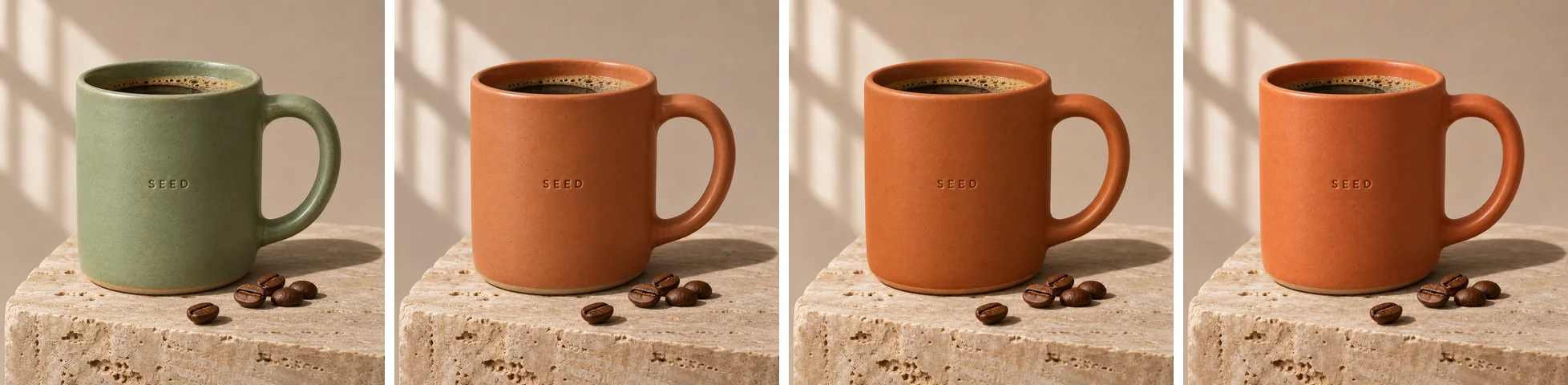
From left: the reference image, then the edit by GPT Image 2.5 Sunburst (30 s), GPT Image 2.6 Sunburst (19 s) and GPT Image 2.6 Flare (51 s).
Change the mug's glaze from sage green to matte terracotta orange. Keep everything else exactly the same: the embossed "SEED" logo, the mug shape and handle, the travertine block, the coffee beans, the lighting, the shadow and the beige background.
All three changed the glaze and left the logo, beans, stone, light and shadow where they were. On a simple one-step edit we could not separate them. OpenAI's consistency claim for Sunburst is about many rounds of edits, which this single round does not test.
Cost: where 2.6 is more expensive
The per-token rate is the same for both generations. What changed is how many output tokens an image uses.
| Quality (1:1 image at 1K) | GPT Image 2.5 output tokens | GPT Image 2.6 output tokens | Credits on SeedVideo AI, 2.5 → 2.6 |
|---|---|---|---|
| low | 196 | 824 | 1 → 2 |
| medium | 439 | 1,449 | 1 → 3 |
| high | 1,756 | 1,756 | 2 → 3 |
| xhigh | 3,122 | 3,122 | 4 → 5 |
| max | 7,024 | 7,024 | 8 → 10 |
The medium figures are from our own requests (439 and 1,449 tokens). We also measured 2.6 at every tier on a 3:4 image, and those numbers line up with the 1:1 values in the provider's documentation once you account for shape; the 2.5 figures for the other tiers come from the same documentation. So 2.6 costs noticeably more for drafts and about the same for top-tier output.
Flare and Sunburst returned identical token counts at every setting we tried. The edit added 1,024 image input tokens for the one reference image on both generations.
For the full breakdown by tier, size and shape, see GPT Image 2.6 price per image. Plans and credit packs are on the SeedVideo AI pricing page.
Which one should you use?
GPT Image 2.6 Flare
Best for: drafts, variants, thumbnails and anything where you would rather see a result in about 13 seconds than about 30.
Not for: layouts where an element must sit in an exact place.
GPT Image 2.6 Sunburst
Best for: final images, exact placement and edits to work that is already approved.
Not for: quick iteration during a busy period; several of our runs waited minutes.
GPT Image 2.5
Best for: volume. It costs 1 credit per 1K image at low or medium, a third of 2.6 at medium, and its timing was the steadiest of the three.
Not for: scenes where stray text would be a problem; it invented signage in our menu test.
If you also work with Google's models, our Nano Banana 2.1 vs Nano Banana 2 test used the same menu, infographic and product prompts, and more matchups live in the model comparisons hub.
What you can and cannot do with 2.6 on SeedVideo AI today
Available now: text-to-image, edits with up to 16 reference images, all five quality tiers, 1K, 2K and 4K, 15 aspect ratios and transparent backgrounds, on both Flare and Sunburst.
GIF output, markup-guided edits and the complexity setting are in the generator as well. The GPT Image 2.6 page has four GIFs, four marked-up edits and two complexity comparisons from a follow-up run.
FAQ
Is GPT Image 2.6 better than GPT Image 2.5?
In our test it was more literal about text, adding nothing we did not ask for, and Flare was about twice as fast. Image quality at medium was close, and a simple edit came out the same on both. GPT Image 2.5 remains cheaper at low and medium quality.
Is GPT Image 2.6 faster than 2.5?
Flare is: 13 seconds at the median against 27 for GPT Image 2.5 Sunburst on the same prompt. Sunburst 2.6 was not faster in our runs, at 30 seconds, and had several waits of two to six minutes.
Does GPT Image 2.6 cost more than 2.5?
At low and medium quality, yes. A 1:1 medium image used 1,449 output tokens on 2.6 and 439 on 2.5 at the same per-token rate. From high quality upward the token counts are the same.
What is the difference between Flare and Sunburst?
They take the same parameters and used the same tokens in our test. Flare is faster; Sunburst followed a placement instruction that Flare missed and is the variant OpenAI recommends for detailed work and repeated edits.
Can I try GPT Image 2.6 for free?
New SeedVideo AI accounts receive starter credits, enough for a first GPT Image 2.6 image. After that, a 1K image costs 2 credits at low quality and 3 at medium or high.
Try the same prompts
Every prompt in this test is ready to copy. Open the GPT Image 2.6 generator, pick Flare or Sunburst, paste one in and compare your result with the images above. When a still is approved, you can animate it with image-to-video in the same workspace.