
AI photo editing for real estate is safe for one kind of edit and risky for the rest. Removing things that were added to the photo, such as a camera date stamp, an agent logo or a watermark, is not just allowed: most MLSs ban text and branding on listing photos, so it has to go. Removing things that belong to the scene, such as clutter, trash bins or a car, counts as a digital alteration under several MLS rule sets and California law, which means a label and often the original photo next to it. Removing permanent features such as power lines, a water tower, a crack or a neighbouring building is prohibited outright, because a listing photo has to give buyers a true picture. We read the current rules of five large MLSs, the NAR Code of Ethics and California's new disclosure law on November 3, 2026, and tested each kind of edit on real listing-style photos with the AI watermark remover and the AI image extender on SeedVideo AI. Here is what passed, what looked fake, and what you would have to disclose.
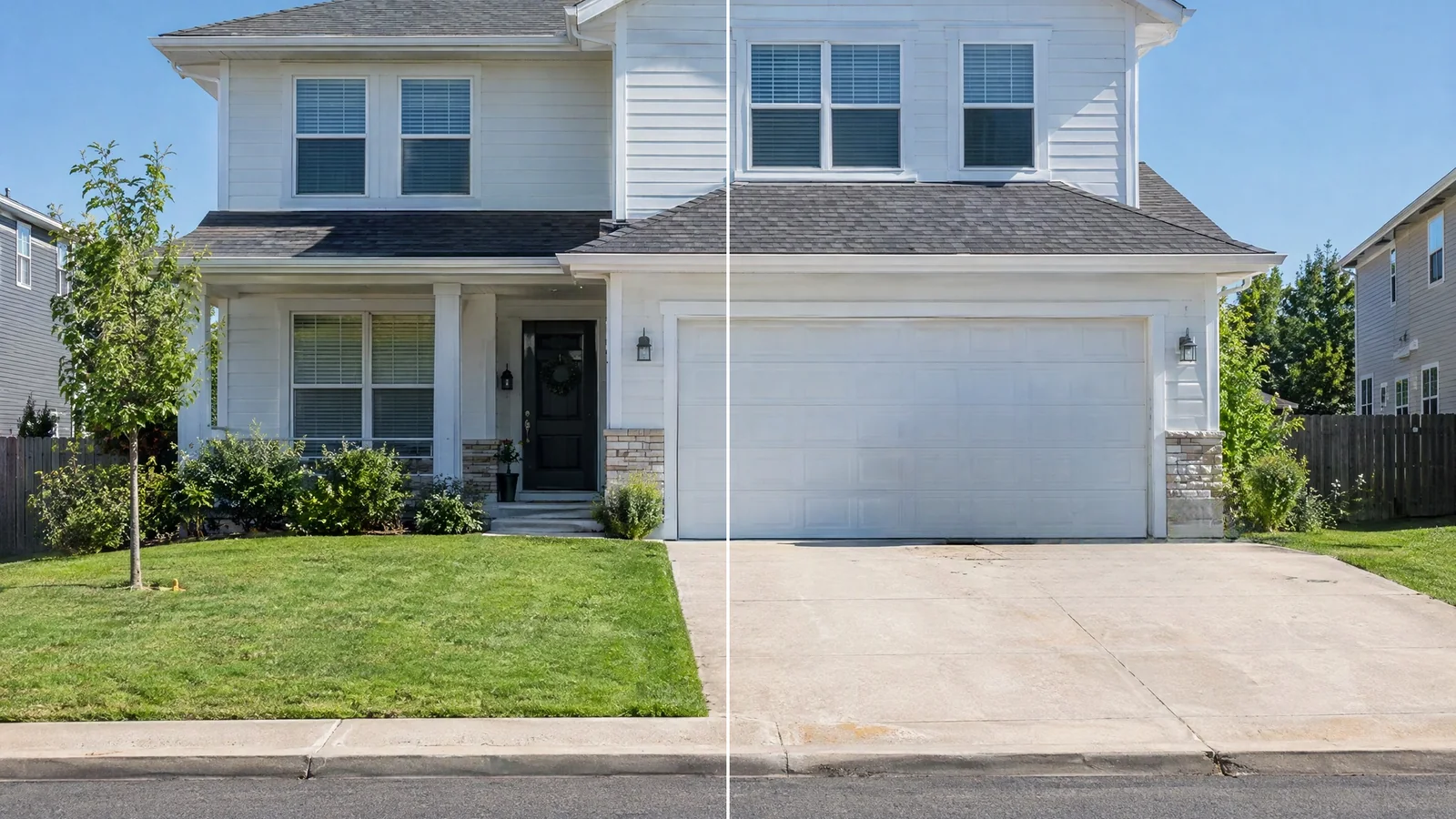
Brush an area mode on an exterior: trash bins and a hose removed from the driveway. Under several MLS rules this still counts as a digitally altered photo.
Quick Answer
- Remove freely: date stamps, text, agent logos, watermarks and other overlays. Most MLSs ban them on listing photos.
- Remove only with a label: temporary items such as clutter, bins, hoses and cars. Mark the photo as digitally altered and keep the original next to it if your MLS requires that.
- Never remove or add: power lines, poles, water towers, roads, defects, views or permanent fixtures, and do not change walls, floors or cabinets.
- Do not uncrop interiors: extending a vertical photo invents parts of the room. Reshoot in landscape instead.
TL;DR
- NAR's Code of Ethics (Article 12) requires a "true picture" in advertising, and Standard of Practice 12-10 extends that to images.
- Bright MLS, Stellar MLS, Canopy MLS and CRMLS ban removing or faking permanent features, and all five MLSs we checked restrict branding or added text on photos.
- Where the "digitally altered" label goes differs: the caption (CRMLS), the remarks (Bright), caption plus a checkbox and a fixed remarks sentence (Stellar), or directly on the image (Canopy, MLS Now).
- In our tests, removing a date stamp and two trash bins looked clean; removing a pile of clutter left a visibly smeared floor; extending a vertical room photo invented a door and a sideboard that do not exist.
Three kinds of edits and how MLS rules treat them
| Edit | Examples | Typical MLS status | Tool |
|---|---|---|---|
| Remove overlays added to the photo | Camera date stamp, text, agent logo, watermark, QR code | Required: branding and added text are banned on listing photos | Watermark remover, All text or Logos & icons |
| Remove temporary items in the scene | Laundry, shoes, trash bins, hoses, cars, personal photos | Allowed by some MLSs only as a labelled, digitally altered photo; California requires disclosure and a link to the original | Watermark remover, Brush an area |
| Change permanent features | Power lines, poles, water towers, nearby roads, cracks, stains, views, wall colour, flooring | Prohibited | None. Leave them in |
| Add content | Virtual staging, sky replacement, extending the frame | Virtual staging allowed with disclosure on most MLSs; adding views or features is prohibited | Use with a label, or not at all |
What five MLSs and California law require
Last verified: November 3, 2026. Rules change and vary by MLS, so check your own MLS before you upload. This is general information, not legal advice.
| Rule set | Where the "altered" label goes | Original photo | Branding and text | Notable bans |
|---|---|---|---|---|
| CRMLS (California) | Photo description, e.g. "digitally altered" or "virtually staged" | Must appear immediately before or after the altered image | Signs (including a For Sale sign), logos, contact info, team names: immediate fine | Removing elements from the property, including utility poles and wires; changing wall colour, flooring or cabinets. Alteration violations: warning, then a $250 fine |
| Bright MLS (Mid-Atlantic) | Private and public remarks for virtual staging | Not specified | No readable text, graphics, contact info, signs or logos; exterior photo must be an unbranded curbside view | Removing power lines, water towers or nearby roads; fake views |
| Stellar MLS (Florida) | Photo description plus a checkbox; public remarks start with "One or more photo(s) was virtually staged." | Not specified | No branding, people or words in photos | Changing permanent fixtures, adding views, hiding defects, changing room size. Automatic fine |
| Canopy MLS (Charlotte) | Directly on the image; captions or remarks alone are not enough | Must sit immediately before or after the altered image | Embedded or stamped text may be rejected | Removing power lines, water towers or highways; hiding defects; fake views |
| MLS Now (Ohio) | On the image and in the caption ("Virtually Staged" or "Digitally Altered") | Keep it on file; the primary photo must be unaltered | No branding, watermarks, marketing overlays or QR codes | Sky replacement only if views are not materially changed |
| California law (Bus. & Prof. Code §10140.8, from January 1, 2026) | On or next to the image, "reasonably conspicuous" | A link or QR code to the original, unaltered image | Not covered | Applies to adding, removing or changing elements such as fixtures, furniture, paint, utility poles, views or neighbouring properties. Lighting, white balance, colour correction, angle, straightening, cropping and exposure are exempt |
The common ground is clear: none of these MLSs lets you remove power lines or defects or add a fake view, none allows agent branding or text on photos, and CRMLS even stamps its own watermark on every upload.
Test 1: removing a camera date stamp
Phone and older camera photos often carry a burned-in date. Because it is text, All text mode finds and removes it without any brushing. On our living-room photo the orange stamp was gone in 8.2 seconds, and the floor underneath continued naturally. This is an overlay, not part of the property, and every MLS above bans added text, so this is the edit you should always make.
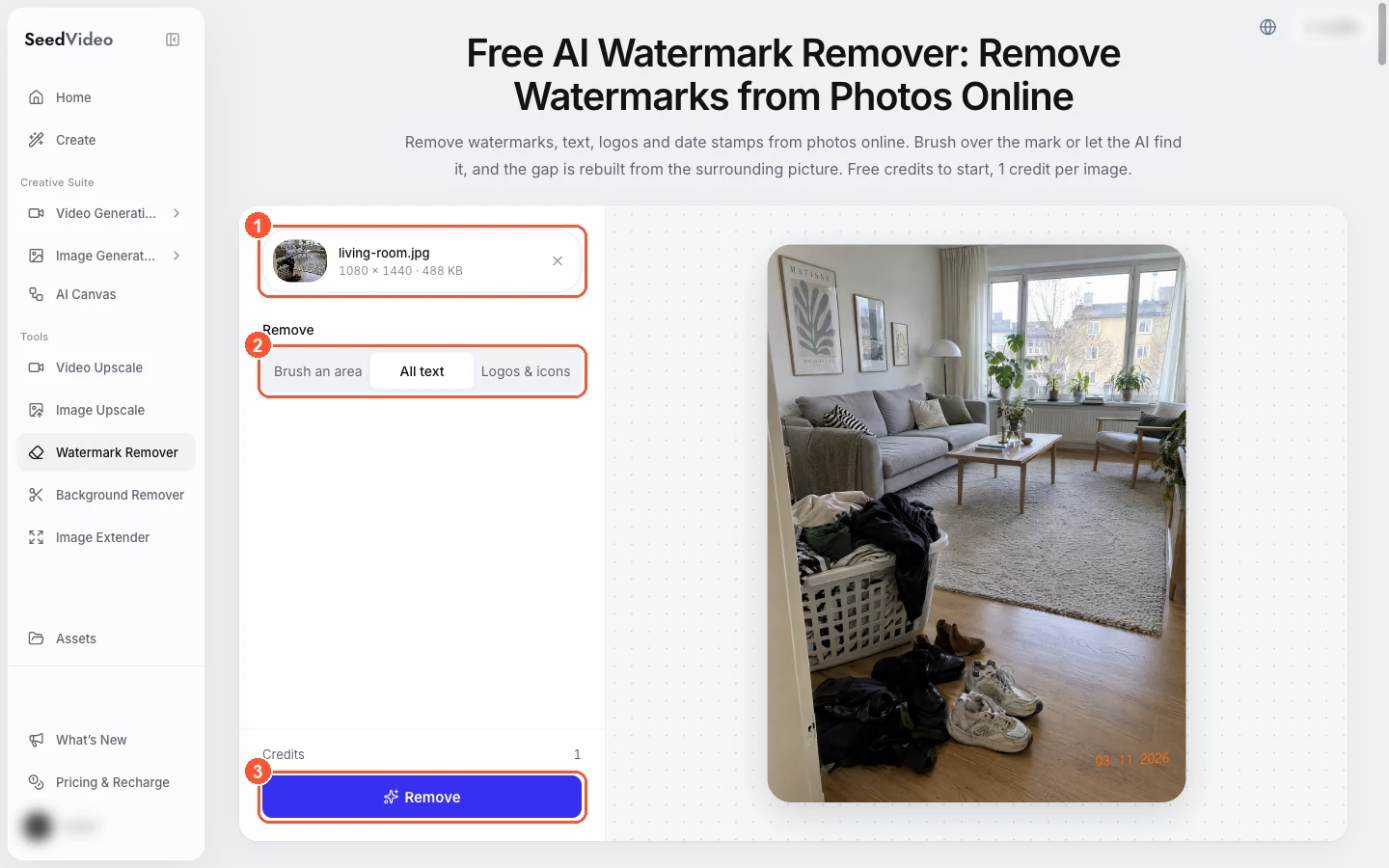
The watermark remover workspace: 1 the uploaded photo, 2 All text mode selected, 3 the Remove button.
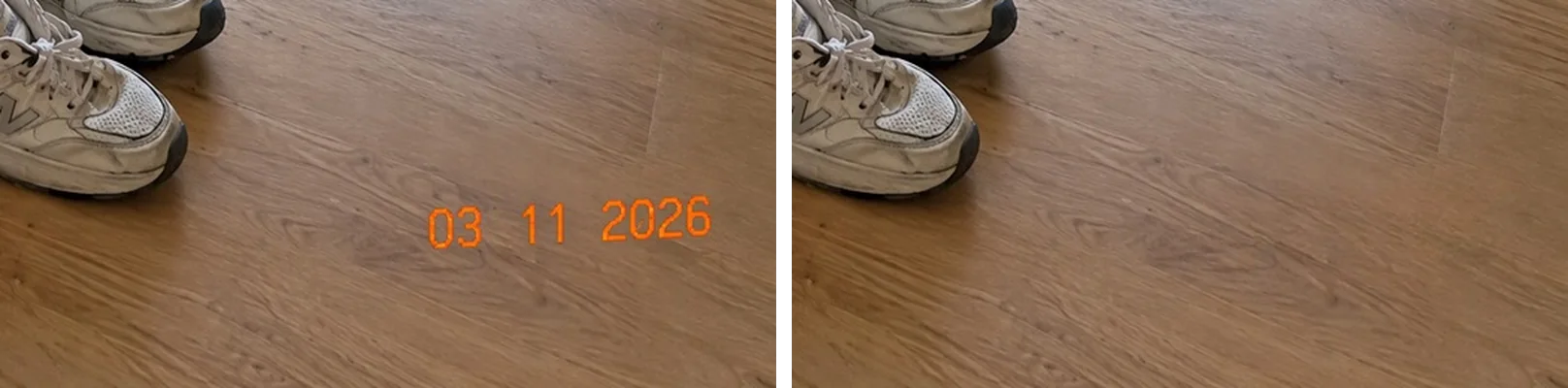
All text mode: the camera date stamp is removed and the floorboards continue underneath.
Test 2: removing clutter, and why it is better to tidy first
We then brushed over a laundry basket, a heap of clothes and several pairs of shoes, a large part of the frame. The result removed every item but left a blurry, smeared patch across the floor and rug that a buyer would notice at once. Large removals are where AI fill is weakest, because there is little real texture nearby to rebuild from.
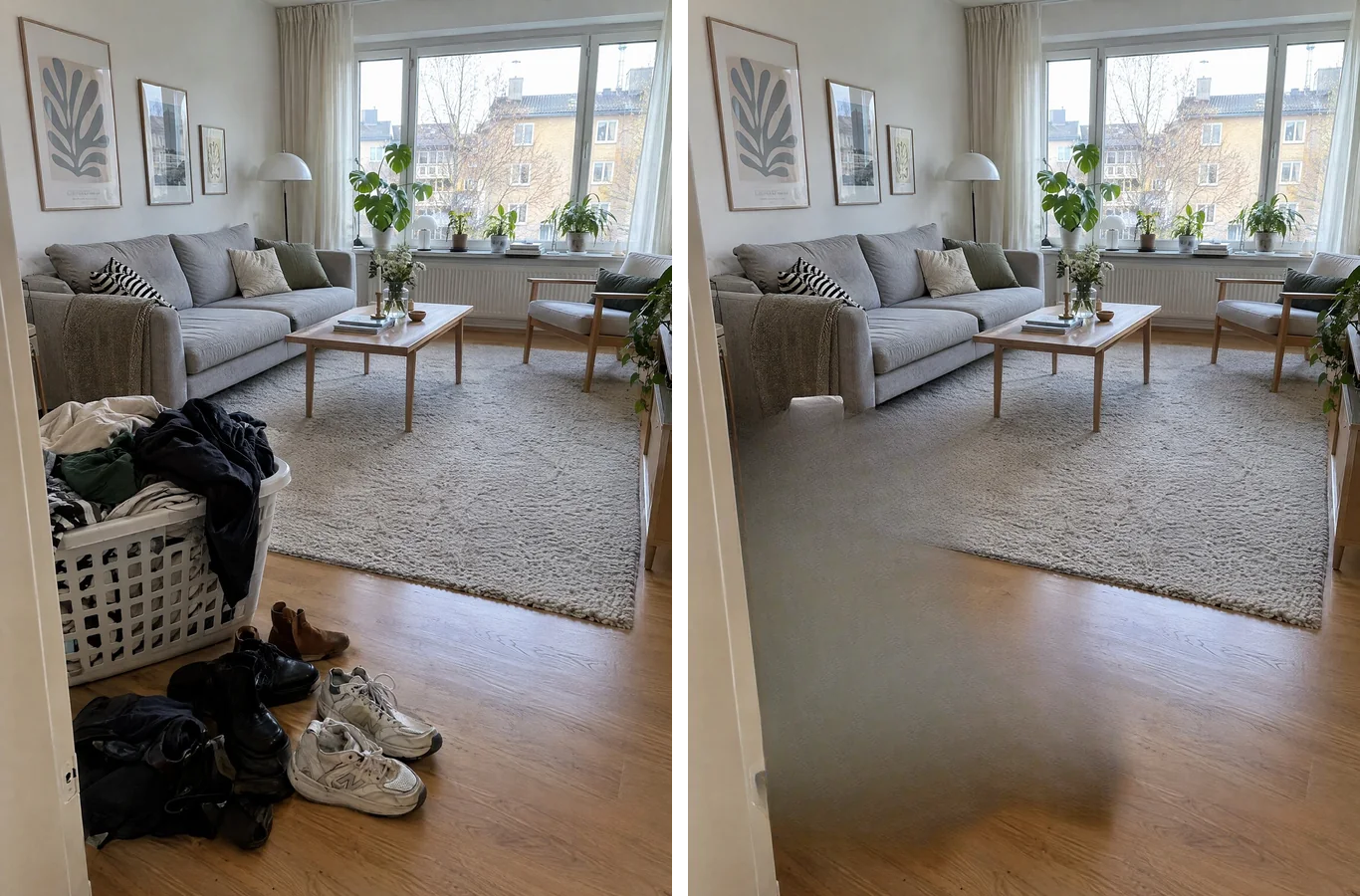
Left: the cluttered room. Right: after a large brush removal, the floor shows a visible smeared patch.
Even when a removal looks clean, it is still an alteration under California's definition and CRMLS's rules, so it needs a label and, in several MLSs, the original photo next to it. Ten minutes of tidying before the shoot avoids both problems.
Test 3: removing trash bins and a hose from an exterior
Small, separate objects on a simple background are where AI removal works best. Two wheelie bins and a garden hose disappeared from the driveway in 15.1 seconds, and the garage door and concrete continued without a seam. Because the bins are temporary, removing them is not hiding a defect, but it is still removing an element of the scene: label the photo as digitally altered where your MLS or state requires it, and keep the original.
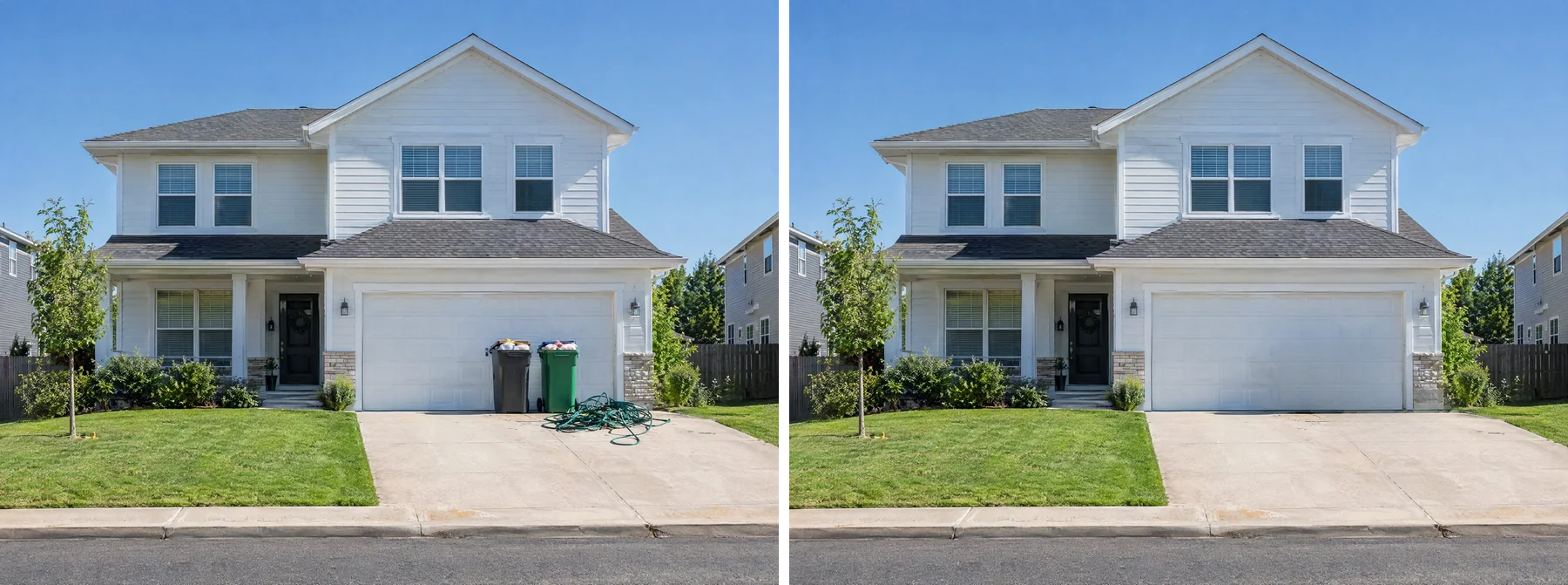
Brush an area mode: bins and hose removed. Label it as digitally altered where required.
What you should not remove from the same photo: power lines, the neighbouring houses, a cracked driveway or a road behind the house. Bright, Canopy and CRMLS name power lines and roads explicitly, and Stellar bans hiding defects or changing permanent fixtures.
Test 4: why you should not uncrop listing photos
Portals and MLSs want landscape photos: Realtor.com recommends exactly 3264 × 2448 px (4:3), MLS Now requires landscape photos of at least 1024 × 768, and Airbnb says vertical photos do not showcase a space as well in search results. It is tempting to extend a vertical phone photo to 4:3 with AI. We tried it: one run took the 1080 × 1440 living room to 1920 × 1440 in 8.6 seconds, and the result looks plausible at a glance.
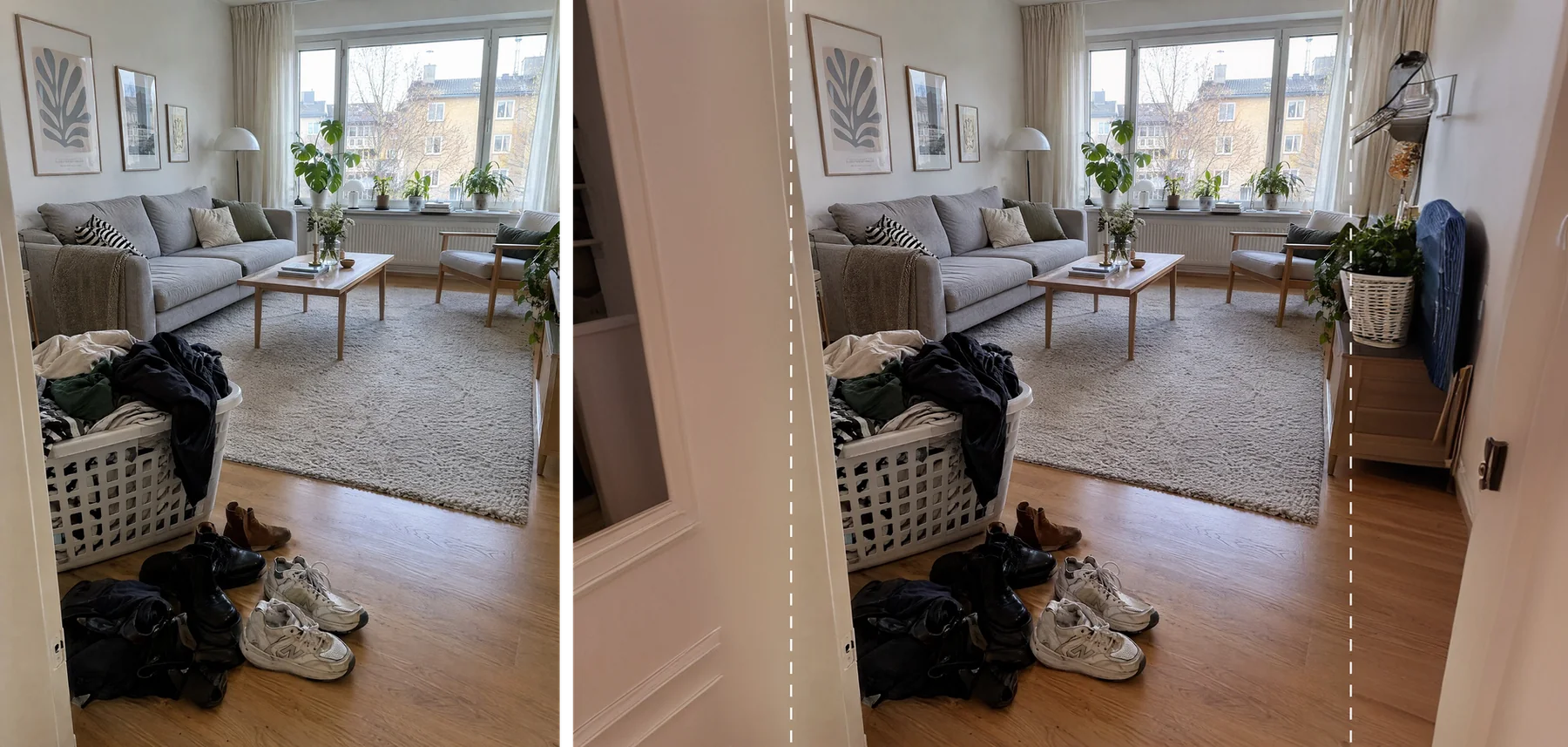
Outside the dashed lines, the AI invented an open door on the left and a sideboard, shelf and ironing board on the right.
Look outside the dashed lines, though. The AI added an open door on the left and a sideboard with a plant, a shelf and an ironing board on the right. None of them exist in the apartment. For a listing, that is adding elements to the property, which is exactly what the rules above forbid. Turn the phone sideways and reshoot instead; keep the extender for sky or lawn margins in marketing graphics, and label those too.
Photo size guidance for portals
| Where | Size and shape | Other limits |
|---|---|---|
| Realtor.com | Exactly 3264 × 2448 px recommended (4:3 landscape), at least 72 dpi | 20 MB max; other ratios get white borders |
| Zillow | At least 330 × 220 px; 1536 × 1152 suggested | Under 50 MB (10 MB suggested) |
| MLS Now | At least 1024 × 768, landscape | JPG only, 6 MB max, up to 50 photos |
| NWMLS | Not specified | Up to 40 photos |
| Airbnb | At least 1024 × 683 px; landscape displays best in search | Its photo guide suggests 1200 × 800 or more |
A pre-upload checklist for edited listing photos
- Every date stamp, logo, watermark and contact detail is removed.
- No permanent feature was removed or changed: lines, poles, roads, views, damage, walls, floors.
- Any removed temporary items are disclosed the way your MLS requires, and the original is kept or shown.
- Virtual staging is labelled in the places your MLS names.
- Photos are landscape and meet your MLS's minimum size.
- The edited areas hold up at full size: no smears, repeated textures or invented objects.
Use the photos in a listing video
Clean, honest stills also make good first frames for a walkthrough clip. Our guide to real estate videos from listing photos shows how to animate rooms with the AI image-to-video generator. The same true-picture rule applies: describe camera motion, not new furniture or views. For the living room, a prompt like this keeps the room as it is:
Slow steady dolly forward into a bright Scandinavian living room with a grey sofa, oak coffee table and large windows, soft natural daylight, realistic real estate walkthrough, no new furniture, smooth gimbal movement.
More image fixes are collected in our quality fixes guides.
FAQ
Can I use AI to edit real estate listing photos?
Yes, within limits. Removing overlays such as date stamps and logos is fine and usually required. Removing temporary items needs a digitally altered label on many MLSs. Removing or adding permanent features is prohibited.
Can I remove power lines from listing photos?
No. Bright, Canopy and CRMLS explicitly prohibit removing power lines, poles, water towers or nearby roads, because they are outside the owner's control and buyers need to see them, and other MLSs ban misleading edits in general.
Do I have to disclose AI-edited listing photos?
If the edit adds, removes or changes elements of the property, generally yes. California's law requires a conspicuous disclosure and a link to the original, and MLSs set where the label goes. Lighting, colour correction, straightening and cropping are exempt in California.
Can I put my logo or a watermark on listing photos?
Not on MLS photos in most markets. The MLSs above ban branding, contact details and added text, and they apply their own watermark.
Is virtual staging allowed?
On most MLSs, yes, with a "virtually staged" label in the places the MLS names. Some, like Stellar, only allow staging unattached furniture or décor outdoors.
Can AI turn vertical listing photos into horizontal ones?
It can, but it invents the missing parts of the room. For listing photos, reshoot in landscape rather than uncropping.
Clean up listing photos the right way
Remove date stamps, logos and watermarks with the AI watermark remover, and label any edit that changes the scene. Your first image is free, no sign-up needed.
Sources (checked November 3, 2026): NAR 2026 Code of Ethics, California Bus. & Prof. Code §10140.8, CRMLS digitally altered images FAQ, CRMLS photographs and media FAQ, Bright MLS image policy, Stellar MLS Article 04.04, Canopy MLS digital images, MLS Now images rules, MLS Now photo requirements, NWMLS photography guide, Realtor.com image sizes, Zillow photo tips, Airbnb photo requirements.