For social media ads in 2026, the best overall choice depends on the asset you need. SeedVideo AI with Seedance 2.5 suits product-photo motion and brand shots; HeyGen fits scripted presenter ads and localized demos; Runway fits creative variations and edits to existing footage. For a free commercial-use starting point, Runway has fewer licensing obstacles than HeyGen Free, although its model selection and one-time credits limit what you can make.
A small ecommerce seller may need one accurate product demonstration, while an agency may need twenty approved hooks in several languages. Those jobs require different tools. Start with the source material, the claim you must prove, and the placement. Then compare the selected plan's credits, export permissions, aspect ratios, and revision controls. This guide compares production fit rather than advertising returns: none of these tools guarantees higher click-through rates, ROAS, or sales, and a synthetic presenter is not evidence of a real customer's experience.
Last verified: September 13, 2026. Prices below are public USD monthly-billing rates before applicable taxes. Plan exports, native generation, and upscaling are separate capabilities.
| Tool and selected workflow | Starting monthly price | Free tier conditions | Maximum resolution relevant to this workflow | Maximum duration relevant to this workflow | Commercial use |
|---|---|---|---|---|---|
| SeedVideo AI / Seedance 2.5 | Lite $14.90; Pro $29 | 5 introductory credits; pricing comparison does not include Seedance 2.5 in Free | Current generator lists 1080p; Lite pricing lists 720p, Pro/Premium 1080p | Current duration control: 4 to 30 seconds | Available on eligible paid plans; input rights still required |
| HeyGen presenter/product demos | Creator $29; Pro from $49 | Public pricing lists 3 videos/month, up to 1 minute; help qualifies availability by region | Creator 1080p export; Pro 4K export, not a native B-roll specification | Creator/Pro up to 30 minutes per video | Paid-plan terms permit it; Free terms prohibit advertising and client work |
| Runway / Gen-4.5 and creative editing | Standard $15; Pro $35; Max $95 | 125 one-time credits and a selection of models; Gen-4.5 requires Standard or higher | Gen-4.5 native 720p; paid 4K upscaling; Aleph 2.0 editing up to 1080p | Gen-4.5 2 to 10 seconds; Aleph 2.0 edits footage up to 30 seconds | Runway permits commercial output use subject to its terms and third-party rights |
TL;DR
- For a product that must remain recognizable, start with an approved product photograph or real demo footage. Use generation for controlled motion and supporting scenes.
- For someone explaining an offer in several languages, shortlist HeyGen's paid presenter workflow and budget for script, pronunciation, and claim review.
- For new backgrounds, shot ideas, or revisions to an existing brand film, shortlist Runway. Choose the actual model and distinguish its native output from an upscale.
- For repeated variants, compare reusable steps and review time. Parallel generation is not automatic catalog advertising or campaign management.
Quick Answer
The best AI video generator for social media ads is the one that preserves the evidence your ad depends on. A bottle's real label, a software screen, and an approved offer should survive every variation. When a claim relies on a physical action, film that action rather than asking a model to invent it.
For product-led creative, use the Seedance 2.5 model page to assess the reference-led workflow, then open the AI image-to-video generator with an approved source image. Keep an editor in the process for text, voice, captions, and placement-specific exports.
Choose the ad type before the software
An AI video ad generator can mean a presenter, a model that generates moving images, or a template editor that assembles existing assets. Compare them by the job they perform. A presenter may explain a product accurately while lacking the cinematic control you want for a brand film. A beautiful generated shot may still be unsuitable as a demonstration.
| Ad type | Best starting material | Useful AI contribution | What needs human approval |
|---|---|---|---|
| UGC-style explanation | Approved script, licensed presenter or consenting adult | Presenter delivery, language variants, hook changes | Identity consent, accurate claims, clear synthetic-content treatment |
| Product demonstration | Real product photos, screen capture, filmed operation | Controlled motion, narration, scene assembly | Labels, dimensions, interface behavior, physical results |
| Brand short film | Approved mood references and product identity | Scene concepts, camera motion, visual revisions | Brand continuity, trademarks, factual implications |
| Template offer ad | Approved footage, price, offer dates and logo | Repeatable assembly and caption versions | Terms, dates, legibility and placement preview |
| Catalog or agency variants | Organized assets, approved copy fields and review owners | Reusable workflows, localization, parallel work | Every SKU, language, offer and export |
The practical distinction for UGC is between a delivery style and a testimonial. Casual framing and conversational language can be useful. A synthetic character saying they personally purchased a product creates a different problem. Keep genuine endorsements attached to the actual consenting person and the experience they can substantiate. The AI UGC video ads workflow is a useful starting point for organizing the creative, but an ad still needs its own evidence and approval.
SeedVideo AI: product-photo motion and brand shots
Best for: teams that want reference-led product motion, original supporting scenes, and a longer short-form shot plan. Not for: treating generated action as proof of product performance or expecting an automatic campaign publisher.
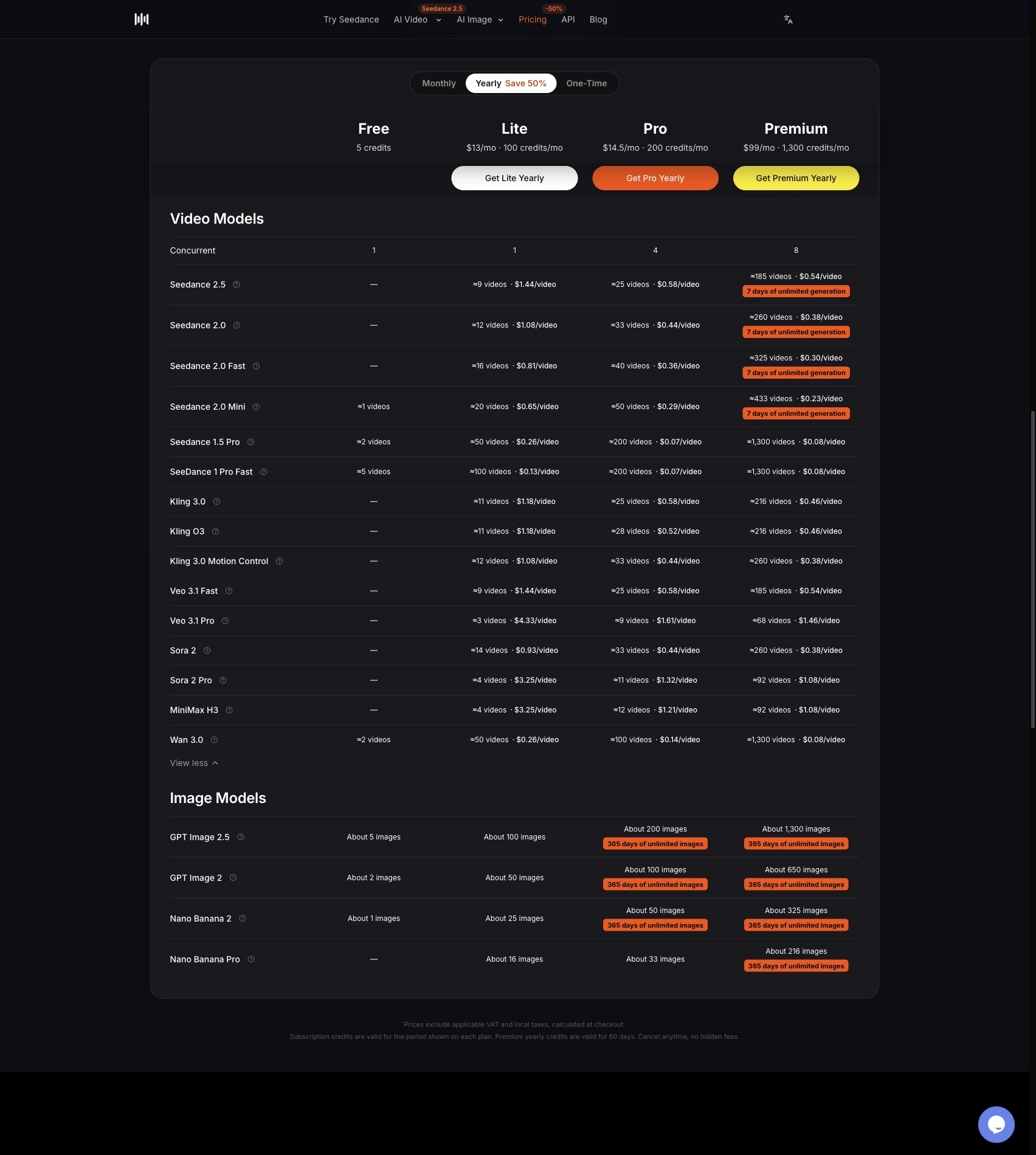
The current Seedance 2.5 generator offers image and video input controls, aspect-ratio selection, an audio toggle, and duration settings from 4 to 30 seconds. Its resolution menu lists 480p, 720p, and 1080p. Access depends on the account and plan: the pricing comparison lists 720p for Lite and 1080p for Pro and Premium. Select the intended resolution before committing your budget; the presence of a menu option does not make every option a free entitlement.
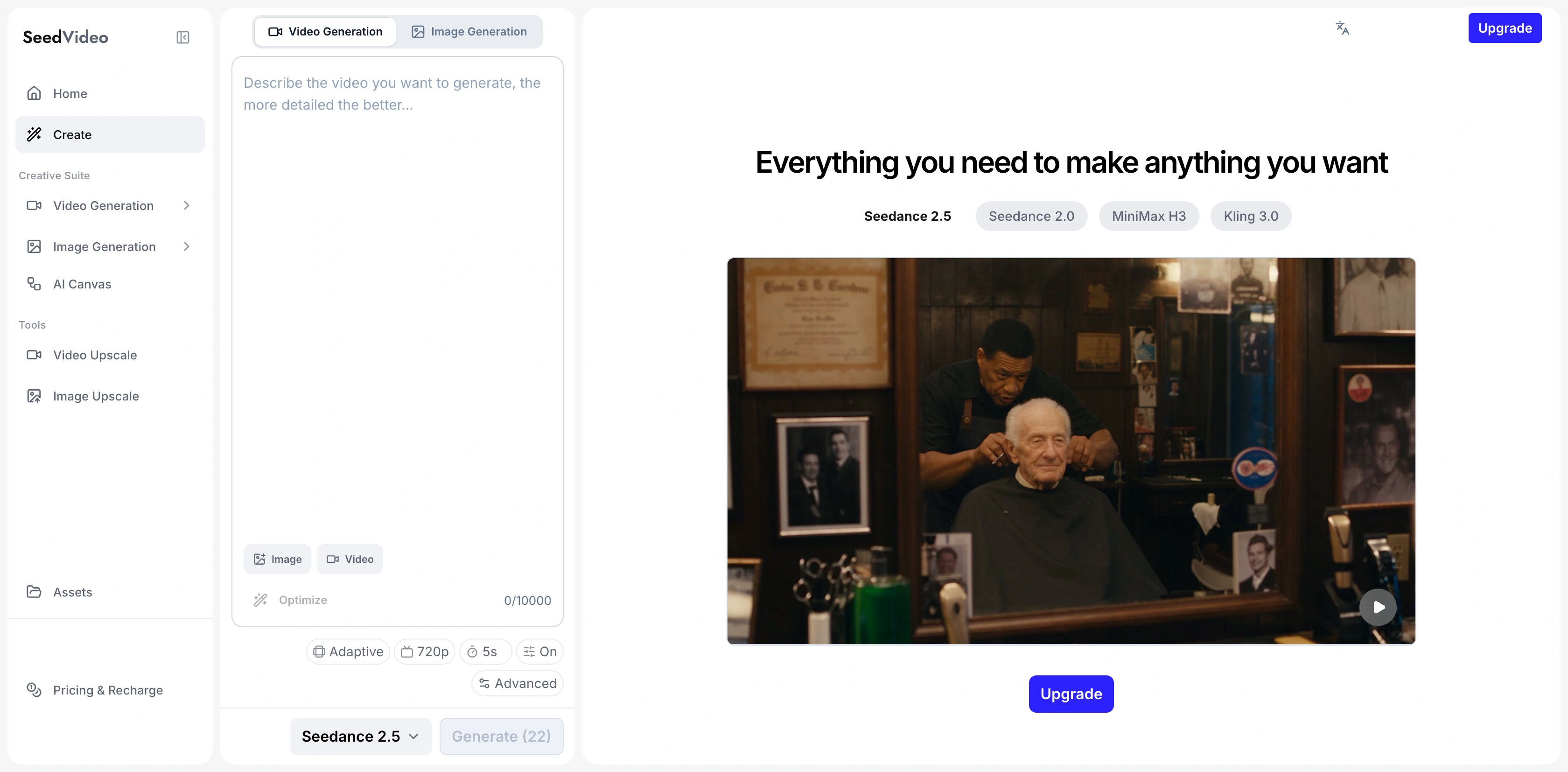
The current SeedVideo AI generator shows Seedance 2.5 selected, with source-material controls, aspect ratio, resolution, duration, audio and generation settings.
For a product ad, prepare a clean image with the correct packaging and an approved background. Describe the movement separately from the product details that must remain fixed. A request for a small camera push toward a bottle is easier to review than a request that also changes its label, opens the cap, pours liquid, and adds a person. Build those actions as separate shots when the product behavior matters.
Open the image-to-video workspace for an existing product image. Use the text-to-video workspace for an original environment or supporting concept. When you already have an approved clip and only need to swap the product, restyle the background, or extend the ending, use the video to video workspace instead of regenerating the shot. If the final ad needs a real interface interaction, capture the interface and edit it into the sequence rather than generating a substitute screen.
The current pricing page lists Lite at $14.90/month for 100 credits, Pro at $29/month for 200 credits, and Premium at $149/month for 1,300 credits under monthly billing. Concurrent generation limits are 1, 4, and 8 respectively. Those limits help organize production; they do not promise that every generated clip will be usable. Five introductory credits should not be described as free Seedance 2.5 advertising: the comparison table does not include that model in the Free column.
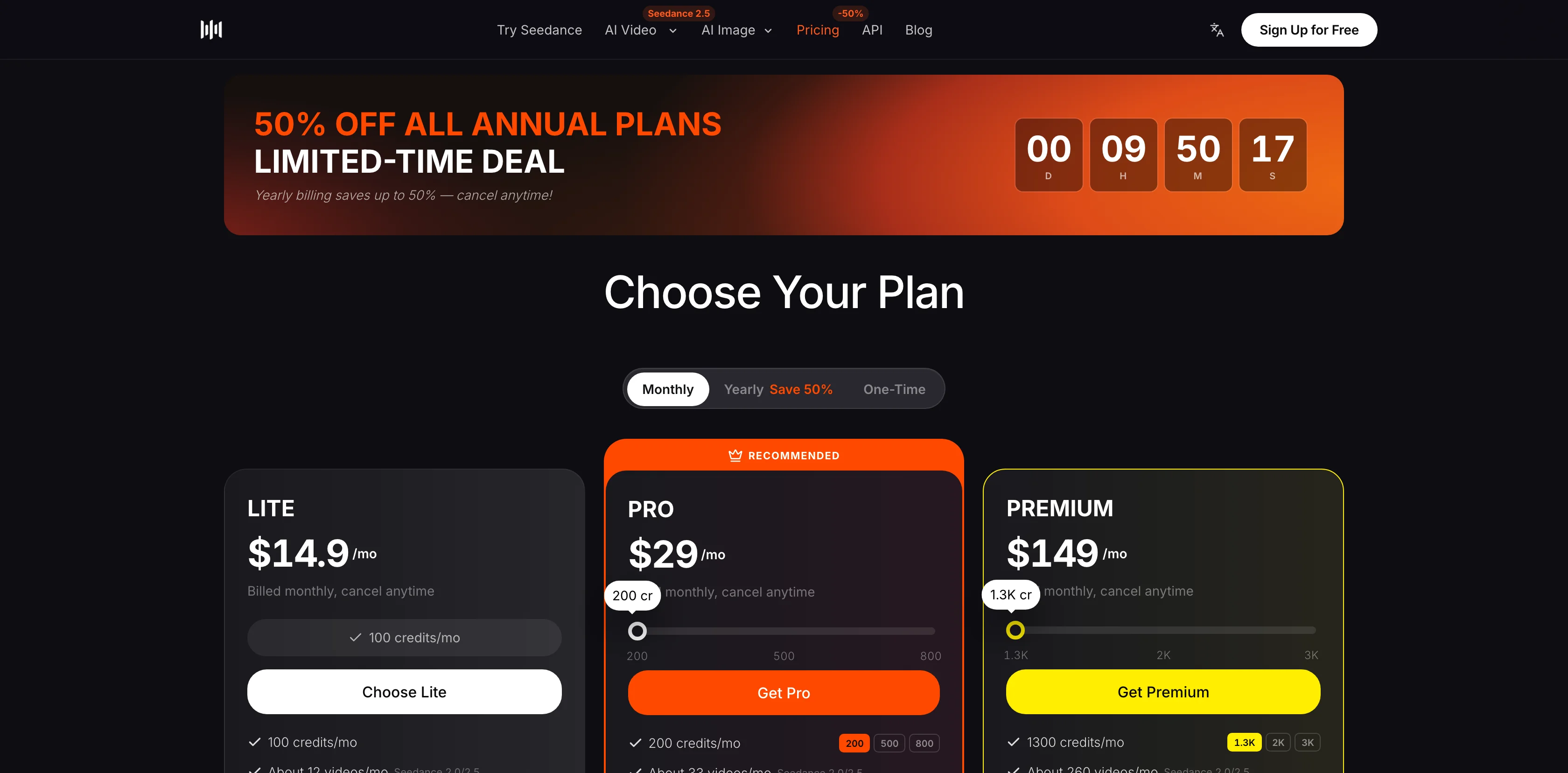
SeedVideo AI's monthly pricing view lists Lite at $14.90, Pro at $29 and Premium at $149, with the selected credit allowances.
For an ecommerce team, the main review cost is often checking the product across frames. Freeze the source photograph and record the allowed movement. Reject changes to a logo, the number of buttons, package shape, or functional details. The AI product video guide can help split a product sequence into an opening, a factual demonstration, and a closing product hold.
HeyGen: scripted presenters and localized demos
Best for: approved explanations delivered by a presenter, language versions, and screen-capture-plus-presenter demos. Not for: passing a synthetic presenter off as an actual customer's endorsement or assuming Free output can run as paid advertising.
HeyGen's product video page describes product URL, photograph, description, and script inputs. It also describes presenter or presenter-free styles, narration, captions, brand adjustments, and multiple aspect ratios. For software, the useful combination is a real screen capture beside a scripted presenter. The screen provides the evidence; the presenter guides the viewer through it.
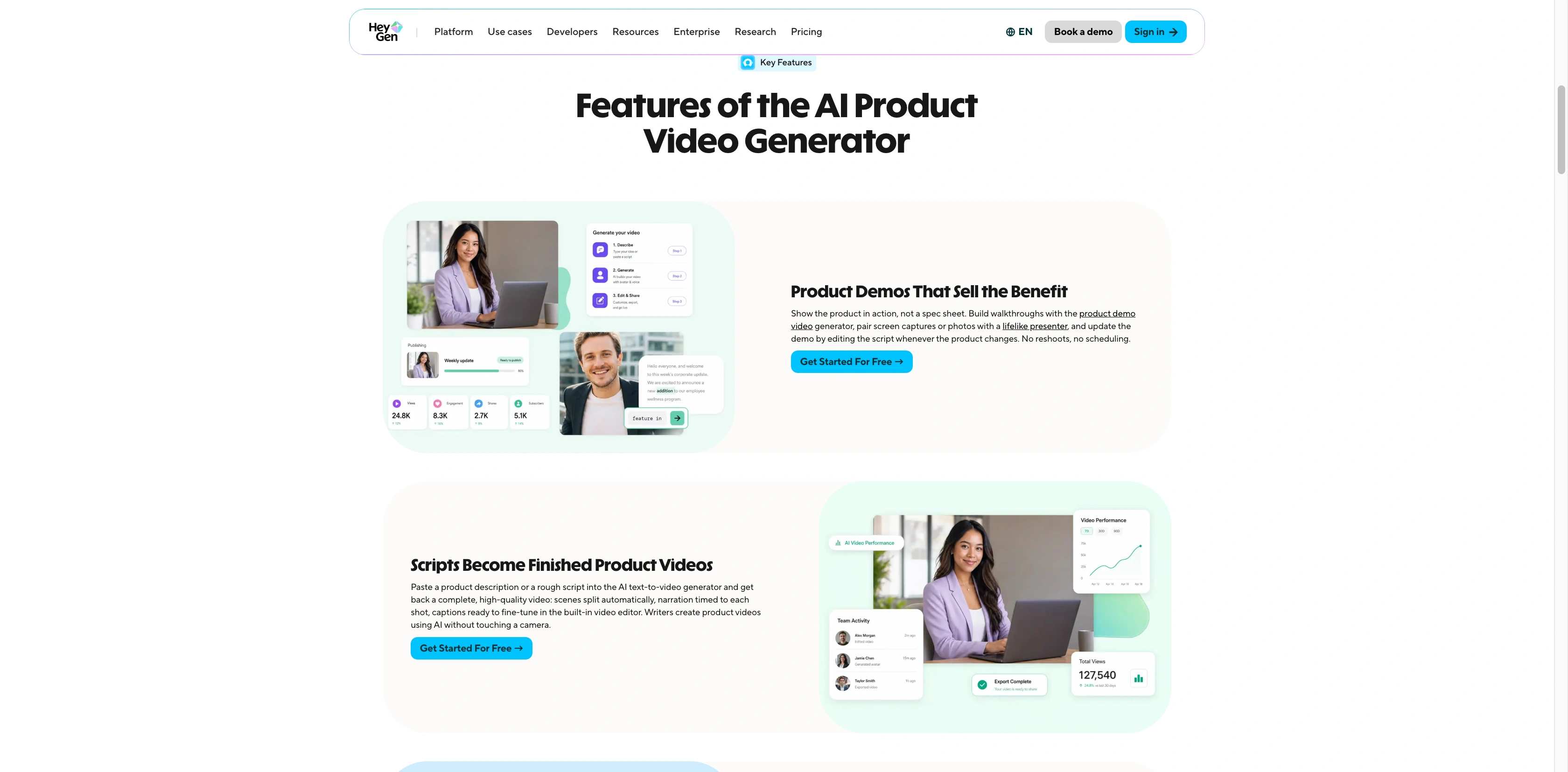
HeyGen's official product-demo page describes combining screen captures or photos with a presenter and updating the script when the product changes.
Current HeyGen pricing lists Creator at $29/month with 600 credits and 1080p export. Pro starts at $49/month with 1,000 credits and 4K export. Both list videos up to 30 minutes. These are plan-level export limits, not the native settings of every generated background clip. Annual Creator is $288, equivalent to $24/month; compare that prepaid commitment with monthly billing before choosing it.
The current plan guide distinguishes credit-based plans from legacy subscriptions and separately priced API products. A product URL workflow or an API catalog example does not establish unlimited web-plan batch production. Brand kits, templates, and localized scripts can reduce repeated setup, but each variant still needs review.
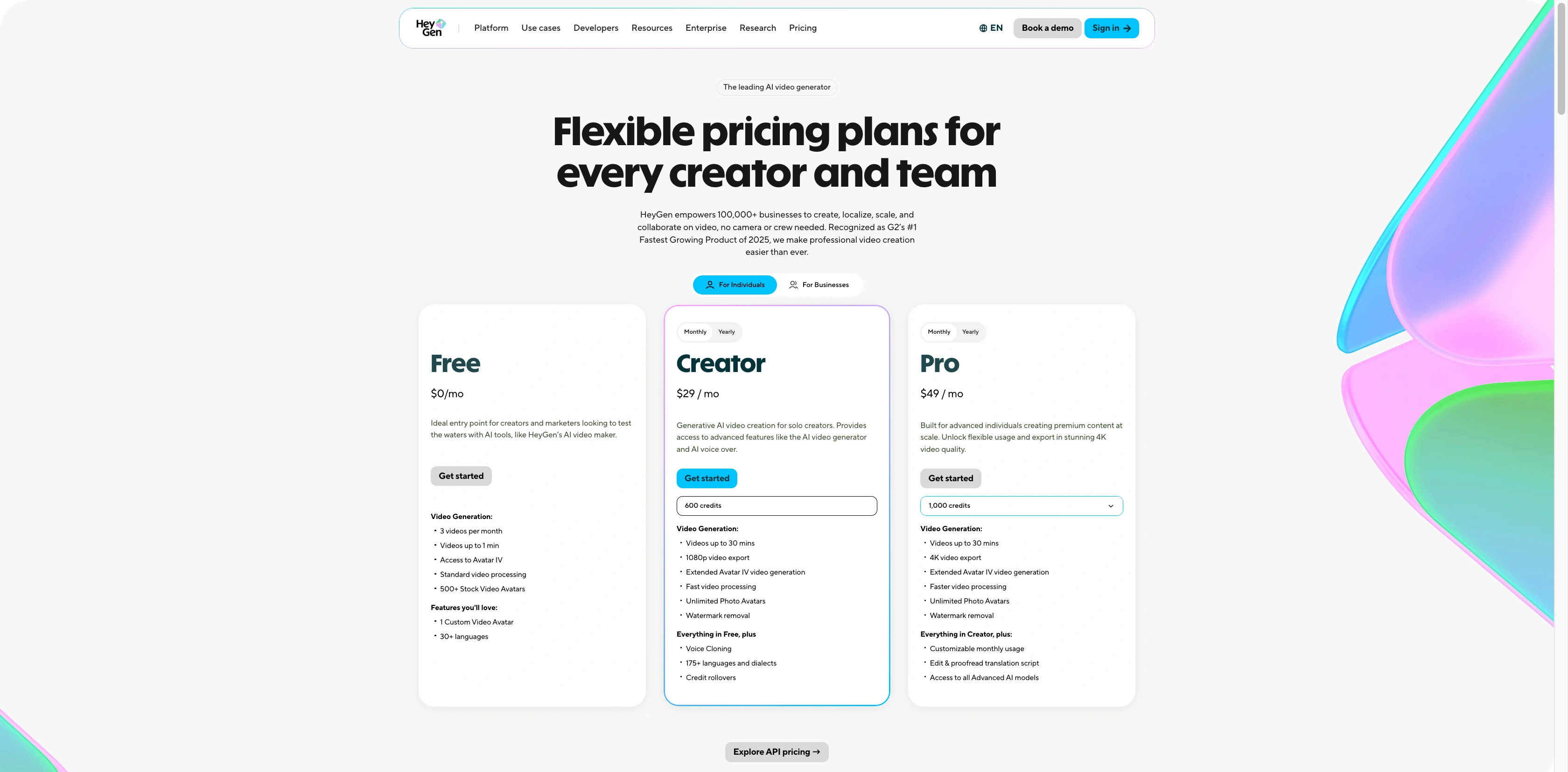
HeyGen's monthly plan cards show Free, Creator at $29 and Pro from $49, alongside credit and export conditions.
The licensing distinction matters more than the free price. HeyGen's terms permit commercial output use on specified paid plans, while the Free section limits output to personal, non-commercial, or internal evaluation and prohibits advertising and client work. The Free allowance also varies by region according to the help guide. A 720p sharing link is not a confirmed entitlement to a downloadable ad export.
When localizing, approve the translated meaning before changing the voice. Check product names, units, discount conditions, subtitle line breaks, and how the offer sounds in that market. A fluent voice can deliver an inaccurate claim just as confidently as an accurate one. Keep the original approved script alongside the translated version so the reviewer can compare them.
Runway: creative variations and existing-footage edits
Best for: teams that need shot iteration, reusable creative workflows, and revisions to existing footage. Not for: assuming every free model supports the same controls or calling a 4K upscale native 4K generation.
Current Runway pricing lists Standard at $15/month, Pro at $35/month, and Max at $95/month. Annual equivalents are $12, $28, and $76/month. Free includes 125 one-time credits and a selection of models; Gen-4.5 requires Standard or higher. Standard lists 625 monthly credits and five parallel image/video generations. Pro lists 2,250 credits and fifteen parallel generations. Compare the actual model's credit cost rather than dividing the subscription by an imagined number of finished ads.
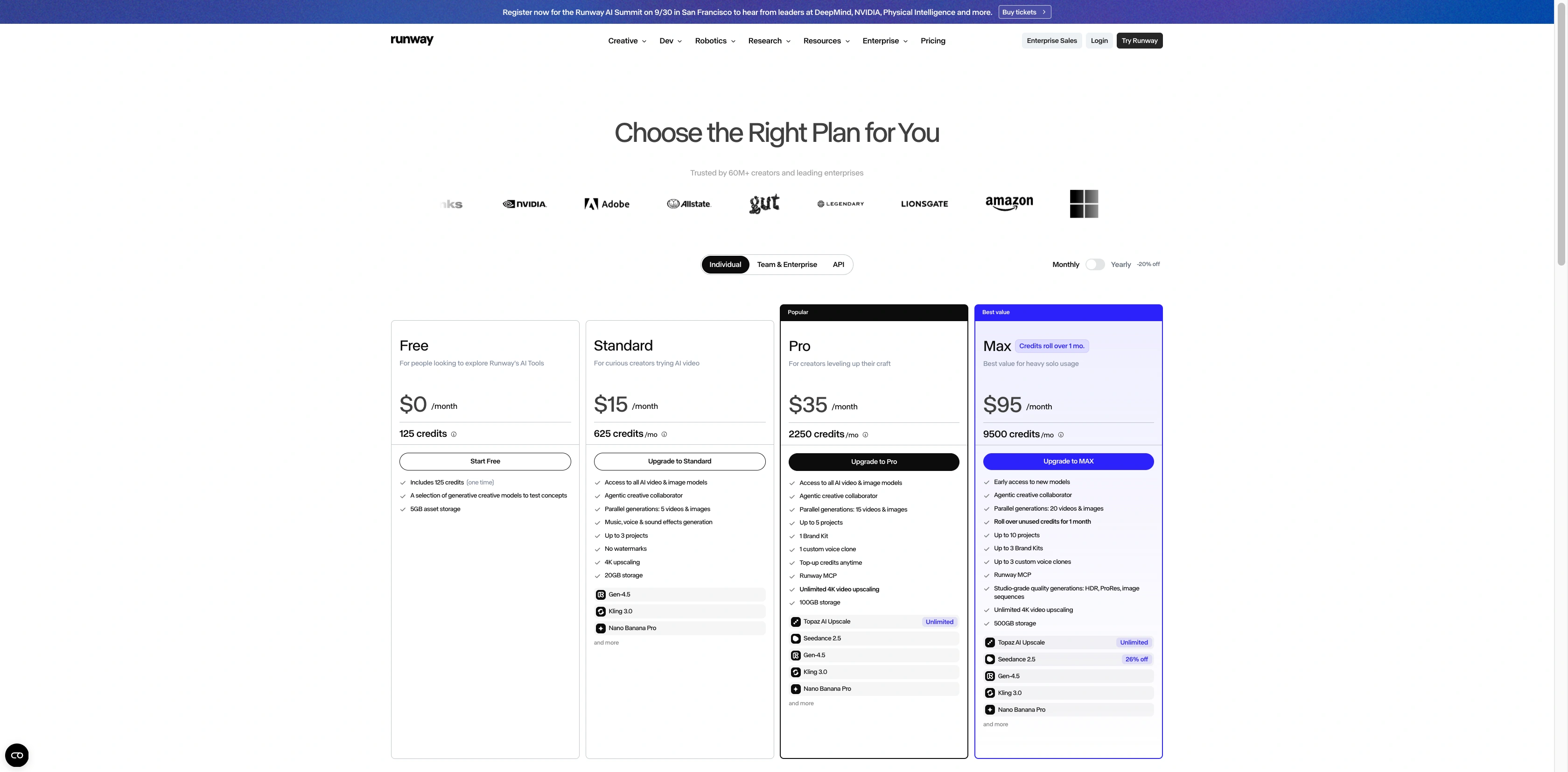
Runway's current monthly pricing page lists Free, Standard, Pro and Max, with the included credits and creative workflow features.
The Gen-4.5 guide lists native 720p output and durations from 2 to 10 seconds. Text-to-video is listed at 16:9; image-to-video supports vertical, square, and other listed ratios. For a TikTok-first concept, check the selected input mode rather than assuming every text workflow can generate a vertical master.
Runway's Workflows can connect models and save reusable steps. Its Reshoot Product app creates product still images from an uploaded product photograph. That can prepare a scene, but it is a different operation from producing a finished video ad. The Add Performance app combines a driving performance with a character image or video; it requires an appropriate person and voice permission plan.
For existing brand footage, Aleph 2.0 and Edit Studio describe editing up to 30 seconds of 1080p footage. Keep that specification separate from Gen-4.5 generation. Runway's commercial-use guidance permits commercial output use, but its terms still require the relevant input rights and permissions. Check confidentiality requirements before uploading unreleased assets; a paid plan alone is not proof of a private training arrangement.
TikTok, Meta and YouTube: plan the frame and preview the placement
A 9:16 master is a useful starting format for full-screen vertical placements such as TikTok, Reels, and YouTube Shorts. It is a production recommendation, not a claim that every ad format has identical requirements. Prepare a separate crop when a feed placement calls for square or another ratio. A centered product photograph leaves more room for those versions than a tightly framed landscape shot.
| Placement to prepare | Practical starting frame | Keep clear of interface overlays | Final review |
|---|---|---|---|
| TikTok vertical feed | 9:16 | Bottom caption/CTA area and right-side controls | Use the actual format's current safe-zone guide and preview |
| Meta Reels | 9:16 | Caption, account and engagement overlays | Preview each selected placement rather than trusting one crop |
| YouTube Shorts | 9:16 | Player and action overlays | Check the mobile preview and the approved destination |
| Mixed feed campaign | Separate vertical and square versions as needed | Product, offer and captions need breathing room | Review every exported version at phone size |
Interface overlays vary by placement, device, caption length, and ad format. TikTok's current in-feed specifications, Meta's safe-zone guidance, and YouTube Shorts ad guidance should be read for the chosen placement. Put the product identity and offer away from the edges, then use the actual preview to check whether the CTA, subtitles, or profile UI obscure them. A technically valid export can still hide the information a buyer needs.
Set the ratio before generation. If the scene is designed around a hand holding a product at one edge, a later crop may cut off the action. Place the focal subject with enough space for the planned captions. Add accurate price and offer text in an editor, where it can be checked and updated reliably.
A repeatable social-ad workflow
- Write one buyer question and one approved answer. For example, a software ad may show how to export a report; an ecommerce ad may show how a lid closes. Separate the claim from the visual style.
- Gather the evidence. Use approved product photos, real operation footage, accurate screen captures, licensed music, and permissioned presenter assets. Assign a reviewer for product accuracy and another for the offer.
- Build a short sequence: hook, evidence, next step. Generate supporting scenes where they add context. Keep any physical or interface demonstration grounded in real material.
- Make a small variant set. Change the hook or opening frame while holding the product, offer, and main evidence fixed. This makes the difference between versions understandable.
- Review the full export. Watch every frame for packaging changes, impossible movement, screen errors, pronunciation, subtitle mistakes, and crop problems. Pause at the final offer and check the destination.
- Apply the required disclosure and placement checks. Save the approved version with its script, source permissions, and export settings. Measure campaign results only after distribution; production fit is not an advertising-effectiveness measurement.
For an agency, name files by client, product, language, hook, and approval state. Give each offer a date and owner. A reusable workflow is most useful when it makes those differences easy to inspect. Otherwise, producing more variants simply creates more copies to correct. Use the commercial video guide to plan the shot sequence before increasing volume.
Budget for approved ads, not generated files
The monthly price is only one part of the cost. Include model credits, discarded attempts, editor time, localization, and revisions after review. Compare cost per approved asset: total production expense divided by the number of versions your team has cleared for use. This is an internal planning calculation, not a forecast of sales.
A small seller can begin with real product footage and one controlled AI supporting shot. A brand team may value tighter identity review and an editable master. An agency should prioritize reusable steps, permissions, consistent naming, and language review. Buy for that workload rather than for a headline resolution or an advertised number of possible videos.
Authenticity and disclosure checklist
Before releasing an ad, check that the person and voice are licensed for the intended use; every factual claim matches the real product; synthetic scenes do not imply a demonstration that never occurred; and the offer, destination, music, and third-party marks are approved. Treat a synthetic presenter as a production choice, not a source of customer evidence.
TikTok's misleading-content ad policy requires disclosure for fully AI-generated or significantly AI-modified creative. YouTube's GenAI disclosure guidance covers meaningful realistic alterations and photorealistic generation; routine script or caption assistance is a different case. Google Ads AI labeling requirements are a separate advertising layer and can depend on the market. Check both the upload and ad requirements. Tool licensing or a disclosure label alone does not guarantee platform acceptance. For regulated products or disputed claims, obtain the appropriate professional review before distribution.
FAQ
What is the best AI video generator for social media ads in 2026?
Choose by production task. SeedVideo AI with Seedance 2.5 fits reference-led product and brand shots; HeyGen fits scripted presenters and localization; Runway fits creative variations and footage edits. These are workflow recommendations, not measured ROAS or image-quality rankings.
Which free AI video tool can I use for commercial ads?
Runway permits commercial output use subject to its terms, but Free has 125 one-time credits and limited model selection. HeyGen Free terms prohibit advertising and client work. SeedVideo AI's introductory credits are not a guaranteed free Seedance 2.5 allowance. Verify the selected feature and input permissions before distribution.
Can AI-generated UGC replace a real customer testimonial?
A synthetic presenter can deliver an approved explanation. It should not be presented as an actual customer with a purchase or experience that did not happen. Genuine testimonials require authentic substantiation and the relevant person's permission.
Does a 4K plan mean the video model generates native 4K?
No. Runway Gen-4.5 lists native 720p and separate 4K upscaling. HeyGen Pro's 4K figure is a plan-level export entitlement. Compare native model output, edited footage, and export settings separately.
Can these tools automatically create and publish hundreds of ads?
Reusable templates, localization, workflows, and parallel generation can support repeated production. They do not establish that every web plan includes catalog automation, unlimited generation, approval routing, or direct social-platform publication. Check the exact product or API and budget for review.
Will AI video ads improve CTR, ROAS or sales?
No tool choice guarantees those outcomes. Creative, offer, audience, destination, distribution, and measurement all matter. Run a controlled campaign comparison with approved assets before attributing an improvement to AI production.
Build the first approved version
Choose one ad type, one product, one placement, and one claim you can prove. Prepare the real evidence and decide which scene needs generation. For product-led creative, start at the Seedance 2.5 model page, then keep the product, script, and offer under review through the final export.