Seedream 5.5 is the image model ByteDance released on November 9, 2026, as the follow-up to Seedream 5.0 Pro. The output sizes did not change: it still tops out at 2K, with the same 10-reference limit and one image per run. What changed is how it edits and what it can export. Seedream 5.5 can return a transparent PNG from a plain text prompt, it is built to keep the rest of an image fixed while you change one detail over many rounds, and it renders dense small text more reliably. If you need 3K or 4K, more than 10 references, or several images from one request, Seedream 5.0 Lite is still the model for that.
On November 12, 2026 we ran the same prompts through Seedream 5.5, Seedream 5.0 Pro and Seedream 5.0 Lite. Seedream 5.5 was the only one that printed every line of a poster as written. In a six-round edit it drifted much less than Seedream 5.0 Pro in the parts it was told to leave alone. It was not faster than Seedream 5.0 Pro at generating an image from text, but it was faster at editing one.
Last verified: 2026-11-12. Test images and timings are from our own runs that day; the evaluation percentages further down are ByteDance's.
Quick Answer
| Seedream 5.5 | Seedream 5.0 Pro | Seedream 5.0 Lite | |
|---|---|---|---|
| Released | November 9, 2026 | July 2026 | February 2026 |
| Quality tiers | 1K, 1.5K, 2K | 1K, 1.5K, 2K | 2K, 3K, 4K |
| Largest custom size | 4,624,220 pixels | 4,624,220 pixels | 16,777,216 pixels |
| Reference images | Up to 10 | Up to 10 | Up to 14 |
| Images per run | 1 | 1 | Up to 15 |
| Transparent PNG | From text or from images | Only when editing one image that already has alpha | Not listed |
| Layer splitting | Separate model, up to 100 layers | Base plus up to 16 layers | Not listed |
| Prompt languages | Chinese, English and 14 more | Chinese, English and 14 more | Chinese, English |
| Volcengine price per output image | ¥0.13 up to 2.61 megapixels, ¥0.23 above | ¥0.30 up to 2.61 megapixels, ¥0.60 above | ¥0.22 |
| Volcengine price per input image | ¥0.05 | First free, then ¥0.02 | Free |
| Credits on SeedVideo AI, no reference images | 1 at 1K and 1.5K, 2 at 2K | 2 at 1K and 1.5K, 3 at 2K | 2 at 2K, 3K and 4K |
Sources: the Seedream 5.5 API reference, the Volcengine Ark image API for the 5.0 models, Volcengine's launch notes for the layer count, and Volcengine's model price list, read November 12, 2026. Credits are SeedVideo AI's own prices on the same date.
TL;DR
- Seedream 5.5 does not do 4K. Its largest preset is 3136 × 1344 (21:9 at 2K).
- Transparent backgrounds now work from text alone. On 5.0 Pro you had to start from an image that already had an alpha channel.
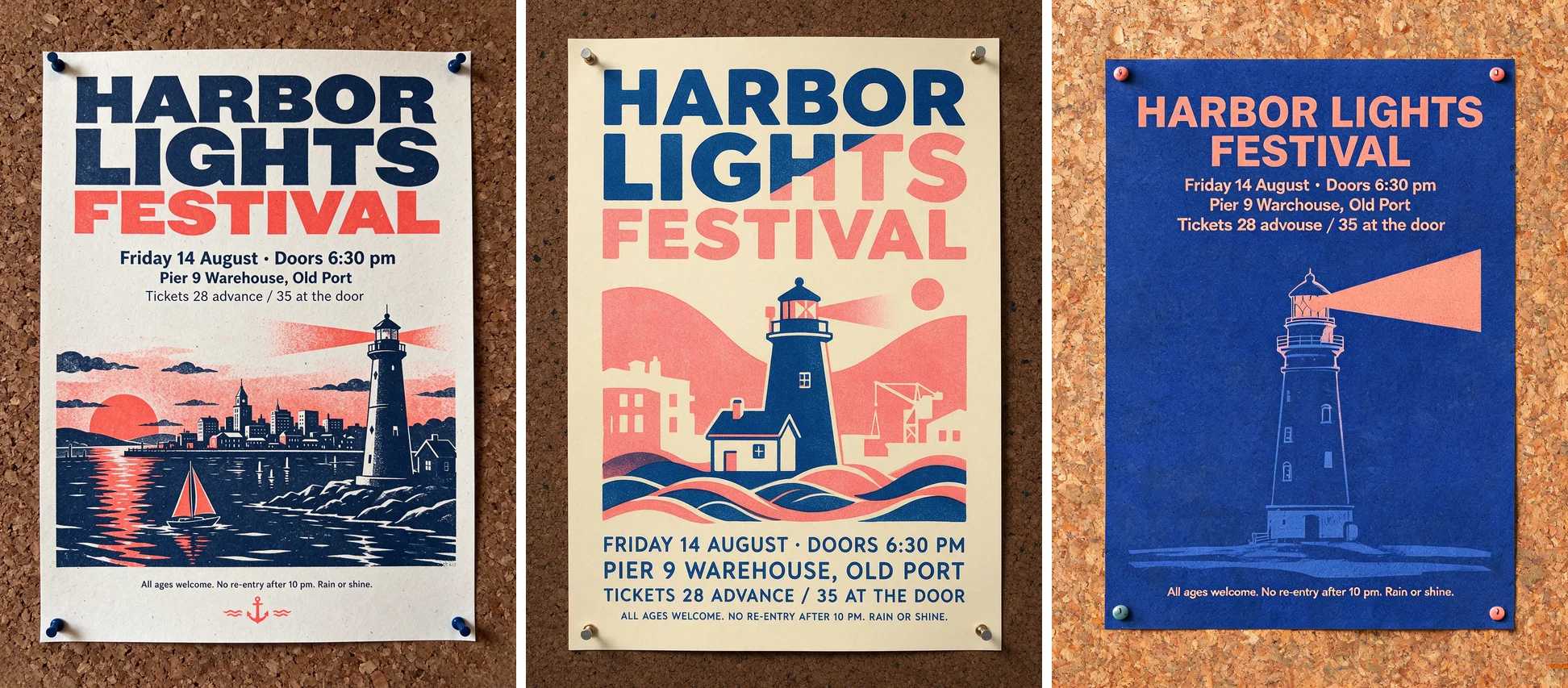
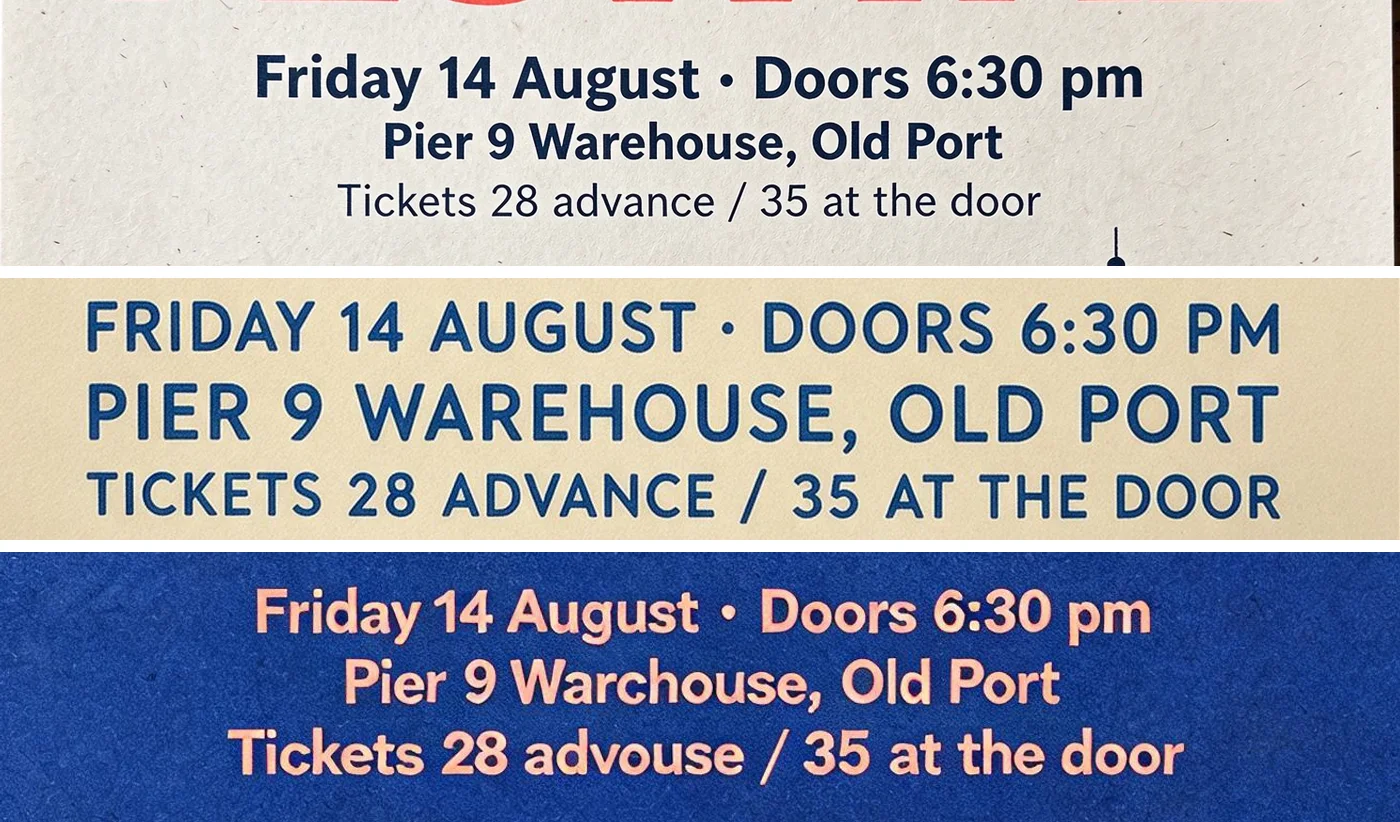
- In our poster test, Seedream 5.5 spelled every line correctly and kept the capitalization we wrote. Seedream 5.0 Pro spelled everything correctly but set it all in capitals. Seedream 5.0 Lite misspelled two words.
- Over six edit rounds on one product photo, both Seedream 5.5 and Seedream 5.0 Pro made every change and kept the label text. Seedream 5.0 Pro's wall color and label paper drifted; Seedream 5.5's barely moved.
- Text-to-image at 2K took a median of 47 seconds on Seedream 5.5, 43 on Seedream 5.0 Pro and 27 on Seedream 5.0 Lite. Edits took 61 seconds on Seedream 5.5 and 97 on Seedream 5.0 Pro.
- "100 rounds of editing" is a demo, not a product limit, and the model has no memory between rounds.
- Volcengine charges ¥0.13 or ¥0.23 per output image depending on size, plus ¥0.05 per input image. Seedream 5.0 Pro is ¥0.30 or ¥0.60 per output.
- On SeedVideo AI a Seedream 5.5 image is 1 credit at 1K or 1.5K and 2 credits at 2K, and reference images add to that.
- A Seedream 5.5 Pro is planned, with no date.
Same-prompt test: Seedream 5.5 vs 5.0 Pro vs 5.0 Lite
We sent three prompts to all three models on November 12, 2026, each at 2K with the same aspect ratio and no reference images. Every image below is the first and only result for that prompt; nothing was re-rolled or retouched. In each row the order is Seedream 5.5, Seedream 5.0 Pro, Seedream 5.0 Lite.
Small text on a poster
A printed concert poster pinned to a cork board, photographed straight on. Bold title spelled exactly "HARBOR LIGHTS FESTIVAL". Below it, three lines of smaller text spelled exactly: "Friday 14 August · Doors 6:30 pm", "Pier 9 Warehouse, Old Port", "Tickets 28 advance / 35 at the door". At the bottom, one line of very small print spelled exactly: "All ages welcome. No re-entry after 10 pm. Rain or shine." Navy and coral two-color risograph style, a simple lighthouse illustration, visible paper grain. All text sharp, correctly spelled and readable.
The three lines under the title, cropped from each image at full size:
| Seedream 5.5 | Seedream 5.0 Pro | Seedream 5.0 Lite | |
|---|---|---|---|
| Words spelled correctly | All | All | All but two: "Warchouse", "advouse" |
| Capitalization as written | Yes | No, every line set in capitals | Yes |
| Very small print at the bottom | Correct | Correct | Correct |
| Two-color navy and coral | Yes | Yes | Yes |
A candid street portrait
A candid documentary photograph of an elderly fishmonger laughing behind his stall at an early-morning street market. Overcast natural light, shallow depth of field, crushed ice and whole fish in the foreground, handwritten price tags out of focus, other shoppers blurred behind him. Real skin texture with wrinkles and pores, slightly messy grey hair, a worn apron. Shot on a 35mm lens, unposed, no retouching.
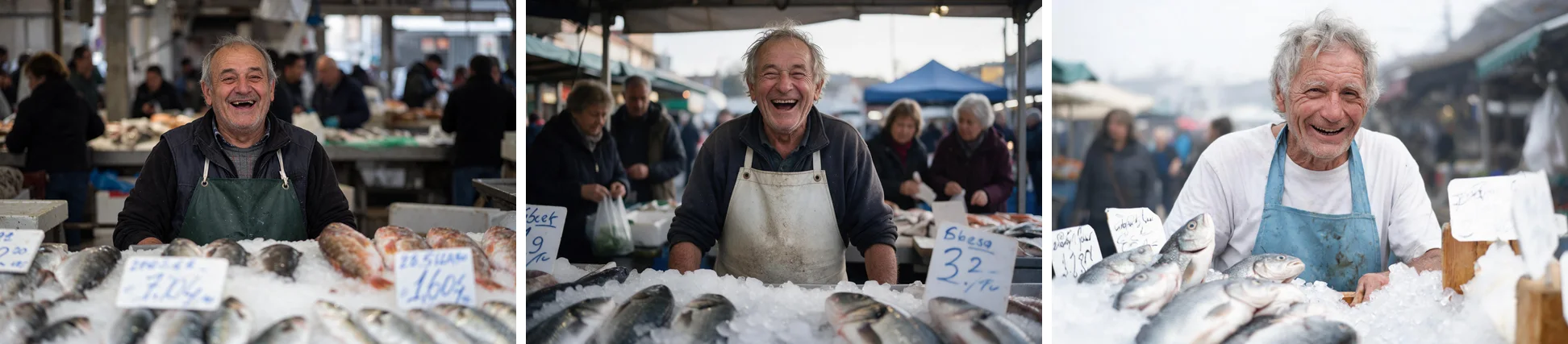
All three read as photographs, and none of them put readable writing on the price tags. Seedream 5.5 and Seedream 5.0 Pro both gave an overcast, unposed market with shoppers behind the stall. Seedream 5.0 Lite came out brighter and cleaner, closer to a stock photo than to the documentary look in the prompt. We would not call a winner between Seedream 5.5 and Seedream 5.0 Pro from one image.
A product label
Premium studio product photograph of a frosted glass skincare dropper bottle with a white dropper cap, standing on a pale grey stone slab against a soft light-grey background. The front label is cream paper with text spelled exactly: brand "LUMEN" in large serif capitals, then "Daily Renewal Serum", then small print "Niacinamide 10% + Zinc 1%", and at the bottom "30 ml / 1.0 fl oz". Soft diffused light from the left, gentle shadow, sharp focus on the label.
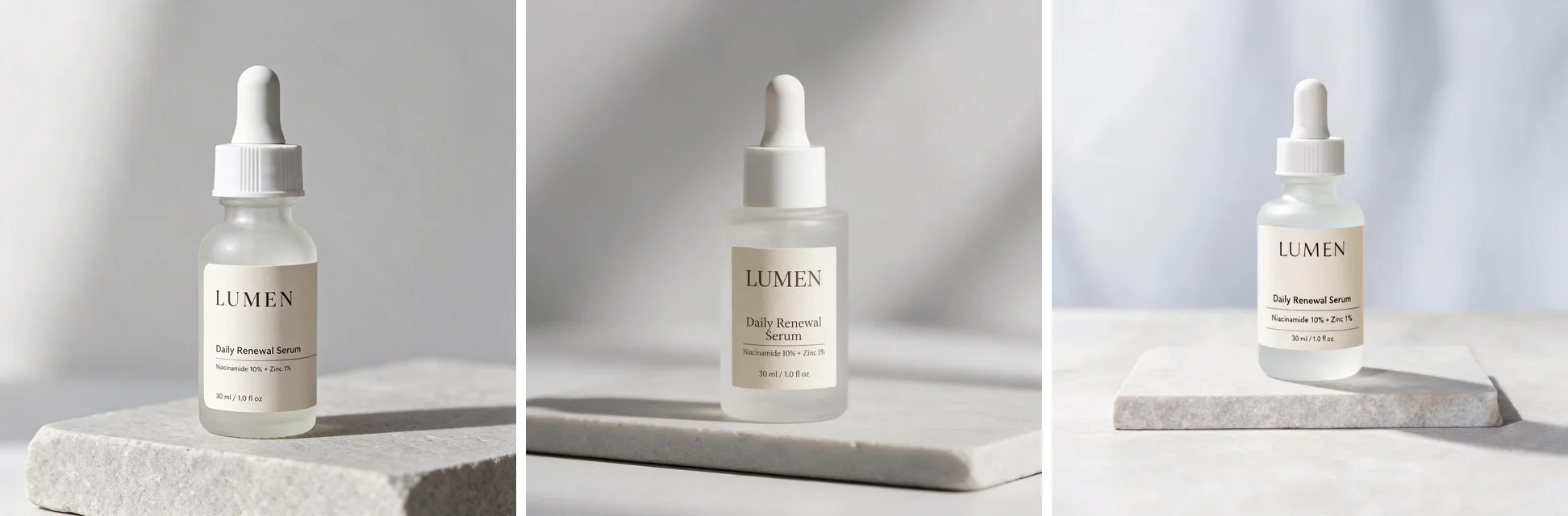
Seedream 5.5 and Seedream 5.0 Pro printed all four label lines correctly; Seedream 5.0 Pro broke "Daily Renewal Serum" across two lines. On Seedream 5.0 Lite the large lines are right, but several letters in the small "Niacinamide 10% + Zinc 1%" line are malformed when you look at the image at full size. The Seedream 5.5 bottle is the starting image for the editing test below.
Does Seedream 5.5 support 4K?
No. Several pages list 4K or "up to 8.29 megapixels" for Seedream 5.5, but the published API contract has three tiers, 1K, 1.5K and 2K, and caps custom sizes at 4,624,220 total pixels. That is the same range as Seedream 5.0 Pro. ByteDance's own gallery images for the model are between about 4.2 and 4.7 megapixels, which fits the 2K tier.
These are the exact pixel sizes per tier:
| Aspect ratio | 1K | 1.5K | 2K |
|---|---|---|---|
| 1:1 | 1024 × 1024 | 1536 × 1536 | 2048 × 2048 |
| 2:3 | 832 × 1248 | 1248 × 1872 | 1664 × 2496 |
| 3:2 | 1248 × 832 | 1872 × 1248 | 2496 × 1664 |
| 3:4 | 864 × 1152 | 1344 × 1792 | 1776 × 2368 |
| 4:3 | 1152 × 864 | 1792 × 1344 | 2368 × 1776 |
| 4:5 | 896 × 1120 | 1344 × 1680 | 1792 × 2240 |
| 5:4 | 1120 × 896 | 1680 × 1344 | 2240 × 1792 |
| 9:16 | 800 × 1424 | 1152 × 2048 | 1584 × 2816 |
| 16:9 | 1424 × 800 | 2048 × 1152 | 2816 × 1584 |
| 21:9 | 1568 × 672 | 2352 × 1008 | 3136 × 1344 |
| 9:21 | 672 × 1568 | 1008 × 2352 | 1344 × 3136 |
If you need a larger file, generate at 2K and upscale it, or use Seedream 5.0 Lite, which outputs 2K, 3K and 4K.
Transparent PNG: what actually changed
This is the most practical difference. On Seedream 5.0 Pro, the background: transparent option only works for image-to-image requests with exactly one input image, and that image must already have a transparent channel. In other words, it could keep transparency but not create it.
Seedream 5.5 has three background modes: auto, transparent and opaque. Transparent works for text-to-image and for editing, and the reference images do not need an alpha channel. The output is always a PNG in that mode. ByteDance calls this native RGBA output and says it covers both fully transparent backgrounds and partly transparent areas such as glass.
Two prompting notes follow from that. A transparent background and a see-through object are separate requests, so describe each one. And check the result on a light, a dark and a colored background before you ship it, because fringing shows up on only some of them.
We tried both cases on Seedream 5.5 at 1K with background: transparent and no reference image. Each result took 15 to 18 seconds and came back as a PNG with an alpha channel. Below, each PNG is placed over white, near-black and amber; the image itself is not edited.

The sticker is a clean cut-out: the white border has no halo on the dark or the amber background.
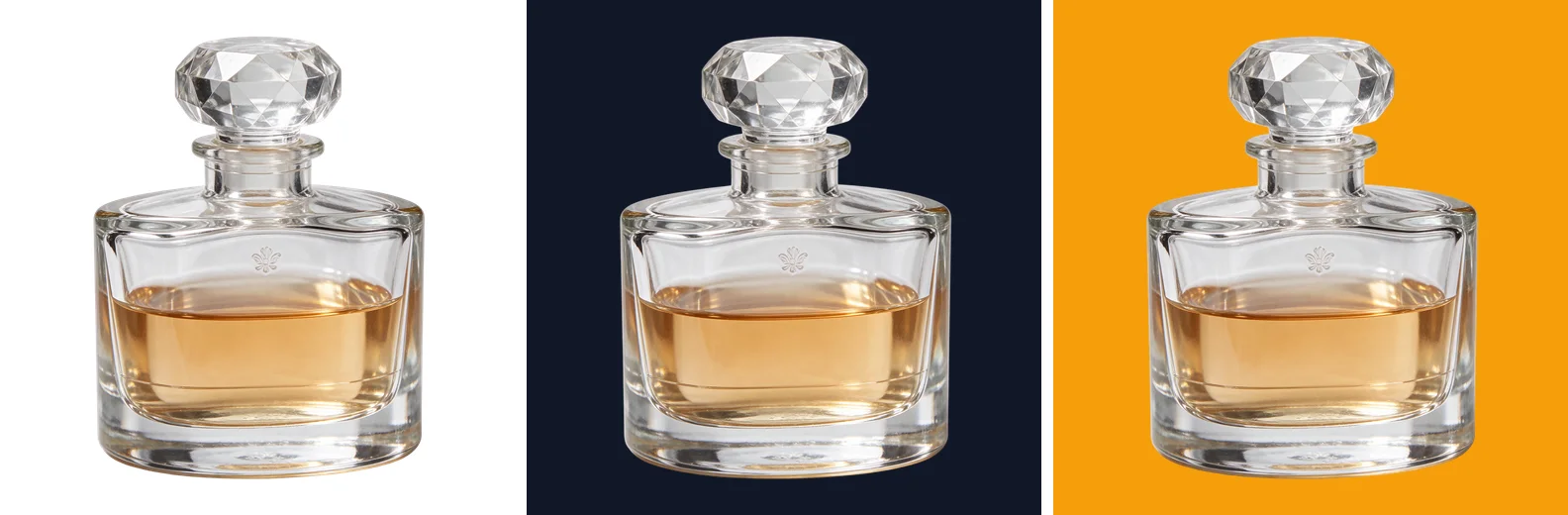
The glass bottle is where it fell short. The background was removed cleanly, but the glass itself came back opaque: the bottle keeps its light-grey studio look on every background, and only about 0.5% of the pixels are partly transparent, all of them along the edge. In this run, asking for a see-through object in the prompt did not produce one. If you need real glass transparency, plan on more than one try, or fix the alpha in an editor.
What "100 rounds of editing" means
ByteDance's launch post says the model "supports continued work on the same image across 100 rounds of editing". The demo behind it edits one portrait 100 times, and each round uses the previous round's output as its input.
That tells you how to use it. There is no session memory in the API. To edit over several rounds you send the last result back as the reference image, describe one change, and say what must stay the same. The claim is about stability: areas you did not ask to change are meant to stay pixel-stable, without the color drift and softening that usually build up after a handful of edits. It is a demo protocol, not a cap, and each round is a separate generation that you pay for.
Our six-round edit test
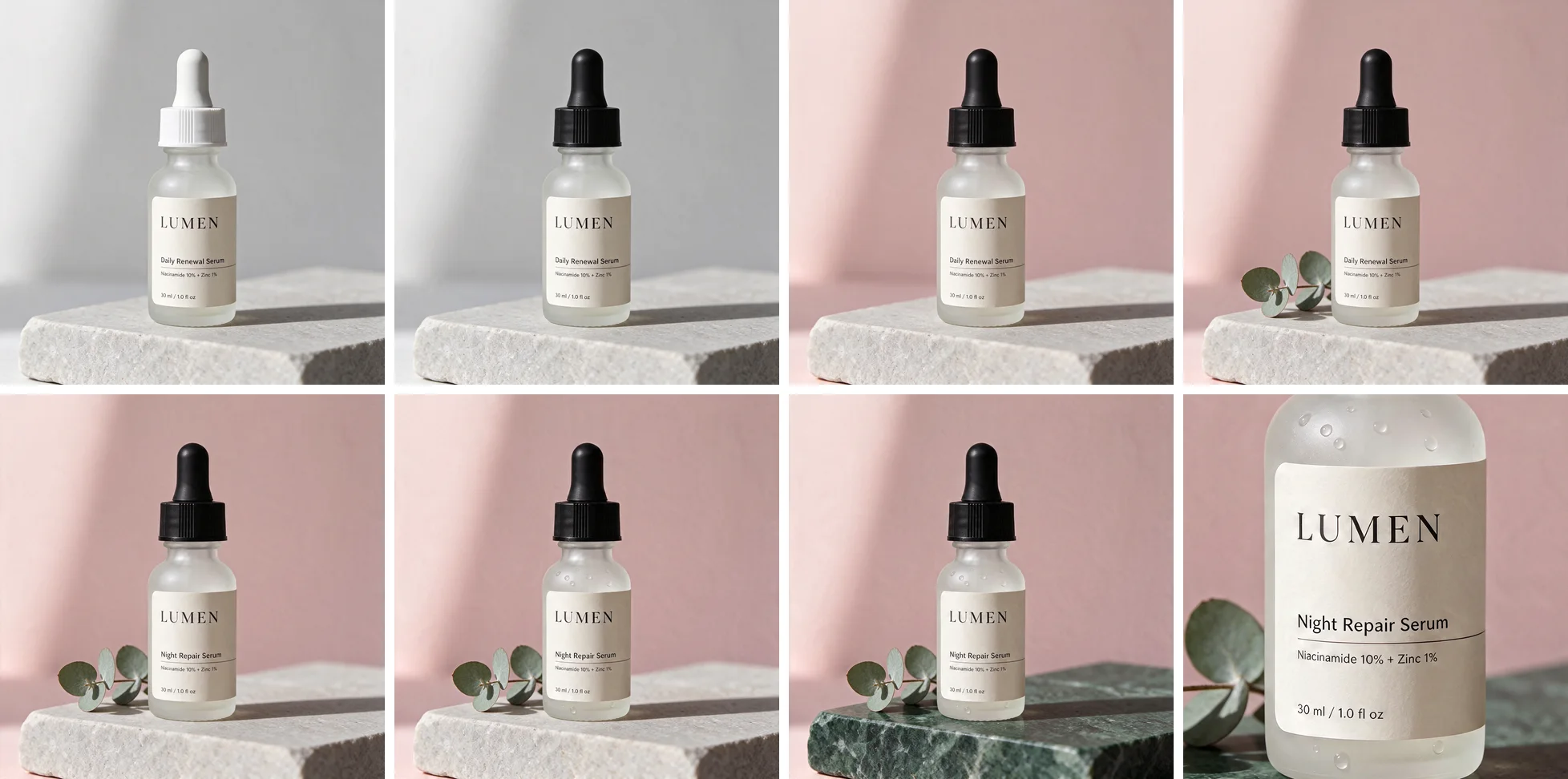
We did not run 100 rounds. We ran six, on Seedream 5.5 and on Seedream 5.0 Pro, starting both from the same image: the Seedream 5.5 serum bottle from the test above. Each round sent the previous round's output back as the only reference image, at 2K, with one instruction:
- Change the dropper cap from white to matte black. Keep the bottle, the label and all its text, the stone slab, the background and the lighting exactly the same.
- Change the background wall to a soft pale pink. Keep the bottle, the black cap, the label and all its text, the stone slab and the lighting exactly the same.
- Add a small sprig of eucalyptus lying on the stone slab to the left of the bottle. Keep the bottle, the cap, the label and all its text, the background and the lighting exactly the same.
- Change only the second line of the label from "Daily Renewal Serum" to "Night Repair Serum". Keep every other line of text, the bottle, the cap, the eucalyptus, the background and the lighting exactly the same.
- Add a few small water droplets on the frosted glass of the bottle. Keep the label and all its text, the cap, the eucalyptus, the stone slab, the background and the lighting exactly the same.
- Change the stone slab from pale grey to dark green marble. Keep the bottle, the droplets, the cap, the label and all its text, the eucalyptus, the background and the lighting exactly the same.
Seedream 5.5, reading left to right and top to bottom: the starting image, rounds 1 to 6, then a close-up of the label after round 6.
Seedream 5.0 Pro, same order:
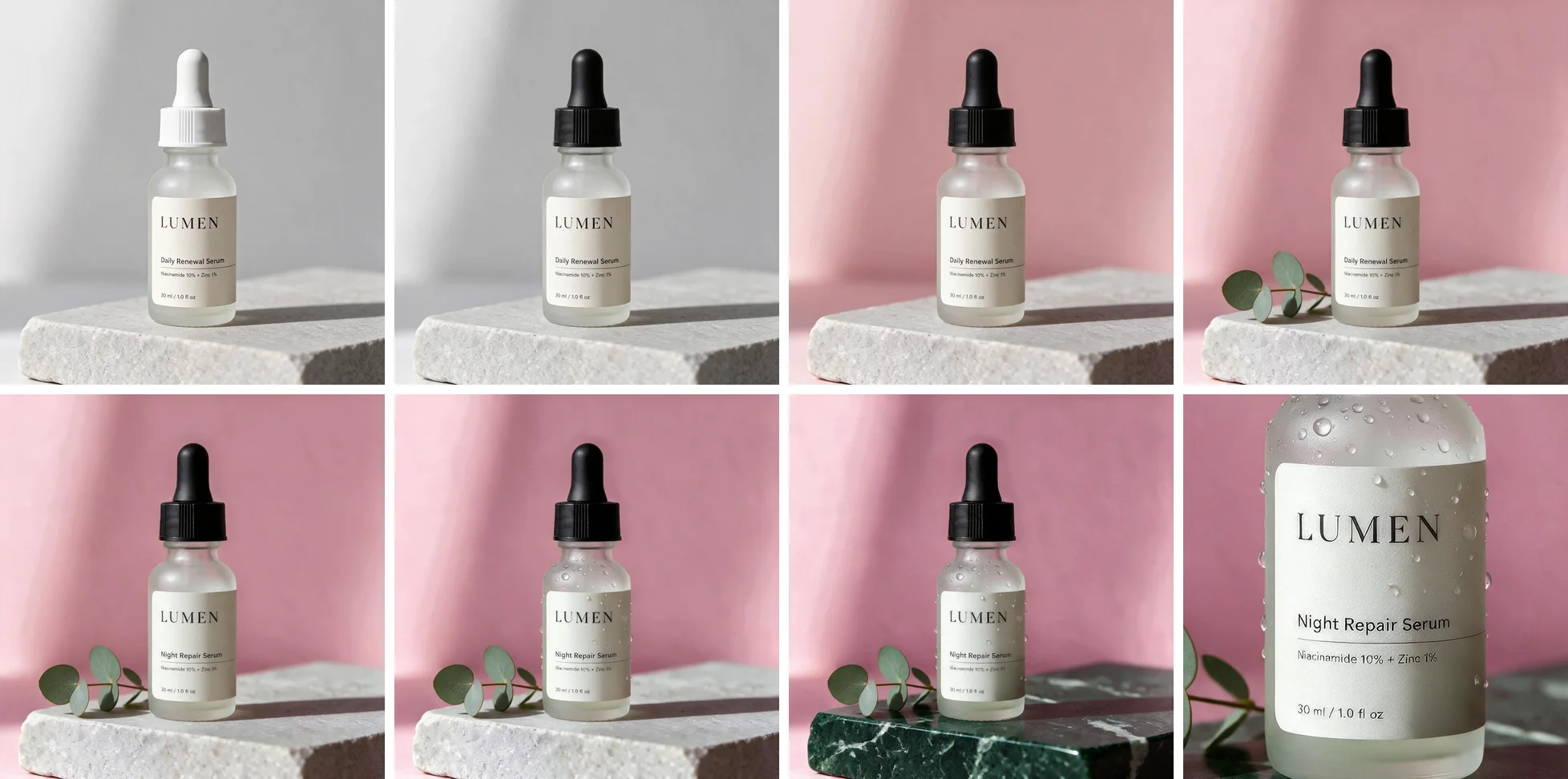
Both models made all six changes, and both still had every label line spelled correctly after round 6, including the rewritten "Night Repair Serum". The difference is in what they were told to leave alone.
| Measured on the 2K outputs | Seedream 5.5 | Seedream 5.0 Pro |
|---|---|---|
| Wall color shift from round 2 to round 6 | 3.5 | 17.3 |
| Label paper color shift from the start to round 6 | 9.0 | 16.2 |
| Average change per pixel in the cap area, per round, rounds 4 to 6 | 0.6 to 1.7 | 3.6 to 3.7 |
| Median time per edit | 61 s | 97 s |
The color rows are the distance between the average color of the same patch in two rounds, on a 0 to 441 scale where 0 is identical. The cap row is the average difference per pixel value, on a 0 to 255 scale, in an area no instruction touched. You can see the wall result without the numbers: Seedream 5.0 Pro's pale pink is a stronger pink by round 6, its cream label has turned a cooler grey-white, and its "few small" droplets became many. Seedream 5.5 kept the wall and the label where they were. Its label paper did get slightly darker over six rounds, so it is steadier, not frozen.
Text and realism: ByteDance's numbers
From the same launch post:
- Severe text corruption fell to 0.4% and minor corruption to 1.7% in tests covering Chinese and English, including dense small text.
- Image-to-image realism scored +55.62% against the previous version in side-by-side review.
- Against GPT Image 2.5 Sunburst and Nano Banana 2.1, ByteDance reports a lead on text structure and on text-to-image realism.
These are the vendor's own evaluations. Treat them as a reason to test, not as a result.
Price and speed
Volcengine's launch notes gave one price, ¥0.28 for a 2K square edit, and described Seedream 5.5 as 60% cheaper and nearly 40% faster than Seedream 5.0 Pro. The full price list is now public, and it shows where both numbers come from.
| Seedream 5.5 | Seedream 5.0 Pro | Seedream 5.0 Lite | |
|---|---|---|---|
| Output image, up to 2.61 megapixels | ¥0.13 | ¥0.30 | ¥0.22 |
| Output image, above 2.61 megapixels | ¥0.23 | ¥0.60 | ¥0.22 |
| Input image | ¥0.05 each | First free, then ¥0.02 each | Free |
Billing has two parts, input images and output images, and prompt text is free. The 1K and 1.5K presets are all under 2.61 megapixels, so they share the lower rate; every 2K preset is above it. A 2K square edit with one input image is ¥0.05 plus ¥0.23, which is the ¥0.28 from the launch notes. Against Seedream 5.0 Pro's ¥0.60, a 2K output is about 62% cheaper.
The speed claim held for editing in our runs, but not for generating from text:
| Our runs, November 12, 2026 | Seedream 5.5 | Seedream 5.0 Pro | Seedream 5.0 Lite |
|---|---|---|---|
| Text to image at 2K, median of 8 | 47 s | 43 s | 27 s |
| Text to image at 2K, range | 19 to 65 s | 33 to 85 s | 23 to 38 s |
| Edit with one reference at 2K, median of 6 | 61 s | 97 s | Not tested |
Times run from sending the request to the finished image, through the API, one request per model at a time. Editing on Seedream 5.5 was about 38% faster than on Seedream 5.0 Pro, close to the "nearly 40%" in the launch notes. For text to image, Seedream 5.5 was not faster than Seedream 5.0 Pro: 47 seconds against 43 at the median, with single runs anywhere from 19 to 65 seconds. This was three days after launch, so expect these numbers to move.
One thing changed in the other direction. Seedream 5.0 Pro does not charge for the first input image and Seedream 5.0 Lite does not charge for any, but Seedream 5.5 charges for each one. An edit with many reference images narrows the gap.
On SeedVideo AI, a Seedream 5.5 image with no reference images costs 1 credit at 1K or 1.5K and 2 credits at 2K. Seedream 5.0 Pro costs 2 credits at 1K or 1.5K and 3 at 2K. Reference images count toward the Seedream 5.5 price: a 1K edit with one or two references is 2 credits, and a 2K edit with up to three is 3 credits. The exact cost of a request is shown on the Generate button before you run it.
Which one should you use?
Use Seedream 5.5 when the job is editing: product images that go through rounds of revisions, posters where the copy changes and the layout must not, or stickers and cut-outs that need a transparent background. It is also the one to pick when the exact wording and capitalization of small text matters.
Stay on Seedream 5.0 Lite when you need 3K or 4K, more than 10 reference images, or a batch of up to 15 images from one request. It was also the fastest of the three in our runs, as long as the image does not depend on small print.
Seedream 5.0 Pro has the same sizes and reference limit as Seedream 5.5. The main reasons to keep using it are an existing workflow you have already tuned, or edits that attach many reference images, where its flat price can come out lower.
FAQ
When was Seedream 5.5 released?
ByteDance announced it on November 9, 2026. It started rolling out that day in Jimeng, Doubao and the Volcengine Ark experience center. The API price list followed within days, and Seedream 5.5 has been available on SeedVideo AI since November 12, 2026.
Can Seedream 5.5 split an image into layers?
Yes, through a separate layer-splitting model. It returns a base image plus transparent PNG layers with their stacking order and positions, and Volcengine says it supports up to 100 layers. Seedream 5.0 Pro returned a base plus up to 16. Layers are billed as output images, each at the rate for its own size. SeedVideo AI does not offer layer splitting yet.
How much does Seedream 5.5 cost on SeedVideo AI?
With no reference images, 1 credit at 1K or 1.5K and 2 credits at 2K. Each reference image adds to the cost: a 1K edit with one or two references is 2 credits, and a 2K edit with one to three is 3 credits. The Generate button shows the exact cost before you run a request.
How many reference images does Seedream 5.5 accept?
Up to 10, at up to 30 MB each. It returns one image per request.
Is there a Seedream 5.5 Pro?
Not yet. ByteDance says a Pro version of the 5.5 series will follow and has not given a date.
Try it
Open the Seedream 5.5 image generator, upload one image, and ask for a single change. Then feed the result back in and ask for another. If you want to compare, the Seedream 5.0 page runs Pro and Lite in the same workspace.