TL;DR
- Seedance 2.5 has no timestamp field. You write the timings inside the prompt itself, as bracketed beats like
[0s],[2s],[4s], and the model reads them as ordering and pacing language. - That makes them scene direction, not an edit timeline. A beat can land a few tenths early or late, and nothing enforces the cut point.
- One beat holds one action. Add a second verb and the model usually picks whichever one it understood best.
- Budget roughly two to three seconds of screen time per visible action: two or three beats for a 5-second clip, four or five for 10 seconds, six or so for a full 30.
- Identity, lens, grade and negative constraints belong outside the beats, in a global block that governs the whole shot.
Quick Answer
A Seedance 2.5 timestamp prompt is an ordinary text prompt with time markers written into it, so that a single generation reads as a small sequence of beats instead of one undifferentiated motion. You open the generator, stay in Text to Video, set the duration you actually want, and write the shot as [0s] first move, [3s] second move, [6s] resolution, each beat naming one subject action, one camera instruction and one lighting cue. Everything that must stay constant (who the character is, what lens you are imitating, the colour grade, what you do not want) sits above or below the beats as a global block. The model honours the order reliably and the exact seconds approximately, which is enough to control rhythm and far short of frame-accurate editing. The technique works the same way in Image to Video, except [0s] should describe motion rather than re-describe the frame you uploaded.
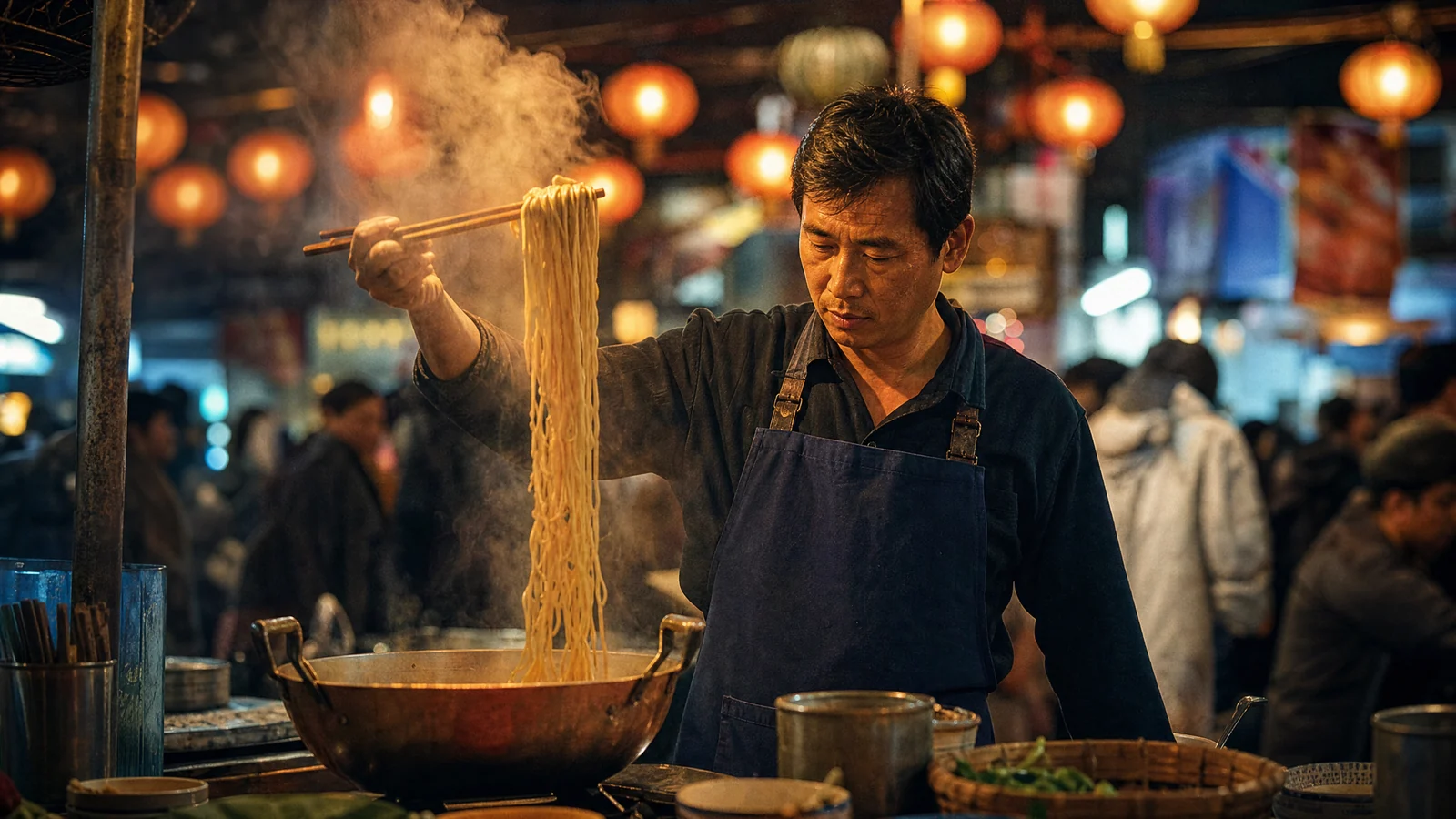
Video prompt: Night market food stall at 9pm. A vendor in a navy apron lifts a tangle of steaming wheat noodles high out of a copper wok with long chopsticks. [0s] Chopsticks enter the wok, steam low and flat. [2s] He lifts steadily, noodles stretching, steam blooming upward through lantern light. [4s] He holds at the top, head tilting down toward the bowl. Slow push-in on a 35mm anamorphic lens, f/2.0, warm amber key from paper lanterns overhead, cool blue spill from the street behind, shallow depth of field, blurred crowd and neon bokeh, filmic grain.
What Seedance 2.5 Actually Does With a Timestamp Prompt
It is worth being precise here, because the phrase "timestamp prompt" makes it sound like a feature with a switch attached to it. It is not one.
Open the composer and the controls you get are the three mode tabs, one prompt box, and a parameter row for aspect ratio, duration, resolution and sound. Nothing on that row takes a time code. There is no keyframe panel, no beat editor, no field where [0s] means something to the software. When you type [0s], it travels to the model as part of the same string as the rest of your description.
So what does the model do with it? It treats the markers as sequencing language, the way it treats "then", "after that" and "finally", but with a rhythm attached. It learns from your markers roughly how much of the clip each action should occupy. In practice that gives you three things reliably: the order of events, the approximate proportion of the runtime each event gets, and a clean separation between actions that would otherwise blur into one another.
What it does not give you is a contract. If you write [4s], the movement may begin at 3.6 seconds or 4.4. If your requested duration is 5 seconds and you ask for five distinct events, the model compresses or drops some of them. Treating the markers as an editing timeline is where most disappointment with this technique comes from. Treating them as a director's beat sheet is where the results come from.
That distinction also decides where this fits in a production process. Beats shape what happens inside one continuous shot. Cutting between shots, trimming to an exact frame and mixing audio still belong downstream in an editor. If you are trying to control motion inside a shot, start in the AI text-to-video generator and write the beats. If you are trying to assemble a sequence, generate each beat-driven shot separately and join them afterwards.
The Syntax That Survives Generation
There is no official grammar to comply with, which is freeing and slightly dangerous. These are the conventions that hold up in practice.
Use bracketed whole seconds. [0s], [3s], [6s]. Brackets visually separate the beat marker from the prose, and whole seconds avoid asking for a precision the model cannot deliver. Ranges such as 0–3s and 3–6s work too, and read slightly better for slower, continuous motion where you care about the span rather than the trigger.
Start at zero. [0s] is the state the clip opens in. Skipping it and starting at [1s] leaves the first second undefined, and the model fills it with something generic.
One action per beat. This is the rule that matters most. "[3s] She turns toward the camera and raises the cup while the rain stops" is three events wearing one marker, and you will get one of them. Split it, or lengthen the clip.
Write each beat as subject, action, camera, light. Not every beat needs all four, but the order keeps the model from attaching a camera move to the wrong subject. "[3s] The vendor lifts the noodles clear of the wok, camera pushes in slowly, steam catches the lantern key."
Keep the invariants outside the beats. Anything true for the whole clip goes in a single block before or after the timed section: the character's appearance, the lens, the aspect ratio feel, the grade, the things you want excluded. Repeating the character description inside every beat is the single most common cause of the face drifting, because each repetition invites a slightly different interpretation.
For the wider grammar of prompt construction that these beats sit inside, the Seedance 2.5 prompt guide covers subject blocks, style anchors and negative phrasing in more depth than there is room for here.
How Many Beats a Clip Can Hold
| Clip duration | Beats that hold up | Marker set that works | Failure mode past this |
|---|---|---|---|
| 4–5s | 2–3 | [0s] [2s] [4s] |
Actions merge into one blurred motion |
| 6–8s | 3–4 | [0s] [2s] [4s] [6s] |
The last beat gets clipped |
| 9–12s | 4–5 | [0s] [3s] [6s] [9s] |
Pacing drifts; middle beats rush |
| 15–20s | 5–6 | [0s] [4s] [8s] [12s] [16s] |
Subject identity starts to wander |
| 21–30s | 6–7 | [0s] [5s] [10s] [15s] [20s] [25s] |
Scene coherence breaks before the end |
The arithmetic behind the table is simple: a visible, readable action needs about two to three seconds of screen time. Below two seconds the viewer registers movement but not what happened. So the real constraint is not how many markers the prompt can hold, it is how many distinct things a viewer can absorb in the runtime you bought.
Setting Up Before You Write Beats
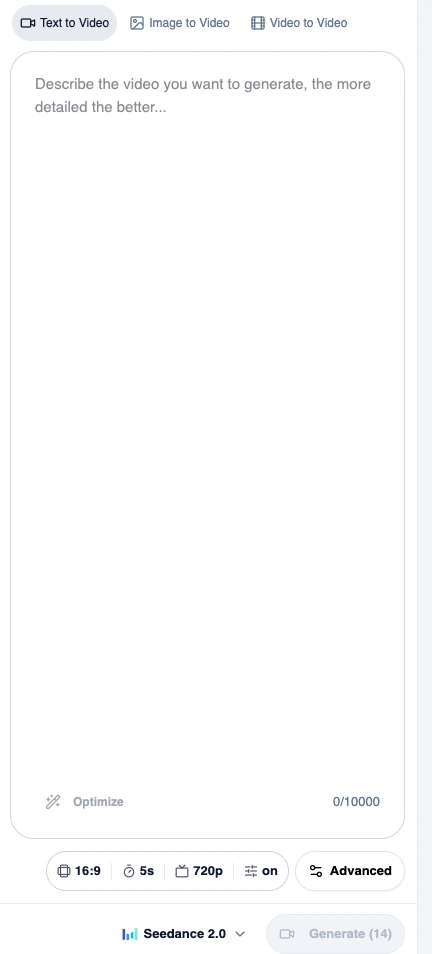
The composer: three mode tabs above the prompt box, and the parameter row underneath with aspect ratio, duration, resolution and sound. Timings are typed into the prompt box itself.
Three settings decide whether your beats have room to breathe.
| Control | Options | What it does to your beats |
|---|---|---|
| Duration | 4 to 30 seconds, default 5 | The hard budget. Beats are shares of this number, so set it before you write |
| Aspect ratio | 16:9, 9:16, 1:1, 4:3, 3:4, 21:9, Adaptive | Locks to Adaptive once you upload a start image |
| Resolution | 480p, 720p, 1080p, default 720p | Fine detail in a short beat survives better at higher resolution |
| Sound | On or off, generated in sync with the picture | On by default, and worth timing deliberately |
| Prompt length | Up to 10,000 characters | Long enough that you never need to abbreviate beats |
The ordering here matters more than it looks. Writing six beats and then discovering the duration is still on the 5-second default produces a clip where everything happens at once, and it is the most common way people conclude that timestamps "don't work" in Seedance 2.5.
Five Timestamp Prompt Templates You Can Copy
Each of these is written for a specific duration. Change the subject freely; keep the beat count matched to the runtime.
1. Food and product hero shot — 5 seconds, 3 beats
Night market food stall at 9pm, one continuous shot. [0s] Chopsticks enter a copper wok, steam sitting low and flat over the surface. [2s] The vendor lifts a tangle of wheat noodles steadily upward, steam blooming into the lantern light. [4s] He holds at the top of the lift, head tilting down toward the waiting bowl. Camera: slow push-in, 35mm anamorphic, f/2.0, shallow depth of field. Light: warm amber key from paper lanterns overhead, cool blue spill from the street behind. Style: filmic grain, teal and orange grade, blurred crowd bokeh. Avoid: cuts, text overlays, sudden camera jumps.
Why it works: three beats across five seconds gives each action a clean 1.5 to 2 seconds, and the entire clip is one physical gesture broken into its beginning, middle and hold.
2. Product commercial push-in — 8 seconds, 3 beats

Video prompt: A matte ceramic coffee cup on a pale oak counter in morning light. [0s] Wide on the counter, steam rising in a thin straight ribbon, striped shadows from window blinds lying still across the wood. [3s] Camera pushes in slowly toward the cup, the ribbon of steam beginning to curl and drift left. [6s] Camera settles at a close three-quarter framing, a soft highlight running along the rim, steam thinning out. Macro-leaning perspective, shallow depth of field, warm neutral palette, clean premium advertising lighting, no hands in frame.
Matte ceramic coffee cup on a pale oak counter, morning, one continuous shot. [0s] Wide framing on the counter, a thin straight ribbon of steam, striped blind shadows lying still across the wood. [3s] Camera pushes in slowly; the steam begins to curl and drift left. [6s] Camera settles into a close three-quarter framing, a soft highlight travelling along the cup rim. Camera: single continuous push-in, 50mm equivalent, f/2.8. Light: hard directional sun through blinds, warm neutral grade, no colour cast. Avoid: hands entering frame, cuts, text, logos.
Why it works: the camera move is stated once as a global instruction, then each beat says where in that move the shot currently is. This is far more stable than giving each beat its own camera verb, which reads as three separate moves.
3. Character beat with a turn to camera — 10 seconds, 4 beats
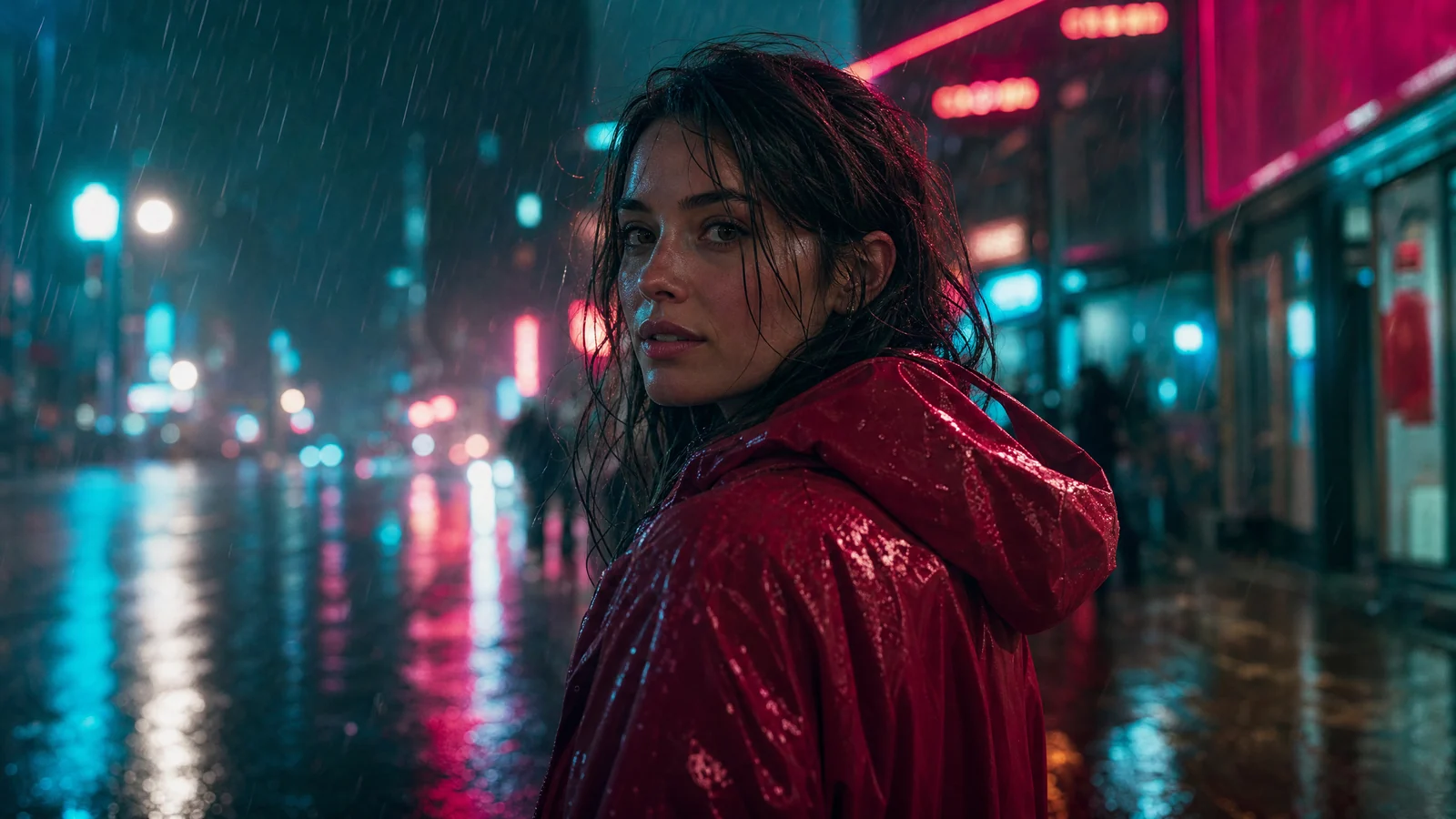
Video prompt: A woman in a scarlet rain jacket walks away from camera down a rain-slicked city street at night. [0s] She walks steadily away, neon reflections rippling in the wet asphalt ahead of her. [3s] She slows, shoulders settling, rain still falling through the backlight. [6s] She turns her head toward the camera, hair damp and catching the rim light. [8s] She holds the look, calm and direct, rain continuing. Telephoto compression, shallow depth of field, teal and magenta neon, moody cinematic grade, same woman throughout.
A woman in a scarlet rain jacket on a rain-slicked city street at night, one continuous shot. Character (constant): mid-twenties, dark hair damp and loose, scarlet hooded rain jacket, calm expression. [0s] She walks steadily away from camera, neon reflections rippling in the wet asphalt ahead of her. [3s] She slows, shoulders settling, rain still falling through the backlight. [6s] She turns her head back toward the camera, hair catching the rim light. [8s] She holds the look, calm and direct, rain continuing. Camera: locked telephoto, slight compression, shallow depth of field. Light: teal and magenta neon signage, wet rim light from behind. Avoid: changing her jacket colour, cuts, extra people in the foreground.
Why it works: the character block appears exactly once, at the top, and no beat re-describes her. That single decision is what keeps her face stable across ten seconds. If you want an even stronger identity lock, start from a still of the person instead and animate it in the AI image-to-video generator, where the uploaded frame anchors the appearance and [0s] only needs to describe the first movement.
4. Interior reveal — 12 seconds, 4 beats
Sunlit modern living room, mid-afternoon, one continuous camera move. [0s] Start tight on a linen armchair by the window, dust motes visible in the light shaft. [3s] Camera begins a slow rightward dolly, revealing the low oak coffee table. [6s] The dolly continues past an open bookshelf, warm light spilling across the floorboards. [9s] Camera settles on the far window, city skyline soft and out of focus beyond the glass. Camera: one uninterrupted dolly right, 24mm, f/4, eye height, no cuts. Light: late afternoon sun, warm bounce off pale walls, no artificial fill. Avoid: people in frame, camera shake, snap zooms.
Why it works: each beat names a new object entering frame rather than a new action, which is exactly what a reveal is. If you want to push the camera language further, the guide to AI video camera movement prompts breaks down which moves hold up and which ones tend to collapse into drift.
5. Three-act story — 30 seconds, 6 beats
A lone hiker crossing a high alpine ridge at sunrise, one continuous sequence. Character (constant): a hiker in a burnt-orange shell jacket and grey pack, face mostly turned away. [0s] Silhouetted against a pale pre-dawn sky, walking slowly along the ridge line. [5s] First sun hits the ridge; the jacket colour ignites against the blue shadow of the valley. [10s] The hiker stops, breath visible, looking out across the valley below. [15s] Camera drifts wide, revealing the full scale of the range behind. [20s] The hiker resumes walking, smaller now in the frame. [25s] The frame holds as they crest the ridge and the sun clears the peaks fully. Camera: slow continuous drift from medium to wide, 35mm, f/5.6, no cuts. Light: sunrise, cold blue to warm gold transition across the clip. Sound: wind, boots on scree, no music. Avoid: dialogue, text overlays, additional hikers.
Why it works: thirty seconds is enough for a genuine arc, but only if each beat gets five seconds and the changes are gradual. Notice there is no beat asking for a new location. The scene stays constant, and only light, scale and position change. For what the longest runtime does and does not make possible, the 30-second Seedance 2.5 video guide is the companion piece to this one.
Timing Action, Camera, Light and Sound Together
Most beat sheets fail not because a beat is wrong but because four layers are competing for the same second. It helps to decide, per layer, whether it changes on the beat or runs continuously underneath.
| Layer | Best written as | Why |
|---|---|---|
| Subject action | Per beat, one verb each | This is what the marker exists for |
| Camera | One global move, with beats naming position inside it | Multiple camera verbs read as multiple shots |
| Lighting | Global, unless the light itself is the event | Light changing on every beat looks like flicker |
| Sound | One or two cues, placed on beats that have a physical impact | Audio generated in sync, so it needs an anchor |
| Style and grade | Global, once | Restating it per beat invites reinterpretation |
The practical rule: only one layer should change per beat. If the subject moves at [3s], let the camera keep doing what it was already doing. If the camera arrives somewhere at [6s], let the subject hold. Two simultaneous changes at the same marker is the fastest way to get a clip where neither lands.
Sound deserves a specific mention, since it is generated in sync rather than added afterwards. Placing a cue like "boots hit gravel" on a beat where something physically contacts something else gives the audio a real anchor. Leaving sound unspecified across a 20-second clip generally produces ambience that ignores the action entirely.
When a single shot genuinely cannot hold the whole idea, that is the point to split into several generations. The approach in Seedance 2.5 multi-shot storytelling covers how to keep continuity across separate clips rather than forcing it into one.
Troubleshooting Beats That Drift
| Symptom | Likely cause | Fix |
|---|---|---|
| A beat is skipped entirely | Two actions shared one marker | Split into two markers, or cut the weaker action |
| Everything happens in the first two seconds | Beat count exceeds the duration budget | Raise the duration, or drop to three beats |
| Subject's face or clothing changes mid-clip | Character re-described inside multiple beats | Move the description to a single global block |
| The final beat feels rushed or cut off | The last marker sits too close to the end | Place the last marker at least three seconds before the end |
| Camera jumps instead of moving | Each beat carried its own camera verb | State one continuous move globally, position per beat |
| Motion starts noticeably early or late | Normal marker tolerance | Widen the gap between markers; do not chase exact seconds |
| Beats land but the clip feels mechanical | No connective motion between beats | Add "gradually", "continuing", "without stopping" between beats |
The one that catches people most often is the last-beat problem. A marker at [9s] in a 10-second clip gives the final action one second to happen, and one second is below the legibility floor for almost anything. Pull it back to [7s] and the ending resolves.
A 30-Second Check Before You Generate
Read your own prompt against these six questions. It takes about half a minute and saves a regeneration more often than not.
- Does the duration match the beat count? Two to three beats per five seconds of runtime, no more.
- Does every beat contain exactly one action verb? Scan for "and" and "while", which usually mark a beat that needs splitting.
- Is the character or product described exactly once? Anywhere it appears twice, delete one.
- Is the camera one move or several? If several, rewrite it as one move with beats naming positions inside it.
- Is the final marker at least three seconds from the end? If not, pull it back.
- Does any beat have a sound worth anchoring? Add one cue where something makes physical contact.
If a clip still misses after two attempts, the fastest diagnostic is to halve the beats and regenerate. A shot that works at three beats and breaks at five tells you it was a budget problem, not a phrasing problem.
FAQ
Does Seedance 2.5 have a dedicated timestamp parameter?
No. The generator exposes aspect ratio, duration, resolution and sound, and nothing that accepts a time code. Markers like [0s] are written inside the prompt text and read by the model as ordering and pacing language.
How accurate are the timings?
Close enough to control rhythm, not close enough to edit against. The order of beats is respected reliably; the exact second a movement starts can shift by a few tenths in either direction. Plan for tolerance rather than precision.
How many beats can a 5-second clip hold?
Two or three. A readable action needs roughly two seconds of screen time, so three beats is already tight. Four beats in five seconds usually produces one blurred movement instead of three distinct ones.
Do timestamp prompts work with Image to Video?
Yes, with one adjustment. The uploaded image already establishes the frame, so [0s] should describe the first movement rather than restate what is visible. Aspect ratio also locks to Adaptive once a start image is attached.
Should I use brackets or ranges?
Brackets like [3s] suit discrete actions that trigger at a moment. Ranges like 3–6s suit continuous motion where the span matters more than the trigger. Mixing both in one prompt is fine as long as the sequence stays in order.
What if I need more beats than the runtime allows?
Split the idea across separate generations and join them in an editor. One 30-second clip with twelve beats will fail; three 10-second clips with four beats each will not.
Start Writing Beats
Timestamp prompts are the cheapest upgrade available in AI video, because they cost nothing but a rewrite of text you were already going to type. Pick one of the templates above, set the duration first, keep one action per beat, and put everything constant in a single block.
When you are ready to try it, open the AI video generator and write a timed prompt, set the duration to match your beat count, and generate. SeedVideo AI runs Seedance 2.5 alongside the rest of the model lineup, so you can test the same beat sheet across models and keep the version that holds its timing best.