A restaurant's existing menu photos are already the hard part. Turning them into short videos for social and delivery listings takes one still per dish, a prompt that describes one food motion, and about five minutes per clip. The catch nobody mentions: food morphs more readily than almost any other subject, because steam, sauce and melted cheese have no fixed shape for the model to hold. Picking the right photo matters more than writing a clever prompt.
Last verified: 2026-09-25 against the SeedVideo AI model documentation.
TL;DR
- Shoot or pick one dish per frame. Overlapping plates are the single biggest cause of warping.
- One motion per clip. Steam rising, sauce pouring, or a slow push in. Asking for three at once gives you none of them cleanly.
- Your phone photos are usually good enough. The accepted range is 300 to 6000 pixels per side, so a modern phone shot sits comfortably inside it.
- Hot food is easier than cold food. Steam and glaze read as motion; a salad mostly just sits there.
- For a 30-second promo, six 5-second clips beat one long take, because drift compounds over length.
Quick Answer
Start with the photo, not the prompt. Choose a menu shot where one dish fills the frame, nothing overlaps its outline, and the light comes clearly from one side. Upload it as a single image so the workflow is image-to-video and the photo becomes the start frame. Write one sentence describing one food motion plus one slow camera move, generate at 5 seconds, and check the result at full size. Most restaurants get a usable clip on the second try. You can animate a source image from a menu photo you already have.
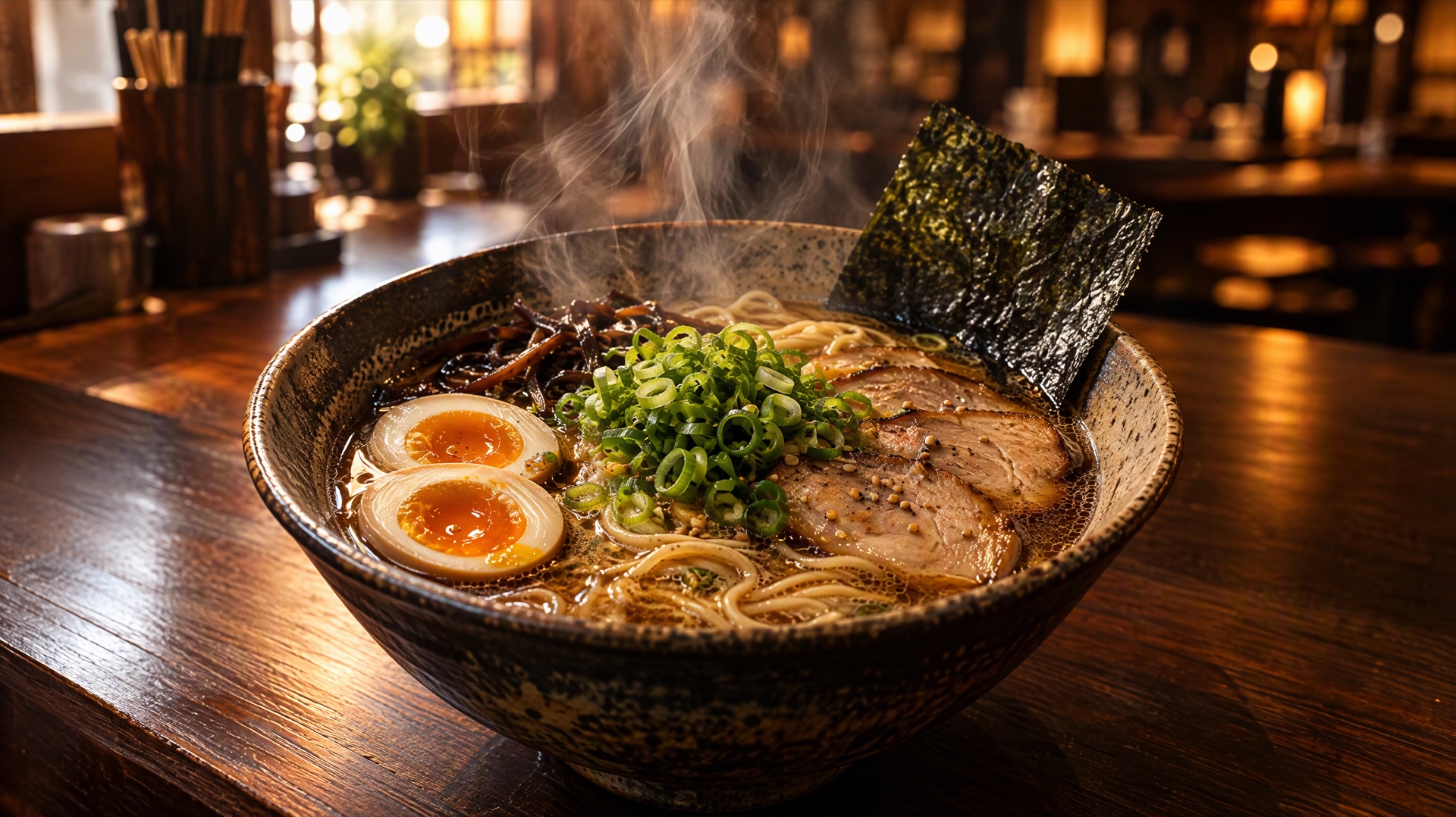
Image prompt: A cinematic restaurant food photograph: a rustic ceramic bowl of steaming ramen on a dark walnut counter, thin curls of steam rising and catching a warm backlight from a window just out of frame, soft-boiled egg halved to show the jammy yolk, scallions and nori arranged with visible texture, shallow depth of field with the blurred warm glow of the dining room behind, 50mm lens, slight overhead three-quarter angle, rich amber and deep brown color grade, high micro detail in broth surface and noodle strands.
Which menu photos actually work
Not every dish animates equally well. Sort your menu before you start generating, because the difference between a good candidate and a bad one is larger than anything you can fix later.
| Dish type | How well it animates | Why | Best motion to ask for |
|---|---|---|---|
| Hot soups, ramen, stews | Very well | Steam gives the model real motion to render | Rising steam, slow push in |
| Grilled and seared items | Well | Glaze and char have strong texture and highlights | Slow orbit, light shifting across the surface |
| Desserts with sauce | Very well | Pouring is a single clear action | Sauce pour, chocolate drip |
| Drinks with ice or foam | Well | Condensation and bubbles read as life | Slow tilt up, condensation forming |
| Salads and cold plates | Poorly | Nothing naturally moves | Camera move only, no food motion |
| Overlapping platters | Poorly | The model cannot separate the items | Reshoot as single dishes |
If a dish is in the bottom two rows, use a camera move and leave the food still. A gentle push in on a beautiful salad looks intentional. A salad whose leaves rearrange themselves looks broken.
The photo requirements
The documented image limits are JPEG, PNG or WebP, between 300 and 6000 pixels per side, an aspect ratio between 0.4 and 2.5, and up to 30 MB per file. A photo from any phone made in the last several years fits inside that range without any editing.
Those are the accepted bounds rather than the good ones. In practice, four things separate a menu photo that animates cleanly from one that does not:
- One dish per frame. If a second plate crosses into the shot, the model has to decide where one ends and the other begins, and that boundary is where warping starts.
- Clear light direction. A window on one side or a single overhead lamp is ideal. Flat, shadowless lighting gives the model no cue about which surfaces stay bright.
- Sharp at full size. Open the photo at 100 percent, not as a thumbnail. Soft focus in the still becomes flicker in the video.
- Visible texture. Char marks, sesame seeds, herb flecks and broth surface give the model something specific to hold steady. A uniform beige surface has nothing to anchor to.
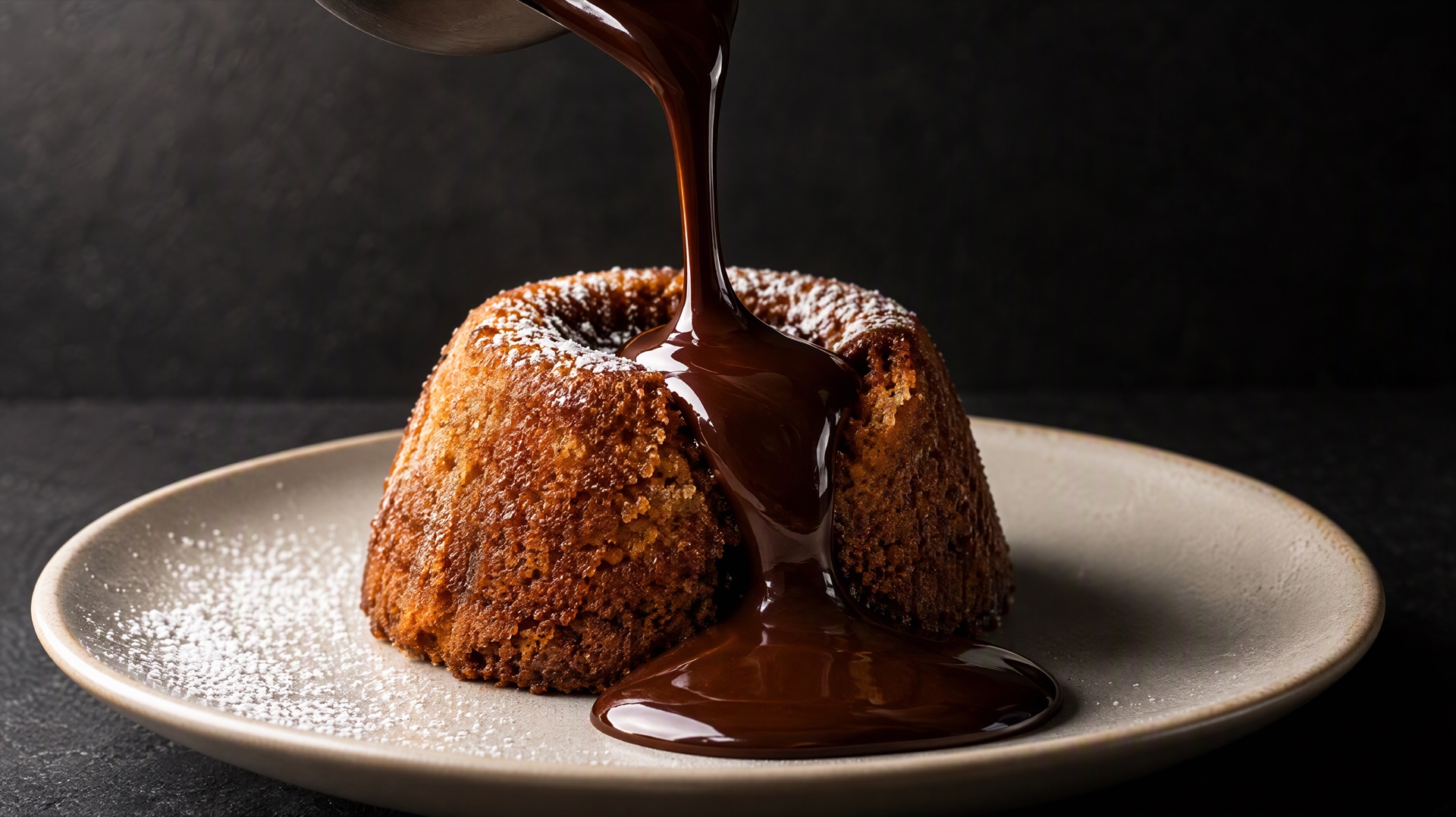
Image prompt: A close-up restaurant dessert photograph: a thick ribbon of dark chocolate sauce caught mid-pour as it lands on a golden lava cake set on a pale ceramic plate, the sauce glossy and unbroken in a clean arc, a single dusting of powdered sugar on the plate rim, one bright softbox from the upper left creating a crisp specular highlight along the sauce, deep shadow falloff on the right, seamless dark slate background, 100mm macro lens, crisp focus on the point of contact, warm neutral grade.
Prompt recipes for food motion
Food prompts fail when they ask for too much. One food motion plus one camera move is the whole formula. Here are five that hold up.
Rising steam
Thin steam rises steadily from the surface of the bowl, curling slowly in the warm backlight, the broth surface barely rippling, camera pushes in very slowly, everything else stays still.
Sauce pour
A steady ribbon of sauce pours from above and spreads slowly across the surface, glossy and continuous, the plate stays completely still, camera holds steady.
Cheese pull
A slice lifts slowly upward and the melted cheese stretches into long strands, the rest of the dish stays in place, camera holds at the same distance.
Sizzle and glaze
Light catches the glazed surface and shifts gradually as the camera orbits slowly to the right, a faint shimmer of heat above the plate, the food itself does not change shape.
Cold plate, camera only
The dish remains completely still and unchanged, camera pushes in slowly and smoothly toward the centre of the plate, natural daylight unchanged throughout.
Notice how often those prompts say what should not move. Telling the model explicitly that the plate stays still gives it less room to reinvent the geometry, which is where most food morphing comes from.
Keep clips at 5 seconds while you are testing. Seedance 2.5 produces 4 to 30 second output, but a 30-second take gives small inconsistencies twenty-five extra seconds to compound. For prompt structure beyond food, the AI product video generator walkthrough covers the same first-frame logic for physical products, and the AI fruit video guide is the closest neighbour for food specifically.
Assembling a 30-second promo
Six clips of five seconds each, not one long take. Shorter clips drift less, and a cut every five seconds matches how people watch short video anyway.
| Shot | Content | Motion | Length |
|---|---|---|---|
| 1 | Exterior or dining room still | Slow push in | 5s |
| 2 | Signature hot dish | Rising steam | 5s |
| 3 | Second dish, different colour | Slow orbit | 5s |
| 4 | Dessert or drink | Sauce pour or condensation | 5s |
| 5 | Wide table with several dishes | Camera move only | 5s |
| 6 | Signature dish again, closer | Slow push in | 5s |
Shot 5 is the one to be careful with. A table of several plates is exactly the overlapping case that warps, so use a camera move and no food motion, or shoot each plate separately and cut between them.
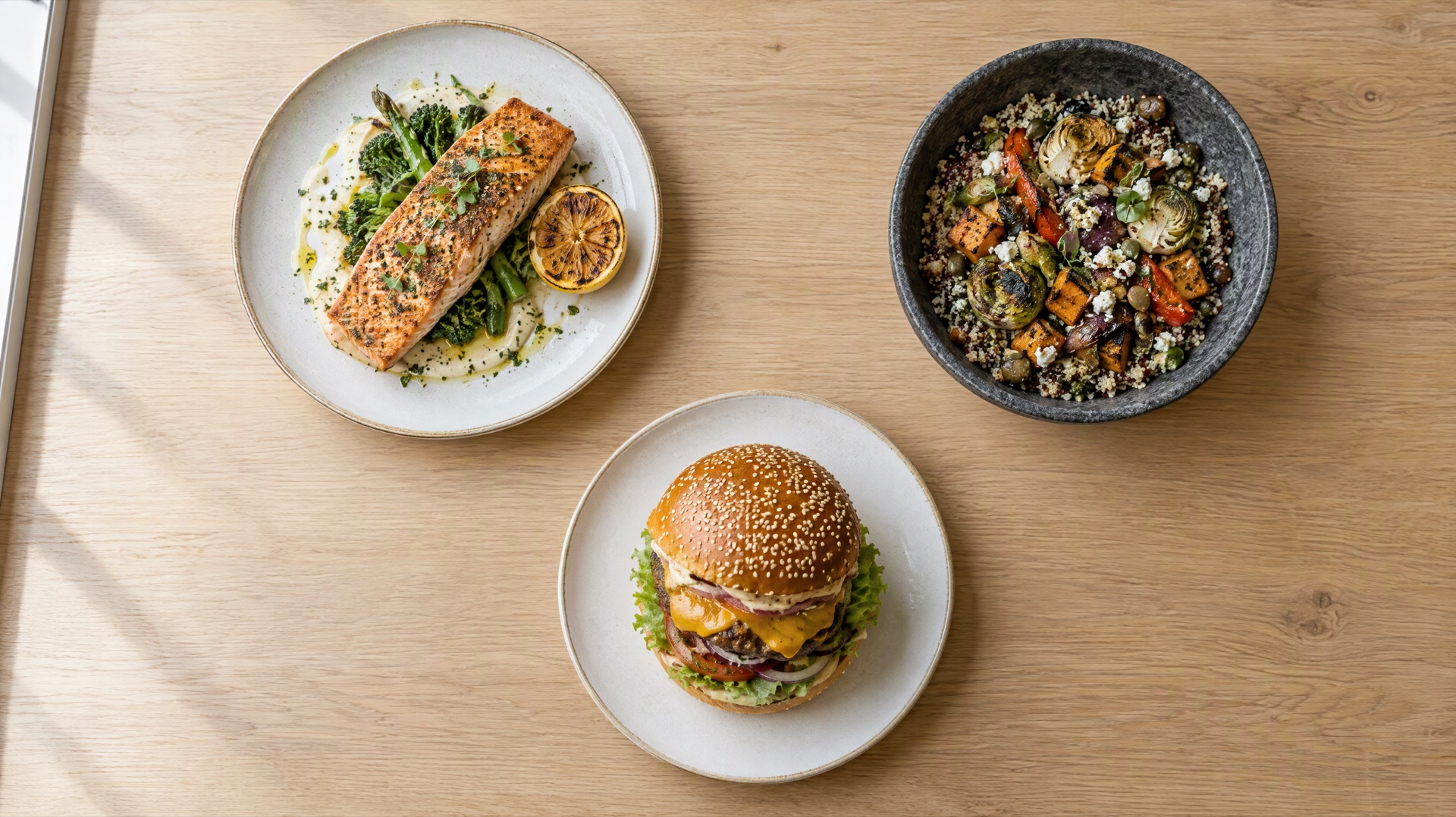
Image prompt: An overhead restaurant menu photograph: three plated dishes arranged on a light oak table with generous clean space between them, a seared salmon fillet with charred lemon, a stone bowl of mixed grains and roasted vegetables, and a stacked burger with visible sesame crust, each dish fully separated from the others with no overlapping plates or props, soft even daylight from a large window on the left with gentle natural shadows, flat top-down framing, 35mm lens, crisp focus across all three plates, natural color grade.
That flat lay works as a source image precisely because the plates do not touch. Generous space between dishes is not just a styling choice, it is what keeps each one from bleeding into its neighbour once motion starts.
Working the generator
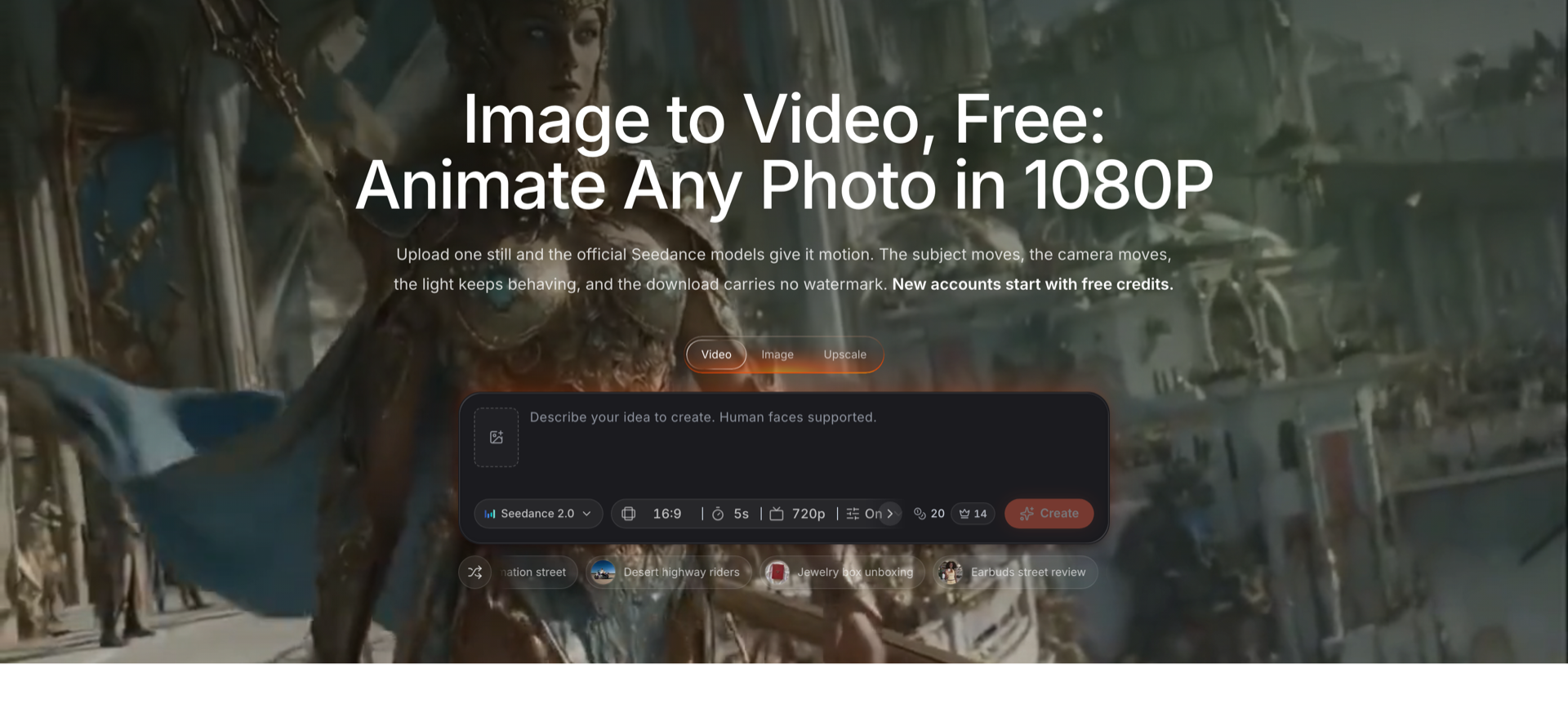
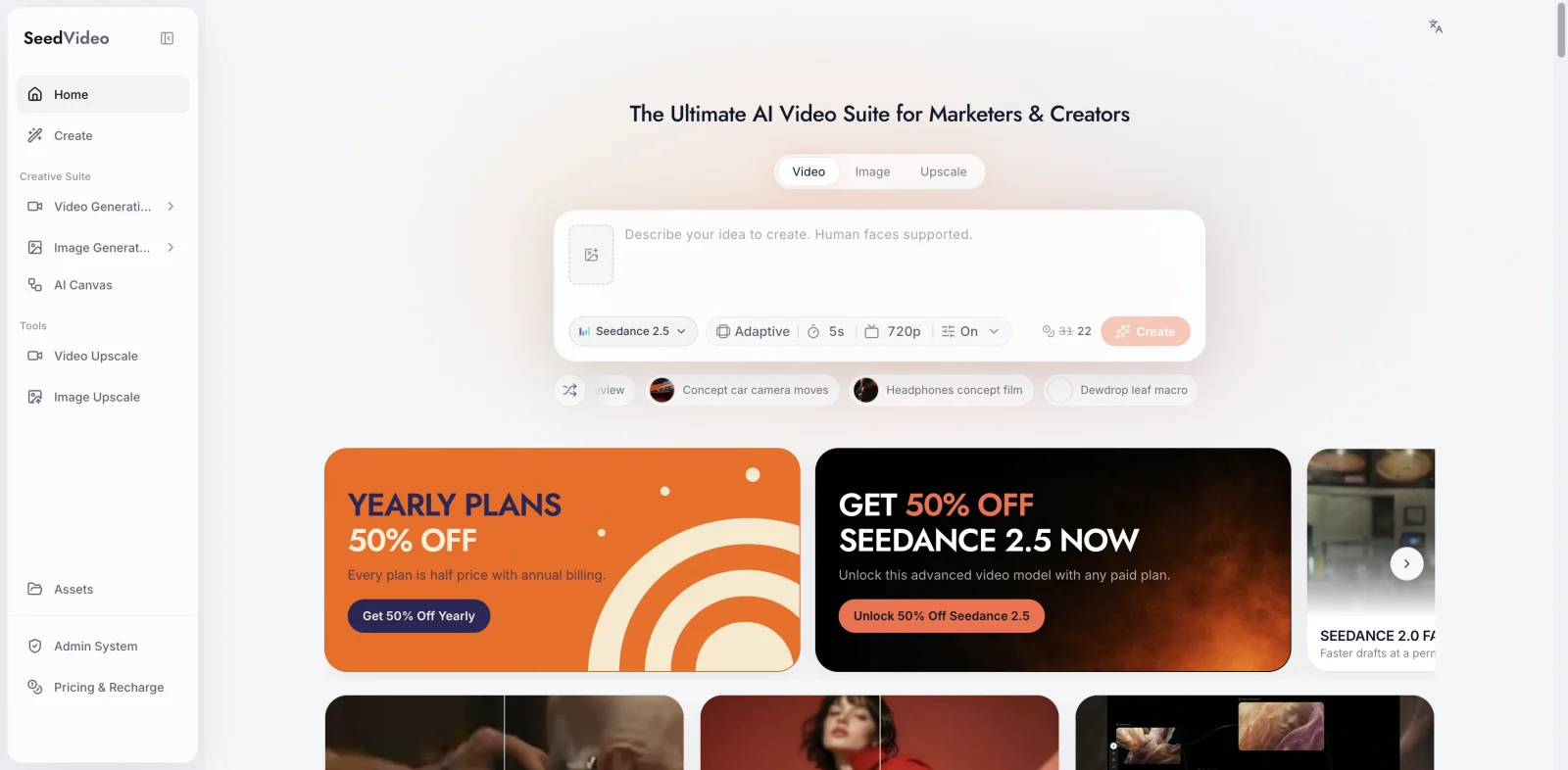
SeedVideo AI image-to-video generator, captured 2026-09-25, showing the model, aspect ratio, duration and resolution controls.
The generator opens at 16:9, 5 seconds and 720p with Seedance 2.0 selected. For restaurant work, three of those defaults usually need changing:
- Aspect ratio. Switch to 9:16 for stories and short-form feeds. Most restaurant video is watched vertically.
- Resolution. Raise it before generating, not after. The Seedance 2.0 family reaches 1080p while 2.5 and 2.0-mini cap at 720p, so if you want 1080p for a hero clip, stay on the 2.0 family.
- Model. Attach one image and the workflow becomes image-to-video with your photo as the start frame. That is what you want for a menu shot.
One trap worth knowing: attach exactly two images and the workflow becomes first-and-last-frame generation, which blends one photo into the other. If you meant them as references rather than as a start and end frame, set reference_mode to true, which is supported on the Seedance 2.0 and 2.5 families. The guide to fixing AI video flicker and morphing goes through that in detail.
You can animate a source image from the same screen, or create a video from a prompt when you need an establishing shot of a room you have not photographed.
Where the clips go
| Destination | Aspect ratio | Practical length | Notes |
|---|---|---|---|
| Instagram Reels and TikTok | 9:16 | 15 to 30s | Cut every 5s, put the signature dish first |
| Google Business Profile | 16:9 or 9:16 | Up to 30s | Shows in local search and Maps |
| Delivery app listings | Usually 1:1 or 16:9 | 5 to 15s | Check each platform's current spec before exporting |
| Website hero | 16:9 | 5 to 10s | Loop a single dish, muted |
| In-store screens | 16:9 | Loop | Silent by default, so lead with motion |
Delivery platforms change their media specs often enough that it is worth checking the current requirement in your merchant dashboard rather than trusting a number from an article, including this one.
Realistic expectations
Two honest limits are worth stating before you build a workflow around this.
Food does not always behave. Steam, melting cheese and pouring liquid have no fixed shape, which is what makes them look alive, and also what makes them the first thing to warp when a generation goes wrong. Expect to discard some takes.
Second, generated motion is a marketing asset, not documentation of your dish. Keeping the source photo as an accurate representation of what you actually serve matters both for customer expectations and for local advertising rules, which vary by jurisdiction and are worth checking for your own market.
FAQ
Can I make restaurant videos from photos I already have?
Yes, and that is the intended path. Image-to-video takes a single still as the start frame and adds motion. The accepted input range is 300 to 6000 pixels per side with an aspect ratio between 0.4 and 2.5, so ordinary phone photos qualify without editing. The bigger constraint is composition: one dish per frame, nothing overlapping, clear light direction.
Which dishes work best for AI food video?
Hot dishes with visible steam, anything with a glossy glaze or char, and desserts or drinks that can be shown with a pour. They animate well because there is real motion to render. Cold plates and salads animate poorly because nothing naturally moves, so use a slow camera push on those and ask for no food motion at all.
Why does my food video warp or melt halfway through?
Usually one of three things. The source photo is soft at full size, the frame contains overlapping plates the model cannot separate, or the prompt asked for several motions at once. Fix them in that order. Food warps more readily than most subjects because steam and sauce have no fixed shape, so a clean single-dish photo matters more here than in other categories.
How long should a restaurant promo clip be?
Cut it from 5-second pieces. Seedance 2.5 produces 4 to 30 second output, but longer single takes give small errors more time to accumulate. Six 5-second clips assembled into 30 seconds is more reliable than one 30-second generation, and the cuts suit short-form feeds anyway.
What resolution should I generate at?
Raise it above the 720p default before generating. The Seedance 2.0 family runs 480p to 1080p, while Seedance 2.5 and 2.0-mini cap at 720p. For a website hero or in-store screen, stay on the 2.0 family and generate at 1080p. For social feeds viewed on phones, 720p is usually enough.
Do I need a photographer for this?
Not for the input. A phone photo taken next to a window, with one dish in frame and nothing crossing its edge, is a better source than a professionally lit shot of a crowded table. Composition and light direction matter far more than camera quality for this particular use.
Start with your three best sellers
Pick the three dishes you sell most, find the cleanest existing photo of each, and generate one 5-second clip per dish with a single motion. That gives you a week of social posts from photos already sitting in your camera roll, and it tells you which of your menu photos are good enough before you commit to reshooting anything. The AI image-to-video generator starts new accounts with free credits, so the test costs an evening rather than a production budget.